3.0
Copyright © 2004-2010 Rod Johnson, Juergen Hoeller, Keith Donald, Colin Sampaleanu, Rob Harrop, Alef Arendsen, Thomas Risberg, Darren Davison, Dmitriy Kopylenko, Mark Pollack, Thierry Templier, Erwin Vervaet, Portia Tung, Ben Hale, Adrian Colyer, John Lewis, Costin Leau, Mark Fisher, Sam Brannen, Ramnivas Laddad, Arjen Poutsma, Chris Beams, Tareq Abedrabbo, Andy Clement, Dave Syer, Oliver Gierke
Table of Contents
- I. Overview of Spring Framework
- II. What's New in Spring 3.0
- 2. New Features and Enhancements in Spring 3.0
- 2.1. Java 5
- 2.2. Improved documentation
- 2.3. New articles and tutorials
- 2.4. New module organization and build system
- 2.5. Overview of new features
- 2.5.1. Core APIs updated for Java 5
- 2.5.2. Spring Expression Language
- 2.5.3. The Inversion of Control (IoC) container
- 2.5.4. General purpose type conversion system and field formatting system
- 2.5.5. The Data Tier
- 2.5.6. The Web Tier
- 2.5.7. Declarative model validation
- 2.5.8. Early support for Java EE 6
- 2.5.9. Support for embedded databases
- III. Core Technologies
- 3. The IoC container
- 3.1. Introduction to the Spring IoC container and beans
- 3.2. Container overview
- 3.3. Bean overview
- 3.4. Dependencies
- 3.5. Bean scopes
- 3.6. Customizing the nature of a bean
- 3.7. Bean definition inheritance
- 3.8. Container extension points
- 3.9. Annotation-based container configuration
- 3.10. Classpath scanning and managed components
- 3.10.1. @Component and further stereotype annotations
- 3.10.2. Automatically detecting classes and registering bean definitions
- 3.10.3. Using filters to customize scanning
- 3.10.4. Defining bean metadata within components
- 3.10.5. Naming autodetected components
- 3.10.6. Providing a scope for autodetected components
- 3.10.7. Providing qualifier metadata with annotations
- 3.11. Java-based container configuration
- 3.12. Registering a LoadTimeWeaver
- 3.13. Additional Capabilities of the ApplicationContext
- 3.14. The BeanFactory
- 4. Resources
- 4.1. Introduction
- 4.2. The Resource interface
- 4.3. Built-in Resource implementations
- 4.4. The ResourceLoader
- 4.5. The ResourceLoaderAware interface
- 4.6. Resources as dependencies
- 4.7. Application contexts and Resource paths
- 5. Validation, Data Binding, and Type Conversion
- 5.1. Introduction
- 5.2. Validation using Spring's Validator interface
- 5.3. Resolving codes to error messages
- 5.4. Bean manipulation and the BeanWrapper
- 5.5. Spring 3 Type Conversion
- 5.6. Spring 3 Field Formatting
- 5.7. Spring 3 Validation
- 6. Spring Expression Language (SpEL)
- 6.1. Introduction
- 6.2. Feature Overview
- 6.3. Expression Evaluation using Spring's Expression Interface
- 6.4. Expression support for defining bean definitions
- 6.5. Language Reference
- 6.5.1. Literal expressions
- 6.5.2. Properties, Arrays, Lists, Maps, Indexers
- 6.5.3. Inline lists
- 6.5.4. Array construction
- 6.5.5. Methods
- 6.5.6. Operators
- 6.5.7. Assignment
- 6.5.8. Types
- 6.5.9. Constructors
- 6.5.10. Variables
- 6.5.11. Functions
- 6.5.12. Bean references
- 6.5.13. Ternary Operator (If-Then-Else)
- 6.5.14. The Elvis Operator
- 6.5.15. Safe Navigation operator
- 6.5.16. Collection Selection
- 6.5.17. Collection Projection
- 6.5.18. Expression templating
- 6.6. Classes used in the examples
- 7. Aspect Oriented Programming with Spring
- 7.1. Introduction
- 7.2. @AspectJ support
- 7.3. Schema-based AOP support
- 7.4. Choosing which AOP declaration style to use
- 7.5. Mixing aspect types
- 7.6. Proxying mechanisms
- 7.7. Programmatic creation of @AspectJ Proxies
- 7.8. Using AspectJ with Spring applications
- 7.9. Further Resources
- 8. Spring AOP APIs
- 8.1. Introduction
- 8.2. Pointcut API in Spring
- 8.3. Advice API in Spring
- 8.4. Advisor API in Spring
- 8.5. Using the ProxyFactoryBean to create AOP proxies
- 8.6. Concise proxy definitions
- 8.7. Creating AOP proxies programmatically with the ProxyFactory
- 8.8. Manipulating advised objects
- 8.9. Using the "autoproxy" facility
- 8.10. Using TargetSources
- 8.11. Defining new Advice types
- 8.12. Further resources
- 9. Testing
- IV. Data Access
- 10. Transaction Management
- 10.1. Introduction to Spring Framework transaction management
- 10.2. Advantages of the Spring Framework's transaction support model
- 10.3. Understanding the Spring Framework transaction abstraction
- 10.4. Synchronizing resources with transactions
- 10.5. Declarative transaction management
- 10.5.1. Understanding the Spring Framework's declarative transaction implementation
- 10.5.2. Example of declarative transaction implementation
- 10.5.3. Rolling back a declarative transaction
- 10.5.4. Configuring different transactional semantics for different beans
- 10.5.5. <tx:advice/> settings
- 10.5.6. Using @Transactional
- 10.5.7. Transaction propagation
- 10.5.8. Advising transactional operations
- 10.5.9. Using @Transactional with AspectJ
- 10.6. Programmatic transaction management
- 10.7. Choosing between programmatic and declarative transaction management
- 10.8. Application server-specific integration
- 10.9. Solutions to common problems
- 10.10. Further Resources
- 11. DAO support
- 12. Data access with JDBC
- 12.1. Introduction to Spring Framework JDBC
- 12.2. Using the JDBC core classes to control basic JDBC processing and error handling
- 12.3. Controlling database connections
- 12.4. JDBC batch operations
- 12.5. Simplifying JDBC operations with the SimpleJdbc classes
- 12.5.1. Inserting data using SimpleJdbcInsert
- 12.5.2. Retrieving auto-generated keys using SimpleJdbcInsert
- 12.5.3. Specifying columns for a SimpleJdbcInsert
- 12.5.4. Using SqlParameterSource to provide parameter values
- 12.5.5. Calling a stored procedure with SimpleJdbcCall
- 12.5.6. Explicitly declaring parameters to use for a SimpleJdbcCall
- 12.5.7. How to define SqlParameters
- 12.5.8. Calling a stored function using SimpleJdbcCall
- 12.5.9. Returning ResultSet/REF Cursor from a SimpleJdbcCall
- 12.6. Modeling JDBC operations as Java objects
- 12.7. Common problems with parameter and data value handling
- 12.8. Embedded database support
- 12.8.1. Why use an embedded database?
- 12.8.2. Creating an embedded database instance using Spring XML
- 12.8.3. Creating an embedded database instance programmatically
- 12.8.4. Extending the embedded database support
- 12.8.5. Using HSQL
- 12.8.6. Using H2
- 12.8.7. Using Derby
- 12.8.8. Testing data access logic with an embedded database
- 12.9. Initializing a DataSource
- 13. Object Relational Mapping (ORM) Data Access
- 13.1. Introduction to ORM with Spring
- 13.2. General ORM integration considerations
- 13.3. Hibernate
- 13.3.1. SessionFactory setup in a Spring container
- 13.3.2. Implementing DAOs based on plain Hibernate 3 API
- 13.3.3. Declarative transaction demarcation
- 13.3.4. Programmatic transaction demarcation
- 13.3.5. Transaction management strategies
- 13.3.6. Comparing container-managed and locally defined resources
- 13.3.7. Spurious application server warnings with Hibernate
- 13.4. JDO
- 13.5. JPA
- 13.6. iBATIS SQL Maps
- 14. Marshalling XML using O/X Mappers
- V. The Web
- 15. Web MVC framework
- 15.1. Introduction to Spring Web MVC framework
- 15.2. The DispatcherServlet
- 15.3. Implementing Controllers
- 15.3.1. Defining a controller with @Controller
- 15.3.2. Mapping requests with @RequestMapping
- 15.3.2.1. URI Templates
- 15.3.2.2. Advanced @RequestMapping options
- 15.3.2.3. Supported handler method arguments and return types
- 15.3.2.4. Binding request parameters to method parameters with @RequestParam
- 15.3.2.5. Mapping the request body with the @RequestBody annotation
- 15.3.2.6. Mapping the response body with the @ResponseBody annotation
- 15.3.2.7. Using HttpEntity<?>
- 15.3.2.8. Providing a link to data from the model with @ModelAttribute
- 15.3.2.9. Specifying attributes to store in a session with @SessionAttributes
- 15.3.2.10. Mapping cookie values with the @CookieValue annotation
- 15.3.2.11. Mapping request header attributes with the @RequestHeader annotation
- 15.3.2.12. Customizing WebDataBinder initialization
- 15.4. Handler mappings
- 15.5. Resolving views
- 15.6. Using locales
- 15.7. Using themes
- 15.8. Spring's multipart (fileupload) support
- 15.9. Handling exceptions
- 15.10. Convention over configuration support
- 15.11. ETag support
- 15.12. Configuring Spring MVC
- 15.13. More Spring Web MVC Resources
- 16. View technologies
- 16.1. Introduction
- 16.2. JSP & JSTL
- 16.2.1. View resolvers
- 16.2.2. 'Plain-old' JSPs versus JSTL
- 16.2.3. Additional tags facilitating development
- 16.2.4. Using Spring's form tag library
- 16.2.4.1. Configuration
- 16.2.4.2. The form tag
- 16.2.4.3. The input tag
- 16.2.4.4. The checkbox tag
- 16.2.4.5. The checkboxes tag
- 16.2.4.6. The radiobutton tag
- 16.2.4.7. The radiobuttons tag
- 16.2.4.8. The password tag
- 16.2.4.9. The select tag
- 16.2.4.10. The option tag
- 16.2.4.11. The options tag
- 16.2.4.12. The textarea tag
- 16.2.4.13. The hidden tag
- 16.2.4.14. The errors tag
- 16.2.4.15. HTTP Method Conversion
- 16.3. Tiles
- 16.4. Velocity & FreeMarker
- 16.5. XSLT
- 16.6. Document views (PDF/Excel)
- 16.7. JasperReports
- 16.8. Feed Views
- 16.9. XML Marshalling View
- 16.10. JSON Mapping View
- 17. Integrating with other web frameworks
- 18. Portlet MVC Framework
- 18.1. Introduction
- 18.2. The DispatcherPortlet
- 18.3. The ViewRendererServlet
- 18.4. Controllers
- 18.5. Handler mappings
- 18.6. Views and resolving them
- 18.7. Multipart (file upload) support
- 18.8. Handling exceptions
- 18.9. Annotation-based controller configuration
- 18.9.1. Setting up the dispatcher for annotation support
- 18.9.2. Defining a controller with @Controller
- 18.9.3. Mapping requests with @RequestMapping
- 18.9.4. Supported handler method arguments
- 18.9.5. Binding request parameters to method parameters with @RequestParam
- 18.9.6. Providing a link to data from the model with @ModelAttribute
- 18.9.7. Specifying attributes to store in a Session with @SessionAttributes
- 18.9.8. Customizing WebDataBinder initialization
- 18.10. Portlet application deployment
- VI. Integration
- 19. Remoting and web services using Spring
- 19.1. Introduction
- 19.2. Exposing services using RMI
- 19.3. Using Hessian or Burlap to remotely call services via HTTP
- 19.4. Exposing services using HTTP invokers
- 19.5. Web services
- 19.5.1. Exposing servlet-based web services using JAX-RPC
- 19.5.2. Accessing web services using JAX-RPC
- 19.5.3. Registering JAX-RPC Bean Mappings
- 19.5.4. Registering your own JAX-RPC Handler
- 19.5.5. Exposing servlet-based web services using JAX-WS
- 19.5.6. Exporting standalone web services using JAX-WS
- 19.5.7. Exporting web services using the JAX-WS RI's Spring support
- 19.5.8. Accessing web services using JAX-WS
- 19.6. JMS
- 19.7. Auto-detection is not implemented for remote interfaces
- 19.8. Considerations when choosing a technology
- 19.9. Accessing RESTful services on the Client
- 20. Enterprise JavaBeans (EJB) integration
- 21. JMS (Java Message Service)
- 22. JMX
- 23. JCA CCI
- 24. Email
- 25. Task Execution and Scheduling
- 26. Dynamic language support
- VII. Appendices
- A. Classic Spring Usage
- B. Classic Spring AOP Usage
- B.1. Pointcut API in Spring
- B.2. Advice API in Spring
- B.3. Advisor API in Spring
- B.4. Using the ProxyFactoryBean to create AOP proxies
- B.5. Concise proxy definitions
- B.6. Creating AOP proxies programmatically with the ProxyFactory
- B.7. Manipulating advised objects
- B.8. Using the "autoproxy" facility
- B.9. Using TargetSources
- B.10. Defining new Advice types
- B.11. Further resources
- C. XML Schema-based configuration
- C.1. Introduction
- C.2. XML Schema-based configuration
- C.2.1. Referencing the schemas
- C.2.2. The util schema
- C.2.3. The jee schema
- C.2.3.1. <jee:jndi-lookup/> (simple)
- C.2.3.2. <jee:jndi-lookup/> (with single JNDI environment setting)
- C.2.3.3. <jee:jndi-lookup/> (with multiple JNDI environment settings)
- C.2.3.4. <jee:jndi-lookup/> (complex)
- C.2.3.5. <jee:local-slsb/> (simple)
- C.2.3.6. <jee:local-slsb/> (complex)
- C.2.3.7. <jee:remote-slsb/>
- C.2.4. The lang schema
- C.2.5. The jms schema
- C.2.6. The tx (transaction) schema
- C.2.7. The aop schema
- C.2.8. The context schema
- C.2.9. The tool schema
- C.2.10. The beans schema
- D. Extensible XML authoring
- E. spring-beans-2.0.dtd
- F. spring.tld
- G. spring-form.tld
- G.1. Introduction
- G.2. The checkbox tag
- G.3. The checkboxes tag
- G.4. The errors tag
- G.5. The form tag
- G.6. The hidden tag
- G.7. The input tag
- G.8. The label tag
- G.9. The option tag
- G.10. The options tag
- G.11. The password tag
- G.12. The radiobutton tag
- G.13. The radiobuttons tag
- G.14. The select tag
- G.15. The textarea tag
The Spring Framework is a lightweight solution and a potential one-stop-shop for building your enterprise-ready applications. However, Spring is modular, allowing you to use only those parts that you need, without having to bring in the rest. You can use the IoC container, with Struts on top, but you can also use only the Hibernate integration code or the JDBC abstraction layer. The Spring Framework supports declarative transaction management, remote access to your logic through RMI or web services, and various options for persisting your data. It offers a full-featured MVC framework, and enables you to integrate AOP transparently into your software.
Spring is designed to be non-intrusive, meaning that your domain logic code generally has no dependencies on the framework itself. In your integration layer (such as the data access layer), some dependencies on the data access technology and the Spring libraries will exist. However, it should be easy to isolate these dependencies from the rest of your code base.
This document is a reference guide to Spring Framework features. If you have any requests, comments, or questions on this document, please post them on the user mailing list or on the support forums at http://forum.springsource.org/.
Spring Framework is a Java platform that provides comprehensive infrastructure support for developing Java applications. Spring handles the infrastructure so you can focus on your application.
Spring enables you to build applications from “plain old Java objects” (POJOs) and to apply enterprise services non-invasively to POJOs. This capability applies to the Java SE programming model and to full and partial Java EE.
Examples of how you, as an application developer, can use the Spring platform advantage:
Make a Java method execute in a database transaction without having to deal with transaction APIs.
Make a local Java method a remote procedure without having to deal with remote APIs.
Make a local Java method a management operation without having to deal with JMX APIs.
Make a local Java method a message handler without having to deal with JMS APIs.
Java applications -- a loose term that runs the gamut from constrained applets to n-tier server-side enterprise applications -- typically consist of objects that collaborate to form the application proper. Thus the objects in an application have dependencies on each other.
Although the Java platform provides a wealth of application development functionality, it lacks the means to organize the basic building blocks into a coherent whole, leaving that task to architects and developers. True, you can use design patterns such as Factory, Abstract Factory, Builder, Decorator, and Service Locator to compose the various classes and object instances that make up an application. However, these patterns are simply that: best practices given a name, with a description of what the pattern does, where to apply it, the problems it addresses, and so forth. Patterns are formalized best practices that you must implement yourself in your application.
The Spring Framework Inversion of Control (IoC) component addresses this concern by providing a formalized means of composing disparate components into a fully working application ready for use. The Spring Framework codifies formalized design patterns as first-class objects that you can integrate into your own application(s). Numerous organizations and institutions use the Spring Framework in this manner to engineer robust, maintainable applications.
The Spring Framework consists of features organized into about 20 modules. These modules are grouped into Core Container, Data Access/Integration, Web, AOP (Aspect Oriented Programming), Instrumentation, and Test, as shown in the following diagram.
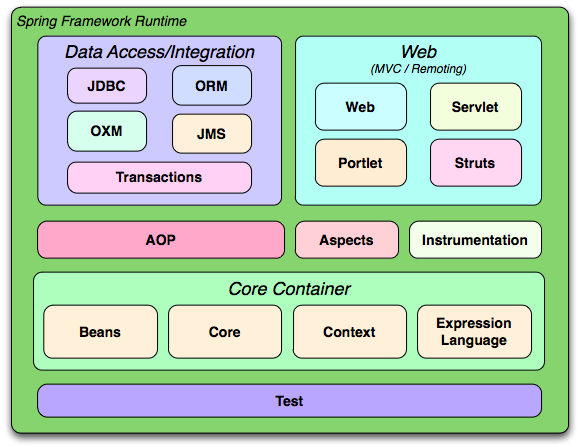
Overview of the Spring Framework
The Core Container consists of the Core, Beans, Context, and Expression Language modules.
The Core and
Beans modules provide the fundamental parts of the
framework, including the IoC and Dependency Injection features. The
BeanFactory is a sophisticated implementation of
the factory pattern. It removes the need for programmatic singletons and
allows you to decouple the configuration and specification of
dependencies from your actual program logic.
The Context
module builds on the solid base provided by the Core and Beans
modules: it is a means to access objects in a framework-style manner
that is similar to a JNDI registry. The Context module inherits its
features from the Beans module and adds support for internationalization
(using, for example, resource bundles), event-propagation,
resource-loading, and the transparent creation of contexts by, for
example, a servlet container. The Context module also supports Java EE
features such as EJB, JMX ,and basic remoting. The
ApplicationContext interface is the focal point
of the Context module.
The Expression Language module provides a powerful expression language for querying and manipulating an object graph at runtime. It is an extension of the unified expression language (unified EL) as specified in the JSP 2.1 specification. The language supports setting and getting property values, property assignment, method invocation, accessing the context of arrays, collections and indexers, logical and arithmetic operators, named variables, and retrieval of objects by name from Spring's IoC container. It also supports list projection and selection as well as common list aggregations.
The Data Access/Integration layer consists of the JDBC, ORM, OXM, JMS and Transaction modules.
The JDBC module provides a JDBC-abstraction layer that removes the need to do tedious JDBC coding and parsing of database-vendor specific error codes.
The ORM module provides integration layers for popular object-relational mapping APIs, including JPA, JDO, Hibernate, and iBatis. Using the ORM package you can use all of these O/R-mapping frameworks in combination with all of the other features Spring offers, such as the simple declarative transaction management feature mentioned previously.
The OXM module provides an abstraction layer that supports Object/XML mapping implementations for JAXB, Castor, XMLBeans, JiBX and XStream.
The Java Messaging Service (JMS) module contains features for producing and consuming messages.
The Transaction module supports programmatic and declarative transaction management for classes that implement special interfaces and for all your POJOs (plain old Java objects).
The Web layer consists of the Web, Web-Servlet, Web-Struts, and Web-Portlet modules.
Spring's Web module provides basic web-oriented integration features such as multipart file-upload functionality and the initialization of the IoC container using servlet listeners and a web-oriented application context. It also contains the web-related parts of Spring's remoting support.
The Web-Servlet module contains Spring's model-view-controller (MVC) implementation for web applications. Spring's MVC framework provides a clean separation between domain model code and web forms, and integrates with all the other features of the Spring Framework.
The Web-Struts module contains the support classes for integrating a classic Struts web tier within a Spring application. Note that this support is now deprecated as of Spring 3.0. Consider migrating your application to Struts 2.0 and its Spring integration or to a Spring MVC solution.
The Web-Portlet module provides the MVC implementation to be used in a portlet environment and mirrors the functionality of Web-Servlet module.
Spring's AOP module provides an AOP Alliance-compliant aspect-oriented programming implementation allowing you to define, for example, method-interceptors and pointcuts to cleanly decouple code that implements functionality that should be separated. Using source-level metadata functionality, you can also incorporate behavioral information into your code, in a manner similar to that of .NET attributes.
The separate Aspects module provides integration with AspectJ.
The Instrumentation module provides class instrumentation support and classloader implementations to be used in certain application servers.
The building blocks described previously make Spring a logical choice in many scenarios, from applets to full-fledged enterprise applications that use Spring's transaction management functionality and web framework integration.
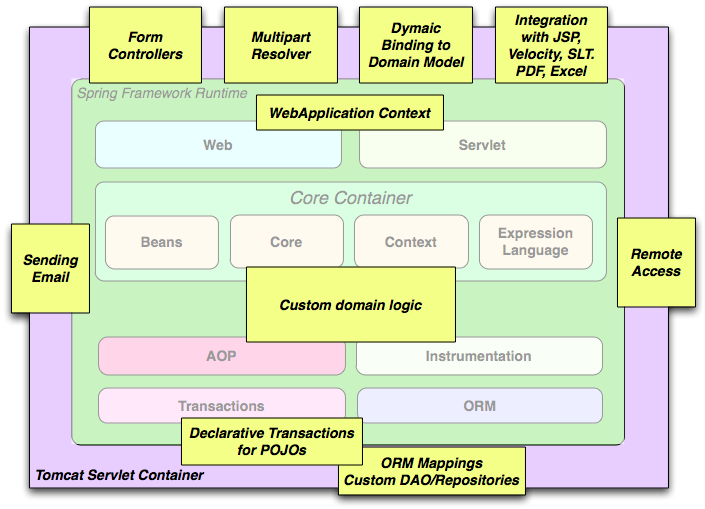
Typical full-fledged Spring web application
Spring's declarative
transaction management features make the web application fully
transactional, just as it would be if you used EJB container-managed
transactions. All your custom business logic can be implemented with
simple POJOs and managed by Spring's IoC container. Additional services
include support for sending email and validation that is independent of
the web layer, which lets you choose where to execute validation rules.
Spring's ORM support is integrated with JPA, Hibernate, JDO and iBatis;
for example, when using Hibernate, you can continue to use your existing
mapping files and standard Hibernate
SessionFactory configuration. Form
controllers seamlessly integrate the web-layer with the domain model,
removing the need for ActionForms or other classes
that transform HTTP parameters to values for your domain model.
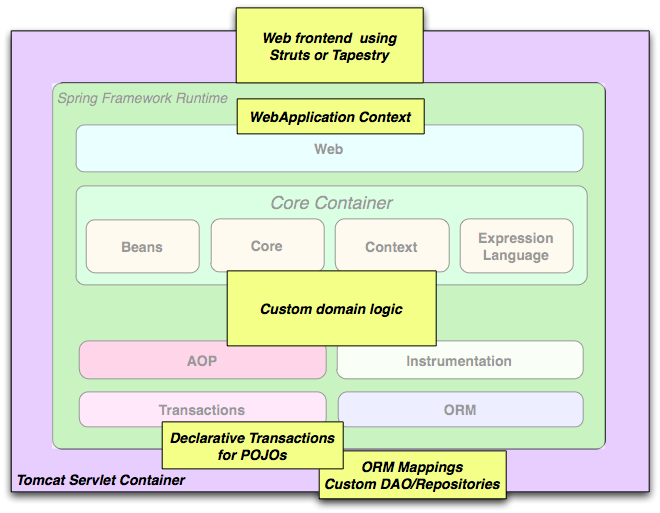
Spring middle-tier using a third-party web framework
Sometimes circumstances do not allow you to completely switch to a
different framework. The Spring Framework does not
force you to use everything within it; it is not an
all-or-nothing solution. Existing front-ends built
with WebWork, Struts, Tapestry, or other UI frameworks can be integrated
with a Spring-based middle-tier, which allows you to use Spring
transaction features. You simply need to wire up your business logic using
an ApplicationContext and use a
WebApplicationContext to integrate your web
layer.
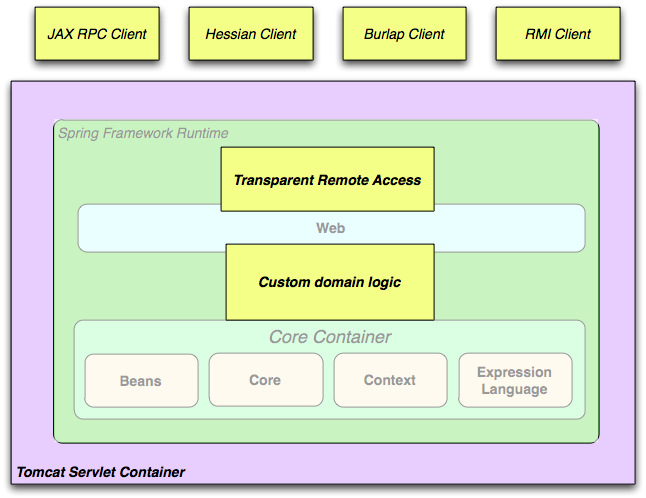
Remoting usage scenario
When you need to access existing code through web services, you can
use Spring's Hessian-, Burlap-,
Rmi- or JaxRpcProxyFactory
classes. Enabling remote access to existing applications is not
difficult.
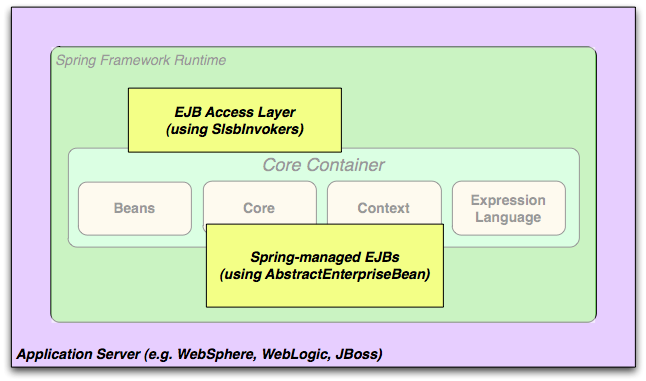
EJBs - Wrapping existing POJOs
The Spring Framework also provides an access and abstraction layer for Enterprise JavaBeans, enabling you to reuse your existing POJOs and wrap them in stateless session beans for use in scalable, fail-safe web applications that might need declarative security.
Dependency management and dependency injection are different
things. To get those nice features of Spring into your application (like
dependency injection) you need to assemble all the libraries needed (jar
files) and get them onto your classpath at runtime, and possibly at
compile time. These dependencies are not virtual components that are
injected, but physical resources in a file system (typically). The
process of dependency management involves locating those resources,
storing them and adding them to classpaths. Dependencies can be direct
(e.g. my application depends on Spring at runtime), or indirect (e.g. my
application depends on commons-dbcp which depends on
commons-pool). The indirect dependencies are also known as
"transitive" and it is those dependencies that are hardest to identify
and manage.
If you are going to use Spring you need to get a copy of the jar
libraries that comprise the pieces of Spring that you need. To make this
easier Spring is packaged as a set of modules that separate the
dependencies as much as possible, so for example if you don't want to
write a web application you don't need the spring-web modules. To refer
to Spring library modules in this guide we use a shorthand naming
convention spring-* or spring-*.jar, where "*"
represents the short name for the module (e.g. spring-core,
spring-webmvc, spring-jms, etc.). The actual
jar file name that you use may be in this form (see below) or it may
not, and normally it also has a version number in the file name (e.g.
spring-core-3.0.0.RELEASE.jar).
In general, Spring publishes its artifacts to four different places:
On the community download site http://www.springsource.org/downloads/community. Here you find all the Spring jars bundled together into a zip file for easy download. The names of the jars here since version 3.0 are in the form
org.springframework.*-<version>.jar.Maven Central, which is the default repository that Maven queries, and does not require any special configuration to use. Many of the common libraries that Spring depends on also are available from Maven Central and a large section of the Spring community uses Maven for dependency management, so this is convenient for them. The names of the jars here are in the form
spring-*-<version>.jarand the Maven groupId isorg.springframework.The Enterprise Bundle Repository (EBR), which is run by SpringSource and also hosts all the libraries that integrate with Spring. Both Maven and Ivy repositories are available here for all Spring jars and their dependencies, plus a large number of other common libraries that people use in applications with Spring. Both full releases and also milestones and development snapshots are deployed here. The names of the jar files are in the same form as the community download (
org.springframework.*-<version>.jar), and the dependencies are also in this "long" form, with external libraries (not from SpringSource) having the prefixcom.springsource. See the FAQ for more information.In a public Maven repository hosted on Amazon S3 for development snapshots and milestone releases (a copy of the final releases is also held here). The jar file names are in the same form as Maven Central, so this is a useful place to get development versions of Spring to use with other libraries depoyed in Maven Central.
So the first thing you need to decide is how to manage your dependencies: most people use an automated system like Maven or Ivy, but you can also do it manually by downloading all the jars yourself. When obtaining Spring with Maven or Ivy you have then to decide which place you'll get it from. In general, if you care about OSGi, use the EBR, since it houses OSGi compatible artifacts for all of Spring's dependencies, such as Hibernate and Freemarker. If OSGi does not matter to you, either place works, though there are some pros and cons between them. In general, pick one place or the other for your project; do not mix them. This is particularly important since EBR artifacts necessarily use a different naming convention than Maven Central artifacts.
Table 1.1. Comparison of Maven Central and SpringSource EBR Repositories
| Feature | Maven Central | EBR |
|---|---|---|
| OSGi Compatible | Not explicit | Yes |
| Number of Artifacts | Tens of thousands; all kinds | Hundreds; those that Spring integrates with |
| Consistent Naming Conventions | No | Yes |
| Naming Convention: GroupId | Varies. Newer artifacts often use domain name, e.g. org.slf4j. Older ones often just use the artifact name, e.g. log4j. | Domain name of origin or main package root, e.g. org.springframework |
| Naming Convention: ArtifactId | Varies. Generally the project or module name, using a hyphen "-" separator, e.g. spring-core, logj4. | Bundle Symbolic Name, derived from the main package root, e.g. org.springframework.beans. If the jar had to be patched to ensure OSGi compliance then com.springsource is appended, e.g. com.springsource.org.apache.log4j |
| Naming Convention: Version | Varies. Many new artifacts use m.m.m or m.m.m.X (with m=digit, X=text). Older ones use m.m. Some neither. Ordering is defined but not often relied on, so not strictly reliable. | OSGi version number m.m.m.X, e.g. 3.0.0.RC3. The text qualifier imposes alphabetic ordering on versions with the same numeric values. |
| Publishing | Usually automatic via rsync or source control updates. Project authors can upload individual jars to JIRA. | Manual (JIRA processed by SpringSource) |
| Quality Assurance | By policy. Accuracy is responsibility of authors. | Extensive for OSGi manifest, Maven POM and Ivy metadata. QA performed by Spring team. |
| Hosting | Contegix. Funded by Sonatype with several mirrors. | S3 funded by SpringSource. |
| Search Utilities | Various | http://www.springsource.com/repository |
| Integration with SpringSource Tools | Integration through STS with Maven dependency management | Extensive integration through STS with Maven, Roo, CloudFoundry |
Although Spring provides integration and support for a huge range of enterprise and other external tools, it intentionally keeps its mandatory dependencies to an absolute minimum: you shouldn't have to locate and download (even automatically) a large number of jar libraries in order to use Spring for simple use cases. For basic dependency injection there is only one mandatory external dependency, and that is for logging (see below for a more detailed description of logging options).
Next we outline the basic steps needed to configure an application that depends on Spring, first with Maven and then with Ivy. In all cases, if anything is unclear, refer to the documentation of your dependency management system, or look at some sample code - Spring itself uses Ivy to manage dependencies when it is building, and our samples mostly use Maven.
If you are using Maven for dependency management you don't even need to supply the logging dependency explicitly. For example, to create an application context and use dependency injection to configure an application, your Maven dependencies will look like this:
<dependencies>
   <dependency>
      <groupId>org.springframework</groupId>
      <artifactId>spring-context</artifactId>
      <version>3.0.0.RELEASE</version>
      <scope>runtime</scope>
   </dependency>
</dependencies>
That's it. Note the scope can be declared as runtime if you don't need to compile against Spring APIs, which is typically the case for basic dependency injection use cases.
We used the Maven Central naming conventions in the example above, so that works with Maven Central or the SpringSource S3 Maven repository. To use the S3 Maven repository (e.g. for milestones or developer snaphots), you need to specify the repository location in your Maven configuration. For full releases:
<repositories>
   <repository>
      <id>com.springsource.repository.maven.release</id>
      <url>http://maven.springframework.org/release/</url>
      <snapshots><enabled>false</enabled></snapshots>
   </repository>
</repositories>
For milestones:
<repositories>
   <repository>
      <id>com.springsource.repository.maven.milestone</id>
      <url>http://maven.springframework.org/milestone/</url>
      <snapshots><enabled>false</enabled></snapshots>
   </repository>
</repositories>
And for snapshots:
<repositories>
   <repository>
      <id>com.springsource.repository.maven.snapshot</id>
      <url>http://maven.springframework.org/snapshot/</url>
      <snapshots><enabled>true</enabled></snapshots>
   </repository>
</repositories>
To use the SpringSource EBR you would need to use a different naming convention for the dependencies. The names are usually easy to guess, e.g. in this case it is:
<dependencies>
   <dependency>
      <groupId>org.springframework</groupId>
      <artifactId>org.springframework.context</artifactId>
      <version>3.0.0.RELEASE</version>
      <scope>runtime</scope>
   </dependency>
</dependencies>
You also need to declare the location of the repository explicitly (only the URL is important):
<repositories>
   <repository>
      <id>com.springsource.repository.bundles.release</id>
      <url>http://repository.springsource.com/maven/bundles/release/</url>
   </repository>
</repositories>
If you are managing your dependencies by hand, the URL in the repository declaration above is not browseable, but there is a user interface at http://www.springsource.com/repository that can be used to search for and download dependencies. It also has handy snippets of Maven and Ivy configuration that you can copy and paste if you are using those tools.
If you prefer to use Ivy to manage dependencies then there are similar names and configuration options.
To configure Ivy to point to the SpringSource EBR add the
following resolvers to your
ivysettings.xml:
<resolvers>

  <url name="com.springsource.repository.bundles.release">

    <ivy pattern="http://repository.springsource.com/ivy/bundles/release/
      [organisation]/[module]/[revision]/[artifact]-[revision].[ext]" />
    <artifact pattern="http://repository.springsource.com/ivy/bundles/release/
      [organisation]/[module]/[revision]/[artifact]-[revision].[ext]" />

  </url>

  <url name="com.springsource.repository.bundles.external">

    <ivy pattern="http://repository.springsource.com/ivy/bundles/external/
       [organisation]/[module]/[revision]/[artifact]-[revision].[ext]" />
    <artifact pattern="http://repository.springsource.com/ivy/bundles/external/
       [organisation]/[module]/[revision]/[artifact]-[revision].[ext]" />

  </url>

</resolvers>
The XML above is not valid because the lines are too long - if you copy-paste then remove the extra line endings in the middle of the url patterns.
Once Ivy is configured to look in the EBR adding a dependency is
easy. Simply pull up the details page for the bundle in question in
the repository browser and you'll find an Ivy snippet ready for you to
include in your dependencies section. For example (in
ivy.xml):
<dependency org="org.springframework"
name="org.springframework.core" rev="3.0.0.RELEASE" conf="compile->runtime"/>Logging is a very important dependency for Spring because a) it is the only mandatory external dependency, b) everyone likes to see some output from the tools they are using, and c) Spring integrates with lots of other tools all of which have also made a choice of logging dependency. One of the goals of an application developer is often to have unified logging configured in a central place for the whole application, including all external components. This is more difficult than it might have been since there are so many choices of logging framework.
The mandatory logging dependency in Spring is the Jakarta Commons
Logging API (JCL). We compile against JCL and we also make JCL
Log objects visible for classes that extend the
Spring Framework. It's important to users that all versions of Spring
use the same logging library: migration is easy because backwards
compatibility is preserved even with applications that extend Spring.
The way we do this is to make one of the modules in Spring depend
explicitly on commons-logging (the canonical implementation
of JCL), and then make all the other modules depend on that at compile
time. If you are using Maven for example, and wondering where you picked
up the dependency on commons-logging, then it is from
Spring and specifically from the central module called
spring-core.
The nice thing about commons-logging is that you
don't need anything else to make your application work. It has a runtime
discovery algorithm that looks for other logging frameworks in well
known places on the classpath and uses one that it thinks is appropriate
(or you can tell it which one if you need to). If nothing else is
available you get pretty nice looking logs just from the JDK
(java.util.logging or JUL for short). You should find that your Spring
application works and logs happily to the console out of the box in most
situations, and that's important.
Unfortunately, the runtime discovery algorithm in
commons-logging, while convenient for the end-user, is
problematic. If we could turn back the clock and start Spring now
as a new project it would use a different logging dependency. The
first choice would probably be the Simple Logging Facade for Java (SLF4J), which is also used by a lot
of other tools that people use with Spring inside their
applications.
Switching off commons-logging is easy: just make
sure it isn't on the classpath at runtime. In Maven terms you exclude
the dependency, and because of the way that the Spring dependencies
are declared, you only have to do that once.
<dependencies>
   <dependency>
      <groupId>org.springframework</groupId>
      <artifactId>spring-context</artifactId>
      <version>3.0.0.RELEASE</version>
      <scope>runtime</scope>
      <exclusions>
         <exclusion>
            <groupId>commons-logging</groupId>
            <artifactId>commons-logging</artifactId>
         </exclusion>
      </exclusions>
   </dependency>
</dependencies>
Now this application is probably broken because there is no implementation of the JCL API on the classpath, so to fix it a new one has to be provided. In the next section we show you how to provide an alternative implementation of JCL using SLF4J as an example.
SLF4J is a cleaner dependency and more efficient at runtime than
commons-logging because it uses compile-time bindings
instead of runtime discovery of the other logging frameworks it
integrates. This also means that you have to be more explicit about what
you want to happen at runtime, and declare it or configure it
accordingly. SLF4J provides bindings to many common logging frameworks,
so you can usually choose one that you already use, and bind to that for
configuration and management.
SLF4J provides bindings to many common logging frameworks,
including JCL, and it also does the reverse: bridges between other
logging frameworks and itself. So to use SLF4J with Spring you need to
replace the commons-logging dependency with the SLF4J-JCL
bridge. Once you have done that then logging calls from within Spring
will be translated into logging calls to the SLF4J API, so if other
libraries in your application use that API, then you have a single place
to configure and manage logging.
A common choice might be to bridge Spring to SLF4J, and then
provide explicit binding from SLF4J to Log4J. You need to supply 4
dependencies (and exclude the existing commons-logging):
the bridge, the SLF4J API, the binding to Log4J, and the Log4J
implementation itself. In Maven you would do that like this
<dependencies>
   <dependency>
      <groupId>org.springframework</groupId>
      <artifactId>spring-context</artifactId>
      <version>3.0.0.RELEASE</version>
      <scope>runtime</scope>
      <exclusions>
         <exclusion>
            <groupId>commons-logging</groupId>
            <artifactId>commons-logging</artifactId>
         </exclusion>
      </exclusions>
   </dependency>
   <dependency>
      <groupId>org.slf4j</groupId>
      <artifactId>jcl-over-slf4j</artifactId>
      <version>1.5.8</version>
      <scope>runtime</scope>
   </dependency>
   <dependency>
      <groupId>org.slf4j</groupId>
      <artifactId>slf4j-api</artifactId>
      <version>1.5.8</version>
      <scope>runtime</scope>
   </dependency>
   <dependency>
      <groupId>org.slf4j</groupId>
      <artifactId>slf4j-log4j12</artifactId>
      <version>1.5.8</version>
      <scope>runtime</scope>
   </dependency>
   <dependency>
      <groupId>log4j</groupId>
      <artifactId>log4j</artifactId>
      <version>1.2.14</version>
      <scope>runtime</scope>
   </dependency>
</dependencies>
That might seem like a lot of dependencies just to get some
logging. Well it is, but it is optional, and it
should behave better than the vanilla commons-logging with
respect to classloader issues, notably if you are in a strict container
like an OSGi platform. Allegedly there is also a performance benefit
because the bindings are at compile-time not runtime.
A more common choice amongst SLF4J users, which uses fewer steps
and generates fewer dependencies, is to bind directly to Logback. This removes the extra
binding step because Logback implements SLF4J directly, so you only need
to depend on two libaries not four (jcl-over-slf4j and
logback). If you do that you might also need to exlude the
slf4j-api dependency from other external dependencies (not Spring),
because you only want one version of that API on the classpath.
Many people use Log4j as a logging framework for configuration and management purposes. It's efficient and well-established, and in fact it's what we use at runtime when we build and test Spring. Spring also provides some utilities for configuring and initializing Log4j, so it has an optional compile-time dependency on Log4j in some modules.
To make Log4j work with the default JCL dependency
(commons-logging) all you need to do is put Log4j on the
classpath, and provide it with a configuration file
(log4j.properties or log4j.xml in the root
of the classpath). So for Maven users this is your dependency
declaration:
<dependencies>
   <dependency>
      <groupId>org.springframework</groupId>
      <artifactId>spring-context</artifactId>
      <version>3.0.0.RELEASE</version>
      <scope>runtime</scope>
   </dependency>
   <dependency>
      <groupId>log4j</groupId>
      <artifactId>log4j</artifactId>
      <version>1.2.14</version>
      <scope>runtime</scope>
   </dependency>
</dependencies>
And here's a sample log4j.properties for logging to the console:
log4j.rootCategory=INFO, stdout

log4j.appender.stdout=org.apache.log4j.ConsoleAppender
log4j.appender.stdout.layout=org.apache.log4j.PatternLayout
log4j.appender.stdout.layout.ConversionPattern=%d{ABSOLUTE} %5p %t %c{2}:%L - %m%n

log4j.category.org.springframework.beans.factory=DEBUGMany people run their Spring applications in a container that
itself provides an implementation of JCL. IBM Websphere Application
Server (WAS) is the archetype. This often causes problems, and
unfortunately there is no silver bullet solution; simply excluding
commons-logging from your application is not enough in
most situations.
To be clear about this: the problems reported are usually not
with JCL per se, or even with commons-logging: rather
they are to do with binding commons-logging to another
framework (often Log4J). This can fail because
commons-logging changed the way they do the runtime
discovery in between the older versions (1.0) found in some
containers and the modern versions that most people use now (1.1).
Spring does not use any unusual parts of the JCL API, so nothing
breaks there, but as soon as Spring or your application tries to do
any logging you can find that the bindings to Log4J are not
working.
In such cases with WAS the easiest thing to do is to invert the class loader hierarchy (IBM calls it "parent last") so that the application controls the JCL dependency, not the container. That option isn't always open, but there are plenty of other suggestions in the public domain for alternative approaches, and your mileage may vary depending on the exact version and feature set of the container.
If you have been using the Spring Framework for some time, you will be aware that Spring has undergone two major revisions: Spring 2.0, released in October 2006, and Spring 2.5, released in November 2007. It is now time for a third overhaul resulting in Spring 3.0.
The entire framework code has been revised to take advantage of Java 5 features like generics, varargs and other language improvements. We have done our best to still keep the code backwards compatible. We now have consistent use of generic Collections and Maps, consistent use of generic FactoryBeans, and also consistent resolution of bridge methods in the Spring AOP API. Generic ApplicationListeners automatically receive specific event types only. All callback interfaces such as TransactionCallback and HibernateCallback declare a generic result value now. Overall, the Spring core codebase is now freshly revised and optimized for Java 5.
Spring's TaskExecutor abstraction has been updated for close integration with Java 5's java.util.concurrent facilities. We provide first-class support for Callables and Futures now, as well as ExecutorService adapters, ThreadFactory integration, etc. This has been aligned with JSR-236 (Concurrency Utilities for Java EE 6) as far as possible. Furthermore, we provide support for asynchronous method invocations through the use of the new @Async annotation (or EJB 3.1's @Asynchronous annotation).
The Spring reference documentation has also substantially been updated to reflect all of the changes and new features for Spring 3.0. While every effort has been made to ensure that there are no errors in this documentation, some errors may nevertheless have crept in. If you do spot any typos or even more serious errors, and you can spare a few cycles during lunch, please do bring the error to the attention of the Spring team by raising an issue.
There are many excellent articles and tutorials that show how to get started with Spring 3 features. Read them at the Spring Documentation page.
The samples have been improved and updated to take advantage of the new features in Spring 3. Additionally, the samples have been moved out of the source tree into a dedicated SVN repository available at:
https://anonsvn.springframework.org/svn/spring-samples/
As such, the samples are no longer distributed alongside Spring 3 and need to be downloaded separately from the repository mentioned above. However, this documentation will continue to refer to some samples (in particular Petclinic) to illustrate various features.
![[Note]](images/note.gif) | Note |
|---|---|
For more information on Subversion (or in short SVN), see the project homepage at:
http://subversion.apache.org/ |
The framework modules have been revised and are now managed separately with one source-tree per module jar:
org.springframework.aop
org.springframework.beans
org.springframework.context
org.springframework.context.support
org.springframework.expression
org.springframework.instrument
org.springframework.jdbc
org.springframework.jms
org.springframework.orm
org.springframework.oxm
org.springframework.test
org.springframework.transaction
org.springframework.web
org.springframework.web.portlet
org.springframework.web.servlet
org.springframework.web.struts
We are now using a new Spring build system as known from Spring Web Flow 2.0. This gives us:
Ivy-based "Spring Build" system
consistent deployment procedure
consistent dependency management
consistent generation of OSGi manifests
This is a list of new features for Spring 3.0. We will cover these features in more detail later in this section.
Spring Expression Language
IoC enhancements/Java based bean metadata
General-purpose type conversion system and field formatting system
Object to XML mapping functionality (OXM) moved from Spring Web Services project
Comprehensive REST support
@MVC additions
Declarative model validation
Early support for Java EE 6
Embedded database support
BeanFactory interface returns typed bean instances as far as possible:
T getBean(Class<T> requiredType)
T getBean(String name, Class<T> requiredType)
Map<String, T> getBeansOfType(Class<T> type)
Spring's TaskExecutor interface now extends
java.util.concurrent.Executor:
extended AsyncTaskExecutor supports standard Callables with Futures
New Java 5 based converter API and SPI:
stateless ConversionService and Converters
superseding standard JDK PropertyEditors
Typed ApplicationListener<E>
Spring introduces an expression language which is similar to Unified EL in its syntax but offers significantly more features. The expression language can be used when defining XML and Annotation based bean definitions and also serves as the foundation for expression language support across the Spring portfolio. Details of this new functionality can be found in the chapter Spring Expression Language (SpEL).
The Spring Expression Language was created to provide the Spring community a single, well supported expression language that can be used across all the products in the Spring portfolio. Its language features are driven by the requirements of the projects in the Spring portfolio, including tooling requirements for code completion support within the Eclipse based SpringSource Tool Suite.
The following is an example of how the Expression Language can be used to configure some properties of a database setup
<bean class="mycompany.RewardsTestDatabase">
    <property name="databaseName"
        value="#{systemProperties.databaseName}"/>
    <property name="keyGenerator"
        value="#{strategyBean.databaseKeyGenerator}"/>
</bean>
This functionality is also available if you prefer to configure your components using annotations:
@Repository
public class RewardsTestDatabase {

    @Value("#{systemProperties.databaseName}")
    public void setDatabaseName(String dbName) { … }

    @Value("#{strategyBean.databaseKeyGenerator}")
    public void setKeyGenerator(KeyGenerator kg) { … }
}
Some core features from the JavaConfig project have been added to the Spring Framework now. This means that the following annotations are now directly supported:
@Configuration
@Bean
@DependsOn
@Primary
@Lazy
@Import
@ImportResource
@Value
Here is an example of a Java class providing basic configuration using the new JavaConfig features:
package org.example.config;

@Configuration
public class AppConfig {
    private @Value("#{jdbcProperties.url}") String jdbcUrl;
    private @Value("#{jdbcProperties.username}") String username;
    private @Value("#{jdbcProperties.password}") String password;

    @Bean
    public FooService fooService() {
        return new FooServiceImpl(fooRepository());
    }

    @Bean
    public FooRepository fooRepository() {
        return new HibernateFooRepository(sessionFactory());
    }

    @Bean
    public SessionFactory sessionFactory() {
        // wire up a session factory
        AnnotationSessionFactoryBean asFactoryBean =
            new AnnotationSessionFactoryBean();
        asFactoryBean.setDataSource(dataSource());
        // additional config
        return asFactoryBean.getObject();
    }

    @Bean
    public DataSource dataSource() {
        return new DriverManagerDataSource(jdbcUrl, username, password);
    }
}
To get this to work you need to add the following component scanning entry in your minimal application context XML file.
<context:component-scan base-package="org.example.config"/>
<util:properties id="jdbcProperties" location="classpath:org/example/config/jdbc.properties"/>
Or you can bootstrap a @Configuration class directly using
AnnotationConfigApplicationContext:
public static void main(String[] args) {
    ApplicationContext ctx = new AnnotationConfigApplicationContext(AppConfig.class);
    FooService fooService = ctx.getBean(FooService.class);
    fooService.doStuff();
}
See Section 3.11.2, “Instantiating the Spring container using
AnnotationConfigApplicationContext” for full information on
AnnotationConfigApplicationContext.
@Bean annotated methods are also supported
inside Spring components. They contribute a factory bean definition to
the container. See Defining bean metadata within
components for more information
A general purpose type conversion system has been introduced. The system is currently used by SpEL for type conversion, and may also be used by a Spring Container and DataBinder when binding bean property values.
In addition, a formatter SPI has been introduced for formatting field values. This SPI provides a simpler and more robust alternative to JavaBean PropertyEditors for use in client environments such as Spring MVC.
Object to XML mapping functionality (OXM) from the Spring Web
Services project has been moved to the core Spring Framework now. The
functionality is found in the org.springframework.oxm
package. More information on the use of the OXM
module can be found in the Marshalling XML using O/X
Mappers chapter.
The most exciting new feature for the Web Tier is the support for building RESTful web services and web applications. There are also some new annotations that can be used in any web application.
Server-side support for building RESTful applications has been
provided as an extension of the existing annotation driven MVC web
framework. Client-side support is provided by the
RestTemplate class in the spirit of other
template classes such as JdbcTemplate and
JmsTemplate. Both server and client side REST
functionality make use of
HttpConverters to facilitate the
conversion between objects and their representation in HTTP requests
and responses.
The MarshallingHttpMessageConverter uses
the Object to XML mapping functionality mentioned
earlier.
Refer to the sections on MVC and the RestTemplate for more information.
A mvc namespace has been introduced that greatly simplifies Spring MVC configuration.
Additional annotations such as
@CookieValue and
@RequestHeaders have been added. See Mapping cookie values with the
@CookieValue annotation and Mapping request header attributes with
the @RequestHeader annotation for more information.
Several validation enhancements, including JSR 303 support that uses Hibernate Validator as the default provider.
We provide support for asynchronous method invocations through the use of the new @Async annotation (or EJB 3.1's @Asynchronous annotation).
JSR 303, JSF 2.0, JPA 2.0, etc
Convenient support for embedded Java database engines, including HSQL, H2, and Derby, is now provided.
This part of the reference documentation covers all of those technologies that are absolutely integral to the Spring Framework.
Foremost amongst these is the Spring Framework's Inversion of Control (IoC) container. A thorough treatment of the Spring Framework's IoC container is closely followed by comprehensive coverage of Spring's Aspect-Oriented Programming (AOP) technologies. The Spring Framework has its own AOP framework, which is conceptually easy to understand, and which successfully addresses the 80% sweet spot of AOP requirements in Java enterprise programming.
Coverage of Spring's integration with AspectJ (currently the richest - in terms of features - and certainly most mature AOP implementation in the Java enterprise space) is also provided.
Finally, the adoption of the test-driven-development (TDD) approach to software development is certainly advocated by the Spring team, and so coverage of Spring's support for integration testing is covered (alongside best practices for unit testing). The Spring team has found that the correct use of IoC certainly does make both unit and integration testing easier (in that the presence of setter methods and appropriate constructors on classes makes them easier to wire together in a test without having to set up service locator registries and suchlike)... the chapter dedicated solely to testing will hopefully convince you of this as well.
This chapter covers the Spring Framework implementation of the Inversion of Control (IoC) [1]principle. IoC is also known as dependency injection (DI). It is a process whereby objects define their dependencies, that is, the other objects they work with, only through constructor arguments, arguments to a factory method, or properties that are set on the object instance after it is constructed or returned from a factory method. The container then injects those dependencies when it creates the bean. This process is fundamentally the inverse, hence the name Inversion of Control (IoC), of the bean itself controlling the instantiation or location of its dependencies by using direct construction of classes, or a mechanism such as the Service Locator pattern.
The org.springframework.beans and
org.springframework.context packages are the basis for
Spring Framework's IoC container. The BeanFactory interface provides an advanced
configuration mechanism capable of managing any type of object.
ApplicationContext is a sub-interface of
BeanFactory. It adds easier integration
with Spring's AOP features; message resource handling (for use in
internationalization), event publication; and application-layer specific
contexts such as the WebApplicationContext
for use in web applications.
In short, the BeanFactory provides the
configuration framework and basic functionality, and the
ApplicationContext adds more
enterprise-specific functionality. The
ApplicationContext is a complete superset
of the BeanFactory, and is used exclusively
in this chapter in descriptions of Spring's IoC container.
For
more information on using the BeanFactory instead
of the ApplicationContext, refer to Section 3.14, “The BeanFactory”.
In Spring, the objects that form the backbone of your application and that are managed by the Spring IoC container are called beans. A bean is an object that is instantiated, assembled, and otherwise managed by a Spring IoC container. Otherwise, a bean is simply one of many objects in your application. Beans, and the dependencies among them, are reflected in the configuration metadata used by a container.
The interface
org.springframework.context.ApplicationContext
represents the Spring IoC container and is responsible for instantiating,
configuring, and assembling the aforementioned beans. The container gets
its instructions on what objects to instantiate, configure, and assemble
by reading configuration metadata. The configuration metadata is
represented in XML, Java annotations, or Java code. It allows you to
express the objects that compose your application and the rich
interdependencies between such objects.
Several implementations of the
ApplicationContext interface are supplied
out-of-the-box with Spring. In standalone applications it is common to
create an instance of ClassPathXmlApplicationContext or FileSystemXmlApplicationContext.
While XML has been the traditional format
for defining configuration metadata you can instruct the container to use
Java annotations or code as the metadata format by providng a small amount
of XML configuration to declaratively enable support for these additional
metadata formats.
In most application scenarios, explicit user code is not required to
instantiate one or more instances of a Spring IoC container. For example,
in a web application scenario, a simple eight (or so) lines of boilerplate
J2EE web descriptor XML in the web.xml file of the
application will typically suffice (see Section 3.13.4, “Convenient ApplicationContext
instantiation for web applications”).
If you are using the SpringSource Tool Suite Eclipse-powered development environment
or Spring Roo this
boilerplate configuration can be easily created with few mouse clicks or
keystrokes.
The following diagram is a high-level view of how Spring works. Your
application classes are combined with configuration metadata so that after
the ApplicationContext is created and initialized,
you have a fully configured and executable system or application.
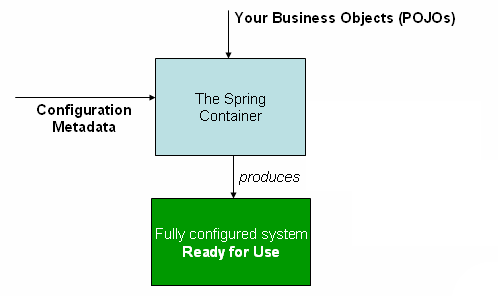
The Spring IoC container
As the preceding diagram shows, the Spring IoC container consumes a form of configuration metadata; this configuration metadata represents how you as an application developer tell the Spring container to instantiate, configure, and assemble the objects in your application.
Configuration metadata is traditionally supplied in a simple and intuitive XML format, which is what most of this chapter uses to convey key concepts and features of the Spring IoC container.
| Note |
|---|---|
XML-based metadata is not the only allowed form of configuration metadata. The Spring IoC container itself is totally decoupled from the format in which this configuration metadata is actually written. |
For information about using other forms of metadata with the Spring container, see:
Annotation-based configuration: Spring 2.5 introduced support for annotation-based configuration metadata.
Java-based configuration: Starting with Spring 3.0, many features provided by the Spring JavaConfig project became part of the core Spring Framework. Thus you can define beans external to your application classes by using Java rather than XML files. To use these new features, see the
@Configuration,@Bean, @Importand@DependsOnannotations.
Spring configuration consists of at least one and typically more
than one bean definition that the container must manage. XML-based
configuration metadata shows these beans configured as
<bean/> elements inside a top-level
<beans/> element.
These bean definitions correspond to the actual objects that make up
your application. Typically you define service layer objects, data
access objects (DAOs), presentation objects such as Struts
Action instances, infrastructure objects
such as Hibernate SessionFactories, JMS
Queues, and so forth. Typically one does
not configure fine-grained domain objects in the container, because it
is usually the responsibility of DAOs and business logic to create and
load domain objects. However, you can use Spring's integration with
AspectJ to configure objects that have been created outside the control
of an IoC container. See Using
AspectJ to dependency-inject domain objects with Spring.
The following example shows the basic structure of XML-based configuration metadata:
<?xml version="1.0" encoding="UTF-8"?>
<beans xmlns="http://www.springframework.org/schema/beans"
       xmlns:xsi="http://www.w3.org/2001/XMLSchema-instance"
       xsi:schemaLocation="http://www.springframework.org/schema/beans
           http://www.springframework.org/schema/beans/spring-beans-3.0.xsd">

  <bean id="..." class="...">
    <!-- collaborators and configuration for this bean go here -->
  </bean>

  <bean id="..." class="...">
    <!-- collaborators and configuration for this bean go here -->
  </bean>

  <!-- more bean definitions go here -->

</beans>
The id attribute is a string that you use to
identify the individual bean definition. The class
attribute defines the type of the bean and uses the fully qualified
classname. The value of the id attribute refers to collaborating
objects. The XML for referring to collaborating objects is not shown in
this example; see Dependencies
for more information.
Instantiating a Spring IoC container is straightforward. The
location path or paths supplied to an
ApplicationContext constructor are
actually resource strings that allow the container to load configuration
metadata from a variety of external resources such as the local file
system, from the Java CLASSPATH, and so on.
ApplicationContext context =
new ClassPathXmlApplicationContext(new String[] {"services.xml", "daos.xml"}); | Note |
|---|---|
After you learn about Spring's IoC container, you may want to know
more about Spring's |
The following example shows the service layer objects
(services.xml) configuration file:
<?xml version="1.0" encoding="UTF-8"?>
<beans xmlns="http://www.springframework.org/schema/beans"
       xmlns:xsi="http://www.w3.org/2001/XMLSchema-instance"
       xsi:schemaLocation="http://www.springframework.org/schema/beans
           http://www.springframework.org/schema/beans/spring-beans-3.0.xsd">

  <!-- services -->

  <bean id="petStore"
        class="org.springframework.samples.jpetstore.services.PetStoreServiceImpl">
    <property name="accountDao" ref="accountDao"/>
    <property name="itemDao" ref="itemDao"/>
    <!-- additional collaborators and configuration for this bean go here -->
  </bean>

  <!-- more bean definitions for services go here -->

</beans>
The following example shows the data access objects
daos.xml file:
<?xml version="1.0" encoding="UTF-8"?>
<beans xmlns="http://www.springframework.org/schema/beans"
       xmlns:xsi="http://www.w3.org/2001/XMLSchema-instance"
       xsi:schemaLocation="http://www.springframework.org/schema/beans
           http://www.springframework.org/schema/beans/spring-beans-3.0.xsd">

  <bean id="accountDao"
      class="org.springframework.samples.jpetstore.dao.ibatis.SqlMapAccountDao">
    <!-- additional collaborators and configuration for this bean go here -->
  </bean>

  <bean id="itemDao" class="org.springframework.samples.jpetstore.dao.ibatis.SqlMapItemDao">
    <!-- additional collaborators and configuration for this bean go here -->
  </bean>

  <!-- more bean definitions for data access objects go here -->

</beans>
In the preceding example, the service layer consists of the class
PetStoreServiceImpl, and two data access objects
of the type SqlMapAccountDao and SqlMapItemDao
are based on the iBatis
Object/Relational mapping framework. The property
name element refers to the name of the JavaBean property, and
the ref element refers to the name of another bean
definition. This linkage between id and ref elements expresses the
dependency between collaborating objects. For details of configuring an
object's dependencies, see Dependencies.
It can be useful to have bean definitions span multiple XML files. Often each individual XML configuration file represents a logical layer or module in your architecture.
You can use the application context constructor to load bean
definitions from all these XML fragments. This constructor takes
multiple Resource locations, as was
shown in the previous section. Alternatively, use one or more
occurrences of the <import/> element to load
bean definitions from another file or files. For example:
<beans> <import resource="services.xml"/> <import resource="resources/messageSource.xml"/> <import resource="/resources/themeSource.xml"/> <bean id="bean1" class="..."/> <bean id="bean2" class="..."/> </beans>
In the preceding example, external bean definitions are loaded
from three files, services.xml,
messageSource.xml, and
themeSource.xml. All location paths are relative to
the definition file doing the importing, so
services.xml must be in the same directory or
classpath location as the file doing the importing, while
messageSource.xml and
themeSource.xml must be in a
resources location below the location of the
importing file. As you can see, a leading slash is ignored, but given
that these paths are relative, it is better form not to use the slash
at all. The contents of the files being imported, including the top
level <beans/> element, must be valid XML
bean definitions according to the Spring Schema or DTD.
| Note |
|---|---|
It is possible, but not recommended, to reference files in parent directories using a relative "../" path. Doing so creates a dependency on a file that is outside the current application. In particular, this reference is not recommended for "classpath:" URLs (for example, "classpath:../services.xml"), where the runtime resolution process chooses the "nearest" classpath root and then looks into its parent directory. Classpath configuration changes may lead to the choice of a different, incorrect directory. You can always use fully qualified resource locations instead of relative paths: for example, "file:C:/config/services.xml" or "classpath:/config/services.xml". However, be aware that you are coupling your application's configuration to specific absolute locations. It is generally preferable to keep an indirection for such absolute locations, for example, through "${...}" placeholders that are resolved against JVM system properties at runtime. |
The ApplicationContext is the
interface for an advanced factory capable of maintaining a registry of
different beans and their dependencies. Using the method T
getBean(Stringname, Class<T> requiredType) you can
retrieve instances of your beans.
The ApplicationContext enables you to
read bean definitions and access them as follows:
// create and configure beans ApplicationContext context = new ClassPathXmlApplicationContext(new String[] {"services.xml", "daos.xml"}); // retrieve configured instance PetStoreServiceImpl service = context.getBean("petStore", PetStoreServiceImpl.class); // use configured instance List userList service.getUsernameList();
You use getBean() to retrieve instances of
your beans. The ApplicationContext
interface has a few other methods for retrieving beans, but ideally your
application code should never use them. Indeed, your application code
should have no calls to the getBean() method at
all, and thus no dependency on Spring APIs at all. For example, Spring's
integration with web frameworks provides for dependency injection for
various web framework classes such as controllers and JSF-managed
beans.
A Spring IoC container manages one or more beans.
These beans are created with the configuration metadata that you supply to
the container, for example, in the form of XML
<bean/> definitions.
Within the container itself, these bean definitions are represented as
BeanDefinition objects, which contain
(among other information) the following metadata:
A package-qualified class name: typically the actual implementation class of the bean being defined.
Bean behavioral configuration elements, which state how the bean should behave in the container (scope, lifecycle callbacks, and so forth).
References to other beans that are needed for the bean to do its work; these references are also called collaborators or dependencies.
Other configuration settings to set in the newly created object, for example, the number of connections to use in a bean that manages a connection pool, or the size limit of the pool.
This metadata translates to a set of properties that make up each bean definition.
Table 3.1. The bean definition
| Property | Explained in... |
|---|---|
| class | |
| name | |
| scope | |
| constructor arguments | |
| properties | |
| autowiring mode | |
| lazy-initialization mode | |
| initialization method | |
| destruction method |
In addition to bean definitions that contain information on how to
create a specific bean, the
ApplicationContext implementations also
permit the registration of existing objects that are created outside the
container, by users. This is done by accessing the ApplicationContext's
BeanFactory via the method getBeanFactory() which
returns the BeanFactory implementation
DefaultListableBeanFactory.
DefaultListableBeanFactory supports this
registration through the methods
registerSingleton(..) and
registerBeanDefinition(..). However, typical
applications work solely with beans defined through metadata bean
definitions.
Every bean has one or more identifiers. These identifiers must be unique within the container that hosts the bean. A bean usually has only one identifier, but if it requires more than one, the extra ones can be considered aliases.
In XML-based configuration metadata, you use the
id and/or name attributes to
specify the bean identifier(s). The id attribute
allows you to specify exactly one id, and because it is a real XML
element ID attribute, the XML parser can do some extra validation when
other elements reference the id. As such, it is the preferred way to
specify a bean identifier. However, the XML specification does limit the
characters that are legal in XML ids. This is usually not a constraint,
but if you need to use one of these special XML characters, or want to
introduce other aliases to the bean, you can also specify them in the
name attribute, separated by a comma
(,), semicolon (;), or white
space.
You are not required to supply a name or id for a bean. If no name
or id is supplied explicitly, the container generates a unique name for
that bean. However, if you want to refer to that bean by name, through
the use of the ref element or Service Location style lookup,
you must provide a name. Motivations for not supplying a name are
related to using inner beans
and autowiring
collaborators.
In a bean definition itself, you can supply more than one name for
the bean, by using a combination of up to one name specified by the
id attribute, and any number of other names in the
name attribute. These names can be equivalent
aliases to the same bean, and are useful for some situations, such as
allowing each component in an application to refer to a common
dependency by using a bean name that is specific to that component
itself.
Specifying all aliases where the bean is actually defined is not
always adequate, however. It is sometimes desirable to introduce an
alias for a bean that is defined elsewhere. This is commonly the case
in large systems where configuration is split amongst each subsystem,
each subsystem having its own set of object definitions. In XML-based
configuration metadata, you can use the
<alias/> element to accomplish this.
<alias name="fromName" alias="toName"/>
In this case, a bean in the same container which is named
fromName, may also after the use of this alias
definition, be referred to as toName.
For example, the configuration metadata for subsystem A may refer to a DataSource via the name 'subsystemA-dataSource. The configuration metadata for subsystem B may refer to a DataSource via the name 'subsystemB-dataSource'. When composing the main application that uses both these subsystems the main application refers to the DataSource via the name 'myApp-dataSource'. To have all three names refer to the same object you add to the MyApp configuration metadata the following aliases definitions:
<alias name="subsystemA-dataSource" alias="subsystemB-dataSource"/> <alias name="subsystemA-dataSource" alias="myApp-dataSource" />
Now each component and the main application can refer to the dataSource through a name that is unique and guaranteed not to clash with any other definition (effectively creating a namespace), yet they refer to the same bean.
A bean definition essentially is a recipe for creating one or more objects. The container looks at the recipe for a named bean when asked, and uses the configuration metadata encapsulated by that bean definition to create (or acquire) an actual object.
If you use XML-based configuration metadata, you specify the type
(or class) of object that is to be instantiated in the
class attribute of the
<bean/> element. This class
attribute, which internally is a Class property
on a BeanDefinition instance, is usually
mandatory. (For exceptions, see Section 3.3.2.3, “Instantiation using an instance factory method” and Section 3.7, “Bean definition inheritance”.) You use the
Class property in one of two ways:
Typically, to specify the bean class to be constructed in the case where the container itself directly creates the bean by calling its constructor reflectively, somewhat equivalent to Java code using the
newoperator.
To specify the actual class containing the
staticfactory method that will be invoked to create the object, in the less common case where the container invokes astatic, factory method on a class to create the bean. The object type returned from the invocation of thestaticfactory method may be the same class or another class entirely.
When you create a bean by the constructor approach, all normal classes are usable by and compatible with Spring. That is, the class being developed does not need to implement any specific interfaces or to be coded in a specific fashion. Simply specifying the bean class should suffice. However, depending on what type of IoC you use for that specific bean, you may need a default (empty) constructor.
The Spring IoC container can manage virtually any class you want it to manage; it is not limited to managing true JavaBeans. Most Spring users prefer actual JavaBeans with only a default (no-argument) constructor and appropriate setters and getters modeled after the properties in the container. You can also have more exotic non-bean-style classes in your container. If, for example, you need to use a legacy connection pool that absolutely does not adhere to the JavaBean specification, Spring can manage it as well.
With XML-based configuration metadata you can specify your bean class as follows:
<bean id="exampleBean" class="examples.ExampleBean"/> <bean name="anotherExample" class="examples.ExampleBeanTwo"/>
For details about the mechanism for supplying arguments to the constructor (if required) and setting object instance properties after the object is constructed, see Injecting Dependencies.
When defining a bean that you create with a static factory method,
you use the class attribute to specify the class
containing the static factory method and an
attribute named factory-method to specify the name
of the factory method itself. You should be able to call this method
(with optional arguments as described later) and return a live object,
which subsequently is treated as if it had been created through a
constructor. One use for such a bean definition is to call
static factories in legacy code.
The following bean definition specifies that the bean will be
created by calling a factory-method. The definition does not specify
the type (class) of the returned object, only the class containing the
factory method. In this example, the
createInstance() method must be a
static method.
<bean id="clientService" class="examples.ClientService" factory-method="createInstance"/>
public class ClientService { private static ClientService clientService = new ClientService(); private ClientService() {} public static ClientService createInstance() { return clientService; } }
For details about the mechanism for supplying (optional) arguments to the factory method and setting object instance properties after the object is returned from the factory, see Dependencies and configuration in detail.
Similar to instantiation through a static factory
method, instantiation with an instance factory method invokes a
non-static method of an existing bean from the container to create a
new bean. To use this mechanism, leave the class
attribute empty, and in the factory-bean
attribute, specify the name of a bean in the current (or
parent/ancestor) container that contains the instance method that is
to be invoked to create the object. Set the name of the factory method
itself with the factory-method attribute.
<!-- the factory bean, which contains a method called createInstance() --> <bean id="serviceLocator" class="examples.DefaultServiceLocator"> <!-- inject any dependencies required by this locator bean --> </bean> <!-- the bean to be created via the factory bean --> <bean id="clientService" factory-bean="serviceLocator" factory-method="createClientServiceInstance"/>
public class DefaultServiceLocator { private static ClientService clientService = new ClientServiceImpl(); private DefaultServiceLocator() {} public ClientService createClientServiceInstance() { return clientService; } }
One factory class can also hold more than one factory method as shown here:
<bean id="serviceLocator" class="examples.DefaultServiceLocator"> <!-- inject any dependencies required by this locator bean --> </bean> <bean id="clientService" factory-bean="serviceLocator" factory-method="createClientServiceInstance"/> <bean id="accountService" factory-bean="serviceLocator" factory-method="createAccountServiceInstance"/>
public class DefaultServiceLocator { private static ClientService clientService = new ClientServiceImpl(); private static AccountService accountService = new AccountServiceImpl(); private DefaultServiceLocator() {} public ClientService createClientServiceInstance() { return clientService; } public AccountService createAccountServiceInstance() { return accountService; } }
This approach shows that the factory bean itself can be managed and configured through dependency injection (DI). See Dependencies and configuration in detail.
| Note |
|---|---|
In Spring documentation, factory bean
refers to a bean that is configured in the Spring container that
will create objects through an instance or static
factory method. By contrast,
|
A typical enterprise application does not consist of a single object (or bean in the Spring parlance). Even the simplest application has a few objects that work together to present what the end-user sees as a coherent application. This next section explains how you go from defining a number of bean definitions that stand alone to a fully realized application where objects collaborate to achieve a goal.
Dependency injection (DI) is a process whereby objects define their dependencies, that is, the other objects they work with, only through constructor arguments, arguments to a factory method, or properties that are set on the object instance after it is constructed or returned from a factory method. The container then injects those dependencies when it creates the bean. This process is fundamentally the inverse, hence the name Inversion of Control (IoC), of the bean itself controlling the instantiation or location of its dependencies on its own by using direct construction of classes, or the Service Locator pattern.
Code is cleaner with the DI principle and decoupling is more effective when objects are provided with their dependencies. The object does not look up its dependencies, and does not know the location or class of the dependencies. As such, your classes become easier to test, in particular when the dependencies are on interfaces or abstract base classes, which allow for stub or mock implementations to be used in unit tests.
DI exists in two major variants, Constructor-based dependency injection and Setter-based dependency injection.
Constructor-based DI is accomplished by the
container invoking a constructor with a number of arguments, each
representing a dependency. Calling a static factory
method with specific arguments to construct the bean is nearly
equivalent, and this discussion treats arguments to a constructor and to
a static factory method similarly. The following
example shows a class that can only be dependency-injected with
constructor injection. Notice that there is nothing
special about this class, it is a POJO that has no
dependencies on container specific interfaces, base classes or
annotations.
public class SimpleMovieLister { // the SimpleMovieLister has a dependency on a MovieFinder private MovieFinder movieFinder; // a constructor so that the Spring container can 'inject' a MovieFinder public SimpleMovieLister(MovieFinder movieFinder) { this.movieFinder = movieFinder; } // business logic that actually 'uses' the injected MovieFinder is omitted... }
Constructor argument resolution matching occurs using the argument's type. If no potential ambiguity exists in the constructor arguments of a bean definition, then the order in which the constructor arguments are defined in a bean definition is the order in which those arguments are supplied to the appropriate constructor when the bean is being instantiated. Consider the following class:
package x.y; public class Foo { public Foo(Bar bar, Baz baz) { // ... } }
No potential ambiguity exists, assuming that
Bar and Baz classes are
not related by inheritance. Thus the following configuration works
fine, and you do not need to specify the constructor argument indexes
and/or types explicitly in the
<constructor-arg/> element.
<beans> <bean id="foo" class="x.y.Foo"> <constructor-arg ref="bar"/> <constructor-arg ref="baz"/> </bean> <bean id="bar" class="x.y.Bar"/> <bean id="baz" class="x.y.Baz"/> </beans>
When another bean is referenced, the type is known, and matching
can occur (as was the case with the preceding example). When a simple
type is used, such as
<value>true<value>, Spring cannot
determine the type of the value, and so cannot match by type without
help. Consider the following class:
package examples; public class ExampleBean { // No. of years to the calculate the Ultimate Answer private int years; // The Answer to Life, the Universe, and Everything private String ultimateAnswer; public ExampleBean(int years, String ultimateAnswer) { this.years = years; this.ultimateAnswer = ultimateAnswer; } }
In the preceding scenario, the container
can use type matching with simple types if you
explicitly specify the type of the constructor argument using the
type attribute. For example:
<bean id="exampleBean" class="examples.ExampleBean"> <constructor-arg type="int" value="7500000"/> <constructor-arg type="java.lang.String" value="42"/> </bean>
Use the index attribute to specify explicitly
the index of constructor arguments. For example:
<bean id="exampleBean" class="examples.ExampleBean"> <constructor-arg index="0" value="7500000"/> <constructor-arg index="1" value="42"/> </bean>
In addition to resolving the ambiguity of multiple simple values, specifying an index resolves ambiguity where a constructor has two arguments of the same type. Note that the index is 0 based.
As of Spring 3.0 you can also use the constructor parameter name for value disambiguation:
<bean id="exampleBean" class="examples.ExampleBean"> <constructor-arg name="years" value="7500000"/> <constructor-arg name="ultimateanswer" value="42"/> </bean>
Keep in mind that to make this work out of the box your code
must be compiled with the debug flag enabled so that Spring can
look up the parameter name from the constructor. If you can't compile
your code with debug flag (or don't want to) you can use
@ConstructorProperties
JDK annotation to explicitly name your constructor arguments. The
sample class would then have to look as follows:
package examples; public class ExampleBean { // Fields omitted @ConstructorProperties({"years", "ultimateAnswer"}) public ExampleBean(int years, String ultimateAnswer) { this.years = years; this.ultimateAnswer = ultimateAnswer; } }
Setter-based DI is accomplished by the
container calling setter methods on your beans after invoking a
no-argument constructor or no-argument static factory
method to instantiate your bean.
The following example shows a class that can only be dependency-injected using pure setter injection. This class is conventional Java. It is a POJO that has no dependencies on container specific interfaces, base classes or annotations.
public class SimpleMovieLister { // the SimpleMovieLister has a dependency on the MovieFinder private MovieFinder movieFinder; // a setter method so that the Spring container can 'inject' a MovieFinder public void setMovieFinder(MovieFinder movieFinder) { this.movieFinder = movieFinder; } // business logic that actually 'uses' the injected MovieFinder is omitted... }
The ApplicationContext supports
constructor- and setter-based DI for the beans it manages. It also
supports setter-based DI after some dependencies are already injected
through the constructor approach. You configure the dependencies in the
form of a BeanDefinition, which you use
with PropertyEditor instances to convert
properties from one format to another. However, most Spring users do not
work with these classes directly (programmatically), but rather with an
XML definition file that is then converted internally into instances of
these classes, and used to load an entire Spring IoC container
instance.
The container performs bean dependency resolution as follows:
The
ApplicationContextis created and initialized with configuration metadata that describes all the beans. Configuration metadata can be specified via XML, Java code or annotations.For each bean, its dependencies are expressed in the form of properties, constructor arguments, or arguments to the static-factory method if you are using that instead of a normal constructor. These dependencies are provided to the bean, when the bean is actually created.
Each property or constructor argument is an actual definition of the value to set, or a reference to another bean in the container.
Each property or constructor argument which is a value is converted from its specified format to the actual type of that property or constructor argument. By default Spring can convert a value supplied in string format to all built-in types, such as
int,long,String,boolean, etc.
The Spring container validates the configuration of each bean as the container is created, including the validation of whether bean reference properties refer to valid beans. However, the bean properties themselves are not set until the bean is actually created. Beans that are singleton-scoped and set to be pre-instantiated (the default) are created when the container is created. Scopes are defined in Section 3.5, “Bean scopes” Otherwise, the bean is created only when it is requested. Creation of a bean potentially causes a graph of beans to be created, as the bean's dependencies and its dependencies' dependencies (and so on) are created and assigned.
You can generally trust Spring to do the right thing. It detects
configuration problems, such as references to non-existent beans and
circular dependencies, at container load-time. Spring sets properties
and resolves dependencies as late as possible, when the bean is actually
created. This means that a Spring container which has loaded correctly
can later generate an exception when you request an object if there is a
problem creating that object or one of its dependencies. For example,
the bean throws an exception as a result of a missing or invalid
property. This potentially delayed visibility of some configuration
issues is why ApplicationContext
implementations by default pre-instantiate singleton beans. At the cost
of some upfront time and memory to create these beans before they are
actually needed, you discover configuration issues when the
ApplicationContext is created, not later.
You can still override this default behavior so that singleton beans
will lazy-initialize, rather than be pre-instantiated.
If no circular dependencies exist, when one or more collaborating beans are being injected into a dependent bean, each collaborating bean is totally configured prior to being injected into the dependent bean. This means that if bean A has a dependency on bean B, the Spring IoC container completely configures bean B prior to invoking the setter method on bean A. In other words, the bean is instantiated (if not a pre-instantiated singleton), its dependencies are set, and the relevant lifecycle methods (such as a configured init method or the IntializingBean callback method) are invoked.
The following example uses XML-based configuration metadata for setter-based DI. A small part of a Spring XML configuration file specifies some bean definitions:
<bean id="exampleBean" class="examples.ExampleBean"> <!-- setter injection using the nested <ref/> element --> <property name="beanOne"><ref bean="anotherExampleBean"/></property> <!-- setter injection using the neater 'ref' attribute --> <property name="beanTwo" ref="yetAnotherBean"/> <property name="integerProperty" value="1"/> </bean> <bean id="anotherExampleBean" class="examples.AnotherBean"/> <bean id="yetAnotherBean" class="examples.YetAnotherBean"/>
public class ExampleBean { private AnotherBean beanOne; private YetAnotherBean beanTwo; private int i; public void setBeanOne(AnotherBean beanOne) { this.beanOne = beanOne; } public void setBeanTwo(YetAnotherBean beanTwo) { this.beanTwo = beanTwo; } public void setIntegerProperty(int i) { this.i = i; } }
In the preceding example, setters are declared to match against the properties specified in the XML file. The following example uses constructor-based DI:
<bean id="exampleBean" class="examples.ExampleBean"> <!-- constructor injection using the nested <ref/> element --> <constructor-arg> <ref bean="anotherExampleBean"/> </constructor-arg> <!-- constructor injection using the neater 'ref' attribute --> <constructor-arg ref="yetAnotherBean"/> <constructor-arg type="int" value="1"/> </bean> <bean id="anotherExampleBean" class="examples.AnotherBean"/> <bean id="yetAnotherBean" class="examples.YetAnotherBean"/>
public class ExampleBean { private AnotherBean beanOne; private YetAnotherBean beanTwo; private int i; public ExampleBean( AnotherBean anotherBean, YetAnotherBean yetAnotherBean, int i) { this.beanOne = anotherBean; this.beanTwo = yetAnotherBean; this.i = i; } }
The constructor arguments specified in the bean definition will be
used as arguments to the constructor of the
ExampleBean.
Now consider a variant of this example, where instead of using a
constructor, Spring is told to call a static factory
method to return an instance of the object:
<bean id="exampleBean" class="examples.ExampleBean" factory-method="createInstance"> <constructor-arg ref="anotherExampleBean"/> <constructor-arg ref="yetAnotherBean"/> <constructor-arg value="1"/> </bean> <bean id="anotherExampleBean" class="examples.AnotherBean"/> <bean id="yetAnotherBean" class="examples.YetAnotherBean"/>
public class ExampleBean { // a private constructor private ExampleBean(...) { ... } // a static factory method; the arguments to this method can be // considered the dependencies of the bean that is returned, // regardless of how those arguments are actually used. public static ExampleBean createInstance ( AnotherBean anotherBean, YetAnotherBean yetAnotherBean, int i) { ExampleBean eb = new ExampleBean (...); // some other operations... return eb; } }
Arguments to the static factory method are
supplied via <constructor-arg/> elements,
exactly the same as if a constructor had actually been used. The type of
the class being returned by the factory method does not have to be of
the same type as the class that contains the static
factory method, although in this example it is. An instance (non-static)
factory method would be used in an essentially identical fashion (aside
from the use of the factory-bean attribute instead of
the class attribute), so details will not be
discussed here.
As mentioned in the previous section, you can define bean properties
and constructor arguments as references to other managed beans
(collaborators), or as values defined inline. Spring's XML-based
configuration metadata supports sub-element types within its
<property/> and
<constructor-arg/> elements for this
purpose.
The value attribute of the
<property/> element specifies a property or
constructor argument as a human-readable string representation. As mentioned previously,
JavaBeans PropertyEditors are used to convert these
string values from a String to the actual type of
the property or argument.
<bean id="myDataSource" class="org.apache.commons.dbcp.BasicDataSource" destroy-method="close"> <!-- results in a setDriverClassName(String) call --> <property name="driverClassName" value="com.mysql.jdbc.Driver"/> <property name="url" value="jdbc:mysql://localhost:3306/mydb"/> <property name="username" value="root"/> <property name="password" value="masterkaoli"/> </bean>
The following example uses the p-namespace for even more succinct XML configuration.
<beans xmlns="http://www.springframework.org/schema/beans" xmlns:xsi="http://www.w3.org/2001/XMLSchema-instance" xmlns:p="http://www.springframework.org/schema/p" xsi:schemaLocation="http://www.springframework.org/schema/beans http://www.springframework.org/schema/beans/spring-beans-3.0.xsd"> <bean id="myDataSource" class="org.apache.commons.dbcp.BasicDataSource" destroy-method="close" p:driverClassName="com.mysql.jdbc.Driver" p:url="jdbc:mysql://localhost:3306/mydb" p:username="root" p:password="masterkaoli"/> </beans>
The preceding XML is more succinct; however, typos are discovered at runtime rather than design time, unless you use an IDE such as IntelliJ IDEA or the SpringSource Tool Suite (STS) that support automatic property completion when you create bean definitions. Such IDE assistance is highly recommended.
You can also configure a java.util.Properties
instance as:
<bean id="mappings" class="org.springframework.beans.factory.config.PropertyPlaceholderConfigurer"> <!-- typed as a java.util.Properties --> <property name="properties"> <value> jdbc.driver.className=com.mysql.jdbc.Driver jdbc.url=jdbc:mysql://localhost:3306/mydb </value> </property> </bean>
The Spring container converts the text inside the
<value/> element into a
java.util.Properties instance by using the
JavaBeans PropertyEditor mechanism. This
is a nice shortcut, and is one of a few places where the Spring team do
favor the use of the nested <value/> element
over the value attribute style.
The idref element is simply an error-proof way
to pass the id (string value - not a reference)
of another bean in the container to a
<constructor-arg/> or
<property/> element.
<bean id="theTargetBean" class="..."/> <bean id="theClientBean" class="..."> <property name="targetName"> <idref bean="theTargetBean" /> </property> </bean>
The above bean definition snippet is exactly equivalent (at runtime) to the following snippet:
<bean id="theTargetBean" class="..." /> <bean id="client" class="..."> <property name="targetName" value="theTargetBean" /> </bean>
The first form is preferable to the second, because using the
idref tag allows the container to validate
at deployment time that the referenced, named
bean actually exists. In the second variation, no validation is
performed on the value that is passed to the
targetName property of the
client bean. Typos are only discovered (with most
likely fatal results) when the client bean is
actually instantiated. If the client bean is a
prototype bean, this typo
and the resulting exception may only be discovered long after the
container is deployed.
Additionally, if the referenced bean is in the same XML unit, and
the bean name is the bean id, you can use the
local attribute, which allows the XML parser itself
to validate the bean id earlier, at XML document parse time.
<property name="targetName"> <!-- a bean with id 'theTargetBean' must exist; otherwise an exception will be thrown --> <idref local="theTargetBean"/> </property>
A common place (at least in versions earlier than Spring 2.0)
where the <idref/> element brings value is in the configuration
of AOP interceptors in a
ProxyFactoryBean bean definition. Using
<idref/> elements when you specify the interceptor names
prevents you from misspelling an interceptor id.
The ref element is the final element inside a
<constructor-arg/> or
<property/> definition element. Here you set
the value of the specified property of a bean to be a reference to
another bean (a collaborator) managed by the container. The referenced
bean is a dependency of the bean whose property will be set, and it is
initialized on demand as needed before the property is set. (If the
collaborator is a singleton bean, it may be initialized already by the
container.) All references are ultimately a reference to another object.
Scoping and validation depend on whether you specify the id/name of the
other object through the
bean, or
local,parent attributes.
Specifying the target bean through the bean
attribute of the <ref/> tag is the most general
form, and allows creation of a reference to any bean in the same
container or parent container, regardless of whether it is in the same
XML file. The value of the bean attribute may be the
same as the id attribute of the target bean, or as
one of the values in the name attribute of the target
bean.
<ref bean="someBean"/>
Specifying the target bean through the local
attribute leverages the ability of the XML parser to validate XML id
references within the same file. The value of the
local attribute must be the same as the
id attribute of the target bean. The XML parser
issues an error if no matching element is found in the same file. As
such, using the local variant is the best choice (in order to know about
errors as early as possible) if the target bean is in the same XML
file.
<ref local="someBean"/>
Specifying the target bean through the parent
attribute creates a reference to a bean that is in a parent container of
the current container. The value of the parent
attribute may be the same as either the id attribute
of the target bean, or one of the values in the name
attribute of the target bean, and the target bean must be in a parent
container of the current one. You use this bean reference variant mainly
when you have a hierarchy of containers and you want to wrap an existing
bean in a parent container with a proxy that will have the same name as
the parent bean.
<!-- in the parent context --> <bean id="accountService" class="com.foo.SimpleAccountService"> <!-- insert dependencies as required as here --> </bean>
<!-- in the child (descendant) context --> <bean id="accountService" <-- bean name is the same as the parent bean --> class="org.springframework.aop.framework.ProxyFactoryBean"> <property name="target"> <ref parent="accountService"/> <!-- notice how we refer to the parent bean --> </property> <!-- insert other configuration and dependencies as required here --> </bean>
A <bean/> element inside the
<property/> or
<constructor-arg/> elements defines a so-called
inner bean.
<bean id="outer" class="..."> <!-- instead of using a reference to a target bean, simply define the target bean inline --> <property name="target"> <bean class="com.example.Person"> <!-- this is the inner bean --> <property name="name" value="Fiona Apple"/> <property name="age" value="25"/> </bean> </property> </bean>
An inner bean definition does not require a defined id or name; the
container ignores these values. It also ignores the
scope flag. Inner beans are
always anonymous and they are
always scoped as prototypes. It is
not possible to inject inner beans into
collaborating beans other than into the enclosing bean.
In the <list/>,
<set/>, <map/>, and
<props/> elements, you set the properties and
arguments of the Java Collection types
List, Set,
Map, and
Properties, respectively.
<bean id="moreComplexObject" class="example.ComplexObject"> <!-- results in a setAdminEmails(java.util.Properties) call --> <property name="adminEmails"> <props> <prop key="administrator">[email protected]</prop> <prop key="support">[email protected]</prop> <prop key="development">[email protected]</prop> </props> </property> <!-- results in a setSomeList(java.util.List) call --> <property name="someList"> <list> <value>a list element followed by a reference</value> <ref bean="myDataSource" /> </list> </property> <!-- results in a setSomeMap(java.util.Map) call --> <property name="someMap"> <map> <entry key="an entry" value="just some string"/> <entry key ="a ref" value-ref="myDataSource"/> </map> </property> <!-- results in a setSomeSet(java.util.Set) call --> <property name="someSet"> <set> <value>just some string</value> <ref bean="myDataSource" /> </set> </property> </bean>
The value of a map key or value, or a set value, can also again be any of the following elements:
bean | ref | idref | list | set | map | props | value | null
As of Spring 2.0, the container supports the
merging of collections. An application developer
can define a parent-style <list/>,
<map/>, <set/> or
<props/> element, and have child-style
<list/>, <map/>,
<set/> or <props/>
elements inherit and override values from the parent collection. That
is, the child collection's values are the result of merging the
elements of the parent and child collections, with the child's
collection elements overriding values specified in the parent
collection.
This section on merging discusses the parent-child bean mechanism. Readers unfamiliar with parent and child bean definitions may wish to read the relevant section before continuing.
The following example demonstrates collection merging:
<beans> <bean id="parent" abstract="true" class="example.ComplexObject"> <property name="adminEmails"> <props> <prop key="administrator">[email protected]</prop> <prop key="support">[email protected]</prop> </props> </property> </bean> <bean id="child" parent="parent"> <property name="adminEmails"> <!-- the merge is specified on the *child* collection definition --> <props merge="true"> <prop key="sales">[email protected]</prop> <prop key="support">[email protected]</prop> </props> </property> </bean> <beans>
Notice the use of the merge=true attribute on
the <props/> element of the
adminEmails property of the
child bean definition. When the
child bean is resolved and instantiated by the
container, the resulting instance has an
adminEmails Properties
collection that contains the result of the merging of the child's
adminEmails collection with the parent's
adminEmails collection.
[email protected] [email protected] [email protected]
The child Properties collection's value set
inherits all property elements from the parent
<props/>, and the child's value for the
support value overrides the value in the parent
collection.
This merging behavior applies similarly to the
<list/>, <map/>, and
<set/> collection types. In the specific case
of the <list/> element, the semantics
associated with the List collection type, that
is, the notion of an ordered collection of values,
is maintained; the parent's values precede all of the child list's
values. In the case of the Map,
Set, and
Properties collection types, no
ordering exists. Hence no ordering semantics are in effect for the
collection types that underlie the associated
Map,
Set, and
Properties implementation types that
the container uses internally.
You cannot merge different collection types (such as a
Map and a
List), and if you do attempt to do so
an appropriate Exception is thrown. The
merge attribute must be specified on the lower,
inherited, child definition; specifying the merge
attribute on a parent collection definition is redundant and will not
result in the desired merging. The merging feature is available only
in Spring 2.0 and later.
In Java 5 and later, you can use strongly typed collections (using
generic types). That is, it is possible to declare a
Collection type such that it can only
contain String elements (for example). If you
are using Spring to dependency-inject a strongly-typed
Collection into a bean, you can take
advantage of Spring's type-conversion support such that the elements
of your strongly-typed Collection
instances are converted to the appropriate type prior to being added
to the Collection.
public class Foo { private Map<String, Float> accounts; public void setAccounts(Map<String, Float> accounts) { this.accounts = accounts; } }
<beans> <bean id="foo" class="x.y.Foo"> <property name="accounts"> <map> <entry key="one" value="9.99"/> <entry key="two" value="2.75"/> <entry key="six" value="3.99"/> </map> </property> </bean> </beans>
When the accounts property of the
foo bean is prepared for injection, the generics
information about the element type of the strongly-typed
Map<String, Float> is available by
reflection. Thus Spring's type conversion infrastructure recognizes
the various value elements as being of type
Float, and the string values 9.99,
2.75, and 3.99 are converted into an
actual Float type.
Spring
treats empty arguments for properties and the like as empty
Strings. The following XML-based configuration
metadata snippet sets the email property to the empty
String value ("")
<bean class="ExampleBean"> <property name="email" value=""/> </bean>
The preceding example is equivalent to the following Java code:
exampleBean.setEmail(""). The
<null/> element handles null
values. For example:
<bean class="ExampleBean"> <property name="email"><null/></property> </bean>
The above configuration is equivalent to the following Java code:
exampleBean.setEmail(null).
The p-namespace enables you to use the bean
element's attributes, instead of nested
<property/> elements, to describe your property
values and/or collaborating beans.
Spring 2.0 and later supports extensible configuration formats with namespaces, which are based on an XML
Schema definition. The beans configuration format
discussed in this chapter is defined in an XML Schema document. However,
the p-namespace is not defined in an XSD file and exists only in the
core of Spring.
The following example shows two XML snippets that resolve to the same result: The first uses standard XML format and the second uses the p-namespace.
<beans xmlns="http://www.springframework.org/schema/beans" xmlns:xsi="http://www.w3.org/2001/XMLSchema-instance" xmlns:p="http://www.springframework.org/schema/p" xsi:schemaLocation="http://www.springframework.org/schema/beans http://www.springframework.org/schema/beans/spring-beans-3.0.xsd"> <bean name="classic" class="com.example.ExampleBean"> <property name="email" value="[email protected]"/> </bean> <bean name="p-namespace" class="com.example.ExampleBean" p:email="[email protected]"/> </beans>
The example shows an attribute in the p-namespace called email in the bean definition. This tells Spring to include a property declaration. As previously mentioned, the p-namespace does not have a schema definition, so you can set the name of the attribute to the property name.
This next example includes two more bean definitions that both have a reference to another bean:
<beans xmlns="http://www.springframework.org/schema/beans" xmlns:xsi="http://www.w3.org/2001/XMLSchema-instance" xmlns:p="http://www.springframework.org/schema/p" xsi:schemaLocation="http://www.springframework.org/schema/beans http://www.springframework.org/schema/beans/spring-beans-3.0.xsd"> <bean name="john-classic" class="com.example.Person"> <property name="name" value="John Doe"/> <property name="spouse" ref="jane"/> </bean> <bean name="john-modern" class="com.example.Person" p:name="John Doe" p:spouse-ref="jane"/> <bean name="jane" class="com.example.Person"> <property name="name" value="Jane Doe"/> </bean> </beans>
As you can see, this example includes not only a property value
using the p-namespace, but also uses a special format to declare
property references. Whereas the first bean definition uses
<property name="spouse" ref="jane"/> to create
a reference from bean john to bean
jane, the second bean definition uses
p:spouse-ref="jane" as an attribute to do the exact
same thing. In this case spouse is the property name,
whereas the -ref part indicates that this is not a
straight value but rather a reference to another bean.
| Note |
|---|---|
The p-namespace is not as flexible as the standard XML format. For
example, the format for declaring property references clashes with
properties that end in |
You can use compound or nested property names when you set bean
properties, as long as all components of the path except the final
property name are not null. Consider the following
bean definition.
<bean id="foo" class="foo.Bar">
<property name="fred.bob.sammy" value="123" />
</bean>
The foo bean has a fred
property, which has a bob property, which has a
sammy property, and that final
sammy property is being set to the value
123. In order for this to work, the
fred property of foo, and the
bob property of fred must not be
null after the bean is constructed, or a
NullPointerException is thrown.
If a bean is a dependency of another that usually means that one bean
is set as a property of another. Typically you accomplish this with the
<ref/>
element in XML-based configuration metadata. However, sometimes
dependencies between beans are less direct; for example, a static
initializer in a class needs to be triggered, such as database driver
registration. The depends-on attribute can explicitly
force one or more beans to be initialized before the bean using this
element is initialized. The following example uses the
depends-on attribute to express a dependency on a
single bean:
<bean id="beanOne" class="ExampleBean" depends-on="manager"/>

<bean id="manager" class="ManagerBean" />
To express a dependency on multiple beans, supply a list of bean names
as the value of the depends-on attribute, with commas,
whitespace and semicolons, used as valid delimiters:
<bean id="beanOne" class="ExampleBean" depends-on="manager,accountDao">
<property name="manager" ref="manager" />
</bean>

<bean id="manager" class="ManagerBean" />
<bean id="accountDao" class="x.y.jdbc.JdbcAccountDao" />
| Note |
|---|---|
The |
By default, ApplicationContext
implementations eagerly create and configure all singleton beans as part of
the initialization process. Generally, this pre-instantiation is
desirable, because errors in the configuration or surrounding environment
are discovered immediately, as opposed to hours or even days later. When
this behavior is not desirable, you can prevent
pre-instantiation of a singleton bean by marking the bean definition as
lazy-initialized. A lazy-initialized bean tells the IoC container to
create a bean instance when it is first requested, rather than at
startup.
In XML, this behavior is controlled by the
lazy-init attribute on the
<bean/> element; for example:
<bean id="lazy" class="com.foo.ExpensiveToCreateBean" lazy-init="true"/>

<bean name="not.lazy" class="com.foo.AnotherBean"/>
When the preceding configuration is consumed by an
ApplicationContext, the bean named
lazy is not eagerly pre-instantiated when the
ApplicationContext is starting up, whereas
the not.lazy bean is eagerly pre-instantiated.
However, when a lazy-initialized bean is a dependency of a singleton
bean that is not lazy-initialized, the
ApplicationContext creates the
lazy-initialized bean at startup, because it must satisfy the singleton's
dependencies. The lazy-initialized bean is injected into a singleton bean
elsewhere that is not lazy-initialized.
You can also control lazy-initialization at the container level by
using the default-lazy-init attribute on the
<beans/> element; for example:
<beans default-lazy-init="true">
  <!-- no beans will be pre-instantiated... -->
</beans>
The Spring container can autowire relationships
between collaborating beans. You can allow Spring to resolve collaborators
(other beans) automatically for your bean by inspecting the contents of
the ApplicationContext. Autowiring has the
following advantages:
Autowiring can significantly reduce the need to specify properties or constructor arguments. (Other mechanisms such as a bean template discussed elsewhere in this chapter are also valuable in this regard.)
Autowiring can update a configuration as your objects evolve. For example, if you need to add a dependency to a class, that dependency can be satisfied automatically without you needing to modify the configuration. Thus autowiring can be especially useful during development, without negating the option of switching to explicit wiring when the code base becomes more stable.
When using XML-based configuration metadata[2], you specify autowire mode for a bean definition with the
autowire attribute of the
<bean/> element. The autowiring functionality has
five modes. You specify autowiring per bean and thus
can choose which ones to autowire.
Table 3.2. Autowiring modes
| Mode | Explanation |
|---|---|
| no | (Default) No autowiring. Bean references must be
defined via a |
| byName | Autowiring by property name. Spring looks for a bean
with the same name as the property that needs to be autowired. For
example, if a bean definition is set to autowire by name, and it
contains a master property (that is, it has a
setMaster(..) method), Spring looks for a
bean definition named |
| byType | Allows a property to be autowired if exactly one bean of the property type exists in the container. If more than one exists, a fatal exception is thrown, which indicates that you may not use byType autowiring for that bean. If there are no matching beans, nothing happens; the property is not set. |
| constructor | Analogous to byType, but applies to constructor arguments. If there is not exactly one bean of the constructor argument type in the container, a fatal error is raised. |
With byType or constructor
autowiring mode, you can wire arrays and typed-collections. In such cases
all autowire candidates within the container that
match the expected type are provided to satisfy the dependency. You can
autowire strongly-typed Maps if the expected key type is
String. An autowired Maps values will consist of
all bean instances that match the expected type, and the Maps keys will
contain the corresponding bean names.
You can combine autowire behavior with dependency checking, which is performed after autowiring completes.
Autowiring works best when it is used consistently across a project. If autowiring is not used in general, it might be confusing to developers to use it to wire only one or two bean definitions.
Consider the limitations and disadvantages of autowiring:
Explicit dependencies in
propertyandconstructor-argsettings always override autowiring. You cannot autowire so-called simple properties such as primitives,Strings, andClasses(and arrays of such simple properties). This limitation is by-design.
Autowiring is less exact than explicit wiring. Although, as noted in the above table, Spring is careful to avoid guessing in case of ambiguity that might have unexpected results, the relationships between your Spring-managed objects are no longer documented explicitly.
Wiring information may not be available to tools that may generate documentation from a Spring container.
Multiple bean definitions within the container may match the type specified by the setter method or constructor argument to be autowired. For arrays, collections, or Maps, this is not necessarily a problem. However for dependencies that expect a single value, this ambiguity is not arbitrarily resolved. If no unique bean definition is available, an exception is thrown.
In the latter scenario, you have several options:
Abandon autowiring in favor of explicit wiring.
Avoid autowiring for a bean definition by setting its
autowire-candidateattributes tofalseas described in the next section.Designate a single bean definition as the primary candidate by setting the
primaryattribute of its<bean/>element totrue.If you are using Java 5 or later, implement the more fine-grained control available with annotation-based configuration, as described in Section 3.9, “Annotation-based container configuration”.
On a per-bean basis, you can exclude a bean from autowiring. In
Spring's XML format, set the autowire-candidate
attribute of the <bean/> element to
false; the container makes that specific bean
definition unavailable to the autowiring infrastructure (including
annotation style configurations such as @Autowired).
You can also limit autowire candidates based on pattern-matching
against bean names. The top-level <beans/>
element accepts one or more patterns within its
default-autowire-candidates attribute. For example,
to limit autowire candidate status to any bean whose name ends with
Repository, provide a value of *Repository. To
provide multiple patterns, define them in a comma-separated list. An
explicit value of true or false
for a bean definitions autowire-candidate attribute
always takes precedence, and for such beans, the pattern matching rules
do not apply.
These techniques are useful for beans that you never want to be injected into other beans by autowiring. It does not mean that an excluded bean cannot itself be configured using autowiring. Rather, the bean itself is not a candidate for autowiring other beans.
In most application scenarios, most beans in the container are singletons. When a singleton bean needs to collaborate with another singleton bean, or a non-singleton bean needs to collaborate with another non-singleton bean, you typically handle the dependency by defining one bean as a property of the other. A problem arises when the bean lifecycles are different. Suppose singleton bean A needs to use non-singleton (prototype) bean B, perhaps on each method invocation on A. The container only creates the singleton bean A once, and thus only gets one opportunity to set the properties. The container cannot provide bean A with a new instance of bean B every time one is needed.
A solution is to forego some inversion of control. You can make bean A aware of the container by
implementing the ApplicationContextAware
interface, and by making a
getBean("B") call to the container ask for (a typically new) bean B
instance every time bean A needs it. The following is an example of this
approach:
// a class that uses a stateful Command-style class to perform some processing
package fiona.apple;

// Spring-API imports
import org.springframework.beans.BeansException;
import org.springframework.context.Applicationcontext;
import org.springframework.context.ApplicationContextAware;

public class CommandManager implements ApplicationContextAware {

 private ApplicationContext applicationContext;

 public Object process(Map commandState) {
    // grab a new instance of the appropriate Command
    Command command = createCommand();
    // set the state on the (hopefully brand new) Command instance
    command.setState(commandState);
    return command.execute();
 }

 protected Command createCommand() {
    // notice the Spring API dependency!
    return this.applicationContext.getBean("command", Command.class);
 }

 public void setApplicationContext(ApplicationContext applicationContext)
                                                                  throws BeansException {
    this.applicationContext = applicationContext;
 }
}
The preceding is not desirable, because the business code is aware of and coupled to the Spring Framework. Method Injection, a somewhat advanced feature of the Spring IoC container, allows this use case to be handled in a clean fashion.
Lookup method injection is the ability of the container to override methods on container managed beans, to return the lookup result for another named bean in the container. The lookup typically involves a prototype bean as in the scenario described in the preceding section. The Spring Framework implements this method injection by using bytecode generation from the CGLIB library to generate dynamically a subclass that overrides the method.
| Note |
|---|---|
For this dynamic subclassing to work, you must have the CGLIB
jar(s) in your classpath. The class that the Spring container will
subclass cannot be |
Looking at the CommandManager class in the
previous code snippet, you see that the Spring container will
dynamically override the implementation of the
createCommand() method. Your
CommandManager class will not have any Spring
dependencies, as can be seen in the reworked example:
package fiona.apple;

// no more Spring imports!

public abstract class CommandManager {

 public Object process(Object commandState) {
    // grab a new instance of the appropriate Command interface
    Command command = createCommand();
    // set the state on the (hopefully brand new) Command instance
    command.setState(commandState);
    return command.execute();
 }

  // okay... but where is the implementation of this method?
 protected abstract Command createCommand();
}
In the client class containing the method to be injected (the
CommandManager in this case), the method to be
injected requires a signature of the following form:
<public|protected> [abstract] <return-type> theMethodName(no-arguments);
If the method is abstract, the
dynamically-generated subclass implements the method. Otherwise, the
dynamically-generated subclass overrides the concrete method defined in
the original class. For example:
<!-- a stateful bean deployed as a prototype (non-singleton) -->
<bean id="command" class="fiona.apple.AsyncCommand" scope="prototype">
<!-- inject dependencies here as required -->
</bean>

<!-- commandProcessor uses statefulCommandHelper -->
<bean id="commandManager" class="fiona.apple.CommandManager">
<lookup-method name="createCommand" bean="command"/>
</bean>
The bean identified as commandManager calls its
own method createCommand() whenever it needs a
new instance of the command bean. You must be
careful to deploy the command bean as a prototype, if
that is actually what is needed. If it is deployed as a singleton, the same
instance of the command bean is returned each
time.
![[Tip]](images/tip.gif) | Tip |
|---|---|
The interested reader may also find the
|
A less useful form of method injection than lookup method Injection is the ability to replace arbitrary methods in a managed bean with another method implementation. Users may safely skip the rest of this section until the functionality is actually needed.
With XML-based configuration metadata, you can use the
replaced-method element to replace an existing method
implementation with another, for a deployed bean. Consider the following
class, with a method computeValue, which we want to override:
public class MyValueCalculator {

public String computeValue(String input) {
  // some real code...
}

// some other methods...

}
A class implementing the
org.springframework.beans.factory.support.MethodReplacer
interface provides the new method definition.
/** meant to be used to override the existing computeValue(String)
  implementation in MyValueCalculator
*/
public class ReplacementComputeValue implements MethodReplacer {

  public Object reimplement(Object o, Method m, Object[] args) throws Throwable {
      // get the input value, work with it, and return a computed result
      String input = (String) args[0];
      ...
      return ...;
  }
}
The bean definition to deploy the original class and specify the method override would look like this:
<bean id="myValueCalculator" class="x.y.z.MyValueCalculator">

<!-- arbitrary method replacement -->
<replaced-method name="computeValue" replacer="replacementComputeValue">
  <arg-type>String</arg-type>
</replaced-method>
</bean>

<bean id="replacementComputeValue" class="a.b.c.ReplacementComputeValue"/>
You can use one or more contained
<arg-type/> elements within the
<replaced-method/> element to indicate the
method signature of the method being overridden. The signature for the
arguments is necessary only if the method is overloaded and multiple
variants exist within the class. For convenience, the type string for an
argument may be a substring of the fully qualified type name. For
example, the following all match
java.lang.String:
    java.lang.String
  String
  Str
Because the number of arguments is often enough to distinguish between each possible choice, this shortcut can save a lot of typing, by allowing you to type only the shortest string that will match an argument type.
When you create a bean definition, you create a recipe for creating actual instances of the class defined by that bean definition. The idea that a bean definition is a recipe is important, because it means that, as with a class, you can create many object instances from a single recipe.
You can control not only the various dependencies and configuration
values that are to be plugged into an object that is created from a
particular bean definition, but also the scope of the
objects created from a particular bean definition. This approach is powerful
and flexible in that you can choose the scope of the
objects you create through configuration instead of having to bake in the
scope of an object at the Java class level. Beans can be defined to be
deployed in one of a number of scopes: out of the box, the Spring Framework
supports five scopes, three of which are available only if you use a
web-aware ApplicationContext.
The following scopes are supported out of the box. You can also create a custom scope.
Table 3.3. Bean scopes
| Scope | Description |
|---|---|
(Default) Scopes a single bean definition to a single object instance per Spring IoC container. | |
Scopes a single bean definition to any number of object instances. | |
Scopes a single bean definition to the lifecycle of a
single HTTP request; that is, each HTTP request has its own instance
of a bean created off the back of a single bean definition. Only
valid in the context of a web-aware Spring
| |
Scopes a single bean definition to the lifecycle of an
HTTP | |
Scopes a single bean definition to the lifecycle of a
global HTTP |
| Thread-scoped beans |
|---|---|
As of Spring 3.0, a thread scope is available, but is not registered by default. For more information, see the documentation for SimpleThreadScope. For instructions on how to register this or any other custom scope, see Section 3.5.5.2, “Using a custom scope”. |
Only one shared instance of a singleton bean is managed, and all requests for beans with an id or ids matching that bean definition result in that one specific bean instance being returned by the Spring container.
To put it another way, when you define a bean definition and it is scoped as a singleton, the Spring IoC container creates exactly one instance of the object defined by that bean definition. This single instance is stored in a cache of such singleton beans, and all subsequent requests and references for that named bean return the cached object.
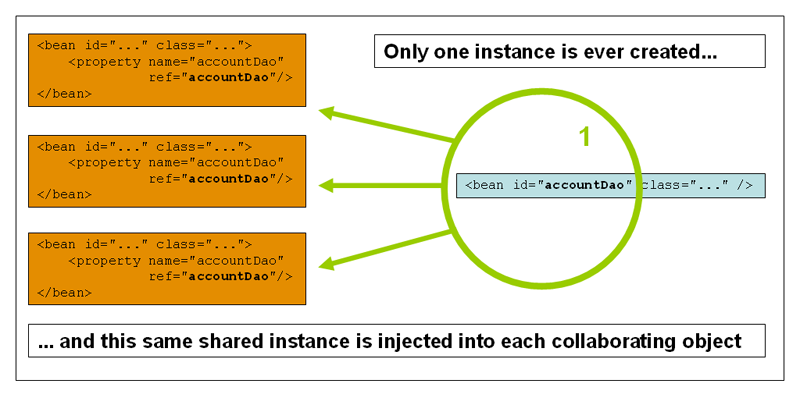
Spring's concept of a singleton bean differs from the Singleton
pattern as defined in the Gang of Four (GoF) patterns book. The GoF
Singleton hard-codes the scope of an object such that one and
only one instance of a particular class is created
per ClassLoader. The scope of the Spring
singleton is best described as per container and per
bean. This means that if you define one bean for a particular
class in a single Spring container, then the Spring container creates one
and only one instance of the class defined by that
bean definition. The singleton scope is the default scope in
Spring. To define a bean as a singleton in XML, you would
write, for example:
<bean id="accountService" class="com.foo.DefaultAccountService"/>

<!-- the following is equivalent, though redundant (singleton scope is the default) -->
<bean id="accountService" class="com.foo.DefaultAccountService" scope="singleton"/>
The non-singleton, prototype scope of bean deployment results in the
creation of a new bean instance every time a request
for that specific bean is made. That is, the bean is injected into another
bean or you request it through a getBean() method call
on the container. As a rule, use the prototype scope for all stateful
beans and the singleton scope for stateless beans.
The following diagram illustrates the Spring prototype scope. A data access object (DAO) is not typically configured as a prototype, because a typical DAO does not hold any conversational state; it was just easier for this author to reuse the core of the singleton diagram.
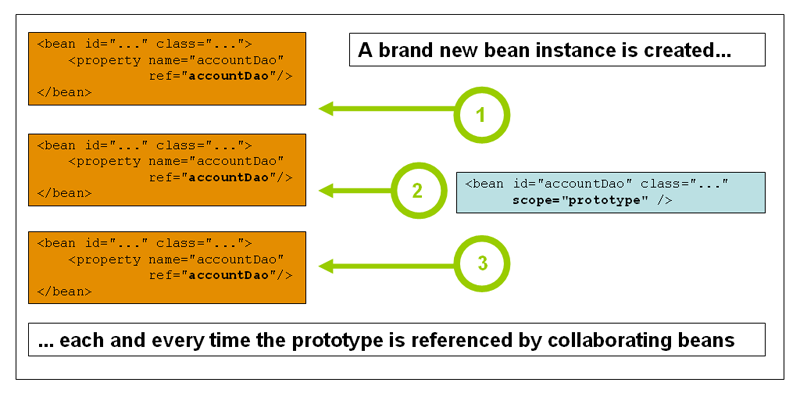
The following example defines a bean as a prototype in XML:
<!-- using spring-beans-2.0.dtd -->
<bean id="accountService" class="com.foo.DefaultAccountService" scope="prototype"/>
In contrast to the other scopes, Spring does not manage the complete lifecycle of a prototype bean: the container instantiates, configures, and otherwise assembles a prototype object, and hands it to the client, with no further record of that prototype instance. Thus, although initialization lifecycle callback methods are called on all objects regardless of scope, in the case of prototypes, configured destruction lifecycle callbacks are not called. The client code must clean up prototype-scoped objects and release expensive resources that the prototype bean(s) are holding. To get the Spring container to release resources held by prototype-scoped beans, try using a custom bean post-processor, which holds a reference to beans that need to be cleaned up.
In some respects, the Spring container's role in regard to a
prototype-scoped bean is a replacement for the Java new
operator. All lifecycle management past that point must be handled by the
client. (For details on the lifecycle of a bean in the Spring container,
see Section 3.6.1, “Lifecycle callbacks”.)
When you use singleton-scoped beans with dependencies on prototype beans, be aware that dependencies are resolved at instantiation time. Thus if you dependency-inject a prototype-scoped bean into a singleton-scoped bean, a new prototype bean is instantiated and then dependency-injected into the singleton bean. The prototype instance is the sole instance that is ever supplied to the singleton-scoped bean.
However, suppose you want the singleton-scoped bean to acquire a new instance of the prototype-scoped bean repeatedly at runtime. You cannot dependency-inject a prototype-scoped bean into your singleton bean, because that injection occurs only once, when the Spring container is instantiating the singleton bean and resolving and injecting its dependencies. If you need a new instance of a prototype bean at runtime more than once, see Section 3.4.6, “Method injection”
The request, session, and
global session scopes are only
available if you use a web-aware Spring
ApplicationContext implementation (such as
XmlWebApplicationContext). If you use these scopes
with regular Spring IoC containers such as the
ClassPathXmlApplicationContext, you get an
IllegalStateException complaining about an unknown
bean scope.
To support the scoping of beans at the request,
session, and global session levels
(web-scoped beans), some minor initial configuration is required before
you define your beans. (This initial setup is not
required for the standard scopes, singleton and prototype.)
How you accomplish this initial setup depends on your particular Servlet environment..
If you access scoped beans within Spring Web MVC, in effect, within
a request that is processed by the Spring
DispatcherServlet, or
DispatcherPortlet, then no special setup is
necessary: DispatcherServlet and
DispatcherPortlet already expose all relevant
state.
If you use a Servlet 2.4+ web container, with requests processed
outside of Spring's DispatcherServlet (for example, when using JSF or
Struts), you need to add the following
javax.servlet.ServletRequestListener to
the declarations in your web applications web.xml
file:
<web-app>
...
<listener>
  <listener-class>
      org.springframework.web.context.request.RequestContextListener
  </listener-class>
</listener>
...
</web-app>
If you use an older web container (Servlet 2.3), use the provided
javax.servlet.Filter implementation. The
following snippet of XML configuration must be included in the
web.xml file of your web application if you want to
access web-scoped beans in requests outside of Spring's
DispatcherServlet on a Servlet 2.3 container. (The filter mapping
depends on the surrounding web application configuration, so you must
change it as appropriate.)
<web-app>
..
<filter>
  <filter-name>requestContextFilter</filter-name>
  <filter-class>org.springframework.web.filter.RequestContextFilter</filter-class>
</filter>
<filter-mapping>
  <filter-name>requestContextFilter</filter-name>
  <url-pattern>/*</url-pattern>
</filter-mapping>
...
</web-app>
DispatcherServlet,
RequestContextListener and
RequestContextFilter all do exactly the same
thing, namely bind the HTTP request object to the
Thread that is servicing that request. This makes
beans that are request- and session-scoped available further down the
call chain.
Consider the following bean definition:
<bean id="loginAction" class="com.foo.LoginAction" scope="request"/>
The Spring container creates a new instance of the
LoginAction bean by using the
loginAction bean definition for each and every HTTP
request. That is, the loginAction bean is scoped at
the HTTP request level. You can change the internal state of the
instance that is created as much as you want, because other instances
created from the same loginAction bean definition
will not see these changes in state; they are particular to an
individual request. When the request completes processing, the bean that
is scoped to the request is discarded.
Consider the following bean definition:
<bean id="userPreferences" class="com.foo.UserPreferences" scope="session"/>
The Spring container creates a new instance of the
UserPreferences bean by using the
userPreferences bean definition for the lifetime of a
single HTTP Session. In other words, the
userPreferences bean is effectively scoped at the
HTTP Session level. As with
request-scoped beans, you can change the internal
state of the instance that is created as much as you want, knowing that
other HTTP Session instances that are
also using instances created from the same
userPreferences bean definition do not see these
changes in state, because they are particular to an individual HTTP
Session. When the HTTP
Session is eventually discarded, the bean
that is scoped to that particular HTTP
Session is also discarded.
Consider the following bean definition:
<bean id="userPreferences" class="com.foo.UserPreferences" scope="globalSession"/>
The global session scope is similar to the
standard HTTP Session scope (described above), and
applies only in the context of portlet-based web applications. The
portlet specification defines the notion of a global
Session that is shared among all portlets
that make up a single portlet web application. Beans defined at the
global session scope are scoped (or bound) to the
lifetime of the global portlet
Session.
If you write a standard Servlet-based web application and you define
one or more beans as having global session scope, the
standard HTTP Session scope is used, and
no error is raised.
The Spring IoC container manages not only the instantiation of your objects (beans), but also the wiring up of collaborators (or dependencies). If you want to inject (for example) an HTTP request scoped bean into another bean, you must inject an AOP proxy in place of the scoped bean. That is, you need to inject a proxy object that exposes the same public interface as the scoped object but that can also retrieve the real, target object from the relevant scope (for example, an HTTP request) and delegate method calls onto the real object.
| Note |
|---|---|
You do not need to use the
|
The configuration in the following example is only one line, but it is important to understand the “why” as well as the “how” behind it.
<?xml version="1.0" encoding="UTF-8"?>
<beans xmlns="http://www.springframework.org/schema/beans"
     xmlns:xsi="http://www.w3.org/2001/XMLSchema-instance"
     xmlns:aop="http://www.springframework.org/schema/aop"
     xsi:schemaLocation="http://www.springframework.org/schema/beans
         http://www.springframework.org/schema/beans/spring-beans-3.0.xsd
         http://www.springframework.org/schema/aop
         http://www.springframework.org/schema/aop/spring-aop-3.0.xsd">

  <!-- an HTTP Session-scoped bean exposed as a proxy -->
  <bean id="userPreferences" class="com.foo.UserPreferences" scope="session">

        <!-- this next element effects the proxying of the surrounding bean -->
        <aop:scoped-proxy/>
  </bean>

  <!-- a singleton-scoped bean injected with a proxy to the above bean -->
  <bean id="userService" class="com.foo.SimpleUserService">

      <!-- a reference to the proxied userPreferences bean -->
      <property name="userPreferences" ref="userPreferences"/>

  </bean>
</beans>
To create such a proxy, you insert a child
<aop:scoped-proxy/> element into a scoped bean
definition.
(If
you choose class-based proxying, you also need the CGLIB library in your
classpath. See the section called “Choosing the type of proxy to create” and Appendix C, XML Schema-based configuration.) Why do definitions of beans scoped at the
request, session,
globalSession and custom-scope levels require the
<aop:scoped-proxy/> element ? Let's examine the
following singleton bean definition and contrast it with what you need
to define for the aforementioned scopes. (The following
userPreferences bean definition as it stands is
incomplete.)
<bean id="userPreferences" class="com.foo.UserPreferences" scope="session"/>

<bean id="userManager" class="com.foo.UserManager">
  <property name="userPreferences" ref="userPreferences"/>
</bean>
In the preceding example, the singleton bean
userManager is injected with a reference to the HTTP
Session-scoped bean
userPreferences. The salient point here is that the
userManager bean is a singleton: it will be
instantiated exactly once per container, and its
dependencies (in this case only one, the
userPreferences bean) are also injected only once.
This means that the userManager bean will only
operate on the exact same userPreferences object,
that is, the one that it was originally injected with.
This is not the behavior you want when
injecting a shorter-lived scoped bean into a longer-lived scoped bean,
for example injecting an HTTP
Session-scoped collaborating bean as a
dependency into singleton bean. Rather, you need a single
userManager object, and for the lifetime of an HTTP
Session, you need a
userPreferences object that is specific to said HTTP
Session. Thus the container creates an
object that exposes the exact same public interface as the
UserPreferences class (ideally an object that
is a UserPreferences
instance) which can fetch the real
UserPreferences object from the scoping mechanism
(HTTP request, Session, etc.). The
container injects this proxy object into the
userManager bean, which is unaware that this
UserPreferences reference is a proxy. In this
example, when a UserManager instance
invokes a method on the dependency-injected
UserPreferences object, it actually is invoking a
method on the proxy. The proxy then fetches the real
UserPreferences object from (in this case) the
HTTP Session, and delegates the method
invocation onto the retrieved real
UserPreferences object.
Thus you need the following, correct and complete, configuration
when injecting request-, session-,
and globalSession-scoped beans into collaborating
objects:
<bean id="userPreferences" class="com.foo.UserPreferences" scope="session">
  <aop:scoped-proxy/>
</bean>

<bean id="userManager" class="com.foo.UserManager">
  <property name="userPreferences" ref="userPreferences"/>
</bean>
By default, when the Spring container creates a proxy for a bean
that is marked up with the
<aop:scoped-proxy/> element, a
CGLIB-based class proxy is created. This means that you
need to have the CGLIB library in the classpath of your
application.
Note: CGLIB proxies only intercept public method calls! Do not call non-public methods on such a proxy; they will not be delegated to the scoped target object.
Alternatively, you can configure the Spring container to create
standard JDK interface-based proxies for such scoped beans, by
specifying false for the value of the
proxy-target-class attribute of the
<aop:scoped-proxy/> element. Using JDK
interface-based proxies means that you do not need additional
libraries in your application classpath to effect such proxying.
However, it also means that the class of the scoped bean must
implement at least one interface, and that all
collaborators into which the scoped bean is injected must reference
the bean through one of its interfaces.
<!-- DefaultUserPreferences implements the UserPreferences interface -->
<bean id="userPreferences" class="com.foo.DefaultUserPreferences" scope="session">
  <aop:scoped-proxy proxy-target-class="false"/>
</bean>

<bean id="userManager" class="com.foo.UserManager">
  <property name="userPreferences" ref="userPreferences"/>
</bean>
For more detailed information about choosing class-based or interface-based proxying, see Section 7.6, “Proxying mechanisms”.
As of Spring 2.0, the bean scoping mechanism is extensible. You can
define your own scopes, or even redefine existing scopes, although the
latter is considered bad practice and you cannot
override the built-in singleton and
prototype scopes.
To integrate your custom scope(s) into the Spring container, you
need to implement the
org.springframework.beans.factory.config.Scope
interface, which is described in this section. For an idea of how to
implement your own scopes, see the Scope
implementations that are supplied with the Spring Framework itself and
the Scope Javadoc, which explains the methods you need to implement
in more detail.
The Scope interface has four methods to get
objects from the scope, remove them from the scope, and allow them to be
destroyed.
The following method returns the object from the underlying scope. The session scope implementation, for example, returns the session-scoped bean (and if it does not exist, the method returns a new instance of the bean, after having bound it to the session for future reference).
Object get(String name, ObjectFactory objectFactory)
The following method removes the object from the underlying scope. The session scope implementation for example, removes the session-scoped bean from the underlying session. The object should be returned, but you can return null if the object with the specified name is not found.
Object remove(String name)
The following method registers the callbacks the scope should execute when it is destroyed or when the specified object in the scope is destroyed. Refer to the Javadoc or a Spring scope implementation for more information on destruction callbacks.
void registerDestructionCallback(String name, Runnable destructionCallback)The following method obtains the conversation identifier for the underlying scope. This identifier is different for each scope. For a session scoped implementation, this identifier can be the session identifier.
String getConversationId()
After you write and test one or more custom
Scope implementations, you need to make
the Spring container aware of your new scope(s). The following method is
the central method to register a new
Scope with the Spring container:
void registerScope(String scopeName, Scope scope);This method is declared on the
ConfigurableBeanFactory interface, which
is available on most of the concrete
ApplicationContext implementations that
ship with Spring via the BeanFactory property.
The first argument to the registerScope(..)
method is the unique name associated with a scope; examples of such
names in the Spring container itself are singleton
and prototype. The second argument to the
registerScope(..) method is an actual instance
of the custom Scope implementation that
you wish to register and use.
Suppose that you write your custom
Scope implementation, and then register
it as below.
| Note |
|---|---|
The example below uses |
Scope threadScope = new SimpleThreadScope();
beanFactory.registerScope("thread", threadScope);
You then create bean definitions that adhere to the scoping rules of
your custom Scope:
<bean id="..." class="..." scope="thread">
With a custom Scope implementation,
you are not limited to programmatic registration of the scope. You can
also do the Scope registration
declaratively, using the CustomScopeConfigurer
class:
<?xml version="1.0" encoding="UTF-8"?>
<beans xmlns="http://www.springframework.org/schema/beans"
     xmlns:xsi="http://www.w3.org/2001/XMLSchema-instance"
     xmlns:aop="http://www.springframework.org/schema/aop"
     xsi:schemaLocation="http://www.springframework.org/schema/beans
         http://www.springframework.org/schema/beans/spring-beans-3.0.xsd
         http://www.springframework.org/schema/aop
         http://www.springframework.org/schema/aop/spring-aop-3.0.xsd">

  <bean class="org.springframework.beans.factory.config.CustomScopeConfigurer">
      <property name="scopes">
          <map>
              <entry key="thread">
                  <bean class="org.springframework.context.support.SimpleThreadScope"/>
              </entry>
          </map>
      </property>
  </bean>

  <bean id="bar" class="x.y.Bar" scope="thread">
      <property name="name" value="Rick"/>
      <aop:scoped-proxy/>
  </bean>

  <bean id="foo" class="x.y.Foo">
      <property name="bar" ref="bar"/>
  </bean>

</beans>
| Note |
|---|---|
When you place <aop:scoped-proxy/> in a
|
To interact with the container's management of the bean lifecycle, you
can implement the Spring InitializingBean
and DisposableBean interfaces. The
container calls afterPropertiesSet() for the
former and destroy() for the latter to allow the
bean to perform certain actions upon initialization and destruction of
your beans. You can also achieve the same integration with the container
without coupling your classes to Spring interfaces through the use of
init-method and destroy method object definition metadata.
Internally, the Spring Framework uses
BeanPostProcessor implementations to
process any callback interfaces it can find and call the appropriate
methods. If you need custom features or other lifecycle behavior Spring
does not offer out-of-the-box, you can implement a
BeanPostProcessor yourself. For more
information, see Section 3.8, “Container extension points”.
In addition to the initialization and destruction callbacks,
Spring-managed objects may also implement the
Lifecycle interface so that those objects
can participate in the startup and shutdown process as driven by the
container's own lifecycle.
The lifecycle callback interfaces are described in this section.
The
org.springframework.beans.factory.InitializingBean
interface allows a bean to perform initialization work after all
necessary properties on the bean have been set by the container. The
InitializingBean interface specifies a
single method:
void afterPropertiesSet() throws Exception;
It is recommended that you do not use the
InitializingBean interface because it
unnecessarily couples the code to Spring. Alternatively, specify a POJO
initialization method. In the case of XML-based configuration metadata,
you use the init-method attribute to specify the name
of the method that has a void no-argument signature. For example, the
following definition:
<bean id="exampleInitBean" class="examples.ExampleBean" init-method="init"/>
public class ExampleBean {

  public void init() {
      // do some initialization work
  }
}
...is exactly the same as...
<bean id="exampleInitBean" class="examples.AnotherExampleBean"/>
public class AnotherExampleBean implements InitializingBean {

  public void afterPropertiesSet() {
      // do some initialization work
  }
}
... but does not couple the code to Spring.
Implementing the
org.springframework.beans.factory.DisposableBean
interface allows a bean to get a callback when the container containing
it is destroyed. The DisposableBean
interface specifies a single method:
void destroy() throws Exception;
It is recommended that you do not use the
DisposableBean callback interface because
it unnecessarily couples the code to Spring. Alternatively, specify a
generic method that is supported by bean definitions. With XML-based
configuration metadata, you use the destroy-method
attribute on the <bean/>. For example, the
following definition:
<bean id="exampleInitBean" class="examples.ExampleBean" destroy-method="cleanup"/>
public class ExampleBean {

  public void cleanup() {
      // do some destruction work (like releasing pooled connections)
  }
}
...is exactly the same as...
<bean id="exampleInitBean" class="examples.AnotherExampleBean"/>
public class AnotherExampleBean implements DisposableBean {

  public void destroy() {
      // do some destruction work (like releasing pooled connections)
  }
}
... but does not couple the code to Spring.
When you write initialization and destroy method callbacks that do
not use the Spring-specific
InitializingBean and
DisposableBean callback interfaces, you
typically write methods with names such as init(),
initialize(), dispose(), and so
on. Ideally, the names of such lifecycle callback methods are
standardized across a project so that all developers use the same method
names and ensure consistency.
You can configure the Spring container to look
for named initialization and destroy callback method names on
every bean. This means that you, as an application
developer, can write your application classes and use an initialization
callback called init(), without having to configure
an init-method="init" attribute with each bean
definition. The Spring IoC container calls that method when the bean is
created (and in accordance with the standard lifecycle callback contract
described previously). This feature also enforces a consistent naming
convention for initialization and destroy method callbacks.
Suppose that your initialization callback methods are named
init() and destroy callback methods are named
destroy(). Your class will resemble the class in the
following example.
public class DefaultBlogService implements BlogService {

  private BlogDao blogDao;

  public void setBlogDao(BlogDao blogDao) {
      this.blogDao = blogDao;
  }

  // this is (unsurprisingly) the initialization callback method
  public void init() {
      if (this.blogDao == null) {
          throw new IllegalStateException("The [blogDao] property must be set.");
      }
  }
}
<beans default-init-method="init">

  <bean id="blogService" class="com.foo.DefaultBlogService">
      <property name="blogDao" ref="blogDao" />
  </bean>

</beans>
The presence of the default-init-method attribute
on the top-level <beans/> element attribute
causes the Spring IoC container to recognize a method called
init on beans as the initialization method callback.
When a bean is created and assembled, if the bean class has such a
method, it is invoked at the appropriate time.
You configure destroy method callbacks similarly (in XML, that is)
by using the default-destroy-method attribute on the
top-level <beans/> element.
Where existing bean classes already have callback methods that are
named at variance with the convention, you can override the default by
specifying (in XML, that is) the method name using the
init-method and destroy-method
attributes of the <bean/> itself.
The Spring container guarantees that a configured initialization callback is called immediately after a bean is supplied with all dependencies. Thus the initialization callback is called on the raw bean reference, which means that AOP interceptors and so forth are not yet applied to the bean. A target bean is fully created first, then an AOP proxy (for example) with its interceptor chain is applied. If the target bean and the proxy are defined separately, your code can even interact with the raw target bean, bypassing the proxy. Hence, it would be inconsistent to apply the interceptors to the init method, because doing so would couple the lifecycle of the target bean with its proxy/interceptors and leave strange semantics when your code interacts directly to the raw target bean.
As of Spring 2.5, you have three options for controlling bean
lifecycle behavior: the InitializingBean and DisposableBean callback
interfaces; custom init() and
destroy() methods; and the @PostConstruct and
@PreDestroy annotations. You can
combine these mechanisms to control a given bean.
| Note |
|---|---|
If multiple lifecycle mechanisms are configured for a bean, and
each mechanism is configured with a different method name, then each
configured method is executed in the order listed below. However, if
the same method name is configured - for example,
|
Multiple lifecycle mechanisms configured for the same bean, with different initialization methods, are called as follows:
Methods annotated with
@PostConstructafterPropertiesSet()as defined by theInitializingBeancallback interfaceA custom configured
init()method
Destroy methods are called in the same order:
Methods annotated with
@PreDestroydestroy()as defined by theDisposableBeancallback interfaceA custom configured
destroy()method
The Lifecycle interface defines the
essential methods for any object that has its own lifecycle requirements
(e.g. starts and stops some background process):
public interface Lifecycle {

  void start();

  void stop();

  boolean isRunning();

}
Any Spring-managed object may implement that interface. Then, when
the ApplicationContext itself starts and stops, it will cascade those
calls to all Lifecycle implementations defined within that context. It
does this by delegating to a
LifecycleProcessor:
public interface LifecycleProcessor extends Lifecycle {

  void onRefresh();

  void onClose();

}
Notice that the LifecycleProcessor is
itself an extension of the Lifecycle
interface. It also adds two other methods for reacting to the context
being refreshed and closed.
The order of startup and shutdown invocations can be important. If a
"depends-on" relationship exists between any two objects, the dependent
side will start after its dependency, and it will
stop before its dependency. However, at times the
direct dependencies are unknown. You may only know that objects of a
certain type should start prior to objects of another type. In those
cases, the SmartLifecycle interface
defines another option, namely the getPhase()
method as defined on its super-interface,
Phased.
public interface Phased {

  int getPhase();

}


public interface SmartLifecycle extends Lifecycle, Phased {

  boolean isAutoStartup();

  void stop(Runnable callback);

}
When starting, the objects with the lowest phase start first, and
when stopping, the reverse order is followed. Therefore, an object that
implements SmartLifecycle and whose
getPhase() method returns Integer.MIN_VALUE would be
among the first to start and the last to stop. At the other end of the
spectrum, a phase value of Integer.MAX_VALUE would
indicate that the object should be started last and stopped first
(likely because it depends on other processes to be running). When
considering the phase value, it's also important to know that the
default phase for any "normal" Lifecycle
object that does not implement
SmartLifecycle would be 0. Therefore, any
negative phase value would indicate that an object should start before
those standard components (and stop after them), and vice versa for any
positive phase value.
As you can see the stop method defined by
SmartLifecycle accepts a callback. Any
implementation must invoke that callback's run()
method after that implementation's shutdown process is complete. That
enables asynchronous shutdown where necessary since the default
implementation of the LifecycleProcessor
interface, DefaultLifecycleProcessor, will wait
up to its timeout value for the group of objects within each phase to
invoke that callback. The default per-phase timeout is 30 seconds. You
can override the default lifecycle processor instance by defining a bean
named "lifecycleProcessor" within the context. If you only want to
modify the timeout, then defining the following would be
sufficient:
<bean id="lifecycleProcessor" class="org.springframework.context.support.DefaultLifecycleProcessor">
  <!-- timeout value in milliseconds -->
  <property name="timeoutPerShutdownPhase" value="10000"/>
</bean>
As mentioned, the LifecycleProcessor
interface defines callback methods for the refreshing and closing of the
context as well. The latter will simply drive the shutdown process as if
stop() had been called explicitly, but it will happen when the context
is closing. The 'refresh' callback on the other hand enables another
feature of SmartLifecycle beans. When the
context is refreshed (after all objects have been instantiated and
initialized), that callback will be invoked, and at that point the
default lifecycle processor will check the boolean value returned by
each SmartLifecycle object's
isAutoStartup() method. If "true", then that
object will be started at that point rather than waiting for an explicit
invocation of the context's or its own start() method (unlike the
context refresh, the context start does not happen automatically for a
standard context implementation). The "phase" value as well as any
"depends-on" relationships will determine the startup order in the same
way as described above.
| Note |
|---|---|
This section applies only to non-web applications. Spring's
web-based |
If you are using Spring's IoC container in a non-web application environment; for example, in a rich client desktop environment; you register a shutdown hook with the JVM. Doing so ensures a graceful shutdown and calls the relevant destroy methods on your singleton beans so that all resources are released. Of course, you must still configure and implement these destroy callbacks correctly.
To register a shutdown hook, you call the
registerShutdownHook() method that is declared
on the AbstractApplicationContext class:
import org.springframework.context.support.AbstractApplicationContext;
import org.springframework.context.support.ClassPathXmlApplicationContext;

public final class Boot {

  public static void main(final String[] args) throws Exception {
      AbstractApplicationContext ctx
          = new ClassPathXmlApplicationContext(new String []{"beans.xml"});

      // add a shutdown hook for the above context...
      ctx.registerShutdownHook();

      // app runs here...

      // main method exits, hook is called prior to the app shutting down...
  }
}
When an ApplicationContext creates a
class that implements the
org.springframework.context.ApplicationContextAware
interface, the class is provided with a reference to that
ApplicationContext.
public interface ApplicationContextAware {

  void setApplicationContext(ApplicationContext applicationContext) throws BeansException;
}
Thus beans can manipulate programmatically the
ApplicationContext that created them,
through the ApplicationContext interface,
or by casting the reference to a known subclass of this interface, such as
ConfigurableApplicationContext, which exposes
additional functionality. One use would be the programmatic retrieval of
other beans. Sometimes this capability is useful; however, in general you
should avoid it, because it couples the code to Spring and does not follow
the Inversion of Control style, where collaborators are provided to beans
as properties. Other methods of the ApplicationContext provide access to
file resources, publishing application events, and accessing a
MessageSource. These additional features are described in Section 3.13, “Additional Capabilities of the
ApplicationContext”
As of Spring 2.5, autowiring is another alternative to obtain
reference to the ApplicationContext. The
"traditional" constructor and byType
autowiring modes (as described in Section 3.4.5, “Autowiring collaborators”) can provide a dependency of type
ApplicationContext for a constructor
argument or setter method parameter, respectively. For more flexibility,
including the ability to autowire fields and multiple parameter methods,
use the new annotation-based autowiring features. If you do, the
ApplicationFactory is autowired into a
field, constructor argument, or method parameter that is expecting the
BeanFactory type if the field, constructor,
or method in question carries the
@Autowired annotation. For more
information, see Section 3.9.2, “@Autowired and @Inject”.
When an ApplicationContext creates a class that implements the
org.springframework.beans.factory.BeanNameAware
interface, the class is provided with a reference to the name defined in
its associated object definition.
public interface BeanNameAware {

  void setBeanName(string name) throws BeansException;
}
The callback is invoked after population of normal bean properties but
before an initialization callback such as
InitializingBeans
afterPropertiesSet or a custom init-method.
Besides ApplicationContextAware and
BeanNameAware discussed above, Spring
offers a range of
Aware interfaces that
allow beans to indicate to the container that they require a certain
infrastructure dependency. The most important
Aware interfaces are summarized below - as
a general rule, the name is a good indication of the dependency
type:
Table 3.4. Aware interfaces
| Name | Injected Dependency | Explained in... |
|---|---|---|
| Declaring
| |
| Event publisher of the enclosing
| Section 3.13, “Additional Capabilities of the ApplicationContext” |
| Class loader used to load the bean classes. | |
| Declaring
| |
| Name of the declaring bean | |
| Resource adapter
| |
| Defined weaver for processing class definition at load time | Section 7.8.4, “Load-time weaving with AspectJ in the Spring Framework” |
| Configured strategy for resolving messages (with support for parametrization and internationalization) | Section 3.13, “Additional Capabilities of the ApplicationContext” |
| Spring JMX notification publisher | |
| Current | |
| Current | |
| Configured loader for low-level access to resources | |
| Current | |
| Current |
Note again that usage of these interfaces ties your code to the Spring API and does not follow the Inversion of Control style. As such, they are recommended for infrastructure beans that require programmatic access to the container.
A bean definition can contain a lot of configuration information, including constructor arguments, property values, and container-specific information such as initialization method, static factory method name, and so on. A child bean definition inherits configuration data from a parent definition. The child definition can override some values, or add others, as needed. Using parent and child bean definitions can save a lot of typing. Effectively, this is a form of templating.
If you work with an ApplicationContext
interface programmatically, child bean definitions are represented by the
ChildBeanDefinition class. Most users do not work
with them on this level, instead configuring bean definitions
declaratively in something like the
ClassPathXmlApplicationContext. When you use
XML-based configuration metadata, you indicate a child bean definition by
using the parent attribute, specifying the parent bean
as the value of this attribute.
<bean id="inheritedTestBean" abstract="true"
    class="org.springframework.beans.TestBean">
  <property name="name" value="parent"/>
  <property name="age" value="1"/>
</bean>

<bean id="inheritsWithDifferentClass"
      class="org.springframework.beans.DerivedTestBean"
      parent="inheritedTestBean" init-method="initialize">

  <property name="name" value="override"/>
  <!-- the age property value of 1 will be inherited from  parent -->

</bean>
A child bean definition uses the bean class from the parent definition if none is specified, but can also override it. In the latter case, the child bean class must be compatible with the parent, that is, it must accept the parent's property values.
A child bean definition inherits constructor argument values, property
values, and method overrides from the parent, with the option to add new
values. Any initialization method, destroy method, and/or
static factory method settings that you specify will
override the corresponding parent settings.
The remaining settings are always taken from the child definition: depends on, autowire mode, dependency check, singleton, scope, lazy init.
The preceding example explicitly marks the parent bean definition as
abstract by using the abstract attribute. If the parent
definition does not specify a class, explicitly marking the parent bean
definition as abstract is required, as follows:
<bean id="inheritedTestBeanWithoutClass" abstract="true">
    <property name="name" value="parent"/>
    <property name="age" value="1"/>
</bean>

<bean id="inheritsWithClass" class="org.springframework.beans.DerivedTestBean"
    parent="inheritedTestBeanWithoutClass" init-method="initialize">
  <property name="name" value="override"/>
  <!-- age will inherit the value of 1 from the parent bean definition-->
</bean>
The parent bean cannot be instantiated on its own because it is
incomplete, and it is also explicitly marked as
abstract. When a definition is
abstract like this, it is usable only as a pure
template bean definition that serves as a parent definition for child
definitions. Trying to use such an abstract parent bean
on its own, by referring to it as a ref property of another bean or doing
an explicit getBean() call with the parent bean
id, returns an error. Similarly, the container's internal
preInstantiateSingletons() method ignores bean
definitions that are defined as abstract.
| Note |
|---|---|
|
Typically, an application developer does not need to subclass any
ApplicationContext implementation classes.
You can extend The Spring IoC container infinitely by plugging in
implementations of special integration interfaces. The next few sections
describe these integration interfaces.
The BeanPostProcessor interface defines
callback methods that you can implement to provide
your own (or override the container's default) instantiation logic,
dependency-resolution logic, and so forth. If you want to implement some
custom logic after the Spring container finishes instantiating,
configuring, and otherwise initializing a bean, you can plug in one or
more BeanPostProcessor
implementations.
You can configure multiple BeanPostProcessor
interfaces. You can control the order in which these
BeanPostProcessor interfaces execute by setting the
order property. You can set this property only if the
BeanPostProcessor implements the
Ordered interface; if you write your own
BeanPostProcessor you should consider
implementing the Ordered interface too. For
more details, consult the Javadoc for the
BeanPostProcessor and
Ordered interfaces.
| Note |
|---|---|
To change the actual bean definition (that is, the recipe that
defines the bean), you instead need to use a
|
The
org.springframework.beans.factory.config.BeanPostProcessor
interface consists of exactly two callback methods. When such a class is
registered as a post-processor with the container, for each bean instance
that is created by the container, the post-processor gets a callback from
the container both before container initialization
methods (such as afterPropertiesSet and any declared
init method) are called, and also afterwards. The post-processor can take
any action with the bean instance, including ignoring the callback
completely. A bean post-processor typically checks for callback
interfaces, or may wrap a bean with a proxy. Some Spring AOP
infrastructure classes are implemented as bean post-processors and they do
this proxy-wrapping logic.
An ApplicationContext
automatically detects any beans that are defined in
the configuration metadata it receives that implement the
BeanPostProcessor interface. The
ApplicationContext registers these beans as
post-processors, to be then called appropriately by the container upon
bean creation. You can then deploy the post-processors as you would any
bean.
| BeanPostProcessors and AOP auto-proxying |
|---|---|
Classes that implement the
For any such bean, you should see an info log message: “Bean foo is not eligible for getting processed by all BeanPostProcessor interfaces (for example: not eligible for auto-proxying)”. |
The following examples show how to write, register, and use
BeanPostProcessors in the context of an
ApplicationContext.
This first example illustrates basic usage. The example shows a
custom BeanPostProcessor implementation
that invokes the toString() method of each bean
as it is created by the container and prints the resulting string to the
system console.
Find below the custom
BeanPostProcessor implementation class
definition:
package scripting;

import org.springframework.beans.factory.config.BeanPostProcessor;
import org.springframework.beans.BeansException;

public class InstantiationTracingBeanPostProcessor implements BeanPostProcessor {

  // simply return the instantiated bean as-is
  public Object postProcessBeforeInitialization(Object bean, String beanName)
                                                                     throws BeansException {
      return bean; // we could potentially return any object reference here...
  }

  public Object postProcessAfterInitialization(Object bean, String beanName)
                                                                     throws BeansException {
      System.out.println("Bean '" + beanName + "' created : " + bean.toString());
      return bean;
  }
}
<?xml version="1.0" encoding="UTF-8"?>
<beans xmlns="http://www.springframework.org/schema/beans"
     xmlns:xsi="http://www.w3.org/2001/XMLSchema-instance"
     xmlns:lang="http://www.springframework.org/schema/lang"
     xsi:schemaLocation="http://www.springframework.org/schema/beans
         http://www.springframework.org/schema/beans/spring-beans-3.0.xsd
         http://www.springframework.org/schema/lang
         http://www.springframework.org/schema/lang/spring-lang-3.0.xsd">

  <lang:groovy id="messenger"
        script-source="classpath:org/springframework/scripting/groovy/Messenger.groovy">
      <lang:property name="message" value="Fiona Apple Is Just So Dreamy."/>
  </lang:groovy>

  <!--
      when the above bean (messenger) is instantiated, this custom
      BeanPostProcessor implementation will output the fact to the system console
   -->
  <bean class="scripting.InstantiationTracingBeanPostProcessor"/>

</beans>
Notice how the
InstantiationTracingBeanPostProcessor is simply
defined. It does not even have a name, and because it is a bean it can
be dependency-injected just like any other bean. (The preceding
configuration also defines a bean that is backed by a Groovy script. The
Spring 2.0 dynamic language support is detailed in the chapter entitled
Chapter 26, Dynamic language support.)
The following small driver script executes the preceding code and configuration:
import org.springframework.context.ApplicationContext;
import org.springframework.context.support.ClassPathXmlApplicationContext;
import org.springframework.scripting.Messenger;

public final class Boot {

  public static void main(final String[] args) throws Exception {
      ApplicationContext ctx = new ClassPathXmlApplicationContext("scripting/beans.xml");
      Messenger messenger = (Messenger) ctx.getBean("messenger");
      System.out.println(messenger);
  }
}
The output of the preceding execution resembles the following:
Bean 'messenger' created : org.springframework.scripting.groovy.GroovyMessenger@272961
org.springframework.scripting.groovy.GroovyMessenger@272961
Using callback interfaces or annotations in conjunction with a
custom BeanPostProcessor implementation
is a common means of extending the Spring IoC container. An example is
Spring's RequiredAnnotationBeanPostProcessor -- a
BeanPostProcessor implementation that
ships with the Spring distribution which ensures that JavaBean
properties on beans that are marked with an (arbitrary) annotation are
actually (configured to be) dependency-injected with a value.
The next extension point that we will look at is the
org.springframework.beans.factory.config.BeanFactoryPostProcessor.
The semantics of this interface are similar to the
BeanPostProcessor, with one major
difference: BeanFactoryPostProcessors operate on the
bean configuration metadata; that is, the Spring IoC
container allows BeanFactoryPostProcessors to read the
configuration metadata and potentially change it
before the container instantiates any beans other
than BeanFactoryPostProcessors.
You can configure multiple
BeanFactoryPostProcessors. You can control the order in
which these BeanFactoryPostProcessors execute by
setting the order property. However, you can only set
this property if the
BeanFactoryPostProcessor implements the
Ordered interface. If you write your own
BeanFactoryPostProcessor, you should
consider implementing the Ordered interface
too; consult the Javadoc for the
BeanFactoryPostProcessor and
Ordered interfaces for more details.
| Note |
|---|---|
If you want to change the actual bean instances
(the objects that are created from the configuration metadata), then you
instead need to use a Also, |
A bean factory post-processor is executed automatically when it is
declared inside of an ApplicationContext,
in order to apply changes to the configuration metadata that defines a
container. Spring includes a number of pre-existing bean factory
post-processors, such as PropertyOverrideConfigurer
and PropertyPlaceholderConfigurer. A custom
BeanFactoryPostProcessor can also be used,
for example, to register custom property editors.
An ApplicationContext detects any beans
that are deployed into it and that implement the
BeanFactoryPostProcessor interface. It
automatically uses these beans as bean factory post-processors, at the
appropriate time. You can then deploy these post-processor beans as you
would any other bean.
| Note |
|---|---|
As with |
You use the
PropertyPlaceholderConfigurer to
externalize property values from a bean definition into another separate
file in the standard Java Properties format.
Doing so enables the person deploying an application to customize
environment-specific properties such as database URLs and passwords,
without the complexity or risk of modifying the main XML definition file
or files for the container.
Consider the following XML-based configuration metadata fragment,
where a DataSource with placeholder
values is defined. The example shows properties configured from an
external Properties file. At runtime, a
PropertyPlaceholderConfigurer is applied to the
metadata that will replace some properties of the DataSource. The values
to replace are specified as 'placeholders' of the form ${property-name}
which follows the Ant / Log4J / JSP EL style.
<bean class="org.springframework.beans.factory.config.PropertyPlaceholderConfigurer">
  <property name="locations" value="classpath:com/foo/jdbc.properties"/>
</bean>

<bean id="dataSource" destroy-method="close"
    class="org.apache.commons.dbcp.BasicDataSource">
  <property name="driverClassName" value="${jdbc.driverClassName}"/>
  <property name="url" value="${jdbc.url}"/>
  <property name="username" value="${jdbc.username}"/>
  <property name="password" value="${jdbc.password}"/>
</bean>
The actual values come from another file in the standard Java
Properties format:
jdbc.driverClassName=org.hsqldb.jdbcDriver
jdbc.url=jdbc:hsqldb:hsql://production:9002
jdbc.username=sa
jdbc.password=root
Therefore, the string ${jdbc.username} is replaced at runtime with the value 'sa' and similarly for other placeholder values that match to keys in the property file. The PropertyPlaceholderConfigurer checks for placeholders in most locations of a bean definition and the placeholder prefix and suffix can be customized.
With the context namespace introduced in Spring
2.5, it is possible to configure property placeholders with a dedicated
configuration element. You can provide multiple locations as a
comma-separated list in the location
attribute.
<context:property-placeholder location="classpath:com/foo/jdbc.properties"/>
The PropertyPlaceholderConfigurer does not
look for properties only in the Properties file
you specify, but also checks against the Java
System properties if it cannot find a property
you are trying to use. You can customize this behavior by setting the
systemPropertiesMode property of the configurer. It
has three values that specify configurer behavior: always override,
never override, and override only if the property
is not found in the properties file specified.
Consult the Javadoc for the
PropertyPlaceholderConfigurer for more
information.
| Class name substitution |
|---|---|
You can use the
<bean class="org.springframework.beans.factory.config.PropertyPlaceholderConfigurer">
  <property name="locations">
      <value>classpath:com/foo/strategy.properties</value>
  </property>
  <property name="properties">
      <value>custom.strategy.class=com.foo.DefaultStrategy</value>
  </property>
</bean>

<bean id="serviceStrategy" class="${custom.strategy.class}"/>
If the class cannot be resolved at runtime to a valid class,
resolution of the bean fails when it is about to be created, which is
during the |
The PropertyOverrideConfigurer, another bean
factory post-processor, resembles the
PropertyPlaceholderConfigurer, but unlike
the latter, the original definitions can have default values or no
values at all for bean properties. If an overriding
Properties file does not have an entry for a
certain bean property, the default context definition is used.
Note that the bean definition is not aware of
being overridden, so it is not immediately obvious from the XML
definition file that the override configurer is used. In case of
multiple PropertyOverrideConfigurer instances
that define different values for the same bean property, the last one
wins, due to the overriding mechanism.
Properties file configuration lines take this format:
beanName.property=value
For example:
dataSource.driverClassName=com.mysql.jdbc.Driver
dataSource.url=jdbc:mysql:mydb
This example file is usable against a container definition that contains a bean called dataSource, which has driver and url properties.
Compound property names are also supported, as long as every component of the path except the final property being overridden is already non-null (presumably initialized by the constructors). In this example...
foo.fred.bob.sammy=123
... the sammy property of the
bob property of the fred property
of the foo bean is set to the scalar value
123.
| Note |
|---|---|
Specified override values are always literal values; they are not translated into bean references. This convention also applies when the original value in the XML bean definition specifies a bean reference. |
With the context namespace introduced in Spring
2.5, it is possible to configure property overriding with a dedicated
configuration element:
<context:property-override location="classpath:override.properties"/>
You implement the
org.springframework.beans.factory.FactoryBean
interface for objects that are themselves
factories.
The FactoryBean interface is a point of
pluggability into the Spring IoC container's instantiation logic. If you
have complex initialization code that is better expressed in Java as
opposed to a (potentially) verbose amount of XML, you can create your own
FactoryBean, write the complex
initialization inside that class, and then plug your custom
FactoryBean into the container.
The FactoryBean interface provides
three methods:
Object getObject(): returns an instance of the object this factory creates. The instance can possibly be shared, depending on whether this factory returns singletons or prototypes.boolean isSingleton(): returnstrueif thisFactoryBeanreturns singletons,falseotherwise.Class getObjectType(): returns the object type returned by thegetObject()method ornullif the type is not known in advance
The FactoryBean concept and interface
is used in a number of places within the Spring Framework; more than 50
implementations of the FactoryBean
interface ship with Spring itself.
When you need to ask a container for an actual
FactoryBean instance itself, not the bean
it produces, you preface the bean id with the ampersand symbol
& (without quotes) when calling the
getBean() method of the
ApplicationContext. So for a given
FactoryBean with an id of
myBean, invoking getBean("myBean")
on the container returns the product of the
FactoryBean, and invoking
getBean("&myBean") returns the
FactoryBean instance
itself.
An alternative to XML setups is provided by annotation-based
configuration which rely on the bytecode metadata for wiring up components
instead of angle-bracket declarations. Instead of using XML to describe a
bean wiring, the developer moves the configuration into the component class
itself by using annotations on the relevant class, method, or field
declaration. As mentioned in Section 3.8.1.2, “Example: The
RequiredAnnotationBeanPostProcessor”, using a
BeanPostProcessor in conjunction with
annotations is a common means of extending the Spring IoC container. For
example, Spring 2.0 introduced the possibility of enforcing required
properties with the @Required annotation. As of Spring 2.5, it is now possible to follow
that same general approach to drive Spring's dependency injection.
Essentially, the @Autowired annotation
provides the same capabilities as described in Section 3.4.5, “Autowiring collaborators” but with more fine-grained control and
wider applicability. Spring 2.5 also adds support for JSR-250 annotations
such as @Resource,
@PostConstruct, and
@PreDestroy. Spring 3.0 adds support for
JSR-330 (Dependency Injection for Java) annotations contained in the
javax.inject package such as @Inject,
@Qualifier, @Named, and @Provider if the JSR330 jar is
present on the classpath. Use of these annotations also requires that
certain BeanPostProcessors be registered
within the Spring container.
| Note |
|---|---|
| Annotation injection is performed before XML injection, thus the latter configuration will override the former for properties wired through both approaches. |
As always, you can register them as individual bean definitions, but
they can also be implicitly registered by including the following tag in an
XML-based Spring configuration (notice the inclusion of the
context namespace):
<?xml version="1.0" encoding="UTF-8"?>
<beans xmlns="http://www.springframework.org/schema/beans"
     xmlns:xsi="http://www.w3.org/2001/XMLSchema-instance"
     xmlns:context="http://www.springframework.org/schema/context"
     xsi:schemaLocation="http://www.springframework.org/schema/beans
         http://www.springframework.org/schema/beans/spring-beans-3.0.xsd
         http://www.springframework.org/schema/context
         http://www.springframework.org/schema/context/spring-context-3.0.xsd">

   <context:annotation-config/>

</beans>
(The implicitly registered post-processors include AutowiredAnnotationBeanPostProcessor, CommonAnnotationBeanPostProcessor, PersistenceAnnotationBeanPostProcessor, as
well as the aforementioned RequiredAnnotationBeanPostProcessor.)
| Note |
|---|---|
|
The @Required annotation applies to
bean property setter methods, as in the following example:
public class SimpleMovieLister {

  private MovieFinder movieFinder;

  @Required
  public void setMovieFinder(MovieFinder movieFinder) {
      this.movieFinder = movieFinder;
  }

  // ...
}
This annotation simply indicates that the affected bean property must
be populated at configuration time, through an explicit property value in
a bean definition or through autowiring. The container throws an exception
if the affected bean property has not been populated; this allows for
eager and explicit failure, avoiding
NullPointerExceptions or the like later on. It is
still recommended that you put assertions into the bean class itself, for
example, into an init method. Doing so enforces those required references
and values even when you use the class outside of a container.
As expected, you can apply the
@Autowired annotation to "traditional"
setter methods:
| Note |
|---|---|
JSR 330's @Inject annotation can be used in place of Spring's
|
public class SimpleMovieLister {

  private MovieFinder movieFinder;

  @Autowired
  public void setMovieFinder(MovieFinder movieFinder) {
      this.movieFinder = movieFinder;
  }

  // ...
}
You can also apply the annotation to methods with arbitrary names and/or multiple arguments:
public class MovieRecommender {

  private MovieCatalog movieCatalog;

  private CustomerPreferenceDao customerPreferenceDao;

  @Autowired
  public void prepare(MovieCatalog movieCatalog,
                      CustomerPreferenceDao customerPreferenceDao) {
      this.movieCatalog = movieCatalog;
      this.customerPreferenceDao = customerPreferenceDao;
  }

  // ...
}
You can apply @Autowired to
constructors and fields:
public class MovieRecommender {

  @Autowired
  private MovieCatalog movieCatalog;

  private CustomerPreferenceDao customerPreferenceDao;

  @Autowired
  public MovieRecommender(CustomerPreferenceDao customerPreferenceDao) {
      this.customerPreferenceDao = customerPreferenceDao;
  }

  // ...
}
It is also possible to provide all beans of a
particular type from the ApplicationContext
by adding the annotation to a field or method that expects an array of
that type:
public class MovieRecommender {

  @Autowired
  private MovieCatalog[] movieCatalogs;

  // ...
}
The same applies for typed collections:
public class MovieRecommender {

  private Set<MovieCatalog> movieCatalogs;

  @Autowired
  public void setMovieCatalogs(Set<MovieCatalog> movieCatalogs) {
      this.movieCatalogs = movieCatalogs;
  }

  // ...
}
Even typed Maps can be autowired as long as the expected key type is
String. The Map values will contain all beans of
the expected type, and the keys will contain the corresponding bean
names:
public class MovieRecommender {

  private Map<String, MovieCatalog> movieCatalogs;

  @Autowired
  public void setMovieCatalogs(Map<String, MovieCatalog> movieCatalogs) {
      this.movieCatalogs = movieCatalogs;
  }

  // ...
}
By default, the autowiring fails whenever zero candidate beans are available; the default behavior is to treat annotated methods, constructors, and fields as indicating required dependencies. This behavior can be changed as demonstrated below.
public class SimpleMovieLister {

  private MovieFinder movieFinder;

  @Autowired(required=false)
  public void setMovieFinder(MovieFinder movieFinder) {
      this.movieFinder = movieFinder;
  }

  // ...
}
| Note |
|---|---|
Only one annotated constructor per-class can be marked as required, but multiple non-required constructors can be annotated. In that case, each is considered among the candidates and Spring uses the greediest constructor whose dependencies can be satisfied, that is the constructor that has the largest number of arguments.
|
You can also use @Autowired for
interfaces that are well-known resolvable dependencies:
BeanFactory,
ApplicationContext,
ResourceLoader,
ApplicationEventPublisher, and
MessageSource. These interfaces and their
extended interfaces, such as
ConfigurableApplicationContext or
ResourcePatternResolver, are automatically
resolved, with no special setup necessary.
public class MovieRecommender {

  @Autowired
  private ApplicationContext context;

  public MovieRecommender() {
  }

  // ...
}
Because autowiring by type may lead to multiple candidates, it is
often necessary to have more control over the selection process. One way
to accomplish this is with Spring's
@Qualifier annotation. You can associate
qualifier values with specific arguments, narrowing the set of type
matches so that a specific bean is chosen for each argument. In the
simplest case, this can be a plain descriptive value:
| Note |
|---|---|
JSR 330's |
public class MovieRecommender {

  @Autowired
  @Qualifier("main")
  private MovieCatalog movieCatalog;

  // ...
}
The @Qualifier annotation can also be
specified on individual constructor arguments or method parameters:
public class MovieRecommender {

  private MovieCatalog movieCatalog;

  private CustomerPreferenceDao customerPreferenceDao;

  @Autowired
  public void prepare(@Qualifier("main") MovieCatalog movieCatalog,
                      CustomerPreferenceDao customerPreferenceDao) {
      this.movieCatalog = movieCatalog;
      this.customerPreferenceDao = customerPreferenceDao;
  }

  // ...
}
The corresponding bean definitions appear as follows. The bean with qualifier value "main" is wired with the constructor argument that is qualified with the same value.
<?xml version="1.0" encoding="UTF-8"?>
<beans xmlns="http://www.springframework.org/schema/beans"
  xmlns:xsi="http://www.w3.org/2001/XMLSchema-instance"
  xmlns:context="http://www.springframework.org/schema/context"
  xsi:schemaLocation="http://www.springframework.org/schema/beans
      http://www.springframework.org/schema/beans/spring-beans-3.0.xsd
      http://www.springframework.org/schema/context
      http://www.springframework.org/schema/context/spring-context-3.0.xsd">

  <context:annotation-config/>

  <bean class="example.SimpleMovieCatalog">
      <qualifier value="main"/>
      <!-- inject any dependencies required by this bean -->
  </bean>

  <bean class="example.SimpleMovieCatalog">
      <qualifier value="action"/>
      <!-- inject any dependencies required by this bean -->
  </bean>

  <bean id="movieRecommender" class="example.MovieRecommender"/>

</beans>
For a fallback match, the bean name is considered a default qualifier
value. Thus you can define the bean with an id "main" instead of the
nested qualifier element, leading to the same matching result. However,
although you can use this convention to refer to specific beans by name,
@Autowired is fundamentally about
type-driven injection with optional semantic qualifiers. This means that
qualifier values, even with the bean name fallback, always have narrowing
semantics within the set of type matches; they do not semantically express
a reference to a unique bean id. Good qualifier values are "main" or
"EMEA" or "persistent", expressing characteristics of a specific component
that are independent from the bean id, which may be auto-generated in case
of an anonymous bean definition like the one in the preceding
example.
Qualifiers also apply to typed collections, as discussed above, for
example, to Set<MovieCatalog>. In this case, all
matching beans according to the declared qualifiers are injected as a
collection. This implies that qualifiers do not have to be unique; they
rather simply constitute filtering criteria. For example, you can define
multiple MovieCatalog beans with the same qualifier
value "action"; all of which would be injected into a
Set<MovieCatalog> annotated with
@Qualifier("action").
| Tip |
|---|---|
If you intend to express annotation-driven injection by name, do not
primarily use As a specific consequence of this semantic difference, beans that
are themselves defined as a collection or map type cannot be injected
through
|
You can create your own custom qualifier annotations. Simply define an
annotation and provide the @Qualifier
annotation within your definition:
| Note |
|---|---|
You can use JSR 330's |
@Target({ElementType.FIELD, ElementType.PARAMETER})
@Retention(RetentionPolicy.RUNTIME)
@Qualifier
public @interface Genre {

  String value();
}
Then you can provide the custom qualifier on autowired fields and parameters:
public class MovieRecommender {

  @Autowired
  @Genre("Action")
  private MovieCatalog actionCatalog;

  private MovieCatalog comedyCatalog;

  @Autowired
  public void setComedyCatalog(@Genre("Comedy") MovieCatalog comedyCatalog) {
      this.comedyCatalog = comedyCatalog;
  }

  // ...
}
Next, provide the information for the candidate bean definitions. You
can add <qualifier/> tags as sub-elements of the
<bean/> tag and then specify the
type and value to match your custom
qualifier annotations. The type is matched against the fully-qualified
class name of the annotation. Or, as a convenience if no risk of
conflicting names exists, you can use the short class name. Both
approaches are demonstrated in the following example.
<?xml version="1.0" encoding="UTF-8"?>
<beans xmlns="http://www.springframework.org/schema/beans"
  xmlns:xsi="http://www.w3.org/2001/XMLSchema-instance"
  xmlns:context="http://www.springframework.org/schema/context"
  xsi:schemaLocation="http://www.springframework.org/schema/beans
      http://www.springframework.org/schema/beans/spring-beans-3.0.xsd
      http://www.springframework.org/schema/context
      http://www.springframework.org/schema/context/spring-context-3.0.xsd">

  <context:annotation-config/>

  <bean class="example.SimpleMovieCatalog">
      <qualifier type="Genre" value="Action"/>
      <!-- inject any dependencies required by this bean -->
  </bean>

  <bean class="example.SimpleMovieCatalog">
      <qualifier type="example.Genre" value="Comedy"/>
      <!-- inject any dependencies required by this bean -->
  </bean>

  <bean id="movieRecommender" class="example.MovieRecommender"/>

</beans>
In Section 3.10, “Classpath scanning and managed components”, you will see an annotation-based alternative to providing the qualifier metadata in XML. Specifically, see Section 3.10.7, “Providing qualifier metadata with annotations”.
In some cases, it may be sufficient to use an annotation without a value. This may be useful when the annotation serves a more generic purpose and can be applied across several different types of dependencies. For example, you may provide an offline catalog that would be searched when no Internet connection is available. First define the simple annotation:
@Target({ElementType.FIELD, ElementType.PARAMETER})
@Retention(RetentionPolicy.RUNTIME)
@Qualifier
public @interface Offline {

}
Then add the annotation to the field or property to be autowired:
public class MovieRecommender {

  @Autowired
  @Offline
  private MovieCatalog offlineCatalog;

  // ...
}
Now the bean definition only needs a qualifier
type:
<bean class="example.SimpleMovieCatalog">
  <qualifier type="Offline"/>
  <!-- inject any dependencies required by this bean -->
</bean>
You can also define custom qualifier annotations that accept named
attributes in addition to or instead of the simple
value attribute. If multiple attribute values are then
specified on a field or parameter to be autowired, a bean definition must
match all such attribute values to be considered an
autowire candidate. As an example, consider the following annotation
definition:
@Target({ElementType.FIELD, ElementType.PARAMETER})
@Retention(RetentionPolicy.RUNTIME)
@Qualifier
public @interface MovieQualifier {

  String genre();

  Format format();
}
In this case Format is an enum:
public enum Format {

  VHS, DVD, BLURAY
}
The fields to be autowired are annotated with the custom qualifier and
include values for both attributes: genre and
format.
public class MovieRecommender {

  @Autowired
  @MovieQualifier(format=Format.VHS, genre="Action")
  private MovieCatalog actionVhsCatalog;

  @Autowired
  @MovieQualifier(format=Format.VHS, genre="Comedy")
  private MovieCatalog comedyVhsCatalog;

  @Autowired
  @MovieQualifier(format=Format.DVD, genre="Action")
  private MovieCatalog actionDvdCatalog;

  @Autowired
  @MovieQualifier(format=Format.BLURAY, genre="Comedy")
  private MovieCatalog comedyBluRayCatalog;

  // ...
}
Finally, the bean definitions should contain matching qualifier
values. This example also demonstrates that bean meta
attributes may be used instead of the
<qualifier/> sub-elements. If available, the
<qualifier/> and its attributes take precedence,
but the autowiring mechanism falls back on the values provided within the
<meta/> tags if no such qualifier is present, as
in the last two bean definitions in the following example.
<?xml version="1.0" encoding="UTF-8"?>
<beans xmlns="http://www.springframework.org/schema/beans"
  xmlns:xsi="http://www.w3.org/2001/XMLSchema-instance"
  xmlns:context="http://www.springframework.org/schema/context"
  xsi:schemaLocation="http://www.springframework.org/schema/beans
      http://www.springframework.org/schema/beans/spring-beans-3.0.xsd
      http://www.springframework.org/schema/context
      http://www.springframework.org/schema/context/spring-context-3.0.xsd">

  <context:annotation-config/>

  <bean class="example.SimpleMovieCatalog">
      <qualifier type="MovieQualifier">
          <attribute key="format" value="VHS"/>
          <attribute key="genre" value="Action"/>
      </qualifier>
      <!-- inject any dependencies required by this bean -->
  </bean>

  <bean class="example.SimpleMovieCatalog">
      <qualifier type="MovieQualifier">
          <attribute key="format" value="VHS"/>
          <attribute key="genre" value="Comedy"/>
      </qualifier>
      <!-- inject any dependencies required by this bean -->
  </bean>

  <bean class="example.SimpleMovieCatalog">
      <meta key="format" value="DVD"/>
      <meta key="genre" value="Action"/>
      <!-- inject any dependencies required by this bean -->
  </bean>

  <bean class="example.SimpleMovieCatalog">
      <meta key="format" value="BLURAY"/>
      <meta key="genre" value="Comedy"/>
      <!-- inject any dependencies required by this bean -->
  </bean>

</beans>
The CustomAutowireConfigurer is a
BeanFactoryPostProcessor that enables you
to register your own custom qualifier annotation types even if they are
not annotated with Spring's @Qualifier
annotation.
<bean id="customAutowireConfigurer"
     class="org.springframework.beans.factory.annotation.CustomAutowireConfigurer">
  <property name="customQualifierTypes">
      <set>
          <value>example.CustomQualifier</value>
      </set>
  </property>
</bean>
The particular implementation of
AutowireCandidateResolver that is activated
for the application context depends on the Java version. In versions
earlier than Java 5, the qualifier annotations are not supported, and
therefore autowire candidates are solely determined by the
autowire-candidate value of each bean definition as
well as by any default-autowire-candidates pattern(s)
available on the <beans/> element. In Java 5 or
later, the presence of @Qualifier
annotations and any custom annotations registered with the
CustomAutowireConfigurer will also play a
role.
Regardless of the Java version, when multiple beans qualify as
autowire candidates, the determination of a "primary" candidate is the
same: if exactly one bean definition among the candidates has a
primary attribute set to true, it
will be selected.
Spring also supports injection using the JSR-250
@Resource annotation on fields or bean
property setter methods. This is a common pattern in Java EE 5 and 6, for
example in JSF 1.2 managed beans or JAX-WS 2.0 endpoints. Spring supports
this pattern for Spring-managed objects as well.
@Resource takes a name attribute, and
by default Spring interprets that value as the bean name to be injected.
In other words, it follows by-name semantics, as
demonstrated in this example:
public class SimpleMovieLister {

  private MovieFinder movieFinder;

  @Resource(name="myMovieFinder")
  public void setMovieFinder(MovieFinder movieFinder) {
      this.movieFinder = movieFinder;
  }
}
If no name is specified explicitly, the default name is derived from the field name or setter method. In case of a field, it takes the field name; in case of a setter method, it takes the bean property name. So the following example is going to have the bean with name "movieFinder" injected into its setter method:
public class SimpleMovieLister {

  private MovieFinder movieFinder;

  @Resource
  public void setMovieFinder(MovieFinder movieFinder) {
      this.movieFinder = movieFinder;
  }
}
| Note |
|---|---|
The name provided with the annotation is resolved as a bean name by
the |
In the exclusive case of @Resource
usage with no explicit name specified, and similar to
@Autowired,
@Resource finds a primary type match
instead of a specific named bean and resolves well-known resolvable
dependencies: the
BeanFactory,
ApplicationContext, ResourceLoader,
ApplicationEventPublisher, and
MessageSource interfaces.
Thus in the following example, the
customerPreferenceDao field first looks for a bean
named customerPreferenceDao, then falls back to a primary type match for
the type CustomerPreferenceDao. The "context" field
is injected based on the known resolvable dependency type
ApplicationContext.
public class MovieRecommender {

  @Resource
  private CustomerPreferenceDao customerPreferenceDao;

  @Resource
  private ApplicationContext context;

  public MovieRecommender() {
  }

  // ...
}
The CommonAnnotationBeanPostProcessor not only
recognizes the @Resource annotation but
also the JSR-250 lifecycle annotations. Introduced in
Spring 2.5, the support for these annotations offers yet another
alternative to those described in initialization
callbacks and destruction
callbacks. Provided that the
CommonAnnotationBeanPostProcessor is registered
within the Spring ApplicationContext, a
method carrying one of these annotations is invoked at the same point in
the lifecycle as the corresponding Spring lifecycle interface method or
explicitly declared callback method. In the example below, the cache will
be pre-populated upon initialization and cleared upon destruction.
public class CachingMovieLister {

  @PostConstruct
  public void populateMovieCache() {
      // populates the movie cache upon initialization...
  }

  @PreDestroy
  public void clearMovieCache() {
      // clears the movie cache upon destruction...
  }
}
| Note |
|---|---|
For details about the effects of combining various lifecycle mechanisms, see Section 3.6.1.4, “Combining lifecycle mechanisms”. |
Most examples foo bar in this chapter use XML to specify the
configuration metadata that produces each
BeanDefinition within the Spring container.
The previous section (Section 3.9, “Annotation-based container configuration”)
demonstrates how to provide a lot of the configuration metadata through
source-level annotations. Even in those examples, however, the "base" bean
definitions are explicitly defined in the XML file, while the annotations
only drive the dependency injection. This section describes an option for
implicitly detecting the candidate components by
scanning the classpath. Candidate components are classes that match against
a filter criteria and have a corresponding bean definition registered with
the container. This removes the need to use XML to perform bean
registration, instead you can use annotations (for example @Component),
AspectJ type expressions, or your own custom filter criteria to select which
classes will have bean definitions registered with the container.
| Note |
|---|---|
Starting with Spring 3.0, many features provided by the Spring JavaConfig
project are part of the core Spring Framework. This allows you to
define beans using Java rather than using the traditional XML files. Take
a look at the |
In Spring 2.0 and later, the
@Repository annotation is a marker for any
class that fulfills the role or stereotype (also
known as Data Access Object or DAO) of a repository. Among the uses of
this marker is the automatic translation of exceptions as described in
Section 13.2.2, “Exception translation”.
Spring 2.5 introduces further stereotype annotations:
@Component,
@Service, and
@Controller.
@Component is a generic stereotype for any
Spring-managed component. @Repository,
@Service, and
@Controller are specializations of
@Component for more specific use cases, for
example, in the persistence, service, and presentation layers,
respectively. Therefore, you can annotate your component classes with
@Component, but by annotating them with
@Repository,
@Service, or
@Controller instead, your classes are more
properly suited for processing by tools or associating with aspects. For
example, these stereotype annotations make ideal targets for pointcuts. It
is also possible that @Repository,
@Service, and
@Controller may carry additional semantics
in future releases of the Spring Framework. Thus, if you are choosing
between using @Component or
@Service for your service layer,
@Service is clearly the better choice.
Similarly, as stated above, @Repository is
already supported as a marker for automatic exception translation in your
persistence layer.
Spring can automatically detect stereotyped classes and register
corresponding BeanDefinitions with the
ApplicationContext. For example, the
following two classes are eligible for such autodetection:
@Service
public class SimpleMovieLister {

  private MovieFinder movieFinder;

  @Autowired
  public SimpleMovieLister(MovieFinder movieFinder) {
      this.movieFinder = movieFinder;
  }
}
@Repository
public class JpaMovieFinder implements MovieFinder {
  // implementation elided for clarity
}
To autodetect these classes and register the corresponding beans, you need to include the following element in XML, where the base-package element is a common parent package for the two classes. (Alternatively, you can specify a comma-separated list that includes the parent package of each class.)
<?xml version="1.0" encoding="UTF-8"?>
<beans xmlns="http://www.springframework.org/schema/beans"
     xmlns:xsi="http://www.w3.org/2001/XMLSchema-instance"
     xmlns:context="http://www.springframework.org/schema/context"
     xsi:schemaLocation="http://www.springframework.org/schema/beans
         http://www.springframework.org/schema/beans/spring-beans-3.0.xsd
         http://www.springframework.org/schema/context
         http://www.springframework.org/schema/context/spring-context-3.0.xsd">

   <context:component-scan base-package="org.example"/>

</beans>
| Note |
|---|---|
The scanning of classpath packages requires the presence of corresponding directory entries in the classpath. When you build JARs with Ant, make sure that you do not activate the files-only switch of the JAR task. |
Furthermore, the
AutowiredAnnotationBeanPostProcessor and
CommonAnnotationBeanPostProcessor are both
included implicitly when you use the component-scan element. That means
that the two components are autodetected and wired
together - all without any bean configuration metadata provided in
XML.
| Note |
|---|---|
You can disable the registration of
|
By default, classes annotated with
@Component,
@Repository,
@Service,
@Controller, or a custom annotation that
itself is annotated with @Component are the
only detected candidate components. However, you can modify and extend
this behavior simply by applying custom filters. Add them as
include-filter or exclude-filter
sub-elements of the component-scan element. Each filter
element requires the type and
expression attributes. The following table describes
the filtering options.
Table 3.5. Filter Types
| Filter Type | Example Expression | Description |
|---|---|---|
| annotation | org.example.SomeAnnotation | An annotation to be present at the type level in target components. |
| assignable | org.example.SomeClass | A class (or interface) that the target components are assignable to (extend/implement). |
| aspectj | org.example..*Service+ | An AspectJ type expression to be matched by the target components. |
| regex | org\.example\.Default.* | A regex expression to be matched by the target components class names. |
| custom | org.example.MyTypeFilter | A custom implementation of the
org.springframework.core.type
              .TypeFilter
interface. |
The following example shows the XML configuration ignoring all
@Repository annotations and using "stub"
repositories instead.
<beans>

   <context:component-scan base-package="org.example">
      <context:include-filter type="regex" expression=".*Stub.*Repository"/>
      <context:exclude-filter type="annotation"
                              expression="org.springframework.stereotype.Repository"/>
   </context:component-scan>

</beans>
| Note |
|---|---|
You can also disable the default filters by providing
use-default-filters="false" as an attribute of the
<component-scan/> element. This will in effect disable automatic
detection of classes annotated with
|
Spring components can also contribute bean definition metadata to the
container. You do this with the same @Bean annotation
used to define bean metadata within @Configuration
annotated classes. Here is a simple example:
@Component
public class FactoryMethodComponent {

  @Bean @Qualifier("public")
  public TestBean publicInstance() {
      return new TestBean("publicInstance");
  }

  public void doWork() {
      // Component method implementation omitted
  }
}
This class is a Spring component that has application-specific code
contained in its doWork() method. However, it
also contributes a bean definition that has a factory method referring to
the method publicInstance(). The
@Bean annotation identifies the factory method and
other bean definition properties, such as a qualifier value through the
@Qualifier annotation. Other method level
annotations that can be specified are @Scope,
@Lazy, and custom qualifier annotations. Autowired
fields and methods are supported as previously discussed, with additional
support for autowiring of @Bean methods:
@Component
public class FactoryMethodComponent {

  private static int i;

  @Bean @Qualifier("public")
  public TestBean publicInstance() {
      return new TestBean("publicInstance");
  }

  // use of a custom qualifier and autowiring of method parameters

  @Bean @BeanAge(1)
  protected TestBean protectedInstance(@Qualifier("public") TestBean spouse,
                                       @Value("#{privateInstance.age}") String country) {
      TestBean tb = new TestBean("protectedInstance", 1);
      tb.setSpouse(tb);
      tb.setCountry(country);
      return tb;
  }

  @Bean @Scope(BeanDefinition.SCOPE_SINGLETON)
  private TestBean privateInstance() {
      return new TestBean("privateInstance", i++);
  }

  @Bean @Scope(value = WebApplicationContext.SCOPE_SESSION,
               proxyMode = ScopedProxyMode.TARGET_CLASS)
  public TestBean requestScopedInstance() {
      return new TestBean("requestScopedInstance", 3);
  }
}
The example autowires the String method
parameter country to the value of the
Age property on another bean named
privateInstance. A Spring Expression Language element
defines the value of the property through the notation #{
<expression> }. For @Value annotations,
an expression resolver is preconfigured to look for bean names when
resolving expression text.
The @Bean methods in a Spring component are
processed differently than their counterparts inside a Spring
@Configuration class. The difference is that
@Component classes are not enhanced with CGLIB to
intercept the invocation of methods and fields. CGLIB proxying is the
means by which invoking methods or fields within
@Configuration classes @Bean methods
create bean metadata references to collaborating objects. Methods are
not invoked with normal Java semantics. In contrast,
calling a method or field within a @Component classes
@Bean method has standard Java
semantics.
When a component is autodetected as part of the scanning process, its
bean name is generated by the
BeanNameGenerator strategy known to that
scanner. By default, any Spring stereotype annotation
(@Component,
@Repository,
@Service, and
@Controller) that contains a
name value will thereby provide that name to the
corresponding bean definition.
| Note |
|---|---|
JSR 330's @Named annotation can be used as a means to both detect components and to provide them with a name. This behavior is enabled automatically if you have the JSR 330 JAR on the classpath. |
If such an annotation contains no name value or for
any other detected component (such as those discovered by custom filters),
the default bean name generator returns the uncapitalized non-qualified
class name. For example, if the following two components were detected,
the names would be myMovieLister and movieFinderImpl:
@Service("myMovieLister")
public class SimpleMovieLister {
  // ...
}
@Repository
public class MovieFinderImpl implements MovieFinder {
  // ...
}
| Note |
|---|---|
If you do not want to rely on the default bean-naming strategy, you
can provide a custom bean-naming strategy. First, implement the |
<beans>

   <context:component-scan base-package="org.example"
                           name-generator="org.example.MyNameGenerator" />

</beans>
As a general rule, consider specifying the name with the annotation whenever other components may be making explicit references to it. On the other hand, the auto-generated names are adequate whenever the container is responsible for wiring.
As with Spring-managed components in general, the default and most
common scope for autodetected components is singleton. However, sometimes
you need other scopes, which Spring 2.5 provides with a new
@Scope annotation. Simply provide the name
of the scope within the annotation:
@Scope("prototype")
@Repository
public class MovieFinderImpl implements MovieFinder {
  // ...
}
| Note |
|---|---|
To provide a custom strategy for scope resolution rather than
relying on the annotation-based approach, implement the |
<beans>

   <context:component-scan base-package="org.example"
                           scope-resolver="org.example.MyScopeResolver" />

</beans>
When using certain non-singleton scopes, it may be necessary to generate proxies for the scoped objects. The reasoning is described in Section 3.5.4.5, “Scoped beans as dependencies”. For this purpose, a scoped-proxy attribute is available on the component-scan element. The three possible values are: no, interfaces, and targetClass. For example, the following configuration will result in standard JDK dynamic proxies:
<beans>

   <context:component-scan base-package="org.example"
                           scoped-proxy="interfaces" />

</beans>
The @Qualifier annotation is discussed
in Section 3.9.3, “Fine-tuning annotation-based autowiring with qualifiers”. The examples
in that section demonstrate the use of the
@Qualifier annotation and custom qualifier
annotations to provide fine-grained control when you resolve autowire
candidates. Because those examples were based on XML bean definitions, the
qualifier metadata was provided on the candidate bean definitions using
the qualifier or meta sub-elements
of the bean element in the XML. When relying upon
classpath scanning for autodetection of components, you provide the
qualifier metadata with type-level annotations on the candidate class. The
following three examples demonstrate this technique:
@Component
@Qualifier("Action")
public class ActionMovieCatalog implements MovieCatalog {
  // ...
}
@Component
@Genre("Action")
public class ActionMovieCatalog implements MovieCatalog {
  // ...
}
@Component
@Offline
public class CachingMovieCatalog implements MovieCatalog {
  // ...
}
| Note |
|---|---|
As with most annotation-based alternatives, keep in mind that the annotation metadata is bound to the class definition itself, while the use of XML allows for multiple beans of the same type to provide variations in their qualifier metadata, because that metadata is provided per-instance rather than per-class. |
The central artifact in Spring's new Java-configuration support is the
@Configuration-annotated class. These
classes consist principally of
@Bean-annotated methods that define
instantiation, configuration, and initialization logic for objects to be
managed by the Spring IoC container.
Annotating a class with the
@Configuration indicates that the class can
be used by the Spring IoC container as a source of bean definitions. The
simplest possible @Configuration class
would read as follows:
@Configuration
public class AppConfig {
  @Bean
  public MyService myService() {
      return new MyServiceImpl();
  }
}
For those more familiar with Spring <beans/>
XML, the AppConfig class above would be equivalent to:
<beans>
  <bean id="myService" class="com.acme.services.MyServiceImpl"/>
</beans>
As you can see, the @Bean annotation plays the same
role as the <bean/> element. The
@Bean annotation will be discussed in depth in the
sections below. First, however, we'll cover the various ways of creating a
spring container using Java-based configuration.
The sections below document Spring's
AnnotationConfigApplicationContext, new in Spring 3.0.
This versatile ApplicationContext implementation is
capable of accepting not only @Configuration classes as
input, but also plain @Component classes and classes
annotated with JSR-330 metadata.
When @Configuration classes are provided as input,
the @Configuration class itself is registered as a bean
definition, and all declared @Bean methods within the
class are also registered as bean definitions.
When @Component and JSR-330 classes are provided,
they are registered as bean definitions, and it is assumed that DI
metadata such as @Autowired or
@Inject are used within those classes where
necessary.
In much the same way that Spring XML files are used as input when
instantiating a ClassPathXmlApplicationContext,
@Configuration classes may be used as input when
instantiating an AnnotationConfigApplicationContext.
This allows for completely XML-free usage of the Spring container:
public static void main(String[] args) {
  ApplicationContext ctx = new AnnotationConfigApplicationContext(AppConfig.class);
  MyService myService = ctx.getBean(MyService.class);
  myService.doStuff();
}
As mentioned above,
AnnotationConfigApplicationContext is not limited to
working only with @Configuration classes. Any
@Component or JSR-330 annotated class may be supplied
as input to the constructor. For example:
public static void main(String[] args) {
  ApplicationContext ctx = new AnnotationConfigApplicationContext(MyServiceImpl.class, Dependency1.class, Dependency2.class);
  MyService myService = ctx.getBean(MyService.class);
  myService.doStuff();
}
The above assumes that MyServiceImpl,
Dependency1 and Dependency2 use
Spring dependency injection annotations such as
@Autowired.
An AnnotationConfigApplicationContext may be
instantiated using a no-arg constructor and then configured using the
register() method. This approach is particularly
useful when programmatically building an
AnnotationConfigApplicationContext.
public static void main(String[] args) {
  AnnotationConfigApplicationContext ctx = new AnnotationConfigApplicationContext();
  ctx.register(AppConfig.class, OtherConfig.class);
  ctx.register(AdditionalConfig.class);
  ctx.refresh();
  MyService myService = ctx.getBean(MyService.class);
  myService.doStuff();
}
Experienced Spring users will be familiar with the following
commonly-used XML declaration from Spring's context:
namespace
<beans>
  <context:component-scan base-package="com.acme"/>
</beans>
In the example above, the com.acme package will be
scanned, looking for any @Component-annotated
classes, and those classes will be registered as Spring bean definitions
within the container.
AnnotationConfigApplicationContext exposes the
scan(String...) method to allow for the same
component-scanning
functionality:
public static void main(String[] args) {
  AnnotationConfigApplicationContext ctx = new AnnotationConfigApplicationContext();
  ctx.scan("com.acme");
  ctx.refresh();
  MyService myService = ctx.getBean(MyService.class);
}
| Note |
|---|---|
Remember that |
A WebApplicationContext variant of
AnnotationConfigApplicationContext is available with
AnnotationConfigWebApplicationContext. This
implementation may be used when configuring the Spring
ContextLoaderListener servlet listener, Spring MVC
DispatcherServlet, etc. What follows is a
web.xml snippet that configures a typical Spring MVC
web application. Note the use of the contextClass
context-param and init-param:
<web-app>
  <!-- Configure ContextLoaderListener to use AnnotationConfigWebApplicationContext
       instead of the default XmlWebApplicationContext -->
  <context-param>
      <param-name>contextClass</param-name>
      <param-value>
          org.springframework.web.context.support.AnnotationConfigWebApplicationContext
      </param-value>
  </context-param>

  <!-- Configuration locations must consist of one or more comma- or space-delimited
       fully-qualified @Configuration classes. Fully-qualified packages may also be
       specified for component-scanning -->
  <context-param>
      <param-name>contextConfigLocation</param-name>
      <param-value>com.acme.AppConfig</param-value>
  </context-param>

  <!-- Bootstrap the root application context as usual using ContextLoaderListener -->
  <listener>
      <listener-class>org.springframework.web.context.ContextLoaderListener</listener-class>
  </listener>

  <!-- Declare a Spring MVC DispatcherServlet as usual -->
  <servlet>
      <servlet-name>dispatcher</servlet-name>
      <servlet-class>org.springframework.web.servlet.DispatcherServlet</servlet-class>
      <!-- Configure DispatcherServlet to use AnnotationConfigWebApplicationContext
           instead of the default XmlWebApplicationContext -->
      <init-param>
          <param-name>contextClass</param-name>
          <param-value>
              org.springframework.web.context.support.AnnotationConfigWebApplicationContext
          </param-value>
      </init-param>
      <!-- Again, config locations must consist of one or more comma- or space-delimited
           and fully-qualified @Configuration classes -->
      <init-param>
          <param-name>contextConfigLocation</param-name>
          <param-value>com.acme.web.MvcConfig</param-value>
      </init-param>
  </servlet>

  <!-- map all requests for /main/* to the dispatcher servlet -->
  <servlet-mapping>
      <servlet-name>dispatcher</servlet-name>
      <url-pattern>/main/*</url-pattern>
  </servlet-mapping>
</web-app>
Much as the <import/> element is used
within Spring XML files to aid in modularizing configurations, the
@Import annotation allows for loading
@Bean definitions from another configuration
class:
@Configuration
public class ConfigA {
  public @Bean A a() { return new A(); }
}

@Configuration
@Import(ConfigA.class)
public class ConfigB {
  public @Bean B b() { return new B(); }
}
Now, rather than needing to specify both
ConfigA.class and ConfigB.class
when instantiating the context, only ConfigB needs to
be supplied
explicitly:
public static void main(String[] args) {
  ApplicationContext ctx = new AnnotationConfigApplicationContext(ConfigB.class);

  // now both beans A and B will be available...
  A a = ctx.getBean(A.class);
  B b = ctx.getBean(B.class);
}
This approach simplifies container instantiation, as only one class
needs to be dealt with, rather than requiring the developer to remember
a potentially large number of @Configuration classes
during construction.
The example above works, but is simplistic. In most practical
scenarios, beans will have dependencies on one another across
configuration classes. When using XML, this is not an issue, per se,
because there is no compiler involved, and one can simply declare
ref="someBean" and trust that Spring will work it
out during container initialization. Of course, when using
@Configuration classes, the Java compiler places
constraints on the configuration model, in that references to other
beans must be valid Java syntax.
Fortunately, solving this problem is simple. Remember that
@Configuration classes are ultimately just another
bean in the container - this means that they can take advantage of
@Autowired injection metadata just like any other
bean!
Let's consider a more real-world scenario with several
@Configuration classes, each depending on beans
declared in the
others:
@Configuration
public class ServiceConfig {
  private @Autowired AccountRepository accountRepository;

  public @Bean TransferService transferService() {
      return new TransferServiceImpl(accountRepository);
  }
}

@Configuration
public class RepositoryConfig {
  private @Autowired DataSource dataSource;

  public @Bean AccountRepository accountRepository() {
      return new JdbcAccountRepository(dataSource);
  }
}

@Configuration
@Import({ServiceConfig.class, RepositoryConfig.class})
public class SystemTestConfig {
  public @Bean DataSource dataSource() { /* return new DataSource */ }
}

public static void main(String[] args) {
  ApplicationContext ctx = new AnnotationConfigApplicationContext(SystemTestConfig.class);
  // everything wires up across configuration classes...
  TransferService transferService = ctx.getBean(TransferService.class);
  transferService.transfer(100.00, "A123", "C456");
}
In the scenario above, using @Autowired works
well and provides the desired modularity, but determining exactly
where the autowired bean definitions are declared is still somewhat
ambiguous. For example, as a developer looking at
ServiceConfig, how do you know exactly where the
@Autowired AccountRepository bean is declared?
It's not explicit in the code, and this may be just fine. Remember
that the SpringSource Tool Suite provides tooling that can render
graphs showing how everything is wired up - that may be all you
need. Also, your Java IDE can easily find all declarations and uses
of the AccountRepository type, and will quickly
show you the location of @Bean methods that
return that type.
In cases where this ambiguity is not acceptable and you wish to
have direct navigation from within your IDE from one
@Configuration class to another, consider
autowiring the configuration classes themselves:
@Configuration
public class ServiceConfig {
  private @Autowired RepositoryConfig repositoryConfig;

  public @Bean TransferService transferService() {
      // navigate 'through' the config class to the @Bean method!
      return new TransferServiceImpl(repositoryConfig.accountRepository());
  }
}
In the situation above, it is completely explicit where
AccountRepository is defined. However,
ServiceConfig is now tightly coupled to
RepositoryConfig; that's the tradeoff. This tight
coupling can be somewhat mitigated by using interface-based or
abstract class-based @Configuration classes.
Consider the following:
@Configuration
public class ServiceConfig {
  private @Autowired RepositoryConfig repositoryConfig;

  public @Bean TransferService transferService() {
      return new TransferServiceImpl(repositoryConfig.accountRepository());
  }
}

@Configuration
public interface RepositoryConfig {
  @Bean AccountRepository accountRepository();
}

@Configuration
public class DefaultRepositoryConfig implements RepositoryConfig {
  public @Bean AccountRepository accountRepository() {
      return new JdbcAccountRepository(...);
  }
}

@Configuration
@Import({ServiceConfig.class, DefaultRepositoryConfig.class}) // import the concrete config!
public class SystemTestConfig {
  public @Bean DataSource dataSource() { /* return DataSource */ }
}

public static void main(String[] args) {
  ApplicationContext ctx = new AnnotationConfigApplicationContext(SystemTestConfig.class);
  TransferService transferService = ctx.getBean(TransferService.class);
  transferService.transfer(100.00, "A123", "C456");
}
Now ServiceConfig is loosely coupled with respect
to the concrete DefaultRepositoryConfig, and
built-in IDE tooling is still useful: it will be easy for the
developer to get a type hierarchy of
RepositoryConfig implementations. In this way,
navigating @Configuration classes and their
dependencies becomes no different than the usual process of
navigating interface-based code.
Spring's @Configuration class support does not
aim to be a 100% complete replacement for Spring XML. Some facilities
such as Spring XML namespaces remain an ideal way to configure the
container. In cases where XML is convenient or necessary, you have a
choice: either instantiate the container in an "XML-centric" way using,
for example, ClassPathXmlApplicationContext, or in a
"Java-centric" fashion using
AnnotationConfigApplicationContext and the
@ImportResource annotation to import XML as
needed.
It may be preferable to bootstrap the Spring container from XML
and include @Configuration classes in an ad-hoc
fashion. For example, in a large existing codebase that uses Spring
XML, it will be easier to create @Configuration
classes on an as-needed basis and include them from the existing XML
files. Below you'll find the options for using
@Configuration classes in this kind of
"XML-centric" situation.
Remember that @Configuration classes are
ultimately just bean definitions in the container. In this example,
we create a @Configuration class named
AppConfig and include it within
system-test-config.xml as a
<bean/>definition. Because
<context:annotation-config/> is switched
on, the container will recognize the
@Configuration annotation, and process the
@Bean methods declared in
AppConfig
properly.
@Configuration
public class AppConfig {
  private @Autowired DataSource dataSource;

  public @Bean AccountRepository accountRepository() {
      return new JdbcAccountRepository(dataSource);
  }

  public @Bean TransferService transferService() {
      return new TransferService(accountRepository());
  }
}
system-test-config.xml
<beans>
  <!-- enable processing of annotations such as @Autowired and @Configuration -->
  <context:annotation-config/>
  <context:property-placeholder location="classpath:/com/acme/jdbc.properties"/>

  <bean class="com.acme.AppConfig"/>

  <bean class="org.springframework.jdbc.datasource.DriverManagerDataSource">
      <property name="url" value="${jdbc.url}"/>
      <property name="username" value="${jdbc.username}"/>
      <property name="password" value="${jdbc.password}"/>
  </bean>
</beans>
jdbc.properties
jdbc.url=jdbc:hsqldb:hsql://localhost/xdb
jdbc.username=sa
jdbc.password=
public static void main(String[] args) {
  ApplicationContext ctx = new ClassPathXmlApplicationContext("classpath:/com/acme/system-test-config.xml");
  TransferService transferService = ctx.getBean(TransferService.class);
  // ...
}
| Note |
|---|---|
In |
Because @Configuration is meta-annotated with
@Component,
@Configuration-annotated classes are
automatically candidates for component scanning. Using the same
scenario as above, we can redefine
system-test-config.xml to take advantage of
component-scanning. Note that in this case, we don't need to
explicitly declare
<context:annotation-config/>, because
<context:component-scan/> enables all the
same
functionality.
system-test-config.xml
<beans>
  <!-- picks up and registers AppConfig as a bean definition -->
  <context:component-scan base-package="com.acme"/>
  <context:property-placeholder location="classpath:/com/acme/jdbc.properties"/>

  <bean class="org.springframework.jdbc.datasource.DriverManagerDataSource">
      <property name="url" value="${jdbc.url}"/>
      <property name="username" value="${jdbc.username}"/>
      <property name="password" value="${jdbc.password}"/>
  </bean>
</beans>
In applications where @Configuration classes
are the primary mechanism for configuring the container, it will still
likely be necessary to use at least some XML. In these scenarios,
simply use @ImportResource and define only as much
XML as is needed. Doing so achieves a "Java-centric" approach to
configuring the container and keeps XML to a bare minimum.
@Configuration
@ImportResource("classpath:/com/acme/properties-config.xml")
public class AppConfig {
  private @Value("${jdbc.url}") String url;
  private @Value("${jdbc.username}") String username;
  private @Value("${jdbc.password}") String password;

  public @Bean DataSource dataSource() {
      return new DriverManagerDataSource(url, username, password);
  }
}
properties-config.xml
<beans>
  <context:property-placeholder location="classpath:/com/acme/jdbc.properties"/>
</beans>
jdbc.properties
jdbc.url=jdbc:hsqldb:hsql://localhost/xdb
jdbc.username=sa
jdbc.password=
public static void main(String[] args) {
  ApplicationContext ctx = new AnnotationConfigApplicationContext(AppConfig.class);
  TransferService transferService = ctx.getBean(TransferService.class);
  // ...
}
@Bean is a method-level annotation and
a direct analog of the XML <bean/> element. The
annotation supports some of the attributes offered by
<bean/>, such as: init-method, destroy-method, autowiring and
name.
You can use the @Bean annotation in a
@Configuration-annotated or in a
@Component-annotated class.
To declare a bean, simply annotate a method with the
@Bean annotation. You use this method to
register a bean definition within an ApplicationContext of
the type specified as the method's return value. By default, the bean
name will be the same as the method name. The following is a simple
example of a @Bean method declaration:
@Configuration
public class AppConfig {

  @Bean
  public TransferService transferService() {
      return new TransferServiceImpl();
  }

}
The preceding configuration is exactly equivalent to the following Spring XML:
<beans>
  <bean id="transferService" class="com.acme.TransferServiceImpl"/>
</beans>
Both declarations make a bean named transferService
available in the ApplicationContext, bound to an object
instance of type TransferServiceImpl:
transferService -> com.acme.TransferServiceImpl
When @Beans have dependencies on one
another, expressing that dependency is as simple as having one bean
method call another:
@Configuration
public class AppConfig {

  @Bean
  public Foo foo() {
      return new Foo(bar());
  }

  @Bean
  public Bar bar() {
      return new Bar();
  }

}
In the example above, the foo bean receives a reference
to bar via constructor injection.
Beans declared in a
@Configuration-annotated class support
the regular lifecycle callbacks. Any classes defined with the
@Bean annotation can use the
@PostConstruct and @PreDestroy
annotations from JSR-250, see JSR-250
annotations for further details.
The regular Spring lifecycle callbacks are fully supported as well. If a bean
implements InitializingBean, DisposableBean,
or Lifecycle, their respective methods are called by the
container.
The standard set of *Aware interfaces such as
BeanFactoryAware,
BeanNameAware,
MessageSourceAware, ApplicationContextAware, and
so on are also fully supported.
The @Bean annotation supports
specifying arbitrary initialization and destruction callback methods,
much like Spring XML's init-method and
destroy-method attributes on the bean element:
public class Foo {
  public void init() {
      // initialization logic
  }
}

public class Bar {
  public void cleanup() {
      // destruction logic
  }
}

@Configuration
public class AppConfig {
  @Bean(initMethod = "init")
  public Foo foo() {
      return new Foo();
  }
  @Bean(destroyMethod = "cleanup")
  public Bar bar() {
      return new Bar();
  }
}
Of course, in the case of Foo above, it would be
equally as valid to call the init() method directly during
construction:
@Configuration
public class AppConfig {
  @Bean
  public Foo foo() {
      Foo foo = new Foo();
      foo.init();
      return foo;
  }

  // ...
}
| Tip |
|---|---|
When you work directly in Java, you can do anything you like with your objects and do not always need to rely on the container lifecycle! |
You can specify that your beans defined with the
@Bean annotation should have a specific
scope. You can use any of the standard scopes specified in the Bean Scopes section.
The default scope is singleton, but you can
override this with the @Scope
annotation:
@Configuration
public class MyConfiguration {
  @Bean
  @Scope("prototype")
  public Encryptor encryptor() {
      // ...
  }
}
Spring offers a convenient way of working with scoped dependencies
through scoped
proxies. The easiest way to create such a proxy when using the
XML configuration is the <aop:scoped-proxy/>
element. Configuring your beans in Java with a @Scope annotation
offers equivalent support with the proxyMode attribute. The default is
no proxy (ScopedProxyMode.NO), but you can specify
ScopedProxyMode.TARGET_CLASS or
ScopedProxyMode.INTERFACES.
If you port the scoped proxy example from the XML reference
documentation (see preceding link) to our
@Bean using Java, it would look like
the following:
// an HTTP Session-scoped bean exposed as a proxy
@Bean
@Scope(value = "session", proxyMode = ScopedProxyMode.TARGET_CLASS)
public UserPreferences userPreferences() {
 return new UserPreferences();
}

@Bean
public Service userService() {
 UserService service = new SimpleUserService();
 // a reference to the proxied userPreferences bean
 service.setUserPreferences(userPreferences());
 return service;
}
As noted earlier, lookup method injection is an advanced feature that you should use rarely. It is useful in cases where a singleton-scoped bean has a dependency on a prototype-scoped bean. Using Java for this type of configuration provides a natural means for implementing this pattern.
public abstract class CommandManager {
  public Object process(Object commandState) {
      // grab a new instance of the appropriate Command interface
      Command command = createCommand();

      // set the state on the (hopefully brand new) Command instance
      command.setState(commandState);
      return command.execute();
  }

  // okay... but where is the implementation of this method?
  protected abstract Command createCommand();
}
Using Java-configuration support , you can create a subclass of
CommandManager where the abstract
createCommand() method is overridden in such a way that
it looks up a new (prototype) command object:
@Bean
@Scope("prototype")
public AsyncCommand asyncCommand() {
  AsyncCommand command = new AsyncCommand();
  // inject dependencies here as required
  return command;
}

@Bean
public CommandManager commandManager() {
  // return new anonymous implementation of CommandManager with command() overridden
  // to return a new prototype Command object
  return new CommandManager() {
      protected Command createCommand() {
          return asyncCommand();
      }
  }
}
By default, configuration classes use a
@Bean method's name as the name of the
resulting bean. This functionality can be overridden, however, with the
name attribute.
@Configuration
public class AppConfig {

  @Bean(name = "myFoo")
  public Foo foo() {
      return new Foo();
  }

}
As discussed in Section 3.3.1, “Naming beans”, it is sometimes
desirable to give a single bean multiple names, otherwise known as
bean aliasing. The name
attribute of the @Bean annotation accepts a String
array for this purpose.
@Configuration
public class AppConfig {

  @Bean(name = { "dataSource", "subsystemA-dataSource", "subsystemB-dataSource" })
  public DataSource dataSource() {
      // instantiate, configure and return DataSource bean...
  }

}
The following example shows a @Bean annotated
method being called twice:
@Configuration
public class AppConfig {

  @Bean
  public ClientService clientService1() {
    ClientServiceImpl clientService = new ClientServiceImpl();
    clientService.setClientDao(clientDao());
    return clientService;
  }
  @Bean
  public ClientService clientService2() {
    ClientServiceImpl clientService = new ClientServiceImpl();
    clientService.setClientDao(clientDao());
    return clientService;
  }

  @Bean
  public ClientDao clientDao() {
    return new ClientDaoImpl();
  }
}
clientDao() has been called once in
clientService1() and once in
clientService2(). Since this method creates a new
instance of ClientDaoImpl and returns it, you would
normally expect having 2 instances (one for each service). That definitely
would be problematic: in Spring, instantiated beans have a
singleton scope by default. This is where the magic
comes in: All @Configuration classes are subclassed at
startup-time with CGLIB. In the subclass, the child
method checks the container first for any cached (scoped) beans before it
calls the parent method and creates a new instance.
| Note |
|---|---|
The behavior could be different according to the scope of your bean. We are talking about singletons here. |
| Note |
|---|---|
Beware that, in order for JavaConfig to work, you must include the CGLIB jar in your list of dependencies. |
| Note |
|---|---|
There are a few restrictions due to the fact that CGLIB dynamically adds features at startup-time:
|
The context namespace introduced in Spring 2.5
provides a load-time-weaver
element.
<beans>

     <context:load-time-weaver/>

</beans>
Adding this element to an XML-based Spring configuration file
activates a Spring LoadTimeWeaver for the
ApplicationContext. Any bean within that
ApplicationContext may implement
LoadTimeWeaverAware, thereby receiving a
reference to the load-time weaver instance. This is particularly useful in
combination with Spring's JPA support where
load-time weaving may be necessary for JPA class transformation. Consult
the LocalContainerEntityManagerFactoryBean Javadoc
for more detail. For more on AspectJ load-time weaving, see Section 7.8.4, “Load-time weaving with AspectJ in the Spring Framework”.
As was discussed in the chapter introduction, the
org.springframework.beans.factory package provides basic
functionality for managing and manipulating beans, including in a
programmatic way. The org.springframework.context package
adds the ApplicationContext interface, which
extends the BeanFactory interface, in
addition to extending other interfaces to provide additional functionality
in a more application framework-oriented style. Many
people use the ApplicationContext in a
completely declarative fashion, not even creating it programmatically, but
instead relying on support classes such as
ContextLoader to automatically instantiate an
ApplicationContext as part of the normal
startup process of a J2EE web application.
To enhance BeanFactory functionality in a
more framework-oriented style the context package also provides the
following functionality:
Access to messages in i18n-style, through the
MessageSourceinterface.Access to resources, such as URLs and files, through the
ResourceLoaderinterface.Event publication to beans implementing the
ApplicationListenerinterface, through the use of theApplicationEventPublisherinterface.Loading of multiple (hierarchical) contexts, allowing each to be focused on one particular layer, such as the web layer of an application, through the
HierarchicalBeanFactoryinterface.
The ApplicationContext interface
extends an interface called MessageSource,
and therefore provides internationalization (i18n) functionality. Spring
also provides the interface
HierarchicalMessageSource, which can resolve
messages hierarchically. Together these interfaces provide the foundation
upon which Spring effects message resolution. The methods defined on these
interfaces include:
String getMessage(String code, Object[] args, String
          default, Locale loc)
: The basic method used to retrieve a message from theMessageSource. When no message is found for the specified locale, the default message is used. Any arguments passed in become replacement values, using theMessageFormatfunctionality provided by the standard library.String getMessage(String code, Object[] args, Locale loc): Essentially the same as the previous method, but with one difference: no default message can be specified; if the message cannot be found, aNoSuchMessageExceptionis thrown.String getMessage(MessageSourceResolvable resolvable, Locale locale): All properties used in the preceding methods are also wrapped in a class namedMessageSourceResolvable, which you can use with this method.
When an ApplicationContext is loaded,
it automatically searches for a
MessageSource bean defined in the context.
The bean must have the name messageSource. If such a
bean is found, all calls to the preceding methods are delegated to the
message source. If no message source is found, the
ApplicationContext attempts to find a
parent containing a bean with the same name. If it does, it uses that bean
as the MessageSource. If the
ApplicationContext cannot find any source
for messages, an empty DelegatingMessageSource is
instantiated in order to be able to accept calls to the methods defined
above.
Spring provides two MessageSource
implementations, ResourceBundleMessageSource and
StaticMessageSource. Both implement
HierarchicalMessageSource in order to do
nested messaging. The StaticMessageSource is rarely
used but provides programmatic ways to add messages to the source. The
ResourceBundleMessageSource is shown in the
following example:
<beans>
<bean id="messageSource"
      class="org.springframework.context.support.ResourceBundleMessageSource">
  <property name="basenames">
    <list>
      <value>format</value>
      <value>exceptions</value>
      <value>windows</value>
    </list>
  </property>
</bean>
</beans>
In the example it is assumed you have three resource bundles defined
in your classpath called format,
exceptions and windows. Any request
to resolve a message will be handled in the JDK standard way of resolving
messages through ResourceBundles. For the purposes of the example, assume
the contents of two of the above resource bundle files are...
# in format.properties
message=Alligators rock!
# in exceptions.properties
argument.required=The '{0}' argument is required.A program to execute the MessageSource
functionality is shown in the next example. Remember that all
ApplicationContext implementations are also
MessageSource implementations and so can be cast to
the MessageSource interface.
public static void main(String[] args) { MessageSource resources = new ClassPathXmlApplicationContext("beans.xml"); String message = resources.getMessage("message", null, "Default", null); System.out.println(message); }
The resulting output from the above program will be...
Alligators rock!
So to summarize, the MessageSource is defined
in a file called beans.xml, which exists at the root of
your classpath. The messageSource bean definition
refers to a number of resource bundles through its
basenames property. The three files that are passed in
the list to the basenames property exist as files at
the root of your classpath and are called
format.properties,
exceptions.properties, and
windows.properties respectively.
The next example shows arguments passed to the message lookup; these arguments will be converted into Strings and inserted into placeholders in the lookup message.
<beans> <!-- this MessageSource is being used in a web application --> <bean id="messageSource" class="org.springframework.context.support.ResourceBundleMessageSource"> <property name="basename" value="test-messages"/> </bean> <!-- lets inject the above MessageSource into this POJO --> <bean id="example" class="com.foo.Example"> <property name="messages" ref="messageSource"/> </bean> </beans>
public class Example { private MessageSource messages; public void setMessages(MessageSource messages) { this.messages = messages; } public void execute() { String message = this.messages.getMessage("argument.required", new Object [] {"userDao"}, "Required", null); System.out.println(message); } }
The resulting output from the invocation of the
execute() method will be...
The userDao argument is required.
With regard to internationalization (i18n), Spring's various
MessageResource implementations follow the same
locale resolution and fallback rules as the standard JDK
ResourceBundle. In short, and continuing with the
example messageSource defined previously, if you want
to resolve messages against the British (en-GB) locale, you would create
files called format_en_GB.properties,
exceptions_en_GB.properties, and
windows_en_GB.properties respectively.
Typically, locale resolution is managed by the surrounding environment of the application. In this example, the locale against which (British) messages will be resolved is specified manually.
# in exceptions_en_GB.properties
argument.required=Ebagum lad, the '{0}' argument is required, I say, required.public static void main(final String[] args) { MessageSource resources = new ClassPathXmlApplicationContext("beans.xml"); String message = resources.getMessage("argument.required", new Object [] {"userDao"}, "Required", Locale.UK); System.out.println(message); }
The resulting output from the running of the above program will be...
Ebagum lad, the 'userDao' argument is required, I say, required.
You can also use the MessageSourceAware
interface to acquire a reference to any
MessageSource that has been defined. Any bean that
is defined in an ApplicationContext that implements
the MessageSourceAware interface is injected with
the application context's MessageSource when the
bean is created and configured.
| Note |
|---|---|
As an alternative to
|
Event handling in the
ApplicationContext is provided through the
ApplicationEvent class and
ApplicationListener interface. If a bean
that implements the ApplicationListener
interface is deployed into the context, every time an
ApplicationEvent gets published to the
ApplicationContext, that bean is notified.
Essentially, this is the standard Observer design
pattern. Spring provides the following standard events:
Table 3.6. Built-in Events
| Event | Explanation |
|---|---|
ContextRefreshedEvent | Published when the
ApplicationContext is initialized
or refreshed, for example, using the
refresh() method on the
ConfigurableApplicationContext
interface. "Initialized" here means that all beans are loaded,
post-processor beans are detected and activated, singletons are
pre-instantiated, and the
ApplicationContext object is ready
for use. As long as the context has not been closed, a refresh can
be triggered multiple times, provided that the chosen
ApplicationContext actually
supports such "hot" refreshes. For example,
XmlWebApplicationContext supports hot
refreshes, but GenericApplicationContext
does not. |
ContextStartedEvent | Published when the
ApplicationContext is started,
using the start() method on the
ConfigurableApplicationContext
interface. "Started" here means that all
Lifecycle beans receive an explicit
start signal. Typically this signal is used to restart beans after
an explicit stop, but it may also be used to start components that
have not been configured for autostart , for example, components
that have not already started on initialization. |
ContextStoppedEvent | Published when the
ApplicationContext is stopped,
using the stop() method on the
ConfigurableApplicationContext
interface. "Stopped" here means that all
Lifecycle beans receive an explicit
stop signal. A stopped context may be restarted through a
start() call. |
ContextClosedEvent | Published when the
ApplicationContext is closed, using
the close() method on the
ConfigurableApplicationContext
interface. "Closed" here means that all singleton beans are
destroyed. A closed context reaches its end of life; it cannot be
refreshed or restarted. |
RequestHandledEvent | A web-specific event telling all beans that an HTTP request
has been serviced. This event is published
after the request is complete. This event is
only applicable to web applications using Spring's
DispatcherServlet. |
You can also create and publish your own custom events. This example
demonstrates a simple class that extends Spring's
ApplicationEvent base class:
public class BlackListEvent extends ApplicationEvent { private final String address; private final String test; public BlackListEvent(Object source, String address, String test) { super(source); this.address = address; this.test = test; } // accessor and other methods... }
To publish a custom ApplicationEvent, call the
publishEvent() method on an
ApplicationEventPublisher. Typically this
is done by creating a class that implements
ApplicationEventPublisherAware and
registering it as a Spring bean. The following example demonstrates such a
class:
public class EmailService implements ApplicationEventPublisherAware { private List<String> blackList; private ApplicationEventPublisher publisher; public void setBlackList(List<String> blackList) { this.blackList = blackList; } public void setApplicationEventPublisher(ApplicationEventPublisher publisher) { this.publisher = publisher; } public void sendEmail(String address, String text) { if (blackList.contains(address)) { BlackListEvent event = new BlackListEvent(this, address, text); publisher.publishEvent(event); return; } // send email... } }
At configuration time, the Spring container will detect that
EmailService implements
ApplicationEventPublisherAware and will
automatically call
setApplicationEventPublisher(). In reality, the
parameter passed in will be the Spring container itself; you're simply
interacting with the application context via its
ApplicationEventPublisher interface.
To receive the custom ApplicationEvent, create
a class that implements ApplicationListener
and register it as a Spring bean. The following example demonstrates such
a class:
public class BlackListNotifier implements ApplicationListener<BlackListEvent> { private String notificationAddress; public void setNotificationAddress(String notificationAddress) { this.notificationAddress = notificationAddress; } public void onApplicationEvent(BlackListEvent event) { // notify appropriate parties via notificationAddress... } }
Notice that ApplicationListener is
generically parameterized with the type of your custom event,
BlackListEvent. This means that the
onApplicationEvent() method can remain type-safe,
avoiding any need for downcasting. You may register as many event
listeners as you wish, but note that by default event listeners receive
events synchronously. This means the
publishEvent() method blocks until all listeners
have finished processing the event. One advantage of this synchronous and
single-threaded approach is that when a listener receives an event, it
operates inside the transaction context of the publisher if a transaction
context is available. If another strategy for event publication becomes
necessary, refer to the JavaDoc for Spring's
ApplicationEventMulticaster
interface.
The following example demonstrates the bean definitions used to register and configure each of the classes above:
<bean id="emailService" class="example.EmailService"> <property name="blackList"> <list> <value>[email protected]</value> <value>[email protected]</value> <value>[email protected]</value> </list> </property> </bean> <bean id="blackListNotifier" class="example.BlackListNotifier"> <property name="notificationAddress" value="[email protected]"/> </bean>
Putting it all together, when the sendEmail()
method of the emailService bean is called, if there are
any emails that should be blacklisted, a custom event of type
BlackListEvent is published. The
blackListNotifier bean is registered as an
ApplicationListener and thus receives the
BlackListEvent, at which point it can notify
appropriate parties.
| Note |
|---|---|
Spring's eventing mechanism is designed for simple communication between Spring beans within the same application context. However, for more sophisticated enterprise integration needs, the separately-maintained Spring Integration project provides complete support for building lightweight, pattern-oriented, event-driven architectures that build upon the well-known Spring programming model. |
For optimal usage and understanding of application contexts, users
should generally familiarize themselves with Spring's
Resource abstraction, as described in the
chapter Chapter 4, Resources.
An application context is a
ResourceLoader, which can be used to load
Resources. A
Resource is essentially a more feature rich
version of the JDK class java.net.URL, in fact, the
implementations of the Resource wrap an
instance of java.net.URL where appropriate. A
Resource can obtain low-level resources
from almost any location in a transparent fashion, including from the
classpath, a filesystem location, anywhere describable with a standard
URL, and some other variations. If the resource location string is a
simple path without any special prefixes, where those resources come from
is specific and appropriate to the actual application context type.
You can configure a bean deployed into the application context to
implement the special callback interface,
ResourceLoaderAware, to be automatically
called back at initialization time with the application context itself
passed in as the ResourceLoader. You can
also expose properties of type Resource, to
be used to access static resources; they will be injected into it like any
other properties. You can specify those
Resource properties as simple String paths,
and rely on a special JavaBean
PropertyEditor that is automatically
registered by the context, to convert those text strings to actual
Resource objects when the bean is
deployed.
The location path or paths supplied to an
ApplicationContext constructor are actually
resource strings, and in simple form are treated appropriately to the
specific context implementation.
ClassPathXmlApplicationContext treats a simple
location path as a classpath location. You can also use location paths
(resource strings) with special prefixes to force loading of definitions
from the classpath or a URL, regardless of the actual context type.
You can create ApplicationContext
instances declaratively by using, for example, a
ContextLoader. Of course you can also create
ApplicationContext instances
programmatically by using one of the
ApplicationContext implementations.
The ContextLoader mechanism comes in two
flavors: the ContextLoaderListener and the
ContextLoaderServlet. They have the same
functionality but differ in that the listener version is not reliable in
Servlet 2.3 containers. In the Servlet 2.4 specification, Servlet context
listeners must execute immediately after the Servlet context for the web
application is created and is available to service the first request (and
also when the Servlet context is about to be shut down). As such a Servlet
context listener is an ideal place to initialize the Spring
ApplicationContext. All things being equal,
you should probably prefer ContextLoaderListener;
for more information on compatibility, have a look at the Javadoc for the
ContextLoaderServlet.
You can register an ApplicationContext
using the ContextLoaderListener as follows:
<context-param> <param-name>contextConfigLocation</param-name> <param-value>/WEB-INF/daoContext.xml /WEB-INF/applicationContext.xml</param-value> </context-param> <listener> <listener-class>org.springframework.web.context.ContextLoaderListener</listener-class> </listener> <!-- or use the ContextLoaderServlet instead of the above listener <servlet> <servlet-name>context</servlet-name> <servlet-class>org.springframework.web.context.ContextLoaderServlet</servlet-class> <load-on-startup>1</load-on-startup> </servlet> -->
The listener inspects the contextConfigLocation
parameter. If the parameter does not exist, the listener uses
/WEB-INF/applicationContext.xml as a default. When the
parameter does exist, the listener separates the
String by using predefined delimiters (comma, semicolon and whitespace)
and uses the values as locations where application contexts will be
searched. Ant-style path patterns are supported as well. Examples are
/WEB-INF/*Context.xml for all files with names ending
with "Context.xml", residing in the "WEB-INF" directory, and
/WEB-INF/**/*Context.xml, for all such files in any
subdirectory of "WEB-INF".
You can use ContextLoaderServlet instead of
ContextLoaderListener. The Servlet uses the
contextConfigLocation parameter just as the listener
does.
In Spring 2.5 and later, it is possible to deploy a Spring ApplicationContext as a RAR file, encapsulating the context and all of its required bean classes and library JARs in a J2EE RAR deployment unit. This is the equivalent of bootstrapping a standalone ApplicationContext, just hosted in J2EE environment, being able to access the J2EE servers facilities. RAR deployment is a more natural alternative to scenario of deploying a headless WAR file, in effect, a WAR file without any HTTP entry points that is used only for bootstrapping a Spring ApplicationContext in a J2EE environment.
RAR deployment is ideal for application contexts that do not need HTTP
entry points but rather consist only of message endpoints and scheduled
jobs. Beans in such a context can use application server resources such as
the JTA transaction manager and JNDI-bound JDBC DataSources and JMS
ConnectionFactory instances, and may also register with the platform's JMX
server - all through Spring's standard transaction management and JNDI and
JMX support facilities. Application components can also interact with the
application server's JCA WorkManager through Spring's
TaskExecutor abstraction.
Check out the JavaDoc of the SpringContextResourceAdapter class for the configuration details involved in RAR deployment.
For a simple deployment of a Spring ApplicationContext as a
J2EE RAR file: package all application classes into a RAR file,
which is a standard JAR file with a different file extension. Add all
required library JARs into the root of the RAR archive. Add a
"META-INF/ra.xml" deployment descriptor (as shown in
SpringContextResourceAdapters JavaDoc) and the
corresponding Spring XML bean definition file(s) (typically
"META-INF/applicationContext.xml"), and drop the resulting RAR file into
your application server's deployment directory.
| Note |
|---|---|
Such RAR deployment units are usually self-contained; they do not expose components to the outside world, not even to other modules of the same application. Interaction with a RAR-based ApplicationContext usually occurs through JMS destinations that it shares with other modules. A RAR-based ApplicationContext may also, for example, schedule some jobs, reacting to new files in the file system (or the like). If it needs to allow synchronous access from the outside, it could for example export RMI endpoints, which of course may be used by other application modules on the same machine. |
The BeanFactory provides the underlying basis
for Spring's IoC functionality but it is only used directly in integration
with other third-party frameworks and is now largely historical in nature
for most users of Spring. The BeanFactory and
related interfaces, such as BeanFactoryAware,
InitializingBean,
DisposableBean, are still present in Spring for the
purposes of backward compatibility with the large number of third-party
frameworks that integrate with Spring. Often third-party components that
can not use more modern equivalents such as @PostConstruct or
@PreDestroy in order to remain compatible with JDK 1.4 or to
avoid a dependency on JSR-250.
This section provides additional background into the differences
between the BeanFactory and
ApplicationContext and how one might access
the IoC container directly through a classic singleton lookup.
Use an ApplicationContext unless you
have a good reason for not doing so.
Because the ApplicationContext
includes all functionality of the
BeanFactory, it is generally recommended
over the BeanFactory, except for a few
situations such as in an Applet where memory
consumption might be critical and a few extra kilobytes might make a
difference. However, for most typical enterprise applications and
systems, the ApplicationContext is what
you will want to use. Spring 2.0 and later makes
heavy use of the BeanPostProcessor extension point
(to effect proxying and so on). If you use only a plain
BeanFactory, a fair amount of support
such as transactions and AOP will not take effect, at least not without
some extra steps on your part. This situation could be confusing because
nothing is actually wrong with the configuration.
The following table lists features provided by the
BeanFactory and
ApplicationContext interfaces and
implementations.
Table 3.7. Feature Matrix
| Feature | BeanFactory | ApplicationContext |
|---|---|---|
Bean instantiation/wiring | Yes | Yes |
Automatic
| No | Yes |
Automatic
| No | Yes |
Convenient
| No | Yes |
| No | Yes |
To explicitly register a bean post-processor with a
BeanFactory implementation, you must
write code like this:
ConfigurableBeanFactory factory = new XmlBeanFactory(...); // now register any needed BeanPostProcessor instances MyBeanPostProcessor postProcessor = new MyBeanPostProcessor(); factory.addBeanPostProcessor(postProcessor); // now start using the factory
To explicitly register a
BeanFactoryPostProcessor when using a
BeanFactory implementation, you must
write code like this:
XmlBeanFactory factory = new XmlBeanFactory(new FileSystemResource("beans.xml")); // bring in some property values from a Properties file PropertyPlaceholderConfigurer cfg = new PropertyPlaceholderConfigurer(); cfg.setLocation(new FileSystemResource("jdbc.properties")); // now actually do the replacement cfg.postProcessBeanFactory(factory);
In both cases, the explicit registration step is inconvenient, which
is one reason why the various
ApplicationContext implementations are
preferred above plain BeanFactory
implementations in the vast majority of Spring-backed applications,
especially when using BeanFactoryPostProcessors and
BeanPostProcessors. These mechanisms implement
important functionality such as property placeholder replacement and
AOP.
It is best to write most application code in a dependency-injection
(DI) style, where that code is served out of a Spring IoC container, has
its own dependencies supplied by the container when it is created, and
is completely unaware of the container. However, for the small glue
layers of code that are sometimes needed to tie other code together, you
sometimes need a singleton (or quasi-singleton) style access to a Spring
IoC container. For example, third-party code may try to construct new
objects directly (Class.forName() style), without the
ability to get these objects out of a Spring IoC container.
If
the object constructed by the third-party code is a small stub or proxy,
which then uses a singleton style access to a Spring IoC container to
get a real object to delegate to, then inversion of control has still
been achieved for the majority of the code (the object coming out of the
container). Thus most code is still unaware of the container or how it
is accessed, and remains decoupled from other code, with all ensuing
benefits. EJBs may also use this stub/proxy approach to delegate to a
plain Java implementation object, retrieved from a Spring IoC container.
While the Spring IoC container itself ideally does not have to be a
singleton, it may be unrealistic in terms of memory usage or
initialization times (when using beans in the Spring IoC container such
as a Hibernate SessionFactory) for each
bean to use its own, non-singleton Spring IoC container.
Looking up the application context in a service locator style is
sometimes the only option for accessing shared Spring-managed
components, such as in an EJB 2.1 environment, or when you want to share
a single ApplicationContext as a parent to WebApplicationContexts across
WAR files. In this case you should look into using the utility class
ContextSingletonBeanFactoryLocator
locator that is described in this SpringSource team blog entry.
Java's standard java.net.URL class and
standard handlers for various URL prefixes unfortunately are not quite
adequate enough for all access to low-level resources. For example,
there is no standardized URL implementation
that may be used to access a resource that needs to be obtained from
the classpath, or relative to a
ServletContext. While it is possible
to register new handlers for specialized URL
prefixes (similar to existing handlers for prefixes such as
http:), this is generally quite complicated, and the
URL interface still lacks some desirable
functionality, such as a method to check for the existence of the
resource being pointed to.
Spring's Resource interface is meant
to be a more capable interface for abstracting access to low-level
resources.
public interface Resource extends InputStreamSource { boolean exists(); boolean isOpen(); URL getURL() throws IOException; File getFile() throws IOException; Resource createRelative(String relativePath) throws IOException; String getFilename(); String getDescription(); }
public interface InputStreamSource { InputStream getInputStream() throws IOException; }
Some of the most important methods from the
Resource interface are:
getInputStream(): locates and opens the resource, returning anInputStreamfor reading from the resource. It is expected that each invocation returns a freshInputStream. It is the responsibility of the caller to close the stream.exists(): returns abooleanindicating whether this resource actually exists in physical form.isOpen(): returns abooleanindicating whether this resource represents a handle with an open stream. Iftrue, theInputStreamcannot be read multiple times, and must be read once only and then closed to avoid resource leaks. Will befalsefor all usual resource implementations, with the exception ofInputStreamResource.getDescription(): returns a description for this resource, to be used for error output when working with the resource. This is often the fully qualified file name or the actual URL of the resource.
Other methods allow you to obtain an actual
URL or File object
representing the resource (if the underlying implementation is compatible,
and supports that functionality).
The Resource abstraction is used
extensively in Spring itself, as an argument type in many method
signatures when a resource is needed. Other methods in some Spring APIs
(such as the constructors to various
ApplicationContext implementations), take a
String which in unadorned or simple form is used to
create a Resource appropriate to that
context implementation, or via special prefixes on the
String path, allow the caller to specify that a
specific Resource implementation must be
created and used.
While the Resource interface is used
a lot with Spring and by Spring, it's actually very useful to use as a
general utility class by itself in your own code, for access to resources,
even when your code doesn't know or care about any other parts of Spring.
While this couples your code to Spring, it really only couples it to this
small set of utility classes, which are serving as a more capable
replacement for URL, and can be considered
equivalent to any other library you would use for this purpose.
It is important to note that the
Resource abstraction does not replace
functionality: it wraps it where possible. For example, a
UrlResource wraps a URL, and uses the wrapped
URL to do its work.
There are a number of Resource
implementations that come supplied straight out of the box in
Spring:
The UrlResource wraps a
java.net.URL, and may be used to access any
object that is normally accessible via a URL, such as files, an HTTP
target, an FTP target, etc. All URLs have a standardized
String representation, such that appropriate
standardized prefixes are used to indicate one URL type from another.
This includes file: for accessing filesystem paths,
http: for accessing resources via the HTTP protocol,
ftp: for accessing resources via FTP, etc.
A UrlResource is created by Java code
explicitly using the UrlResource constructor, but
will often be created implicitly when you call an API method which takes
a String argument which is meant to represent a
path. For the latter case, a JavaBeans
PropertyEditor will ultimately decide
which type of Resource to create. If the
path string contains a few well-known (to it, that is) prefixes such as
classpath:, it will create an appropriate specialized
Resource for that prefix. However, if it
doesn't recognize the prefix, it will assume the this is just a standard
URL string, and will create a UrlResource.
This class represents a resource which should be obtained from the classpath. This uses either the thread context class loader, a given class loader, or a given class for loading resources.
This Resource implementation
supports resolution as java.io.File if the class
path resource resides in the file system, but not for classpath
resources which reside in a jar and have not been expanded (by the
servlet engine, or whatever the environment is) to the filesystem. To
address this the various Resource
implementations always support resolution as a
java.net.URL.
A ClassPathResource is created by Java code
explicitly using the ClassPathResource
constructor, but will often be created implicitly when you call an API
method which takes a String argument which is
meant to represent a path. For the latter case, a JavaBeans
PropertyEditor will recognize the special
prefix classpath:on the string path, and create a
ClassPathResource in that case.
This is a Resource implementation
for java.io.File handles. It obviously supports
resolution as a File, and as a
URL.
This is a Resource implementation
for ServletContext resources,
interpreting relative paths within the relevant web application's root
directory.
This always supports stream access and URL access, but only allows
java.io.File access when the web application
archive is expanded and the resource is physically on the filesystem.
Whether or not it's expanded and on the filesystem like this, or
accessed directly from the JAR or somewhere else like a DB (it's
conceivable) is actually dependent on the Servlet container.
A Resource implementation for a
given InputStream. This should only be
used if no specific Resource
implementation is applicable. In particular, prefer
ByteArrayResource or any of the file-based
Resource implementations where
possible.
In contrast to other Resource
implementations, this is a descriptor for an
already opened resource - therefore returning
true from isOpen(). Do not
use it if you need to keep the resource descriptor somewhere, or if you
need to read a stream multiple times.
The ResourceLoader interface is meant
to be implemented by objects that can return (i.e. load)
Resource instances.
public interface ResourceLoader { Resource getResource(String location); }
All application contexts implement the
ResourceLoader interface, and therefore all
application contexts may be used to obtain
Resource instances.
When you call getResource() on a specific
application context, and the location path specified doesn't have a
specific prefix, you will get back a
Resource type that is appropriate to that
particular application context. For example, assume the following snippet
of code was executed against a
ClassPathXmlApplicationContext instance:
Resource template = ctx.getResource("some/resource/path/myTemplate.txt");What would be returned would be a
ClassPathResource; if the same method was executed
against a FileSystemXmlApplicationContext instance,
you'd get back a FileSystemResource. For a
WebApplicationContext, you'd get back a
ServletContextResource, and so on.
As such, you can load resources in a fashion appropriate to the particular application context.
On the other hand, you may also force
ClassPathResource to be used, regardless of the
application context type, by specifying the special
classpath: prefix:
Resource template = ctx.getResource("classpath:some/resource/path/myTemplate.txt");Similarly, one can force a UrlResource to be
used by specifying any of the standard java.net.URL
prefixes:
Resource template = ctx.getResource("file:/some/resource/path/myTemplate.txt");Resource template = ctx.getResource("http://myhost.com/resource/path/myTemplate.txt");The following table summarizes the strategy for converting
Strings to
Resources:
Table 4.1. Resource strings
| Prefix | Example | Explanation |
|---|---|---|
classpath: | | Loaded from the classpath. |
file: | | Loaded as a |
http: | | Loaded as a
|
(none) | | Depends on the underlying
|
[1] But see also Section 4.7.3, “FileSystemResource caveats”. | ||
The ResourceLoaderAware interface is
a special marker interface, identifying objects that expect to be provided
with a ResourceLoader reference.
public interface ResourceLoaderAware { void setResourceLoader(ResourceLoader resourceLoader); }
When a class implements
ResourceLoaderAware and is deployed into an
application context (as a Spring-managed bean), it is recognized as
ResourceLoaderAware by the application
context. The application context will then invoke the
setResourceLoader(ResourceLoader), supplying
itself as the argument (remember, all application contexts in Spring
implement the ResourceLoader
interface).
Of course, since an
ApplicationContext is a
ResourceLoader, the bean could also
implement the ApplicationContextAware
interface and use the supplied application context directly to load
resources, but in general, it's better to use the specialized
ResourceLoader interface if that's all
that's needed. The code would just be coupled to the resource loading
interface, which can be considered a utility interface, and not the whole
Spring ApplicationContext interface.
As of Spring 2.5, you can rely upon autowiring of the
ResourceLoader as an alternative to
implementing the ResourceLoaderAware interface.
The "traditional" constructor and byType
autowiring modes (as described in Section 3.4.5, “Autowiring collaborators”)
are now capable of providing a dependency of type
ResourceLoader for either a
constructor argument or setter method parameter respectively. For more flexibility
(including the ability to autowire fields and multiple parameter methods), consider
using the new annotation-based autowiring features. In that case, the
ResourceLoader will be autowired into a field,
constructor argument, or method parameter that is expecting the
ResourceLoader type as long as the field,
constructor, or method in question carries the
@Autowired annotation. For more information,
see Section 3.9.2, “@Autowired and @Inject”.
If the bean itself is going to determine and supply the resource
path through some sort of dynamic process, it probably makes sense for the
bean to use the ResourceLoader interface to
load resources. Consider as an example the loading of a template of some
sort, where the specific resource that is needed depends on the role of
the user. If the resources are static, it makes sense to eliminate the use
of the ResourceLoader interface completely,
and just have the bean expose the Resource
properties it needs, and expect that they will be injected into it.
What makes it trivial to then inject these properties, is that all
application contexts register and use a special JavaBeans
PropertyEditor which can convert
String paths to
Resource objects. So if
myBean has a template property of type
Resource, it can be configured with a
simple string for that resource, as follows:
<bean id="myBean" class="..."> <property name="template" value="some/resource/path/myTemplate.txt"/> </bean>
Note that the resource path has no prefix, so because the
application context itself is going to be used as the
ResourceLoader, the resource itself will be
loaded via a ClassPathResource,
FileSystemResource, or
ServletContextResource (as appropriate)
depending on the exact type of the context.
If there is a need to force a specific
Resource type to be used, then a prefix may
be used. The following two examples show how to force a
ClassPathResource and a
UrlResource (the latter being used to access a
filesystem file).
<property name="template" value="classpath:some/resource/path/myTemplate.txt">
<property name="template" value="file:/some/resource/path/myTemplate.txt"/>
An application context constructor (for a specific application context type) generally takes a string or array of strings as the location path(s) of the resource(s) such as XML files that make up the definition of the context.
When such a location path doesn't have a prefix, the specific
Resource type built from that path and
used to load the bean definitions, depends on and is appropriate to the
specific application context. For example, if you create a
ClassPathXmlApplicationContext as follows:
ApplicationContext ctx = new ClassPathXmlApplicationContext("conf/appContext.xml");
The bean definitions will be loaded from the classpath, as a
ClassPathResource will be
used. But if you create a
FileSystemXmlApplicationContext as
follows:
ApplicationContext ctx =
new FileSystemXmlApplicationContext("conf/appContext.xml");The bean definition will be loaded from a filesystem location, in this case relative to the current working directory.
Note that the use of the special classpath prefix or a standard
URL prefix on the location path will override the default type of
Resource created to load the definition.
So this FileSystemXmlApplicationContext...
ApplicationContext ctx =
new FileSystemXmlApplicationContext("classpath:conf/appContext.xml");... will actually load its bean definitions from the classpath.
However, it is still a FileSystemXmlApplicationContext. If it is
subsequently used as a ResourceLoader,
any unprefixed paths will still be treated as filesystem paths.
The ClassPathXmlApplicationContext
exposes a number of constructors to enable convenient instantiation.
The basic idea is that one supplies merely a string array containing
just the filenames of the XML files themselves (without the leading
path information), and one also supplies a
Class; the
ClassPathXmlApplicationContext will derive the
path information from the supplied class.
An example will hopefully make this clear. Consider a directory layout that looks like this:
com/
foo/
services.xml
daos.xml
MessengerService.classA ClassPathXmlApplicationContext instance
composed of the beans defined in the 'services.xml'
and 'daos.xml' could be instantiated like
so...
ApplicationContext ctx = new ClassPathXmlApplicationContext( new String[] {"services.xml", "daos.xml"}, MessengerService.class);
Please do consult the Javadocs for the
ClassPathXmlApplicationContext class for
details of the various constructors.
The resource paths in application context constructor values may
be a simple path (as shown above) which has a one-to-one mapping to a
target Resource, or alternately may contain the special "classpath*:"
prefix and/or internal Ant-style regular expressions (matched using
Spring's PathMatcher utility). Both of the latter
are effectively wildcards
One use for this mechanism is when doing component-style
application assembly. All components can 'publish' context definition
fragments to a well-known location path, and when the final application
context is created using the same path prefixed via
classpath*:, all component fragments will be picked
up automatically.
Note that this wildcarding is specific to use of resource paths in
application context constructors (or when using the
PathMatcher utility class hierarchy directly),
and is resolved at construction time. It has nothing to do with the
Resource type itself. It's not possible
to use the classpath*: prefix to construct an actual
Resource, as a resource points to just
one resource at a time.
When the path location contains an Ant-style pattern, for example:
/WEB-INF/*-context.xml
com/mycompany/**/applicationContext.xml
file:C:/some/path/*-context.xml
classpath:com/mycompany/**/applicationContext.xml... the resolver follows a more complex but defined procedure to
try to resolve the wildcard. It produces a Resource for the path up to
the last non-wildcard segment and obtains a URL from it. If this URL
is not a "jar:" URL or container-specific variant (e.g.
"zip:" in WebLogic, "wsjar" in
WebSphere, etc.), then a java.io.File is
obtained from it and used to resolve the wildcard by traversing the
filesystem. In the case of a jar URL, the resolver either gets a
java.net.JarURLConnection from it or manually
parses the jar URL and then traverses the contents of the jar file
to resolve the wildcards.
If the specified path is already a file URL (either
explicitly, or implicitly because the base
ResourceLoader is a
filesystem one, then wildcarding is guaranteed to work in a
completely portable fashion.
If the specified path is a classpath location, then the
resolver must obtain the last non-wildcard path segment URL via a
Classloader.getResource() call. Since this
is just a node of the path (not the file at the end) it is actually
undefined (in the ClassLoader Javadocs)
exactly what sort of a URL is returned in this case. In practice, it
is always a java.io.File representing the
directory, where the classpath resource resolves to a filesystem
location, or a jar URL of some sort, where the classpath resource
resolves to a jar location. Still, there is a portability concern on
this operation.
If a jar URL is obtained for the last non-wildcard segment,
the resolver must be able to get a
java.net.JarURLConnection from it, or
manually parse the jar URL, to be able to walk the contents of the
jar, and resolve the wildcard. This will work in most environments,
but will fail in others, and it is strongly recommended that the
wildcard resolution of resources coming from jars be thoroughly
tested in your specific environment before you rely on it.
When constructing an XML-based application context, a location
string may use the special classpath*:
prefix:
ApplicationContext ctx =
new ClassPathXmlApplicationContext("classpath*:conf/appContext.xml");This special prefix specifies that all classpath resources that
match the given name must be obtained (internally, this essentially
happens via a ClassLoader.getResources(...)
call), and then merged to form the final application context
definition.
| Classpath*: portability |
|---|---|
The wildcard classpath relies on the |
The "classpath*:" prefix can also be combined
with a PathMatcher pattern in the rest of the location path, for
example "classpath*:META-INF/*-beans.xml". In this
case, the resolution strategy is fairly simple: a
ClassLoader.getResources() call is used on the last non-wildcard path
segment to get all the matching resources in the class loader
hierarchy, and then off each resource the same PathMatcher resoltion
strategy described above is used for the wildcard subpath.
Please note that "classpath*:" when
combined with Ant-style patterns will only work reliably with at least
one root directory before the pattern starts, unless the actual target
files reside in the file system. This means that a pattern like
"classpath*:*.xml" will not retrieve files from the
root of jar files but rather only from the root of expanded
directories. This originates from a limitation in the JDK's
ClassLoader.getResources() method which only
returns file system locations for a passed-in empty string (indicating
potential roots to search).
Ant-style patterns with "classpath:"
resources are not guaranteed to find matching resources if the root
package to search is available in multiple class path locations. This
is because a resource such as
com/mycompany/package1/service-context.xml
may be in only one location, but when a path such as
classpath:com/mycompany/**/service-context.xml
is used to try to resolve it, the resolver will work off the (first) URL
returned by getResource("com/mycompany");. If
this base package node exists in multiple classloader locations, the
actual end resource may not be underneath. Therefore, preferably, use
"classpath*:" with the same Ant-style pattern in
such a case, which will search all class path locations that contain
the root package.
A FileSystemResource that is not attached
to a FileSystemApplicationContext (that is, a
FileSystemApplicationContext is not the actual
ResourceLoader) will treat absolute vs.
relative paths as you would expect. Relative paths are relative to the
current working directory, while absolute paths are relative to the root
of the filesystem.
For backwards compatibility (historical) reasons however, this
changes when the FileSystemApplicationContext is
the ResourceLoader. The
FileSystemApplicationContext simply forces all
attached FileSystemResource instances to treat
all location paths as relative, whether they start with a leading slash
or not. In practice, this means the following are equivalent:
ApplicationContext ctx =
new FileSystemXmlApplicationContext("conf/context.xml");ApplicationContext ctx =
new FileSystemXmlApplicationContext("/conf/context.xml");As are the following: (Even though it would make sense for them to be different, as one case is relative and the other absolute.)
FileSystemXmlApplicationContext ctx = ...;
ctx.getResource("some/resource/path/myTemplate.txt");FileSystemXmlApplicationContext ctx = ...;
ctx.getResource("/some/resource/path/myTemplate.txt");In practice, if true absolute filesystem paths are needed, it is
better to forgo the use of absolute paths with
FileSystemResource /
FileSystemXmlApplicationContext, and just force
the use of a UrlResource, by using the
file: URL prefix.
// actual context type doesn't matter, the Resource will always be UrlResource ctx.getResource("file:/some/resource/path/myTemplate.txt");
// force this FileSystemXmlApplicationContext to load its definition via a UrlResource ApplicationContext ctx = new FileSystemXmlApplicationContext("file:/conf/context.xml");
There are pros and cons for considering validation as business logic,
and Spring offers a design for validation (and data binding) that does not
exclude either one of them. Specifically validation should not be tied to
the web tier, should be easy to localize and it should be possible to plug
in any validator available. Considering the above, Spring has come up with
a Validator interface that is both basic
ands eminently usable in every layer of an application.
Data binding is useful for allowing user input to be dynamically bound
to the domain model of an application (or whatever objects you use to
process user input). Spring provides the so-called
DataBinder to do exactly that. The
Validator and the
DataBinder make up the
validation package, which is primarily used in but not
limited to the MVC framework.
The BeanWrapper is a fundamental
concept in the Spring Framework and is used in a lot of places. However,
you probably will not have the need to use the
BeanWrapper directly. Because this is
reference documentation however, we felt that some explanation might be in
order. We will explain the BeanWrapper in
this chapter since, if you were going to use it at all, you would most
likely do so when trying to bind data to objects.
Spring's DataBinder and the lower-level BeanWrapper both use
PropertyEditors to parse and format property values. The
PropertyEditor concept is part of the
JavaBeans specification, and is also explained in this chapter. Spring 3
introduces a "core.convert" package that provides a general type
conversion facility, as well as a higher-level "format" package for
formatting UI field values. These new packages may be used as simpler
alternatives to PropertyEditors, and will also be discussed in this
chapter.
Spring features a Validator interface
that you can use to validate objects. The
Validator interface works using an
Errors object so that while validating,
validators can report validation failures to the
Errors object.
Let's consider a small data object:
public class Person { private String name; private int age; // the usual getters and setters... }
We're going to provide validation behavior for the
Person class by implementing the following two
methods of the
org.springframework.validation.Validator
interface:
supports(Class)- Can thisValidatorvalidate instances of the suppliedClass?validate(Object, org.springframework.validation.Errors)- validates the given object and in case of validation errors, registers those with the givenErrorsobject
Implementing a Validator is fairly
straightforward, especially when you know of the
ValidationUtils helper class that the Spring
Framework also provides.
public class PersonValidator implements Validator { /** * This Validator validates just Person instances */ public boolean supports(Class clazz) { return Person.class.equals(clazz); } public void validate(Object obj, Errors e) { ValidationUtils.rejectIfEmpty(e, "name", "name.empty"); Person p = (Person) obj; if (p.getAge() < 0) { e.rejectValue("age", "negativevalue"); } else if (p.getAge() > 110) { e.rejectValue("age", "too.darn.old"); } } }
As you can see, the static
rejectIfEmpty(..) method on the
ValidationUtils class is used to reject the
'name' property if it is null or the
empty string. Have a look at the Javadoc for the
ValidationUtils class to see what functionality it
provides besides the example shown previously.
While it is certainly possible to implement a single
Validator class to validate each of the
nested objects in a rich object, it may be better to encapsulate the
validation logic for each nested class of object in its own
Validator implementation. A simple example
of a 'rich' object would be a
Customer that is composed of two
String properties (a first and second name) and a
complex Address object.
Address objects may be used independently of
Customer objects, and so a distinct
AddressValidator has been implemented. If you want
your CustomerValidator to reuse the logic contained
within the AddressValidator class without resorting
to copy-and-paste, you can dependency-inject or instantiate an
AddressValidator within your
CustomerValidator, and use it like so:
public class CustomerValidator implements Validator { private final Validator addressValidator; public CustomerValidator(Validator addressValidator) { if (addressValidator == null) { throw new IllegalArgumentException( "The supplied [Validator] is required and must not be null."); } if (!addressValidator.supports(Address.class)) { throw new IllegalArgumentException( "The supplied [Validator] must support the validation of [Address] instances."); } this.addressValidator = addressValidator; } /** * This Validator validates Customer instances, and any subclasses of Customer too */ public boolean supports(Class clazz) { return Customer.class.isAssignableFrom(clazz); } public void validate(Object target, Errors errors) { ValidationUtils.rejectIfEmptyOrWhitespace(errors, "firstName", "field.required"); ValidationUtils.rejectIfEmptyOrWhitespace(errors, "surname", "field.required"); Customer customer = (Customer) target; try { errors.pushNestedPath("address"); ValidationUtils.invokeValidator(this.addressValidator, customer.getAddress(), errors); } finally { errors.popNestedPath(); } } }
Validation errors are reported to the
Errors object passed to the validator. In
case of Spring Web MVC you can use <spring:bind/>
tag to inspect the error messages, but of course you can also inspect the
errors object yourself. More information about the methods it offers can
be found from the Javadoc.
We've talked about databinding and validation. Outputting messages
corresponding to validation errors is the last thing we need to discuss.
In the example we've shown above, we rejected the name
and the age field. If we're going to output the error
messages by using a MessageSource, we will
do so using the error code we've given when rejecting the field ('name'
and 'age' in this case). When you call (either directly, or indirectly,
using for example the ValidationUtils class)
rejectValue or one of the other
reject methods from the
Errors interface, the underlying
implementation will not only register the code you've passed in, but also
a number of additional error codes. What error codes it registers is
determined by the MessageCodesResolver that
is used. By default, the
DefaultMessageCodesResolver is used, which for
example not only registers a message with the code you gave, but also
messages that include the field name you passed to the reject method. So
in case you reject a field using rejectValue("age",
"too.darn.old"), apart from the too.darn.old
code, Spring will also register too.darn.old.age and
too.darn.old.age.int (so the first will include the
field name and the second will include the type of the field); this is
done as a convenience to aid developers in targeting error messages and
suchlike.
More information on the
MessageCodesResolver and the default
strategy can be found online with the Javadocs for MessageCodesResolver and DefaultMessageCodesResolver respectively.
The org.springframework.beans package adheres to
the JavaBeans standard provided by Sun. A JavaBean is simply a class with
a default no-argument constructor, which follows a naming convention where
(by way of an example) a property named bingoMadness
would have a setter method setBingoMadness(..)
and a getter method getBingoMadness(). For more
information about JavaBeans and the specification, please refer to Sun's
website ( java.sun.com/products/javabeans).
One quite important class in the beans package is the
BeanWrapper interface and its corresponding
implementation (BeanWrapperImpl). As quoted from
the Javadoc, the BeanWrapper offers
functionality to set and get property values (individually or in bulk),
get property descriptors, and to query properties to determine if they are
readable or writable. Also, the BeanWrapper
offers support for nested properties, enabling the setting of properties
on sub-properties to an unlimited depth. Then, the
BeanWrapper supports the ability to add
standard JavaBeans PropertyChangeListeners
and VetoableChangeListeners, without the
need for supporting code in the target class. Last but not least, the
BeanWrapper provides support for the
setting of indexed properties. The
BeanWrapper usually isn't used by
application code directly, but by the
DataBinder and the
BeanFactory.
The way the BeanWrapper works is partly
indicated by its name: it wraps a bean to perform
actions on that bean, like setting and retrieving properties.
Setting and getting properties is done using the
setPropertyValue(s) and
getPropertyValue(s) methods that both come with a
couple of overloaded variants. They're all described in more detail in
the Javadoc Spring comes with. What's important to know is that there
are a couple of conventions for indicating properties of an object. A
couple of examples:
Table 5.1. Examples of properties
| Expression | Explanation |
|---|---|
name | Indicates the property name
corresponding to the methods getName()
or isName() and
setName(..) |
account.name | Indicates the nested property name of
the property account corresponding e.g. to
the methods getAccount().setName() or
getAccount().getName() |
account[2] | Indicates the third element of the
indexed property account. Indexed properties
can be of type array, list
or other naturally ordered
collection |
account[COMPANYNAME] | Indicates the value of the map entry indexed by the key
COMPANYNAME of the Map property
account |
Below you'll find some examples of working with the
BeanWrapper to get and set
properties.
(This next section is not vitally important to you if
you're not planning to work with the
BeanWrapper directly. If you're just
using the DataBinder and the
BeanFactory and their out-of-the-box
implementation, you should skip ahead to the section about
PropertyEditors.)
Consider the following two classes:
public class Company { private String name; private Employee managingDirector; public String getName() { return this.name; } public void setName(String name) { this.name = name; } public Employee getManagingDirector() { return this.managingDirector; } public void setManagingDirector(Employee managingDirector) { this.managingDirector = managingDirector; } }
public class Employee { private String name; private float salary; public String getName() { return this.name; } public void setName(String name) { this.name = name; } public float getSalary() { return salary; } public void setSalary(float salary) { this.salary = salary; } }
The following code snippets show some examples of how to retrieve
and manipulate some of the properties of instantiated
Companies and Employees:
BeanWrapper company = BeanWrapperImpl(new Company()); // setting the company name.. company.setPropertyValue("name", "Some Company Inc."); // ... can also be done like this: PropertyValue value = new PropertyValue("name", "Some Company Inc."); company.setPropertyValue(value); // ok, let's create the director and tie it to the company: BeanWrapper jim = BeanWrapperImpl(new Employee()); jim.setPropertyValue("name", "Jim Stravinsky"); company.setPropertyValue("managingDirector", jim.getWrappedInstance()); // retrieving the salary of the managingDirector through the company Float salary = (Float) company.getPropertyValue("managingDirector.salary");
Spring uses the concept of PropertyEditors to
effect the conversion between an Object and a
String. If you think about it, it sometimes might
be handy to be able to represent properties in a different way than the
object itself. For example, a Date can be
represented in a human readable way (as the
String '2007-14-09'), while
we're still able to convert the human readable form back to the original
date (or even better: convert any date entered in a human readable form,
back to Date objects). This behavior can be
achieved by registering custom editors, of type
java.beans.PropertyEditor. Registering
custom editors on a BeanWrapper or
alternately in a specific IoC container as mentioned in the previous
chapter, gives it the knowledge of how to convert properties to the
desired type. Read more about
PropertyEditors in the Javadoc of the
java.beans package provided by Sun.
A couple of examples where property editing is used in Spring:
setting properties on beans is done using
PropertyEditors. When mentioningjava.lang.Stringas the value of a property of some bean you're declaring in XML file, Spring will (if the setter of the corresponding property has aClass-parameter) use theClassEditorto try to resolve the parameter to aClassobject.parsing HTTP request parameters in Spring's MVC framework is done using all kinds of
PropertyEditorsthat you can manually bind in all subclasses of theCommandController.
Spring has a number of built-in PropertyEditors
to make life easy. Each of those is listed below and they are all
located in the
org.springframework.beans.propertyeditors package.
Most, but not all (as indicated below), are registered by default by
BeanWrapperImpl. Where the property editor is
configurable in some fashion, you can of course still register your own
variant to override the default one:
Table 5.2. Built-in PropertyEditors
| Class | Explanation |
|---|---|
ByteArrayPropertyEditor | Editor for byte arrays. Strings will simply be converted to
their corresponding byte representations. Registered by default
by BeanWrapperImpl. |
ClassEditor | Parses Strings representing classes to actual classes and
the other way around. When a class is not found, an
IllegalArgumentException is thrown.
Registered by default by
BeanWrapperImpl. |
CustomBooleanEditor | Customizable property editor for
Boolean properties. Registered by default
by BeanWrapperImpl, but, can be
overridden by registering custom instance of it as custom
editor. |
CustomCollectionEditor | Property editor for Collections, converting any source
Collection to a given target
Collection type. |
CustomDateEditor | Customizable property editor for java.util.Date, supporting a custom DateFormat. NOT registered by default. Must be user registered as needed with appropriate format. |
CustomNumberEditor | Customizable property editor for any Number subclass like
Integer, Long,
Float, Double.
Registered by default by BeanWrapperImpl,
but can be overridden by registering custom instance of it as a
custom editor. |
FileEditor | Capable of resolving Strings to
java.io.File objects. Registered by
default by BeanWrapperImpl. |
InputStreamEditor | One-way property editor, capable of taking a text string
and producing (via an intermediate
ResourceEditor and
Resource) an
InputStream, so
InputStream properties may be
directly set as Strings. Note that the default usage will not
close the InputStream for you!
Registered by default by
BeanWrapperImpl. |
LocaleEditor | Capable of resolving Strings to
Locale objects and vice versa (the String
format is [language]_[country]_[variant], which is the same
thing the toString() method of Locale provides). Registered by
default by BeanWrapperImpl. |
PatternEditor | Capable of resolving Strings to JDK 1.5
Pattern objects and vice versa. |
PropertiesEditor | Capable of converting Strings (formatted using the format
as defined in the Javadoc for the java.lang.Properties class) to
Properties objects. Registered by default
by BeanWrapperImpl. |
StringTrimmerEditor | Property editor that trims Strings. Optionally allows
transforming an empty string into a null
value. NOT registered by default; must be user registered as
needed. |
URLEditor | Capable of resolving a String representation of a URL to an
actual URL object. Registered by default
by BeanWrapperImpl. |
Spring uses the
java.beans.PropertyEditorManager to set
the search path for property editors that might be needed. The search
path also includes sun.bean.editors, which includes
PropertyEditor implementations for types
such as Font, Color, and
most of the primitive types. Note also that the standard JavaBeans
infrastructure will automatically discover
PropertyEditor classes (without you
having to register them explicitly) if they are in the same package as
the class they handle, and have the same name as that class, with
'Editor' appended; for example, one could have the
following class and package structure, which would be sufficient for the
FooEditor class to be recognized and used as the
PropertyEditor for
Foo-typed properties.
com
chank
pop
Foo
FooEditor // the PropertyEditor for the Foo classNote that you can also use the standard
BeanInfo JavaBeans mechanism here as well
(described in not-amazing-detail here). Find below an example of using the
BeanInfo mechanism for explicitly
registering one or more PropertyEditor
instances with the properties of an associated class.
com
chank
pop
Foo
FooBeanInfo // the BeanInfo for the Foo class Here is the Java source code for the referenced
FooBeanInfo class. This would associate a
CustomNumberEditor with the
age property of the Foo class.
public class FooBeanInfo extends SimpleBeanInfo { public PropertyDescriptor[] getPropertyDescriptors() { try { final PropertyEditor numberPE = new CustomNumberEditor(Integer.class, true); PropertyDescriptor ageDescriptor = new PropertyDescriptor("age", Foo.class) { public PropertyEditor createPropertyEditor(Object bean) { return numberPE; }; }; return new PropertyDescriptor[] { ageDescriptor }; } catch (IntrospectionException ex) { throw new Error(ex.toString()); } } }
When setting bean properties as a string value, a Spring IoC
container ultimately uses standard JavaBeans
PropertyEditors to convert these Strings to the
complex type of the property. Spring pre-registers a number of custom
PropertyEditors (for example, to convert a
classname expressed as a string into a real
Class object). Additionally, Java's standard
JavaBeans PropertyEditor lookup
mechanism allows a PropertyEditor for a class
simply to be named appropriately and placed in the same package as the
class it provides support for, to be found automatically.
If there is a need to register other custom
PropertyEditors, there are several mechanisms
available. The most manual approach, which is not normally convenient
or recommended, is to simply use the
registerCustomEditor() method of the
ConfigurableBeanFactory interface,
assuming you have a BeanFactory
reference. Another, slightly more convenient, mechanism is to use a
special bean factory post-processor called
CustomEditorConfigurer. Although bean factory
post-processors can be used with
BeanFactory implementations, the
CustomEditorConfigurer has a nested property
setup, so it is strongly recommended that it is used with the
ApplicationContext, where it may be
deployed in similar fashion to any other bean, and automatically
detected and applied.
Note that all bean factories and application contexts
automatically use a number of built-in property editors, through their
use of something called a BeanWrapper
to handle property conversions. The standard property editors that the
BeanWrapper registers are listed in
the previous section.
Additionally, ApplicationContexts also override or
add an additional number of editors to handle resource lookups in a
manner appropriate to the specific application context type.
Standard JavaBeans PropertyEditor
instances are used to convert property values expressed as strings to
the actual complex type of the property.
CustomEditorConfigurer, a bean factory
post-processor, may be used to conveniently add support for additional
PropertyEditor instances to an
ApplicationContext.
Consider a user class ExoticType, and
another class DependsOnExoticType which needs
ExoticType set as a property:
package example; public class ExoticType { private String name; public ExoticType(String name) { this.name = name; } } public class DependsOnExoticType { private ExoticType type; public void setType(ExoticType type) { this.type = type; } }
When things are properly set up, we want to be able to assign the
type property as a string, which a
PropertyEditor will behind the scenes
convert into an actual ExoticType
instance:
<bean id="sample" class="example.DependsOnExoticType"> <property name="type" value="aNameForExoticType"/> </bean>
The PropertyEditor implementation
could look similar to this:
// converts string representation to ExoticType object package example; public class ExoticTypeEditor extends PropertyEditorSupport { public void setAsText(String text) { setValue(new ExoticType(text.toUpperCase())); } }
Finally, we use CustomEditorConfigurer to
register the new PropertyEditor with
the ApplicationContext, which will then
be able to use it as needed:
<bean class="org.springframework.beans.factory.config.CustomEditorConfigurer"> <property name="customEditors"> <map> <entry key="example.ExoticType" value="example.ExoticTypeEditor"/> </map> </property> </bean>
Another mechanism for registering property editors with the
Spring container is to create and use a
PropertyEditorRegistrar. This
interface is particularly useful when you need to use the same set
of property editors in several different situations: write a
corresponding registrar and reuse that in each case.
PropertyEditorRegistrars work in conjunction with
an interface called
PropertyEditorRegistry, an interface
that is implemented by the Spring
BeanWrapper (and
DataBinder).
PropertyEditorRegistrars are particularly
convenient when used in conjunction with the
CustomEditorConfigurer (introduced here), which exposes a property called
setPropertyEditorRegistrars(..):
PropertyEditorRegistrars added to a
CustomEditorConfigurer in this fashion can
easily be shared with DataBinder and
Spring MVC Controllers. Furthermore,
it avoids the need for synchronization on custom editors: a
PropertyEditorRegistrar is expected
to create fresh PropertyEditor
instances for each bean creation attempt.
Using a PropertyEditorRegistrar
is perhaps best illustrated with an example. First off, you need to
create your own
PropertyEditorRegistrar
implementation:
package com.foo.editors.spring; public final class CustomPropertyEditorRegistrar implements PropertyEditorRegistrar { public void registerCustomEditors(PropertyEditorRegistry registry) { // it is expected that new PropertyEditor instances are created registry.registerCustomEditor(ExoticType.class, new ExoticTypeEditor()); // you could register as many custom property editors as are required here... } }
See also the
org.springframework.beans.support.ResourceEditorRegistrar
for an example
PropertyEditorRegistrar
implementation. Notice how in its implementation of the
registerCustomEditors(..) method it creates
new instances of each property editor.
Next we configure a
CustomEditorConfigurer and inject an instance
of our CustomPropertyEditorRegistrar into
it:
<bean class="org.springframework.beans.factory.config.CustomEditorConfigurer"> <property name="propertyEditorRegistrars"> <list> <ref bean="customPropertyEditorRegistrar"/> </list> </property> </bean> <bean id="customPropertyEditorRegistrar" class="com.foo.editors.spring.CustomPropertyEditorRegistrar"/>
Finally, and in a bit of a departure from the focus of this
chapter, for those of you using Spring's MVC web
framework, using
PropertyEditorRegistrars in
conjunction with data-binding
Controllers (such as
SimpleFormController) can be very convenient.
Find below an example of using a
PropertyEditorRegistrar in the
implementation of an initBinder(..)
method:
public final class RegisterUserController extends SimpleFormController { private final PropertyEditorRegistrar customPropertyEditorRegistrar; public RegisterUserController(PropertyEditorRegistrar propertyEditorRegistrar) { this.customPropertyEditorRegistrar = propertyEditorRegistrar; } protected void initBinder(HttpServletRequest request, ServletRequestDataBinder binder) throws Exception { this.customPropertyEditorRegistrar.registerCustomEditors(binder); } // other methods to do with registering a User }
This style of PropertyEditor
registration can lead to concise code (the implementation of
initBinder(..) is just one line long!), and
allows common PropertyEditor
registration code to be encapsulated in a class and then shared
amongst as many Controllers as
needed.
Spring 3 introduces a core.convert package that
provides a general type conversion system. The system defines an SPI to
implement type conversion logic, as well as an API to execute type
conversions at runtime. Within a Spring container, this system can be used
as an alternative to PropertyEditors to convert externalized bean property
value strings to required property types. The public API may also be used
anywhere in your application where type conversion is needed.
The SPI to implement type conversion logic is simple and strongly typed:
package org.springframework.core.convert.converter; public interface Converter<S, T> { T convert(S source); }
To create your own Converter, simply implement the interface above. Parameterize S as the type you are converting from, and T as the type you are converting to. For each call to convert(S), the source argument is guaranteed to be NOT null. Your Converter may throw any Exception if conversion fails. An IllegalArgumentException should be thrown to report an invalid source value. Take care to ensure your Converter implementation is thread-safe.
Several converter implementations are provided in the
core.convert.support package as a convenience.
These include converters from Strings to Numbers and other common types.
Consider StringToInteger as an example Converter
implementation:
package org.springframework.core.convert.support; final class StringToInteger implements Converter<String, Integer> { public Integer convert(String source) { return Integer.valueOf(source); } }
When you need to centralize the conversion logic for an entire
class hierarchy, for example, when converting from String to
java.lang.Enum objects, implement
ConverterFactory:
package org.springframework.core.convert.converter; public interface ConverterFactory<S, R> { <T extends R> Converter<S, T> getConverter(Class<T> targetType); }
Parameterize S to be the type you are converting from and R to be the base type defining the range of classes you can convert to. Then implement getConverter(Class<T>), where T is a subclass of R.
Consider the StringToEnum ConverterFactory
as an example:
package org.springframework.core.convert.support; final class StringToEnumConverterFactory implements ConverterFactory<String, Enum> { public <T extends Enum> Converter<String, T> getConverter(Class<T> targetType) { return new StringToEnumConverter(targetType); } private final class StringToEnumConverter<T extends Enum> implements Converter<String, T> { private Class<T> enumType; public StringToEnumConverter(Class<T> enumType) { this.enumType = enumType; } public T convert(String source) { return (T) Enum.valueOf(this.enumType, source.trim()); } } }
When you require a sophisticated Converter implementation, consider the GenericConverter interface. With a more flexible but less strongly typed signature, a GenericConverter supports converting between multiple source and target types. In addition, a GenericConverter makes available source and target field context you can use when implementing your conversion logic. Such context allows a type conversion to be driven by a field annotation, or generic information declared on a field signature.
package org.springframework.core.convert.converter; public interface GenericConverter { public Set<ConvertiblePair> getConvertibleTypes(); Object convert(Object source, TypeDescriptor sourceType, TypeDescriptor targetType); }
To implement a GenericConverter, have getConvertibleTypes() return the supported source->target type pairs. Then implement convert(Object, TypeDescriptor, TypeDescriptor) to implement your conversion logic. The source TypeDescriptor provides access to the source field holding the value being converted. The target TypeDescriptor provides access to the target field where the converted value will be set.
A good example of a GenericConverter is a converter that converts between a Java Array and a Collection. Such an ArrayToCollectionConverter introspects the field that declares the target Collection type to resolve the Collection's element type. This allows each element in the source array to be converted to the Collection element type before the Collection is set on the target field.
| Note |
|---|---|
Because GenericConverter is a more complex SPI interface, only use it when you need it. Favor Converter or ConverterFactory for basic type conversion needs. |
Sometimes you only want a Converter to execute if a specific condition holds true. For example, you might only want to execute a Converter if a specific annotation is present on the target field. Or you might only want to execute a Converter if a specific method, such as static valueOf method, is defined on the target class. ConditionalGenericConverter is an subinterface of GenericConverter that allows you to define such custom matching criteria:
public interface ConditionalGenericConverter extends GenericConverter { boolean matches(TypeDescriptor sourceType, TypeDescriptor targetType); }
A good example of a ConditionalGenericConverter is an EntityConverter that converts between an persistent entity identifier and an entity reference. Such a EntityConverter might only match if the target entity type declares a static finder method e.g. findAccount(Long). You would perform such a finder method check in the implementation of matches(TypeDescriptor, TypeDescriptor).
The ConversionService defines a unified API for executing type conversion logic at runtime. Converters are often executed behind this facade interface:
package org.springframework.core.convert; public interface ConversionService { boolean canConvert(Class<?> sourceType, Class<?> targetType); <T> T convert(Object source, Class<T> targetType); boolean canConvert(TypeDescriptor sourceType, TypeDescriptor targetType); Object convert(Object source, TypeDescriptor sourceType, TypeDescriptor targetType); }
Most ConversionService implementations also implement ConverterRegistry, which provides an SPI for registering converters. Internally, a ConversionService implementation delegates to its registered converters to carry out type conversion logic.
A robust ConversionService implementation is provided in the
core.convert.support package.
GenericConversionService is the general-purpose
implementation suitable for use in most environments.
ConversionServiceFactory provides a convenient
factory for creating common ConversionService configurations.
A ConversionService is a stateless object designed to be instantiated at application startup, then shared between multiple threads. In a Spring application, you typically configure a ConversionService instance per Spring container (or ApplicationContext). That ConversionService will be picked up by Spring and then used whenever a type conversion needs to be performed by the framework. You may also inject this ConversionService into any of your beans and invoke it directly.
| Note |
|---|---|
If no ConversionService is registered with Spring, the original PropertyEditor-based system is used. |
To register a default ConversionService with Spring, add the
following bean definition with id conversionService:
<bean id="conversionService" class="org.springframework.context.support.ConversionServiceFactoryBean"/>
A default ConversionService can convert between strings, numbers,
enums, collections, maps, and other common types. To suppliment or
override the default converters with your own custom converter(s), set
the converters property. Property values may implement
either of the Converter, ConverterFactory, or GenericConverter
interfaces.
<bean id="conversionService" class="org.springframework.context.support.ConversionServiceFactoryBean"> <property name="converters"> <list> <bean class="example.MyCustomConverter"/> </list> </property> </bean>
It is also common to use a ConversionService within a Spring MVC
application. See Section 5.6.4, “Configuring Formatting in Spring MVC”
for details on use with
<mvc:annotation-driven/>.
In certain situations you may wish to apply formatting during
conversion. See Section 5.6.3, “FormatterRegistry SPI” for
details on using
FormattingConversionServiceFactoryBean.
To work with a ConversionService instance programatically, simply inject a reference to it like you would for any other bean:
@Service public class MyService { @Autowired public MyService(ConversionService conversionService) { this.conversionService = conversionService; } public void doIt() { this.conversionService.convert(...) } }
As discussed in the previous section, core.convert is a general-purpose type
conversion system. It provides a unified ConversionService API as well as
a strongly-typed Converter SPI for implementing conversion logic from one
type to another. A Spring Container uses this system to bind bean property
values. In addition, both the Spring Expression Language (SpEL) and
DataBinder use this system to bind field values. For example, when SpEL
needs to coerce a Short to a
Long to complete an
expression.setValue(Object bean, Object value)
attempt, the core.convert system performs the coercion.
Now consider the type conversion requirements of a typical client environment such as a web or desktop application. In such environments, you typically convert from String to support the client postback process, as well as back to String to support the view rendering process. In addition, you often need to localize String values. The more general core.convert Converter SPI does not address such formatting requirements directly. To directly address them, Spring 3 introduces a convenient Formatter SPI that provides a simple and robust alternative to PropertyEditors for client environments.
In general, use the Converter SPI when you need to implement general-purpose type conversion logic; for example, for converting between a java.util.Date and and java.lang.Long. Use the Formatter SPI when you're working in a client environment, such as a web application, and need to parse and print localized field values. The ConversionService provides a unified type conversion API for both SPIs.
The Formatter SPI to implement field formatting logic is simple and strongly typed:
package org.springframework.format; public interface Formatter<T> extends Printer<T>, Parser<T> { }
Where Formatter extends from the Printer and Parser building-block interfaces:
public interface Printer<T> { String print(T fieldValue, Locale locale); }
import java.text.ParseException; public interface Parser<T> { T parse(String clientValue, Locale locale) throws ParseException; }
To create your own Formatter, simply implement the Formatter
interface above. Parameterize T to be the type of object you wish to
format, for example, java.util.Date. Implement
the print() operation to print an instance of T
for display in the client locale. Implement the
parse() operation to parse an instance of T from
the formatted representation returned from the client locale. Your
Formatter should throw a ParseException or IllegalArgumentException if a
parse attempt fails. Take care to ensure your Formatter implementation
is thread-safe.
Several Formatter implementations are provided in
format subpackages as a convenience. The
number package provides a NumberFormatter,
CurrencyFormatter, and PercentFormatter to format java.lang.Number
objects using a java.text.NumberFormat. The
datetime package provides a DateFormatter to format
java.util.Date objects with a java.text.DateFormat. The
datetime.joda package provides comprehensive
datetime formatting support based on the Joda Time library.
Consider DateFormatter as an example
Formatter implementation:
package org.springframework.format.datetime; public final class DateFormatter implements Formatter<Date> { private String pattern; public DateFormatter(String pattern) { this.pattern = pattern; } public String print(Date date, Locale locale) { if (date == null) { return ""; } return getDateFormat(locale).format(date); } public Date parse(String formatted, Locale locale) throws ParseException { if (formatted.length() == 0) { return null; } return getDateFormat(locale).parse(formatted); } protected DateFormat getDateFormat(Locale locale) { DateFormat dateFormat = new SimpleDateFormat(this.pattern, locale); dateFormat.setLenient(false); return dateFormat; } }
The Spring team welcomes community-driven Formatter contributions; see http://jira.springframework.org to contribute.
As you will see, field formatting can be configured by field type or annotation. To bind an Annotation to a formatter, implement AnnotationFormatterFactory:
package org.springframework.format; public interface AnnotationFormatterFactory<A extends Annotation> { Set<Class<?>> getFieldTypes(); Printer<?> getPrinter(A annotation, Class<?> fieldType); Parser<?> getParser(A annotation, Class<?> fieldType); }
Parameterize A to be the field annotationType you wish to associate
formatting logic with, for example
org.springframework.format.annotation.DateTimeFormat. Have
getFieldTypes() return the types of fields the
annotation may be used on. Have getPrinter()
return a Printer to print the value of an annotated field. Have
getParser() return a Parser to parse a
clientValue for an annotated field.
The example AnnotationFormatterFactory implementation below binds the @NumberFormat Annotation to a formatter. This annotation allows either a number style or pattern to be specified:
public final class NumberFormatAnnotationFormatterFactory implements AnnotationFormatterFactory<NumberFormat> { public Set<Class<?>> getFieldTypes() { return new HashSet<Class<?>>(asList(new Class<?>[] { Short.class, Integer.class, Long.class, Float.class, Double.class, BigDecimal.class, BigInteger.class })); } public Printer<Number> getPrinter(NumberFormat annotation, Class<?> fieldType) { return configureFormatterFrom(annotation, fieldType); } public Parser<Number> getParser(NumberFormat annotation, Class<?> fieldType) { return configureFormatterFrom(annotation, fieldType); } private Formatter<Number> configureFormatterFrom(NumberFormat annotation, Class<?> fieldType) { if (!annotation.pattern().isEmpty()) { return new NumberFormatter(annotation.pattern()); } else { Style style = annotation.style(); if (style == Style.PERCENT) { return new PercentFormatter(); } else if (style == Style.CURRENCY) { return new CurrencyFormatter(); } else { return new NumberFormatter(); } } } }
To trigger formatting, simply annotate fields with @NumberFormat:
public class MyModel { @NumberFormat(style=Style.CURRENCY) private BigDecimal decimal; }
A portable format annotation API exists in the
org.springframework.format.annotation package.
Use @NumberFormat to format java.lang.Number fields. Use
@DateTimeFormat to format java.util.Date, java.util.Calendar,
java.util.Long, or Joda Time fields.
The example below uses @DateTimeFormat to format a java.util.Date as a ISO Date (yyyy-MM-dd):
public class MyModel { @DateTimeFormat(iso=ISO.DATE) private Date date; }
At runtime, Formatters are registered in a FormatterRegistry. The FormatterRegistry SPI allows you to configure Formatting rules centrally, instead of duplicating such configuration across your Controllers. For example, you might want to enforce that all Date fields are formatted a certain way, or fields with a specific annotation are formatted in a certain way. With a shared FormatterRegistry, you define these rules once and they are applied whenever formatting is needed.
Review the FormatterRegistry SPI below:
package org.springframework.format; public interface FormatterRegistry { void addFormatterForFieldType(Class<?> fieldType, Printer<?> printer, Parser<?> parser); void addFormatterForFieldType(Class<?> fieldType, Formatter<?> formatter); void addFormatterForAnnotation(AnnotationFormatterFactory<?, ?> factory); }
As shown above, Formatters can be registered by fieldType or
annotation. FormattingConversionService is the
implementation of FormatterRegistry suitable for
most environments. This implementation may be configured
programatically, or declaratively as a Spring bean using
FormattingConversionServiceFactoryBean. Because
this implemementation also implements
ConversionService, it can be directly configured
for use with Spring's DataBinder and the Spring Expression Language
(SpEL).
In a Spring MVC application, you may configure a custom
ConversionService instance explicity as an attribute of the
annotation-driven element of the MVC namespace. This
ConversionService will then be used anytime a type conversion is
required during Controller model binding. If not configured explicitly,
Spring MVC will automatically register default formatters and converters
for common types such as numbers and dates.
To rely on default formatting rules, no custom configuration is required in your Spring MVC config XML:
<?xml version="1.0" encoding="UTF-8"?> <beans xmlns="http://www.springframework.org/schema/beans" xmlns:mvc="http://www.springframework.org/schema/mvc" xmlns:xsi="http://www.w3.org/2001/XMLSchema-instance" xsi:schemaLocation=" http://www.springframework.org/schema/beans http://www.springframework.org/schema/beans/spring-beans-3.0.xsd http://www.springframework.org/schema/mvc http://www.springframework.org/schema/mvc/spring-mvc-3.0.xsd"> <mvc:annotation-driven/> </beans>
With this one-line of configuation, default formatters for Numbers and Date types will be installed, including support for the @NumberFormat and @DateTimeFormat annotations. Full support for the Joda Time formatting library is also installed if Joda Time is present on the classpath.
To inject a ConversionService instance with custom formatters and converters registered, set the conversion-service attribute:
<?xml version="1.0" encoding="UTF-8"?> <beans xmlns="http://www.springframework.org/schema/beans" xmlns:mvc="http://www.springframework.org/schema/mvc" xmlns:xsi="http://www.w3.org/2001/XMLSchema-instance" xsi:schemaLocation=" http://www.springframework.org/schema/beans http://www.springframework.org/schema/beans/spring-beans-3.0.xsd http://www.springframework.org/schema/mvc http://www.springframework.org/schema/mvc/spring-mvc-3.0.xsd"> <mvc:annotation-driven conversion-service="conversionService"/> <bean id="conversionService" class="org.springframework.format.support.FormattingConversionServiceFactoryBean"/> </beans>
A custom ConversionService instance is often constructed by a FactoryBean that internally registers custom Formatters and Converters programatically before the ConversionService is returned. See FormattingConversionServiceFactoryBean for an example.
Spring 3 introduces several enhancements to its validation support. First, the JSR-303 Bean Validation API is now fully supported. Second, when used programatically, Spring's DataBinder can now validate objects as well as bind to them. Third, Spring MVC now has support for declaratively validating @Controller inputs.
JSR-303 standardizes validation constraint declaration and metadata for the Java platform. Using this API, you annotate domain model properties with declarative validation constraints and the runtime enforces them. There are a number of built-in constraints you can take advantage of. You may also define your own custom constraints.
To illustrate, consider a simple PersonForm model with two properties:
public class PersonForm { private String name; private int age; }
JSR-303 allows you to define declarative validation constraints against such properties:
public class PersonForm { @NotNull @Size(max=64) private String name; @Min(0) private int age; }
When an instance of this class is validated by a JSR-303 Validator, these constraints will be enforced.
For general information on JSR-303, see the Bean Validation Specification. For information on the specific capabilities of the default reference implementation, see the Hibernate Validator documentation. To learn how to setup a JSR-303 implementation as a Spring bean, keep reading.
Spring provides full support for the JSR-303 Bean Validation API.
This includes convenient support for bootstrapping a JSR-303
implementation as a Spring bean. This allows for a
javax.validation.ValidatorFactory or
javax.validation.Validator to be injected wherever
validation is needed in your application.
Use the LocalValidatorFactoryBean to
configure a default JSR-303 Validator as a Spring bean:
<bean id="validator" class="org.springframework.validation.beanvalidation.LocalValidatorFactoryBean"/>
The basic configuration above will trigger JSR-303 to initialize using its default bootstrap mechanism. A JSR-303 provider, such as Hibernate Validator, is expected to be present in the classpath and will be detected automatically.
LocalValidatorFactoryBean implements both
javax.validation.ValidatorFactory and
javax.validation.Validator, as well as Spring's
org.springframework.validation.Validator. You may inject
a reference to either of these interfaces into beans that need to
invoke validation logic.
Inject a reference to javax.validation.Validator if
you prefer to work with the JSR-303 API directly:
import javax.validation.Validator; @Service public class MyService { @Autowired private Validator validator;
Inject a reference to
org.springframework.validation.Validator if your bean
requires the Spring Validation API:
import org.springframework.validation.Validator; @Service public class MyService { @Autowired private Validator validator; }
Each JSR-303 validation constraint consists of two parts. First,
a @Constraint annotation that declares the constraint and its
configurable properties. Second, an implementation of the
javax.validation.ConstraintValidator interface that
implements the constraint's behavior. To associate a declaration with
an implementation, each @Constraint annotation references a
corresponding ValidationConstraint implementation class. At runtime, a
ConstraintValidatorFactory instantiates the referenced
implementation when the constraint annotation is encountered in your
domain model.
By default, the LocalValidatorFactoryBean
configures a SpringConstraintValidatorFactory that uses
Spring to create ConstraintValidator instances. This allows your
custom ConstraintValidators to benefit from dependency injection like
any other Spring bean.
Shown below is an example of a custom @Constraint declaration,
followed by an associated ConstraintValidator
implementation that uses Spring for dependency injection:
@Target({ElementType.METHOD, ElementType.FIELD})
@Retention(RetentionPolicy.RUNTIME)
@Constraint(validatedBy=MyConstraintValidator.class)
public @interface MyConstraint {
}import javax.validation.ConstraintValidator; public class MyConstraintValidator implements ConstraintValidator { @Autowired; private Foo aDependency; ... }
As you can see, a ConstraintValidator implementation may have its dependencies @Autowired like any other Spring bean.
The default LocalValidatorFactoryBean
configuration should prove sufficient for most cases. There are a
number of other configuration options for various JSR-303 constructs,
from message interpolation to traversal resolution. See the JavaDocs
of LocalValidatorFactoryBean for more
information on these options.
Since Spring 3, a DataBinder instance can be configured with a
Validator. Once configured, the Validator may be invoked by calling
binder.validate(). Any validation Errors are automatically
added to the binder's BindingResult.
When working with the DataBinder programatically, this can be used to invoke validation logic after binding to a target object:
Foo target = new Foo(); DataBinder binder = new DataBinder(target); binder.setValidator(new FooValidator()); // bind to the target object binder.bind(propertyValues); // validate the target object binder.validate(); // get BindingResult that includes any validation errors BindingResult results = binder.getBindingResult();
Beginning with Spring 3, Spring MVC has the ability to automatically validate @Controller inputs. In previous versions it was up to the developer to manually invoke validation logic.
To trigger validation of a @Controller input, simply annotate the input argument as @Valid:
@Controller public class MyController { @RequestMapping("/foo", method=RequestMethod.POST) public void processFoo(@Valid Foo foo) { /* ... */ }
Spring MVC will validate a @Valid object after binding so-long as an appropriate Validator has been configured.
| Note |
|---|---|
The @Valid annotation is part of the standard JSR-303 Bean Validation API, and is not a Spring-specific construct. |
The Validator instance invoked when a @Valid method argument is encountered may be configured in two ways. First, you may call binder.setValidator(Validator) within a @Controller's @InitBinder callback. This allows you to configure a Validator instance per @Controller class:
@Controller public class MyController { @InitBinder protected void initBinder(WebDataBinder binder) { binder.setValidator(new FooValidator()); } @RequestMapping("/foo", method=RequestMethod.POST) public void processFoo(@Valid Foo foo) { ... } }
Second, you may call setValidator(Validator) on the global WebBindingInitializer. This allows you to configure a Validator instance across all @Controllers. This can be achieved easily by using the Spring MVC namespace:
<?xml version="1.0" encoding="UTF-8"?> <beans xmlns="http://www.springframework.org/schema/beans" xmlns:mvc="http://www.springframework.org/schema/mvc" xmlns:xsi="http://www.w3.org/2001/XMLSchema-instance" xsi:schemaLocation=" http://www.springframework.org/schema/beans http://www.springframework.org/schema/beans/spring-beans-3.0.xsd http://www.springframework.org/schema/mvc http://www.springframework.org/schema/mvc/spring-mvc-3.0.xsd"> <mvc:annotation-driven validator="globalValidator"/> </beans>
With JSR-303, a single javax.validation.Validator
instance typically validates all model objects
that declare validation constraints. To configure a JSR-303-backed
Validator with Spring MVC, simply add a JSR-303 Provider, such as
Hibernate Validator, to your classpath. Spring MVC will detect it and
automatically enable JSR-303 support across all Controllers.
The Spring MVC configuration required to enable JSR-303 support is shown below:
<?xml version="1.0" encoding="UTF-8"?> <beans xmlns="http://www.springframework.org/schema/beans" xmlns:mvc="http://www.springframework.org/schema/mvc" xmlns:xsi="http://www.w3.org/2001/XMLSchema-instance" xsi:schemaLocation=" http://www.springframework.org/schema/beans http://www.springframework.org/schema/beans/spring-beans-3.0.xsd http://www.springframework.org/schema/mvc http://www.springframework.org/schema/mvc/spring-mvc-3.0.xsd"> <!-- JSR-303 support will be detected on classpath and enabled automatically --> <mvc:annotation-driven/> </beans>
With this minimal configuration, anytime a @Valid @Controller input is encountered, it will be validated by the JSR-303 provider. JSR-303, in turn, will enforce any constraints declared against the input. Any ConstraintViolations will automatically be exposed as errors in the BindingResult renderable by standard Spring MVC form tags.
The Spring Expression Language (SpEL for short) is a powerful expression language that supports querying and manipulating an object graph at runtime. The language syntax is similar to Unified EL but offers additional features, most notably method invocation and basic string templating functionality.
While there are several other Java expression languages available, OGNL, MVEL, and JBoss EL, to name a few, the Spring Expression Language was created to provide the Spring community with a single well supported expression language that can be used across all the products in the Spring portfolio. Its language features are driven by the requirements of the projects in the Spring portfolio, including tooling requirements for code completion support within the eclipse based SpringSource Tool Suite. That said, SpEL is based on a technology agnostic API allowing other expression language implementations to be integrated should the need arise.
While SpEL serves as the foundation for expression evaluation within the Spring portfolio, it is not directly tied to Spring and can be used independently. In order to be self contained, many of the examples in this chapter use SpEL as if it were an independent expression language. This requires creating a few bootstrapping infrastructure classes such as the parser. Most Spring users will not need to deal with this infrastructure and will instead only author expression strings for evaluation. An example of this typical use is the integration of SpEL into creating XML or annotated based bean definitions as shown in the section Expression support for defining bean definitions.
This chapter covers the features of the expression language, its API, and its language syntax. In several places an Inventor and Inventor's Society class are used as the target objects for expression evaluation. These class declarations and the data used to populate them are listed at the end of the chapter.
The expression language supports the following functionality
Literal expressions
Boolean and relational operators
Regular expressions
Class expressions
Accessing properties, arrays, lists, maps
Method invocation
Relational operators
Assignment
Calling constructors
Bean references
Array construction
Inline lists
Ternary operator
Variables
User defined functions
Collection projection
Collection selection
Templated expressions
This section introduces the simple use of SpEL interfaces and its expression language. The complete language reference can be found in the section Language Reference.
The following code introduces the SpEL API to evaluate the literal string expression 'Hello World'.
ExpressionParser parser = new SpelExpressionParser(); Expression exp = parser.parseExpression("'Hello World'"); String message = (String) exp.getValue();
The value of the message variable is simply 'Hello World'.
The SpEL classes and interfaces you are most likely to use are located in the packages org.springframework.expression and its sub packages and spel.support.
The interface ExpressionParser is
responsible for parsing an expression string. In this example the
expression string is a string literal denoted by the surrounding single
quotes. The interface Expression is
responsible for evaluating the previously defined expression string. There
are two exceptions that can be thrown,
ParseException and
EvaluationException when calling
'parser.parseExpression' and
'exp.getValue' respectively.
SpEL supports a wide range of features, such as calling methods, accessing properties, and calling constructors.
As an example of method invocation, we call the 'concat' method on the string literal.
ExpressionParser parser = new SpelExpressionParser(); Expression exp = parser.parseExpression("'Hello World'.concat('!')"); String message = (String) exp.getValue();
The value of message is now 'Hello World!'.
As an example of calling a JavaBean property, the String property 'Bytes' can be called as shown below.
ExpressionParser parser = new SpelExpressionParser(); // invokes 'getBytes()' Expression exp = parser.parseExpression("'Hello World'.bytes"); byte[] bytes = (byte[]) exp.getValue();
SpEL also supports nested properties using standard 'dot' notation, i.e. prop1.prop2.prop3 and the setting of property values
Public fields may also be accessed.
ExpressionParser parser = new SpelExpressionParser(); // invokes 'getBytes().length' Expression exp = parser.parseExpression("'Hello World'.bytes.length"); int length = (Integer) exp.getValue();
The String's constructor can be called instead of using a string literal.
ExpressionParser parser = new SpelExpressionParser(); Expression exp = parser.parseExpression("new String('hello world').toUpperCase()"); String message = exp.getValue(String.class);
Note the use of the generic method public <T> T
getValue(Class<T> desiredResultType). Using this method
removes the need to cast the value of the expression to the desired result
type. An EvaluationException will be thrown if the
value cannot be cast to the type T or converted using
the registered type converter.
The more common usage of SpEL is to provide an expression string that
is evaluated against a specific object instance (called the root object).
There are two options here and which to choose depends on whether the object
against which the expression is being evaluated will be changing with each
call to evaluate the expression. In the following example
we retrieve the name property from an instance of the
Inventor class.
// Create and set a calendar GregorianCalendar c = new GregorianCalendar(); c.set(1856, 7, 9); // The constructor arguments are name, birthday, and nationality. Inventor tesla = new Inventor("Nikola Tesla", c.getTime(), "Serbian"); ExpressionParser parser = new SpelExpressionParser(); Expression exp = parser.parseExpression("name"); EvaluationContext context = new StandardEvaluationContext(tesla); String name = (String) exp.getValue(context);
In the last
line, the value of the string variable 'name' will be set to "Nikola
Tesla". The class StandardEvaluationContext is where you can specify which
object the "name" property will be evaluated against. This is the mechanism
to use if the root object is unlikely to change, it can simply be set once
in the evaluation context. If the root object is likely to change
repeatedly, it can be supplied on each call to getValue,
as this next example shows:
/ Create and set a calendar GregorianCalendar c = new GregorianCalendar(); c.set(1856, 7, 9); // The constructor arguments are name, birthday, and nationality. Inventor tesla = new Inventor("Nikola Tesla", c.getTime(), "Serbian"); ExpressionParser parser = new SpelExpressionParser(); Expression exp = parser.parseExpression("name"); String name = (String) exp.getValue(tesla);
In this case the inventor tesla has been
supplied directly to getValue and the expression
evaluation infrastructure creates and manages a default evaluation context
internally - it did not require one to be supplied.
The StandardEvaluationContext is relatively expensive to construct and during repeated usage it builds up cached state that enables subsequent expression evaluations to be performed more quickly. For this reason it is better to cache and reuse them where possible, rather than construct a new one for each expression evaluation.
In some cases it can be desirable to use a configured evaluation context and
yet still supply a different root object on each call to getValue.
getValue allows both to be specified on the same call.
In these situations the root object passed on the call is considered to override
any (which maybe null) specified on the evaluation context.
| Note |
|---|---|
In standalone usage of SpEL there is a need to create the parser, parse expressions and perhaps provide evaluation contexts and a root context object. However, more common usage is to provide only the SpEL expression string as part of a configuration file, for example for Spring bean or Spring Web Flow definitions. In this case, the parser, evaluation context, root object and any predefined variables are all set up implicitly, requiring the user to specify nothing other than the expressions. |
As a final introductory example, the use of a boolean operator is shown using the Inventor object in the previous example.
Expression exp = parser.parseExpression("name == 'Nikola Tesla'"); boolean result = exp.getValue(context, Boolean.class); // evaluates to true
The interface EvaluationContext is
used when evaluating an expression to resolve properties, methods,
fields, and to help perform type conversion. The out-of-the-box
implementation, StandardEvaluationContext, uses
reflection to manipulate the object, caching
java.lang.reflect's Method,
Field, and Constructor
instances for increased performance.
The StandardEvaluationContext is where you
may specify the root object to evaluate against via the method
setRootObject() or passing the root object into
the constructor. You can also specify variables and functions that
will be used in the expression using the methods
setVariable() and
registerFunction(). The use of variables and
functions are described in the language reference sections Variables and Functions. The
StandardEvaluationContext is also where you can
register custom ConstructorResolvers,
MethodResolvers, and
PropertyAccessors to extend how SpEL evaluates
expressions. Please refer to the JavaDoc of these classes for more
details.
By default SpEL uses the conversion service available in Spring
core
(org.springframework.core.convert.ConversionService).
This conversion service comes with many converters built in for common
conversions but is also fully extensible so custom conversions between
types can be added. Additionally it has the key capability that it is
generics aware. This means that when working with generic types in
expressions, SpEL will attempt conversions to maintain type
correctness for any objects it encounters.
What does this mean in practice? Suppose assignment, using
setValue(), is being used to set a
List property. The type of the property is actually
List<Boolean>. SpEL will recognize that the
elements of the list need to be converted to
Boolean before being placed in it. A simple
example:
class Simple { public List<Boolean> booleanList = new ArrayList<Boolean>(); } Simple simple = new Simple(); simple.booleanList.add(true); StandardEvaluationContext simpleContext = new StandardEvaluationContext(simple); // false is passed in here as a string. SpEL and the conversion service will // correctly recognize that it needs to be a Boolean and convert it parser.parseExpression("booleanList[0]").setValue(simpleContext, "false"); // b will be false Boolean b = simple.booleanList.get(0);
SpEL expressions can be used with XML or annotation based
configuration metadata for defining BeanDefinitions. In both cases the
syntax to define the expression is of the form #{ <expression
string> }.
A property or constructor-arg value can be set using expressions as shown below
<bean id="numberGuess" class="org.spring.samples.NumberGuess"> <property name="randomNumber" value="#{ T(java.lang.Math).random() * 100.0 }"/> <!-- other properties --> </bean>
The variable 'systemProperties' is predefined, so you can use it in your expressions as shown below. Note that you do not have to prefix the predefined variable with the '#' symbol in this context.
<bean id="taxCalculator" class="org.spring.samples.TaxCalculator"> <property name="defaultLocale" value="#{ systemProperties['user.region'] }"/> <!-- other properties --> </bean>
You can also refer to other bean properties by name, for example.
<bean id="numberGuess" class="org.spring.samples.NumberGuess"> <property name="randomNumber" value="#{ T(java.lang.Math).random() * 100.0 }"/> <!-- other properties --> </bean> <bean id="shapeGuess" class="org.spring.samples.ShapeGuess"> <property name="initialShapeSeed" value="#{ numberGuess.randomNumber }"/> <!-- other properties --> </bean>
The @Value annotation can be placed on fields,
methods and method/constructor parameters to specify a default
value.
Here is an example to set the default value of a field variable.
public static class FieldValueTestBean @Value("#{ systemProperties['user.region'] }") private String defaultLocale; public void setDefaultLocale(String defaultLocale) { this.defaultLocale = defaultLocale; } public String getDefaultLocale() { return this.defaultLocale; } }
The equivalent but on a property setter method is shown below.
public static class PropertyValueTestBean private String defaultLocale; @Value("#{ systemProperties['user.region'] }") public void setDefaultLocale(String defaultLocale) { this.defaultLocale = defaultLocale; } public String getDefaultLocale() { return this.defaultLocale; } }
Autowired methods and constructors can also use the
@Value annotation.
public class SimpleMovieLister { private MovieFinder movieFinder; private String defaultLocale; @Autowired public void configure(MovieFinder movieFinder, @Value("#{ systemProperties['user.region'] }"} String defaultLocale) { this.movieFinder = movieFinder; this.defaultLocale = defaultLocale; } // ... }
public class MovieRecommender { private String defaultLocale; private CustomerPreferenceDao customerPreferenceDao; @Autowired public MovieRecommender(CustomerPreferenceDao customerPreferenceDao, @Value("#{systemProperties['user.country']}"} String defaultLocale) { this.customerPreferenceDao = customerPreferenceDao; this.defaultLocale = defaultLocale; } // ... }
The types of literal expressions supported are strings, dates, numeric values (int, real, and hex), boolean and null. Strings are delimited by single quotes. To put a single quote itself in a string use two single quote characters. The following listing shows simple usage of literals. Typically they would not be used in isolation like this, but as part of a more complex expression, for example using a literal on one side of a logical comparison operator.
ExpressionParser parser = new SpelExpressionParser(); // evals to "Hello World" String helloWorld = (String) parser.parseExpression("'Hello World'").getValue(); double avogadrosNumber = (Double) parser.parseExpression("6.0221415E+23").getValue(); // evals to 2147483647 int maxValue = (Integer) parser.parseExpression("0x7FFFFFFF").getValue(); boolean trueValue = (Boolean) parser.parseExpression("true").getValue(); Object nullValue = parser.parseExpression("null").getValue();
Numbers support the use of the negative sign, exponential notation, and decimal points. By default real numbers are parsed using Double.parseDouble().
Navigating with property references is easy, just use a period to indicate a nested property value. The instances of Inventor class, pupin and tesla, were populated with data listed in the section Classes used in the examples. To navigate "down" and get Tesla's year of birth and Pupin's city of birth the following expressions are used.
// evals to 1856 int year = (Integer) parser.parseExpression("Birthdate.Year + 1900").getValue(context); String city = (String) parser.parseExpression("placeOfBirth.City").getValue(context);
Case insensitivity is allowed for the first letter of property names. The contents of arrays and lists are obtained using square bracket notation.
ExpressionParser parser = new SpelExpressionParser(); // Inventions Array StandardEvaluationContext teslaContext = new StandardEvaluationContext(tesla); // evaluates to "Induction motor" String invention = parser.parseExpression("inventions[3]").getValue(teslaContext, String.class); // Members List StandardEvaluationContext societyContext = new StandardEvaluationContext(ieee); // evaluates to "Nikola Tesla" String name = parser.parseExpression("Members[0].Name").getValue(societyContext, String.class); // List and Array navigation // evaluates to "Wireless communication" String invention = parser.parseExpression("Members[0].Inventions[6]").getValue(societyContext, String.class);
The contents of maps are obtained by specifying the literal key value within the brackets. In this case, because keys for the Officers map are strings, we can specify string literals.
// Officer's Dictionary Inventor pupin = parser.parseExpression("Officers['president']").getValue(societyContext, Inventor.class); // evaluates to "Idvor" String city = parser.parseExpression("Officers['president'].PlaceOfBirth.City").getValue(societyContext, String.class); // setting values parser.parseExpression("Officers['advisors'][0].PlaceOfBirth.Country").setValue(societyContext, "Croatia");
Lists can be expressed directly in an expression using {} notation.
// evaluates to a Java list containing the four numbers List numbers = (List) parser.parseExpression("{1,2,3,4}").getValue(context); List listOfLists = (List) parser.parseExpression("{{'a','b'},{'x','y'}}").getValue(context);
{} by itself means an empty list. For performance reasons, if the list is itself entirely composed of fixed literals then a constant list is created to represent the expression, rather than building a new list on each evaluation.
Arrays can be built using the familiar Java syntax, optionally supplying an initializer to have the array populated at construction time.
int[] numbers1 = (int[]) parser.parseExpression("new int[4]").getValue(context); // Array with initializer int[] numbers2 = (int[]) parser.parseExpression("new int[]{1,2,3}").getValue(context); // Multi dimensional array int[][] numbers3 = (int[][]) parser.parseExpression("new int[4][5]").getValue(context);
It is not currently allowed to supply an initializer when constructing a multi-dimensional array.
Methods are invoked using typical Java programming syntax. You may also invoke methods on literals. Varargs are also supported.
// string literal, evaluates to "bc" String c = parser.parseExpression("'abc'.substring(2, 3)").getValue(String.class); // evaluates to true boolean isMember = parser.parseExpression("isMember('Mihajlo Pupin')").getValue(societyContext, Boolean.class);
The relational operators; equal, not equal, less than, less than or equal, greater than, and greater than or equal are supported using standard operator notation.
// evaluates to true boolean trueValue = parser.parseExpression("2 == 2").getValue(Boolean.class); // evaluates to false boolean falseValue = parser.parseExpression("2 < -5.0").getValue(Boolean.class); // evaluates to true boolean trueValue = parser.parseExpression("'black' < 'block'").getValue(Boolean.class);
In addition to standard relational operators SpEL supports the 'instanceof' and regular expression based 'matches' operator.
// evaluates to false boolean falseValue = parser.parseExpression("'xyz' instanceof T(int)").getValue(Boolean.class); // evaluates to true boolean trueValue = parser.parseExpression("'5.00' matches '^-?\\d+(\\.\\d{2})?$'").getValue(Boolean.class); //evaluates to false boolean falseValue = parser.parseExpression("'5.0067' matches '^-?\\d+(\\.\\d{2})?$'").getValue(Boolean.class);
Each symbolic operator can also be specified as a purely alphabetic equivalent. This avoids problems where the symbols used have special meaning for the document type in which the expression is embedded (eg. an XML document). The textual equivalents are shown here: lt ('<'), gt ('>'), le ('<='), ge ('>='), eq ('=='), ne ('!='), div ('/'), mod ('%'), not ('!'). These are case insensitive.
The logical operators that are supported are and, or, and not. Their use is demonstrated below.
// -- AND -- // evaluates to false boolean falseValue = parser.parseExpression("true and false").getValue(Boolean.class); // evaluates to true String expression = "isMember('Nikola Tesla') and isMember('Mihajlo Pupin')"; boolean trueValue = parser.parseExpression(expression).getValue(societyContext, Boolean.class); // -- OR -- // evaluates to true boolean trueValue = parser.parseExpression("true or false").getValue(Boolean.class); // evaluates to true String expression = "isMember('Nikola Tesla') or isMember('Albert Einstien')"; boolean trueValue = parser.parseExpression(expression).getValue(societyContext, Boolean.class); // -- NOT -- // evaluates to false boolean falseValue = parser.parseExpression("!true").getValue(Boolean.class); // -- AND and NOT -- String expression = "isMember('Nikola Tesla') and !isMember('Mihajlo Pupin')"; boolean falseValue = parser.parseExpression(expression).getValue(societyContext, Boolean.class);
The addition operator can be used on numbers, strings and dates. Subtraction can be used on numbers and dates. Multiplication and division can be used only on numbers. Other mathematical operators supported are modulus (%) and exponential power (^). Standard operator precedence is enforced. These operators are demonstrated below.
// Addition int two = parser.parseExpression("1 + 1").getValue(Integer.class); // 2 String testString = parser.parseExpression("'test' + ' ' + 'string'").getValue(String.class); // 'test string' // Subtraction int four = parser.parseExpression("1 - -3").getValue(Integer.class); // 4 double d = parser.parseExpression("1000.00 - 1e4").getValue(Double.class); // -9000 // Multiplication int six = parser.parseExpression("-2 * -3").getValue(Integer.class); // 6 double twentyFour = parser.parseExpression("2.0 * 3e0 * 4").getValue(Double.class); // 24.0 // Division int minusTwo = parser.parseExpression("6 / -3").getValue(Integer.class); // -2 double one = parser.parseExpression("8.0 / 4e0 / 2").getValue(Double.class); // 1.0 // Modulus int three = parser.parseExpression("7 % 4").getValue(Integer.class); // 3 int one = parser.parseExpression("8 / 5 % 2").getValue(Integer.class); // 1 // Operator precedence int minusTwentyOne = parser.parseExpression("1+2-3*8").getValue(Integer.class); // -21
Setting of a property is done by using the assignment operator.
This would typically be done within a call to
setValue but can also be done inside a call to
getValue.
Inventor inventor = new Inventor(); StandardEvaluationContext inventorContext = new StandardEvaluationContext(inventor); parser.parseExpression("Name").setValue(inventorContext, "Alexander Seovic2"); // alternatively String aleks = parser.parseExpression("Name = 'Alexandar Seovic'").getValue(inventorContext, String.class);
The special 'T' operator can be used to specify an instance of
java.lang.Class (the 'type'). Static methods are invoked using this
operator as well. The StandardEvaluationContext
uses a TypeLocator to find types and the
StandardTypeLocator (which can be replaced) is
built with an understanding of the java.lang package. This means T()
references to types within java.lang do not need to be fully qualified,
but all other type references must be.
Class dateClass = parser.parseExpression("T(java.util.Date)").getValue(Class.class); Class stringClass = parser.parseExpression("T(String)").getValue(Class.class); boolean trueValue = parser.parseExpression("T(java.math.RoundingMode).CEILING < T(java.math.RoundingMode).FLOOR") .getValue(Boolean.class);
Constructors can be invoked using the new operator. The fully qualified class name should be used for all but the primitive type and String (where int, float, etc, can be used).
Inventor einstein = p.parseExpression("new org.spring.samples.spel.inventor.Inventor('Albert Einstein', 'German')") .getValue(Inventor.class); //create new inventor instance within add method of List p.parseExpression("Members.add(new org.spring.samples.spel.inventor.Inventor('Albert Einstein', 'German'))") .getValue(societyContext);
Variables can be referenced in the expression using the syntax #variableName. Variables are set using the method setVariable on the StandardEvaluationContext.
Inventor tesla = new Inventor("Nikola Tesla", "Serbian"); StandardEvaluationContext context = new StandardEvaluationContext(tesla); context.setVariable("newName", "Mike Tesla"); parser.parseExpression("Name = #newName").getValue(context); System.out.println(tesla.getName()) // "Mike Tesla"
The variable #this is always defined and refers to the current evaluation object (against which unqualified references are resolved). The variable #root is always defined and refers to the root context object. Although #this may vary as components of an expression are evaluated, #root always refers to the root.
// create an array of integers List<Integer> primes = new ArrayList<Integer>(); primes.addAll(Arrays.asList(2,3,5,7,11,13,17)); // create parser and set variable 'primes' as the array of integers ExpressionParser parser = new SpelExpressionParser(); StandardEvaluationContext context = new StandardEvaluationContext(); context.setVariable("primes",primes); // all prime numbers > 10 from the list (using selection ?{...}) // evaluates to [11, 13, 17] List<Integer> primesGreaterThanTen = (List<Integer>) parser.parseExpression("#primes.?[#this>10]").getValue(context);
You can extend SpEL by registering user defined functions that can
be called within the expression string. The function is registered with
the StandardEvaluationContext using the
method.
public void registerFunction(String name, Method m)
A reference to a Java Method provides the implementation of the function. For example, a utility method to reverse a string is shown below.
public abstract class StringUtils {
public static String reverseString(String input) {
StringBuilder backwards = new StringBuilder();
for (int i = 0; i < input.length(); i++)
backwards.append(input.charAt(input.length() - 1 - i));
}
return backwards.toString();
}
}This method is then registered with the evaluation context and can be used within an expression string.
ExpressionParser parser = new SpelExpressionParser(); StandardEvaluationContext context = new StandardEvaluationContext(); context.registerFunction("reverseString", StringUtils.class.getDeclaredMethod("reverseString", new Class[] { String.class })); String helloWorldReversed = parser.parseExpression("#reverseString('hello')").getValue(context, String.class);
If the evaluation context has been configured with a bean resolver it is possible to lookup beans from an expression using the (@) symbol.
ExpressionParser parser = new SpelExpressionParser(); StandardEvaluationContext context = new StandardEvaluationContext(); context.setBeanResolver(new MyBeanResolver()); // This will end up calling resolve(context,"foo") on MyBeanResolver during evaluation Object bean = parser.parseExpression("@foo").getValue(context);
You can use the ternary operator for performing if-then-else conditional logic inside the expression. A minimal example is:
String falseString =
parser.parseExpression("false ? 'trueExp' : 'falseExp'").getValue(String.class);In this case, the boolean false results in returning the string value 'falseExp'. A more realistic example is shown below.
parser.parseExpression("Name").setValue(societyContext, "IEEE"); societyContext.setVariable("queryName", "Nikola Tesla"); expression = "isMember(#queryName)? #queryName + ' is a member of the ' " + "+ Name + ' Society' : #queryName + ' is not a member of the ' + Name + ' Society'"; String queryResultString = parser.parseExpression(expression).getValue(societyContext, String.class); // queryResultString = "Nikola Tesla is a member of the IEEE Society"
Also see the next section on the Elvis operator for an even shorter syntax for the ternary operator.
The Elvis operator is a shortening of the ternary operator syntax and is used in the Groovy language. With the ternary operator syntax you usually have to repeat a variable twice, for example:
String name = "Elvis Presley"; String displayName = name != null ? name : "Unknown";
Instead you can use the Elvis operator, named for the resemblance to Elvis' hair style.
ExpressionParser parser = new SpelExpressionParser(); String name = parser.parseExpression("null?:'Unknown'").getValue(String.class); System.out.println(name); // 'Unknown'
Here is a more complex example.
ExpressionParser parser = new SpelExpressionParser(); Inventor tesla = new Inventor("Nikola Tesla", "Serbian"); StandardEvaluationContext context = new StandardEvaluationContext(tesla); String name = parser.parseExpression("Name?:'Elvis Presley'").getValue(context, String.class); System.out.println(name); // Mike Tesla tesla.setName(null); name = parser.parseExpression("Name?:'Elvis Presley'").getValue(context, String.class); System.out.println(name); // Elvis Presley
The Safe Navigation operator is used to avoid a
NullPointerException and comes from the Groovy
language. Typically when you have a reference to an object you might
need to verify that it is not null before accessing methods or
properties of the object. To avoid this, the safe navigation operator
will simply return null instead of throwing an exception.
ExpressionParser parser = new SpelExpressionParser(); Inventor tesla = new Inventor("Nikola Tesla", "Serbian"); tesla.setPlaceOfBirth(new PlaceOfBirth("Smiljan")); StandardEvaluationContext context = new StandardEvaluationContext(tesla); String city = parser.parseExpression("PlaceOfBirth?.City").getValue(context, String.class); System.out.println(city); // Smiljan tesla.setPlaceOfBirth(null); city = parser.parseExpression("PlaceOfBirth?.City").getValue(context, String.class); System.out.println(city); // null - does not throw NullPointerException!!!
Selection is a powerful expression language feature that allows you to transform some source collection into another by selecting from its entries.
Selection uses the syntax
?[selectionExpression]. This will filter the
collection and return a new collection containing a subset of the
original elements. For example, selection would allow us to easily get a
list of Serbian inventors:
List<Inventor> list = (List<Inventor>)
parser.parseExpression("Members.?[Nationality == 'Serbian']").getValue(societyContext);Selection is possible upon both lists and maps. In the former case
the selection criteria is evaluated against each individual list element
whilst against a map the selection criteria is evaluated against each
map entry (objects of the Java type Map.Entry). Map
entries have their key and value accessible as properties for use in the
selection.
This expression will return a new map consisting of those elements of the original map where the entry value is less than 27.
Map newMap = parser.parseExpression("map.?[value<27]").getValue();In addition to returning all the selected elements, it is possible
to retrieve just the first or the last value. To obtain the first entry
matching the selection the syntax is ^[...] whilst to
obtain the last matching selection the syntax is
$[...].
Projection allows a collection to drive the evaluation of a
sub-expression and the result is a new collection. The syntax for
projection is ![projectionExpression]. Most easily
understood by example, suppose we have a list of inventors but want the
list of cities where they were born. Effectively we want to evaluate
'placeOfBirth.city' for every entry in the inventor list. Using
projection:
// returns [ 'Smiljan', 'Idvor' ] List placesOfBirth = (List)parser.parseExpression("Members.![placeOfBirth.city]");
A map can also be used to drive projection and in this case the
projection expression is evaluated against each entry in the map
(represented as a Java Map.Entry). The result of a
projection across a map is a list consisting of the evaluation of the
projection expression against each map entry.
Expression templates allow a mixing of literal text with one or
more evaluation blocks. Each evaluation block is delimited with prefix
and suffix characters that you can define, a common choice is to use
#{ } as the delimiters. For example,
String randomPhrase = parser.parseExpression("random number is #{T(java.lang.Math).random()}", new TemplateParserContext()).getValue(String.class); // evaluates to "random number is 0.7038186818312008"
The string is evaluated by concatenating the literal text 'random
number is ' with the result of evaluating the expression inside the #{ }
delimiter, in this case the result of calling that random() method. The
second argument to the method parseExpression() is of
the type ParserContext. The
ParserContext interface is used to
influence how the expression is parsed in order to support the
expression templating functionality. The definition of
TemplateParserContext is shown below.
public class TemplateParserContext implements ParserContext { public String getExpressionPrefix() { return "#{"; } public String getExpressionSuffix() { return "}"; } public boolean isTemplate() { return true; } }
Inventor.java
package org.spring.samples.spel.inventor; import java.util.Date; import java.util.GregorianCalendar; public class Inventor { private String name; private String nationality; private String[] inventions; private Date birthdate; private PlaceOfBirth placeOfBirth; public Inventor(String name, String nationality) { GregorianCalendar c= new GregorianCalendar(); this.name = name; this.nationality = nationality; this.birthdate = c.getTime(); } public Inventor(String name, Date birthdate, String nationality) { this.name = name; this.nationality = nationality; this.birthdate = birthdate; } public Inventor() { } public String getName() { return name; } public void setName(String name) { this.name = name; } public String getNationality() { return nationality; } public void setNationality(String nationality) { this.nationality = nationality; } public Date getBirthdate() { return birthdate; } public void setBirthdate(Date birthdate) { this.birthdate = birthdate; } public PlaceOfBirth getPlaceOfBirth() { return placeOfBirth; } public void setPlaceOfBirth(PlaceOfBirth placeOfBirth) { this.placeOfBirth = placeOfBirth; } public void setInventions(String[] inventions) { this.inventions = inventions; } public String[] getInventions() { return inventions; } }
PlaceOfBirth.java
package org.spring.samples.spel.inventor; public class PlaceOfBirth { private String city; private String country; public PlaceOfBirth(String city) { this.city=city; } public PlaceOfBirth(String city, String country) { this(city); this.country = country; } public String getCity() { return city; } public void setCity(String s) { this.city = s; } public String getCountry() { return country; } public void setCountry(String country) { this.country = country; } }
Society.java
package org.spring.samples.spel.inventor; import java.util.*; public class Society { private String name; public static String Advisors = "advisors"; public static String President = "president"; private List<Inventor> members = new ArrayList<Inventor>(); private Map officers = new HashMap(); public List getMembers() { return members; } public Map getOfficers() { return officers; } public String getName() { return name; } public void setName(String name) { this.name = name; } public boolean isMember(String name) { boolean found = false; for (Inventor inventor : members) { if (inventor.getName().equals(name)) { found = true; break; } } return found; } }
Aspect-Oriented Programming (AOP) complements Object-Oriented Programming (OOP) by providing another way of thinking about program structure. The key unit of modularity in OOP is the class, whereas in AOP the unit of modularity is the aspect. Aspects enable the modularization of concerns such as transaction management that cut across multiple types and objects. (Such concerns are often termed crosscutting concerns in AOP literature.)
One of the key components of Spring is the AOP framework. While the Spring IoC container does not depend on AOP, meaning you do not need to use AOP if you don't want to, AOP complements Spring IoC to provide a very capable middleware solution.
AOP is used in the Spring Framework to...
... provide declarative enterprise services, especially as a replacement for EJB declarative services. The most important such service is declarative transaction management.
... allow users to implement custom aspects, complementing their use of OOP with AOP.
If you are interested only in generic declarative services
or other pre-packaged declarative middleware services such as pooling, you
do not need to work directly with Spring AOP, and can skip most of this
chapter.
Let us begin by defining some central AOP concepts and terminology. These terms are not Spring-specific... unfortunately, AOP terminology is not particularly intuitive; however, it would be even more confusing if Spring used its own terminology.
Aspect: a modularization of a concern that cuts across multiple classes. Transaction management is a good example of a crosscutting concern in enterprise Java applications. In Spring AOP, aspects are implemented using regular classes (the schema-based approach) or regular classes annotated with the
@Aspectannotation (the@AspectJstyle).Join point: a point during the execution of a program, such as the execution of a method or the handling of an exception. In Spring AOP, a join point always represents a method execution.
Advice: action taken by an aspect at a particular join point. Different types of advice include "around," "before" and "after" advice. (Advice types are discussed below.) Many AOP frameworks, including Spring, model an advice as an interceptor, maintaining a chain of interceptors around the join point.
Pointcut: a predicate that matches join points. Advice is associated with a pointcut expression and runs at any join point matched by the pointcut (for example, the execution of a method with a certain name). The concept of join points as matched by pointcut expressions is central to AOP, and Spring uses the AspectJ pointcut expression language by default.
Introduction: declaring additional methods or fields on behalf of a type. Spring AOP allows you to introduce new interfaces (and a corresponding implementation) to any advised object. For example, you could use an introduction to make a bean implement an
IsModifiedinterface, to simplify caching. (An introduction is known as an inter-type declaration in the AspectJ community.)Target object: object being advised by one or more aspects. Also referred to as the advised object. Since Spring AOP is implemented using runtime proxies, this object will always be a proxied object.
AOP proxy: an object created by the AOP framework in order to implement the aspect contracts (advise method executions and so on). In the Spring Framework, an AOP proxy will be a JDK dynamic proxy or a CGLIB proxy.
Weaving: linking aspects with other application types or objects to create an advised object. This can be done at compile time (using the AspectJ compiler, for example), load time, or at runtime. Spring AOP, like other pure Java AOP frameworks, performs weaving at runtime.
Types of advice:
Before advice: Advice that executes before a join point, but which does not have the ability to prevent execution flow proceeding to the join point (unless it throws an exception).
After returning advice: Advice to be executed after a join point completes normally: for example, if a method returns without throwing an exception.
After throwing advice: Advice to be executed if a method exits by throwing an exception.
After (finally) advice: Advice to be executed regardless of the means by which a join point exits (normal or exceptional return).
Around advice: Advice that surrounds a join point such as a method invocation. This is the most powerful kind of advice. Around advice can perform custom behavior before and after the method invocation. It is also responsible for choosing whether to proceed to the join point or to shortcut the advised method execution by returning its own return value or throwing an exception.
Around advice is the most general kind of advice. Since Spring
AOP, like AspectJ, provides a full range of advice types, we recommend
that you use the least powerful advice type that can implement the
required behavior. For example, if you need only to update a cache with
the return value of a method, you are better off implementing an after
returning advice than an around advice, although an around advice can
accomplish the same thing. Using the most specific advice type provides
a simpler programming model with less potential for errors. For example,
you do not need to invoke the proceed() method
on the JoinPoint used for around advice,
and hence cannot fail to invoke it.
In Spring 2.0, all advice parameters are statically typed, so that
you work with advice parameters of the appropriate type (the type of the
return value from a method execution for example) rather than
Object arrays.
The concept of join points, matched by pointcuts, is the key to AOP which distinguishes it from older technologies offering only interception. Pointcuts enable advice to be targeted independently of the Object-Oriented hierarchy. For example, an around advice providing declarative transaction management can be applied to a set of methods spanning multiple objects (such as all business operations in the service layer).
Spring AOP is implemented in pure Java. There is no need for a special compilation process. Spring AOP does not need to control the class loader hierarchy, and is thus suitable for use in a Servlet container or application server.
Spring AOP currently supports only method execution join points (advising the execution of methods on Spring beans). Field interception is not implemented, although support for field interception could be added without breaking the core Spring AOP APIs. If you need to advise field access and update join points, consider a language such as AspectJ.
Spring AOP's approach to AOP differs from that of most other AOP frameworks. The aim is not to provide the most complete AOP implementation (although Spring AOP is quite capable); it is rather to provide a close integration between AOP implementation and Spring IoC to help solve common problems in enterprise applications.
Thus, for example, the Spring Framework's AOP functionality is normally used in conjunction with the Spring IoC container. Aspects are configured using normal bean definition syntax (although this allows powerful "autoproxying" capabilities): this is a crucial difference from other AOP implementations. There are some things you cannot do easily or efficiently with Spring AOP, such as advise very fine-grained objects (such as domain objects typically): AspectJ is the best choice in such cases. However, our experience is that Spring AOP provides an excellent solution to most problems in enterprise Java applications that are amenable to AOP.
Spring AOP will never strive to compete with AspectJ to provide a comprehensive AOP solution. We believe that both proxy-based frameworks like Spring AOP and full-blown frameworks such as AspectJ are valuable, and that they are complementary, rather than in competition. Spring 2.0 seamlessly integrates Spring AOP and IoC with AspectJ, to enable all uses of AOP to be catered for within a consistent Spring-based application architecture. This integration does not affect the Spring AOP API or the AOP Alliance API: Spring AOP remains backward-compatible. See the following chapter for a discussion of the Spring AOP APIs.
| Note |
|---|---|
One of the central tenets of the Spring Framework is that of non-invasiveness; this is the idea that you should not be forced to introduce framework-specific classes and interfaces into your business/domain model. However, in some places the Spring Framework does give you the option to introduce Spring Framework-specific dependencies into your codebase: the rationale in giving you such options is because in certain scenarios it might be just plain easier to read or code some specific piece of functionality in such a way. The Spring Framework (almost) always offers you the choice though: you have the freedom to make an informed decision as to which option best suits your particular use case or scenario. One such choice that is relevant to this chapter is that of which AOP framework (and which AOP style) to choose. You have the choice of AspectJ and/or Spring AOP, and you also have the choice of either the @AspectJ annotation-style approach or the Spring XML configuration-style approach. The fact that this chapter chooses to introduce the @AspectJ-style approach first should not be taken as an indication that the Spring team favors the @AspectJ annotation-style approach over the Spring XML configuration-style. See Section 7.4, “Choosing which AOP declaration style to use” for a more complete discussion of the whys and wherefores of each style. |
Spring AOP defaults to using standard J2SE dynamic proxies for AOP proxies. This enables any interface (or set of interfaces) to be proxied.
Spring AOP can also use CGLIB proxies. This is necessary to proxy classes, rather than interfaces. CGLIB is used by default if a business object does not implement an interface. As it is good practice to program to interfaces rather than classes, business classes normally will implement one or more business interfaces. It is possible to force the use of CGLIB, in those (hopefully rare) cases where you need to advise a method that is not declared on an interface, or where you need to pass a proxied object to a method as a concrete type.
It is important to grasp the fact that Spring AOP is proxy-based. See Section 7.6.1, “Understanding AOP proxies” for a thorough examination of exactly what this implementation detail actually means.
@AspectJ refers to a style of declaring aspects as regular Java classes annotated with Java 5 annotations. The @AspectJ style was introduced by the AspectJ project as part of the AspectJ 5 release. Spring 2.0 interprets the same annotations as AspectJ 5, using a library supplied by AspectJ for pointcut parsing and matching. The AOP runtime is still pure Spring AOP though, and there is no dependency on the AspectJ compiler or weaver.
Using the AspectJ compiler and weaver enables use of the
full AspectJ language, and is discussed in Section 7.8, “Using AspectJ with Spring applications”.
To use @AspectJ aspects in a Spring configuration you need to enable Spring support for configuring Spring AOP based on @AspectJ aspects, and autoproxying beans based on whether or not they are advised by those aspects. By autoproxying we mean that if Spring determines that a bean is advised by one or more aspects, it will automatically generate a proxy for that bean to intercept method invocations and ensure that advice is executed as needed.
The @AspectJ support is enabled by including the following element inside your spring configuration:
<aop:aspectj-autoproxy/>This assumes that you are using schema support as described in Appendix C, XML Schema-based configuration. See Section C.2.7, “The aop schema” for how to import the tags in the aop namespace.
If you are using the DTD, it is still possible to enable @AspectJ support by adding the following definition to your application context:
<bean class="org.springframework.aop.aspectj.annotation.AnnotationAwareAspectJAutoProxyCreator" />
You will also need two AspectJ libraries on the classpath of your
application: aspectjweaver.jar
and aspectjrt.jar. These
libraries are available in the 'lib' directory of an AspectJ installation
(version 1.5.1 or later required), or in the 'lib/aspectj' directory of the
Spring-with-dependencies distribution.
With the @AspectJ support enabled, any bean defined in your
application context with a class that is an @AspectJ aspect (has the
@Aspect annotation) will be automatically
detected by Spring and used to configure Spring AOP. The following
example shows the minimal definition required for a not-very-useful
aspect:
A regular bean definition in the application context, pointing to
a bean class that has the @Aspect
annotation:
<bean id="myAspect" class="org.xyz.NotVeryUsefulAspect"> <!-- configure properties of aspect here as normal --> </bean>
And the NotVeryUsefulAspect class
definition, annotated with
org.aspectj.lang.annotation.Aspect
annotation;
package org.xyz; import org.aspectj.lang.annotation.Aspect; @Aspect public class NotVeryUsefulAspect { }
Aspects (classes annotated with
@Aspect) may have methods and fields just
like any other class. They may also contain pointcut, advice, and
introduction (inter-type) declarations.
| Autodetecting aspects through component scanning |
|---|---|
You may register aspect classes as regular beans in your Spring XML configuration, or autodetect them throuch classpath scanning - just like any other Spring-managed bean. However, note that the @Aspect annotation is not sufficient for autodetection in the classpath: For that purpose, you need to add a separate @Component annotation (or alternatively a custom stereotype annotation that qualifies, as per the rules of Spring's component scanner). |
| Advising aspects with other aspects? |
|---|---|
In Spring AOP, it is not possible to have aspects themselves be the target of advice from other aspects. The @Aspect annotation on a class marks it as an aspect, and hence excludes it from auto-proxying. |
Recall that pointcuts determine join points of interest, and thus
enable us to control when advice executes. Spring AOP only
supports method execution join points for Spring beans, so
you can think of a pointcut as matching the execution of methods on
Spring beans. A pointcut declaration has two parts: a signature
comprising a name and any parameters, and a pointcut expression that
determines exactly which method executions we are
interested in. In the @AspectJ annotation-style of AOP, a pointcut
signature is provided by a regular method definition, and the pointcut
expression is indicated using the
@Pointcut annotation (the method serving
as the pointcut signature must have a
void return type).
An example will help make this distinction between a pointcut
signature and a pointcut expression clear. The following example defines
a pointcut named 'anyOldTransfer' that will match the
execution of any method named 'transfer':
@Pointcut("execution(* transfer(..))")// the pointcut expression private void anyOldTransfer() {}// the pointcut signature
The pointcut expression that forms the value of the
@Pointcut annotation is a regular AspectJ
5 pointcut expression. For a full discussion of AspectJ's pointcut
language, see the AspectJ
Programming Guide (and for Java 5 based extensions, the AspectJ
5 Developers Notebook) or one of the books on AspectJ such as
“Eclipse AspectJ” by Colyer et. al. or “AspectJ in
Action” by Ramnivas Laddad.
Spring AOP supports the following AspectJ pointcut designators (PCD) for use in pointcut expressions:
execution - for matching method execution join points, this is the primary pointcut designator you will use when working with Spring AOP
within - limits matching to join points within certain types (simply the execution of a method declared within a matching type when using Spring AOP)
this - limits matching to join points (the execution of methods when using Spring AOP) where the bean reference (Spring AOP proxy) is an instance of the given type
target - limits matching to join points (the execution of methods when using Spring AOP) where the target object (application object being proxied) is an instance of the given type
args - limits matching to join points (the execution of methods when using Spring AOP) where the arguments are instances of the given types
@target- limits matching to join points (the execution of methods when using Spring AOP) where the class of the executing object has an annotation of the given type@args- limits matching to join points (the execution of methods when using Spring AOP) where the runtime type of the actual arguments passed have annotations of the given type(s)@within- limits matching to join points within types that have the given annotation (the execution of methods declared in types with the given annotation when using Spring AOP)@annotation - limits matching to join points where the subject of the join point (method being executed in Spring AOP) has the given annotation
Because Spring AOP limits matching to only method execution
join points, the discussion of the pointcut designators above gives a
narrower definition than you will find in the AspectJ programming
guide. In addition, AspectJ itself has type-based semantics and at an
execution join point both 'this' and
'target' refer to the same object - the object
executing the method. Spring AOP is a proxy-based system and
differentiates between the proxy object itself (bound to
'this') and the target object behind the proxy
(bound to 'target').
| Note |
|---|---|
Due to the proxy-based nature of Spring's AOP framework, protected methods are by definition not intercepted, neither for JDK proxies (where this isn't applicable) nor for CGLIB proxies (where this is technically possible but not recommendable for AOP purposes). As a consequence, any given pointcut will be matched against public methods only! If your interception needs include protected/private methods or even constructors, consider the use of Spring-driven native AspectJ weaving instead of Spring's proxy-based AOP framework. This constitutes a different mode of AOP usage with different characteristics, so be sure to make yourself familiar with weaving first before making a decision. |
Spring AOP also supports an additional PCD named
'bean'. This PCD allows you to limit the matching
of join points to a particular named Spring bean, or to a set of named
Spring beans (when using wildcards). The 'bean' PCD
has the following form:
bean(idOrNameOfBean)
The 'idOrNameOfBean' token can be the name of
any Spring bean: limited wildcard support using the
'*' character is provided, so if you establish
some naming conventions for your Spring beans you can quite easily
write a 'bean' PCD expression to pick them out. As
is the case with other pointcut designators, the
'bean' PCD can be &&'ed, ||'ed, and !
(negated) too.
| Note |
|---|---|
Please note that the ' The ' |
Pointcut expressions can be combined using '&&', '||'
and '!'. It is also possible to refer to pointcut expressions by name.
The following example shows three pointcut expressions:
anyPublicOperation (which matches if a method
execution join point represents the execution of any public method);
inTrading (which matches if a method execution is
in the trading module), and tradingOperation (which
matches if a method execution represents any public method in the
trading module).
@Pointcut("execution(public * *(..))") private void anyPublicOperation() {} @Pointcut("within(com.xyz.someapp.trading..*)") private void inTrading() {} @Pointcut("anyPublicOperation() && inTrading()") private void tradingOperation() {}
It is a best practice to build more complex pointcut expressions out of smaller named components as shown above. When referring to pointcuts by name, normal Java visibility rules apply (you can see private pointcuts in the same type, protected pointcuts in the hierarchy, public pointcuts anywhere and so on). Visibility does not affect pointcut matching.
When working with enterprise applications, you often want to refer to modules of the application and particular sets of operations from within several aspects. We recommend defining a "SystemArchitecture" aspect that captures common pointcut expressions for this purpose. A typical such aspect would look as follows:
package com.xyz.someapp; import org.aspectj.lang.annotation.Aspect; import org.aspectj.lang.annotation.Pointcut; @Aspect public class SystemArchitecture { /** * A join point is in the web layer if the method is defined * in a type in the com.xyz.someapp.web package or any sub-package * under that. */ @Pointcut("within(com.xyz.someapp.web..*)") public void inWebLayer() {} /** * A join point is in the service layer if the method is defined * in a type in the com.xyz.someapp.service package or any sub-package * under that. */ @Pointcut("within(com.xyz.someapp.service..*)") public void inServiceLayer() {} /** * A join point is in the data access layer if the method is defined * in a type in the com.xyz.someapp.dao package or any sub-package * under that. */ @Pointcut("within(com.xyz.someapp.dao..*)") public void inDataAccessLayer() {} /** * A business service is the execution of any method defined on a service * interface. This definition assumes that interfaces are placed in the * "service" package, and that implementation types are in sub-packages. * * If you group service interfaces by functional area (for example, * in packages com.xyz.someapp.abc.service and com.xyz.def.service) then * the pointcut expression "execution(* com.xyz.someapp..service.*.*(..))" * could be used instead. * * Alternatively, you can write the expression using the 'bean' * PCD, like so "bean(*Service)". (This assumes that you have * named your Spring service beans in a consistent fashion.) */ @Pointcut("execution(* com.xyz.someapp.service.*.*(..))") public void businessService() {} /** * A data access operation is the execution of any method defined on a * dao interface. This definition assumes that interfaces are placed in the * "dao" package, and that implementation types are in sub-packages. */ @Pointcut("execution(* com.xyz.someapp.dao.*.*(..))") public void dataAccessOperation() {} }
The pointcuts defined in such an aspect can be referred to anywhere that you need a pointcut expression. For example, to make the service layer transactional, you could write:
<aop:config> <aop:advisor pointcut="com.xyz.someapp.SystemArchitecture.businessService()" advice-ref="tx-advice"/> </aop:config> <tx:advice id="tx-advice"> <tx:attributes> <tx:method name="*" propagation="REQUIRED"/> </tx:attributes> </tx:advice>
The <aop:config> and
<aop:advisor> elements are discussed in Section 7.3, “Schema-based AOP support”. The transaction elements are discussed in
Chapter 10, Transaction Management.
Spring AOP users are likely to use the
execution pointcut designator the most often. The
format of an execution expression is:
execution(modifiers-pattern? ret-type-pattern declaring-type-pattern? name-pattern(param-pattern)
throws-pattern?)All parts except the returning type pattern (ret-type-pattern in
the snippet above), name pattern, and parameters pattern are optional.
The returning type pattern determines what the return type of the
method must be in order for a join point to be matched. Most
frequently you will use * as the returning type
pattern, which matches any return type. A fully-qualified type name
will match only when the method returns the given type. The name
pattern matches the method name. You can use the *
wildcard as all or part of a name pattern. The parameters pattern is
slightly more complex: () matches a method that
takes no parameters, whereas (..) matches any
number of parameters (zero or more). The pattern
(*) matches a method taking one parameter of any
type, (*,String) matches a method taking two
parameters, the first can be of any type, the second must be a String.
Consult the
Language Semantics section of the AspectJ Programming Guide
for more information.
Some examples of common pointcut expressions are given below.
the execution of any public method:
execution(public * *(..))the execution of any method with a name beginning with "set":
execution(* set*(..))
the execution of any method defined by the
AccountServiceinterface:execution(* com.xyz.service.AccountService.*(..))
the execution of any method defined in the service package:
execution(* com.xyz.service.*.*(..))
the execution of any method defined in the service package or a sub-package:
execution(* com.xyz.service..*.*(..))
any join point (method execution only in Spring AOP) within the service package:
within(com.xyz.service.*)
any join point (method execution only in Spring AOP) within the service package or a sub-package:
within(com.xyz.service..*)
any join point (method execution only in Spring AOP) where the proxy implements the
AccountServiceinterface:this(com.xyz.service.AccountService)'this' is more commonly used in a binding form :- see the following section on advice for how to make the proxy object available in the advice body.
any join point (method execution only in Spring AOP) where the target object implements the
AccountServiceinterface:target(com.xyz.service.AccountService)
'target' is more commonly used in a binding form :- see the following section on advice for how to make the target object available in the advice body.
any join point (method execution only in Spring AOP) which takes a single parameter, and where the argument passed at runtime is
Serializable:args(java.io.Serializable)
'args' is more commonly used in a binding form :- see the following section on advice for how to make the method arguments available in the advice body.
Note that the pointcut given in this example is different to
execution(* *(java.io.Serializable)): the args version matches if the argument passed at runtime is Serializable, the execution version matches if the method signature declares a single parameter of typeSerializable.any join point (method execution only in Spring AOP) where the target object has an
@Transactionalannotation:@target(org.springframework.transaction.annotation.Transactional)
'@target' can also be used in a binding form :- see the following section on advice for how to make the annotation object available in the advice body.
any join point (method execution only in Spring AOP) where the declared type of the target object has an
@Transactionalannotation:@within(org.springframework.transaction.annotation.Transactional)
'@within' can also be used in a binding form :- see the following section on advice for how to make the annotation object available in the advice body.
any join point (method execution only in Spring AOP) where the executing method has an
@Transactionalannotation:@annotation(org.springframework.transaction.annotation.Transactional)
'@annotation' can also be used in a binding form :- see the following section on advice for how to make the annotation object available in the advice body.
any join point (method execution only in Spring AOP) which takes a single parameter, and where the runtime type of the argument passed has the
@Classifiedannotation:@args(com.xyz.security.Classified)
'@args' can also be used in a binding form :- see the following section on advice for how to make the annotation object(s) available in the advice body.
any join point (method execution only in Spring AOP) on a Spring bean named '
tradeService':bean(tradeService)
any join point (method execution only in Spring AOP) on Spring beans having names that match the wildcard expression '
*Service':bean(*Service)
During compilation, AspectJ processes pointcuts in order to try and optimize matching performance. Examining code and determining if each join point matches (statically or dynamically) a given pointcut is a costly process. (A dynamic match means the match cannot be fully determined from static analysis and a test will be placed in the code to determine if there is an actual match when the code is running). On first encountering a pointcut declaration, AspectJ will rewrite it into an optimal form for the matching process. What does this mean? Basically pointcuts are rewritten in DNF (Disjunctive Normal Form) and the components of the pointcut are sorted such that those components that are cheaper to evaluate are checked first. This means you do not have to worry about understanding the performance of various pointcut designators and may supply them in any order in a pointcut declaration.
However, AspectJ can only work with what it is told, and for optimal performance of matching you should think about what they are trying to achieve and narrow the search space for matches as much as possible in the definition. The existing designators naturally fall into one of three groups: kinded, scoping and context:
Kinded designators are those which select a particular kind of join point. For example: execution, get, set, call, handler
Scoping designators are those which select a group of join points of interest (of probably many kinds). For example: within, withincode
Contextual designators are those that match (and optionally bind) based on context. For example: this, target, @annotation
A well written pointcut should try and include at least the first two types (kinded and scoping), whilst the contextual designators may be included if wishing to match based on join point context, or bind that context for use in the advice. Supplying either just a kinded designator or just a contextual designator will work but could affect weaving performance (time and memory used) due to all the extra processing and analysis. Scoping designators are very fast to match and their usage means AspectJ can very quickly dismiss groups of join points that should not be further processed - that is why a good pointcut should always include one if possible.
Advice is associated with a pointcut expression, and runs before, after, or around method executions matched by the pointcut. The pointcut expression may be either a simple reference to a named pointcut, or a pointcut expression declared in place.
Before advice is declared in an aspect using the
@Before annotation:
import org.aspectj.lang.annotation.Aspect; import org.aspectj.lang.annotation.Before; @Aspect public class BeforeExample { @Before("com.xyz.myapp.SystemArchitecture.dataAccessOperation()") public void doAccessCheck() { // ... } }
If using an in-place pointcut expression we could rewrite the above example as:
import org.aspectj.lang.annotation.Aspect; import org.aspectj.lang.annotation.Before; @Aspect public class BeforeExample { @Before("execution(* com.xyz.myapp.dao.*.*(..))") public void doAccessCheck() { // ... } }
After returning advice runs when a matched method execution
returns normally. It is declared using the
@AfterReturning annotation:
import org.aspectj.lang.annotation.Aspect; import org.aspectj.lang.annotation.AfterReturning; @Aspect public class AfterReturningExample { @AfterReturning("com.xyz.myapp.SystemArchitecture.dataAccessOperation()") public void doAccessCheck() { // ... } }
Note: it is of course possible to have multiple advice declarations, and other members as well, all inside the same aspect. We're just showing a single advice declaration in these examples to focus on the issue under discussion at the time.
Sometimes you need access in the advice body to the actual value
that was returned. You can use the form of
@AfterReturning that binds the return
value for this:
import org.aspectj.lang.annotation.Aspect; import org.aspectj.lang.annotation.AfterReturning; @Aspect public class AfterReturningExample { @AfterReturning( pointcut="com.xyz.myapp.SystemArchitecture.dataAccessOperation()", returning="retVal") public void doAccessCheck(Object retVal) { // ... } }
The name used in the returning attribute must
correspond to the name of a parameter in the advice method. When a
method execution returns, the return value will be passed to the
advice method as the corresponding argument value. A
returning clause also restricts matching to only
those method executions that return a value of the specified type
(Object in this case, which will match any
return value).
Please note that it is not possible to return a totally different reference when using after-returning advice.
After throwing advice runs when a matched method execution exits
by throwing an exception. It is declared using the
@AfterThrowing annotation:
import org.aspectj.lang.annotation.Aspect; import org.aspectj.lang.annotation.AfterThrowing; @Aspect public class AfterThrowingExample { @AfterThrowing("com.xyz.myapp.SystemArchitecture.dataAccessOperation()") public void doRecoveryActions() { // ... } }
Often you want the advice to run only when exceptions of a given
type are thrown, and you also often need access to the thrown
exception in the advice body. Use the throwing
attribute to both restrict matching (if desired, use
Throwable as the exception type
otherwise) and bind the thrown exception to an advice
parameter.
import org.aspectj.lang.annotation.Aspect; import org.aspectj.lang.annotation.AfterThrowing; @Aspect public class AfterThrowingExample { @AfterThrowing( pointcut="com.xyz.myapp.SystemArchitecture.dataAccessOperation()", throwing="ex") public void doRecoveryActions(DataAccessException ex) { // ... } }
The name used in the throwing attribute must
correspond to the name of a parameter in the advice method. When a
method execution exits by throwing an exception, the exception will be
passed to the advice method as the corresponding argument value. A
throwing clause also restricts matching to only
those method executions that throw an exception of the specified type
(DataAccessException in this case).
After (finally) advice runs however a matched method execution
exits. It is declared using the @After
annotation. After advice must be prepared to handle both normal and
exception return conditions. It is typically used for releasing
resources, etc.
import org.aspectj.lang.annotation.Aspect; import org.aspectj.lang.annotation.After; @Aspect public class AfterFinallyExample { @After("com.xyz.myapp.SystemArchitecture.dataAccessOperation()") public void doReleaseLock() { // ... } }
The final kind of advice is around advice. Around advice runs "around" a matched method execution. It has the opportunity to do work both before and after the method executes, and to determine when, how, and even if, the method actually gets to execute at all. Around advice is often used if you need to share state before and after a method execution in a thread-safe manner (starting and stopping a timer for example). Always use the least powerful form of advice that meets your requirements (i.e. don't use around advice if simple before advice would do).
Around advice is declared using the
@Around annotation. The first parameter
of the advice method must be of type
ProceedingJoinPoint. Within the body of
the advice, calling proceed() on the
ProceedingJoinPoint causes the
underlying method to execute. The proceed method
may also be called passing in an Object[] - the
values in the array will be used as the arguments to the method
execution when it proceeds.
The behavior of proceed when called with an
Object[] is a little different than the
behavior of proceed for around advice compiled by the AspectJ
compiler. For around advice written using the traditional AspectJ
language, the number of arguments passed to proceed must match the
number of arguments passed to the around advice (not the number of
arguments taken by the underlying join point), and the value passed to
proceed in a given argument position supplants the original value at
the join point for the entity the value was bound to (Don't worry if
this doesn't make sense right now!). The approach taken by Spring is
simpler and a better match to its proxy-based, execution only
semantics. You only need to be aware of this difference if you are
compiling @AspectJ aspects written for Spring and using proceed with
arguments with the AspectJ compiler and weaver. There is a way to
write such aspects that is 100% compatible across both Spring AOP and
AspectJ, and this is discussed in the following section on advice
parameters.
import org.aspectj.lang.annotation.Aspect; import org.aspectj.lang.annotation.Around; import org.aspectj.lang.ProceedingJoinPoint; @Aspect public class AroundExample { @Around("com.xyz.myapp.SystemArchitecture.businessService()") public Object doBasicProfiling(ProceedingJoinPoint pjp) throws Throwable { // start stopwatch Object retVal = pjp.proceed(); // stop stopwatch return retVal; } }
The value returned by the around advice will be the return value seen by the caller of the method. A simple caching aspect for example could return a value from a cache if it has one, and invoke proceed() if it does not. Note that proceed may be invoked once, many times, or not at all within the body of the around advice, all of these are quite legal.
Spring 2.0 offers fully typed advice - meaning that you declare
the parameters you need in the advice signature (as we saw for the
returning and throwing examples above) rather than work with
Object[] arrays all the time. We'll see how to
make argument and other contextual values available to the advice body
in a moment. First let's take a look at how to write generic advice
that can find out about the method the advice is currently
advising.
Any advice method may declare as its first parameter, a
parameter of type
org.aspectj.lang.JoinPoint (please
note that around advice is required to declare
a first parameter of type
ProceedingJoinPoint, which is a
subclass of JoinPoint. The
JoinPoint interface provides a number
of useful methods such as getArgs() (returns the
method arguments), getThis() (returns the
proxy object), getTarget() (returns the
target object), getSignature() (returns a
description of the method that is being advised) and
toString() (prints a useful description of
the method being advised). Please do consult the Javadocs for full
details.
We've already seen how to bind the returned value or exception
value (using after returning and after throwing advice). To make
argument values available to the advice body, you can use the
binding form of args. If a parameter name is used
in place of a type name in an args expression, then the value of the
corresponding argument will be passed as the parameter value when
the advice is invoked. An example should make this clearer. Suppose
you want to advise the execution of dao operations that take an
Account object as the first parameter, and you need access to the
account in the advice body. You could write the following:
@Before("com.xyz.myapp.SystemArchitecture.dataAccessOperation() &&" + "args(account,..)") public void validateAccount(Account account) { // ... }
The args(account,..) part of the pointcut
expression serves two purposes: firstly, it restricts matching to
only those method executions where the method takes at least one
parameter, and the argument passed to that parameter is an instance
of Account; secondly, it makes the actual
Account object available to the advice via
the account parameter.
Another way of writing this is to declare a pointcut that
"provides" the Account object value when it
matches a join point, and then just refer to the named pointcut from
the advice. This would look as follows:
@Pointcut("com.xyz.myapp.SystemArchitecture.dataAccessOperation() &&" + "args(account,..)") private void accountDataAccessOperation(Account account) {} @Before("accountDataAccessOperation(account)") public void validateAccount(Account account) { // ... }
The interested reader is once more referred to the AspectJ programming guide for more details.
The proxy object (this), target object
(target), and annotations (@within,
@target, @annotation, @args) can all be bound in a similar
fashion. The following example shows how you could match the
execution of methods annotated with an
@Auditable annotation, and extract
the audit code.
First the definition of the
@Auditable annotation:
@Retention(RetentionPolicy.RUNTIME) @Target(ElementType.METHOD) public @interface Auditable { AuditCode value(); }
And then the advice that matches the execution of
@Auditable methods:
@Before("com.xyz.lib.Pointcuts.anyPublicMethod() && " + "@annotation(auditable)") public void audit(Auditable auditable) { AuditCode code = auditable.value(); // ... }
Spring AOP can handle generics used in class declarations and method parameters. Suppose you have a generic type like this:
public interface Sample<T> { void sampleGenericMethod(T param); void sampleGenericCollectionMethod(Collection>T> param); }
You can restrict interception of method types to certain parameter types by simply typing the advice parameter to the parameter type you want to intercept the method for:
@Before("execution(* ..Sample+.sampleGenericMethod(*)) && args(param)") public void beforeSampleMethod(MyType param) { // Advice implementation }
That this works is pretty obvious as we already discussed above. However, it's worth pointing out that this won't work for generic collections. So you cannot define a pointcut like this:
@Before("execution(* ..Sample+.sampleGenericCollectionMethod(*)) && args(param)") public void beforeSampleMethod(Collection<MyType> param) { // Advice implementation }
To make this work we would have to inspect every element of
the collection, which is not reasonable as we also cannot decide how
to treat null values in general. To achieve
something similar to this you have to type the parameter to
Collection<?> and manually
check the type of the elements.
The parameter binding in advice invocations relies on matching names used in pointcut expressions to declared parameter names in (advice and pointcut) method signatures. Parameter names are not available through Java reflection, so Spring AOP uses the following strategies to determine parameter names:
If the parameter names have been specified by the user explicitly, then the specified parameter names are used: both the advice and the pointcut annotations have an optional "argNames" attribute which can be used to specify the argument names of the annotated method - these argument names are available at runtime. For example:
@Before( value="com.xyz.lib.Pointcuts.anyPublicMethod() && target(bean) && @annotation(auditable)", argNames="bean,auditable") public void audit(Object bean, Auditable auditable) { AuditCode code = auditable.value(); // ... use code and bean }
If the first parameter is of the
JoinPoint,ProceedingJoinPoint, orJoinPoint.StaticParttype, you may leave out the name of the parameter from the value of the "argNames" attribute. For example, if you modify the preceding advice to receive the join point object, the "argNames" attribute need not include it:@Before( value="com.xyz.lib.Pointcuts.anyPublicMethod() && target(bean) && @annotation(auditable)", argNames="bean,auditable") public void audit(JoinPoint jp, Object bean, Auditable auditable) { AuditCode code = auditable.value(); // ... use code, bean, and jp }
The special treatment given to the first parameter of the
JoinPoint,ProceedingJoinPoint, andJoinPoint.StaticParttypes is particularly convenient for advice that do not collect any other join point context. In such situations, you may simply omit the "argNames" attribute. For example, the following advice need not declare the "argNames" attribute:@Before( "com.xyz.lib.Pointcuts.anyPublicMethod()") public void audit(JoinPoint jp) { // ... use jp }
Using the
'argNames'attribute is a little clumsy, so if the'argNames'attribute has not been specified, then Spring AOP will look at the debug information for the class and try to determine the parameter names from the local variable table. This information will be present as long as the classes have been compiled with debug information ('-g:vars'at a minimum). The consequences of compiling with this flag on are: (1) your code will be slightly easier to understand (reverse engineer), (2) the class file sizes will be very slightly bigger (typically inconsequential), (3) the optimization to remove unused local variables will not be applied by your compiler. In other words, you should encounter no difficulties building with this flag on.If an @AspectJ aspect has been compiled by the AspectJ compiler (ajc) even without the debug information then there is no need to add the
argNamesattribute as the compiler will retain the needed information.If the code has been compiled without the necessary debug information, then Spring AOP will attempt to deduce the pairing of binding variables to parameters (for example, if only one variable is bound in the pointcut expression, and the advice method only takes one parameter, the pairing is obvious!). If the binding of variables is ambiguous given the available information, then an
AmbiguousBindingExceptionwill be thrown.If all of the above strategies fail then an
IllegalArgumentExceptionwill be thrown.
We remarked earlier that we would describe how to write a proceed call with arguments that works consistently across Spring AOP and AspectJ. The solution is simply to ensure that the advice signature binds each of the method parameters in order. For example:
@Around("execution(List<Account> find*(..)) &&" + "com.xyz.myapp.SystemArchitecture.inDataAccessLayer() && " + "args(accountHolderNamePattern)") public Object preProcessQueryPattern(ProceedingJoinPoint pjp, String accountHolderNamePattern) throws Throwable { String newPattern = preProcess(accountHolderNamePattern); return pjp.proceed(new Object[] {newPattern}); }
In many cases you will be doing this binding anyway (as in the example above).
What happens when multiple pieces of advice all want to run at the same join point? Spring AOP follows the same precedence rules as AspectJ to determine the order of advice execution. The highest precedence advice runs first "on the way in" (so given two pieces of before advice, the one with highest precedence runs first). "On the way out" from a join point, the highest precedence advice runs last (so given two pieces of after advice, the one with the highest precedence will run second).
When two pieces of advice defined in
different aspects both need to run at the same
join point, unless you specify otherwise the order of execution is
undefined. You can control the order of execution by specifying
precedence. This is done in the normal Spring way by either
implementing the
org.springframework.core.Ordered
interface in the aspect class or annotating it with the
Order annotation. Given two aspects,
the aspect returning the lower value from
Ordered.getValue() (or the annotation value) has
the higher precedence.
When two pieces of advice defined in the same aspect both need to run at the same join point, the ordering is undefined (since there is no way to retrieve the declaration order via reflection for javac-compiled classes). Consider collapsing such advice methods into one advice method per join point in each aspect class, or refactor the pieces of advice into separate aspect classes - which can be ordered at the aspect level.
Introductions (known as inter-type declarations in AspectJ) enable an aspect to declare that advised objects implement a given interface, and to provide an implementation of that interface on behalf of those objects.
An introduction is made using the
@DeclareParents annotation. This
annotation is used to declare that matching types have a new parent
(hence the name). For example, given an interface
UsageTracked, and an implementation of
that interface DefaultUsageTracked, the following
aspect declares that all implementors of service interfaces also
implement the UsageTracked interface. (In
order to expose statistics via JMX for example.)
@Aspect public class UsageTracking { @DeclareParents(value="com.xzy.myapp.service.*+", defaultImpl=DefaultUsageTracked.class) public static UsageTracked mixin; @Before("com.xyz.myapp.SystemArchitecture.businessService() &&" + "this(usageTracked)") public void recordUsage(UsageTracked usageTracked) { usageTracked.incrementUseCount(); } }
The interface to be implemented is determined by the type of the
annotated field. The value attribute of the
@DeclareParents annotation is an AspectJ
type pattern :- any bean of a matching type will implement the
UsageTracked interface. Note that in the before advice of the above
example, service beans can be directly used as implementations of the
UsageTracked interface. If accessing a
bean programmatically you would write the following:
UsageTracked usageTracked = (UsageTracked) context.getBean("myService");(This is an advanced topic, so if you are just starting out with AOP you can safely skip it until later.)
By default there will be a single instance of each aspect within
the application context. AspectJ calls this the singleton instantiation
model. It is possible to define aspects with alternate lifecycles :-
Spring supports AspectJ's perthis and
pertarget instantiation models (percflow,
percflowbelow, and pertypewithin are not
currently supported).
A "perthis" aspect is declared by specifying a
perthis clause in the
@Aspect annotation. Let's look at an
example, and then we'll explain how it works.
@Aspect("perthis(com.xyz.myapp.SystemArchitecture.businessService())") public class MyAspect { private int someState; @Before(com.xyz.myapp.SystemArchitecture.businessService()) public void recordServiceUsage() { // ... } }
The effect of the 'perthis' clause is that one
aspect instance will be created for each unique service object executing
a business service (each unique object bound to 'this' at join points
matched by the pointcut expression). The aspect instance is created the
first time that a method is invoked on the service object. The aspect
goes out of scope when the service object goes out of scope. Before the
aspect instance is created, none of the advice within it executes. As
soon as the aspect instance has been created, the advice declared within
it will execute at matched join points, but only when the service object
is the one this aspect is associated with. See the AspectJ programming
guide for more information on per-clauses.
The 'pertarget' instantiation model works in
exactly the same way as perthis, but creates one aspect instance for
each unique target object at matched join points.
Now that you have seen how all the constituent parts work, let's put them together to do something useful!
The execution of business services can sometimes fail due to
concurrency issues (for example, deadlock loser). If the operation is
retried, it is quite likely to succeed next time round. For business
services where it is appropriate to retry in such conditions (idempotent
operations that don't need to go back to the user for conflict
resolution), we'd like to transparently retry the operation to avoid the
client seeing a
PessimisticLockingFailureException. This is a
requirement that clearly cuts across multiple services in the service
layer, and hence is ideal for implementing via an aspect.
Because we want to retry the operation, we will need to use around advice so that we can call proceed multiple times. Here's how the basic aspect implementation looks:
@Aspect public class ConcurrentOperationExecutor implements Ordered { private static final int DEFAULT_MAX_RETRIES = 2; private int maxRetries = DEFAULT_MAX_RETRIES; private int order = 1; public void setMaxRetries(int maxRetries) { this.maxRetries = maxRetries; } public int getOrder() { return this.order; } public void setOrder(int order) { this.order = order; } @Around("com.xyz.myapp.SystemArchitecture.businessService()") public Object doConcurrentOperation(ProceedingJoinPoint pjp) throws Throwable { int numAttempts = 0; PessimisticLockingFailureException lockFailureException; do { numAttempts++; try { return pjp.proceed(); } catch(PessimisticLockingFailureException ex) { lockFailureException = ex; } } while(numAttempts <= this.maxRetries); throw lockFailureException; } }
Note that the aspect implements the
Ordered interface so we can set the
precedence of the aspect higher than the transaction advice (we want a
fresh transaction each time we retry). The maxRetries
and order properties will both be configured by
Spring. The main action happens in the
doConcurrentOperation around advice. Notice that for
the moment we're applying the retry logic to all
businessService()s. We try to proceed, and if we fail
with an PessimisticLockingFailureException we
simply try again unless we have exhausted all of our retry
attempts.
The corresponding Spring configuration is:
<aop:aspectj-autoproxy/> <bean id="concurrentOperationExecutor" class="com.xyz.myapp.service.impl.ConcurrentOperationExecutor"> <property name="maxRetries" value="3"/> <property name="order" value="100"/> </bean>
To refine the aspect so that it only retries idempotent
operations, we might define an Idempotent
annotation:
@Retention(RetentionPolicy.RUNTIME) public @interface Idempotent { // marker annotation }
and use the annotation to annotate the implementation of service
operations. The change to the aspect to only retry idempotent operations
simply involves refining the pointcut expression so that only
@Idempotent operations match:
@Around("com.xyz.myapp.SystemArchitecture.businessService() && " + "@annotation(com.xyz.myapp.service.Idempotent)") public Object doConcurrentOperation(ProceedingJoinPoint pjp) throws Throwable { ... }
If you are unable to use Java 5, or simply prefer an XML-based format, then Spring 2.0 also offers support for defining aspects using the new "aop" namespace tags. The exact same pointcut expressions and advice kinds are supported as when using the @AspectJ style, hence in this section we will focus on the new syntax and refer the reader to the discussion in the previous section (Section 7.2, “@AspectJ support”) for an understanding of writing pointcut expressions and the binding of advice parameters.
To use the aop namespace tags described in this section, you need to import the spring-aop schema as described in Appendix C, XML Schema-based configuration. See Section C.2.7, “The aop schema” for how to import the tags in the aop namespace.
Within your Spring configurations, all aspect and advisor elements
must be placed within an <aop:config> element
(you can have more than one <aop:config> element
in an application context configuration). An
<aop:config> element can contain pointcut,
advisor, and aspect elements (note these must be declared in that
order).
![[Warning]](images/warning.gif) | Warning |
|---|---|
The |
Using the schema support, an aspect is simply a regular Java object defined as a bean in your Spring application context. The state and behavior is captured in the fields and methods of the object, and the pointcut and advice information is captured in the XML.
An aspect is declared using the <aop:aspect> element, and
the backing bean is referenced using the ref
attribute:
<aop:config> <aop:aspect id="myAspect" ref="aBean"> ... </aop:aspect> </aop:config> <bean id="aBean" class="..."> ... </bean>
The bean backing the aspect ("aBean" in this
case) can of course be configured and dependency injected just like any
other Spring bean.
A named pointcut can be declared inside an <aop:config> element, enabling the pointcut definition to be shared across several aspects and advisors.
A pointcut representing the execution of any business service in the service layer could be defined as follows:
<aop:config> <aop:pointcut id="businessService" expression="execution(* com.xyz.myapp.service.*.*(..))"/> </aop:config>
Note that the pointcut expression itself is using the same AspectJ pointcut expression language as described in Section 7.2, “@AspectJ support”. If you are using the schema based declaration style with Java 5, you can refer to named pointcuts defined in types (@Aspects) within the pointcut expression, but this feature is not available on JDK 1.4 and below (it relies on the Java 5 specific AspectJ reflection APIs). On JDK 1.5 therefore, another way of defining the above pointcut would be:
<aop:config> <aop:pointcut id="businessService" expression="com.xyz.myapp.SystemArchitecture.businessService()"/> </aop:config>
Assuming you have a SystemArchitecture aspect
as described in Section 7.2.3.3, “Sharing common pointcut definitions”.
Declaring a pointcut inside an aspect is very similar to declaring a top-level pointcut:
<aop:config> <aop:aspect id="myAspect" ref="aBean"> <aop:pointcut id="businessService" expression="execution(* com.xyz.myapp.service.*.*(..))"/> ... </aop:aspect> </aop:config>
Much the same way in an @AspectJ aspect, pointcuts declared using the schema based definition style may collect join point context. For example, the following pointcut collects the 'this' object as the join point context and passes it to advice:
<aop:config> <aop:aspect id="myAspect" ref="aBean"> <aop:pointcut id="businessService" expression="execution(* com.xyz.myapp.service.*.*(..)) && this(service)"/> <aop:before pointcut-ref="businessService" method="monitor"/> ... </aop:aspect> </aop:config>
The advice must be declared to receive the collected join point context by including parameters of the matching names:
public void monitor(Object service) { ... }
When combining pointcut sub-expressions, '&&' is awkward within an XML document, and so the keywords 'and', 'or' and 'not' can be used in place of '&&', '||' and '!' respectively. For example, the previous pointcut may be better written as:
<aop:config> <aop:aspect id="myAspect" ref="aBean"> <aop:pointcut id="businessService" expression="execution(* com.xyz.myapp.service.*.*(..)) and this(service)"/> <aop:before pointcut-ref="businessService" method="monitor"/> ... </aop:aspect> </aop:config>
Note that pointcuts defined in this way are referred to by their XML id and cannot be used as named pointcuts to form composite pointcuts. The named pointcut support in the schema based definition style is thus more limited than that offered by the @AspectJ style.
The same five advice kinds are supported as for the @AspectJ style, and they have exactly the same semantics.
Before advice runs before a matched method execution. It is
declared inside an <aop:aspect> using the
<aop:before> element.
<aop:aspect id="beforeExample" ref="aBean"> <aop:before pointcut-ref="dataAccessOperation" method="doAccessCheck"/> ... </aop:aspect>
Here dataAccessOperation is the id of a
pointcut defined at the top (<aop:config>)
level. To define the pointcut inline instead, replace the
pointcut-ref attribute with a
pointcut attribute:
<aop:aspect id="beforeExample" ref="aBean"> <aop:before pointcut="execution(* com.xyz.myapp.dao.*.*(..))" method="doAccessCheck"/> ... </aop:aspect>
As we noted in the discussion of the @AspectJ style, using named pointcuts can significantly improve the readability of your code.
The method attribute identifies a method
(doAccessCheck) that provides the body of the
advice. This method must be defined for the bean referenced by the
aspect element containing the advice. Before a data access operation
is executed (a method execution join point matched by the pointcut
expression), the "doAccessCheck" method on the aspect bean will be
invoked.
After returning advice runs when a matched method execution
completes normally. It is declared inside an
<aop:aspect> in the same way as before
advice. For example:
<aop:aspect id="afterReturningExample" ref="aBean"> <aop:after-returning pointcut-ref="dataAccessOperation" method="doAccessCheck"/> ... </aop:aspect>
Just as in the @AspectJ style, it is possible to get hold of the return value within the advice body. Use the returning attribute to specify the name of the parameter to which the return value should be passed:
<aop:aspect id="afterReturningExample" ref="aBean"> <aop:after-returning pointcut-ref="dataAccessOperation" returning="retVal" method="doAccessCheck"/> ... </aop:aspect>
The doAccessCheck method must declare a parameter named
retVal. The type of this parameter constrains
matching in the same way as described for @AfterReturning. For
example, the method signature may be declared as:
public void doAccessCheck(Object retVal) {...
After throwing advice executes when a matched method execution
exits by throwing an exception. It is declared inside an
<aop:aspect> using the after-throwing
element:
<aop:aspect id="afterThrowingExample" ref="aBean"> <aop:after-throwing pointcut-ref="dataAccessOperation" method="doRecoveryActions"/> ... </aop:aspect>
Just as in the @AspectJ style, it is possible to get hold of the thrown exception within the advice body. Use the throwing attribute to specify the name of the parameter to which the exception should be passed:
<aop:aspect id="afterThrowingExample" ref="aBean"> <aop:after-throwing pointcut-ref="dataAccessOperation" throwing="dataAccessEx" method="doRecoveryActions"/> ... </aop:aspect>
The doRecoveryActions method must declare a parameter named
dataAccessEx. The type of this parameter constrains
matching in the same way as described for @AfterThrowing. For example,
the method signature may be declared as:
public void doRecoveryActions(DataAccessException dataAccessEx) {...
After (finally) advice runs however a matched method execution
exits. It is declared using the after
element:
<aop:aspect id="afterFinallyExample" ref="aBean"> <aop:after pointcut-ref="dataAccessOperation" method="doReleaseLock"/> ... </aop:aspect>
The final kind of advice is around advice. Around advice runs "around" a matched method execution. It has the opportunity to do work both before and after the method executes, and to determine when, how, and even if, the method actually gets to execute at all. Around advice is often used if you need to share state before and after a method execution in a thread-safe manner (starting and stopping a timer for example). Always use the least powerful form of advice that meets your requirements; don't use around advice if simple before advice would do.
Around advice is declared using the
aop:around element. The first parameter of the
advice method must be of type
ProceedingJoinPoint. Within the body of
the advice, calling proceed() on the
ProceedingJoinPoint causes the
underlying method to execute. The proceed method
may also be calling passing in an Object[] -
the values in the array will be used as the arguments to the method
execution when it proceeds. See Section 7.2.4.5, “Around advice” for notes on calling proceed
with an Object[].
<aop:aspect id="aroundExample" ref="aBean"> <aop:around pointcut-ref="businessService" method="doBasicProfiling"/> ... </aop:aspect>
The implementation of the doBasicProfiling
advice would be exactly the same as in the @AspectJ example (minus the
annotation of course):
public Object doBasicProfiling(ProceedingJoinPoint pjp) throws Throwable { // start stopwatch Object retVal = pjp.proceed(); // stop stopwatch return retVal; }
The schema based declaration style supports fully typed advice
in the same way as described for the @AspectJ support - by matching
pointcut parameters by name against advice method parameters. See
Section 7.2.4.6, “Advice parameters” for details. If you
wish to explicitly specify argument names for the advice methods (not
relying on the detection strategies previously described) then this is
done using the arg-names attribute of the advice
element, which is treated in the same manner to the "argNames"
attribute in an advice annotation as described in the section called “Determining argument names”. For example:
<aop:before pointcut="com.xyz.lib.Pointcuts.anyPublicMethod() and @annotation(auditable)" method="audit" arg-names="auditable"/>
The arg-names attribute accepts a
comma-delimited list of parameter names.
Find below a slightly more involved example of the XSD-based approach that illustrates some around advice used in conjunction with a number of strongly typed parameters.
package x.y.service; public interface FooService { Foo getFoo(String fooName, int age); } public class DefaultFooService implements FooService { public Foo getFoo(String name, int age) { return new Foo(name, age); } }
Next up is the aspect. Notice the fact that the
profile(..) method accepts a number of
strongly-typed parameters, the first of which happens to be the join
point used to proceed with the method call: the presence of this
parameter is an indication that the
profile(..) is to be used as
around advice:
package x.y; import org.aspectj.lang.ProceedingJoinPoint; import org.springframework.util.StopWatch; public class SimpleProfiler { public Object profile(ProceedingJoinPoint call, String name, int age) throws Throwable { StopWatch clock = new StopWatch( "Profiling for '" + name + "' and '" + age + "'"); try { clock.start(call.toShortString()); return call.proceed(); } finally { clock.stop(); System.out.println(clock.prettyPrint()); } } }
Finally, here is the XML configuration that is required to effect the execution of the above advice for a particular join point:
<beans xmlns="http://www.springframework.org/schema/beans" xmlns:xsi="http://www.w3.org/2001/XMLSchema-instance" xmlns:aop="http://www.springframework.org/schema/aop" xsi:schemaLocation=" http://www.springframework.org/schema/beans http://www.springframework.org/schema/beans/spring-beans-3.0.xsd http://www.springframework.org/schema/aop http://www.springframework.org/schema/aop/spring-aop-3.0.xsd"> <!-- this is the object that will be proxied by Spring's AOP infrastructure --> <bean id="fooService" class="x.y.service.DefaultFooService"/> <!-- this is the actual advice itself --> <bean id="profiler" class="x.y.SimpleProfiler"/> <aop:config> <aop:aspect ref="profiler"> <aop:pointcut id="theExecutionOfSomeFooServiceMethod" expression="execution(* x.y.service.FooService.getFoo(String,int)) and args(name, age)"/> <aop:around pointcut-ref="theExecutionOfSomeFooServiceMethod" method="profile"/> </aop:aspect> </aop:config> </beans>
If we had the following driver script, we would get output something like this on standard output:
import org.springframework.beans.factory.BeanFactory; import org.springframework.context.support.ClassPathXmlApplicationContext; import x.y.service.FooService; public final class Boot { public static void main(final String[] args) throws Exception { BeanFactory ctx = new ClassPathXmlApplicationContext("x/y/plain.xml"); FooService foo = (FooService) ctx.getBean("fooService"); foo.getFoo("Pengo", 12); } }
StopWatch 'Profiling for 'Pengo' and '12'': running time (millis) = 0 ----------------------------------------- ms % Task name ----------------------------------------- 00000 ? execution(getFoo)
When multiple advice needs to execute at the same join point
(executing method) the ordering rules are as described in Section 7.2.4.7, “Advice ordering”. The precedence between
aspects is determined by either adding the
Order annotation to the bean backing
the aspect or by having the bean implement the
Ordered interface.
Introductions (known as inter-type declarations in AspectJ) enable an aspect to declare that advised objects implement a given interface, and to provide an implementation of that interface on behalf of those objects.
An introduction is made using the
aop:declare-parents element inside an
aop:aspect This element is used to declare that
matching types have a new parent (hence the name). For example, given an
interface UsageTracked, and an
implementation of that interface
DefaultUsageTracked, the following aspect
declares that all implementors of service interfaces also implement the
UsageTracked interface. (In order to
expose statistics via JMX for example.)
<aop:aspect id="usageTrackerAspect" ref="usageTracking"> <aop:declare-parents types-matching="com.xzy.myapp.service.*+" implement-interface="com.xyz.myapp.service.tracking.UsageTracked" default-impl="com.xyz.myapp.service.tracking.DefaultUsageTracked"/> <aop:before pointcut="com.xyz.myapp.SystemArchitecture.businessService() and this(usageTracked)" method="recordUsage"/> </aop:aspect>
The class backing the usageTracking bean would
contain the method:
public void recordUsage(UsageTracked usageTracked) { usageTracked.incrementUseCount(); }
The interface to be implemented is determined by
implement-interface attribute. The value of the
types-matching attribute is an AspectJ type pattern
:- any bean of a matching type will implement the
UsageTracked interface. Note that in the
before advice of the above example, service beans can be directly used
as implementations of the UsageTracked
interface. If accessing a bean programmatically you would write the
following:
UsageTracked usageTracked = (UsageTracked) context.getBean("myService");The only supported instantiation model for schema-defined aspects is the singleton model. Other instantiation models may be supported in future releases.
The concept of "advisors" is brought forward from the AOP support defined in Spring 1.2 and does not have a direct equivalent in AspectJ. An advisor is like a small self-contained aspect that has a single piece of advice. The advice itself is represented by a bean, and must implement one of the advice interfaces described in Section 8.3.2, “Advice types in Spring”. Advisors can take advantage of AspectJ pointcut expressions though.
Spring 2.0 supports the advisor concept with the
<aop:advisor> element. You will most commonly
see it used in conjunction with transactional advice, which also has its
own namespace support in Spring 2.0. Here's how it looks:
<aop:config> <aop:pointcut id="businessService" expression="execution(* com.xyz.myapp.service.*.*(..))"/> <aop:advisor pointcut-ref="businessService" advice-ref="tx-advice"/> </aop:config> <tx:advice id="tx-advice"> <tx:attributes> <tx:method name="*" propagation="REQUIRED"/> </tx:attributes> </tx:advice>
As well as the pointcut-ref attribute used in the
above example, you can also use the pointcut attribute
to define a pointcut expression inline.
To define the precedence of an advisor so that the advice can
participate in ordering, use the order attribute to
define the Ordered value of the advisor.
Let's see how the concurrent locking failure retry example from Section 7.2.7, “Example” looks when rewritten using the schema support.
The execution of business services can sometimes fail due to
concurrency issues (for example, deadlock loser). If the operation is
retried, it is quite likely it will succeed next time round. For
business services where it is appropriate to retry in such conditions
(idempotent operations that don't need to go back to the user for
conflict resolution), we'd like to transparently retry the operation to
avoid the client seeing a
PessimisticLockingFailureException. This is a
requirement that clearly cuts across multiple services in the service
layer, and hence is ideal for implementing via an aspect.
Because we want to retry the operation, we'll need to use around advice so that we can call proceed multiple times. Here's how the basic aspect implementation looks (it's just a regular Java class using the schema support):
public class ConcurrentOperationExecutor implements Ordered { private static final int DEFAULT_MAX_RETRIES = 2; private int maxRetries = DEFAULT_MAX_RETRIES; private int order = 1; public void setMaxRetries(int maxRetries) { this.maxRetries = maxRetries; } public int getOrder() { return this.order; } public void setOrder(int order) { this.order = order; } public Object doConcurrentOperation(ProceedingJoinPoint pjp) throws Throwable { int numAttempts = 0; PessimisticLockingFailureException lockFailureException; do { numAttempts++; try { return pjp.proceed(); } catch(PessimisticLockingFailureException ex) { lockFailureException = ex; } } while(numAttempts <= this.maxRetries); throw lockFailureException; } }
Note that the aspect implements the
Ordered interface so we can set the
precedence of the aspect higher than the transaction advice (we want a
fresh transaction each time we retry). The maxRetries
and order properties will both be configured by
Spring. The main action happens in the
doConcurrentOperation around advice method. We try to
proceed, and if we fail with a
PessimisticLockingFailureException we simply try
again unless we have exhausted all of our retry attempts.
This class is identical to the one used in the @AspectJ example, but with the annotations removed.
The corresponding Spring configuration is:
<aop:config> <aop:aspect id="concurrentOperationRetry" ref="concurrentOperationExecutor"> <aop:pointcut id="idempotentOperation" expression="execution(* com.xyz.myapp.service.*.*(..))"/> <aop:around pointcut-ref="idempotentOperation" method="doConcurrentOperation"/> </aop:aspect> </aop:config> <bean id="concurrentOperationExecutor" class="com.xyz.myapp.service.impl.ConcurrentOperationExecutor"> <property name="maxRetries" value="3"/> <property name="order" value="100"/> </bean>
Notice that for the time being we assume that all business
services are idempotent. If this is not the case we can refine the
aspect so that it only retries genuinely idempotent operations, by
introducing an Idempotent
annotation:
@Retention(RetentionPolicy.RUNTIME) public @interface Idempotent { // marker annotation }
and using the annotation to annotate the implementation of service
operations. The change to the aspect to retry only idempotent operations
simply involves refining the pointcut expression so that only
@Idempotent operations match:
<aop:pointcut id="idempotentOperation" expression="execution(* com.xyz.myapp.service.*.*(..)) and @annotation(com.xyz.myapp.service.Idempotent)"/>
Once you have decided that an aspect is the best approach for implementing a given requirement, how do you decide between using Spring AOP or AspectJ, and between the Aspect language (code) style, @AspectJ annotation style, or the Spring XML style? These decisions are influenced by a number of factors including application requirements, development tools, and team familiarity with AOP.
Use the simplest thing that can work. Spring AOP is simpler than using full AspectJ as there is no requirement to introduce the AspectJ compiler / weaver into your development and build processes. If you only need to advise the execution of operations on Spring beans, then Spring AOP is the right choice. If you need to advise objects not managed by the Spring container (such as domain objects typically), then you will need to use AspectJ. You will also need to use AspectJ if you wish to advise join points other than simple method executions (for example, field get or set join points, and so on).
When using AspectJ, you have the choice of the AspectJ language syntax (also known as the "code style") or the @AspectJ annotation style. Clearly, if you are not using Java 5+ then the choice has been made for you... use the code style. If aspects play a large role in your design, and you are able to use the AspectJ Development Tools (AJDT) plugin for Eclipse, then the AspectJ language syntax is the preferred option: it is cleaner and simpler because the language was purposefully designed for writing aspects. If you are not using Eclipse, or have only a few aspects that do not play a major role in your application, then you may want to consider using the @AspectJ style and sticking with a regular Java compilation in your IDE, and adding an aspect weaving phase to your build script.
If you have chosen to use Spring AOP, then you have a choice of @AspectJ or XML style. Clearly if you are not running on Java 5+, then the XML style is the appropriate choice; for Java 5 projects there are various tradeoffs to consider.
The XML style will be most familiar to existing Spring users. It can be used with any JDK level (referring to named pointcuts from within pointcut expressions does still require Java 5+ though) and is backed by genuine POJOs. When using AOP as a tool to configure enterprise services then XML can be a good choice (a good test is whether you consider the pointcut expression to be a part of your configuration you might want to change independently). With the XML style arguably it is clearer from your configuration what aspects are present in the system.
The XML style has two disadvantages. Firstly it does not fully encapsulate the implementation of the requirement it addresses in a single place. The DRY principle says that there should be a single, unambiguous, authoritative representation of any piece of knowledge within a system. When using the XML style, the knowledge of how a requirement is implemented is split across the declaration of the backing bean class, and the XML in the configuration file. When using the @AspectJ style there is a single module - the aspect - in which this information is encapsulated. Secondly, the XML style is slightly more limited in what it can express than the @AspectJ style: only the "singleton" aspect instantiation model is supported, and it is not possible to combine named pointcuts declared in XML. For example, in the @AspectJ style you can write something like:
@Pointcut(execution(* get*())) public void propertyAccess() {} @Pointcut(execution(org.xyz.Account+ *(..)) public void operationReturningAnAccount() {} @Pointcut(propertyAccess() && operationReturningAnAccount()) public void accountPropertyAccess() {}
In the XML style I can declare the first two pointcuts:
<aop:pointcut id="propertyAccess" expression="execution(* get*())"/> <aop:pointcut id="operationReturningAnAccount" expression="execution(org.xyz.Account+ *(..))"/>
The downside of the XML approach is that you cannot define the
'accountPropertyAccess' pointcut by combining these
definitions.
The @AspectJ style supports additional instantiation models, and richer pointcut composition. It has the advantage of keeping the aspect as a modular unit. It also has the advantage the @AspectJ aspects can be understood (and thus consumed) both by Spring AOP and by AspectJ - so if you later decide you need the capabilities of AspectJ to implement additional requirements then it is very easy to migrate to an AspectJ-based approach. On balance the Spring team prefer the @AspectJ style whenever you have aspects that do more than simple "configuration" of enterprise services.
It is perfectly possible to mix @AspectJ style aspects using the
autoproxying support, schema-defined <aop:aspect>
aspects, <aop:advisor> declared advisors and even
proxies and interceptors defined using the Spring 1.2 style in the same
configuration. All of these are implemented using the same underlying
support mechanism and will co-exist without any difficulty.
Spring AOP uses either JDK dynamic proxies or CGLIB to create the proxy for a given target object. (JDK dynamic proxies are preferred whenever you have a choice).
If the target object to be proxied implements at least one interface then a JDK dynamic proxy will be used. All of the interfaces implemented by the target type will be proxied. If the target object does not implement any interfaces then a CGLIB proxy will be created.
If you want to force the use of CGLIB proxying (for example, to proxy every method defined for the target object, not just those implemented by its interfaces) you can do so. However, there are some issues to consider:
finalmethods cannot be advised, as they cannot be overriden.You will need the CGLIB 2 binaries on your classpath, whereas dynamic proxies are available with the JDK. Spring will automatically warn you when it needs CGLIB and the CGLIB library classes are not found on the classpath.
The constructor of your proxied object will be called twice. This is a natural consequence of the CGLIB proxy model whereby a subclass is generated for each proxied object. For each proxied instance, two objects are created: the actual proxied object and an instance of the subclass that implements the advice. This behavior is not exhibited when using JDK proxies. Usually, calling the constructor of the proxied type twice, is not an issue, as there are usually only assignments taking place and no real logic is implemented in the constructor.
To force the use of CGLIB proxies set
the value of the proxy-target-class attribute of the
<aop:config> element to true:
<aop:config proxy-target-class="true"> <!-- other beans defined here... --> </aop:config>
To force CGLIB proxying when using the @AspectJ autoproxy support,
set the 'proxy-target-class' attribute of the
<aop:aspectj-autoproxy> element to
true:
<aop:aspectj-autoproxy proxy-target-class="true"/>
| Note |
|---|---|
Multiple To be clear: using ' |
Spring AOP is proxy-based. It is vitally important that you grasp the semantics of what that last statement actually means before you write your own aspects or use any of the Spring AOP-based aspects supplied with the Spring Framework.
Consider first the scenario where you have a plain-vanilla, un-proxied, nothing-special-about-it, straight object reference, as illustrated by the following code snippet.
public class SimplePojo implements Pojo { public void foo() { // this next method invocation is a direct call on the 'this' reference this.bar(); } public void bar() { // some logic... } }
If you invoke a method on an object reference, the method is invoked directly on that object reference, as can be seen below.
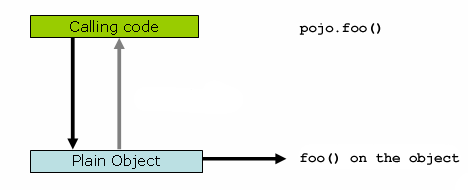
public class Main { public static void main(String[] args) { Pojo pojo = new SimplePojo(); // this is a direct method call on the 'pojo' reference pojo.foo(); } }
Things change slightly when the reference that client code has is a proxy. Consider the following diagram and code snippet.
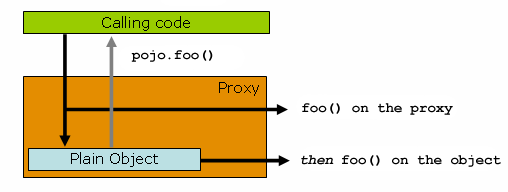
public class Main { public static void main(String[] args) { ProxyFactory factory = new ProxyFactory(new SimplePojo()); factory.addInterface(Pojo.class); factory.addAdvice(new RetryAdvice()); Pojo pojo = (Pojo) factory.getProxy(); // this is a method call on the proxy! pojo.foo(); } }
The key thing to understand here is that the client code inside
the main(..) of the Main
class has a reference to the proxy. This means that
method calls on that object reference will be calls on the proxy, and as
such the proxy will be able to delegate to all of the interceptors
(advice) that are relevant to that particular method call. However, once
the call has finally reached the target object, the
SimplePojo reference in this case, any method
calls that it may make on itself, such as
this.bar() or
this.foo(), are going to be invoked against the
this reference, and
not the proxy. This has important implications. It
means that self-invocation is not going to result
in the advice associated with a method invocation getting a chance to
execute.
Okay, so what is to be done about this? The best approach (the term best is used loosely here) is to refactor your code such that the self-invocation does not happen. For sure, this does entail some work on your part, but it is the best, least-invasive approach. The next approach is absolutely horrendous, and I am almost reticent to point it out precisely because it is so horrendous. You can (choke!) totally tie the logic within your class to Spring AOP by doing this:
public class SimplePojo implements Pojo { public void foo() { // this works, but... gah! ((Pojo) AopContext.currentProxy()).bar(); } public void bar() { // some logic... } }
This totally couples your code to Spring AOP, and it makes the class itself aware of the fact that it is being used in an AOP context, which flies in the face of AOP. It also requires some additional configuration when the proxy is being created:
public class Main { public static void main(String[] args) { ProxyFactory factory = new ProxyFactory(new SimplePojo()); factory.adddInterface(Pojo.class); factory.addAdvice(new RetryAdvice()); factory.setExposeProxy(true); Pojo pojo = (Pojo) factory.getProxy(); // this is a method call on the proxy! pojo.foo(); } }
Finally, it must be noted that AspectJ does not have this self-invocation issue because it is not a proxy-based AOP framework.
In addition to declaring aspects in your configuration using either
<aop:config> or
<aop:aspectj-autoproxy>, it is also possible
programmatically to create proxies that advise target objects. For the
full details of Spring's AOP API, see the next chapter. Here we want to
focus on the ability to automatically create proxies using @AspectJ
aspects.
The class
org.springframework.aop.aspectj.annotation.AspectJProxyFactory
can be used to create a proxy for a target object that is advised by one
or more @AspectJ aspects. Basic usage for this class is very simple, as
illustrated below. See the Javadocs for full information.
// create a factory that can generate a proxy for the given target object AspectJProxyFactory factory = new AspectJProxyFactory(targetObject); // add an aspect, the class must be an @AspectJ aspect // you can call this as many times as you need with different aspects factory.addAspect(SecurityManager.class); // you can also add existing aspect instances, the type of the object supplied must be an @AspectJ aspect factory.addAspect(usageTracker); // now get the proxy object... MyInterfaceType proxy = factory.getProxy();
Everything we've covered so far in this chapter is pure Spring AOP. In this section, we're going to look at how you can use the AspectJ compiler/weaver instead of, or in addition to, Spring AOP if your needs go beyond the facilities offered by Spring AOP alone.
Spring ships with a small AspectJ aspect library, which is available
standalone in your distribution as spring-aspects.jar; you'll need to add this
to your classpath in order to use the aspects in it. Section 7.8.1, “Using AspectJ to dependency inject domain objects with
Spring” and Section 7.8.2, “Other Spring aspects for AspectJ”
discuss the content of this library and how you can use it. Section 7.8.3, “Configuring AspectJ aspects using Spring IoC” discusses how to dependency inject AspectJ
aspects that are woven using the AspectJ compiler. Finally, Section 7.8.4, “Load-time weaving with AspectJ in the Spring Framework” provides an introduction to load-time weaving for
Spring applications using AspectJ.
The Spring container instantiates and configures beans defined in
your application context. It is also possible to ask a bean factory to
configure a pre-existing object given the name of a
bean definition containing the configuration to be applied. The
spring-aspects.jar contains an
annotation-driven aspect that exploits this capability to allow
dependency injection of any object. The support is
intended to be used for objects created outside of the control
of any container. Domain objects often fall into this
category because they are often created programmatically using the
new operator, or by an ORM tool as a result of a
database query.
The @Configurable annotation marks
a class as eligible for Spring-driven configuration. In the simplest
case it can be used just as a marker annotation:
package com.xyz.myapp.domain; import org.springframework.beans.factory.annotation.Configurable; @Configurable public class Account { // ... }
When used as a marker interface in this way, Spring will configure
new instances of the annotated type (Account in
this case) using a prototype-scoped bean definition with the same name
as the fully-qualified type name
(com.xyz.myapp.domain.Account). Since the default
name for a bean is the fully-qualified name of its type, a convenient
way to declare the prototype definition is simply to omit the
id attribute:
<bean class="com.xyz.myapp.domain.Account" scope="prototype"> <property name="fundsTransferService" ref="fundsTransferService"/> </bean>
If you want to explicitly specify the name of the prototype bean definition to use, you can do so directly in the annotation:
package com.xyz.myapp.domain; import org.springframework.beans.factory.annotation.Configurable; @Configurable("account") public class Account { // ... }
Spring will now look for a bean definition named
"account" and use that as the definition to configure
new Account instances.
You can also use autowiring to avoid having to specify a
prototype-scoped bean definition at all. To have Spring apply autowiring
use the 'autowire' property of the
@Configurable annotation: specify either
@Configurable(autowire=Autowire.BY_TYPE) or
@Configurable(autowire=Autowire.BY_NAME for
autowiring by type or by name respectively. As an alternative, as of
Spring 2.5 it is preferable to specify explicit, annotation-driven
dependency injection for your @Configurable
beans by using @Autowired and
@Resource at the field or method level (see
Section 3.9, “Annotation-based container configuration” for further details).
Finally you can enable Spring dependency checking for the object
references in the newly created and configured object by using the
dependencyCheck attribute (for example:
@Configurable(autowire=Autowire.BY_NAME,dependencyCheck=true)).
If this attribute is set to true, then Spring will validate after
configuration that all properties (which are not primitives or
collections) have been set.
Using the annotation on its own does nothing of course. It is the
AnnotationBeanConfigurerAspect in spring-aspects.jar that acts on the
presence of the annotation. In essence the aspect says "after returning
from the initialization of a new object of a type annotated with
@Configurable, configure the newly
created object using Spring in accordance with the properties of the
annotation". In this context, initialization refers
to newly instantiated objects (e.g., objects instantiated with the
'new' operator) as well as to
Serializable objects that are undergoing
deserialization (e.g., via readResolve()).
| Note |
|---|---|
One of the key phrases in the above paragraph is 'in
essence'. For most cases, the exact semantics of
'after returning from the initialization of a new
object' will be fine... in this context, 'after
initialization' means that the dependencies will be
injected after the object has been constructed -
this means that the dependencies will not be available for use in the
constructor bodies of the class. If you want the dependencies to be
injected before the constructor bodies execute,
and thus be available for use in the body of the constructors, then
you need to define this on the
@Configurable(preConstruction=true) You can find out more information about the language semantics of the various pointcut types in AspectJ in this appendix of the AspectJ Programming Guide. |
For this to work the annotated types must be woven with the
AspectJ weaver - you can either use a build-time Ant or Maven task to do
this (see for example the AspectJ
Development Environment Guide) or load-time weaving (see Section 7.8.4, “Load-time weaving with AspectJ in the Spring Framework”). The
AnnotationBeanConfigurerAspect itself needs
configuring by Spring (in order to obtain a reference to the bean
factory that is to be used to configure new objects). The Spring context
namespace defines a convenient tag for doing this: just include
the following in your application context configuration:
<context:spring-configured/>If you are using the DTD instead of schema, the equivalent definition is:
<bean class="org.springframework.beans.factory.aspectj.AnnotationBeanConfigurerAspect" factory-method="aspectOf"/>
Instances of @Configurable objects
created before the aspect has been configured will
result in a warning being issued to the log and no configuration of the
object taking place. An example might be a bean in the Spring
configuration that creates domain objects when it is initialized by
Spring. In this case you can use the "depends-on" bean attribute to
manually specify that the bean depends on the configuration
aspect.
<bean id="myService" class="com.xzy.myapp.service.MyService" depends-on="org.springframework.beans.factory.aspectj.AnnotationBeanConfigurerAspect"> <!-- ... --> </bean>
| Note |
|---|---|
Do not activate |
One of the goals of the
@Configurable support is to enable
independent unit testing of domain objects without the difficulties
associated with hard-coded lookups. If
@Configurable types have not been woven
by AspectJ then the annotation has no affect during unit testing, and
you can simply set mock or stub property references in the object
under test and proceed as normal. If
@Configurable types
have been woven by AspectJ then you can still
unit test outside of the container as normal, but you will see a
warning message each time that you construct an
@Configurable object indicating that it
has not been configured by Spring.
The AnnotationBeanConfigurerAspect used
to implement the @Configurable support
is an AspectJ singleton aspect. The scope of a singleton aspect is the
same as the scope of static members, that is to say
there is one aspect instance per classloader that defines the type.
This means that if you define multiple application contexts within the
same classloader hierarchy you need to consider where to define the
<context:spring-configured/> bean and where to
place spring-aspects.jar on
the classpath.
Consider a typical Spring web-app configuration with a shared
parent application context defining common business services and
everything needed to support them, and one child application context
per servlet containing definitions particular to that servlet. All of
these contexts will co-exist within the same classloader hierarchy,
and so the AnnotationBeanConfigurerAspect can only
hold a reference to one of them. In this case we recommend defining
the <context:spring-configured/> bean in the
shared (parent) application context: this defines the services that
you are likely to want to inject into domain objects. A consequence is
that you cannot configure domain objects with references to beans
defined in the child (servlet-specific) contexts using the
@Configurable mechanism (probably not something you want to do
anyway!).
When deploying multiple web-apps within the same container,
ensure that each web-application loads the types in spring-aspects.jar using its own
classloader (for example, by placing spring-aspects.jar in 'WEB-INF/lib'). If spring-aspects.jar is only added to the
container wide classpath (and hence loaded by the shared parent
classloader), all web applications will share the same aspect instance
which is probably not what you want.
In addition to the @Configurable
aspect, spring-aspects.jar
contains an AspectJ aspect that can be used to drive Spring's
transaction management for types and methods annotated with the
@Transactional annotation. This is
primarily intended for users who want to use the Spring Framework's
transaction support outside of the Spring container.
The aspect that interprets
@Transactional annotations is the
AnnotationTransactionAspect. When using this
aspect, you must annotate the implementation class
(and/or methods within that class), not the
interface (if any) that the class implements. AspectJ follows Java's
rule that annotations on interfaces are not
inherited.
A @Transactional annotation on a
class specifies the default transaction semantics for the execution of
any public operation in the class.
A @Transactional annotation on a
method within the class overrides the default transaction semantics
given by the class annotation (if present). Methods with
public, protected, and default
visibility may all be annotated. Annotating protected
and default visibility methods directly is the only way to get
transaction demarcation for the execution of such methods.
For AspectJ programmers that want to use the Spring configuration
and transaction management support but don't want to (or cannot) use
annotations, spring-aspects.jar
also contains abstract aspects you can extend to
provide your own pointcut definitions. See the sources for the
AbstractBeanConfigurerAspect and
AbstractTransactionAspect aspects for more
information. As an example, the following excerpt shows how you could
write an aspect to configure all instances of objects defined in the
domain model using prototype bean definitions that match the
fully-qualified class names:
public aspect DomainObjectConfiguration extends AbstractBeanConfigurerAspect { public DomainObjectConfiguration() { setBeanWiringInfoResolver(new ClassNameBeanWiringInfoResolver()); } // the creation of a new bean (any object in the domain model) protected pointcut beanCreation(Object beanInstance) : initialization(new(..)) && SystemArchitecture.inDomainModel() && this(beanInstance); }
When using AspectJ aspects with Spring applications, it is natural
to both want and expect to be able to configure such aspects using
Spring. The AspectJ runtime itself is responsible for aspect creation,
and the means of configuring the AspectJ created aspects via Spring
depends on the AspectJ instantiation model (the
'per-xxx' clause) used by the aspect.
The majority of AspectJ aspects are singleton
aspects. Configuration of these aspects is very easy: simply create a
bean definition referencing the aspect type as normal, and include the
bean attribute 'factory-method="aspectOf"'. This
ensures that Spring obtains the aspect instance by asking AspectJ for it
rather than trying to create an instance itself. For example:
<bean id="profiler" class="com.xyz.profiler.Profiler" factory-method="aspectOf"> <property name="profilingStrategy" ref="jamonProfilingStrategy"/> </bean>
Non-singleton aspects are harder to configure: however it is
possible to do so by creating prototype bean definitions and using the
@Configurable support from spring-aspects.jar to configure the
aspect instances once they have bean created by the AspectJ
runtime.
If you have some @AspectJ aspects that you want to weave with
AspectJ (for example, using load-time weaving for domain model types)
and other @AspectJ aspects that you want to use with Spring AOP, and
these aspects are all configured using Spring, then you will need to
tell the Spring AOP @AspectJ autoproxying support which exact subset of
the @AspectJ aspects defined in the configuration should be used for
autoproxying. You can do this by using one or more
<include/> elements inside the
<aop:aspectj-autoproxy/> declaration. Each
<include/> element specifies a name pattern,
and only beans with names matched by at least one of the patterns will
be used for Spring AOP autoproxy configuration:
<aop:aspectj-autoproxy> <aop:include name="thisBean"/> <aop:include name="thatBean"/> </aop:aspectj-autoproxy>
| Note |
|---|---|
Do not be misled by the name of the
|
Load-time weaving (LTW) refers to the process of weaving AspectJ aspects into an application's class files as they are being loaded into the Java virtual machine (JVM). The focus of this section is on configuring and using LTW in the specific context of the Spring Framework: this section is not an introduction to LTW though. For full details on the specifics of LTW and configuring LTW with just AspectJ (with Spring not being involved at all), see the LTW section of the AspectJ Development Environment Guide.
The value-add that the Spring Framework brings to AspectJ LTW is
in enabling much finer-grained control over the weaving process.
'Vanilla' AspectJ LTW is effected using a Java (5+) agent, which is
switched on by specifying a VM argument when starting up a JVM. It is
thus a JVM-wide setting, which may be fine in some situations, but often
is a little too coarse. Spring-enabled LTW enables you to switch on LTW
on a per-ClassLoader basis,
which obviously is more fine-grained and which can make more sense in a
'single-JVM-multiple-application' environment (such as is found in a
typical application server environment).
Further, in certain
environments, this support enables load-time weaving
without making any modifications to the application server's
launch script that will be needed to add
-javaagent:path/to/aspectjweaver.jar or (as we describe later in this
section) -javaagent:path/to/org.springframework.instrument-{version}.jar
(previously named spring-agent.jar). Developers simply modify
one or more files that form the application context to enable load-time
weaving instead of relying on administrators who typically are in charge
of the deployment configuration such as the launch script.
Now that the sales pitch is over, let us first walk through a quick example of AspectJ LTW using Spring, followed by detailed specifics about elements introduced in the following example. For a complete example, please see the Petclinic sample application.
Let us assume that you are an application developer who has been tasked with diagnosing the cause of some performance problems in a system. Rather than break out a profiling tool, what we are going to do is switch on a simple profiling aspect that will enable us to very quickly get some performance metrics, so that we can then apply a finer-grained profiling tool to that specific area immediately afterwards.
Here is the profiling aspect. Nothing too fancy, just a quick-and-dirty time-based profiler, using the @AspectJ-style of aspect declaration.
package foo; import org.aspectj.lang.ProceedingJoinPoint; import org.aspectj.lang.annotation.Aspect; import org.aspectj.lang.annotation.Around; import org.aspectj.lang.annotation.Pointcut; import org.springframework.util.StopWatch; import org.springframework.core.annotation.Order; @Aspect public class ProfilingAspect { @Around("methodsToBeProfiled()") public Object profile(ProceedingJoinPoint pjp) throws Throwable { StopWatch sw = new StopWatch(getClass().getSimpleName()); try { sw.start(pjp.getSignature().getName()); return pjp.proceed(); } finally { sw.stop(); System.out.println(sw.prettyPrint()); } } @Pointcut("execution(public * foo..*.*(..))") public void methodsToBeProfiled(){} }
We will also need to create an
'META-INF/aop.xml' file, to inform the AspectJ
weaver that we want to weave our
ProfilingAspect into our classes. This file
convention, namely the presence of a file (or files) on the Java
classpath called ' META-INF/aop.xml' is standard
AspectJ.
<!DOCTYPE aspectj PUBLIC "-//AspectJ//DTD//EN" "http://www.eclipse.org/aspectj/dtd/aspectj.dtd"> <aspectj> <weaver> <!-- only weave classes in our application-specific packages --> <include within="foo.*"/> </weaver> <aspects> <!-- weave in just this aspect --> <aspect name="foo.ProfilingAspect"/> </aspects> </aspectj>
Now to the Spring-specific portion of the configuration. We need
to configure a LoadTimeWeaver (all
explained later, just take it on trust for now). This load-time weaver
is the essential component responsible for weaving the aspect
configuration in one or more 'META-INF/aop.xml'
files into the classes in your application. The good thing is that it
does not require a lot of configuration, as can be seen below (there
are some more options that you can specify, but these are detailed
later).
<?xml version="1.0" encoding="UTF-8"?> <beans xmlns="http://www.springframework.org/schema/beans" xmlns:xsi="http://www.w3.org/2001/XMLSchema-instance" xmlns:context="http://www.springframework.org/schema/context" xsi:schemaLocation=" http://www.springframework.org/schema/beans http://www.springframework.org/schema/beans/spring-beans-3.0.xsd http://www.springframework.org/schema/context http://www.springframework.org/schema/context/spring-context-3.0.xsd"> <!-- a service object; we will be profiling its methods --> <bean id="entitlementCalculationService" class="foo.StubEntitlementCalculationService"/> <!-- this switches on the load-time weaving --> <context:load-time-weaver/> </beans>
Now that all the required artifacts are in place - the aspect,
the 'META-INF/aop.xml' file, and the Spring
configuration -, let us create a simple driver class with a
main(..) method to demonstrate the LTW in
action.
package foo; import org.springframework.context.support.ClassPathXmlApplicationContext; public final class Main { public static void main(String[] args) { ApplicationContext ctx = new ClassPathXmlApplicationContext("beans.xml", Main.class); EntitlementCalculationService entitlementCalculationService = (EntitlementCalculationService) ctx.getBean("entitlementCalculationService"); // the profiling aspect is 'woven' around this method execution entitlementCalculationService.calculateEntitlement(); } }
There is one last thing to do. The introduction to this section
did say that one could switch on LTW selectively on a
per-ClassLoader basis with Spring, and this is
true. However, just for this example, we are going to use a Java agent
(supplied with Spring) to switch on the LTW. This is the command line
we will use to run the above Main class:
java -javaagent:C:/projects/foo/lib/global/spring-instrument.jar foo.Main
The '-javaagent' is a Java 5+ flag for
specifying and enabling agents
to instrument programs running on the JVM. The Spring
Framework ships with such an agent, the
InstrumentationSavingAgent, which is packaged
in the spring-instrument.jar
that
was supplied as the value of the -javaagent
argument in the above example.
The output from the execution of the Main
program will look something like that below. (I have introduced a
Thread.sleep(..) statement into the
calculateEntitlement() implementation so that
the profiler actually captures something other than 0 milliseconds -
the 01234 milliseconds is not
an overhead introduced by the AOP :) )
Calculating entitlement StopWatch 'ProfilingAspect': running time (millis) = 1234 ------ ----- ---------------------------- ms % Task name ------ ----- ---------------------------- 01234 100% calculateEntitlement
Since this LTW is effected using full-blown AspectJ, we are not
just limited to advising Spring beans; the following slight variation
on the Main program will yield the same
result.
package foo; import org.springframework.context.support.ClassPathXmlApplicationContext; public final class Main { public static void main(String[] args) { new ClassPathXmlApplicationContext("beans.xml", Main.class); EntitlementCalculationService entitlementCalculationService = new StubEntitlementCalculationService(); // the profiling aspect will be 'woven' around this method execution entitlementCalculationService.calculateEntitlement(); } }
Notice how in the above program we are simply bootstrapping the
Spring container, and then creating a new instance of the
StubEntitlementCalculationService totally
outside the context of Spring... the profiling advice still gets woven
in.
The example admittedly is simplistic... however the basics of the LTW support in Spring have all been introduced in the above example, and the rest of this section will explain the 'why' behind each bit of configuration and usage in detail.
| Note |
|---|---|
The |
The aspects that you use in LTW have to be AspectJ aspects. They can be written in either the AspectJ language itself or you can write your aspects in the @AspectJ-style. The latter option is of course only an option if you are using Java 5+, but it does mean that your aspects are then both valid AspectJ and Spring AOP aspects. Furthermore, the compiled aspect classes need to be available on the classpath.
The AspectJ LTW infrastructure is configured using one or more
'META-INF/aop.xml' files, that are on the Java
classpath (either directly, or more typically in jar files).
The structure and contents of this file is detailed in the main
AspectJ reference documentation, and the interested reader is referred
to that resource. (I appreciate that this section is brief,
but the 'aop.xml' file is 100% AspectJ - there is
no Spring-specific information or semantics that apply to it, and so
there is no extra value that I can contribute either as a result), so
rather than rehash the quite satisfactory section that the AspectJ
developers wrote, I am just directing you there.)
At a minimum you will need the following libraries to use the Spring Framework's support for AspectJ LTW:
spring-aop.jar(version 2.5 or later, plus all mandatory dependencies)aspectjrt.jar(version 1.5 or later)aspectjweaver.jar(version 1.5 or later)
If you are using the Spring-provided agent to enable instrumentation, you will also need:
spring-instrument.jar
The key component in Spring's LTW support is the
LoadTimeWeaver interface (in the
org.springframework.instrument.classloading
package), and the numerous implementations of it that ship with the
Spring distribution. A LoadTimeWeaver
is responsible for adding one or more
java.lang.instrument.ClassFileTransformers to a
ClassLoader at runtime, which opens the door to
all manner of interesting applications, one of which happens to be the
LTW of aspects.
| Tip |
|---|---|
If you are unfamiliar with the idea of runtime class file
transformation, you are encouraged to read the Javadoc API
documentation for the |
Configuring a LoadTimeWeaver
using XML for a particular
ApplicationContext can be as easy as
adding one line. (Please note that you almost certainly will need to
be using an ApplicationContext as your
Spring container - typically a
BeanFactory will not be enough because
the LTW support makes use of
BeanFactoryPostProcessors.)
To enable the Spring Framework's LTW support, you need to
configure a LoadTimeWeaver, which
typically is done using the
<context:load-time-weaver/> element. Find
below a valid <context:load-time-weaver/>
definition that uses default settings.
<?xml version="1.0" encoding="UTF-8"?> <beans xmlns="http://www.springframework.org/schema/beans" xmlns:xsi="http://www.w3.org/2001/XMLSchema-instance" xmlns:context="http://www.springframework.org/schema/context" xsi:schemaLocation=" http://www.springframework.org/schema/beans http://www.springframework.org/schema/beans/spring-beans-3.0.xsd http://www.springframework.org/schema/context http://www.springframework.org/schema/context/spring-context-3.0.xsd"> <context:load-time-weaver/> </beans>
The above <context:load-time-weaver/>
bean definition will define and register a number of LTW-specific
infrastructure beans for you automatically, such as a
LoadTimeWeaver and an
AspectJWeavingEnabler. Notice how the
<context:load-time-weaver/> is defined in the
'context' namespace; note also that the referenced
XML Schema file is only available in versions of Spring 2.5 and
later.
What the above configuration does is define and register a
default LoadTimeWeaver bean for you.
The default LoadTimeWeaver is the
DefaultContextLoadTimeWeaver class, which
attempts to decorate an automatically detected
LoadTimeWeaver: the exact type of
LoadTimeWeaver that will be
'automatically detected' is dependent upon your runtime environment
(summarised in the following table).
Table 7.1. DefaultContextLoadTimeWeaver
LoadTimeWeavers
| Runtime Environment | LoadTimeWeaver implementation |
|---|---|
Running in BEA's Weblogic 10 |
|
Running in Oracle's OC4J |
|
Running in GlassFish |
|
Running in JBoss AS |
|
JVM started with Spring
|
|
Fallback, expecting the underlying ClassLoader to follow common conventions
(e.g. applicable to |
|
Note that these are just the
LoadTimeWeavers that are autodetected
when using the DefaultContextLoadTimeWeaver: it
is of course possible to specify exactly which
LoadTimeWeaver implementation that you
wish to use by specifying the fully-qualified classname as the value
of the 'weaver-class' attribute of the
<context:load-time-weaver/> element. Find
below an example of doing just that:
<?xml version="1.0" encoding="UTF-8"?> <beans xmlns="http://www.springframework.org/schema/beans" xmlns:xsi="http://www.w3.org/2001/XMLSchema-instance" xmlns:context="http://www.springframework.org/schema/context" xsi:schemaLocation=" http://www.springframework.org/schema/beans http://www.springframework.org/schema/beans/spring-beans-3.0.xsd http://www.springframework.org/schema/context http://www.springframework.org/schema/context/spring-context-3.0.xsd"> <context:load-time-weaver weaver-class="org.springframework.instrument.classloading.ReflectiveLoadTimeWeaver"/> </beans>
The LoadTimeWeaver that is
defined and registered by the
<context:load-time-weaver/> element can be
later retrieved from the Spring container using the well-known name
'loadTimeWeaver'. Remember that the
LoadTimeWeaver exists just as a
mechanism for Spring's LTW infrastructure to add one or more
ClassFileTransformers. The actual
ClassFileTransformer that does the LTW is the
ClassPreProcessorAgentAdapter (from the
org.aspectj.weaver.loadtime package) class. See the
class-level Javadoc for the
ClassPreProcessorAgentAdapter class for further
details, because the specifics of how the weaving is actually effected
is beyond the scope of this section.
There is one final attribute of the
<context:load-time-weaver/> left to discuss:
the 'aspectj-weaving' attribute. This is a simple
attribute that controls whether LTW is enabled or not, it is as simple
as that. It accepts one of three possible values, summarised below,
with the default value if the attribute is not present being '
autodetect'
Table 7.2. 'aspectj-weaving' attribute values
| Attribute Value | Explanation |
|---|---|
| AspectJ weaving is on, and aspects will be woven at load-time as appropriate. |
| LTW is off... no aspect will be woven at load-time. |
| If the Spring LTW infrastructure can find at
least one ' |
This last section contains any additional settings and configuration that you will need when using Spring's LTW support in environments such as application servers and web containers.
Apache Tomcat's default class loader
does not support class transformation which is why Spring provides an enhanced implementation that
addresses this need. Named TomcatInstrumentableClassLoader, the loader works
on Tomcat 5.0 and above and can be registered individually for each web application
as follows:
Tomcat 6.0.x or higher
Copy
org.springframework.instrument.tomcat.jarinto $CATALINA_HOME/lib, where $CATALINA_HOME represents the root of the Tomcat installation)Instruct Tomcat to use the custom class loader (instead of the default) by editing the web application context file:
<Context path="/myWebApp" docBase="/my/webApp/location"> <Loader loaderClass="org.springframework.instrument.classloading.tomcat.TomcatInstrumentableClassLoader"/> </Context>
Apache Tomcat 6.0.x (similar to 5.0.x/5.5.x) series supports several context locations:
- server configuration file - $CATALINA_HOME/conf/server.xml
- default context configuration - $CATALINA_HOME/conf/context.xml - that affects all deployed web applications
- per-web application configuration which can be deployed either on the server-side at $CATALINA_HOME/conf/[enginename]/[hostname]/[webapp]-context.xml or embedded inside the web-app archive at META-INF/context.xml
For efficiency, the embedded per-web-app configuration style is recommended because it will impact only applications that use the custom class loader and does not require any changes to the server configuration. See the Tomcat 6.0.x documentation for more details about available context locations.
Tomcat 5.0.x/5.5.x
Copy
org.springframework.instrument.tomcat.jarinto $CATALINA_HOME/server/lib, where $CATALINA_HOME represents the root of the Tomcat installation.Instruct Tomcat to use the custom class loader instead of the default one by editing the web application context file:
<Context path="/myWebApp" docBase="/my/webApp/location"> <Loader loaderClass="org.springframework.instrument.classloading.tomcat.TomcatInstrumentableClassLoader"/> </Context>
Tomcat 5.0.x and 5.5.x series supports several context locations:
- server configuration file - $CATALINA_HOME/conf/server.xml
- default context configuration - $CATALINA_HOME/conf/context.xml - that affects all deployed web applications
- per-web application configuration which can be deployed either on the server-side at $CATALINA_HOME/conf/[enginename]/[hostname]/[webapp]-context.xml or embedded inside the web-app archive at META-INF/context.xml
For efficiency, the embedded web-app configuration style is recommended recommended because it will impact only applications that use the class loader. See the Tomcat 5.x documentation for more details about available context locations.
Tomcat versions prior to 5.5.20 contained a bug in the XML configuration parsing that prevented usage of the
Loadertag inside server.xml configuration, regardless of whether a class loader is specified or whether it is the official or a custom one. See Tomcat's bugzilla for more details.In Tomcat 5.5.x, versions 5.5.20 or later, you should set useSystemClassLoaderAsParent to
falseto fix this problem:<Context path="/myWebApp" docBase="/my/webApp/location"> <Loader loaderClass="org.springframework.instrument.classloading.tomcat.TomcatInstrumentableClassLoader" useSystemClassLoaderAsParent="false"/> </Context>
This setting is not needed on Tomcat 6 or higher.
Alternatively, consider the use of the Spring-provided generic VM agent, to be specified in Tomcat's launch script (see above). This will make instrumentation available to all deployed web applications, no matter what ClassLoader they happen to run on.
Recent versions of BEA WebLogic (version 10 and above), Oracle
Containers for Java EE (OC4J 10.1.3.1 and above), Resin (3.1 and above) and JBoss (5.x or above)
provide a ClassLoader that is capable of local instrumentation.
Spring's native LTW leverages such ClassLoaders to enable AspectJ weaving.
You can enable LTW by simply activating context:load-time-weaver
as described earlier. Specifically, you do not
need to modify the launch script to add
-javaagent:path/to/spring-instrument.jar.
Note that GlassFish instrumentation-capable ClassLoader is available only in its EAR environment. For GlassFish web applications, follow the Tomcat setup instructions as outlined above.
When class instrumentation is required in environments that do not support or
are not supported by the existing LoadTimeWeaver
implementations,
a JDK agent can be the only solution. For such cases, Spring
provides InstrumentationLoadTimeWeaver,
which requires a Spring-specific (but very general) VM agent,
org.springframework.instrument-{version}.jar
(previously named spring-agent.jar).
To use it, you must start the virtual machine with the Spring agent, by supplying the following JVM options:
-javaagent:/path/to/org.springframework.instrument-{version}.jarNote that this requires modification of the VM launch script which may prevent you from using this in application server environments (depending on your operation policies). Additionally, the JDK agent will instrument the entire VM which can prove expensive.
For performance reasons, it is recommended to use this configuration only if your target environment (such as Jetty) does not have (or does not support) a dedicated LTW.
More information on AspectJ can be found on the AspectJ website.
The book Eclipse AspectJ by Adrian Colyer et. al. (Addison-Wesley, 2005) provides a comprehensive introduction and reference for the AspectJ language.
The book AspectJ in Action by Ramnivas Laddad (Manning, 2003) comes highly recommended; the focus of the book is on AspectJ, but a lot of general AOP themes are explored (in some depth).
The previous chapter described the Spring 2.0 and later version's support for AOP using @AspectJ and schema-based aspect definitions. In this chapter we discuss the lower-level Spring AOP APIs and the AOP support used in Spring 1.2 applications. For new applications, we recommend the use of the Spring 2.0 and later AOP support described in the previous chapter, but when working with existing applications, or when reading books and articles, you may come across Spring 1.2 style examples. Spring 3.0 is backwards compatible with Spring 1.2 and everything described in this chapter is fully supported in Spring 3.0.
Let's look at how Spring handles the crucial pointcut concept.
Spring's pointcut model enables pointcut reuse independent of advice types. It's possible to target different advice using the same pointcut.
The org.springframework.aop.Pointcut interface
is the central interface, used to target advices to particular classes
and methods. The complete interface is shown below:
public interface Pointcut { ClassFilter getClassFilter(); MethodMatcher getMethodMatcher(); }
Splitting the Pointcut interface
into two parts allows reuse of class and method matching parts, and
fine-grained composition operations (such as performing a "union" with
another method matcher).
The ClassFilter interface is used
to restrict the pointcut to a given set of target classes. If the
matches() method always returns true, all target
classes will be matched:
public interface ClassFilter { boolean matches(Class clazz); }
The MethodMatcher interface is
normally more important. The complete interface is shown below:
public interface MethodMatcher { boolean matches(Method m, Class targetClass); boolean isRuntime(); boolean matches(Method m, Class targetClass, Object[] args); }
The matches(Method, Class) method is used to
test whether this pointcut will ever match a given method on a target
class. This evaluation can be performed when an AOP proxy is created, to
avoid the need for a test on every method invocation. If the 2-argument
matches method returns true for a given method, and the
isRuntime() method for the MethodMatcher returns
true, the 3-argument matches method will be invoked on every method
invocation. This enables a pointcut to look at the arguments passed to
the method invocation immediately before the target advice is to
execute.
Most MethodMatchers are static, meaning that their
isRuntime() method returns false. In this case, the
3-argument matches method will never be invoked.
| Tip |
|---|---|
If possible, try to make pointcuts static, allowing the AOP framework to cache the results of pointcut evaluation when an AOP proxy is created. |
Spring supports operations on pointcuts: notably, union and intersection.
Union means the methods that either pointcut matches.
Intersection means the methods that both pointcuts match.
Union is usually more useful.
Pointcuts can be composed using the static methods in the org.springframework.aop.support.Pointcuts class, or using the ComposablePointcut class in the same package. However, using AspectJ pointcut expressions is usually a simpler approach.
Since 2.0, the most important type of pointcut used by Spring is
org.springframework.aop.aspectj.AspectJExpressionPointcut.
This is a pointcut that uses an AspectJ supplied library to parse an
AspectJ pointcut expression string.
See the previous chapter for a discussion of supported AspectJ pointcut primitives.
Spring provides several convenient pointcut implementations. Some can be used out of the box; others are intended to be subclassed in application-specific pointcuts.
Static pointcuts are based on method and target class, and cannot take into account the method's arguments. Static pointcuts are sufficient - and best - for most usages. It's possible for Spring to evaluate a static pointcut only once, when a method is first invoked: after that, there is no need to evaluate the pointcut again with each method invocation.
Let's consider some static pointcut implementations included with Spring.
One obvious way to specify static pointcuts is regular
expressions. Several AOP frameworks besides Spring make this
possible.
org.springframework.aop.support.JdkRegexpMethodPointcut
is a generic regular expression pointcut, using the regular
expression support in JDK 1.4+.
Using the JdkRegexpMethodPointcut class,
you can provide a list of pattern Strings. If any of these is a
match, the pointcut will evaluate to true. (So the result is
effectively the union of these pointcuts.)
The usage is shown below:
<bean id="settersAndAbsquatulatePointcut" class="org.springframework.aop.support.JdkRegexpMethodPointcut"> <property name="patterns"> <list> <value>.*set.*</value> <value>.*absquatulate</value> </list> </property> </bean>
Spring provides a convenience class,
RegexpMethodPointcutAdvisor, that allows us to
also reference an Advice (remember that an Advice can be an
interceptor, before advice, throws advice etc.). Behind the scenes,
Spring will use a JdkRegexpMethodPointcut. Using
RegexpMethodPointcutAdvisor simplifies wiring, as
the one bean encapsulates both pointcut and advice, as shown
below:
<bean id="settersAndAbsquatulateAdvisor" class="org.springframework.aop.support.RegexpMethodPointcutAdvisor"> <property name="advice"> <ref local="beanNameOfAopAllianceInterceptor"/> </property> <property name="patterns"> <list> <value>.*set.*</value> <value>.*absquatulate</value> </list> </property> </bean>
RegexpMethodPointcutAdvisor can be used with any Advice type.
Dynamic pointcuts are costlier to evaluate than static pointcuts. They take into account method arguments, as well as static information. This means that they must be evaluated with every method invocation; the result cannot be cached, as arguments will vary.
The main example is the control flow
pointcut.
Spring control flow pointcuts are conceptually similar to
AspectJ cflow pointcuts, although less
powerful. (There is currently no way to specify that a pointcut
executes below a join point matched by another pointcut.) A control
flow pointcut matches the current call stack. For example, it might
fire if the join point was invoked by a method in the
com.mycompany.web package, or by the
SomeCaller class. Control flow pointcuts are
specified using the
org.springframework.aop.support.ControlFlowPointcut
class.
| Note |
|---|---|
Control flow pointcuts are significantly more expensive to evaluate at runtime than even other dynamic pointcuts. In Java 1.4, the cost is about 5 times that of other dynamic pointcuts. |
Spring provides useful pointcut superclasses to help you to implement your own pointcuts.
Because static pointcuts are most useful, you'll probably subclass StaticMethodMatcherPointcut, as shown below. This requires implementing just one abstract method (although it's possible to override other methods to customize behavior):
class TestStaticPointcut extends StaticMethodMatcherPointcut { public boolean matches(Method m, Class targetClass) { // return true if custom criteria match } }
There are also superclasses for dynamic pointcuts.
You can use custom pointcuts with any advice type in Spring 1.0 RC2 and above.
Because pointcuts in Spring AOP are Java classes, rather than language features (as in AspectJ) it's possible to declare custom pointcuts, whether static or dynamic. Custom pointcuts in Spring can be arbitrarily complex. However, using the AspectJ pointcut expression language is recommended if possible.
| Note |
|---|---|
Later versions of Spring may offer support for "semantic pointcuts" as offered by JAC: for example, "all methods that change instance variables in the target object." |
Let's now look at how Spring AOP handles advice.
Each advice is a Spring bean. An advice instance can be shared across all advised objects, or unique to each advised object. This corresponds to per-class or per-instance advice.
Per-class advice is used most often. It is appropriate for generic advice such as transaction advisors. These do not depend on the state of the proxied object or add new state; they merely act on the method and arguments.
Per-instance advice is appropriate for introductions, to support mixins. In this case, the advice adds state to the proxied object.
It's possible to use a mix of shared and per-instance advice in the same AOP proxy.
Spring provides several advice types out of the box, and is extensible to support arbitrary advice types. Let us look at the basic concepts and standard advice types.
The most fundamental advice type in Spring is interception around advice.
Spring is compliant with the AOP Alliance interface for around advice using method interception. MethodInterceptors implementing around advice should implement the following interface:
public interface MethodInterceptor extends Interceptor { Object invoke(MethodInvocation invocation) throws Throwable; }
The MethodInvocation argument to the
invoke() method exposes the method being
invoked; the target join point; the AOP proxy; and the arguments to
the method. The invoke() method should return
the invocation's result: the return value of the join point.
A simple MethodInterceptor implementation
looks as follows:
public class DebugInterceptor implements MethodInterceptor { public Object invoke(MethodInvocation invocation) throws Throwable { System.out.println("Before: invocation=[" + invocation + "]"); Object rval = invocation.proceed(); System.out.println("Invocation returned"); return rval; } }
Note the call to the MethodInvocation's
proceed() method. This proceeds down the
interceptor chain towards the join point. Most interceptors will
invoke this method, and return its return value. However, a
MethodInterceptor, like any around advice, can return a different
value or throw an exception rather than invoke the proceed method.
However, you don't want to do this without good reason!
| Note |
|---|---|
MethodInterceptors offer interoperability with other AOP Alliance-compliant AOP implementations. The other advice types discussed in the remainder of this section implement common AOP concepts, but in a Spring-specific way. While there is an advantage in using the most specific advice type, stick with MethodInterceptor around advice if you are likely to want to run the aspect in another AOP framework. Note that pointcuts are not currently interoperable between frameworks, and the AOP Alliance does not currently define pointcut interfaces. |
A simpler advice type is a before
advice. This does not need a
MethodInvocation object, since it will only be
called before entering the method.
The main advantage of a before advice is that there is no need
to invoke the proceed() method, and therefore no
possibility of inadvertently failing to proceed down the interceptor
chain.
The MethodBeforeAdvice interface is shown
below. (Spring's API design would allow for field before advice,
although the usual objects apply to field interception and it's
unlikely that Spring will ever implement it).
public interface MethodBeforeAdvice extends BeforeAdvice { void before(Method m, Object[] args, Object target) throws Throwable; }
Note the return type is void. Before advice
can insert custom behavior before the join point executes, but cannot
change the return value. If a before advice throws an exception, this
will abort further execution of the interceptor chain. The exception
will propagate back up the interceptor chain. If it is unchecked, or
on the signature of the invoked method, it will be passed directly to
the client; otherwise it will be wrapped in an unchecked exception by
the AOP proxy.
An example of a before advice in Spring, which counts all method invocations:
public class CountingBeforeAdvice implements MethodBeforeAdvice { private int count; public void before(Method m, Object[] args, Object target) throws Throwable { ++count; } public int getCount() { return count; } }
| Tip |
|---|---|
Before advice can be used with any pointcut. |
Throws advice is invoked after
the return of the join point if the join point threw an exception.
Spring offers typed throws advice. Note that this means that the
org.springframework.aop.ThrowsAdvice interface does
not contain any methods: It is a tag interface identifying that the
given object implements one or more typed throws advice methods. These
should be in the form of:
afterThrowing([Method, args, target], subclassOfThrowable)
Only the last argument is required. The method signatures may have either one or four arguments, depending on whether the advice method is interested in the method and arguments. The following classes are examples of throws advice.
The advice below is invoked if a
RemoteException is thrown (including
subclasses):
public class RemoteThrowsAdvice implements ThrowsAdvice { public void afterThrowing(RemoteException ex) throws Throwable { // Do something with remote exception } }
The following advice is invoked if a
ServletException is thrown. Unlike the
above advice, it declares 4 arguments, so that it has access to the
invoked method, method arguments and target object:
public class ServletThrowsAdviceWithArguments implements ThrowsAdvice { public void afterThrowing(Method m, Object[] args, Object target, ServletException ex) { // Do something with all arguments } }
The final example illustrates how these two methods could be
used in a single class, which handles both
RemoteException and
ServletException. Any number of throws advice
methods can be combined in a single class.
public static class CombinedThrowsAdvice implements ThrowsAdvice { public void afterThrowing(RemoteException ex) throws Throwable { // Do something with remote exception } public void afterThrowing(Method m, Object[] args, Object target, ServletException ex) { // Do something with all arguments } }
Note: If a throws-advice method throws an exception itself, it will override the original exception (i.e. change the exception thrown to the user). The overriding exception will typically be a RuntimeException; this is compatible with any method signature. However, if a throws-advice method throws a checked exception, it will have to match the declared exceptions of the target method and is hence to some degree coupled to specific target method signatures. Do not throw an undeclared checked exception that is incompatible with the target method's signature!
| Tip |
|---|---|
Throws advice can be used with any pointcut. |
An after returning advice in Spring must implement the org.springframework.aop.AfterReturningAdvice interface, shown below:
public interface AfterReturningAdvice extends Advice { void afterReturning(Object returnValue, Method m, Object[] args, Object target) throws Throwable; }
An after returning advice has access to the return value (which it cannot modify), invoked method, methods arguments and target.
The following after returning advice counts all successful method invocations that have not thrown exceptions:
public class CountingAfterReturningAdvice implements AfterReturningAdvice { private int count; public void afterReturning(Object returnValue, Method m, Object[] args, Object target) throws Throwable { ++count; } public int getCount() { return count; } }
This advice doesn't change the execution path. If it throws an exception, this will be thrown up the interceptor chain instead of the return value.
| Tip |
|---|---|
After returning advice can be used with any pointcut. |
Spring treats introduction advice as a special kind of interception advice.
Introduction requires an IntroductionAdvisor,
and an IntroductionInterceptor, implementing the
following interface:
public interface IntroductionInterceptor extends MethodInterceptor { boolean implementsInterface(Class intf); }
The invoke() method inherited from the AOP
Alliance MethodInterceptor interface must implement
the introduction: that is, if the invoked method is on an introduced
interface, the introduction interceptor is responsible for handling
the method call - it cannot invoke
proceed().
Introduction advice cannot be used with any pointcut, as it
applies only at class, rather than method, level. You can only use
introduction advice with the IntroductionAdvisor,
which has the following methods:
public interface IntroductionAdvisor extends Advisor, IntroductionInfo { ClassFilter getClassFilter(); void validateInterfaces() throws IllegalArgumentException; } public interface IntroductionInfo { Class[] getInterfaces(); }
There is no MethodMatcher, and
hence no Pointcut, associated with
introduction advice. Only class filtering is logical.
The getInterfaces() method returns the
interfaces introduced by this advisor.
validateInterfaces()
method is used internally to see whether or not the introduced interfaces can be implemented by the configured
IntroductionInterceptor
.
Let's look at a simple example from the Spring test suite. Let's suppose we want to introduce the following interface to one or more objects:
public interface Lockable { void lock(); void unlock(); boolean locked(); }
This illustrates a mixin. We
want to be able to cast advised objects to Lockable, whatever their
type, and call lock and unlock methods. If we call the lock() method,
we want all setter methods to throw a
LockedException. Thus we can add an aspect that
provides the ability to make objects immutable, without them having
any knowledge of it: a good example of AOP.
Firstly, we'll need an
IntroductionInterceptor that does the heavy
lifting. In this case, we extend the
org.springframework.aop.support.DelegatingIntroductionInterceptor
convenience class. We could implement IntroductionInterceptor
directly, but using
DelegatingIntroductionInterceptor is best for most
cases.
The DelegatingIntroductionInterceptor is
designed to delegate an introduction to an actual implementation of
the introduced interface(s), concealing the use of interception to do
so. The delegate can be set to any object using a constructor
argument; the default delegate (when the no-arg constructor is used)
is this. Thus in the example below, the delegate is the
LockMixin subclass of
DelegatingIntroductionInterceptor. Given a delegate
(by default itself), a
DelegatingIntroductionInterceptor instance looks
for all interfaces implemented by the delegate (other than
IntroductionInterceptor), and will support introductions against any
of them. It's possible for subclasses such as
LockMixin to call the
suppressInterface(Class intf) method to suppress
interfaces that should not be exposed. However, no matter how many
interfaces an IntroductionInterceptor is prepared
to support, the IntroductionAdvisor used will
control which interfaces are actually exposed. An introduced interface
will conceal any implementation of the same interface by the
target.
Thus LockMixin subclasses
DelegatingIntroductionInterceptor and implements
Lockable itself. The superclass automatically picks up that Lockable
can be supported for introduction, so we don't need to specify that.
We could introduce any number of interfaces in this way.
Note the use of the locked instance variable.
This effectively adds additional state to that held in the target
object.
public class LockMixin extends DelegatingIntroductionInterceptor implements Lockable { private boolean locked; public void lock() { this.locked = true; } public void unlock() { this.locked = false; } public boolean locked() { return this.locked; } public Object invoke(MethodInvocation invocation) throws Throwable { if (locked() && invocation.getMethod().getName().indexOf("set") == 0) throw new LockedException(); return super.invoke(invocation); } }
Often it isn't necessary to override the invoke()
method: the
DelegatingIntroductionInterceptor implementation -
which calls the delegate method if the method is introduced, otherwise
proceeds towards the join point - is usually sufficient. In the
present case, we need to add a check: no setter method can be invoked
if in locked mode.
The introduction advisor required is simple. All it needs to do
is hold a distinct LockMixin instance, and specify
the introduced interfaces - in this case, just
Lockable. A more complex example might take a
reference to the introduction interceptor (which would be defined as a
prototype): in this case, there's no configuration relevant for a
LockMixin, so we simply create it using
new.
public class LockMixinAdvisor extends DefaultIntroductionAdvisor { public LockMixinAdvisor() { super(new LockMixin(), Lockable.class); } }
We can apply this advisor very simply: it requires no
configuration. (However, it is necessary: It's
impossible to use an IntroductionInterceptor
without an IntroductionAdvisor.) As usual with
introductions, the advisor must be per-instance, as it is stateful. We
need a different instance of LockMixinAdvisor, and
hence LockMixin, for each advised object. The
advisor comprises part of the advised object's state.
We can apply this advisor programmatically, using the
Advised.addAdvisor() method, or (the recommended
way) in XML configuration, like any other advisor. All proxy creation
choices discussed below, including "auto proxy creators," correctly
handle introductions and stateful mixins.
In Spring, an Advisor is an aspect that contains just a single advice object associated with a pointcut expression.
Apart from the special case of introductions, any advisor can be
used with any advice.
org.springframework.aop.support.DefaultPointcutAdvisor
is the most commonly used advisor class. For example, it can be used with
a MethodInterceptor, BeforeAdvice or
ThrowsAdvice.
It is possible to mix advisor and advice types in Spring in the same AOP proxy. For example, you could use a interception around advice, throws advice and before advice in one proxy configuration: Spring will automatically create the necessary interceptor chain.
If you're using the Spring IoC container (an ApplicationContext or BeanFactory) for your business objects - and you should be! - you will want to use one of Spring's AOP FactoryBeans. (Remember that a factory bean introduces a layer of indirection, enabling it to create objects of a different type.)
| Note |
|---|---|
The Spring 2.0 AOP support also uses factory beans under the covers. |
The basic way to create an AOP proxy in Spring is to use the org.springframework.aop.framework.ProxyFactoryBean. This gives complete control over the pointcuts and advice that will apply, and their ordering. However, there are simpler options that are preferable if you don't need such control.
The ProxyFactoryBean, like other Spring
FactoryBean implementations, introduces a level of
indirection. If you define a ProxyFactoryBean with
name foo, what objects referencing
foo see is not the
ProxyFactoryBean instance itself, but an object
created by the ProxyFactoryBean's implementation of
the getObject() method. This method will create an
AOP proxy wrapping a target object.
One of the most important benefits of using a
ProxyFactoryBean or another IoC-aware class to create
AOP proxies, is that it means that advices and pointcuts can also be
managed by IoC. This is a powerful feature, enabling certain approaches
that are hard to achieve with other AOP frameworks. For example, an
advice may itself reference application objects (besides the target,
which should be available in any AOP framework), benefiting from all the
pluggability provided by Dependency Injection.
In common with most FactoryBean
implementations provided with Spring, the
ProxyFactoryBean class is itself a JavaBean. Its
properties are used to:
Specify the target you want to proxy.
Specify whether to use CGLIB (see below and also Section 8.5.3, “JDK- and CGLIB-based proxies”).
Some key properties are inherited from
org.springframework.aop.framework.ProxyConfig
(the superclass for all AOP proxy factories in Spring). These key
properties include:
proxyTargetClass:trueif the target class is to be proxied, rather than the target class' interfaces. If this property value is set totrue, then CGLIB proxies will be created (but see also Section 8.5.3, “JDK- and CGLIB-based proxies”).optimize: controls whether or not aggressive optimizations are applied to proxies created via CGLIB. One should not blithely use this setting unless one fully understands how the relevant AOP proxy handles optimization. This is currently used only for CGLIB proxies; it has no effect with JDK dynamic proxies.frozen: if a proxy configuration isfrozen, then changes to the configuration are no longer allowed. This is useful both as a slight optimization and for those cases when you don't want callers to be able to manipulate the proxy (via theAdvisedinterface) after the proxy has been created. The default value of this property isfalse, so changes such as adding additional advice are allowed.exposeProxy: determines whether or not the current proxy should be exposed in aThreadLocalso that it can be accessed by the target. If a target needs to obtain the proxy and theexposeProxyproperty is set totrue, the target can use theAopContext.currentProxy()method.
Other properties specific to
ProxyFactoryBean include:
proxyInterfaces: array of String interface names. If this isn't supplied, a CGLIB proxy for the target class will be used (but see also Section 8.5.3, “JDK- and CGLIB-based proxies”).interceptorNames: String array ofAdvisor, interceptor or other advice names to apply. Ordering is significant, on a first come-first served basis. That is to say that the first interceptor in the list will be the first to be able to intercept the invocation.The names are bean names in the current factory, including bean names from ancestor factories. You can't mention bean references here since doing so would result in the
ProxyFactoryBeanignoring the singleton setting of the advice.You can append an interceptor name with an asterisk (
*). This will result in the application of all advisor beans with names starting with the part before the asterisk to be applied. An example of using this feature can be found in Section 8.5.6, “Using 'global' advisors”.singleton: whether or not the factory should return a single object, no matter how often the
getObject()method is called. SeveralFactoryBeanimplementations offer such a method. The default value istrue. If you want to use stateful advice - for example, for stateful mixins - use prototype advices along with a singleton value offalse.
This section serves as the definitive documentation on how the
ProxyFactoryBean chooses to create one of either
a JDK- and CGLIB-based proxy for a particular target object (that is to
be proxied).
| Note |
|---|---|
The behavior of the |
If the class of a target object that is to be proxied (hereafter
simply referred to as the target class) doesn't implement any
interfaces, then a CGLIB-based proxy will be created. This is the
easiest scenario, because JDK proxies are interface based, and no
interfaces means JDK proxying isn't even possible. One simply plugs in
the target bean, and specifies the list of interceptors via the
interceptorNames property. Note that a CGLIB-based
proxy will be created even if the proxyTargetClass
property of the ProxyFactoryBean has been set to
false. (Obviously this makes no sense, and is best
removed from the bean definition because it is at best redundant, and at
worst confusing.)
If the target class implements one (or more) interfaces, then the
type of proxy that is created depends on the configuration of the
ProxyFactoryBean.
If the proxyTargetClass property of the
ProxyFactoryBean has been set to
true, then a CGLIB-based proxy will be created. This
makes sense, and is in keeping with the principle of least surprise.
Even if the proxyInterfaces property of the
ProxyFactoryBean has been set to one or more
fully qualified interface names, the fact that the
proxyTargetClass property is set to
true will cause CGLIB-based
proxying to be in effect.
If the proxyInterfaces property of the
ProxyFactoryBean has been set to one or more
fully qualified interface names, then a JDK-based proxy will be created.
The created proxy will implement all of the interfaces that were
specified in the proxyInterfaces property; if the
target class happens to implement a whole lot more interfaces than those
specified in the proxyInterfaces property, that is
all well and good but those additional interfaces will not be
implemented by the returned proxy.
If the proxyInterfaces property of the
ProxyFactoryBean has not
been set, but the target class does implement one (or
more) interfaces, then the
ProxyFactoryBean will auto-detect the fact that
the target class does actually implement at least one interface, and a
JDK-based proxy will be created. The interfaces that are actually
proxied will be all of the interfaces that the
target class implements; in effect, this is the same as simply supplying
a list of each and every interface that the target class implements to
the proxyInterfaces property. However, it is
significantly less work, and less prone to typos.
Let's look at a simple example of
ProxyFactoryBean in action. This example
involves:
A target bean that will be proxied. This is the "personTarget" bean definition in the example below.
An Advisor and an Interceptor used to provide advice.
An AOP proxy bean definition specifying the target object (the personTarget bean) and the interfaces to proxy, along with the advices to apply.
<bean id="personTarget" class="com.mycompany.PersonImpl"> <property name="name" value="Tony"/> <property name="age" value="51"/> </bean> <bean id="myAdvisor" class="com.mycompany.MyAdvisor"> <property name="someProperty" value="Custom string property value"/> </bean> <bean id="debugInterceptor" class="org.springframework.aop.interceptor.DebugInterceptor"> </bean> <bean id="person" class="org.springframework.aop.framework.ProxyFactoryBean"> <property name="proxyInterfaces" value="com.mycompany.Person"/> <property name="target" ref="personTarget"/> <property name="interceptorNames"> <list> <value>myAdvisor</value> <value>debugInterceptor</value> </list> </property> </bean>
Note that the interceptorNames property takes a
list of String: the bean names of the interceptor or advisors in the
current factory. Advisors, interceptors, before, after returning and
throws advice objects can be used. The ordering of advisors is
significant.
| Note |
|---|---|
You might be wondering why the list doesn't hold bean references. The reason for this is that if the ProxyFactoryBean's singleton property is set to false, it must be able to return independent proxy instances. If any of the advisors is itself a prototype, an independent instance would need to be returned, so it's necessary to be able to obtain an instance of the prototype from the factory; holding a reference isn't sufficient. |
The "person" bean definition above can be used in place of a Person implementation, as follows:
Person person = (Person) factory.getBean("person");Other beans in the same IoC context can express a strongly typed dependency on it, as with an ordinary Java object:
<bean id="personUser" class="com.mycompany.PersonUser"> <property name="person"><ref local="person"/></property> </bean>
The PersonUser class in this example would
expose a property of type Person. As far as it's concerned, the AOP
proxy can be used transparently in place of a "real" person
implementation. However, its class would be a dynamic proxy class. It
would be possible to cast it to the Advised interface
(discussed below).
It's possible to conceal the distinction between target and proxy
using an anonymous inner bean, as follows. Only the
ProxyFactoryBean definition is different; the advice
is included only for completeness:
<bean id="myAdvisor" class="com.mycompany.MyAdvisor"> <property name="someProperty" value="Custom string property value"/> </bean> <bean id="debugInterceptor" class="org.springframework.aop.interceptor.DebugInterceptor"/> <bean id="person" class="org.springframework.aop.framework.ProxyFactoryBean"> <property name="proxyInterfaces" value="com.mycompany.Person"/> <!-- Use inner bean, not local reference to target --> <property name="target"> <bean class="com.mycompany.PersonImpl"> <property name="name" value="Tony"/> <property name="age" value="51"/> </bean> </property> <property name="interceptorNames"> <list> <value>myAdvisor</value> <value>debugInterceptor</value> </list> </property> </bean>
This has the advantage that there's only one object of type
Person: useful if we want to prevent users of the
application context from obtaining a reference to the un-advised object,
or need to avoid any ambiguity with Spring IoC
autowiring. There's also arguably an advantage in
that the ProxyFactoryBean definition is self-contained. However, there
are times when being able to obtain the un-advised target from the
factory might actually be an advantage: for
example, in certain test scenarios.
What if you need to proxy a class, rather than one or more interfaces?
Imagine that in our example above, there was no
Person interface: we needed to advise a class called
Person that didn't implement any business interface.
In this case, you can configure Spring to use CGLIB proxying, rather
than dynamic proxies. Simply set the proxyTargetClass
property on the ProxyFactoryBean above to true. While it's best to
program to interfaces, rather than classes, the ability to advise
classes that don't implement interfaces can be useful when working with
legacy code. (In general, Spring isn't prescriptive. While it makes it
easy to apply good practices, it avoids forcing a particular
approach.)
If you want to, you can force the use of CGLIB in any case, even if you do have interfaces.
CGLIB proxying works by generating a subclass of the target class at runtime. Spring configures this generated subclass to delegate method calls to the original target: the subclass is used to implement the Decorator pattern, weaving in the advice.
CGLIB proxying should generally be transparent to users. However, there are some issues to consider:
Finalmethods can't be advised, as they can't be overridden.You'll need the CGLIB 2 binaries on your classpath; dynamic proxies are available with the JDK.
There's little performance difference between CGLIB proxying and dynamic proxies. As of Spring 1.0, dynamic proxies are slightly faster. However, this may change in the future. Performance should not be a decisive consideration in this case.
By appending an asterisk to an interceptor name, all advisors with bean names matching the part before the asterisk, will be added to the advisor chain. This can come in handy if you need to add a standard set of 'global' advisors:
<bean id="proxy" class="org.springframework.aop.framework.ProxyFactoryBean"> <property name="target" ref="service"/> <property name="interceptorNames"> <list> <value>global*</value> </list> </property> </bean> <bean id="global_debug" class="org.springframework.aop.interceptor.DebugInterceptor"/> <bean id="global_performance" class="org.springframework.aop.interceptor.PerformanceMonitorInterceptor"/>
Especially when defining transactional proxies, you may end up with many similar proxy definitions. The use of parent and child bean definitions, along with inner bean definitions, can result in much cleaner and more concise proxy definitions.
First a parent, template, bean definition is created for the proxy:
<bean id="txProxyTemplate" abstract="true" class="org.springframework.transaction.interceptor.TransactionProxyFactoryBean"> <property name="transactionManager" ref="transactionManager"/> <property name="transactionAttributes"> <props> <prop key="*">PROPAGATION_REQUIRED</prop> </props> </property> </bean>
This will never be instantiated itself, so may actually be incomplete. Then each proxy which needs to be created is just a child bean definition, which wraps the target of the proxy as an inner bean definition, since the target will never be used on its own anyway.
<bean id="myService" parent="txProxyTemplate"> <property name="target"> <bean class="org.springframework.samples.MyServiceImpl"> </bean> </property> </bean>
It is of course possible to override properties from the parent template, such as in this case, the transaction propagation settings:
<bean id="mySpecialService" parent="txProxyTemplate"> <property name="target"> <bean class="org.springframework.samples.MySpecialServiceImpl"> </bean> </property> <property name="transactionAttributes"> <props> <prop key="get*">PROPAGATION_REQUIRED,readOnly</prop> <prop key="find*">PROPAGATION_REQUIRED,readOnly</prop> <prop key="load*">PROPAGATION_REQUIRED,readOnly</prop> <prop key="store*">PROPAGATION_REQUIRED</prop> </props> </property> </bean>
Note that in the example above, we have explicitly marked the parent bean definition as abstract by using the abstract attribute, as described previously, so that it may not actually ever be instantiated. Application contexts (but not simple bean factories) will by default pre-instantiate all singletons. It is therefore important (at least for singleton beans) that if you have a (parent) bean definition which you intend to use only as a template, and this definition specifies a class, you must make sure to set the abstract attribute to true, otherwise the application context will actually try to pre-instantiate it.
It's easy to create AOP proxies programmatically using Spring. This enables you to use Spring AOP without dependency on Spring IoC.
The following listing shows creation of a proxy for a target object, with one interceptor and one advisor. The interfaces implemented by the target object will automatically be proxied:
ProxyFactory factory = new ProxyFactory(myBusinessInterfaceImpl);
factory.addAdvice(myMethodInterceptor);
factory.addAdvisor(myAdvisor);
MyBusinessInterface tb = (MyBusinessInterface) factory.getProxy();The first step is to construct an object of type
org.springframework.aop.framework.ProxyFactory. You can
create this with a target object, as in the above example, or specify the
interfaces to be proxied in an alternate constructor.
You can add advices (with interceptors as a specialized kind of advice) and/or advisors, and manipulate them for the life of the ProxyFactory. If you add an IntroductionInterceptionAroundAdvisor, you can cause the proxy to implement additional interfaces.
There are also convenience methods on ProxyFactory (inherited from
AdvisedSupport) which allow you to add other advice
types such as before and throws advice. AdvisedSupport is the superclass
of both ProxyFactory and ProxyFactoryBean.
| Tip |
|---|---|
Integrating AOP proxy creation with the IoC framework is best practice in most applications. We recommend that you externalize configuration from Java code with AOP, as in general. |
However you create AOP proxies, you can manipulate them using the
org.springframework.aop.framework.Advised interface.
Any AOP proxy can be cast to this interface, whichever other interfaces it
implements. This interface includes the following methods:
Advisor[] getAdvisors(); void addAdvice(Advice advice) throws AopConfigException; void addAdvice(int pos, Advice advice) throws AopConfigException; void addAdvisor(Advisor advisor) throws AopConfigException; void addAdvisor(int pos, Advisor advisor) throws AopConfigException; int indexOf(Advisor advisor); boolean removeAdvisor(Advisor advisor) throws AopConfigException; void removeAdvisor(int index) throws AopConfigException; boolean replaceAdvisor(Advisor a, Advisor b) throws AopConfigException; boolean isFrozen();
The getAdvisors() method will return an Advisor
for every advisor, interceptor or other advice type that has been added to
the factory. If you added an Advisor, the returned advisor at this index
will be the object that you added. If you added an interceptor or other
advice type, Spring will have wrapped this in an advisor with a pointcut
that always returns true. Thus if you added a
MethodInterceptor, the advisor returned for this index
will be an DefaultPointcutAdvisor returning your
MethodInterceptor and a pointcut that matches all
classes and methods.
The addAdvisor() methods can be used to add any
Advisor. Usually the advisor holding pointcut and advice will be the
generic DefaultPointcutAdvisor, which can be used with
any advice or pointcut (but not for introductions).
By default, it's possible to add or remove advisors or interceptors even once a proxy has been created. The only restriction is that it's impossible to add or remove an introduction advisor, as existing proxies from the factory will not show the interface change. (You can obtain a new proxy from the factory to avoid this problem.)
A simple example of casting an AOP proxy to the
Advised interface and examining and manipulating its
advice:
Advised advised = (Advised) myObject; Advisor[] advisors = advised.getAdvisors(); int oldAdvisorCount = advisors.length; System.out.println(oldAdvisorCount + " advisors"); // Add an advice like an interceptor without a pointcut // Will match all proxied methods // Can use for interceptors, before, after returning or throws advice advised.addAdvice(new DebugInterceptor()); // Add selective advice using a pointcut advised.addAdvisor(new DefaultPointcutAdvisor(mySpecialPointcut, myAdvice)); assertEquals("Added two advisors", oldAdvisorCount + 2, advised.getAdvisors().length);
| Note |
|---|---|
It's questionable whether it's advisable (no pun intended) to modify advice on a business object in production, although there are no doubt legitimate usage cases. However, it can be very useful in development: for example, in tests. I have sometimes found it very useful to be able to add test code in the form of an interceptor or other advice, getting inside a method invocation I want to test. (For example, the advice can get inside a transaction created for that method: for example, to run SQL to check that a database was correctly updated, before marking the transaction for roll back.) |
Depending on how you created the proxy, you can usually set a
frozen flag, in which case the
Advised isFrozen() method will
return true, and any attempts to modify advice through addition or removal
will result in an AopConfigException. The ability to
freeze the state of an advised object is useful in some cases, for
example, to prevent calling code removing a security interceptor. It may
also be used in Spring 1.1 to allow aggressive optimization if runtime
advice modification is known not to be required.
So far we've considered explicit creation of AOP proxies using a
ProxyFactoryBean or similar factory bean.
Spring also allows us to use "autoproxy" bean definitions, which can automatically proxy selected bean definitions. This is built on Spring "bean post processor" infrastructure, which enables modification of any bean definition as the container loads.
In this model, you set up some special bean definitions in your XML
bean definition file to configure the auto proxy infrastructure. This
allows you just to declare the targets eligible for autoproxying: you
don't need to use ProxyFactoryBean.
There are two ways to do this:
Using an autoproxy creator that refers to specific beans in the current context.
A special case of autoproxy creation that deserves to be considered separately; autoproxy creation driven by source-level metadata attributes.
The org.springframework.aop.framework.autoproxy
package provides the following standard autoproxy creators.
The BeanNameAutoProxyCreator class is a
BeanPostProcessor that automatically creates AOP
proxies for beans with names matching literal values or
wildcards.
<bean class="org.springframework.aop.framework.autoproxy.BeanNameAutoProxyCreator"> <property name="beanNames" value="jdk*,onlyJdk"/> <property name="interceptorNames"> <list> <value>myInterceptor</value> </list> </property> </bean>
As with ProxyFactoryBean, there is an
interceptorNames property rather than a list of
interceptors, to allow correct behavior for prototype advisors. Named
"interceptors" can be advisors or any advice type.
As with auto proxying in general, the main point of using
BeanNameAutoProxyCreator is to apply the same
configuration consistently to multiple objects, with minimal volume of
configuration. It is a popular choice for applying declarative
transactions to multiple objects.
Bean definitions whose names match, such as "jdkMyBean" and
"onlyJdk" in the above example, are plain old bean definitions with
the target class. An AOP proxy will be created automatically by the
BeanNameAutoProxyCreator. The same advice will be
applied to all matching beans. Note that if advisors are used (rather
than the interceptor in the above example), the pointcuts may apply
differently to different beans.
A more general and extremely powerful auto proxy creator is
DefaultAdvisorAutoProxyCreator. This will
automagically apply eligible advisors in the current context, without
the need to include specific bean names in the autoproxy advisor's
bean definition. It offers the same merit of consistent configuration
and avoidance of duplication as
BeanNameAutoProxyCreator.
Using this mechanism involves:
Specifying a
DefaultAdvisorAutoProxyCreatorbean definition.Specifying any number of Advisors in the same or related contexts. Note that these must be Advisors, not just interceptors or other advices. This is necessary because there must be a pointcut to evaluate, to check the eligibility of each advice to candidate bean definitions.
The DefaultAdvisorAutoProxyCreator will
automatically evaluate the pointcut contained in each advisor, to see
what (if any) advice it should apply to each business object (such as
"businessObject1" and "businessObject2" in the example).
This means that any number of advisors can be applied automatically to each business object. If no pointcut in any of the advisors matches any method in a business object, the object will not be proxied. As bean definitions are added for new business objects, they will automatically be proxied if necessary.
Autoproxying in general has the advantage of making it impossible for callers or dependencies to obtain an un-advised object. Calling getBean("businessObject1") on this ApplicationContext will return an AOP proxy, not the target business object. (The "inner bean" idiom shown earlier also offers this benefit.)
<bean class="org.springframework.aop.framework.autoproxy.DefaultAdvisorAutoProxyCreator"/> <bean class="org.springframework.transaction.interceptor.TransactionAttributeSourceAdvisor"> <property name="transactionInterceptor" ref="transactionInterceptor"/> </bean> <bean id="customAdvisor" class="com.mycompany.MyAdvisor"/> <bean id="businessObject1" class="com.mycompany.BusinessObject1"> <!-- Properties omitted --> </bean> <bean id="businessObject2" class="com.mycompany.BusinessObject2"/>
The DefaultAdvisorAutoProxyCreator is very
useful if you want to apply the same advice consistently to many
business objects. Once the infrastructure definitions are in place,
you can simply add new business objects without including specific
proxy configuration. You can also drop in additional aspects very
easily - for example, tracing or performance monitoring aspects - with
minimal change to configuration.
The DefaultAdvisorAutoProxyCreator offers support for filtering
(using a naming convention so that only certain advisors are
evaluated, allowing use of multiple, differently configured,
AdvisorAutoProxyCreators in the same factory) and ordering. Advisors
can implement the org.springframework.core.Ordered
interface to ensure correct ordering if this is an issue. The
TransactionAttributeSourceAdvisor used in the above example has a
configurable order value; the default setting is unordered.
This is the superclass of DefaultAdvisorAutoProxyCreator. You
can create your own autoproxy creators by subclassing this class, in
the unlikely event that advisor definitions offer insufficient
customization to the behavior of the framework
DefaultAdvisorAutoProxyCreator.
A particularly important type of autoproxying is driven by
metadata. This produces a similar programming model to .NET
ServicedComponents. Instead of using XML deployment
descriptors as in EJB, configuration for transaction management and
other enterprise services is held in source-level attributes.
In this case, you use the
DefaultAdvisorAutoProxyCreator, in combination with
Advisors that understand metadata attributes. The metadata specifics are
held in the pointcut part of the candidate advisors, rather than in the
autoproxy creation class itself.
This is really a special case of the
DefaultAdvisorAutoProxyCreator, but deserves
consideration on its own. (The metadata-aware code is in the pointcuts
contained in the advisors, not the AOP framework itself.)
The /attributes directory of the JPetStore
sample application shows the use of attribute-driven autoproxying. In
this case, there's no need to use the
TransactionProxyFactoryBean. Simply defining
transactional attributes on business objects is sufficient, because of
the use of metadata-aware pointcuts. The bean definitions include the
following code, in /WEB-INF/declarativeServices.xml.
Note that this is generic, and can be used outside the JPetStore:
<bean class="org.springframework.aop.framework.autoproxy.DefaultAdvisorAutoProxyCreator"/> <bean class="org.springframework.transaction.interceptor.TransactionAttributeSourceAdvisor"> <property name="transactionInterceptor" ref="transactionInterceptor"/> </bean> <bean id="transactionInterceptor" class="org.springframework.transaction.interceptor.TransactionInterceptor"> <property name="transactionManager" ref="transactionManager"/> <property name="transactionAttributeSource"> <bean class="org.springframework.transaction.interceptor.AttributesTransactionAttributeSource"> <property name="attributes" ref="attributes"/> </bean> </property> </bean> <bean id="attributes" class="org.springframework.metadata.commons.CommonsAttributes"/>
The DefaultAdvisorAutoProxyCreator bean
definition (the name is not significant, hence it can even be omitted)
will pick up all eligible pointcuts in the current application context.
In this case, the "transactionAdvisor" bean definition, of type
TransactionAttributeSourceAdvisor, will apply to
classes or methods carrying a transaction attribute. The
TransactionAttributeSourceAdvisor depends on a TransactionInterceptor,
via constructor dependency. The example resolves this via autowiring.
The AttributesTransactionAttributeSource depends on
an implementation of the
org.springframework.metadata.Attributes interface. In
this fragment, the "attributes" bean satisfies this, using the Jakarta
Commons Attributes API to obtain attribute information. (The application
code must have been compiled using the Commons Attributes compilation
task.)
The /annotation directory of the JPetStore
sample application contains an analogous example for auto-proxying
driven by JDK 1.5+ annotations. The following configuration enables
automatic detection of Spring's Transactional
annotation, leading to implicit proxies for beans containing that
annotation:
<bean class="org.springframework.aop.framework.autoproxy.DefaultAdvisorAutoProxyCreator"/> <bean class="org.springframework.transaction.interceptor.TransactionAttributeSourceAdvisor"> <property name="transactionInterceptor" ref="transactionInterceptor"/> </bean> <bean id="transactionInterceptor" class="org.springframework.transaction.interceptor.TransactionInterceptor"> <property name="transactionManager" ref="transactionManager"/> <property name="transactionAttributeSource"> <bean class="org.springframework.transaction.annotation.AnnotationTransactionAttributeSource"/> </property> </bean>
The TransactionInterceptor defined here depends
on a PlatformTransactionManager definition, which is
not included in this generic file (although it could be) because it will
be specific to the application's transaction requirements (typically
JTA, as in this example, or Hibernate, JDO or JDBC):
<bean id="transactionManager" class="org.springframework.transaction.jta.JtaTransactionManager"/>
| Tip |
|---|---|
If you require only declarative transaction management, using these generic XML definitions will result in Spring automatically proxying all classes or methods with transaction attributes. You won't need to work directly with AOP, and the programming model is similar to that of .NET ServicedComponents. |
This mechanism is extensible. It's possible to do autoproxying based on custom attributes. You need to:
Define your custom attribute.
Specify an Advisor with the necessary advice, including a pointcut that is triggered by the presence of the custom attribute on a class or method. You may be able to use an existing advice, merely implementing a static pointcut that picks up the custom attribute.
It's possible for such advisors to be unique to each advised class
(for example, mixins): they simply need to be defined as prototype,
rather than singleton, bean definitions. For example, the
LockMixin introduction interceptor from the Spring
test suite, shown above, could be used in conjunction with an
attribute-driven pointcut to target a mixin, as shown here. We use the
generic DefaultPointcutAdvisor, configured using
JavaBean properties:
<bean id="lockMixin" class="org.springframework.aop.LockMixin" scope="prototype"/> <bean id="lockableAdvisor" class="org.springframework.aop.support.DefaultPointcutAdvisor" scope="prototype"> <property name="pointcut" ref="myAttributeAwarePointcut"/> <property name="advice" ref="lockMixin"/> </bean> <bean id="anyBean" class="anyclass" ...
If the attribute aware pointcut matches any methods in the
anyBean or other bean definitions, the mixin will be
applied. Note that both lockMixin and
lockableAdvisor definitions are prototypes. The
myAttributeAwarePointcut pointcut can be a singleton
definition, as it doesn't hold state for individual advised
objects.
Spring offers the concept of a TargetSource,
expressed in the org.springframework.aop.TargetSource
interface. This interface is responsible for returning the "target object"
implementing the join point. The TargetSource
implementation is asked for a target instance each time the AOP proxy
handles a method invocation.
Developers using Spring AOP don't normally need to work directly with TargetSources, but this provides a powerful means of supporting pooling, hot swappable and other sophisticated targets. For example, a pooling TargetSource can return a different target instance for each invocation, using a pool to manage instances.
If you do not specify a TargetSource, a default implementation is used that wraps a local object. The same target is returned for each invocation (as you would expect).
Let's look at the standard target sources provided with Spring, and how you can use them.
| Tip |
|---|---|
When using a custom target source, your target will usually need to be a prototype rather than a singleton bean definition. This allows Spring to create a new target instance when required. |
The
org.springframework.aop.target.HotSwappableTargetSource
exists to allow the target of an AOP proxy to be switched while allowing
callers to keep their references to it.
Changing the target source's target takes effect immediately. The
HotSwappableTargetSource is threadsafe.
You can change the target via the swap() method
on HotSwappableTargetSource as follows:
HotSwappableTargetSource swapper =
(HotSwappableTargetSource) beanFactory.getBean("swapper");
Object oldTarget = swapper.swap(newTarget);The XML definitions required look as follows:
<bean id="initialTarget" class="mycompany.OldTarget"/> <bean id="swapper" class="org.springframework.aop.target.HotSwappableTargetSource"> <constructor-arg ref="initialTarget"/> </bean> <bean id="swappable" class="org.springframework.aop.framework.ProxyFactoryBean"> <property name="targetSource" ref="swapper"/> </bean>
The above swap() call changes the target of the
swappable bean. Clients who hold a reference to that bean will be
unaware of the change, but will immediately start hitting the new
target.
Although this example doesn't add any advice - and it's not
necessary to add advice to use a TargetSource - of
course any TargetSource can be used in conjunction
with arbitrary advice.
Using a pooling target source provides a similar programming model to stateless session EJBs, in which a pool of identical instances is maintained, with method invocations going to free objects in the pool.
A crucial difference between Spring pooling and SLSB pooling is that Spring pooling can be applied to any POJO. As with Spring in general, this service can be applied in a non-invasive way.
Spring provides out-of-the-box support for Jakarta Commons Pool
1.3, which provides a fairly efficient pooling implementation. You'll
need the commons-pool Jar on your application's classpath to use this
feature. It's also possible to subclass
org.springframework.aop.target.AbstractPoolingTargetSource
to support any other pooling API.
Sample configuration is shown below:
<bean id="businessObjectTarget" class="com.mycompany.MyBusinessObject" scope="prototype"> ... properties omitted </bean> <bean id="poolTargetSource" class="org.springframework.aop.target.CommonsPoolTargetSource"> <property name="targetBeanName" value="businessObjectTarget"/> <property name="maxSize" value="25"/> </bean> <bean id="businessObject" class="org.springframework.aop.framework.ProxyFactoryBean"> <property name="targetSource" ref="poolTargetSource"/> <property name="interceptorNames" value="myInterceptor"/> </bean>
Note that the target object - "businessObjectTarget" in the
example - must be a prototype. This allows the
PoolingTargetSource implementation to create new
instances of the target to grow the pool as necessary. See the javadoc
for AbstractPoolingTargetSource and the concrete
subclass you wish to use for information about its properties: "maxSize"
is the most basic, and always guaranteed to be present.
In this case, "myInterceptor" is the name of an interceptor that would need to be defined in the same IoC context. However, it isn't necessary to specify interceptors to use pooling. If you want only pooling, and no other advice, don't set the interceptorNames property at all.
It's possible to configure Spring so as to be able to cast any
pooled object to the
org.springframework.aop.target.PoolingConfig
interface, which exposes information about the configuration and current
size of the pool through an introduction. You'll need to define an
advisor like this:
<bean id="poolConfigAdvisor" class="org.springframework.beans.factory.config.MethodInvokingFactoryBean"> <property name="targetObject" ref="poolTargetSource"/> <property name="targetMethod" value="getPoolingConfigMixin"/> </bean>
This advisor is obtained by calling a convenience method on the
AbstractPoolingTargetSource class, hence the use of
MethodInvokingFactoryBean. This advisor's name ("poolConfigAdvisor"
here) must be in the list of interceptors names in the ProxyFactoryBean
exposing the pooled object.
The cast will look as follows:
PoolingConfig conf = (PoolingConfig) beanFactory.getBean("businessObject"); System.out.println("Max pool size is " + conf.getMaxSize());
| Note |
|---|---|
Pooling stateless service objects is not usually necessary. We don't believe it should be the default choice, as most stateless objects are naturally thread safe, and instance pooling is problematic if resources are cached. |
Simpler pooling is available using autoproxying. It's possible to set the TargetSources used by any autoproxy creator.
Setting up a "prototype" target source is similar to a pooling TargetSource. In this case, a new instance of the target will be created on every method invocation. Although the cost of creating a new object isn't high in a modern JVM, the cost of wiring up the new object (satisfying its IoC dependencies) may be more expensive. Thus you shouldn't use this approach without very good reason.
To do this, you could modify the
poolTargetSource definition shown above as follows.
(I've also changed the name, for clarity.)
<bean id="prototypeTargetSource" class="org.springframework.aop.target.PrototypeTargetSource"> <property name="targetBeanName" ref="businessObjectTarget"/> </bean>
There's only one property: the name of the target bean. Inheritance is used in the TargetSource implementations to ensure consistent naming. As with the pooling target source, the target bean must be a prototype bean definition.
ThreadLocal target sources are useful if
you need an object to be created for each incoming request (per thread
that is). The concept of a ThreadLocal provide a
JDK-wide facility to transparently store resource alongside a thread.
Setting up a ThreadLocalTargetSource is pretty
much the same as was explained for the other types of target
source:
<bean id="threadlocalTargetSource" class="org.springframework.aop.target.ThreadLocalTargetSource"> <property name="targetBeanName" value="businessObjectTarget"/> </bean>
| Note |
|---|---|
ThreadLocals come with serious issues (potentially resulting in
memory leaks) when incorrectly using them in a multi-threaded and
multi-classloader environments. One should always consider wrapping a
threadlocal in some other class and never directly use the
|
Spring AOP is designed to be extensible. While the interception implementation strategy is presently used internally, it is possible to support arbitrary advice types in addition to the out-of-the-box interception around advice, before, throws advice and after returning advice.
The org.springframework.aop.framework.adapter
package is an SPI package allowing support for new custom advice types to
be added without changing the core framework. The only constraint on a
custom Advice type is that it must
implement the org.aopalliance.aop.Advice
tag interface.
Please refer to the
org.springframework.aop.framework.adapter package's
Javadocs for further information.
Please refer to the Spring sample applications for further examples of Spring AOP:
The JPetStore's default configuration illustrates the use of the
TransactionProxyFactoryBeanfor declarative transaction management.The
/attributesdirectory of the JPetStore illustrates the use of attribute-driven declarative transaction management.
Testing is an integral part of enterprise software development. This chapter focuses on the value-add of the IoC principle to unit testing and on the benefits of Spring Framework integration testing. (A thorough treatment of testing in the enterprise is beyond the scope of this chapter.)
Dependency Injection should make your code less dependent on the
container than it would be with traditional Java EE development. The POJOs
that make up your application should be testable in JUnit or TestNG tests,
with objects simply instantiated using the new
operator, without Spring or any other container. You
can use mock objects (in conjunction
with other valuable testing techniques) to test your code in isolation. If
you follow the architecture recommendations for Spring, the resulting
clean layering and componentization of your codebase will facilitate
easier unit testing. For example, you can test service layer objects by
stubbing or mocking DAO or Repository interfaces, without needing to
access persistent data while running unit tests.
True unit tests typically run extremely quickly, as there is no runtime infrastructure to set up. Emphasizing true unit tests as part of your development methodology will boost your productivity. You may not need this section of the testing chapter to help you write effective unit tests for your IoC-based applications. For certain unit testing scenarios, however, the Spring Framework provides the following mock objects and testing support classes.
The org.springframework.mock.jndi package
contains an implementation of the JNDI SPI, which you can use to set
up a simple JNDI environment for test suites or stand-alone
applications. If, for example, JDBC DataSources
get bound to the same JNDI names in test code as within a Java EE
container, you can reuse both application code and configuration in
testing scenarios without modification.
The org.springframework.mock.web package
contains a comprehensive set of Servlet API mock objects, targeted at
usage with Spring's Web MVC framework, which are useful for testing
web contexts and controllers. These mock objects are generally more
convenient to use than dynamic mock objects such as EasyMock or existing Servlet API
mock objects such as MockObjects.
The org.springframework.test.util package
contains ReflectionTestUtils, which is a
collection of reflection-based utility methods. Developers use these
methods in unit and integration testing scenarios in which they need
to set a non-public field or invoke a
non-public setter method when testing application
code involving, for example:
ORM frameworks such as JPA and Hibernate that condone
privateorprotectedfield access as opposed topublicsetter methods for properties in a domain entity.Spring's support for annotations such as
@Autowiredand@Resource,which provides dependency injection forprivateorprotectedfields, setter methods, and configuration methods
The org.springframework.test.web package
contains ModelAndViewAssert, which you can use
in combination with JUnit 4+, TestNG, and so on for unit tests dealing
with Spring MVC ModelAndView objects.
| Unit testing Spring MVC Controllers |
|---|---|
To test your Spring MVC |
It is important to be able to perform some integration testing without requiring deployment to your application server or connecting to other enterprise infrastructure. This will enable you to test things such as:
The correct wiring of your Spring IoC container contexts.
Data access using JDBC or an ORM tool. This would include such things as the correctness of SQL statements, Hibernate queries, JPA entity mappings, etc.
The Spring Framework provides first class support for
integration testing in
the spring-test module.
The name of the actual jar file might include the release
version and might also be in the
long org.springframework.test form,
depending on where you got it from (see
the section on Dependency
Management for an explanation). This library includes
the org.springframework.test package, which
contains valuable classes for integration testing with a Spring
container. This testing does not rely on an application server
or other deployment environment. Such tests are slower to run
than unit tests but much faster than the equivalent Cactus
tests or remote tests that rely on deployment to an application
server.
In Spring 2.5 and later, unit and integration testing support is provided in the form of the annotation-driven Spring TestContext Framework. The TestContext Framework is agnostic of the actual testing framework in use, thus allowing instrumentation of tests in various environments including JUnit, TestNG, and so on.
| Legacy JUnit 3.8 class hierarchy is deprecated |
|---|---|
As of Spring 3.0, the legacy JUnit 3.8 base class hierarchy (for
example,
|
Spring's integration testing support has the following goals:
Spring IoC container caching between test execution.
Transaction management appropriate to integration testing.
Spring-specific support classes that are useful in writing integration tests.
The next few sections describe each goal and provide links to implementation and configuration details.
The Spring TestContext Framework provides consistent loading of
Spring ApplicationContexts and caching of those
contexts. Support for the caching of loaded contexts is important,
because startup time can become an issue - not because of the overhead
of Spring itself, but because the objects instantiated by the Spring
container take time to instantiate. For example, a project with 50 to
100 Hibernate mapping files might take 10 to 20 seconds to load the
mapping files, and incurring that cost before running every test in
every test fixture leads to slower overall test runs that could reduce
productivity.
Test classes provide an array containing the resource locations
of XML configuration metadata - typically in the classpath - that is
used to configure the application. These locations are the same as or
similar to the list of configuration locations specified in
web.xml or other deployment configuration
files.
By default, once loaded, the configured
ApplicationContext is reused for each
test. Thus the setup cost is incurred only once (per test fixture),
and subsequent test execution is much faster. In the unlikely case
that a test corrupts the application context and requires reloading --
for example, by changing a bean definition or the state of an
application object-- a Spring testing support mechanism causes the
test fixture to reload the configurations and rebuilds the application
context before executing the next test.
See context management and caching with the TestContext Framework.
When the TestContext framework loads your application context,
it can optionally configure instances of your test classes via
Dependency Injection. This provides a convenient mechanism for setting
up test fixtures using preconfigured beans from your application
context. A strong benefit here is that you can reuse application
contexts across various testing scenarios (e.g., for configuring
Spring-managed object graphs, transactional proxies,
DataSources, etc.), thus avoiding the need to
duplicate complex test fixture set up for individual test
cases.
As an example, consider the scenario where we have a class,
HibernateTitleDao, that performs data access
logic for say, the Title domain object. We want
to write integration tests that test all of the following
areas:
The Spring configuration: basically, is everything related to the configuration of the
HibernateTitleDaobean correct and present?The Hibernate mapping file configuration: is everything mapped correctly and are the correct lazy-loading settings in place?
The logic of the
HibernateTitleDao: does the configured instance of this class perform as anticipated?
See: dependency injection of test fixtures with the TestContext Framework.
One common issue in tests that access a real database is their affect on the state of the persistence store. Even when you're using a development database, changes to the state may affect future tests. Also, many operations - such as inserting or modifying persistent data - cannot be performed (or verified) outside a transaction.
The TestContext framework addresses this issue. By default, the
framework will create and roll back a transaction for each test. You
simply write code that can assume the existence of a transaction. If
you call transactionally proxied objects in your tests, they will
behave correctly, according to their transactional semantics. In
addition, if test methods delete the contents of selected tables while
running within a transaction, the transaction will roll back by
default, and the database will return to its state prior to execution
of the test. Transactional support is provided to your test class via
a PlatformTransactionManager bean defined in
the test's application context.
If you want a transaction to commit - unusual, but occasionally
useful when you want a particular test to populate or modify the
database - the TestContext framework can be instructed to cause the
transaction to commit instead of roll back via the @TransactionConfiguration
and @Rollback
annotations.
See transaction management with the TestContext Framework.
The Spring TestContext Framework provides several
abstract support classes that simplify the writing
of integration tests. These base test classes provide well-defined
hooks into the testing framework as well as convenient instance
variables and methods, which enable you to access:
The
ApplicationContext, for performing explicit bean lookups or testing the state of the context as a whole.A
SimpleJdbcTemplate, for querying to confirm state. For example, you use an ORM tool to query before and after testing application code that creates an object and persists it, to verify that the data appears in the database. (Spring ensures that the query runs in the scope of the same transaction.) You need to tell your ORM tool to 'flush' its changes, by using, for example, theflush()method on Hibernate'sSessioninterface.
In addition, you may want to create your own custom, application-wide superclass with instance variables and methods specific to your project.
See support classes for the TestContext Framework.
The org.springframework.test.jdbc package
contains SimpleJdbcTestUtils, which is a
Java-5-based collection of JDBC related utility functions intended to
simplify standard database testing scenarios. Note that AbstractTransactionalJUnit38SpringContextTests,
AbstractTransactionalJUnit4SpringContextTests,
and AbstractTransactionalTestNGSpringContextTests
provide convenience methods which delegate to
SimpleJdbcTestUtils internally.
The Spring Framework provides the following set of Spring-specific annotations that you can use in your unit and integration tests in conjunction with the TestContext framework. Refer to the respective JavaDoc for further information, including default attribute values, attribute aliases, and so on.
@ContextConfigurationDefines class-level metadata that is used to determine how to load and configure an
ApplicationContext. Specifically,@ContextConfigurationdefines the application context resourcelocationsto load as well as theContextLoaderstrategy to use for loading the context.@ContextConfiguration(locations={"example/test-context.xml"}, loader=CustomContextLoader.class) public class CustomConfiguredApplicationContextTests { // class body... }Note @ContextConfigurationsupports inherited resource locations by default. See Context management and caching and JavaDoc for an example and further details.@DirtiesContextIndicates that the underlying Spring
ApplicationContexthas been dirtied (modified)as follows during the execution of a test and should be closed, regardless of whether the test passed:After the current test class, when declared on a class with class mode set to
AFTER_CLASS, which is the default class mode.After each test method in the current test class, when declared on a class with class mode set to
AFTER_EACH_TEST_METHOD.After the current test, when declared on a method.
Use this annotation if a test has modified the context (for example, by replacing a bean definition). Subsequent tests are supplied a new context.
Limitations of @DirtiesContext with JUnit 3.8 In a JUnit 3.8 environment
@DirtiesContextis only supported on methods and thus not at the class level.You can use
@DirtiesContextas a class-level and method-level annotation within the same class. In such scenarios, theApplicationContextis marked as dirty after any such annotated method as well as after the entire class. If theClassModeis set toAFTER_EACH_TEST_METHOD, the context is marked dirty after each test method in the class.@DirtiesContext public class ContextDirtyingTests { // some tests that result in the Spring container being dirtied }
@DirtiesContext(classMode = ClassMode.AFTER_EACH_TEST_METHOD) public class ContextDirtyingTests { // some tests that result in the Spring container being dirtied }
@DirtiesContext @Test public void testProcessWhichDirtiesAppCtx() { // some logic that results in the Spring container being dirtied }
When an application context is marked dirty, it is removed from the testing framework's cache and closed; thus the underlying Spring container is rebuilt for any subsequent test that requires a context with the same set of resource locations.
@TestExecutionListenersDefines class-level metadata for configuring which
TestExecutionListeners should be registered with aTestContextManager. Typically,@TestExecutionListenersare used in conjunction with@ContextConfiguration.@ContextConfiguration @TestExecutionListeners({CustomTestExecutionListener.class, AnotherTestExecutionListener.class}) public class CustomTestExecutionListenerTests { // class body... }@TestExecutionListenerssupports inherited listeners by default. See the JavaDoc for an example and further details.@TransactionConfigurationDefines class-level metadata for configuring transactional tests. Specifically, the bean name of the
PlatformTransactionManagerthat is to be used to drive transactions can be explicitly configured if the bean name of the desired PlatformTransactionManager is not "transactionManager". In addition, you can change thedefaultRollbackflag tofalse. Typically,@TransactionConfigurationis used in conjunction with@ContextConfiguration.@ContextConfiguration @TransactionConfiguration(transactionManager="txMgr", defaultRollback=false) public class CustomConfiguredTransactionalTests { // class body... }
@RollbackIndicates whether the transaction for the annotated test method should be rolled back after the test method has completed. If
true, the transaction is rolled back; otherwise, the transaction is committed. Use@Rollbackto override the default rollback flag configured at the class level.@Rollback(false) @Test public void testProcessWithoutRollback() { // ... }
@BeforeTransactionIndicates that the annotated
public voidmethod should be executed before a transaction is started for test methods configured to run within a transaction through the@Transactionalannotation.@BeforeTransaction public void beforeTransaction() { // logic to be executed before a transaction is started }
@AfterTransactionIndicates that the annotated
public voidmethod should be executed after a transaction has ended for test methods configured to run within a transaction through the@Transactionalannotation.@AfterTransaction public void afterTransaction() { // logic to be executed after a transaction has ended }
@NotTransactionalThe presence of this annotation indicates that the annotated test method must not execute in a transactional context.
@NotTransactional @Test public void testProcessWithoutTransaction() { // ... }
@NotTransactional is deprecated As of Spring 3.0,
@NotTransactionalis deprecated in favor of moving the non-transactional test method to a separate (non-transactional) test class or to a@BeforeTransactionor@AfterTransactionmethod. As an alternative to annotating an entire class with@Transactional, consider annotating individual methods with@Transactional; doing so allows a mix of transactional and non-transactional methods in the same test class without the need for using@NotTransactional.
The following annotations are only supported when used in conjunction with JUnit (that is., with the SpringJUnit4ClassRunner or the JUnit 3.8.2 and JUnit 4.5+ support classes.
@IfProfileValueIndicates that the annotated test is enabled for a specific testing environment. If the configured
ProfileValueSourcereturns a matchingvaluefor the providedname, the test is enabled. This annotation can be applied to an entire class or to individual methods. Class-level usage overrides method-level usage.@IfProfileValue(name="java.vendor", value="Sun Microsystems Inc.") @Test public void testProcessWhichRunsOnlyOnSunJvm() { // some logic that should run only on Java VMs from Sun Microsystems }
Alternatively, you can configure
@IfProfileValuewith a list ofvalues(with OR semantics) to achieve TestNG-like support for test groups in a JUnit environment. Consider the following example:@IfProfileValue(name="test-groups", values={"unit-tests", "integration-tests"}) @Test public void testProcessWhichRunsForUnitOrIntegrationTestGroups() { // some logic that should run only for unit and integration test groups }
@ProfileValueSourceConfigurationClass-level annotation that specifies what type of
ProfileValueSourceto use when retrieving profile values configured through the@IfProfileValueannotation. If@ProfileValueSourceConfigurationis not declared for a test,SystemProfileValueSourceis used by default.@ProfileValueSourceConfiguration(CustomProfileValueSource.class) public class CustomProfileValueSourceTests { // class body... }
@ExpectedExceptionIndicates that the annotated test method is expected to throw an exception during execution. The type of the expected exception is provided in the annotation, and if an instance of the exception is thrown during the test method execution then the test passes. Likewise if an instance of the exception is not thrown during the test method execution then the test fails.
@ExpectedException(SomeBusinessException.class) public void testProcessRainyDayScenario() { // some logic that should result in an Exception being thrown }
Using Spring's
@ExpectedExceptionannotation in conjunction with JUnit 4's@Test(expected=...)configuration would lead to an unresolvable conflict. Developers must therefore choose one or the other when integrating with JUnit 4, in which case it is generally preferable to use the explicit JUnit 4 configuration.@TimedIndicates that the annotated test method must finish execution in a specified time period (in milliseconds). If the text execution time exceeds the specified time period, the test fails.
The time period includes execution of the test method itself, any repetitions of the test (see
@Repeat), as well as any set up or tear down of the test fixture.@Timed(millis=1000) public void testProcessWithOneSecondTimeout() { // some logic that should not take longer than 1 second to execute }
Spring's
@Timedannotation has different semantics than JUnit 4's@Test(timeout=...)support. Specifically, due to the manner in which JUnit 4 handles test execution timeouts (that is, by executing the test method in a separateThread),@Test(timeout=...)applies to each iteration in the case of repetitions and preemptively fails the test if the test takes too long. Spring's@Timed, on the other hand, times the total test execution time (including all repetitions) and does not preemptively fail the test but rather waits for the test to complete before failing.@RepeatIndicates that the annotated test method must be executed repeatedly. The number of times that the test method is to be executed is specified in the annotation.
The scope of execution to be repeated includes execution of the test method itself as well as any set up or tear down of the test fixture.
@Repeat(10) @Test public void testProcessRepeatedly() { // ... }
The following non-test-specific annotations are supported with standard semantics for all configurations of the Spring TestContext Framework.
@Autowired@Qualifier@Resource(javax.annotation) if JSR-250 is present@Inject(javax.inject) if JSR-330 is present@Named(javax.inject) if JSR-330 is present@Provider(javax.inject) if JSR-330 is present@PersistenceContext(javax.persistence) if JPA is present@PersistenceUnit(javax.persistence) if JPA is present@Required@Transactional
The Spring TestContext
Framework (located in the
org.springframework.test.context package) provides
generic, annotation-driven unit and integration testing support that is
agnostic of the testing framework in use, whether JUnit 3.8.2, JUnit
4.5+, TestNG 5.10, and so on. The TestContext framework also places a
great deal of importance on convention over
configuration with reasonable defaults that can be overridden
through annotation-based configuration.
In addition to generic testing infrastructure, the TestContext
framework provides explicit support for JUnit 3.8.2, JUnit 4.5+, and
TestNG 5.10 in the form of abstract support classes.
For JUnit 4.5+, the framework also provides a custom
Runner that allows one to write test
classes that are not required to extend a particular class
hierarchy.
The following section provides an overview of the internals of the TestContext framework. If you are only interested in using the framework and not necessarily interested in extending it with your own custom listeners, feel free to go directly to the configuration (context management, dependency injection, transaction management), support classes, and annotation support sections.
The core of the framework consists of the
TestContext and
TestContextManager classes and the
TestExecutionListener interface. A
TestContextManager is created on a per-test
basis. The TestContextManager in turn manages a
TestContext that holds the context of the
current test. The TestContextManager also
updates the state of the TestContext as the
test progresses and delegates to
TestExecutionListeners, which
instrument the actual test execution, by providing dependency
injection, managing transactions, and so on. Consult the JavaDoc and
the Spring test suite for further information and examples of various
configurations.
TestContext: Encapsulates the context in which a test is executed, agnostic of the actual testing framework in use.TestContextManager: The main entry point into the Spring TestContext Framework, which manages a singleTestContextand signals events to all registeredTestExecutionListeners at well-defined test execution points: test instance preparation, prior to any before methods of a particular testing framework, and after any after methods of a particular testing framework.TestExecutionListener: Defines a listener API for reacting to test execution events published by theTestContextManagerwith which the listener is registered.Spring provides three
TestExecutionListenerimplementations that are configured by default:DependencyInjectionTestExecutionListener, DirtiesContextTestExecutionListener, andTransactionalTestExecutionListener. Respectively, they support dependency injection of the test instance, handling of the@DirtiesContextannotation, and transactional test execution with default rollback semantics.
The following three sections explain how to configure the
TestContext framework through annotations and
provide working examples of how to write unit and integration tests
with the framework.
Each TestContext provides context
management and caching support for the test instance for which it is
responsible. Test instances do not automatically receive access to the
configured ApplicationContext. However, if a
test class implements the
ApplicationContextAware interface, a
reference to the ApplicationContext is supplied
to the test instance, if the
DependencyInjectionTestExecutionListener is
configured, which is the default.
AbstractJUnit38SpringContextTests,
AbstractJUnit4SpringContextTests, and
AbstractTestNGSpringContextTests already
implement ApplicationContextAware and
therefore provide this functionality out-of-the-box.
| @Autowired ApplicationContext |
|---|---|
As an alternative to implementing the
@RunWith(SpringJUnit4ClassRunner.class) @ContextConfiguration public class MyTest { @Autowired private ApplicationContext applicationContext; // class body... } |
In contrast to the now deprecated JUnit 3.8 legacy class
hierarchy, test classes that use the TestContext framework do not need
to override any protected instance methods to
configure their application context. Rather, configuration is achieved
merely by declaring the
@ContextConfiguration annotation at the
class level. If your test class does not explicitly declare
application context resource locations, the
configured ContextLoader determines how
and whether to load a context from a default set of locations. For
example, GenericXmlContextLoader , which is the
default ContextLoader, generates a
default location based on the name of the test class. If your class is
named com.example.MyTest,
GenericXmlContextLoader loads your application
context from
"classpath:/com/example/MyTest-context.xml".
package com.example; @RunWith(SpringJUnit4ClassRunner.class) // ApplicationContext will be loaded from "classpath:/com/example/MyTest-context.xml" @ContextConfiguration public class MyTest { // class body... }
If the default location does not suit your needs, you can
configure explicitly the locations attribute of
@ContextConfiguration with an array
that contains the resource locations of XML configuration metadata
(assuming an XML-capable ContextLoader
has been configured) - typically in the classpath
- used to configure the application. (See the following code example.)
This location will be the same, or nearly the same, as the list of
configuration locations specified in web.xml or
other deployment configuration. Alternatively, you can implement and
configure your own custom
ContextLoader.
@RunWith(SpringJUnit4ClassRunner.class) // ApplicationContext will be loaded from "/applicationContext.xml" and "/applicationContext-test.xml" // in the root of the classpath @ContextConfiguration({"/applicationContext.xml", "/applicationContext-test.xml"}) public class MyTest { // class body... }
@ContextConfiguration supports an
alias for the locations attribute through the
standard value attribute. Thus, if you do not need
to configure a custom ContextLoader,
you can omit the declaration of the locations
attribute name and declare the resource locations by using the
shorthand format demonstrated in the following example.
@ContextConfiguration also supports a
boolean inheritLocations attribute that denotes
whether resource locations from superclasses should be
inherited. The default value is
true, which means that an annotated class inherits
the resource locations defined by an annotated superclass.
Specifically, the resource locations for an annotated class are
appended to the list of resource locations defined by an annotated
superclass. Thus, subclasses have the option of
extending the list of resource locations. In the
following example, the
ApplicationContext for
ExtendedTest is loaded from "/base-context.xml"
and "/extended-context.xml", in that
order. Beans defined in "/extended-context.xml" may therefore override
those defined in "/base-context.xml".
@RunWith(SpringJUnit4ClassRunner.class) // ApplicationContext will be loaded from "/base-context.xml" in the root of the classpath @ContextConfiguration("/base-context.xml") public class BaseTest { // class body... } // ApplicationContext will be loaded from "/base-context.xml" and "/extended-context.xml" // in the root of the classpath @ContextConfiguration("/extended-context.xml") public class ExtendedTest extends BaseTest { // class body... }
If inheritLocations is set to
false, the resource locations for the annotated
class shadows and effectively replaces any resource locations defined
by a superclass.
By default, once loaded, the configured
ApplicationContext is reused for each
test. Thus the setup cost is incurred only once (per test fixture),
and subsequent test execution is much faster. In the unlikely case
that a test dirties (modifies)
the application context, requiring reloading -- for example, by
changing a bean definition or the state of an application object --
you can annotate your test method with
@DirtiesContext (assuming
DirtiesContextTestExecutionListener has been
configured, which is the default) to cause the test fixture to reload
the configurations and rebuild the application context before
executing the next test.
When you configure the
DependencyInjectionTestExecutionListener --
which is configured by default through the
@TestExecutionListeners annotation--
the dependencies of your test instances are
injected from beans in the application context
you configured through
@ContextConfiguration by setter
injection, field injection, or both, depending on which annotations
you choose and whether you place them on setter methods or fields. For
consistency with the annotation support introduced in Spring 2.5, you
can use Spring's @Autowired annotation
or the @Resource annotation from JSR
250. The semantics for both are consistent throughout the Spring
Framework. For example, if you prefer autowiring by
type, annotate your setter methods or fields with
@Autowired. If you prefer to have your
dependencies injected by name, annotate your
setter methods or fields with
@Resource.
| Tip |
|---|---|
The TestContext framework does not instrument the manner in
which a test instance is instantiated. Thus the use of
|
Because @Autowired performs autowiring by
type, if you have multiple bean definitions of the
same type, you cannot rely on this approach for those particular
beans. In that case, you can use
@Resource for injection by
name. Alternatively, if your test class has access to its
ApplicationContext, you can perform an explicit
lookup by using (for example) a call to
applicationContext.getBean("titleDao"). A
third option is to use @Autowired in
conjunction with @Qualifier.
If you do not want dependency injection applied to your test
instances, simply do not annotate fields or setter methods with
@Autowired or
@Resource. Alternatively, you can
disable dependency injection altogether by explicitly configuring your
class with @TestExecutionListeners and
omitting
DependencyInjectionTestExecutionListener.class from
the list of listeners.
Consider the scenario of a class,
HibernateTitleDao, as outlined in the Goals section. (We will look at
the application context configuration after all sample code listings.)
A JUnit 4-based implementation of the test class itself uses
@Autowired for field injection.
| Note |
|---|---|
The dependency injection behavior in the following code listings is not in any way specific to JUnit 4. The same DI techniques can be used in conjunction with any testing framework. The following examples make calls to static assertion methods
such as |
@RunWith(SpringJUnit4ClassRunner.class) // specifies the Spring configuration to load for this test fixture @ContextConfiguration("daos.xml") public final class HibernateTitleDaoTests { // this instance will be dependency injected by type @Autowired private HibernateTitleDao titleDao; public void testLoadTitle() throws Exception { Title title = this.titleDao.loadTitle(new Long(10)); assertNotNull(title); } }
Alternatively, you can configure the class to use
@Autowired for setter injection.
@RunWith(SpringJUnit4ClassRunner.class) // specifies the Spring configuration to load for this test fixture @ContextConfiguration("daos.xml") public final class HibernateTitleDaoTests { // this instance will be dependency injected by type private HibernateTitleDao titleDao; @Autowired public void setTitleDao(HibernateTitleDao titleDao) { this.titleDao = titleDao; } public void testLoadTitle() throws Exception { Title title = this.titleDao.loadTitle(new Long(10)); assertNotNull(title); } }
Here is an example of @Resource
for field injection.
@RunWith(SpringJUnit4ClassRunner.class) // specifies the Spring configuration to load for this test fixture @ContextConfiguration("daos.xml") public final class HibernateTitleDaoTests { // this instance will be dependency injected by name @Resource private HibernateTitleDao titleDao; public void testLoadTitle() throws Exception { Title title = this.titleDao.loadTitle(new Long(10)); assertNotNull(title); } }
Here is an example of @Resource
for setter injection.
@RunWith(SpringJUnit4ClassRunner.class) // specifies the Spring configuration to load for this test fixture @ContextConfiguration("daos.xml") public final class HibernateTitleDaoTests { // this instance will be dependency injected by name private HibernateTitleDao titleDao; @Resource public void setTitleDao(HibernateTitleDao titleDao) { this.titleDao = titleDao; } public void testLoadTitle() throws Exception { Title title = this.titleDao.loadTitle(new Long(10)); assertNotNull(title); } }
The preceding code listings use the same XML context file
referenced by the @ContextConfiguration
annotation (that is, daos.xml), which looks like
this:
<?xml version="1.0" encoding="UTF-8"?> <beans xmlns="http://www.springframework.org/schema/beans" xmlns:xsi="http://www.w3.org/2001/XMLSchema-instance" xsi:schemaLocation="http://www.springframework.org/schema/beans http://www.springframework.org/schema/beans/spring-beans-3.0.xsd"> <!-- this bean will be injected into the HibernateTitleDaoTests class --> <bean id="titleDao" class="com.foo.dao.hibernate.HibernateTitleDao"> <property name="sessionFactory" ref="sessionFactory"/> </bean> <bean id="sessionFactory" class="org.springframework.orm.hibernate3.LocalSessionFactoryBean"> <!-- dependencies elided for clarity --> </bean> </beans>
| Note |
|---|---|
If you are extending from a Spring-provided test base class
that happens to use // ... @Autowired @Override public void setDataSource(@Qualifier("myDataSource") DataSource dataSource) { super.setDataSource(dataSource); } // ... The specified qualifier value indicates the specific
Alternatively, consider using the
// ... @Resource("myDataSource") @Override public void setDataSource(DataSource dataSource) { super.setDataSource(dataSource); } // ... |
In the TestContext framework, transactions are managed by the
TransactionalTestExecutionListener, which is
configured through the
@TestExecutionListeners annotation by
default, even if you do not explicitly declare
@TestExecutionListeners on your test
class. To enable support for transactions, however, you must provide a
PlatformTransactionManager bean in the
application context loaded by
@ContextConfiguration semantics. In
addition, you must declare
@Transactional either at the class or
method level.
For class-level transaction configuration (that is, setting the
bean name for the transaction manager and the default rollback flag),
see the @TransactionConfiguration entry
in the annotation
support section.
If transactions are not enabled for the entire test class, you
can annotate methods explicitly with
@Transactional. To control whether a
transaction should commit for a particular test method, you can use
the @Rollback annotation to override
the class-level default rollback setting.
AbstractTransactionalJUnit38SpringContextTests,
AbstractTransactionalJUnit4SpringContextTests,
and AbstractTransactionalTestNGSpringContextTests
are preconfigured for transactional support at the class level.
Occasionally you need to execute certain code before or after a
transactional test method but outside the transactional context, for
example, to verify the initial database state prior to execution of
your test or to verify expected transactional commit behavior after
test execution (for example, if the test was configured not to roll
back the transaction).
TransactionalTestExecutionListener supports the
@BeforeTransaction and
@AfterTransaction annotations exactly
for such scenarios. Simply annotate any public void
method in your test class with one of these annotations, and the
TransactionalTestExecutionListener ensures that
your before transaction method or after
transaction method is executed at the appropriate
time.
| Tip |
|---|---|
Any before methods (for example, methods
annotated with JUnit 4's @Before) and any after
methods (such as methods annotated with JUnit 4's @After)
are executed within a transaction.
In addition, methods annotated with
|
The following JUnit 4 based example displays a fictitious integration testing scenario highlighting several transaction-related annotations. Consult the annotation support section of the reference manual for further information and configuration examples.
@RunWith(SpringJUnit4ClassRunner.class) @ContextConfiguration @TransactionConfiguration(transactionManager="txMgr", defaultRollback=false) @Transactional public class FictitiousTransactionalTest { @BeforeTransaction public void verifyInitialDatabaseState() { // logic to verify the initial state before a transaction is started } @Before public void setUpTestDataWithinTransaction() { // set up test data within the transaction } @Test // overrides the class-level defaultRollback setting @Rollback(true) public void modifyDatabaseWithinTransaction() { // logic which uses the test data and modifies database state } @After public void tearDownWithinTransaction() { // execute "tear down" logic within the transaction } @AfterTransaction public void verifyFinalDatabaseState() { // logic to verify the final state after transaction has rolled back } }
| Avoid false positives when testing ORM code |
|---|---|
When you test code involving an ORM framework such as JPA or Hibernate, flush the underlying session within test methods which update the state of the session. Failing to flush the ORM framework's underlying session can produce false positives: your test may pass, but the same code throws an exception in a live, production environment. In the following Hibernate-based example test case, one method demonstrates a false positive and the other method correctly exposes the results of flushing the session. // ... @Autowired private SessionFactory sessionFactory; @Test // no expected exception! public void falsePositive() { updateEntityInHibernateSession(); // False positive: an exception will be thrown once the session is // finally flushed (i.e., in production code) } @Test(expected = GenericJDBCException.class) public void updateWithSessionFlush() { updateEntityInHibernateSession(); // Manual flush is required to avoid false positive in test sessionFactory.getCurrentSession().flush(); } // ... |
The
org.springframework.test.context.junit38 package
provides support classes for JUnit 3.8 based test cases.
AbstractJUnit38SpringContextTests: AbstractTestCasethat integrates the Spring TestContext Framework with explicitApplicationContexttesting support in a JUnit 3.8 environment. When you extend theAbstractJUnit38SpringContextTestsclass, you need access to the followingprotectedinstance variables:applicationContext: Perform explicit bean lookups or test the state of the context as a whole.
AbstractTransactionalJUnit38SpringContextTests: Abstract transactional extension ofAbstractJUnit38SpringContextTeststhat also adds some convenience functionality for JDBC access. Expects ajavax.sql.DataSourcebean and aPlatformTransactionManagerbean to be defined in theApplicationContext. When you extend theAbstractTransactionalJUnit38SpringContextTestsclass, you will have access to the followingprotectedinstance variables:applicationContext: Inherited from theAbstractJUnit38SpringContextTestssuperclass. Use this variable to perform explicit bean lookups or to test the state of the context as a whole.simpleJdbcTemplate: Useful for querying to confirm state. For example, use an ORM tool to query before and after testing application code that creates an object and persists it, to verify that the data appears in the database. (Spring ensures that the query runs in the scope of the same transaction.) You need to tell your ORM tool to 'flush' its changes for this to work correctly by, for example, using theflush()method on Hibernate'sSessioninterface.
The org.springframework.test.context.junit4
package provides support classes for JUnit 4.5+ based test
cases.
AbstractJUnit4SpringContextTests: Abstract base test class that integrates the Spring TestContext Framework with explicitApplicationContexttesting support in a JUnit 4.5+ environment.When you extend
AbstractJUnit4SpringContextTests, you can access the followingprotectedinstance variable:applicationContext: Perform explicit bean lookups or test the state of the context as a whole.
AbstractTransactionalJUnit4SpringContextTests: Abstract transactional extension ofAbstractJUnit4SpringContextTeststhat also adds some convenience functionality for JDBC access. Expects ajavax.sql.DataSourcebean and aPlatformTransactionManagerbean to be defined in theApplicationContext. When you extendAbstractTransactionalJUnit4SpringContextTestsyou can access the followingprotectedinstance variables:applicationContext: Inherited from theAbstractJUnit4SpringContextTestssuperclass. Perform explicit bean lookups or test the state of the context as a whole.simpleJdbcTemplate: Useful for querying to confirm state. For example, use an ORM tool to query before and after testing application code that creates an object and persists it, to verify that the data appears in the database. (Spring ensures that the query runs in the scope of the same transaction.) You need to tell your ORM tool to 'flush' its changes for this to work correctly by, for example, using theflush()method on Hibernate'sSessioninterface.
| Tip |
|---|---|
These classes are a convenience for extension. If you do not
want your test classes to be tied to a Spring-specific class
hierarchy -- for example, if you want to extend directly the class
you are testing -- you can configure your own custom test classes
by using
|
The Spring TestContext Framework offers
full integration with JUnit 4.5+ through a custom runner (tested on
JUnit 4.5, 4.6, and 4.7). By annotating test classes with
@RunWith(SpringJUnit4ClassRunner.class),
developers can implement standard JUnit 4.5+ unit and integration
tests and simultaneously reap the benefits of the TestContext
framework such as support for loading application contexts,
dependency injection of test instances, transactional test method
execution, and so on. The following code listing displays the minimal
requirements for configuring a test class to run with the custom Spring
Runner. @TestExecutionListeners is
configured with an empty list in order to disable the default listeners,
which otherwise would require an ApplicationContext to be configured
through @ContextConfiguration.
@RunWith(SpringJUnit4ClassRunner.class) @TestExecutionListeners({}) public class SimpleTest { @Test public void testMethod() { // execute test logic... } }
The org.springframework.test.context.testng
package provides support classes for TestNG based test cases.
AbstractTestNGSpringContextTests: Abstract base test class that integrates the Spring TestContext Framework with explicitApplicationContexttesting support in a TestNG environment.When you extend
AbstractTestNGSpringContextTestsyou can access the followingprotectedinstance variable:applicationContext: Perform explicit bean lookups or test the state of the context as a whole.
AbstractTransactionalTestNGSpringContextTests: Abstract transactional extension ofAbstractTestNGSpringContextTeststhat adds some convenience functionality for JDBC access. Expects ajavax.sql.DataSourcebean and aPlatformTransactionManagerbean to be defined in theApplicationContext. When you extendAbstractTransactionalTestNGSpringContextTests,you can access the followingprotectedinstance variables:applicationContext: Inherited from theAbstractTestNGSpringContextTestssuperclass. Perform explicit bean lookups or test the state of the context as a whole.simpleJdbcTemplate: Useful for querying to confirm state. For example, use an ORM tool to query before and after testing application code that creates an object and persists it, to verify that the data appears in the database. (Spring ensures that the query runs in the scope of the same transaction.) You need to tell your ORM tool to 'flush' its changes for this to work correctly by, for example, using theflush()method on Hibernate'sSessioninterface.
| Tip |
|---|---|
These classes are a convenience for extension. If you do not
want your test classes to be tied to a Spring-specific class
hierarchy--for example, if you want to directly extend the class
you are testing--you can configure your own custom test classes by
using |
The PetClinic application, available from the samples repository,
illustrates several features of the Spring
TestContext Framework in a JUnit 4.5+ environment. Most test
functionality is included in the
AbstractClinicTests, for which a partial listing
is shown below:
import static org.junit.Assert.assertEquals; // import ... @ContextConfiguration public abstract class AbstractClinicTests extends AbstractTransactionalJUnit4SpringContextTests { @Autowired protected Clinic clinic; @Test public void getVets() { Collection<Vet> vets = this.clinic.getVets(); assertEquals("JDBC query must show the same number of vets", super.countRowsInTable("VETS"), vets.size()); Vet v1 = EntityUtils.getById(vets, Vet.class, 2); assertEquals("Leary", v1.getLastName()); assertEquals(1, v1.getNrOfSpecialties()); assertEquals("radiology", (v1.getSpecialties().get(0)).getName()); // ... } // ... }
Notes:
This test case extends the
AbstractTransactionalJUnit4SpringContextTestsclass, from which it inherits configuration for Dependency Injection (through theDependencyInjectionTestExecutionListener) and transactional behavior (through theTransactionalTestExecutionListener).The
clinicinstance variable - the application object being tested - is set by Dependency Injection through@Autowiredsemantics.The
testGetVets()method illustrates how you can use the inheritedcountRowsInTable()method to easily verify the number of rows in a given table, thus testing correct behavior of the application code being tested. This allows for stronger tests and lessens dependency on the exact test data. For example, you can add additional rows in the database without breaking tests.Like many integration tests that use a database, most of the tests in
AbstractClinicTestsdepend on a minimum amount of data already in the database before the test cases run. You might, however, choose to populate the database in your test cases also - again, within the same transaction.
The PetClinic application supports three data access technologies:
JDBC, Hibernate, and JPA. By declaring
@ContextConfiguration without any
specific resource locations, the
AbstractClinicTests class will have its
application context loaded from the default location,
AbstractClinicTests-context.xml, which declares a
common DataSource. Subclasses specify additional
context locations that must declare a
PlatformTransactionManager and a concrete
implementation of Clinic.
For example, the Hibernate implementation of the PetClinic tests
contains the following implementation. For this example,
HibernateClinicTests does not contain a single
line of code: we only need to declare
@ContextConfiguration, and the tests are
inherited from AbstractClinicTests. Because
@ContextConfiguration is declared without
any specific resource locations, the Spring TestContext
Framework loads an application context from all the beans
defined in AbstractClinicTests-context.xml (that is,
the inherited locations) and
HibernateClinicTests-context.xml, with
HibernateClinicTests-context.xml possibly overriding
beans defined in
AbstractClinicTests-context.xml.
@ContextConfiguration public class HibernateClinicTests extends AbstractClinicTests { }
As you can see in the PetClinic application, the Spring
configuration is split across multiple files. As
is typical of large-scale applications, configuration locations are
often specified in a common base class for all application-specific
integration tests. Such a base class may also add useful instance
variables--populated by Dependency Injection, naturally--such as a
HibernateTemplate, in the case of an application
using Hibernate.
As far as possible, you should have exactly the same Spring
configuration files in your integration tests as in the deployed
environment. One likely point of difference concerns database connection
pooling and transaction infrastructure. If you are deploying to a
full-blown application server, you will probably use its connection pool
(available through JNDI) and JTA implementation. Thus in production you
will use a JndiObjectFactoryBean /
<jee:jndi-lookup> for the
DataSource and
JtaTransactionManager. JNDI and JTA will not be
available in out-of-container integration tests, so you should use a
combination like the Commons DBCP BasicDataSource
and DataSourceTransactionManager or
HibernateTransactionManager for them. You can
factor out this variant behavior into a single XML file, having the
choice between application server and a 'local' configuration separated
from all other configuration, which will not vary between the test and
production environments. In addition, it is advisable to use properties
files for connection settings: see the PetClinic application for an
example.
Consult the following resources for more information about testing:
JUnit: The Spring Framework's unit and integration test suite, written with JUnit 3.8.2 and JUnit 4.7 as the testing framework.
TestNG: A testing framework inspired by JUnit 3.8 with added support for Java 5 annotations, test groups, data-driven testing, distributed testing, and so on.
MockObjects.com: Web site dedicated to mock objects, a technique for improving the design of code within test-driven development.
"Mock Objects": Article in Wikipedia.
EasyMock: Used extensively by the Spring Framework in its test suite.
JMock: Library that supports test-driven development of Java code with mock objects.
DbUnit: JUnit extension (also usable with Ant and Maven) targeted for database-driven projects that, among other things, puts your database into a known state between test runs.
Grinder: Java load testing framework.
This part of the reference documentation is concerned with data access and the interaction between the data access layer and the business or service layer.
Spring's comprehensive transaction management support is covered in some detail, followed by thorough coverage of the various data access frameworks and technologies that the Spring Framework integrates with.
Comprehensive transaction support is among the most compelling reasons to use the Spring Framework. The Spring Framework provides a consistent abstraction for transaction management that delivers the following benefits:
Consistent programming model across different transaction APIs such as Java Transaction API (JTA), JDBC, Hibernate, Java Persistence API (JPA), and Java Data Objects (JDO).
Support for declarative transaction management.
Simpler API for programmatic transaction management than complex transaction APIs such as JTA.
Excellent integration with Spring's data access abstractions.
The following sections describe the Spring Framework's transaction value-adds and technologies. (The chapter also includes discussions of best practices, application server integration, and solutions to common problems.)
Advantages of the Spring Framework's transaction support model describes why you would use the Spring Framework's transaction abstraction instead of EJB Container-Managed Transactions (CMT) or choosing to drive local transactions through a proprietary API such as Hibernate.
Understanding the Spring Framework transaction abstraction outlines the core classes and describes how to configure and obtain
DataSourceinstances from a variety of sources.Synchronizing resources with transactions describes how the application code ensures that resources are created, reused, and cleaned up properly.
Declarative transaction management describes support for declarative transaction management.
Programmatic transaction management covers support for programmatic (that is, explicitly coded) transaction management.
Traditionally, Java EE developers have had two choices for transaction management: global or local transactions, both of which have profound limitations. Global and local transaction management is reviewed in the next two sections, followed by a discussion of how the Spring Framework's transaction management support addresses the limitations of the global and local transaction models.
Global transactions enable you to work with multiple transactional
resources, typically relational databases and message queues. The
application server manages global transactions through the JTA, which is
a cumbersome API to use (partly due to its exception model).
Furthermore, a JTA UserTransaction
normally needs to be sourced from JNDI, meaning that you
also need to use JNDI in order to use JTA.
Obviously the use of global transactions would limit any potential reuse
of application code, as JTA is normally only available in an application
server environment.
Previously, the preferred way to use global transactions was via EJB CMT (Container Managed Transaction): CMT is a form of declarative transaction management (as distinguished from programmatic transaction management). EJB CMT removes the need for transaction-related JNDI lookups, although of course the use of EJB itself necessitates the use of JNDI. It removes most but not all of the need to write Java code to control transactions. The significant downside is that CMT is tied to JTA and an application server environment. Also, it is only available if one chooses to implement business logic in EJBs, or at least behind a transactional EJB facade. The negatives of EJB in general are so great that this is not an attractive proposition, especially in the face of compelling alternatives for declarative transaction management.
Local transactions are resource-specific, such as a transaction associated with a JDBC connection. Local transactions may be easier to use, but have significant disadvantages: they cannot work across multiple transactional resources. For example, code that manages transactions using a JDBC connection cannot run within a global JTA transaction. Because the application server is not involved in transaction management, it cannot help ensure correctness across multiple resources. (It is worth noting that most applications use a single transaction resource.) Another downside is that local transactions are invasive to the programming model.
Spring resolves the disadvantages of global and local transactions. It enables application developers to use a consistent programming model in any environment. You write your code once, and it can benefit from different transaction management strategies in different environments. The Spring Framework provides both declarative and programmatic transaction management. Most users prefer declarative transaction management, which is recommended in most cases.
With programmatic transaction management, developers work with the Spring Framework transaction abstraction, which can run over any underlying transaction infrastructure. With the preferred declarative model, developers typically write little or no code related to transaction management, and hence do not depend on the Spring Framework transaction API, or any other transaction API.
The key to the Spring transaction abstraction is the notion of a
transaction strategy. A transaction strategy is
defined by the
org.springframework.transaction.PlatformTransactionManager
interface:
public interface PlatformTransactionManager { TransactionStatus getTransaction(TransactionDefinition definition) throws TransactionException; void commit(TransactionStatus status) throws TransactionException; void rollback(TransactionStatus status) throws TransactionException; }
This is primarily a service provider interface (SPI), although it
can be used programmatically from your
application code. Because
PlatformTransactionManager is an
interface, it can be easily mocked or stubbed as
necessary. It is not tied to a lookup strategy such as JNDI.
PlatformTransactionManager implementations
are defined like any other object (or bean) in the Spring Framework IoC
container. This benefit alone makes Spring Framework transactions a
worthwhile abstraction even when you work with JTA. Transactional code can
be tested much more easily than if it used JTA directly.
Again in keeping with Spring's philosophy, the
TransactionException that can be thrown by
any of the PlatformTransactionManager
interface's methods is unchecked (that is, it extends
the java.lang.RuntimeException class).
Transaction infrastructure failures are almost invariably fatal. In rare
cases where application code can actually recover from a transaction
failure, the application developer can still choose to catch and handle
TransactionException. The salient point is
that developers are not forced to do so.
The getTransaction(..) method returns a
TransactionStatus object, depending on a
TransactionDefinition parameter. The
returned TransactionStatus might represent
a new transaction, or can represent an existing transaction if a matching
transaction exists in the current call stack. The implication in this
latter case is that, as with Java EE transaction contexts, a
TransactionStatus is associated with a
thread of execution.
The TransactionDefinition interface
specifies:
Isolation: The degree to which this transaction is isolated from the work of other transactions. For example, can this transaction see uncommitted writes from other transactions?
Propagation: Typically, all code executed within a transaction scope will run in that transaction. However, you have the option of specifying the behavior in the event that a transactional method is executed when a transaction context already exists. For example, code can continue running in the existing transaction (the common case); or the existing transaction can be suspended and a new transaction created. Spring offers all of the transaction propagation options familiar from EJB CMT. To read about the semantics of transaction propagation in Spring, see Section 10.5.7, “Transaction propagation”.
Timeout: How long this transaction runs before timing out and being rolled back automatically by the underlying transaction infrastructure.
Read-only status: A read-only transaction can be used when your code reads but does not modify data. Read-only transactions can be a useful optimization in some cases, such as when you are using Hibernate.
These settings reflect standard transactional concepts. If necessary, refer to resources that discuss transaction isolation levels and other core transaction concepts. Understanding these concepts is essential to using the Spring Framework or any transaction management solution.
The TransactionStatus interface
provides a simple way for transactional code to control transaction
execution and query transaction status. The concepts should be familiar,
as they are common to all transaction APIs:
public interface TransactionStatus extends SavepointManager { boolean isNewTransaction(); boolean hasSavepoint(); void setRollbackOnly(); boolean isRollbackOnly(); void flush(); boolean isCompleted(); }
Regardless of whether you opt for declarative or programmatic
transaction management in Spring, defining the correct
PlatformTransactionManager implementation
is absolutely essential. You typically define this implementation through
dependency injection.
PlatformTransactionManager
implementations normally require knowledge of the environment in which
they work: JDBC, JTA, Hibernate, and so on. The following examples show
how you can define a local
PlatformTransactionManager implementation.
(This example works with plain JDBC.)
You define a JDBC DataSource
<bean id="dataSource" class="org.apache.commons.dbcp.BasicDataSource" destroy-method="close"> <property name="driverClassName" value="${jdbc.driverClassName}" /> <property name="url" value="${jdbc.url}" /> <property name="username" value="${jdbc.username}" /> <property name="password" value="${jdbc.password}" /> </bean>
The related PlatformTransactionManager
bean definition will then have a reference to the
DataSource definition. It will look like this:
<bean id="txManager" class="org.springframework.jdbc.datasource.DataSourceTransactionManager"> <property name="dataSource" ref="dataSource"/> </bean>
If you use JTA in a Java EE container then you use a container
DataSource, obtained through JNDI, in
conjunction with Spring's JtaTransactionManager.
This is what the JTA and JNDI lookup version would look like:
<?xml version="1.0" encoding="UTF-8"?> <beans xmlns="http://www.springframework.org/schema/beans" xmlns:xsi="http://www.w3.org/2001/XMLSchema-instance" xmlns:jee="http://www.springframework.org/schema/jee" xsi:schemaLocation=" http://www.springframework.org/schema/beans http://www.springframework.org/schema/beans/spring-beans-3.0.xsd http://www.springframework.org/schema/jee http://www.springframework.org/schema/jee/spring-jee-3.0.xsd"> <jee:jndi-lookup id="dataSource" jndi-name="jdbc/jpetstore"/> <bean id="txManager" class="org.springframework.transaction.jta.JtaTransactionManager" /> <!-- other <bean/> definitions here --> </beans>
The JtaTransactionManager does not need to
know about the DataSource, or any other
specific resources, because it uses the container's global transaction
management infrastructure.
| Note |
|---|---|
The above definition of the |
You can also use Hibernate local transactions easily, as shown in
the following examples. In this case, you need to define a Hibernate
LocalSessionFactoryBean, which your application
code will use to obtain Hibernate Session
instances.
The DataSource bean definition will
be similar to the local JDBC example shown previously and thus is not
shown in the following example.
| Note |
|---|---|
If the |
The txManager bean in this case is of the
HibernateTransactionManager type. In the same way
as the DataSourceTransactionManager needs a
reference to the DataSource, the
HibernateTransactionManager needs a reference to
the SessionFactory.
<bean id="sessionFactory" class="org.springframework.orm.hibernate3.LocalSessionFactoryBean"> <property name="dataSource" ref="dataSource" /> <property name="mappingResources"> <list> <value>org/springframework/samples/petclinic/hibernate/petclinic.hbm.xml</value> </list> </property> <property name="hibernateProperties"> <value> hibernate.dialect=${hibernate.dialect} </value> </property> </bean> <bean id="txManager" class="org.springframework.orm.hibernate3.HibernateTransactionManager"> <property name="sessionFactory" ref="sessionFactory" /> </bean>
If you are using Hibernate and Java EE container-managed JTA
transactions, then you should simply use the same
JtaTransactionManager as in the previous JTA
example for JDBC.
<bean id="txManager" class="org.springframework.transaction.jta.JtaTransactionManager"/>
| Note |
|---|---|
If you use JTA , then your transaction manager definition will look the same regardless of what data access technology you use, be it JDBC, Hibernate JPA or any other supported technology. This is due to the fact that JTA transactions are global transactions, which can enlist any transactional resource. |
In all these cases, application code does not need to change. You can change how transactions are managed merely by changing configuration, even if that change means moving from local to global transactions or vice versa.
It should now be clear how you create different transaction
managers, and how they are linked to related resources that need to be
synchronized to transactions (for example
DataSourceTransactionManager to a JDBC
DataSource,
HibernateTransactionManager to a Hibernate
SessionFactory, and so forth). This section
describes how the application code, directly or indirectly using a
persistence API such as JDBC, Hibernate, or JDO, ensures that these
resources are created, reused, and cleaned up properly. The section also
discusses how transaction synchronization is triggered (optionally)
through the relevant
PlatformTransactionManager.
The preferred approach is to use Spring's highest level template
based persistence integration APIs or to use native ORM APIs with
transaction- aware factory beans or proxies for managing the native
resource factories. These transaction-aware solutions internally handle
resource creation and reuse, cleanup, optional transaction
synchronization of the resources, and exception mapping. Thus user data
access code does not have to address these tasks, but can be focused
purely on non-boilerplate persistence logic. Generally, you use the
native ORM API or take a template approach for JDBC
access by using the JdbcTemplate. These solutions
are detailed in subsequent chapters of this reference documentation.
Classes such as DataSourceUtils (for JDBC),
EntityManagerFactoryUtils (for JPA),
SessionFactoryUtils (for Hibernate),
PersistenceManagerFactoryUtils (for JDO), and so
on exist at a lower level. When you want the application code to deal
directly with the resource types of the native persistence APIs, you use
these classes to ensure that proper Spring Framework-managed instances
are obtained, transactions are (optionally) synchronized, and exceptions
that occur in the process are properly mapped to a consistent
API.
For example, in the case of JDBC, instead of the traditional JDBC
approach of calling the getConnection() method on the
DataSource, you instead use Spring's
org.springframework.jdbc.datasource.DataSourceUtils
class as follows:
Connection conn = DataSourceUtils.getConnection(dataSource);
If an existing transaction already has a connection synchronized
(linked) to it, that instance is returned. Otherwise, the method call
triggers the creation of a new connection, which is (optionally)
synchronized to any existing transaction, and made available for
subsequent reuse in that same transaction. As mentioned, any
SQLException is wrapped in a Spring
Framework
CannotGetJdbcConnectionException, one of
the Spring Framework's hierarchy of unchecked DataAccessExceptions. This
approach gives you more information than can be obtained easily from the
SQLException, and ensures portability
across databases, even across different persistence technologies.
This approach also works without Spring transaction management (transaction synchronization is optional), so you can use it whether or not you are using Spring for transaction management.
Of course, once you have used Spring's JDBC support, JPA support
or Hibernate support, you will generally prefer not to use
DataSourceUtils or the other helper classes,
because you will be much happier working through the Spring abstraction
than directly with the relevant APIs. For example, if you use the Spring
JdbcTemplate or jdbc.object
package to simplify your use of JDBC, correct connection retrieval
occurs behind the scenes and you won't need to write any special
code.
At the very lowest level exists the
TransactionAwareDataSourceProxy class. This is a
proxy for a target DataSource, which
wraps the target DataSource to add
awareness of Spring-managed transactions. In this respect, it is similar
to a transactional JNDI DataSource as
provided by a Java EE server.
It should almost never be necessary or desirable to use this
class, except when existing code must be called and passed a standard
JDBC DataSource interface implementation.
In that case, it is possible that this code is usable, but participating
in Spring managed transactions. It is preferable to write your new code
by using the higher level abstractions mentioned above.
| Note |
|---|---|
Most Spring Framework users choose declarative transaction management. This option has the least impact on application code, and hence is most consistent with the ideals of a non-invasive lightweight container. |
The Spring Framework's declarative transaction management is made possible with Spring aspect-oriented programming (AOP), although, as the transactional aspects code comes with the Spring Framework distribution and may be used in a boilerplate fashion, AOP concepts do not generally have to be understood to make effective use of this code.
The Spring Framework's declarative transaction management is similar
to EJB CMT in that you can specify transaction behavior (or lack of it)
down to individual method level. It is possible to make a
setRollbackOnly() call within a transaction
context if necessary. The differences between the two types of transaction
management are:
Unlike EJB CMT, which is tied to JTA, the Spring Framework's declarative transaction management works in any environment. It can work with JTA transactions or local transactions using JDBC, JPA, Hibernate or JDO by simply adjusting the configuration files.
You can apply the Spring Framework declarative transaction management to any class, not merely special classes such as EJBs.
The Spring Framework offers declarative rollback rules, a feature with no EJB equivalent. Both programmatic and declarative support for rollback rules is provided.
The Spring Framework enables you to customize transactional behavior, by using AOP. For example, you can insert custom behavior in the case of transaction rollback. You can also add arbitrary advice, along with the transactional advice. With EJB CMT, you cannot influence the container's transaction management except with
setRollbackOnly().The Spring Framework does not support propagation of transaction contexts across remote calls, as do high-end application servers. If you need this feature, we recommend that you use EJB. However, consider carefully before using such a feature, because normally, one does not want transactions to span remote calls.
The concept of rollback rules is important: they enable you to
specify which exceptions (and throwables) should
cause automatic rollback. You specify this declaratively, in
configuration, not in Java code. So, although you can still call
setRollbackOnly()on the
TransactionStatus object to roll back the
current transaction back, most often you can specify a rule that
MyApplicationException must always result
in rollback. The significant advantage to this option is that business
objects do not depend on the transaction infrastructure. For example, they
typically do not need to import Spring transaction APIs or other Spring
APIs.
Although EJB container default behavior automatically rolls back the
transaction on a system exception (usually a runtime
exception), EJB CMT does not roll back the transaction automatically on an
application exception (that is, a checked exception
other than java.rmi.RemoteException). While
the Spring default behavior for declarative transaction management follows
EJB convention (roll back is automatic only on unchecked exceptions), it
is often useful to customize this behavior.
It is not sufficient to tell you simply to annotate your classes
with the @Transactional annotation, add
the line (<tx:annotation-driven/>) to your
configuration, and then expect you to understand how it all works. This
section explains the inner workings of the Spring Framework's
declarative transaction infrastructure in the event of
transaction-related issues.
The most important concepts to grasp with regard to the Spring
Framework's declarative transaction support are that this support is
enabled via AOP
proxies, and that the transactional advice is driven
by metadata (currently XML- or annotation-based).
The combination of AOP with transactional metadata yields an AOP proxy
that uses a TransactionInterceptor in conjunction
with an appropriate PlatformTransactionManager
implementation to drive transactions around method
invocations.
| Note |
|---|---|
Spring AOP is covered in Chapter 7, Aspect Oriented Programming with Spring. |
Conceptually, calling a method on a transactional proxy looks like this...
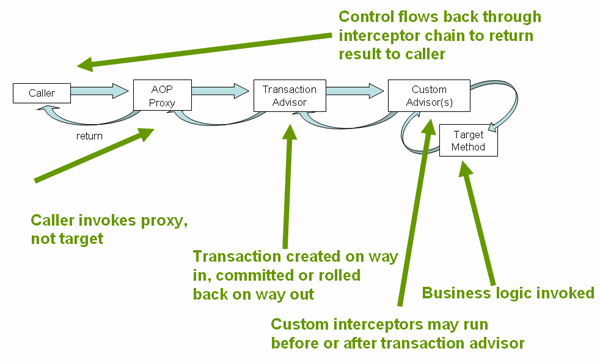
Consider the following interface, and its attendant
implementation. This example uses Foo and
Bar classes as placeholders so that you can
concentrate on the transaction usage without focusing on a particular
domain model. For the purposes of this example, the fact that the
DefaultFooService class throws
UnsupportedOperationException instances
in the body of each implemented method is good; it allows you to see
transactions created and then rolled back in response to the
UnsupportedOperationException instance.
// the service interface that we want to make transactional package x.y.service; public interface FooService { Foo getFoo(String fooName); Foo getFoo(String fooName, String barName); void insertFoo(Foo foo); void updateFoo(Foo foo); }
// an implementation of the above interface package x.y.service; public class DefaultFooService implements FooService { public Foo getFoo(String fooName) { throw new UnsupportedOperationException(); } public Foo getFoo(String fooName, String barName) { throw new UnsupportedOperationException(); } public void insertFoo(Foo foo) { throw new UnsupportedOperationException(); } public void updateFoo(Foo foo) { throw new UnsupportedOperationException(); } }
Assume that the first two methods of the
FooService interface,
getFoo(String) and getFoo(String, String),
must execute in the context of a transaction with read-only
semantics, and that the other methods,insertFoo(Foo)
and updateFoo(Foo), must execute in the context of a
transaction with read-write semantics. The following configuration is
explained in detail in the next few paragraphs.
<!-- from the file 'context.xml' --> <?xml version="1.0" encoding="UTF-8"?> <beans xmlns="http://www.springframework.org/schema/beans" xmlns:xsi="http://www.w3.org/2001/XMLSchema-instance" xmlns:aop="http://www.springframework.org/schema/aop" xmlns:tx="http://www.springframework.org/schema/tx" xsi:schemaLocation=" http://www.springframework.org/schema/beans http://www.springframework.org/schema/beans/spring-beans-3.0.xsd http://www.springframework.org/schema/tx http://www.springframework.org/schema/tx/spring-tx-3.0.xsd http://www.springframework.org/schema/aop http://www.springframework.org/schema/aop/spring-aop-3.0.xsd"> <!-- this is the service object that we want to make transactional --> <bean id="fooService" class="x.y.service.DefaultFooService"/> <!-- the transactional advice (what 'happens'; see the <aop:advisor/> bean below) --> <tx:advice id="txAdvice" transaction-manager="txManager"> <!-- the transactional semantics... --> <tx:attributes> <!-- all methods starting with 'get' are read-only --> <tx:method name="get*" read-only="true"/> <!-- other methods use the default transaction settings (see below) --> <tx:method name="*"/> </tx:attributes> </tx:advice> <!-- ensure that the above transactional advice runs for any execution of an operation defined by the FooService interface --> <aop:config> <aop:pointcut id="fooServiceOperation" expression="execution(* x.y.service.FooService.*(..))"/> <aop:advisor advice-ref="txAdvice" pointcut-ref="fooServiceOperation"/> </aop:config> <!-- don't forget the DataSource --> <bean id="dataSource" class="org.apache.commons.dbcp.BasicDataSource" destroy-method="close"> <property name="driverClassName" value="oracle.jdbc.driver.OracleDriver"/> <property name="url" value="jdbc:oracle:thin:@rj-t42:1521:elvis"/> <property name="username" value="scott"/> <property name="password" value="tiger"/> </bean> <!-- similarly, don't forget the PlatformTransactionManager --> <bean id="txManager" class="org.springframework.jdbc.datasource.DataSourceTransactionManager"> <property name="dataSource" ref="dataSource"/> </bean> <!-- other <bean/> definitions here --> </beans>
Examine the preceding configuration. You want to make a service
object, the fooService bean, transactional. The
transaction semantics to apply are encapsulated in the
<tx:advice/> definition. The
<tx:advice/> definition reads as
“... all methods on starting with
'get' are to execute in the context of a read-only
transaction, and all other methods are to execute with the default
transaction semantics”. The
transaction-manager attribute of the
<tx:advice/> tag is set to the name of the
PlatformTransactionManager bean that is
going to drive the transactions, in this case, the
txManager bean.
| Tip |
|---|---|
You can omit the |
The <aop:config/> definition ensures that
the transactional advice defined by the txAdvice bean
executes at the appropriate points in the program. First you define a
pointcut that matches the execution of any operation defined in the
FooService interface
(fooServiceOperation). Then you associate the
pointcut with the txAdvice using an advisor. The
result indicates that at the execution of a
fooServiceOperation, the advice defined by
txAdvice will be run.
The expression defined within the
<aop:pointcut/> element is an AspectJ pointcut
expression; see Chapter 7, Aspect Oriented Programming with Spring for more details on pointcut
expressions in Spring 2.0.
A common requirement is to make an entire service layer transactional. The best way to do this is simply to change the pointcut expression to match any operation in your service layer. For example:
<aop:config> <aop:pointcut id="fooServiceMethods" expression="execution(* x.y.service.*.*(..))"/> <aop:advisor advice-ref="txAdvice" pointcut-ref="fooServiceMethods"/> </aop:config>
| Note |
|---|---|
In this example it is assumed that all your service
interfaces are defined in the |
Now that we've analyzed the configuration, you may be asking yourself, “Okay... but what does all this configuration actually do?”.
The above configuration will be used to create a transactional
proxy around the object that is created from the
fooService bean definition. The
proxy will be configured with the transactional advice, so that when an
appropriate method is invoked on the proxy, a
transaction is started, suspended, marked as read-only, and so on,
depending on the transaction configuration associated with that method.
Consider the following program that test drives the above
configuration:
public final class Boot { public static void main(final String[] args) throws Exception { ApplicationContext ctx = new ClassPathXmlApplicationContext("context.xml", Boot.class); FooService fooService = (FooService) ctx.getBean("fooService"); fooService.insertFoo (new Foo()); } }
The output from running the preceding program will resemble the following. (The Log4J output and the stack trace from the UnsupportedOperationException thrown by the insertFoo(..) method of the DefaultFooService class have been truncated for clarity.)
<!-- the Spring container is starting up... --> [AspectJInvocationContextExposingAdvisorAutoProxyCreator] - Creating implicit proxy for bean 'fooService' with 0 common interceptors and 1 specific interceptors <!-- the DefaultFooService is actually proxied --> [JdkDynamicAopProxy] - Creating JDK dynamic proxy for [x.y.service.DefaultFooService] <!-- ... the insertFoo(..) method is now being invoked on the proxy --> [TransactionInterceptor] - Getting transaction for x.y.service.FooService.insertFoo <!-- the transactional advice kicks in here... --> [DataSourceTransactionManager] - Creating new transaction with name [x.y.service.FooService.insertFoo] [DataSourceTransactionManager] - Acquired Connection [org.apache.commons.dbcp.PoolableConnection@a53de4] for JDBC transaction <!-- the insertFoo(..) method from DefaultFooService throws an exception... --> [RuleBasedTransactionAttribute] - Applying rules to determine whether transaction should rollback on java.lang.UnsupportedOperationException [TransactionInterceptor] - Invoking rollback for transaction on x.y.service.FooService.insertFoo due to throwable [java.lang.UnsupportedOperationException] <!-- and the transaction is rolled back (by default, RuntimeException instances cause rollback) --> [DataSourceTransactionManager] - Rolling back JDBC transaction on Connection [org.apache.commons.dbcp.PoolableConnection@a53de4] [DataSourceTransactionManager] - Releasing JDBC Connection after transaction [DataSourceUtils] - Returning JDBC Connection to DataSource Exception in thread "main" java.lang.UnsupportedOperationException at x.y.service.DefaultFooService.insertFoo(DefaultFooService.java:14) <!-- AOP infrastructure stack trace elements removed for clarity --> at $Proxy0.insertFoo(Unknown Source) at Boot.main(Boot.java:11)
The previous section outlined the basics of how to specify transactional settings for classes, typically service layer classes, declaratively in your application. This section describes how you can control the rollback of transactions in a simple declarative fashion.
The recommended way to indicate to the Spring Framework's
transaction infrastructure that a transaction's work is to be rolled
back is to throw an Exception from code
that is currently executing in the context of a transaction. The Spring
Framework's transaction infrastructure code will catch any unhandled
Exception as it bubbles up the call
stack, and make a determination whether to mark the transaction for
rollback.
In its default configuration, the Spring Framework's transaction
infrastructure code only marks a transaction for
rollback in the case of runtime, unchecked exceptions; that is, when the
thrown exception is an instance or subclass of
RuntimeException.
(Errors will also - by default - result
in a rollback). Checked exceptions that are thrown from a transactional
method do not result in rollback in the default
configuration.
You can configure exactly which
Exception types mark a transaction for
rollback, including checked exceptions. The following XML snippet
demonstrates how you configure rollback for a checked,
application-specific Exception
type.
<tx:advice id="txAdvice" transaction-manager="txManager"> <tx:attributes> <tx:method name="get*" read-only="true" rollback-for="NoProductInStockException"/> <tx:method name="*"/> </tx:attributes> </tx:advice>
You can also specify 'no rollback rules', if you do
not want a transaction rolled back when an
exception is thrown. The following example tells the Spring Framework's
transaction infrastructure to commit the attendant transaction even in
the face of an unhandled
InstrumentNotFoundException.
<tx:advice id="txAdvice"> <tx:attributes> <tx:method name="updateStock" no-rollback-for="InstrumentNotFoundException"/> <tx:method name="*"/> </tx:attributes> </tx:advice>
When the Spring Framework's transaction infrastructure catches an
exception and is consults configured rollback rules to determine whether
to mark the transaction for rollback, the strongest
matching rule wins. So in the case of the following configuration, any
exception other than an
InstrumentNotFoundException results in a
rollback of the attendant transaction.
<tx:advice id="txAdvice"> <tx:attributes> <tx:method name="*" rollback-for="Throwable" no-rollback-for="InstrumentNotFoundException"/> </tx:attributes> </tx:advice>
You can also indicate a required rollback programmatically. Although very simple, this process is quite invasive, and tightly couples your code to the Spring Framework's transaction infrastructure:
public void resolvePosition() { try { // some business logic... } catch (NoProductInStockException ex) { // trigger rollback programmatically TransactionAspectSupport.currentTransactionStatus().setRollbackOnly(); } }
You are strongly encouraged to use the declarative approach to rollback if at all possible. Programmatic rollback is available should you absolutely need it, but its usage flies in the face of achieving a clean POJO-based architecture.
Consider the scenario where you have a number of service layer
objects, and you want to apply a totally different
transactional configuration to each of them. You do this by defining
distinct <aop:advisor/> elements with differing
pointcut and advice-ref attribute
values.
As a point of comparison, first assume that all of your service
layer classes are defined in a root x.y.service
package. To make all beans that are instances of classes defined in that
package (or in subpackages) and that have names ending in
Service have the default transactional configuration,
you would write the following:
<?xml version="1.0" encoding="UTF-8"?> <beans xmlns="http://www.springframework.org/schema/beans" xmlns:xsi="http://www.w3.org/2001/XMLSchema-instance" xmlns:aop="http://www.springframework.org/schema/aop" xmlns:tx="http://www.springframework.org/schema/tx" xsi:schemaLocation=" http://www.springframework.org/schema/beans http://www.springframework.org/schema/beans/spring-beans-3.0.xsd http://www.springframework.org/schema/tx http://www.springframework.org/schema/tx/spring-tx-3.0.xsd http://www.springframework.org/schema/aop http://www.springframework.org/schema/aop/spring-aop-3.0.xsd"> <aop:config> <aop:pointcut id="serviceOperation" expression="execution(* x.y.service..*Service.*(..))"/> <aop:advisor pointcut-ref="serviceOperation" advice-ref="txAdvice"/> </aop:config> <!-- these two beans will be transactional... --> <bean id="fooService" class="x.y.service.DefaultFooService"/> <bean id="barService" class="x.y.service.extras.SimpleBarService"/> <!-- ... and these two beans won't --> <bean id="anotherService" class="org.xyz.SomeService"/> <!-- (not in the right package) --> <bean id="barManager" class="x.y.service.SimpleBarManager"/> <!-- (doesn't end in 'Service') --> <tx:advice id="txAdvice"> <tx:attributes> <tx:method name="get*" read-only="true"/> <tx:method name="*"/> </tx:attributes> </tx:advice> <!-- other transaction infrastructure beans such as a PlatformTransactionManager omitted... --> </beans>
The following example shows how to configure two distinct beans with totally different transactional settings.
<?xml version="1.0" encoding="UTF-8"?> <beans xmlns="http://www.springframework.org/schema/beans" xmlns:xsi="http://www.w3.org/2001/XMLSchema-instance" xmlns:aop="http://www.springframework.org/schema/aop" xmlns:tx="http://www.springframework.org/schema/tx" xsi:schemaLocation=" http://www.springframework.org/schema/beans http://www.springframework.org/schema/beans/spring-beans-3.0.xsd http://www.springframework.org/schema/tx http://www.springframework.org/schema/tx/spring-tx-3.0.xsd http://www.springframework.org/schema/aop http://www.springframework.org/schema/aop/spring-aop-3.0.xsd"> <aop:config> <aop:pointcut id="defaultServiceOperation" expression="execution(* x.y.service.*Service.*(..))"/> <aop:pointcut id="noTxServiceOperation" expression="execution(* x.y.service.ddl.DefaultDdlManager.*(..))"/> <aop:advisor pointcut-ref="defaultServiceOperation" advice-ref="defaultTxAdvice"/> <aop:advisor pointcut-ref="noTxServiceOperation" advice-ref="noTxAdvice"/> </aop:config> <!-- this bean will be transactional (see the 'defaultServiceOperation' pointcut) --> <bean id="fooService" class="x.y.service.DefaultFooService"/> <!-- this bean will also be transactional, but with totally different transactional settings --> <bean id="anotherFooService" class="x.y.service.ddl.DefaultDdlManager"/> <tx:advice id="defaultTxAdvice"> <tx:attributes> <tx:method name="get*" read-only="true"/> <tx:method name="*"/> </tx:attributes> </tx:advice> <tx:advice id="noTxAdvice"> <tx:attributes> <tx:method name="*" propagation="NEVER"/> </tx:attributes> </tx:advice> <!-- other transaction infrastructure beans such as a PlatformTransactionManager omitted... --> </beans>
This section summarizes the various transactional settings that
can be specified using the <tx:advice/> tag.
The default <tx:advice/> settings are:
Propagation setting is
REQUIRED.Isolation level is
DEFAULT.Transaction is read/write.
Transaction timeout defaults to the default timeout of the underlying transaction system, or none if timeouts are not supported.
Any
RuntimeExceptiontriggers rollback, and any checkedExceptiondoes not.
You can change these default settings; the various attributes of
the <tx:method/> tags that are nested within
<tx:advice/> and
<tx:attributes/> tags are summarized
below:
Table 10.1. <tx:method/> settings
| Attribute | Required? | Default | Description |
|---|---|---|---|
name | Yes | Method name(s) with which the transaction
attributes are to be associated. The wildcard (*) character
can be used to associate the same transaction attribute
settings with a number of methods; for example,
| |
propagation | No | REQUIRED | Transaction propagation behavior. |
isolation | No | DEFAULT | Transaction isolation level. |
timeout | No | -1 | Transaction timeout value (in seconds). |
read-only | No | false | Is this transaction read-only? |
rollback-for | No |
| |
no-rollback-for | No |
|
In addition to the XML-based declarative approach to transaction configuration, you can use an annotation-based approach. Declaring transaction semantics directly in the Java source code puts the declarations much closer to the affected code. There is not much danger of undue coupling, because code that is meant to be used transactionally is almost always deployed that way anyway.
The ease-of-use afforded by the use of the
@Transactional annotation is best
illustrated with an example, which is explained in the text that
follows. Consider the following class definition:
// the service class that we want to make transactional @Transactional public class DefaultFooService implements FooService { Foo getFoo(String fooName); Foo getFoo(String fooName, String barName); void insertFoo(Foo foo); void updateFoo(Foo foo); }
When the above POJO is defined as a bean in a Spring IoC container, the bean instance can be made transactional by adding merely one line of XML configuration:
<!-- from the file 'context.xml' --> <?xml version="1.0" encoding="UTF-8"?> <beans xmlns="http://www.springframework.org/schema/beans" xmlns:xsi="http://www.w3.org/2001/XMLSchema-instance" xmlns:aop="http://www.springframework.org/schema/aop" xmlns:tx="http://www.springframework.org/schema/tx" xsi:schemaLocation=" http://www.springframework.org/schema/beans http://www.springframework.org/schema/beans/spring-beans-3.0.xsd http://www.springframework.org/schema/tx http://www.springframework.org/schema/tx/spring-tx-3.0.xsd http://www.springframework.org/schema/aop http://www.springframework.org/schema/aop/spring-aop-3.0.xsd"> <!-- this is the service object that we want to make transactional --> <bean id="fooService" class="x.y.service.DefaultFooService"/> <!-- enable the configuration of transactional behavior based on annotations --> <tx:annotation-driven transaction-manager="txManager"/> <!-- a PlatformTransactionManager is still required --> <bean id="txManager" class="org.springframework.jdbc.datasource.DataSourceTransactionManager"> <!-- (this dependency is defined somewhere else) --> <property name="dataSource" ref="dataSource"/> </bean> <!-- other <bean/> definitions here --> </beans>
| Tip |
|---|---|
You can omit the |
You can place the @Transactional
annotation before an interface definition, a method on an interface, a
class definition, or a public method on a class.
However, the mere presence of the
@Transactional annotation is not enough
to activate the transactional behavior. The
@Transactional annotation is simply
metadata that can be consumed by some runtime infrastructure that is
@Transactional-aware and that can use the
metadata to configure the appropriate beans with transactional behavior.
In the preceding example, the
<tx:annotation-driven/> element
switches on the transactional behavior.
| Tip |
|---|---|
Spring recommends that you only annotate concrete classes (and
methods of concrete classes) with the
|
| Note |
|---|---|
In proxy mode (which is the default), only external method calls
coming in through the proxy are intercepted. This means that
self-invocation, in effect, a method within the target object calling
another method of the target object, will not lead to an actual
transaction at runtime even if the invoked method is marked with
|
Consider the use of AspectJ mode (see mode attribute in table
below) if you expect self-invocations to be wrapped with transactions as
well. In
this case, there will not be a proxy in the first place; instead, the
target class will be weaved (that is, its byte code will be modified) in
order to turn @Transactional into runtime
behavior on any kind of method.
Table 10.2. <tx:annotation-driven/>
settings
| Attribute | Default | Description |
|---|---|---|
transaction-manager | transactionManager | Name of transaction manager to use. Only required
if the name of the transaction manager is not
|
mode | proxy | The default mode "proxy" processes annotated beans to be proxied using Spring's AOP framework (following proxy semantics, as discussed above, applying to method calls coming in through the proxy only). The alternative mode "aspectj" instead weaves the affected classes with Spring's AspectJ transaction aspect, modifying the target class byte code to apply to any kind of method call. AspectJ weaving requires spring-aspects.jar in the classpath as well as load-time weaving (or compile-time weaving) enabled. (See Section 7.8.4.5, “Spring configuration” for details on how to set up load-time weaving.) |
proxy-target-class | false | Applies to proxy mode only. Controls what type of
transactional proxies are created for classes annotated with
the |
order | Ordered.LOWEST_PRECEDENCE | Defines the order of the transaction advice that
is applied to beans annotated with
|
| Note |
|---|---|
The |
| Note |
|---|---|
|
The most derived location takes precedence when evaluating the
transactional settings for a method. In
the case of the following example, the
DefaultFooService class is annotated at the class
level with the settings for a read-only transaction, but the
@Transactional annotation on the
updateFoo(Foo) method in the same class takes
precedence over the transactional settings defined at the class
level.
@Transactional(readOnly = true) public class DefaultFooService implements FooService { public Foo getFoo(String fooName) { // do something } // these settings have precedence for this method @Transactional(readOnly = false, propagation = Propagation.REQUIRES_NEW) public void updateFoo(Foo foo) { // do something } }
The @Transactional annotation is
metadata that specifies that an interface, class, or method must have
transactional semantics; for example, “start a brand
new read-only transaction when this method is invoked, suspending any
existing transaction”. The default
@Transactional settings are as
follows:
Propagation setting is
PROPAGATION_REQUIRED.Isolation level is
ISOLATION_DEFAULT.Transaction is read/write.
Transaction timeout defaults to the default timeout of the underlying transaction system, or to none if timeouts are not supported.
Any
RuntimeExceptiontriggers rollback, and any checkedExceptiondoes not.
These default settings can be changed; the various properties of
the @Transactional annotation are
summarized in the following table:
Table 10.3. @Transactional
properties
| Property | Type | Description |
|---|---|---|
value | String | Optional qualifier specifying the transaction manager to be used. |
propagation | enum: Propagation | Optional propagation setting. |
isolation | enum: Isolation | Optional isolation level. |
readOnly | boolean | Read/write vs. read-only transaction |
timeout | int (in seconds granularity) | Transaction timeout. |
rollbackFor | Array of Class objects, which
must be derived from
Throwable. | Optional array of exception classes that must cause rollback. |
rollbackForClassname | Array of class names. Classes must be derived from
Throwable. | Optional array of names of exception classes that must cause rollback. |
noRollbackFor | Array of Class objects, which
must be derived from
Throwable. | Optional array of exception classes that must not cause rollback. |
noRollbackForClassname | Array of String class names,
which must be derived from
Throwable. | Optional array of names of exception classes that must not cause rollback. |
Currently you cannot have explicit control over the name of a
transaction, where 'name' means the transaction name that will be
shown in a transaction monitor, if applicable (for example, WebLogic's
transaction monitor), and in logging output. For declarative
transactions, the transaction name is always the fully-qualified class
name + "." + method
name of the transactionally-advised class. For example, if the
handlePayment(..) method of the
BusinessService class started a transaction,
the name of the transaction would be:
com.foo.BusinessService.handlePayment.
Most Spring applications only need a single transaction manager, but there may be situations
where you want multiple independent transaction managers in a single application.
The value attribute of the @Transactional annotation can
be used to optionally specify the identity of the PlatformTransactionManager
to be used. This can either be the bean name or the qualifier value of the transaction manager bean.
For example, using the qualifier notation, the following Java code
public class TransactionalService { @Transactional("order") public void setSomething(String name) { ... } @Transactional("account") public void doSomething() { ... } }
could be combined with the following transaction manager bean declarations in the application context.
<tx:annotation-driven/> <bean id="transactionManager1" class="org.springframework.jdbc.DataSourceTransactionManager"> ... <qualifier value="order"/> </bean> <bean id="transactionManager2" class="org.springframework.jdbc.DataSourceTransactionManager"> ... <qualifier value="account"/> </bean>
In this case, the two methods on TransactionalService will run under separate
transaction managers, differentiated by the "order" and "account" qualifiers.
The default <tx:annotation-driven> target bean name transactionManager will
still be used if no specifically qualified PlatformTransactionManager bean is found.
If you find you are repeatedly using the same attributes with @Transactional
on many different methods, then Spring's meta-annotation support allows you to define custom shortcut
annotations for your specific use cases. For example, defining the following annotations
@Target({ElementType.METHOD, ElementType.TYPE})
@Retention(RetentionPolicy.RUNTIME)
@Transactional("order")
public @interface OrderTx {
}
@Target({ElementType.METHOD, ElementType.TYPE})
@Retention(RetentionPolicy.RUNTIME)
@Transactional("account")
public @interface AccountTx {
}
allows us to write the example from the previous section as
public class TransactionalService { @OrderTx public void setSomething(String name) { ... } @AccountTx public void doSomething() { ... } }
Here we have used the syntax to define the transaction manager qualifier, but could also have included propagation behavior, rollback rules, timeouts etc.
This section describes some semantics of transaction propagation in Spring. Please note that this section is not an introduction to transaction propagation proper; rather it details some of the semantics regarding transaction propagation in Spring.
In Spring-managed transactions, be aware of the difference between physical and logical transactions, and how the propagation setting applies to this difference.
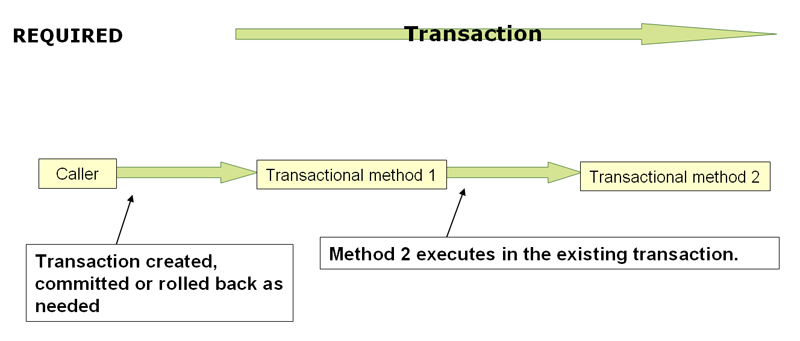
PROPAGATION_REQUIRED
When the propagation setting is
PROPAGATION_REQUIRED, a
logical transaction scope is created for each
method upon which the setting is applied. Each such logical
transaction scope can determine rollback-only status individually,
with an outer transaction scope being logically independent from the
inner transaction scope. Of course, in case of standard
PROPAGATION_REQUIRED behavior, all these scopes
will be mapped to the same physical transaction. So a rollback-only
marker set in the inner transaction scope does affect the outer
transaction's chance to actually commit (as you would expect it
to).
However, in the case where an inner transaction scope sets the
rollback-only marker, the outer transaction has not decided on the
rollback itself, and so the rollback (silently triggered by the inner
transaction scope) is unexpected. A corresponding
UnexpectedRollbackException is thrown at that
point. This is expected behavior so that the
caller of a transaction can never be misled to assume that a commit
was performed when it really was not. So if an inner transaction (of
which the outer caller is not aware) silently marks a transaction as
rollback-only, the outer caller still calls commit. The outer caller
needs to receive an UnexpectedRollbackException
to indicate clearly that a rollback was performed instead.
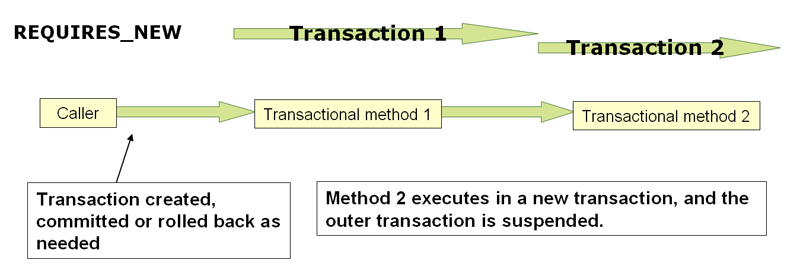
PROPAGATION_REQUIRES_NEW
PROPAGATION_REQUIRES_NEW, in contrast to
PROPAGATION_REQUIRED, uses a
completely independent transaction for each
affected transaction scope. In that case, the underlying physical
transactions are different and hence can commit or roll back
independently, with an outer transaction not affected by an inner
transaction's rollback status.
PROPAGATION_NESTED uses a
single physical transaction with multiple
savepoints that it can roll back to. Such partial rollbacks allow an
inner transaction scope to trigger a rollback for its
scope, with the outer transaction being able to continue
the physical transaction despite some operations having been rolled
back. This setting is typically mapped onto JDBC savepoints, so will
only work with JDBC resource transactions. See Spring's
DataSourceTransactionManager.
Suppose you want to execute both
transactional and some basic profiling advice. How
do you effect this in the context of
<tx:annotation-driven/>?
When you invoke the updateFoo(Foo)
method, you want to see the following actions:
Configured profiling aspect starts up.
Transactional advice executes.
Method on the advised object executes.
Transaction commits.
Profiling aspect reports exact duration of the whole transactional method invocation.
| Note |
|---|---|
This chapter is not concerned with explaining AOP in any great detail (except as it applies to transactions). See Chapter 7, Aspect Oriented Programming with Spring for detailed coverage of the following AOP configuration and AOP in general. |
Here is the code for a simple profiling aspect discussed above.
The
ordering of advice is controlled through the
Ordered interface. For full details on
advice ordering, see Section 7.2.4.7, “Advice ordering”.
package x.y; import org.aspectj.lang.ProceedingJoinPoint; import org.springframework.util.StopWatch; import org.springframework.core.Ordered; public class SimpleProfiler implements Ordered { private int order; // allows us to control the ordering of advice public int getOrder() { return this.order; } public void setOrder(int order) { this.order = order; } // this method is the around advice public Object profile(ProceedingJoinPoint call) throws Throwable { Object returnValue; StopWatch clock = new StopWatch(getClass().getName()); try { clock.start(call.toShortString()); returnValue = call.proceed(); } finally { clock.stop(); System.out.println(clock.prettyPrint()); } return returnValue; } }
<?xml version="1.0" encoding="UTF-8"?> <beans xmlns="http://www.springframework.org/schema/beans" xmlns:xsi="http://www.w3.org/2001/XMLSchema-instance" xmlns:aop="http://www.springframework.org/schema/aop" xmlns:tx="http://www.springframework.org/schema/tx" xsi:schemaLocation=" http://www.springframework.org/schema/beans http://www.springframework.org/schema/beans/spring-beans-3.0.xsd http://www.springframework.org/schema/tx http://www.springframework.org/schema/tx/spring-tx-3.0.xsd http://www.springframework.org/schema/aop http://www.springframework.org/schema/aop/spring-aop-3.0.xsd"> <bean id="fooService" class="x.y.service.DefaultFooService"/> <!-- this is the aspect --> <bean id="profiler" class="x.y.SimpleProfiler"> <!-- execute before the transactional advice (hence the lower order number) --> <property name="order" value="1"/> </bean> <tx:annotation-driven transaction-manager="txManager" order="200"/> <aop:config> <!-- this advice will execute around the transactional advice --> <aop:aspect id="profilingAspect" ref="profiler"> <aop:pointcut id="serviceMethodWithReturnValue" expression="execution(!void x.y..*Service.*(..))"/> <aop:around method="profile" pointcut-ref="serviceMethodWithReturnValue"/> </aop:aspect> </aop:config> <bean id="dataSource" class="org.apache.commons.dbcp.BasicDataSource" destroy-method="close"> <property name="driverClassName" value="oracle.jdbc.driver.OracleDriver"/> <property name="url" value="jdbc:oracle:thin:@rj-t42:1521:elvis"/> <property name="username" value="scott"/> <property name="password" value="tiger"/> </bean> <bean id="txManager" class="org.springframework.jdbc.datasource.DataSourceTransactionManager"> <property name="dataSource" ref="dataSource"/> </bean> </beans>
The result of the above configuration is a
fooService bean that has profiling and transactional
aspects applied to it in the desired order. You
configure any number of additional aspects in similar fashion.
The following example effects the same setup as above, but uses the purely XML declarative approach.
<?xml version="1.0" encoding="UTF-8"?> <beans xmlns="http://www.springframework.org/schema/beans" xmlns:xsi="http://www.w3.org/2001/XMLSchema-instance" xmlns:aop="http://www.springframework.org/schema/aop" xmlns:tx="http://www.springframework.org/schema/tx" xsi:schemaLocation=" http://www.springframework.org/schema/beans http://www.springframework.org/schema/beans/spring-beans-3.0.xsd http://www.springframework.org/schema/tx http://www.springframework.org/schema/tx/spring-tx-3.0.xsd http://www.springframework.org/schema/aop http://www.springframework.org/schema/aop/spring-aop-3.0.xsd"> <bean id="fooService" class="x.y.service.DefaultFooService"/> <!-- the profiling advice --> <bean id="profiler" class="x.y.SimpleProfiler"> <!-- execute before the transactional advice (hence the lower order number) --> <property name="order" value="1"/> </bean> <aop:config> <aop:pointcut id="entryPointMethod" expression="execution(* x.y..*Service.*(..))"/> <!-- will execute after the profiling advice (c.f. the order attribute) --> <aop:advisor advice-ref="txAdvice" pointcut-ref="entryPointMethod" order="2"/> <!-- order value is higher than the profiling aspect --> <aop:aspect id="profilingAspect" ref="profiler"> <aop:pointcut id="serviceMethodWithReturnValue" expression="execution(!void x.y..*Service.*(..))"/> <aop:around method="profile" pointcut-ref="serviceMethodWithReturnValue"/> </aop:aspect> </aop:config> <tx:advice id="txAdvice" transaction-manager="txManager"> <tx:attributes> <tx:method name="get*" read-only="true"/> <tx:method name="*"/> </tx:attributes> </tx:advice> <!-- other <bean/> definitions such as a DataSource and a PlatformTransactionManager here --> </beans>
The result of the above configuration will be a
fooService bean that has profiling and transactional
aspects applied to it in that order. If you want
the profiling advice to execute after the
transactional advice on the way in, and before the
transactional advice on the way out, then you simply swap the value of
the profiling aspect bean's order property so that it
is higher than the transactional advice's order value.
You configure additional aspects in similar fashion.
It is also possible to use the Spring Framework's
@Transactional support outside of a
Spring container by means of an AspectJ aspect. To do so, you first
annotate your classes (and optionally your classes' methods) with the
@Transactional annotation, and then you
link (weave) your application with the
org.springframework.transaction.aspectj.AnnotationTransactionAspect
defined in the spring-aspects.jar file. The aspect must
also be configured with a transaction manager. You can of course use the
Spring Framework's IoC container to take care of dependency-injecting
the aspect. The simplest way to configure the transaction management
aspect is to use the <tx:annotation-driven/>
element and specify the mode attribute to
aspectj as described in Section 10.5.6, “Using @Transactional”. Because we're focusing
here on applications running outside of a Spring container, we'll show
you how to do it programmatically.
| Note |
|---|---|
Prior to continuing, you may want to read Section 10.5.6, “Using @Transactional” and Chapter 7, Aspect Oriented Programming with Spring respectively. |
// construct an appropriate transaction manager DataSourceTransactionManager txManager = new DataSourceTransactionManager(getDataSource()); // configure the AnnotationTransactionAspect to use it; this must be done before executing any transactional methods AnnotationTransactionAspect.aspectOf().setTransactionManager(txManager);
| Note |
|---|---|
When using this aspect, you must annotate the implementation class (and/or methods within that class), not the interface (if any) that the class implements. AspectJ follows Java's rule that annotations on interfaces are not inherited. |
The @Transactional annotation on a
class specifies the default transaction semantics for the execution of
any method in the class.
The @Transactional annotation on a
method within the class overrides the default transaction semantics
given by the class annotation (if present). Any method may be annotated,
regardless of visibility.
To weave your applications with the
AnnotationTransactionAspect you must either build
your application with AspectJ (see the AspectJ
Development Guide) or use load-time weaving. See Section 7.8.4, “Load-time weaving with AspectJ in the Spring Framework” for a discussion of load-time weaving with
AspectJ.
The Spring Framework provides two means of programmatic transaction management:
Using the
TransactionTemplate.Using a
PlatformTransactionManagerimplementation directly.
The Spring team generally recommends the
TransactionTemplate for programmatic transaction
management. The second approach is similar to using the JTA
UserTransaction API, although exception
handling is less cumbersome.
The TransactionTemplate adopts the same
approach as other Spring templates such as the
JdbcTemplate. It uses a callback approach, to
free application code from having to do the boilerplate acquisition and
release of transactional resources, and results in code that is
intention driven, in that the code that is written focuses solely on
what the developer wants to do.
| Note |
|---|---|
As you will see in the examples that follow, using the
|
Application code that must execute in a transactional context, and
that will use the TransactionTemplate explicitly,
looks like the following. You, as an application developer, write a
TransactionCallback implementation
(typically expressed as an anonymous inner class) that contains the code
that you need to execute in the context of a transaction. You then pass
an instance of your custom
TransactionCallback to the
execute(..) method exposed on the
TransactionTemplate.
public class SimpleService implements Service { // single TransactionTemplate shared amongst all methods in this instance private final TransactionTemplate transactionTemplate; // use constructor-injection to supply the PlatformTransactionManager public SimpleService(PlatformTransactionManager transactionManager) { Assert.notNull(transactionManager, "The 'transactionManager' argument must not be null."); this.transactionTemplate = new TransactionTemplate(transactionManager); } public Object someServiceMethod() { return transactionTemplate.execute(new TransactionCallback() { // the code in this method executes in a transactional context public Object doInTransaction(TransactionStatus status) { updateOperation1(); return resultOfUpdateOperation2(); } }); } }
If there is no return value, use the convenient
TransactionCallbackWithoutResult class with an
anonymous class as follows:
transactionTemplate.execute(new TransactionCallbackWithoutResult() { protected void doInTransactionWithoutResult(TransactionStatus status) { updateOperation1(); updateOperation2(); } });
Code within the callback can roll the transaction back by calling
the setRollbackOnly() method on the supplied
TransactionStatus object:
transactionTemplate.execute(new TransactionCallbackWithoutResult() { protected void doInTransactionWithoutResult(TransactionStatus status) { try { updateOperation1(); updateOperation2(); } catch (SomeBusinessExeption ex) { status.setRollbackOnly(); } } });
You can specify transaction settings such as the propagation
mode, the isolation level, the timeout, and so forth on the
TransactionTemplate either programmatically or
in configuration. TransactionTemplate instances
by default have the default
transactional settings. The following example shows the
programmatic customization of the transactional settings for a
specific TransactionTemplate:
public class SimpleService implements Service { private final TransactionTemplate transactionTemplate; public SimpleService(PlatformTransactionManager transactionManager) { Assert.notNull(transactionManager, "The 'transactionManager' argument must not be null."); this.transactionTemplate = new TransactionTemplate(transactionManager); // the transaction settings can be set here explicitly if so desired this.transactionTemplate.setIsolationLevel(TransactionDefinition.ISOLATION_READ_UNCOMMITTED); this.transactionTemplate.setTimeout(30); // 30 seconds // and so forth... } }
The following example defines a
TransactionTemplate with some custom
transactional settings, using Spring XML configuration. The
sharedTransactionTemplate can then be injected into
as many services as are required.
<bean id="sharedTransactionTemplate" class="org.springframework.transaction.support.TransactionTemplate"> <property name="isolationLevelName" value="ISOLATION_READ_UNCOMMITTED"/> <property name="timeout" value="30"/> </bean>"
Finally, instances of the
TransactionTemplate class are threadsafe, in that
instances do not maintain any conversational state.
TransactionTemplate instances
do however maintain configuration state, so while a
number of classes may share a single instance of a
TransactionTemplate, if a class needs to use a
TransactionTemplate with different settings (for
example, a different isolation level), then you need to create two
distinct TransactionTemplate instances.
You can also use the
org.springframework.transaction.PlatformTransactionManager
directly to manage your transaction. Simply pass the implementation of
the PlatformTransactionManager you are
using to your bean through a bean reference. Then, using the
TransactionDefinition and
TransactionStatus objects you can
initiate transactions, roll back, and commit.
DefaultTransactionDefinition def = new DefaultTransactionDefinition(); // explicitly setting the transaction name is something that can only be done programmatically def.setName("SomeTxName"); def.setPropagationBehavior(TransactionDefinition.PROPAGATION_REQUIRED); TransactionStatus status = txManager.getTransaction(def); try { // execute your business logic here } catch (MyException ex) { txManager.rollback(status); throw ex; } txManager.commit(status);
Programmatic transaction management is usually a good idea only if
you have a small number of transactional operations. For example, if you
have a web application that require transactions only for certain update
operations, you may not want to set up transactional proxies using Spring
or any other technology. In this case, using the
TransactionTemplate may be a
good approach. Being able to set the transaction name explicitly is also
something that can only be done using the programmatic approach to
transaction management.
On the other hand, if your application has numerous transactional operations, declarative transaction management is usually worthwhile. It keeps transaction management out of business logic, and is not difficult to configure. When using the Spring Framework, rather than EJB CMT, the configuration cost of declarative transaction management is greatly reduced.
Spring's transaction abstraction generally is application server
agnostic. Additionally, Spring's
JtaTransactionManager class, which can optionally
perform a JNDI lookup for the JTA
UserTransaction and
TransactionManager objects, autodetects the
location for the latter object, which varies by application server. Having
access to the JTA TransactionManager allows
for enhanced transaction semantics, in particular supporting transaction
suspension. See the JtaTransactionManager Javadocs
for details.
Spring's JtaTransactionManager is the
standard choice to run on Java EE application servers, and is known to
work on all common servers. Advanced functionality such as transaction
suspension works on many servers as well -- including GlassFish, JBoss,
Geronimo, and Oracle OC4J -- without any special configuration required.
However, for fully supported transaction suspension and further advanced
integration, Spring ships special adapters for IBM WebSphere, BEA WebLogic
Server, and Oracle OC4J. These adapters are discussed in the following
sections.
For standard scenarios, including WebLogic Server,
WebSphere and OC4J, consider using the convenient
<tx:jta-transaction-manager/> configuration
element. When configured, this element automatically detects
the underlying server and chooses the best transaction manager available
for the platform. This means that you won't have to configure
server-specific adapter classes (as discussed in the following sections)
explicitly; rather, they are chosen automatically, with the standard
JtaTransactionManager as default fallback.
On WebSphere 6.1.0.9 and above, the recommended Spring JTA
transaction manager to use is
WebSphereUowTransactionManager. This special
adapter leverages IBM's UOWManager API,
which is available in WebSphere Application Server 6.0.2.19 and later
and 6.1.0.9 and later. With this adapter, Spring-driven transaction
suspension (suspend/resume as initiated by
PROPAGATION_REQUIRES_NEW) is officially supported by
IBM!
On WebLogic Server 9.0 or above, you typically would use the
WebLogicJtaTransactionManager instead of the
stock JtaTransactionManager class. This special
WebLogic-specific subclass of the normal
JtaTransactionManager supports the full power of
Spring's transaction definitions in a WebLogic-managed transaction
environment, beyond standard JTA semantics: Features include transaction
names, per-transaction isolation levels, and proper resuming of
transactions in all cases.
Spring ships a special adapter class for OC4J 10.1.3 or later
called OC4JJtaTransactionManager. This class is
analogous to the WebLogicJtaTransactionManager
class discussed in the previous section, providing similar value-adds on
OC4J: transaction names and per-transaction isolation levels.
The full JTA functionality, including transaction suspension,
works fine with Spring's JtaTransactionManager on
OC4J as well. The special
OC4JJtaTransactionManager adapter simply provides
value-adds beyond standard JTA.
Use the correct
PlatformTransactionManager implementation
based on your choice of transactional technologies and requirements.
Used properly, the Spring Framework merely provides a straightforward
and portable abstraction. If you are using global transactions, you
must use the
org.springframework.transaction.jta.JtaTransactionManager
class (or an application
server-specific subclass of it) for all your transactional
operations. Otherwise the transaction infrastructure attempts to perform
local transactions on resources such as container
DataSource instances. Such local
transactions do not make sense, and a good application server treats
them as errors.
For more information about the Spring Framework's transaction support:
Distributed transactions in Spring, with and without XA is a JavaWorld presentation in which SpringSource's David Syer guides you through seven patterns for distributed transactions in Spring applications, three of them with XA and four without.
Java Transaction Design Strategies is a book available from InfoQ that provides a well-paced introduction to transactions in Java. It also includes side-by-side examples of how to configure and use transactions with both the Spring Framework and EJB3.
The Data Access Object (DAO) support in Spring is aimed at making it easy to work with data access technologies like JDBC, Hibernate, JPA or JDO in a consistent way. This allows one to switch between the aforementioned persistence technologies fairly easily and it also allows one to code without worrying about catching exceptions that are specific to each technology.
Spring provides a convenient translation from technology-specific
exceptions like SQLException to its own exception
class hierarchy with the DataAccessException as the
root exception. These exceptions wrap the original exception so there is
never any risk that one might lose any information as to what might have
gone wrong.
In addition to JDBC exceptions, Spring can also wrap Hibernate-specific exceptions, converting them from proprietary, checked exceptions (in the case of versions of Hibernate prior to Hibernate 3.0), to a set of focused runtime exceptions (the same is true for JDO and JPA exceptions). This allows one to handle most persistence exceptions, which are non-recoverable, only in the appropriate layers, without having annoying boilerplate catch-and-throw blocks and exception declarations in one's DAOs. (One can still trap and handle exceptions anywhere one needs to though.) As mentioned above, JDBC exceptions (including database-specific dialects) are also converted to the same hierarchy, meaning that one can perform some operations with JDBC within a consistent programming model.
The above holds true for the various template classes in Springs
support for various ORM frameworks. If one uses the interceptor-based
classes then the application must care about handling
HibernateExceptions and
JDOExceptions itself, preferably via delegating to
SessionFactoryUtils'
convertHibernateAccessException(..) or
convertJdoAccessException() methods respectively.
These methods convert the exceptions to ones that are compatible with the
exceptions in the org.springframework.dao exception
hierarchy. As JDOExceptions are unchecked, they can
simply get thrown too, sacrificing generic DAO abstraction in terms of
exceptions though.
The exception hierarchy that Spring provides can be seen below.
(Please note that the class hierarchy detailed in the image shows only a
subset of the entire DataAccessException
hierarchy.)
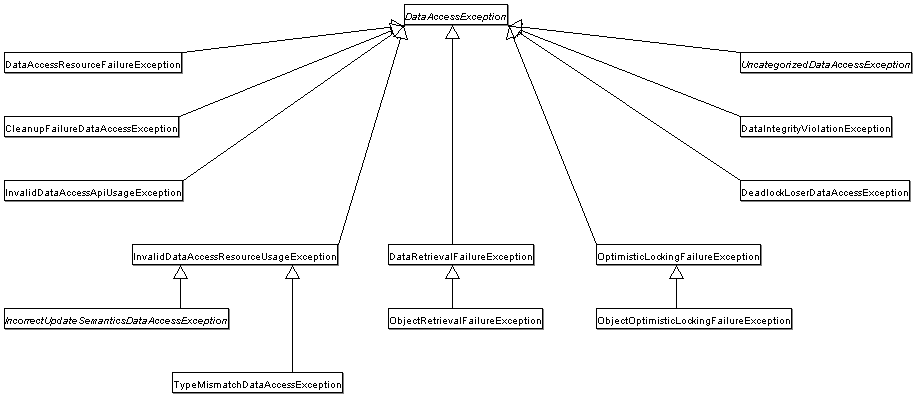
The best way to guarantee that your Data Access Objects (DAOs) or
repositories provide exception translation is to use the
@Repository annotation. This annotation
also allows the component scanning support to find and configure your DAOs
and repositories without having to provide XML configuration entries for
them.
@Repository public class SomeMovieFinder implements MovieFinder { // ... }
Any DAO or repository implementation will need to access to a
persistence resource, depending on the persistence technology used; for
example, a JDBC-based repository will need access to a JDBC
DataSource; a JPA-based repository will need
access to an EntityManager. The easiest way
to accomplish this is to have this resource dependency injected using one of
the @Autowired,
@Resource or
@PersistenceContext annotations. Here is an
example for a JPA repository:
@Repository public class JpaMovieFinder implements MovieFinder { @PersistenceContext private EntityManager entityManager; // ... }
If you are using the classic Hibernate APIs than you can inject the SessionFactory:
@Repository public class HibernateMovieFinder implements MovieFinder { private SessionFactory sessionFactory; @Autowired public void setSessionFactory(SessionFactory sessionFactory) { this.sessionFactory = sessionFactory; } // ... }
Last example we will show here is for typical JDBC support. You
would have the DataSource injected into an
initialization method where you would create a
JdbcTemplate and other data access support classes
like SimpleJdbcCall etc using this
DataSource.
@Repository public class JdbcMovieFinder implements MovieFinder { private JdbcTemplate jdbcTemplate; @Autowired public void init(DataSource dataSource) { this.jdbcTemplate = new JdbcTemplate(dataSource); } // ... }
| Note |
|---|---|
Please see the specific coverage of each persistence technology for details on how to configure the application context to take advantage of these annotations. |
The value-add provided by the Spring Framework JDBC abstraction is perhaps best shown by the sequence of actions outlined in the table below. The table shows what actions Spring will take care of and which actions are the responsibility of you, the application developer.
Table 12.1. Spring JDBC - who does what?
| Action | Spring | You |
|---|---|---|
| Define connection parameters. | X | |
| Open the connection. | X | |
| Specify the SQL statement. | X | |
| Declare parameters and provide parameter values | X | |
| Prepare and execute the statement. | X | |
| Set up the loop to iterate through the results (if any). | X | |
| Do the work for each iteration. | X | |
| Process any exception. | X | |
| Handle transactions. | X | |
| Close the connection, statement and resultset. | X |
The Spring Framework takes care of all the low-level details that can make JDBC such a tedious API to develop with.
You can choose among several approaches to form the basis for your JDBC database access. In addition to three flavors of the JdbcTemplate, a new SimpleJdbcInsert and SimplejdbcCall approach optimizes database metadata, and the RDBMS Object style takes a more object-oriented approach similar to that of JDO Query design. Once you start using one of these approaches, you can still mix and match to include a feature from a different approach. All approaches require a JDBC 2.0-compliant driver, and some advanced features require a JDBC 3.0 driver.
| Note |
|---|---|
Spring 3.0 updates all of the following approaches with Java 5 support such as generics and varargs. |
JdbcTemplate is the classic Spring JDBC approach and the most popular. This "lowest level" approach and all others use a JdbcTemplate under the covers, and all are updated with Java 5 support such as generics and varargs.
NamedParameterJdbcTemplate wraps a
JdbcTemplateto provide named parameters instead of the traditional JDBC "?" placeholders. This approach provides better documentation and ease of use when you have multiple parameters for an SQL statement.SimpleJdbcTemplate combines the most frequently used operations of JdbcTemplate and NamedParameterJdbcTemplate.
SimpleJdbcInsert and SimpleJdbcCall optimize database metadata to limit the amount of necessary configuration. This approach simplifies coding so that you only need to provide the name of the table or procedure and provide a map of parameters matching the column names. This only works if the database provides adequate metadata. If the database doesn't provide this metadata, you will have to provide explicit configuration of the parameters.
RDBMS Objects including MappingSqlQuery, SqlUpdate and StoredProcedure requires you to create reusable and thread-safe objects during initialization of your data access layer. This approach is modeled after JDO Query wherein you define your query string, declare parameters, and compile the query. Once you do that, execute methods can be called multiple times with various parameter values passed in.
The Spring Framework's JDBC abstraction framework consists of four
different packages, namely core,
datasource, object, and
support.
The org.springframework.jdbc.core package
contains the JdbcTemplate class and its various
callback interfaces, plus a variety of related classes. A subpackage
named org.springframework.jdbc.core.simple contains
the SimpleJdbcTemplate class and the related
SimpleJdbcInsert and
SimpleJdbcCall classes. Another subpackage named
org.springframework.jdbc.core.namedparam contains the
NamedParameterJdbcTemplate class and the related
support classes. See Section 12.2, “Using the JDBC core classes to control basic JDBC processing and
error handling”, Section 12.4, “JDBC batch operations”, and Section 12.5, “Simplifying JDBC operations with the SimpleJdbc classes”
The org.springframework.jdbc.datasource package
contains a utility class for easy
DataSource access, and various simple
DataSource implementations that can be
used for testing and running unmodified JDBC code outside of a Java EE
container. A subpackage named
org.springfamework.jdbc.datasource.embedded provides
support for creating in-memory database instances using Java database
engines such as HSQL and H2. See Section 12.3, “Controlling database connections” and
Section 12.8, “Embedded database support”
The org.springframework.jdbc.object package
contains classes that represent RDBMS queries, updates, and stored
procedures as thread safe, reusable objects. See Section 12.6, “Modeling JDBC operations as Java objects”.This approach is modeled by JDO, although of
course objects returned by queries are “disconnected” from
the database. This higher level of JDBC abstraction depends on the
lower-level abstraction in the
org.springframework.jdbc.core package.
The
org.springframework.jdbc.support package provides
SQLException translation functionality and some
utility classes. Exceptions thrown during JDBC processing are translated
to exceptions defined in the org.springframework.dao
package. This means that code using the Spring JDBC abstraction layer
does not need to implement JDBC or RDBMS-specific error handling. All
translated exceptions are unchecked, which gives you the option of
catching the exceptions from which you can recover while allowing other
exceptions to be propagated to the caller. See Section 12.2.4, “SQLExceptionTranslator”.
The JdbcTemplate class is the central class
in the JDBC core package. It handles the creation and release of
resources, which helps you avoid common errors such as forgetting to
close the connection. It performs the basic tasks of the core JDBC
workflow such as statement creation and execution, leaving application
code to provide SQL and extract results. The
JdbcTemplate class executes SQL queries, update
statements and stored procedure calls, performs iteration over
ResultSets and extraction of returned
parameter values.
It also catches JDBC exceptions and translates them to the generic, more
informative, exception hierarchy defined in the
org.springframework.dao package.
When you use the JdbcTemplate for your
code, you only need to implement callback interfaces, giving them a
clearly defined contract. The
PreparedStatementCreator callback
interface creates a prepared statement given a
Connection provided by this class,
providing SQL and any necessary parameters. The same is true for the
CallableStatementCreator interface, which
creates callable statements. The
RowCallbackHandler interface extracts
values from each row of a
ResultSet.
The JdbcTemplate can be used within a DAO
implementation through direct instantiation with a
DataSource reference, or be configured in
a Spring IoC container and given to DAOs as a bean reference.
| Note |
|---|---|
The |
All SQL issued by this class is logged at the
DEBUG level under the category corresponding to the
fully qualified class name of the template instance (typically
JdbcTemplate, but it may be different if you are
using a custom subclass of the JdbcTemplate
class).
This section provides some examples of
JdbcTemplate class usage. These examples are
not an exhaustive list of all of the functionality exposed by the
JdbcTemplate; see the attendant Javadocs for
that.
Here is a simple query for getting the number of rows in a relation:
int rowCount = this.jdbcTemplate.queryForInt("select count(*) from t_actor");
A simple query using a bind variable:
int countOfActorsNamedJoe = this.jdbcTemplate.queryForInt( "select count(*) from t_actor where first_name = ?", "Joe");
Querying for a String:
String lastName = this.jdbcTemplate.queryForObject( "select last_name from t_actor where id = ?", new Object[]{1212L}, String.class);
Querying and populating a single domain object:
Actor actor = this.jdbcTemplate.queryForObject( "select first_name, last_name from t_actor where id = ?", new Object[]{1212L}, new RowMapper<Actor>() { public Actor mapRow(ResultSet rs, int rowNum) throws SQLException { Actor actor = new Actor(); actor.setFirstName(rs.getString("first_name")); actor.setLastName(rs.getString("last_name")); return actor; } });
Querying and populating a number of domain objects:
List<Actor> actors = this.jdbcTemplate.query( "select first_name, last_name from t_actor", new RowMapper<Actor>() { public Actor mapRow(ResultSet rs, int rowNum) throws SQLException { Actor actor = new Actor(); actor.setFirstName(rs.getString("first_name")); actor.setLastName(rs.getString("last_name")); return actor; } });
If the last two snippets of code actually existed in the same
application, it would make sense to remove the duplication present
in the two RowMapper anonymous inner
classes, and extract them out into a single class (typically a
static inner class) that can then be referenced
by DAO methods as needed. For example, it may be better to write the
last code snippet as follows:
public List<Actor> findAllActors() { return this.jdbcTemplate.query( "select first_name, last_name from t_actor", new ActorMapper()); } private static final class ActorMapper implements RowMapper<Actor> { public Actor mapRow(ResultSet rs, int rowNum) throws SQLException { Actor actor = new Actor(); actor.setFirstName(rs.getString("first_name")); actor.setLastName(rs.getString("last_name")); return actor; } }
You use the update(..) method to
perform insert, update and delete operations. Parameter values are
usually provided as var args or alternatively as an object
array.
this.jdbcTemplate.update( "insert into t_actor (first_name, last_name) values (?, ?)", "Leonor", "Watling");
this.jdbcTemplate.update( "update t_actor set = ? where id = ?", "Banjo", 5276L);
this.jdbcTemplate.update( "delete from actor where id = ?", Long.valueOf(actorId));
You can use the execute(..) method to
execute any arbitrary SQL, and as such the method is often used for
DDL statements. It is heavily overloaded with variants taking
callback interfaces, binding variable arrays, and so on.
this.jdbcTemplate.execute("create table mytable (id integer, name varchar(100))");
The following example invokes a simple stored procedure. More sophisticated stored procedure support is covered later.
this.jdbcTemplate.update( "call SUPPORT.REFRESH_ACTORS_SUMMARY(?)", Long.valueOf(unionId));
Instances of the JdbcTemplate class are
threadsafe once configured. This is important
because it means that you can configure a single instance of a
JdbcTemplate and then safely inject this
shared reference into multiple DAOs (or
repositories). The JdbcTemplate is stateful, in
that it maintains a reference to a
DataSource, but this state is
not conversational state.
A common practice when using the
JdbcTemplate class (and the associated SimpleJdbcTemplate
and NamedParameterJdbcTemplate
classes) is to configure a DataSource
in your Spring configuration file, and then dependency-inject that
shared DataSource bean into your DAO
classes; the JdbcTemplate is created in the
setter for the DataSource. This leads
to DAOs that look in part like the following:
public class JdbcCorporateEventDao implements CorporateEventDao { private JdbcTemplate jdbcTemplate; public void setDataSource(DataSource dataSource) { this.jdbcTemplate = new JdbcTemplate(dataSource); } // JDBC-backed implementations of the methods on the CorporateEventDao follow... }
The corresponding configuration might look like this.
<?xml version="1.0" encoding="UTF-8"?> <beans xmlns="http://www.springframework.org/schema/beans" xmlns:xsi="http://www.w3.org/2001/XMLSchema-instance" xmlns:context="http://www.springframework.org/schema/context" xsi:schemaLocation=" http://www.springframework.org/schema/beans http://www.springframework.org/schema/beans/spring-beans-3.0.xsd http://www.springframework.org/schema/context http://www.springframework.org/schema/context/spring-context-3.0.xsd"> <bean id="corporateEventDao" class="com.example.JdbcCorporateEventDao"> <property name="dataSource" ref="dataSource"/> </bean> <bean id="dataSource" class="org.apache.commons.dbcp.BasicDataSource" destroy-method="close"> <property name="driverClassName" value="${jdbc.driverClassName}"/> <property name="url" value="${jdbc.url}"/> <property name="username" value="${jdbc.username}"/> <property name="password" value="${jdbc.password}"/> </bean> <context:property-placeholder location="jdbc.properties"/> </beans>
An alternative to explicit configuration is to use
component-scanning and annotation support for dependency injection. In
this case you annotate the class with
@Repository (which makes it a candidate
for component-scanning) and annotate the
DataSource setter method with
@Autowired.
@Repository public class JdbcCorporateEventDao implements CorporateEventDao { private JdbcTemplate jdbcTemplate; @Autowired public void setDataSource(DataSource dataSource) { this.jdbcTemplate = new JdbcTemplate(dataSource); } // JDBC-backed implementations of the methods on the CorporateEventDao follow... }
The corresponding XML configuration file would look like the following:
<?xml version="1.0" encoding="UTF-8"?> <beans xmlns="http://www.springframework.org/schema/beans" xmlns:xsi="http://www.w3.org/2001/XMLSchema-instance" xmlns:context="http://www.springframework.org/schema/context" xsi:schemaLocation=" http://www.springframework.org/schema/beans http://www.springframework.org/schema/beans/spring-beans-3.0.xsd http://www.springframework.org/schema/context http://www.springframework.org/schema/context/spring-context-3.0.xsd"> <!-- Scans within the base package of the application for @Components to configure as beans --> <context:component-scan base-package="org.springframework.docs.test" /> <bean id="dataSource" class="org.apache.commons.dbcp.BasicDataSource" destroy-method="close"> <property name="driverClassName" value="${jdbc.driverClassName}"/> <property name="url" value="${jdbc.url}"/> <property name="username" value="${jdbc.username}"/> <property name="password" value="${jdbc.password}"/> </bean> <context:property-placeholder location="jdbc.properties"/> </beans>
If you are using Spring's
JdbcDaoSupport class, and your various
JDBC-backed DAO classes extend from it, then your sub-class inherits a
setDataSource(..) method from the
JdbcDaoSupport class. You
can choose whether to inherit from this class. The
JdbcDaoSupport class is provided as a
convenience only.
Regardless of which of the above template initialization styles
you choose to use (or not), it is seldom necessary to create a new
instance of a JdbcTemplate class each time you
want to execute SQL. Once configured, a
JdbcTemplate instance is threadsafe. You may
want multiple JdbcTemplate instances if your
application accesses multiple databases, which requires multiple
DataSources, and subsequently multiple
differently configured JdbcTemplates.
The NamedParameterJdbcTemplate class adds
support for programming JDBC statements using named parameters, as
opposed to programming JDBC statements using only classic placeholder
('?') arguments. The
NamedParameterJdbcTemplate class wraps a
JdbcTemplate, and delegates to the wrapped
JdbcTemplate to do much of its work. This section
describes only those areas of the
NamedParameterJdbcTemplate class that differ from
the JdbcTemplate itself; namely, programming JDBC
statements using named parameters.
// some JDBC-backed DAO class... private NamedParameterJdbcTemplate namedParameterJdbcTemplate; public void setDataSource(DataSource dataSource) { this.namedParameterJdbcTemplate = new NamedParameterJdbcTemplate(dataSource); } public int countOfActorsByFirstName(String firstName) { String sql = "select count(*) from T_ACTOR where first_name = :first_name"; SqlParameterSource namedParameters = new MapSqlParameterSource("first_name", firstName); return namedParameterJdbcTemplate.queryForInt(sql, namedParameters); }
Notice the use of the named parameter notation in the value
assigned to the sql variable, and the corresponding
value that is plugged into the namedParameters
variable (of type MapSqlParameterSource).
Alternatively, you can pass along named parameters and their
corresponding values to a
NamedParameterJdbcTemplate instance by using the
Map-based style.The
remaining methods exposed by the
NamedParameterJdbcOperations and
implemented by the NamedParameterJdbcTemplate
class follow a similar pattern and are not covered here.
The following example shows the use of the
Map-based style.
// some JDBC-backed DAO class... private NamedParameterJdbcTemplate namedParameterJdbcTemplate; public void setDataSource(DataSource dataSource) { this.namedParameterJdbcTemplate = new NamedParameterJdbcTemplate(dataSource); } public int countOfActorsByFirstName(String firstName) { String sql = "select count(*) from T_ACTOR where first_name = :first_name"; Map namedParameters = Collections.singletonMap("first_name", firstName); return this.namedParameterJdbcTemplate.queryForInt(sql, namedParameters); }
One nice feature related to the
NamedParameterJdbcTemplate (and existing in the
same Java package) is the SqlParameterSource
interface. You have already seen an example of an implementation of this
interface in one of the previous code snippet (the
MapSqlParameterSource class). An
is a source of
named parameter values to a
SqlParameterSourceNamedParameterJdbcTemplate. The
MapSqlParameterSource class is a very simple
implementation that is simply an adapter around a
java.util.Map, where the keys are the
parameter names and the values are the parameter values.
Another SqlParameterSource
implementation is the
BeanPropertySqlParameterSource class. This class
wraps an arbitrary JavaBean (that is, an instance of a class that
adheres to the JavaBean
conventions), and uses the properties of the wrapped JavaBean as
the source of named parameter values.
public class Actor { private Long id; private String firstName; private String lastName; public String getFirstName() { return this.firstName; } public String getLastName() { return this.lastName; } public Long getId() { return this.id; } // setters omitted... }
// some JDBC-backed DAO class... private NamedParameterJdbcTemplate namedParameterJdbcTemplate; public void setDataSource(DataSource dataSource) { this.namedParameterJdbcTemplate = new NamedParameterJdbcTemplate(dataSource); } public int countOfActors(Actor exampleActor) { // notice how the named parameters match the properties of the above 'Actor' class String sql = "select count(*) from T_ACTOR where first_name = :firstName and last_name = :lastName"; SqlParameterSource namedParameters = new BeanPropertySqlParameterSource(exampleActor); return this.namedParameterJdbcTemplate.queryForInt(sql, namedParameters); }
Remember that the
NamedParameterJdbcTemplate class
wraps a classic JdbcTemplate
template; if you need access to the wrapped
JdbcTemplate instance to access functionality
only present in the JdbcTemplate class, you can
use the getJdbcOperations() method to access
the wrapped JdbcTemplate through the
JdbcOperations interface.
See also Section 12.2.1.2, “JdbcTemplate best practices” for
guidelines on using the
NamedParameterJdbcTemplate class in the context
of an application.
The SimpleJdbcTemplate class wraps the
classic JdbcTemplate and leverages Java 5
language features such as varargs and autoboxing.
| Note |
|---|---|
In Spring 3.0, the original |
The value-add of the SimpleJdbcTemplate
class in the area of syntactic-sugar is best illustrated with a
before-and-after example. The next code snippet shows data access code
that uses the classic JdbcTemplate, followed by a
code snippet that does the same job with the
SimpleJdbcTemplate.
// classic JdbcTemplate-style... private JdbcTemplate jdbcTemplate; public void setDataSource(DataSource dataSource) { this.jdbcTemplate = new JdbcTemplate(dataSource); } public Actor findActor(String specialty, int age) { String sql = "select id, first_name, last_name from T_ACTOR" + " where specialty = ? and age = ?"; RowMapper<Actor> mapper = new RowMapper<Actor>() { public Actor mapRow(ResultSet rs, int rowNum) throws SQLException { Actor actor = new Actor(); actor.setId(rs.getLong("id")); actor.setFirstName(rs.getString("first_name")); actor.setLastName(rs.getString("last_name")); return actor; } }; // notice the wrapping up of the argumenta in an array return (Actor) jdbcTemplate.queryForObject(sql, new Object[] {specialty, age}, mapper); }
Here is the same method, with the
SimpleJdbcTemplate.
// SimpleJdbcTemplate-style... private SimpleJdbcTemplate simpleJdbcTemplate; public void setDataSource(DataSource dataSource) { this.simpleJdbcTemplate = new SimpleJdbcTemplate(dataSource); } public Actor findActor(String specialty, int age) { String sql = "select id, first_name, last_name from T_ACTOR" + " where specialty = ? and age = ?"; RowMapper<Actor> mapper = new RowMapper<Actor>() { public Actor mapRow(ResultSet rs, int rowNum) throws SQLException { Actor actor = new Actor(); actor.setId(rs.getLong("id")); actor.setFirstName(rs.getString("first_name")); actor.setLastName(rs.getString("last_name")); return actor; } }; // notice the use of varargs since the parameter values now come // after the RowMapper parameter return this.simpleJdbcTemplate.queryForObject(sql, mapper, specialty, age); }
See Section 12.2.1.2, “JdbcTemplate best practices” for guidelines on
how to use the SimpleJdbcTemplate class in the
context of an application.
| Note |
|---|---|
The |
SQLExceptionTranslator is an
interface to be implemented by classes that can translate between
SQLExceptions and Spring's own
org.springframework.dao.DataAccessException,
which is agnostic in regard to data access strategy. Implementations can
be generic (for example, using SQLState codes for JDBC) or proprietary
(for example, using Oracle error codes) for greater precision.
SQLErrorCodeSQLExceptionTranslator is the
implementation of SQLExceptionTranslator
that is used by default. This implementation uses specific vendor codes.
It is more precise than the SQLState implementation.
The error code translations are based on codes held in a JavaBean type
class called SQLErrorCodes. This class is created
and populated by an SQLErrorCodesFactory which as
the name suggests is a factory for creating
SQLErrorCodes based on the contents of a
configuration file named sql-error-codes.xml. This file is
populated with vendor codes and based on the
DatabaseProductName taken from the
DatabaseMetaData. The codes for the acual
database you are using are used.
The SQLErrorCodeSQLExceptionTranslator
applies matching rules in the following sequence:
| Note |
|---|---|
The |
Any custom translation implemented by a subclass. Normally the provided concrete
SQLErrorCodeSQLExceptionTranslatoris used so this rule does not apply. It only applies if you have actually provided a subclass implementation.Any custom implementation of the
SQLExceptionTranslatorinterface that is provided as thecustomSqlExceptionTranslatorproperty of theSQLErrorCodesclass.The list of instances of the
CustomSQLErrorCodesTranslationclass, provided for thecustomTranslationsproperty of theSQLErrorCodesclass, are searched for a match.Error code matching is applied.
Use the fallback translator.
SQLExceptionSubclassTranslatoris the default fallback translator. If this translation is not available then the next fallback translator is theSQLStateSQLExceptionTranslator.
You can extend
SQLErrorCodeSQLExceptionTranslator:
public class CustomSQLErrorCodesTranslator extends SQLErrorCodeSQLExceptionTranslator { protected DataAccessException customTranslate(String task, String sql, SQLException sqlex) { if (sqlex.getErrorCode() == -12345) { return new DeadlockLoserDataAccessException(task, sqlex); } return null; } }
In this example, the specific error code -12345
is translated and other errors are left to be translated by the default
translator implementation. To use this custom translator, it is
necessary to pass it to the JdbcTemplate through
the method setExceptionTranslator and to use this
JdbcTemplate for all of the data access
processing where this translator is needed. Here is an example of how
this custom translator can be used:
private JdbcTemplate jdbcTemoplate; public void setDataSource(DataSource dataSource) { // create a JdbcTemplate and set data source this.jdbcTemplate = new JdbcTemplate(); this.jdbcTemplate.setDataSource(dataSource); // create a custom translator and set the DataSource for the default translation lookup CustomSQLErrorCodesTranslator tr = new CustomSQLErrorCodesTranslator(); tr.setDataSource(dataSource); this.jdbcTemplate.setExceptionTranslator(tr); } public void updateShippingCharge(long orderId, long pct) { // use the prepared JdbcTemplate for this update this.jdbcTemplate.update( "update orders" + " set shipping_charge = shipping_charge * ? / 100" + " where id = ?" pct, orderId); }
The custom translator is passed a data source in order to look up
the error codes in sql-error-codes.xml.
Executing an SQL statement requires very little code. You need a
DataSource and a
JdbcTemplate, including the convenience
methods
that are provided with the JdbcTemplate. The
following example shows what you need to include for a minimal but fully
functional class that creates a new table:
import javax.sql.DataSource; import org.springframework.jdbc.core.JdbcTemplate; public class ExecuteAStatement { private JdbcTemplate jdbcTemplate; public void setDataSource(DataSource dataSource) { this.jdbcTemplate = new JdbcTemplate(dataSource); } public void doExecute() { this.jdbcTemplate.execute("create table mytable (id integer, name varchar(100))"); } }
Some query methods return a single value. To retrieve a count or a
specific value from one row, use
queryForInt(..),
queryForLong(..) or
queryForObject(..). The latter converts the
returned JDBC Type to the Java class that is
passed in as an argument. If the type conversion is invalid, then an
InvalidDataAccessApiUsageException is
thrown. Here is an example that contains two query methods, one for an
int and one that queries for a
String.
import javax.sql.DataSource; import org.springframework.jdbc.core.JdbcTemplate; public class RunAQuery { private JdbcTemplate jdbcTemplate; public void setDataSource(DataSource dataSource) { this.jdbcTemplate = new JdbcTemplate(dataSource); } public int getCount() { return this.jdbcTemplate.queryForInt("select count(*) from mytable"); } public String getName() { return (String) this.jdbcTemplate.queryForObject("select name from mytable", String.class); } public void setDataSource(DataSource dataSource) { this.dataSource = dataSource; } }
In addition to the single result query methods, several methods
return a list with an entry for each row that the query returned. The
most generic method is queryForList(..) which
returns a List where each entry is a
Map with each entry in the map
representing the column value for that row. If you add a method to the
above example to retrieve a list of all the rows, it would look like
this:
private JdbcTemplate jdbcTemplate; public void setDataSource(DataSource dataSource) { this.jdbcTemplate = new JdbcTemplate(dataSource); } public List<Map<String, Object>> getList() { return this.jdbcTemplate.queryForList("select * from mytable"); }
The list returned would look something like this:
[{name=Bob, id=1}, {name=Mary, id=2}]The following example shows a column updated for a certain primary key. In this example, an SQL statement has placeholders for row parameters. The parameter values can be passed in as varargs or alternatively as an array of objects. Thus primitives should be wrapped in the primitive wrapper classes explicitly or using auto-boxing.
import javax.sql.DataSource; import org.springframework.jdbc.core.JdbcTemplate; public class ExecuteAnUpdate { private JdbcTemplate jdbcTemplate; public void setDataSource(DataSource dataSource) { this.jdbcTemplate = new JdbcTemplate(dataSource); } public void setName(int id, String name) { this.jdbcTemplate.update( "update mytable set name = ? where id = ?", name, id); } }
An update() convenience method supports the retrieval of primary keys generated
by the database. This support is part of the JDBC 3.0 standard; see
Chapter 13.6 of the specification for details. The method takes a
PreparedStatementCreator as its first argument,
and this is the way the required insert statement is specified. The
other argument is a KeyHolder, which contains the
generated key on successful return from the update. There is not a
standard single way to create an appropriate
PreparedStatement (which explains why the method
signature is the way it is). The following example works on Oracle but
may not work on other platforms:
final String INSERT_SQL = "insert into my_test (name) values(?)"; final String name = "Rob"; KeyHolder keyHolder = new GeneratedKeyHolder(); jdbcTemplate.update( new PreparedStatementCreator() { public PreparedStatement createPreparedStatement(Connection connection) throws SQLException { PreparedStatement ps = connection.prepareStatement(INSERT_SQL, new String[] {"id"}); ps.setString(1, name); return ps; } }, keyHolder); // keyHolder.getKey() now contains the generated key
Spring obtains a connection to the database through a
DataSource. A
DataSource is part of the JDBC
specification and is a generalized connection factory. It allows a
container or a framework to hide connection pooling and transaction
management issues from the application code. As a developer, you need
not know details about how to connect to the database; that is the
responsibility of the administrator that sets up the datasource. You
most likely fill both roles as you develop and test code, but you do not
necessarily have to know how the production data source is
configured.
When using Spring's JDBC layer, you obtain a data source from JNDI or you configure your own with a connection pool implementation provided by a third party. Popular implementations are Apache Jakarta Commons DBCP and C3P0. Implementations in the Spring distribution are meant only for testing purposes and do not provide pooling.
This section uses Spring's
DriverManagerDataSource implementation, and
several additional implementations are covered later.
| Note |
|---|---|
Only use the |
You obtain a connection with
DriverManagerDataSource as you typically obtain a
JDBC connection. Specify the fully qualified classname of the JDBC
driver so that the DriverManager can load the
driver class. Next, provide a URL that varies between JDBC drivers.
(Consult the documentation for your driver for the correct value.) Then
provide a username and a password to connect to the database. Here is an
example of how to configure a
DriverManagerDataSource in Java code:
DriverManagerDataSource dataSource = new DriverManagerDataSource(); dataSource.setDriverClassName("org.hsqldb.jdbcDriver"); dataSource.setUrl("jdbc:hsqldb:hsql://localhost:"); dataSource.setUsername("sa"); dataSource.setPassword("");
Here is the corresponding XML configuration:
<bean id="dataSource" class="org.springframework.jdbc.datasource.DriverManagerDataSource"> <property name="driverClassName" value="${jdbc.driverClassName}"/> <property name="url" value="${jdbc.url}"/> <property name="username" value="${jdbc.username}"/> <property name="password" value="${jdbc.password}"/> </bean> <context:property-placeholder location="jdbc.properties"/>
The following examples show the basic connectivity and configuration for DBCP and C3P0. To learn about more options that help control the pooling features, see the product documentation for the respective connection pooling implementations.
DBCP configuration:
<bean id="dataSource" class="org.apache.commons.dbcp.BasicDataSource" destroy-method="close"> <property name="driverClassName" value="${jdbc.driverClassName}"/> <property name="url" value="${jdbc.url}"/> <property name="username" value="${jdbc.username}"/> <property name="password" value="${jdbc.password}"/> </bean> <context:property-placeholder location="jdbc.properties"/>
C3P0 configuration:
<bean id="dataSource" class="com.mchange.v2.c3p0.ComboPooledDataSource" destroy-method="close"> <property name="driverClass" value="${jdbc.driverClassName}"/> <property name="jdbcUrl" value="${jdbc.url}"/> <property name="user" value="${jdbc.username}"/> <property name="password" value="${jdbc.password}"/> </bean> <context:property-placeholder location="jdbc.properties"/>
The DataSourceUtils class is a convenient
and powerful helper class that provides static
methods to obtain connections from JNDI and close connections if
necessary. It supports thread-bound connections with, for example,
DataSourceTransactionManager.
The SmartDataSource interface
should be implemented by classes that can provide a connection to a
relational database. It extends the
DataSource interface to allow classes
using it to query whether the connection should be closed after a given
operation. This usage is efficient when you know that you will reuse a
connection.
AbstractDataSourceabstractDataSource implementations that
implements code that is common to all DataSource
implementations.
You extend the AbstractDataSource class if you
are writing your own DataSource
implementation.
The SingleConnectionDataSource class is an
implementation of the SmartDataSource
interface that wraps a single
Connection that is
not closed after each use. Obviously, this is not
multi-threading capable.
If any client code calls close in the
assumption of a pooled connection, as when using persistence tools, set
the suppressClose property to
true. This
setting returns a close-suppressing proxy wrapping the physical
connection. Be aware that you will not be able to cast this
to a native Oracle Connection or the like
anymore.
This is primarily a test class. For example, it enables easy
testing of code outside an application server, in conjunction with a
simple JNDI environment. In contrast to
DriverManagerDataSource, it reuses the same
connection all the time, avoiding excessive creation of physical
connections.
The DriverManagerDataSource class is an
implementation of the standard DataSource
interface that configures a plain JDBC driver through bean properties,
and returns a new Connection every
time.
This implementation is useful for test and stand-alone
environments outside of a Java EE container, either as a
DataSource bean in a Spring IoC
container, or in conjunction with a simple JNDI environment.
Pool-assuming Connection.close() calls will simply
close the connection, so any
DataSource-aware persistence code should
work. However, using JavaBean-style connection pools such as
commons-dbcp is so easy, even in a test environment, that
it is almost always preferable to use such a connection pool over
DriverManagerDataSource.
TransactionAwareDataSourceProxy is a proxy
for a target DataSource, which wraps that
target DataSource to add awareness of
Spring-managed transactions. In this respect, it is similar to a
transactional JNDI DataSource as provided
by a Java EE server.
| Note |
|---|---|
It is rarely desirable to use this class, except when already
existing code that must be called and passed a standard JDBC
|
(See the
TransactionAwareDataSourceProxy Javadocs for more
details.)
The DataSourceTransactionManager class is a
PlatformTransactionManager implementation
for single JDBC datasources. It binds a JDBC connection from the
specified data source to the currently executing thread, potentially
allowing for one thread connection per data source.
Application code is required to
retrieve the JDBC connection through
DataSourceUtils.getConnection(DataSource) instead of
Java EE's standard DataSource.getConnection. It
throws unchecked org.springframework.dao exceptions
instead of checked SQLExceptions. All
framework classes like JdbcTemplate use this
strategy implicitly. If not used with this transaction manager, the
lookup strategy behaves exactly like the common one - it can thus be
used in any case.
The DataSourceTransactionManager class
supports custom isolation levels, and timeouts that get applied as
appropriate JDBC statement query timeouts. To support the latter,
application code must either use JdbcTemplate or
call the DataSourceUtils.applyTransactionTimeout(..)
method for each created statement.
This implementation can be used instead of
JtaTransactionManager in the single resource
case, as it does not require the container to support JTA. Switching
between both is just a matter of configuration, if you stick to the
required connection lookup pattern. JTA does not support custom
isolation levels!
Sometimes you need to access vendor specific JDBC methods that
differ from the standard JDBC API. This can be problematic if you are
running in an application server or with a
DataSource that wraps the
Connection, Statement and
ResultSet objects with its own wrapper objects.
To gain access to the native objects you can configure your
JdbcTemplate or
OracleLobHandler with a
NativeJdbcExtractor.
The NativeJdbcExtractor comes in a variety of flavors
to match your execution environment:
SimpleNativeJdbcExtractor
C3P0NativeJdbcExtractor
CommonsDbcpNativeJdbcExtractor
JBossNativeJdbcExtractor
WebLogicNativeJdbcExtractor
WebSphereNativeJdbcExtractor
XAPoolNativeJdbcExtractor
Usually the SimpleNativeJdbcExtractor is
sufficient for unwrapping a Connection object in
most environments. See the Javadocs for more details.
Most JDBC drivers provide improved performance if you batch multiple
calls to the same prepared statement. By grouping updates into batches you
limit the number of round trips to the database. This section covers batch
processing using both the JdbcTemplate and the
SimpleJdbcTemplate.
You accomplish JdbcTemplate batch
processing by implementing two methods of a special interface,
BatchPreparedStatementSetter, and passing that in
as the second parameter in your batchUpdate
method call. Use the getBatchSize method to
provide the size of the current batch. Use the
setValues method to set the values for the
parameters of the prepared statement. This method will be called the
number of times that you specified in the
getBatchSize call. The following example updates
the actor table based on entries in a list. The entire list is used as
the batch in this example:
public class JdbcActorDao implements ActorDao { private JdbcTemplate jdbcTemplate; public void setDataSource(DataSource dataSource) { this.jdbcTemplate = new JdbcTemplate(dataSource); } public int[] batchUpdate(final List<Actor> actors) { int[] updateCounts = jdbcTemplate.batchUpdate( "update t_actor set first_name = ?, last_name = ? where id = ?", new BatchPreparedStatementSetter() { public void setValues(PreparedStatement ps, int i) throws SQLException { ps.setString(1, actors.get(i).getFirstName()); ps.setString(2, actors.get(i).getLastName()); ps.setLong(3, actors.get(i).getId().longValue()); } public int getBatchSize() { return actors.size(); } } ); return updateCounts; } // ... additional methods }
If you are processing a stream of updates or reading from a
file, then you might have a preferred batch size, but the last batch
might not have that number of entries. In this case you can use the
InterruptibleBatchPreparedStatementSetter
interface, which allows you to interrupt a batch once the input source
is exhausted. The isBatchExhausted method allows
you to signal the end of the batch.
The SimpleJdbcTemplate provides an
alternate way of providing the batch update. Instead of implementing a
special batch interface, you provide all parameter values in the call.
The framework loops over these values and uses an internal prepared
statement setter. The API varies depending on whether you use named
parameters. For the named parameters you provide an array of
SqlParameterSource, one entry for each member of
the batch. You can use the
SqlParameterSource.createBatch method to create
this array, passing in either an array of JavaBeans or an array of Maps
containing the parameter values.
This example shows a batch update using named parameters:
public class JdbcActorDao implements ActorDao { private SimpleJdbcTemplate simpleJdbcTemplate; public void setDataSource(DataSource dataSource) { this.simpleJdbcTemplate = new SimpleJdbcTemplate(dataSource); } public int[] batchUpdate(final List<Actor> actors) { SqlParameterSource[] batch = SqlParameterSourceUtils.createBatch(actors.toArray()); int[] updateCounts = simpleJdbcTemplate.batchUpdate( "update t_actor set first_name = :firstName, last_name = :lastName where id = :id", batch); return updateCounts; } // ... additional methods }
For an SQL statement using the classic "?" placeholders, you pass in a list containing an object array with the update values. This object array must have one entry for each placeholder in the SQL statement, and they must be in the same order as they are defined in the SQL statement.
The same example using classic JDBC "?" placeholders:
public class JdbcActorDao implements ActorDao { private SimpleJdbcTemplate simpleJdbcTemplate; public void setDataSource(DataSource dataSource) { this.simpleJdbcTemplate = new SimpleJdbcTemplate(dataSource); } public int[] batchUpdate(final List<Actor> actors) { List<Object[]> batch = new ArrayList<Object[]>(); for (Actor actor : actors) { Object[] values = new Object[] { actor.getFirstName(), actor.getLastName(), actor.getId()}; batch.add(values); } int[] updateCounts = simpleJdbcTemplate.batchUpdate( "update t_actor set first_name = ?, last_name = ? where id = ?", batch); return updateCounts; } // ... additional methods }
All batch update methods return an int array containing the number of affected rows for each batch entry. This count is reported by the JDBC driver. If the count is not available, the JDBC driver returns a -2 value.
The SimpleJdbcInsert and
SimpleJdbcCall classes provide a simplified
configuration by taking advantage of database metadata that can be
retrieved through the JDBC driver. This means there is less to configure
up front, although you can override or turn off the metadata processing if
you prefer to provide all the details in your code.
Let's start by looking at the
SimpleJdbcInsert class with the minimal amount of
configuration options. You should instantiate the
SimpleJdbcInsert in the data access layer's
initialization method. For this example, the initializing method is the
setDataSource method. You do not need to subclass
the SimpleJdbcInsert class; simply create a new
instance and set the table name using the
withTableName method. Configuration methods for
this class follow the "fluid" style that returns the instance of the
SimpleJdbcInsert, which allows you to chain all
configuration methods. This example uses only one configuration method;
you will see examples of multiple ones later.
public class JdbcActorDao implements ActorDao { private SimpleJdbcTemplate simpleJdbcTemplate; private SimpleJdbcInsert insertActor; public void setDataSource(DataSource dataSource) { this.simpleJdbcTemplate = new SimpleJdbcTemplate(dataSource); this.insertActor = new SimpleJdbcInsert(dataSource).withTableName("t_actor"); } public void add(Actor actor) { Map<String, Object> parameters = new HashMap<String, Object>(3); parameters.put("id", actor.getId()); parameters.put("first_name", actor.getFirstName()); parameters.put("last_name", actor.getLastName()); insertActor.execute(parameters); } // ... additional methods }
The execute method used here takes a plain
java.utils.Map as its only parameter. The
important thing to note here is that the keys used for the Map must
match the column names of the table as defined in the database. This is
because we read the metadata in order to construct the actual insert
statement.
This example uses the same insert as the preceding, but instead of
passing in the id it retrieves the auto-generated key and sets it on the
new Actor object. When you create the
SimpleJdbcInsert, in addition to specifying the
table name, you specify the name of the generated key column with the
usingGeneratedKeyColumns method.
public class JdbcActorDao implements ActorDao { private SimpleJdbcTemplate simpleJdbcTemplate; private SimpleJdbcInsert insertActor; public void setDataSource(DataSource dataSource) { this.simpleJdbcTemplate = new SimpleJdbcTemplate(dataSource); this.insertActor = new SimpleJdbcInsert(dataSource) .withTableName("t_actor") .usingGeneratedKeyColumns("id"); } public void add(Actor actor) { Map<String, Object> parameters = new HashMap<String, Object>(2); parameters.put("first_name", actor.getFirstName()); parameters.put("last_name", actor.getLastName()); Number newId = insertActor.executeAndReturnKey(parameters); actor.setId(newId.longValue()); } // ... additional methods }
The main difference when executing the insert by this second
approach is that you do not add the id to the Map and you call the
executeReturningKey method. This returns a
java.lang.Number object with which you can create an
instance of the numerical type that is used in our domain class.You
cannot rely on all databases to return a specific Java class here;
java.lang.Number is the base class that you can rely
on. If you have multiple auto-generated columns, or the generated values
are non-numeric, then you can use a KeyHolder that is
returned from the executeReturningKeyHolder
method.
You can limit the columns for an insert by specifying a list of
column names with the usingColumns method:
public class JdbcActorDao implements ActorDao { private SimpleJdbcTemplate simpleJdbcTemplate; private SimpleJdbcInsert insertActor; public void setDataSource(DataSource dataSource) { this.simpleJdbcTemplate = new SimpleJdbcTemplate(dataSource); this.insertActor = new SimpleJdbcInsert(dataSource) .withTableName("t_actor") .usingColumns("first_name", "last_name") .usingGeneratedKeyColumns("id"); } public void add(Actor actor) { Map<String, Object> parameters = new HashMap<String, Object>(2); parameters.put("first_name", actor.getFirstName()); parameters.put("last_name", actor.getLastName()); Number newId = insertActor.executeAndReturnKey(parameters); actor.setId(newId.longValue()); } // ... additional methods }
The execution of the insert is the same as if you had relied on the metadata to determine which columns to use.
Using a Map to provide parameter values
works fine, but it's not the most convenient class to use. Spring
provides a couple of implementations of the
SqlParameterSource interface that can be used
instead.The
first one is BeanPropertySqlParameterSource,
which is a very convenient class if you have a JavaBean-compliant class
that contains your values. It will use the corresponding getter method
to extract the parameter values. Here is an example:
public class JdbcActorDao implements ActorDao { private SimpleJdbcTemplate simpleJdbcTemplate; private SimpleJdbcInsert insertActor; public void setDataSource(DataSource dataSource) { this.simpleJdbcTemplate = new SimpleJdbcTemplate(dataSource); this.insertActor = new SimpleJdbcInsert(dataSource) .withTableName("t_actor") .usingGeneratedKeyColumns("id"); } public void add(Actor actor) { SqlParameterSource parameters = new BeanPropertySqlParameterSource(actor); Number newId = insertActor.executeAndReturnKey(parameters); actor.setId(newId.longValue()); } // ... additional methods }
Another option is the
MapSqlParameterSource that resembles a Map but
provides a more convenient addValue method that
can be chained.
public class JdbcActorDao implements ActorDao { private SimpleJdbcTemplate simpleJdbcTemplate; private SimpleJdbcInsert insertActor; public void setDataSource(DataSource dataSource) { this.simpleJdbcTemplate = new SimpleJdbcTemplate(dataSource); this.insertActor = new SimpleJdbcInsert(dataSource) .withTableName("t_actor") .usingGeneratedKeyColumns("id"); } public void add(Actor actor) { SqlParameterSource parameters = new MapSqlParameterSource() .addValue("first_name", actor.getFirstName()) .addValue("last_name", actor.getLastName()); Number newId = insertActor.executeAndReturnKey(parameters); actor.setId(newId.longValue()); } // ... additional methods }
As you can see, the configuration is the same; only the executing code has to change to use these alternative input classes.
The SimpleJdbcCall class leverages metadata
in the database to look up names of in and out
parameters, so that you do not have to declare them explicitly. You can
declare parameters if you prefer to do that, or if you have parameters
such as ARRAY or STRUCT that do not have an
automatic mapping to a Java class. The first example shows a simple
procedure that returns only scalar values in VARCHAR and
DATE format from a MySQL database. The example procedure
reads a specified actor entry and returns first_name,
last_name, and birth_date columns in the form
of out parameters.
CREATE PROCEDURE read_actor ( IN in_id INTEGER, OUT out_first_name VARCHAR(100), OUT out_last_name VARCHAR(100), OUT out_birth_date DATE) BEGIN SELECT first_name, last_name, birth_date INTO out_first_name, out_last_name, out_birth_date FROM t_actor where id = in_id; END;
The in_id parameter contains the
id of the actor you are looking up. The out
parameters return the data read from the table.
The SimpleJdbcCall is declared in a similar
manner to the SimpleJdbcInsert. You should
instantiate and configure the class in the initialization method of your
data access layer. Compared to the StoredProcedure class, you don't
have to create a subclass and you don't have to declare parameters that
can be looked up in the database metadata. Following
is an example of a SimpleJdbcCall configuration using the above stored
procedure. The only configuration option, in addition to the
DataSource, is the name of the stored
procedure.
public class JdbcActorDao implements ActorDao { private SimpleJdbcTemplate simpleJdbcTemplate; private SimpleJdbcCall procReadActor; public void setDataSource(DataSource dataSource) { this.simpleJdbcTemplate = new SimpleJdbcTemplate(dataSource); this.procReadActor = new SimpleJdbcCall(dataSource) .withProcedureName("read_actor"); } public Actor readActor(Long id) { SqlParameterSource in = new MapSqlParameterSource() .addValue("in_id", id); Map out = procReadActor.execute(in); Actor actor = new Actor(); actor.setId(id); actor.setFirstName((String) out.get("out_first_name")); actor.setLastName((String) out.get("out_last_name")); actor.setBirthDate((Date) out.get("out_birth_date")); return actor; } // ... additional methods }
The code you write for the execution of the call involves
creating an SqlParameterSource containing the IN
parameter. It's
important to match the name provided for the input value with that of
the parameter name declared
in the stored procedure. The case does not have to match because you use
metadata to determine how database objects should be referred to in a
stored procedure. What is specified in the source for the stored
procedure is not necessarily the way it is stored in the database. Some
databases transform names to all upper case while others use lower case
or use the case as specified.
The execute method takes the IN parameters
and returns a Map containing any out parameters keyed by
the name as specified in the stored procedure. In this case they are
out_first_name, out_last_name and
out_birth_date.
The last part of the execute method creates
an Actor instance to use to return the data retrieved. Again, it is
important to use the names of the out parameters as they
are declared in the stored procedure. Also,
the case in the names of the out parameters stored in the
results map matches that of the out parameter names in the
database, which could vary between databases. To
make your code more portable you should do a case-insensitive lookup or
instruct Spring to use a CaseInsensitiveMap from
the Jakarta Commons project. To do the latter, you create your own
JdbcTemplate and set the
setResultsMapCaseInsensitive property to
true. Then you pass this customized
JdbcTemplate instance into the constructor of
your SimpleJdbcCall. You must include the
commons-collections.jar in your classpath for
this to work. Here is an example of this configuration:
public class JdbcActorDao implements ActorDao { private SimpleJdbcCall procReadActor; public void setDataSource(DataSource dataSource) { JdbcTemplate jdbcTemplate = new JdbcTemplate(dataSource); jdbcTemplate.setResultsMapCaseInsensitive(true); this.procReadActor = new SimpleJdbcCall(jdbcTemplate) .withProcedureName("read_actor"); } // ... additional methods }
By taking this action, you avoid conflicts in the case used
for the names of your returned out parameters.
You have seen how the parameters are deduced based on metadata,
but you can declare then explicitly if you wish. You do this by creating
and configuring SimpleJdbcCall with the
declareParameters method, which takes a variable
number of SqlParameter objects as input. See the
next section for details on how to define an
SqlParameter.
| Note |
|---|---|
Explicit declarations are necessary if the database you use is not a Spring-supported database. Currently Spring supports metadata lookup of stored procedure calls for the following databases: Apache Derby, DB2, MySQL, Microsoft SQL Server, Oracle, and Sybase. We also support metadata lookup of stored functions for: MySQL, Microsoft SQL Server, and Oracle. |
You can opt to declare one, some, or all the parameters
explicitly. The parameter metadata is still used where you do not
declare parameters explicitly. To
bypass all processing of metadata lookups for potential parameters and
only use the declared parameters, you call the method
withoutProcedureColumnMetaDataAccess as part of
the declaration. Suppose that you have two or more different call
signatures declared for a database function. In this case you call the
useInParameterNames to specify the list of IN
parameter names to include for a given signature.
The following example shows a fully declared procedure call, using the information from the preceding example.
public class JdbcActorDao implements ActorDao { private SimpleJdbcCall procReadActor; public void setDataSource(DataSource dataSource) { JdbcTemplate jdbcTemplate = new JdbcTemplate(dataSource); jdbcTemplate.setResultsMapCaseInsensitive(true); this.procReadActor = new SimpleJdbcCall(jdbcTemplate) .withProcedureName("read_actor") .withoutProcedureColumnMetaDataAccess() .useInParameterNames("in_id") .declareParameters( new SqlParameter("in_id", Types.NUMERIC), new SqlOutParameter("out_first_name", Types.VARCHAR), new SqlOutParameter("out_last_name", Types.VARCHAR), new SqlOutParameter("out_birth_date", Types.DATE) ); } // ... additional methods }
The execution and end results of the two examples are the same; this one specifies all details explicitly rather than relying on metadata.
To define a parameter for the SimpleJdbc classes and also for the
RDBMS operations classes, covered in Section 12.6, “Modeling JDBC operations as Java objects”,
you
use an SqlParameter or one of its subclasses. You
typically specify the parameter name and SQL type in the constructor.
The SQL type is specified using the
java.sql.Types constants. We have already seen
declarations like:
new SqlParameter("in_id", Types.NUMERIC), new SqlOutParameter("out_first_name", Types.VARCHAR),
The first line with the SqlParameter
declares an IN parameter. IN parameters can be used for both stored
procedure calls and for queries using the
SqlQuery and its subclasses covered in the
following section.
The second line with the SqlOutParameter
declares an out parameter to be used in a stored procedure
call. There is also an SqlInOutParameter for
InOut parameters, parameters that provide an
IN value to the procedure and that also return a
value.
| Note |
|---|---|
Only parameters declared as |
For IN parameters, in addition to the name and the SQL type, you
can specify a scale for numeric data or a type name for custom database
types. For out parameters, you can provide a
RowMapper to handle mapping of rows returned from
a REF cursor. Another option is to specify an
SqlReturnType that provides an opportunity to
define customized handling of the return values.
You call a stored function in almost the same way as you call a
stored procedure, except that you provide a function name rather than a
procedure name. You use the withFunctionName
method as part of the configuration to indicate that we want to make a
call to a function, and the corresponding string for a function call is
generated. A specialized execute call,
executeFunction, is used to execute the function
and it returns the function return value as an object of a specified
type, which means you do not have to retrieve the return value from the
results map. A
similar convenience method named executeObject is
also available for stored procedures that only have one out
parameter. The following example is based on a stored function named
get_actor_name that returns an actor's full name.
Here is the MySQL source for this function:
CREATE FUNCTION get_actor_name (in_id INTEGER)
RETURNS VARCHAR(200) READS SQL DATA
BEGIN
DECLARE out_name VARCHAR(200);
SELECT concat(first_name, ' ', last_name)
INTO out_name
FROM t_actor where id = in_id;
RETURN out_name;
END;To call this function we again create a
SimpleJdbcCall in the initialization
method.
public class JdbcActorDao implements ActorDao { private SimpleJdbcTemplate simpleJdbcTemplate; private SimpleJdbcCall funcGetActorName; public void setDataSource(DataSource dataSource) { this.simpleJdbcTemplate = new SimpleJdbcTemplate(dataSource); JdbcTemplate jdbcTemplate = new JdbcTemplate(dataSource); jdbcTemplate.setResultsMapCaseInsensitive(true); this.funcGetActorName = new SimpleJdbcCall(jdbcTemplate) .withFunctionName("get_actor_name"); } public String getActorName(Long id) { SqlParameterSource in = new MapSqlParameterSource() .addValue("in_id", id); String name = funcGetActorName.executeFunction(String.class, in); return name; } // ... additional methods }
The execute method used
returns a String containing the return value from
the function call.
Calling a stored procedure or function that returns a result set
is a bit tricky. Some databases return result sets during the JDBC
results processing while others require an explicitly registered
out parameter of a specific type. Both approaches need
additional processing to loop over the result set and process the
returned rows. With the SimpleJdbcCall you use
the returningResultSet method and declare a
RowMapper implementation to be used for a
specific parameter. In the case where the result set is returned during
the results processing, there are no names defined, so the returned
results will have to match the order in which you declare the
RowMapper implementations. The name specified is
still used to store the processed list of results in the results map
that is returned from the execute statement.
The next example uses a stored procedure that takes no IN parameters and returns all rows from the t_actor table. Here is the MySQL source for this procedure:
CREATE PROCEDURE read_all_actors() BEGIN SELECT a.id, a.first_name, a.last_name, a.birth_date FROM t_actor a; END;
To call this procedure you declare the
RowMapper. Because the class you want to map to
follows the JavaBean rules, you can use a
ParameterizedBeanPropertyRowMapper that is
created by passing in the required class to map to in the
newInstance method.
public class JdbcActorDao implements ActorDao { private SimpleJdbcTemplate simpleJdbcTemplate; private SimpleJdbcCall procReadAllActors; public void setDataSource(DataSource dataSource) { this.simpleJdbcTemplate = new SimpleJdbcTemplate(dataSource); JdbcTemplate jdbcTemplate = new JdbcTemplate(dataSource); jdbcTemplate.setResultsMapCaseInsensitive(true); this.procReadAllActors = new SimpleJdbcCall(jdbcTemplate) .withProcedureName("read_all_actors") .returningResultSet("actors", ParameterizedBeanPropertyRowMapper.newInstance(Actor.class)); } public List getActorsList() { Map m = procReadAllActors.execute(new HashMap<String, Object>(0)); return (List) m.get("actors"); } // ... additional methods }
The execute call passes in an empty Map because this call does not take any parameters. The list of Actors is then retrieved from the results map and returned to the caller.
The org.springframework.jdbc.object package
contains classes that allow you to access the database in a more
object-oriented manner. As an example, you can execute queries and get the
results back as a list containing business objects with the relational
column data mapped to the properties of the business object. You can also
execute stored procedures and run update, delete, and insert
statements.
| Note |
|---|---|
Many Spring developers believe that the various RDBMS operation
classes described below (with the exception of the However, if you are getting measurable value from using the RDBMS operation classes, continue using these classes. |
SqlQuery is a reusable, threadsafe class
that encapsulates an SQL query. Subclasses must implement the
newRowMapper(..) method to provide a
RowMapper instance that can create one
object per row obtained from iterating over the
ResultSet that is created during the
execution of the query. The SqlQuery class is
rarely used directly because the MappingSqlQuery
subclass provides a much more convenient implementation for mapping rows
to Java classes. Other implementations that extend
SqlQuery are
MappingSqlQueryWithParameters and
UpdatableSqlQuery.
MappingSqlQuery is a reusable query in
which concrete subclasses must implement the abstract
mapRow(..) method to convert each row of the
supplied ResultSet into an object of the
type specified. The following example shows a custom query that maps the
data from the t_actor relation to an instance of the
Actor class.
public class ActorMappingQuery extends MappingSqlQuery<Actor> { public ActorMappingQuery(DataSource ds) { super(ds, "select id, first_name, last_name from t_actor where id = ?"); super.declareParameter(new SqlParameter("id", Types.INTEGER)); compile(); } @Override protected Actor mapRow(ResultSet rs, int rowNumber) throws SQLException { Actor actor = new Actor(); actor.setId(rs.getLong("id")); actor.setFirstName(rs.getString("first_name")); actor.setLastName(rs.getString("last_name")); return actor; } }
The class extends MappingSqlQuery
parameterized with the Actor type. The
constructor for this customer query takes the
DataSource as the only parameter. In this
constructor you call the constructor on the superclass with the
DataSource and the SQL that should be
executed to retrieve the rows for this query. This SQL will be used to
create a PreparedStatement so it may
contain place holders for any parameters to be passed in during
execution.You
must declare each parameter using the
declareParameter method passing in an
SqlParameter. The
SqlParameter takes a name and the JDBC type as
defined in java.sql.Types. After you define all
parameters, you call the compile() method so the
statement can be prepared and later executed. This class is thread-safe
after it is compiled, so as long as these instances
are created when the DAO is initialized they can be kept as instance
variables and be reused.
private ActorMappingQuery actorMappingQuery; @Autowired public void setDataSource(DataSource dataSource) { this.actorMappingQuery = new ActorMappingQuery(dataSource); } public Customer getCustomer(Long id) { return actorMappingQuery.findObject(id); }
The method in this example retrieves the customer with the id that
is passed in as the only parameter. Since we only want one object
returned we simply call the convenience method findObject
with the id as parameter. If we had instead a query that returned a list
of objects and took additional parameters then we would use one of the
execute methods that takes an array of parameter values passed in as
varargs.
public List<Actor> searchForActors(int age, String namePattern) { List<Actor> actors = actorSearchMappingQuery.execute(age, namePattern); return actors; }
The SqlUpdate class encapsulates an SQL
update. Like a query, an update object is reusable, and like all
RdbmsOperation classes, an update can have
parameters and is defined in SQL. This class provides a number of
update(..) methods analogous to the
execute(..) methods of query objects. The
SQLUpdate class is concrete. It can be
subclassed, for example, to add a custom update method, as in the
following snippet where it's simply called
execute. However,
you don't have to subclass the SqlUpdate class
since it can easily be parameterized by setting SQL and declaring
parameters.
import java.sql.Types; import javax.sql.DataSource; import org.springframework.jdbc.core.SqlParameter; import org.springframework.jdbc.object.SqlUpdate; public class UpdateCreditRating extends SqlUpdate { public UpdateCreditRating(DataSource ds) { setDataSource(ds); setSql("update customer set credit_rating = ? where id = ?"); declareParameter(new SqlParameter("creditRating", Types.NUMERIC)); declareParameter(new SqlParameter("id", Types.NUMERIC)); compile(); } /** * @param id for the Customer to be updated * @param rating the new value for credit rating * @return number of rows updated */ public int execute(int id, int rating) { return update(rating, id); } }
The StoredProcedure class is a superclass
for object abstractions of RDBMS stored procedures. This class is
abstract, and its various
execute(..) methods have protected
access, preventing use other than through a subclass that offers tighter
typing.
The inherited sql property will be the name of
the stored procedure in the RDBMS.
To define a parameter for the
StoredProcedure class, you use an
SqlParameter or one of its subclasses. You must
specify the parameter name and SQL type in the constructor like in the
following code snippet. The SQL type is specified using the
java.sql.Types constants.
new SqlParameter("in_id", Types.NUMERIC), new SqlOutParameter("out_first_name", Types.VARCHAR),
The first line with the SqlParameter
declares an IN parameter. IN parameters can be used for both stored
procedure calls and for queries using the
SqlQuery and its subclasses covered in the
following section.
The second line with the SqlOutParameter
declares an out parameter to be used in the stored
procedure call. There is also an
SqlInOutParameter for
InOut parameters, parameters that provide an
in value to the procedure and that also return a
value.
For in parameters, in addition to the
name and the SQL type, you can specify a scale for numeric data or a
type name for custom database types. For out parameters you
can provide a RowMapper to handle mapping of rows
returned from a REF cursor. Another option is to specify an
SqlReturnType that enables you to define
customized handling of the return values.
Here is an example of a simple DAO that uses a
StoredProcedure to call a function,
sysdate(),which comes with any Oracle database. To
use the stored procedure functionality you have to create a class that
extends StoredProcedure. In this example, the
StoredProcedure class is an inner class, but if
you need to reuse the StoredProcedure you declare
it as a top-level class. This example has no input parameters, but an
output parameter is declared as a date type using the class
SqlOutParameter. The execute()
method executes the procedure and extracts the returned date from the
results Map. The results
Map has an entry for each declared output
parameter, in this case only one, using the parameter name as the
key.
import java.sql.Types; import java.util.Date; import java.util.HashMap; import java.util.Map; import javax.sql.DataSource; import org.springframework.beans.factory.annotation.Autowired; import org.springframework.jdbc.core.SqlOutParameter; import org.springframework.jdbc.object.StoredProcedure; public class StoredProcedureDao { private GetSysdateProcedure getSysdate; @Autowired public void init(DataSource dataSource) { this.getSysdate = new GetSysdateProcedure(dataSource); } public Date getSysdate() { return getSysdate.execute(); } private class GetSysdateProcedure extends StoredProcedure { private static final String SQL = "sysdate"; public GetSysdateProcedure(DataSource dataSource) { setDataSource(dataSource); setFunction(true); setSql(SQL); declareParameter(new SqlOutParameter("date", Types.DATE)); compile(); } public Date execute() { // the 'sysdate' sproc has no input parameters, so an empty Map is supplied... Map<String, Object> results = execute(new HashMap<String, Object>()); Date sysdate = (Date) results.get("date"); return sysdate; } } }
The following example of a StoredProcedure
has two output parameters (in this case, Oracle REF cursors).
import oracle.jdbc.OracleTypes; import org.springframework.jdbc.core.SqlOutParameter; import org.springframework.jdbc.object.StoredProcedure; import javax.sql.DataSource; import java.util.HashMap; import java.util.Map; public class TitlesAndGenresStoredProcedure extends StoredProcedure { private static final String SPROC_NAME = "AllTitlesAndGenres"; public TitlesAndGenresStoredProcedure(DataSource dataSource) { super(dataSource, SPROC_NAME); declareParameter(new SqlOutParameter("titles", OracleTypes.CURSOR, new TitleMapper())); declareParameter(new SqlOutParameter("genres", OracleTypes.CURSOR, new GenreMapper())); compile(); } public Map<String, Object> execute() { // again, this sproc has no input parameters, so an empty Map is supplied return super.execute(new HashMap<String, Object>()); } }
Notice how the overloaded variants of the
declareParameter(..) method that have been used in
the TitlesAndGenresStoredProcedure constructor
are passed RowMapper implementation
instances; this is a very convenient and powerful way to reuse existing
functionality. The code for the two
RowMapper implementations is provided
below.
The TitleMapper class maps a
ResultSet to a
Title domain object for each row in the supplied
ResultSet:
import org.springframework.jdbc.core.RowMapper; import java.sql.ResultSet; import java.sql.SQLException; import com.foo.domain.Title; public final class TitleMapper implements RowMapper<Title> { public Title mapRow(ResultSet rs, int rowNum) throws SQLException { Title title = new Title(); title.setId(rs.getLong("id")); title.setName(rs.getString("name")); return title; } }
The GenreMapper class maps a
ResultSet to a
Genre domain object for each row in the supplied
ResultSet.
import org.springframework.jdbc.core.RowMapper; import java.sql.ResultSet; import java.sql.SQLException; import com.foo.domain.Genre; public final class GenreMapper implements RowMapper<Genre> { public Genre mapRow(ResultSet rs, int rowNum) throws SQLException { return new Genre(rs.getString("name")); } }
To pass parameters to a stored procedure that has one or more
input parameters in its definition in the RDBMS, you can code a strongly
typed execute(..) method that would delegate to the
superclass' untyped execute(Map parameters) method
(which has protected access); for
example:
import oracle.jdbc.OracleTypes; import org.springframework.jdbc.core.SqlOutParameter; import org.springframework.jdbc.core.SqlParameter; import org.springframework.jdbc.object.StoredProcedure; import javax.sql.DataSource; import java.sql.Types; import java.util.Date; import java.util.HashMap; import java.util.Map; public class TitlesAfterDateStoredProcedure extends StoredProcedure { private static final String SPROC_NAME = "TitlesAfterDate"; private static final String CUTOFF_DATE_PARAM = "cutoffDate"; public TitlesAfterDateStoredProcedure(DataSource dataSource) { super(dataSource, SPROC_NAME); declareParameter(new SqlParameter(CUTOFF_DATE_PARAM, Types.DATE); declareParameter(new SqlOutParameter("titles", OracleTypes.CURSOR, new TitleMapper())); compile(); } public Map<String, Object> execute(Date cutoffDate) { Map<String, Object> inputs = new HashMap<String, Object>(); inputs.put(CUTOFF_DATE_PARAM, cutoffDate); return super.execute(inputs); } }
Common problems with parameters and data values exist in the different approaches provided by the Spring Framework JDBC.
Usually Spring determines the SQL type of the parameters based on the type of parameter passed in. It is possible to explicitly provide the SQL type to be used when setting parameter values. This is sometimes necessary to correctly set NULL values.
You can provide SQL type information in several ways:
Many update and query methods of the
JdbcTemplatetake an additional parameter in the form of anintarray. This array is used to indicate the SQL type of the coresponding parameter using constant values from thejava.sql.Typesclass. Provide one entry for each parameter.
You can use the
SqlParameterValueclass to wrap the parameter value that needs this additional information. Create a new instance for each value and pass in the SQL type and parameter value in the constructor. You can also provide an optional scale parameter for numeric values.
For methods working with named parameters, use the
SqlParameterSourceclassesBeanPropertySqlParameterSourceorMapSqlParameterSource. They both have methods for registering the SQL type for any of the named parameter values.
You can store images, other binary objects, and large chunks of
text. These large object are called BLOB for binary data and CLOB for
character data. In Spring you can handle these large objects by using
the JdbcTemplate directly and also when using the higher abstractions
provided by RDBMS Objects and the SimpleJdbc classes. All
of these approaches use an implementation of the
LobHandler interface for the actual management of
the LOB data. The LobHandler provides access to a
LobCreator class, through the
getLobCreator method, used for creating new LOB
objects to be inserted.
The LobCreator/LobHandler provides the
following support for LOB input and output:
BLOB
byte[] – getBlobAsBytes and setBlobAsBytes
InputStream – getBlobAsBinaryStream and setBlobAsBinaryStream
CLOB
String – getClobAsString and setClobAsString
InputStream – getClobAsAsciiStream and setClobAsAsciiStream
Reader – getClobAsCharacterStream and setClobAsCharacterStream
The next example shows how to create and insert a BLOB. Later you will see how to read it back from the database.
This example uses a JdbcTemplate and an
implementation of the
AbstractLobCreatingPreparedStatementCallback.
It implements one method, setValues. This method provides a
LobCreator that you use to set the values for the LOB
columns in your SQL insert statement.
For this example we assume that there is a variable,
lobHandler, that already is set to an instance
of a DefaultLobHandler. You typically set this
value through dependency injection.
final File blobIn = new File("spring2004.jpg"); final InputStream blobIs = new FileInputStream(blobIn); final File clobIn = new File("large.txt"); final InputStream clobIs = new FileInputStream(clobIn); final InputStreamReader clobReader = new InputStreamReader(clobIs); jdbcTemplate.execute( "INSERT INTO lob_table (id, a_clob, a_blob) VALUES (?, ?, ?)", new AbstractLobCreatingPreparedStatementCallback(lobHandler) {protected void setValues(PreparedStatement ps, LobCreator lobCreator) throws SQLException { ps.setLong(1, 1L); lobCreator.setClobAsCharacterStream(ps, 2, clobReader, (int)clobIn.length());
lobCreator.setBlobAsBinaryStream(ps, 3, blobIs, (int)blobIn.length());
} } ); blobIs.close(); clobReader.close();
| Pass in the lobHandler that in this example is a plain
|
| Using the method
|
| Using the method
|
Now it's time to read the LOB data from the database. Again, you
use a JdbcTemplate with the same instance variable
lobHandler and a reference to a
DefaultLobHandler.
List<Map<String, Object>> l = jdbcTemplate.query("select id, a_clob, a_blob from lob_table", new RowMapper<Map<String, Object>>() { public Map<String, Object> mapRow(ResultSet rs, int i) throws SQLException { Map<String, Object> results = new HashMap<String, Object>(); String clobText = lobHandler.getClobAsString(rs, "a_clob");
| Using the method |
| Using the method |
The SQL standard allows for selecting rows based on an expression
that includes a variable list of values. A typical example would be
select * from T_ACTOR where id in (1, 2, 3). This variable
list is not directly supported for prepared statements by the JDBC
standard; you cannot declare a variable number of placeholders. You need
a number of variations with the desired number of placeholders prepared,
or you need to generate the SQL string dynamically once you know how
many placeholders are required. The named parameter support provided in
the NamedParameterJdbcTemplate and
SimpleJdbcTemplate takes the latter approach.
Pass in the values as a java.util.List of
primitive objects. This list will be used to insert the required
placeholders and pass in the values during the statement
execution.
| Note |
|---|---|
Be careful when passing in many values. The JDBC standard does
not guarantee that you can use more than 100 values for an
|
In addition to the primitive values in the value list, you can
create a java.util.List of object arrays. This
list would support multiple expressions defined for the in
clause such as select * from T_ACTOR where (id, last_name) in
((1, 'Johnson'), (2, 'Harrop')). This
of course requires that your database supports this syntax.
When you call stored procedures you can sometimes use complex
types specific to the database. To accommodate these types, Spring
provides a SqlReturnType for handling them when
they are returned from the stored procedure call and
SqlTypeValue when they are passed in as a
parameter to the stored procedure.
Here is an example of returning the value of an Oracle
STRUCT object of the user declared type
ITEM_TYPE. The SqlReturnType
interface has a single method named getTypeValue
that must be implemented. This interface is used as part of the
declaration of an SqlOutParameter.
final TestItem - new TestItem(123L, "A test item", new SimpleDateFormat("yyyy-M-d").parse("2010-12-31");); declareParameter(new SqlOutParameter("item", OracleTypes.STRUCT, "ITEM_TYPE", new SqlReturnType() { public Object getTypeValue(CallableStatement cs, int colIndx, int sqlType, String typeName) throws SQLException { STRUCT struct = (STRUCT)cs.getObject(colIndx); Object[] attr = struct.getAttributes(); TestItem item = new TestItem(); item.setId(((Number) attr[0]).longValue()); item.setDescription((String)attr[1]); item.setExpirationDate((java.util.Date)attr[2]); return item; } }));
You use the SqlTypeValue to
pass in the value of a Java object like TestItem
into a stored procedure. The
SqlTypeValue interface has a single method named
createTypeValue that you must implement. The
active connection is passed in, and you can use it to create
database-specific objects such as
StructDescriptors, as shown in the following
example, or ArrayDescriptors.
final TestItem - new TestItem(123L, "A test item", new SimpleDateFormat("yyyy-M-d").parse("2010-12-31");); SqlTypeValue value = new AbstractSqlTypeValue() { protected Object createTypeValue(Connection conn, int sqlType, String typeName) throws SQLException { StructDescriptor itemDescriptor = new StructDescriptor(typeName, conn); Struct item = new STRUCT(itemDescriptor, conn, new Object[] { testItem.getId(), testItem.getDescription(), new java.sql.Date(testItem.getExpirationDate().getTime()) }); return item; } };
This SqlTypeValue can now be added
to the Map containing the input parameters for the execute call of the
stored procedure.
Another use for the SqlTypeValue is passing
in an array of values to an Oracle stored procedure. Oracle has its own
internal ARRAY class that must be used in this
case, and you can use the SqlTypeValue to create
an instance of the Oracle ARRAY and populate it
with values from the Java ARRAY.
final Long[] ids = new Long[] {1L, 2L}; SqlTypeValue value = new AbstractSqlTypeValue() { protected Object createTypeValue(Connection conn, int sqlType, String typeName) throws SQLException { ArrayDescriptor arrayDescriptor = new ArrayDescriptor(typeName, conn); ARRAY idArray = new ARRAY(arrayDescriptor, conn, ids); return idArray; } };
The org.springframework.jdbc.datasource.embedded
package provides support for embedded Java database engines. Support for
HSQL, H2, and Derby is provided natively. You
can also use an extensible API to plug in new embedded database types and
DataSource implementations.
An embedded database is useful during the development phase of a project because of its lightweight nature. Benefits include ease of configuration, quick startup time, testability, and the ability to rapidly evolve SQL during development.
If you want to expose an embedded database instance as a bean in a Spring ApplicationContext, use the embedded-database tag in the spring-jdbc namespace:
<jdbc:embedded-database id="dataSource"> <jdbc:script location="classpath:schema.sql"/> <jdbc:script location="classpath:test-data.sql"/> </jdbc:embedded-database>
The preceding configuration creates an embedded HSQL database
populated with SQL from schema.sql and testdata.sql resources in the
classpath. The database instance is made available to the Spring
container as a bean of type javax.sql.DataSource.
This bean can then be injected into data access objects as
needed.
The EmbeddedDatabaseBuilder class provides
a fluent API for constructing an embedded database programmatically. Use
this when you need to create an embedded database instance in a
standalone environment, such as a data access object unit test:
EmbeddedDatabaseBuilder builder = new EmbeddedDatabaseBuilder(); EmbeddedDatabase db = builder.setType(H2).addScript("my-schema.sql").addScript("my-test-data.sql").build(); // do stuff against the db (EmbeddedDatabase extends javax.sql.DataSource) db.shutdown()
Spring JDBC embedded database support can be extended in two ways:
Implement
EmbeddedDatabaseConfigurerto support a new embedded database type, such as Apache Derby.Implement
DataSourceFactoryto support a new DataSource implementation, such as a connection pool, to manage embedded database connections.
You are encouraged to contribute back extensions to the Spring community at jira.springframework.org.
Spring supports HSQL 1.8.0 and above. HSQL is the default embedded
database if no type is specified explicitly. To specify HSQL explicitly,
set the type attribute of the
embedded-database tag to HSQL. If
you are using the builder API, call the
setType(EmbeddedDatabaseType) method with
EmbeddedDatabaseType.HSQL.
Spring supports the H2 database as well. To enable H2, set the
type attribute of the
embedded-database tag to H2. If
you are using the builder API, call the
setType(EmbeddedDatabaseType) method with
EmbeddedDatabaseType.H2.
Spring also supports Apache Derby 10.5 and above. To enable Derby,
set the type attribute of the
embedded-database tag to Derby. If
using the builder API, call the
setType(EmbeddedDatabaseType) method with
EmbeddedDatabaseType.Derby.
Embedded databases provide a lightweight way to test data access code. The following is a data access unit test template that uses an embedded database:
public class DataAccessUnitTestTemplate { private EmbeddedDatabase db; @Before public void setUp() { // creates a HSQL in-memory db populated from default scripts classpath:schema.sql and classpath:test-data.sql db = new EmbeddedDatabaseBuilder().addDefaultScripts().build(); } @Test public void testDataAccess() { JdbcTemplate template = new JdbcTemplate(db); template.query(...); } @After public void tearDown() { db.shutdown(); } }
The org.springframework.jdbc.datasource.init
package provides support for initializing an existing
DataSource. The embedded database support provides
one option for creating and initializing a
DataSource for an application, but sometimes you
need to initialize an instance running on a server somewhere.
If you want to initialize a database and you can provide a
reference to a DataSource bean, use the
initialize-database tag in the
spring-jdbc namespace:
<jdbc:initialize-database data-source="dataSource"> <jdbc:script location="classpath:com/foo/sql/db-schema.sql"/> <jdbc:script location="classpath:com/foo/sql/db-test-data.sql"/> </jdbc:initialize-database>
The example above runs the two scripts specified against the
database: the first script is a schema creation, and the second is a
test data set insert. The script locations can also be patterns with
wildcards in the usual ant style used for resources in Spring (e.g.
classpath*:/com/foo/**/sql/*-data.sql). If a pattern is
used the scripts are executed in lexical order of their URL or
filename.
The default behaviour of the database initializer is to unconditionally execute the scripts provided. This will not always be what you want, for instance if running against an existing database that already has test data in it. The likelihood of accidentally deleting data is reduced by the commonest pattern (as shown above) that creates the tables first and then inserts the data - the first step will fail if the tables already exist.
However, to get more control over the creation and deletion of existing data, the XML namespace provides a couple more options. The first is flag to switch the initialization on and off. This can be set according to the environment (e.g. to pull a boolean value from system properties or an environment bean), e.g.
<jdbc:initialize-database data-source="dataSource"
enabled="#{systemProperties.INITIALIZE_DATABASE}">
<jdbc:script location="..."/>
</jdbc:initialize-database>The second option to control what happens with existing data is to be more tolerant of failures. To this end you can control the ability of the initializer to ignore certain errors in the SQL it executes from the scripts, e.g.
<jdbc:initialize-database data-source="dataSource" ignore-failures="DROPS">
<jdbc:script location="..."/>
</jdbc:initialize-database>In this example we are
saying we expect that sometimes the scripts will be run against an empty
dtabase and there are some DROP statements in the scripts which would
therefore fail. So failed SQL DROP statements will be
ignored, but other failures will cause an exception. This is useful if
your SQL dialect doesn't support DROP ... IF EXISTS (or
similar) but you want to unconditionally remove all test data before
re-creating it. In that case the first script is usually a set of drops,
followed by a set of CREATE statements.
The ignore-failures option can be set to
NONE (the default), DROPS (ignore failed
drops) or ALL (ignore all failures).
If you need more control than you get from the XML namespace, you
can simply use the DataSourceInitializer
directly, and define it as a component in your application.
A large class of applications can just use the database initializer with no further complications: those that do not use the database until after the Spring context has started. If your application is not one of those then you might need to read the rest of this section.
The database initializer depends on a data source instance and
runs the scripts provided in its initialization callback (c.f.
init-method in an XML bean definition or
InitializingBean). If other beans depend on the same data
source and also use the data source in an initialization callback then
there might be a problem because the data has not yet been
initialized. A common example of this is a cache that initializes
eagerly and loads up data from the database on application
startup.
To get round this issue you two options: change your cache initialization strategy to a later phase, or ensure that the database initializer is initialized first.
The first option might be easy if the application is in your control, and not otherwise. Some suggestions for how to implement this are
Make the cache initialize lazily on first usage, which improves application startup time
Have your cache or a separate component that initializes the cache implement
LifecycleorSmartLifecycle. When the application context starts up aSmartLifecyclecan be automatically started if itsautoStartupflag is set, and aLifecyclecan be started manually by callingConfigurableApplicationContext.start()on the enclosing context.Use a Spring
ApplicationEventor similar custom observer mechanism to trigger the cache initialization.ContextRefreshedEventis always published by the context when it is ready for use (after all beans have been initialized), so that is often a useful hook (this is how theSmartLifecycleworks by default).
The second option can also be easy. Some suggestions on how to implement this are
Rely on Spring BeanFactory default behaviour, which is that beans are initialized in registration order. You can easily arrange that by adopting the common practice of a set of <import/> elements that order your application modules, and ensure that the database and database initialization are listed first
Separate the datasource and the business components that use it and control their startup order by putting them in separate ApplicationContext instances (e.g. parent has the datasource and child has the business components). This structure is common in Spring web applications, but can be more generally applied.
Use a modular runtime like SpringSource dm Server and separate the data source and the components that depend on it. E.g. specify the bundle start up order as datasource -> initializer -> business components.
The Spring Framework supports integration with Hibernate, Java Persistence API (JPA), Java Data Objects (JDO) and iBATIS SQL Maps for resource management, data access object (DAO) implementations, and transaction strategies. For example, for Hibernate there is first-class support with several convenient IoC features that address many typical Hibernate integration issues. You can configure all of the supported features for O/R (object relational) mapping tools through Dependency Injection. They can participate in Spring's resource and transaction management, and they comply with Spring's generic transaction and DAO exception hierarchies. The recommended integration style is to code DAOs against plain Hibernate, JPA, and JDO APIs. The older style of using Spring's DAO templates is no longer recommended; however, coverage of this style can be found in the Section A.1, “Classic ORM usage” in the appendices.
Spring adds significant enhancements to the ORM layer of your choice when you create data access applications. You can leverage as much of the integration support as you wish, and you should compare this integration effort with the cost and risk of building a similar infrastructure in-house. You can use much of the ORM support as you would a library, regardless of technology, because everything is designed as a set of reusable JavaBeans. ORM in a Spring IoC container facilitates configuration and deployment. Thus most examples in this section show configuration inside a Spring container.
Benefits of using the Spring Framework to create your ORM DAOs include:
Easier testing. Spring's IoC approach makes it easy to swap the implementations and configuration locations of Hibernate
SessionFactoryinstances, JDBCDataSourceinstances, transaction managers, and mapped object implementations (if needed). This in turn makes it much easier to test each piece of persistence-related code in isolation.Common data access exceptions. Spring can wrap exceptions from your ORM tool, converting them from proprietary (potentially checked) exceptions to a common runtime DataAccessException hierarchy. This feature allows you to handle most persistence exceptions, which are non-recoverable, only in the appropriate layers, without annoying boilerplate catches, throws, and exception declarations. You can still trap and handle exceptions as necessary. Remember that JDBC exceptions (including DB-specific dialects) are also converted to the same hierarchy, meaning that you can perform some operations with JDBC within a consistent programming model.
General resource management. Spring application contexts can handle the location and configuration of Hibernate
SessionFactoryinstances, JPAEntityManagerFactoryinstances, JDBCDataSourceinstances, iBATIS SQL Maps configuration objects, and other related resources. This makes these values easy to manage and change. Spring offers efficient, easy, and safe handling of persistence resources. For example, related code that uses Hibernate generally needs to use the same HibernateSessionto ensure efficiency and proper transaction handling. Spring makes it easy to create and bind aSessionto the current thread transparently, by exposing a currentSessionthrough the HibernateSessionFactory. Thus Spring solves many chronic problems of typical Hibernate usage, for any local or JTA transaction environment.Integrated transaction management. You can wrap your ORM code with a declarative, aspect-oriented programming (AOP) style method interceptor either through the
@Transactionalannotation or by explicitly configuring the transaction AOP advice in an XML configuration file. In both cases, transaction semantics and exception handling (rollback, and so on) are handled for you. As discussed below, in Resource and transaction management, you can also swap various transaction managers, without affecting your ORM-related code. For example, you can swap between local transactions and JTA, with the same full services (such as declarative transactions) available in both scenarios. Additionally, JDBC-related code can fully integrate transactionally with the code you use to do ORM. This is useful for data access that is not suitable for ORM, such as batch processing and BLOB streaming, which still need to share common transactions with ORM operations.
TODO: provide links to current samples
This section highlights considerations that apply to all ORM technologies. The Section 13.3, “Hibernate” section provides more details and also show these features and configurations in a concrete context.
The major goal of Spring's ORM integration is clear application layering, with any data access and transaction technology, and for loose coupling of application objects. No more business service dependencies on the data access or transaction strategy, no more hard-coded resource lookups, no more hard-to-replace singletons, no more custom service registries. One simple and consistent approach to wiring up application objects, keeping them as reusable and free from container dependencies as possible. All the individual data access features are usable on their own but integrate nicely with Spring's application context concept, providing XML-based configuration and cross-referencing of plain JavaBean instances that need not be Spring-aware. In a typical Spring application, many important objects are JavaBeans: data access templates, data access objects, transaction managers, business services that use the data access objects and transaction managers, web view resolvers, web controllers that use the business services,and so on.
Typical business applications are cluttered with repetitive resource management code. Many projects try to invent their own solutions, sometimes sacrificing proper handling of failures for programming convenience. Spring advocates simple solutions for proper resource handling, namely IoC through templating in the case of JDBC and applying AOP interceptors for the ORM technologies.
The infrastructure provides proper resource handling and
appropriate conversion of specific API exceptions to an unchecked
infrastructure exception hierarchy. Spring
introduces a DAO exception hierarchy, applicable to any data access
strategy. For direct JDBC, the JdbcTemplate class
mentioned in a previous section provides connection handling and proper
conversion of SQLException to the
DataAccessException hierarchy, including
translation of database-specific SQL error codes to meaningful exception
classes. For ORM technologies, see the next section for how to get the
same exception translation benefits.
When it comes to transaction management, the
JdbcTemplate class hooks in to the Spring
transaction support and supports both JTA and JDBC transactions, through
respective Spring transaction managers. For the supported ORM
technologies Spring offers Hibernate, JPA and JDO support through the
Hibernate, JPA, and JDO transaction managers as well as JTA support. For
details on transaction support, see the Chapter 10, Transaction Management
chapter.
When you use Hibernate, JPA, or JDO in a DAO, you must decide how
to handle the persistence technology's native exception classes. The DAO
throws a subclass of a HibernateException,
PersistenceException or
JDOException depending on the technology.
These exceptions are all run-time exceptions and do not have to be
declared or caught. You may also have to deal with
IllegalArgumentException and
IllegalStateException. This means that callers
can only treat exceptions as generally fatal, unless they want to depend
on the persistence technology's own exception structure. Catching
specific causes such as an optimistic locking failure is not possible
without tying the caller to the implementation strategy. This trade off
might be acceptable to applications that are strongly ORM-based and/or
do not need any special exception treatment. However, Spring enables
exception translation to be applied transparently through the
@Repository annotation:
@Repository public class ProductDaoImpl implements ProductDao { // class body here... }
<beans> <!-- Exception translation bean post processor --> <bean class="org.springframework.dao.annotation.PersistenceExceptionTranslationPostProcessor"/> <bean id="myProductDao" class="product.ProductDaoImpl"/> </beans>
The postprocessor automatically looks for all exception
translators (implementations of the
PersistenceExceptionTranslator interface)
and advises all beans marked with the
@Repository annotation so that the
discovered translators can intercept and apply the appropriate
translation on the thrown exceptions.
In summary: you can implement DAOs based on the plain persistence technology's API and annotations, while still benefiting from Spring-managed transactions, dependency injection, and transparent exception conversion (if desired) to Spring's custom exception hierarchies.
We will start with a coverage of Hibernate 3 in a Spring environment, using it to demonstrate the approach that Spring takes towards integrating O/R mappers. This section will cover many issues in detail and show different variations of DAO implementations and transaction demarcation. Most of these patterns can be directly translated to all other supported ORM tools. The following sections in this chapter will then cover the other ORM technologies, showing briefer examples there.
| Note |
|---|---|
As of Spring 3.0, Spring requires Hibernate 3.2 or later. |
To avoid tying application objects to hard-coded resource lookups,
you can define resources such as a JDBC
DataSource or a Hibernate
SessionFactory as beans in the Spring
container. Application objects that need to access resources receive
references to such predefined instances through bean references, as
illustrated in the DAO definition in the next section.
The following excerpt from an XML application context definition
shows how to set up a JDBC DataSource and a
Hibernate SessionFactory on top of
it:
<beans> <bean id="myDataSource" class="org.apache.commons.dbcp.BasicDataSource" destroy-method="close"> <property name="driverClassName" value="org.hsqldb.jdbcDriver"/> <property name="url" value="jdbc:hsqldb:hsql://localhost:9001"/> <property name="username" value="sa"/> <property name="password" value=""/> </bean> <bean id="mySessionFactory" class="org.springframework.orm.hibernate3.LocalSessionFactoryBean"> <property name="dataSource" ref="myDataSource"/> <property name="mappingResources"> <list> <value>product.hbm.xml</value> </list> </property> <property name="hibernateProperties"> <value> hibernate.dialect=org.hibernate.dialect.HSQLDialect </value> </property> </bean> </beans>
Switching from a local Jakarta Commons DBCP
BasicDataSource to a JNDI-located
DataSource (usually managed by an
application server) is just a matter of configuration:
<beans> <jee:jndi-lookup id="myDataSource" jndi-name="java:comp/env/jdbc/myds"/> </beans>
You can also access a JNDI-located
SessionFactory, using Spring's
JndiObjectFactoryBean /
<jee:jndi-lookup> to retrieve and expose it.
However, that is typically not common outside of an EJB context.
Hibernate 3 has a feature called contextual sessions, wherein
Hibernate itself manages one current
Session per transaction. This is roughly
equivalent to Spring's synchronization of one Hibernate
Session per transaction. A corresponding
DAO implementation resembles the following example, based on the plain
Hibernate API:
public class ProductDaoImpl implements ProductDao { private SessionFactory sessionFactory; public void setSessionFactory(SessionFactory sessionFactory) { this.sessionFactory = sessionFactory; } public Collection loadProductsByCategory(String category) { return this.sessionFactory.getCurrentSession() .createQuery("from test.Product product where product.category=?") .setParameter(0, category) .list(); } }
This style is similar to that of the Hibernate reference
documentation and examples, except for holding the
SessionFactory in an instance variable.
We strongly recommend such an instance-based setup over the old-school
static HibernateUtil class
from Hibernate's CaveatEmptor sample application. (In general, do not
keep any resources in static variables unless
absolutely necessary.)
The above DAO follows the dependency injection pattern: it fits
nicely into a Spring IoC container, just as it would if coded against
Spring's HibernateTemplate. Of course, such a DAO
can also be set up in plain Java (for example, in unit tests). Simply
instantiate it and call setSessionFactory(..)
with the desired factory reference. As a Spring bean definition, the DAO
would resemble the following:
<beans> <bean id="myProductDao" class="product.ProductDaoImpl"> <property name="sessionFactory" ref="mySessionFactory"/> </bean> </beans>
The main advantage of this DAO style is that it depends on Hibernate API only; no import of any Spring class is required. This is of course appealing from a non-invasiveness perspective, and will no doubt feel more natural to Hibernate developers.
However, the DAO throws plain
HibernateException (which is unchecked, so does
not have to be declared or caught), which means that callers can only
treat exceptions as generally fatal - unless they want to depend on
Hibernate's own exception hierarchy. Catching specific causes such as an
optimistic locking failure is not possible without tying the caller to
the implementation strategy. This trade off might be acceptable to
applications that are strongly Hibernate-based and/or do not need any
special exception treatment.
Fortunately, Spring's
LocalSessionFactoryBean supports Hibernate's
SessionFactory.getCurrentSession() method for
any Spring transaction strategy, returning the current Spring-managed
transactional Session even with
HibernateTransactionManager. Of course, the
standard behavior of that method remains the return of the current
Session associated with the ongoing JTA
transaction, if any. This behavior applies regardless of whether you are
using Spring's JtaTransactionManager, EJB
container managed transactions (CMTs), or JTA.
In summary: you can implement DAOs based on the plain Hibernate 3 API, while still being able to participate in Spring-managed transactions.
We recommend that you use Spring's declarative transaction support, which enables you to replace explicit transaction demarcation API calls in your Java code with an AOP transaction interceptor. This transaction interceptor can be configured in a Spring container using either Java annotations or XML.This declarative transaction capability allows you to keep business services free of repetitive transaction demarcation code and to focus on adding business logic, which is the real value of your application.
| Note |
|---|---|
Prior to continuing, you are strongly encouraged to read Section 10.5, “Declarative transaction management” if you have not done so. |
Furthermore, transaction semantics like propagation behavior and isolation level can be changed in a configuration file and do not affect the business service implementations.
The following example shows how you can configure an AOP transaction interceptor, using XML, for a simple service class:
<?xml version="1.0" encoding="UTF-8"?> <beans xmlns="http://www.springframework.org/schema/beans" xmlns:xsi="http://www.w3.org/2001/XMLSchema-instance" xmlns:aop="http://www.springframework.org/schema/aop" xmlns:tx="http://www.springframework.org/schema/tx" xsi:schemaLocation=" http://www.springframework.org/schema/beans http://www.springframework.org/schema/beans/spring-beans-3.0.xsd http://www.springframework.org/schema/tx http://www.springframework.org/schema/tx/spring-tx-3.0.xsd http://www.springframework.org/schema/aop http://www.springframework.org/schema/aop/spring-aop-3.0.xsd"> <!-- SessionFactory, DataSource, etc. omitted --> <bean id="transactionManager" class="org.springframework.orm.hibernate3.HibernateTransactionManager"> <property name="sessionFactory" ref="sessionFactory"/> </bean> <aop:config> <aop:pointcut id="productServiceMethods" expression="execution(* product.ProductService.*(..))"/> <aop:advisor advice-ref="txAdvice" pointcut-ref="productServiceMethods"/> </aop:config> <tx:advice id="txAdvice" transaction-manager="myTxManager"> <tx:attributes> <tx:method name="increasePrice*" propagation="REQUIRED"/> <tx:method name="someOtherBusinessMethod" propagation="REQUIRES_NEW"/> <tx:method name="*" propagation="SUPPORTS" read-only="true"/> </tx:attributes> </tx:advice> <bean id="myProductService" class="product.SimpleProductService"> <property name="productDao" ref="myProductDao"/> </bean> </beans>
This is the service class that is advised:
public class ProductServiceImpl implements ProductService { private ProductDao productDao; public void setProductDao(ProductDao productDao) { this.productDao = productDao; } // notice the absence of transaction demarcation code in this method // Spring's declarative transaction infrastructure will be demarcating // transactions on your behalf public void increasePriceOfAllProductsInCategory(final String category) { List productsToChange = this.productDao.loadProductsByCategory(category); // ... } }
We also show an attribute-support based configuration, in the following example. You annotate the service layer with @Transactional annotations and instruct the Spring container to find these annotations and provide transactional semantics for these annotated methods.
public class ProductServiceImpl implements ProductService { private ProductDao productDao; public void setProductDao(ProductDao productDao) { this.productDao = productDao; } @Transactional public void increasePriceOfAllProductsInCategory(final String category) { List productsToChange = this.productDao.loadProductsByCategory(category); // ... } @Transactional(readOnly = true) public List<Product> findAllProducts() { return this.productDao.findAllProducts(); } }
As you can see from the following configuration example, the configuration is much simplified, compared to the XML example above, while still providing the same functionality driven by the annotations in the service layer code. All you need to provide is the TransactionManager implementation and a "<tx:annotation-driven/>" entry.
<?xml version="1.0" encoding="UTF-8"?> <beans xmlns="http://www.springframework.org/schema/beans" xmlns:xsi="http://www.w3.org/2001/XMLSchema-instance" xmlns:aop="http://www.springframework.org/schema/aop" xmlns:tx="http://www.springframework.org/schema/tx" xsi:schemaLocation=" http://www.springframework.org/schema/beans http://www.springframework.org/schema/beans/spring-beans-3.0.xsd http://www.springframework.org/schema/tx http://www.springframework.org/schema/tx/spring-tx-3.0.xsd http://www.springframework.org/schema/aop http://www.springframework.org/schema/aop/spring-aop-3.0.xsd"> <!-- SessionFactory, DataSource, etc. omitted --> <bean id="transactionManager" class="org.springframework.orm.hibernate3.HibernateTransactionManager"> <property name="sessionFactory" ref="sessionFactory"/> </bean> <tx:annotation-driven/> <bean id="myProductService" class="product.SimpleProductService"> <property name="productDao" ref="myProductDao"/> </bean> </beans>
You can demarcate transactions in a higher level of the
application, on top of such lower-level data access services spanning
any number of operations. Nor do restrictions exist on the
implementation of the surrounding business service; it just needs a
Spring PlatformTransactionManager. Again, the
latter can come from anywhere, but preferably as a bean reference
through a setTransactionManager(..) method,
just as the productDAO should be set by a
setProductDao(..) method. The following
snippets show a transaction manager and a business service definition in
a Spring application context, and an example for a business method
implementation:
<beans> <bean id="myTxManager" class="org.springframework.orm.hibernate3.HibernateTransactionManager"> <property name="sessionFactory" ref="mySessionFactory"/> </bean> <bean id="myProductService" class="product.ProductServiceImpl"> <property name="transactionManager" ref="myTxManager"/> <property name="productDao" ref="myProductDao"/> </bean> </beans>
public class ProductServiceImpl implements ProductService { private TransactionTemplate transactionTemplate; private ProductDao productDao; public void setTransactionManager(PlatformTransactionManager transactionManager) { this.transactionTemplate = new TransactionTemplate(transactionManager); } public void setProductDao(ProductDao productDao) { this.productDao = productDao; } public void increasePriceOfAllProductsInCategory(final String category) { this.transactionTemplate.execute(new TransactionCallbackWithoutResult() { public void doInTransactionWithoutResult(TransactionStatus status) { List productsToChange = this.productDao.loadProductsByCategory(category); // do the price increase... } } ); } }
Spring's TransactionInterceptor allows any
checked application exception to be thrown with the callback code, while
TransactionTemplate is restricted to unchecked
exceptions within the callback.
TransactionTemplate triggers a rollback in case
of an unchecked application exception, or if the transaction is marked
rollback-only by the application (via
TransactionStatus).
TransactionInterceptor behaves the same way by
default but allows configurable rollback policies per method.
Both TransactionTemplate and
TransactionInterceptor delegate the actual
transaction handling to a
PlatformTransactionManager instance, which can be
a HibernateTransactionManager (for a single
Hibernate SessionFactory, using a
ThreadLocal
Session under the hood) or a
JtaTransactionManager (delegating to the JTA
subsystem of the container) for Hibernate applications. You can even use
a custom PlatformTransactionManager
implementation. Switching from native Hibernate transaction management
to JTA, such as when facing distributed transaction requirements for
certain deployments of your application, is just a matter of
configuration. Simply replace the Hibernate transaction manager with
Spring's JTA transaction implementation. Both transaction demarcation
and data access code will work without changes, because they just use
the generic transaction management APIs.
For distributed transactions across multiple Hibernate session
factories, simply combine JtaTransactionManager
as a transaction strategy with multiple
LocalSessionFactoryBean definitions. Each DAO
then gets one specific SessionFactory
reference passed into its corresponding bean property. If all underlying
JDBC data sources are transactional container ones, a business service
can demarcate transactions across any number of DAOs and any number of
session factories without special regard, as long as it is using
JtaTransactionManager as the strategy.
<beans> <jee:jndi-lookup id="dataSource1" jndi-name="java:comp/env/jdbc/myds1"/> <jee:jndi-lookup id="dataSource2" jndi-name="java:comp/env/jdbc/myds2"/> <bean id="mySessionFactory1" class="org.springframework.orm.hibernate3.LocalSessionFactoryBean"> <property name="dataSource" ref="myDataSource1"/> <property name="mappingResources"> <list> <value>product.hbm.xml</value> </list> </property> <property name="hibernateProperties"> <value> hibernate.dialect=org.hibernate.dialect.MySQLDialect hibernate.show_sql=true </value> </property> </bean> <bean id="mySessionFactory2" class="org.springframework.orm.hibernate3.LocalSessionFactoryBean"> <property name="dataSource" ref="myDataSource2"/> <property name="mappingResources"> <list> <value>inventory.hbm.xml</value> </list> </property> <property name="hibernateProperties"> <value> hibernate.dialect=org.hibernate.dialect.OracleDialect </value> </property> </bean> <bean id="myTxManager" class="org.springframework.transaction.jta.JtaTransactionManager"/> <bean id="myProductDao" class="product.ProductDaoImpl"> <property name="sessionFactory" ref="mySessionFactory1"/> </bean> <bean id="myInventoryDao" class="product.InventoryDaoImpl"> <property name="sessionFactory" ref="mySessionFactory2"/> </bean> <bean id="myProductService" class="product.ProductServiceImpl"> <property name="productDao" ref="myProductDao"/> <property name="inventoryDao" ref="myInventoryDao"/> </bean> <aop:config> <aop:pointcut id="productServiceMethods" expression="execution(* product.ProductService.*(..))"/> <aop:advisor advice-ref="txAdvice" pointcut-ref="productServiceMethods"/> </aop:config> <tx:advice id="txAdvice" transaction-manager="myTxManager"> <tx:attributes> <tx:method name="increasePrice*" propagation="REQUIRED"/> <tx:method name="someOtherBusinessMethod" propagation="REQUIRES_NEW"/> <tx:method name="*" propagation="SUPPORTS" read-only="true"/> </tx:attributes> </tx:advice> </beans>
Both HibernateTransactionManager and
JtaTransactionManager allow for proper JVM-level
cache handling with Hibernate, without container-specific transaction
manager lookup or a JCA connector (if you are not using EJB to initiate
transactions).
HibernateTransactionManager can export the
Hibernate JDBC Connection to plain JDBC
access code, for a specific DataSource.
This capability allows for high-level transaction demarcation with mixed
Hibernate and JDBC data access completely without JTA, if you are
accessing only one database.
HibernateTransactionManager automatically exposes
the Hibernate transaction as a JDBC transaction if you have set up the
passed-in SessionFactory with a
DataSource through the
dataSource property of the
LocalSessionFactoryBean class. Alternatively, you
can specify explicitly the DataSource for
which the transactions are supposed to be exposed through the
dataSource property of the
HibernateTransactionManager class.
You can switch between a container-managed JNDI
SessionFactory and a
locally defined one, without having to change a single line of
application code. Whether to keep resource definitions in the container
or locally within the application is mainly a matter of the transaction
strategy that you use. Compared to a Spring-defined local
SessionFactory, a manually registered
JNDI SessionFactory does not provide any
benefits. Deploying a SessionFactory
through Hibernate's JCA connector provides the added value of
participating in the Java EE server's management infrastructure, but
does not add actual value beyond that.
Spring's transaction support is not bound to a container.
Configured with any strategy other than JTA, transaction support also
works in a stand-alone or test environment. Especially in the typical
case of single-database transactions, Spring's single-resource local
transaction support is
a lightweight and powerful alternative to JTA. When you use local EJB
stateless session beans to drive transactions, you depend both on an EJB
container and JTA, even if you access only a single database, and only
use stateless session beans to provide declarative transactions through
container-managed transactions. Also,
direct use of JTA programmatically requires a Java EE environment as
well. JTA does not involve only container dependencies in terms of JTA
itself and of JNDI DataSource instances.
For non-Spring, JTA-driven Hibernate transactions, you have to use the
Hibernate JCA connector, or extra Hibernate transaction code with the
TransactionManagerLookup configured for
proper JVM-level caching.
Spring-driven transactions can work as well with a locally defined
Hibernate SessionFactory as they do with
a local JDBC DataSource if they are
accessing a single database. Thus you only have to use Spring's JTA
transaction strategy when you have distributed transaction requirements.
A JCA connector requires container-specific deployment steps, and
obviously JCA support in the first place. This configuration requires
more work than deploying a simple web application with local resource
definitions and Spring-driven transactions. Also, you often need the
Enterprise Edition of your container if you are using, for example,
WebLogic Express, which does not provide JCA. A Spring application with
local resources and transactions spanning one single database works in
any Java EE web container (without JTA, JCA, or EJB) such as Tomcat,
Resin, or even plain Jetty. Additionally, you can easily reuse such a
middle tier in desktop applications or test suites.
All things considered, if you do not use EJBs, stick with local
SessionFactory setup and Spring's
HibernateTransactionManager or
JtaTransactionManager. You get all of the
benefits, including proper transactional JVM-level caching and
distributed transactions, without the inconvenience of container
deployment. JNDI registration of a Hibernate
SessionFactory through the JCA connector
only adds value when used in conjunction with EJBs.
In some JTA environments with very strict
XADataSource implementations -- currently
only some WebLogic Server and WebSphere versions -- when Hibernate is
configured without regard to the JTA
PlatformTransactionManager object for
that environment, it is possible for spurious warning or exceptions to
show up in the application server log. These warnings or exceptions
indicate that the connection being accessed is no longer valid, or JDBC
access is no longer valid, possibly because the transaction is no longer
active. As an example, here is an actual exception from WebLogic:
java.sql.SQLException: The transaction is no longer active - status: 'Committed'. No further JDBC access is allowed within this transaction.
You resolve this warning by simply making Hibernate aware of the
JTA PlatformTransactionManager instance,
to which it will synchronize (along with Spring). You have two options
for doing this:
If in your application context you are already directly obtaining the JTA
PlatformTransactionManagerobject (presumably from JNDI throughJndiObjectFactoryBean/) and feeding it, for example, to Spring's<jee:jndi-lookup>JtaTransactionManager, then the easiest way is to specify a reference to the bean defining this JTAPlatformTransactionManagerinstance as the value of the jtaTransactionManager property forLocalSessionFactoryBean.Spring then makes the object available to Hibernate.More likely you do not already have the JTA
PlatformTransactionManagerinstance, because Spring'sJtaTransactionManagercan find it itself. Thus you need to configure Hibernate to look up JTAPlatformTransactionManagerdirectly. You do this by configuring an application server- specificTransactionManagerLookupclass in the Hibernate configuration, as described in the Hibernate manual.
The remainder of this section describes the sequence of events
that occur with and without Hibernate's awareness of the JTA
PlatformTransactionManager.
When Hibernate is not configured with any awareness of the JTA
PlatformTransactionManager, the following
events occur when a JTA transaction commits:
The JTA transaction commits.
Spring's
JtaTransactionManageris synchronized to the JTA transaction, so it is called back through an afterCompletion callback by the JTA transaction manager.Among other activities, this synchronization can trigger a callback by Spring to Hibernate, through Hibernate's
afterTransactionCompletioncallback (used to clear the Hibernate cache), followed by an explicitclose()call on the Hibernate Session, which causes Hibernate to attempt toclose()the JDBC Connection.In some environments, this
Connection.close()call then triggers the warning or error, as the application server no longer considers theConnectionusable at all, because the transaction has already been committed.
When Hibernate is configured with awareness of the JTA
PlatformTransactionManager, the following
events occur when a JTA transaction commits:
the JTA transaction is ready to commit.
Spring's
JtaTransactionManageris synchronized to the JTA transaction, so the transaction is called back through a beforeCompletion callback by the JTA transaction manager.Spring is aware that Hibernate itself is synchronized to the JTA transaction, and behaves differently than in the previous scenario. Assuming the Hibernate
Sessionneeds to be closed at all, Spring will close it now.The JTA transaction commits.
Hibernate is synchronized to the JTA transaction, so the transaction is called back through an afterCompletion callback by the JTA transaction manager, and can properly clear its cache.
Spring supports the standard JDO 2.0 and 2.1 APIs as data access
strategy, following the same style as the Hibernate support. The
corresponding integration classes reside in the
org.springframework.orm.jdo package.
Spring provides a
LocalPersistenceManagerFactoryBean class that
allows you to define a local JDO
PersistenceManagerFactory within a Spring
application context:
<beans> <bean id="myPmf" class="org.springframework.orm.jdo.LocalPersistenceManagerFactoryBean"> <property name="configLocation" value="classpath:kodo.properties"/> </bean> </beans>
Alternatively, you can set up a
PersistenceManagerFactory through direct
instantiation of a
PersistenceManagerFactory implementation
class. A JDO PersistenceManagerFactory
implementation class follows the JavaBeans pattern, just like a JDBC
DataSource implementation class, which is
a natural fit for a configuration that uses Spring. This setup style
usually supports a Spring-defined JDBC
DataSource, passed into the
connectionFactory property. For example, for the
open source JDO implementation DataNucleus (formerly JPOX) (http://www.datanucleus.org/),
this is the XML configuration of the
PersistenceManagerFactory
implementation:
<beans> <bean id="dataSource" class="org.apache.commons.dbcp.BasicDataSource" destroy-method="close"> <property name="driverClassName" value="${jdbc.driverClassName}"/> <property name="url" value="${jdbc.url}"/> <property name="username" value="${jdbc.username}"/> <property name="password" value="${jdbc.password}"/> </bean> <bean id="myPmf" class="org.datanucleus.jdo.JDOPersistenceManagerFactory" destroy-method="close"> <property name="connectionFactory" ref="dataSource"/> <property name="nontransactionalRead" value="true"/> </bean> </beans>
You can also set up JDO
PersistenceManagerFactory in the JNDI
environment of a Java EE application server, usually through the JCA
connector provided by the particular JDO implementation. Spring's
standard JndiObjectFactoryBean /
can be used to
retrieve and expose such a
<jee:jndi-lookup>PersistenceManagerFactory. However,
outside an EJB context, no real benefit exists in holding the
PersistenceManagerFactory in JNDI: only
choose such a setup for a good reason. See Section 13.3.6, “Comparing container-managed and locally defined resources” for a discussion; the arguments
there apply to JDO as well.
DAOs can also be written directly against plain JDO API, without
any Spring dependencies, by using an injected
PersistenceManagerFactory. The following
is an example of a corresponding DAO implementation:
public class ProductDaoImpl implements ProductDao { private PersistenceManagerFactory persistenceManagerFactory; public void setPersistenceManagerFactory(PersistenceManagerFactory pmf) { this.persistenceManagerFactory = pmf; } public Collection loadProductsByCategory(String category) { PersistenceManager pm = this.persistenceManagerFactory.getPersistenceManager(); try { Query query = pm.newQuery(Product.class, "category = pCategory"); query.declareParameters("String pCategory"); return query.execute(category); } finally { pm.close(); } } }
Because the above DAO follows the dependency injection pattern, it
fits nicely into a Spring container, just as it would if coded against
Spring's JdoTemplate:
<beans> <bean id="myProductDao" class="product.ProductDaoImpl"> <property name="persistenceManagerFactory" ref="myPmf"/> </bean> </beans>
The main problem with such DAOs is that they always get a new
PersistenceManager from the factory. To
access a Spring-managed transactional
PersistenceManager, define a
TransactionAwarePersistenceManagerFactoryProxy
(as included in Spring) in front of your target
PersistenceManagerFactory, then passing a
reference to that proxy into your DAOs as in the following example:
<beans> <bean id="myPmfProxy" class="org.springframework.orm.jdo.TransactionAwarePersistenceManagerFactoryProxy"> <property name="targetPersistenceManagerFactory" ref="myPmf"/> </bean> <bean id="myProductDao" class="product.ProductDaoImpl"> <property name="persistenceManagerFactory" ref="myPmfProxy"/> </bean> </beans>
Your data access code will receive a transactional
PersistenceManager (if any) from the
PersistenceManagerFactory.getPersistenceManager()
method that it calls. The latter method call goes through the proxy,
which first checks for a current transactional
PersistenceManager before getting a new
one from the factory. Any close() calls on the
PersistenceManager are ignored in case of
a transactional
PersistenceManager.
If your data access code always runs within an active transaction
(or at least within active transaction synchronization), it is safe to
omit the PersistenceManager.close() call and
thus the entire finally block, which you might do to
keep your DAO implementations concise:
public class ProductDaoImpl implements ProductDao { private PersistenceManagerFactory persistenceManagerFactory; public void setPersistenceManagerFactory(PersistenceManagerFactory pmf) { this.persistenceManagerFactory = pmf; } public Collection loadProductsByCategory(String category) { PersistenceManager pm = this.persistenceManagerFactory.getPersistenceManager(); Query query = pm.newQuery(Product.class, "category = pCategory"); query.declareParameters("String pCategory"); return query.execute(category); } }
With such DAOs that rely on active transactions, it is recommended
that you enforce active transactions through turning off
TransactionAwarePersistenceManagerFactoryProxy's
allowCreate flag:
<beans> <bean id="myPmfProxy" class="org.springframework.orm.jdo.TransactionAwarePersistenceManagerFactoryProxy"> <property name="targetPersistenceManagerFactory" ref="myPmf"/> <property name="allowCreate" value="false"/> </bean> <bean id="myProductDao" class="product.ProductDaoImpl"> <property name="persistenceManagerFactory" ref="myPmfProxy"/> </bean> </beans>
The main advantage of this DAO style is that it depends on JDO API only; no import of any Spring class is required. This is of course appealing from a non-invasiveness perspective, and might feel more natural to JDO developers.
However, the DAO throws plain
JDOException (which is unchecked, so does
not have to be declared or caught), which means that callers can only
treat exceptions as fatal, unless you want to depend on JDO's own
exception structure. Catching specific causes such as an optimistic
locking failure is not possible without tying the caller to the
implementation strategy. This trade off might be acceptable to
applications that are strongly JDO-based and/or do not need any special
exception treatment.
In summary, you can DAOs based on the plain JDO API, and they can
still participate in Spring-managed transactions. This strategy might
appeal to you if you are already familiar with JDO. However, such DAOs
throw plain JDOException, and you would
have to convert explicitly to Spring's
DataAccessException (if desired).
| Note |
|---|---|
You are strongly encouraged to read Section 10.5, “Declarative transaction management” if you have not done so, to get a more detailed coverage of Spring's declarative transaction support. |
To execute service operations within transactions, you can use Spring's common declarative transaction facilities. For example:
<?xml version="1.0" encoding="UTF-8"?> <beans xmlns="http://www.springframework.org/schema/beans" xmlns:xsi="http://www.w3.org/2001/XMLSchema-instance" xmlns:aop="http://www.springframework.org/schema/aop" xmlns:tx="http://www.springframework.org/schema/tx" xsi:schemaLocation=" http://www.springframework.org/schema/beans http://www.springframework.org/schema/beans/spring-beans-3.0.xsd http://www.springframework.org/schema/tx http://www.springframework.org/schema/tx/spring-tx-3.0.xsd http://www.springframework.org/schema/aop http://www.springframework.org/schema/aop/spring-aop-3.0.xsd"> <bean id="myTxManager" class="org.springframework.orm.jdo.JdoTransactionManager"> <property name="persistenceManagerFactory" ref="myPmf"/> </bean> <bean id="myProductService" class="product.ProductServiceImpl"> <property name="productDao" ref="myProductDao"/> </bean> <tx:advice id="txAdvice" transaction-manager="txManager"> <tx:attributes> <tx:method name="increasePrice*" propagation="REQUIRED"/> <tx:method name="someOtherBusinessMethod" propagation="REQUIRES_NEW"/> <tx:method name="*" propagation="SUPPORTS" read-only="true"/> </tx:attributes> </tx:advice> <aop:config> <aop:pointcut id="productServiceMethods" expression="execution(* product.ProductService.*(..))"/> <aop:advisor advice-ref="txAdvice" pointcut-ref="productServiceMethods"/> </aop:config> </beans>
JDO requires an active transaction to modify a persistent object.
The non-transactional flush concept does not exist in JDO, in contrast
to Hibernate. For this reason, you need to set up the chosen JDO
implementation for a specific environment. Specifically, you need to set
it up explicitly for JTA synchronization, to detect an active JTA
transaction itself. This is not necessary for local transactions as
performed by Spring's JdoTransactionManager, but
it is necessary to participate in JTA transactions, whether driven by
Spring's JtaTransactionManager or by EJB CMT and
plain JTA.
JdoTransactionManager is capable of
exposing a JDO transaction to JDBC access code that accesses the same
JDBC DataSource, provided that the
registered JdoDialect supports retrieval of the
underlying JDBC Connection. This is the
case for JDBC-based JDO 2.0 implementations by default.
As an advanced feature, both JdoTemplate
and JdoTransactionManager support a custom
JdoDialect that can be passed into the
jdoDialect bean property. In this scenario, the DAOs will
not receive a PersistenceManagerFactory
reference but rather a full JdoTemplate instance
(for example, passed into the jdoTemplate
property of JdoDaoSupport). Using a
JdoDialect implementation, you can enable
advanced features supported by Spring, usually in a vendor-specific
manner:
Applying specific transaction semantics such as custom isolation level or transaction timeout
Retrieving the transactional JDBC
Connectionfor exposure to JDBC-based DAOsApplying query timeouts, which are automatically calculated from Spring-managed transaction timeouts
Eagerly flushing a
PersistenceManager,to make transactional changes visible to JDBC-based data access codeAdvanced translation of
JDOExceptionsto SpringDataAccessExceptions
See the JdoDialect Javadoc for more details
on its operations and how to use them within Spring's JDO
support.
The Spring JPA, available under the
org.springframework.orm.jpa package, offers
comprehensive support for the Java
Persistence API in a similar manner to the integration with
Hibernate or JDO, while being aware of the underlying implementation in
order to provide additional features.
The Spring JPA support offers three ways of setting up the JPA
EntityManagerFactory that will be used by
the application to obtain an entity manager.
| Note |
|---|---|
Only use this option in simple deployment environments such as stand-alone applications and integration tests. |
The LocalEntityManagerFactoryBean creates
an EntityManagerFactory suitable for
simple deployment environments where the application uses only JPA for
data access. The factory bean uses the JPA
PersistenceProvider autodetection
mechanism (according to JPA's Java SE bootstrapping) and, in most
cases, requires you to specify only the persistence unit name:
<beans> <bean id="myEmf" class="org.springframework.orm.jpa.LocalEntityManagerFactoryBean"> <property name="persistenceUnitName" value="myPersistenceUnit"/> </bean> </beans>
This form of JPA deployment is the simplest and the most
limited. You cannot refer to
an existing JDBC DataSource bean
definition and no support for global transactions exists. Furthermore,
weaving (byte-code transformation) of persistent classes is
provider-specific, often requiring a specific JVM agent to specified
on startup. This option is sufficient only for stand-alone
applications and test environments, for which the JPA specification is
designed.
| Note |
|---|---|
Use this option when deploying to a Java EE 5 server. Check your server's documentation on how to deploy a custom JPA provider into your server, allowing for a different provider than the server's default. |
Obtaining an EntityManagerFactory
from JNDI (for example in a Java EE 5 environment), is simply a matter
of changing the XML configuration:
<beans> <jee:jndi-lookup id="myEmf" jndi-name="persistence/myPersistenceUnit"/> </beans>
This action assumes standard Java EE 5 bootstrapping: the Java
EE server autodetects persistence units (in effect,
META-INF/persistence.xml files in application jars)
and persistence-unit-ref entries in the Java EE
deployment descriptor (for example, web.xml) and
defines environment naming context locations for those persistence
units.
In such a scenario, the entire persistence unit deployment,
including the weaving (byte-code transformation) of persistent
classes, is up to the Java EE server. The JDBC
DataSource is defined through a JNDI
location in the META-INF/persistence.xml file;
EntityManager transactions are integrated with the server's JTA
subsystem. Spring merely uses the obtained
EntityManagerFactory, passing it on to
application objects through dependency injection, and managing
transactions for the persistence unit,
typically through JtaTransactionManager.
If multiple persistence units are used in the same application,
the bean names of such JNDI-retrieved persistence units should match
the persistence unit names that the application uses to refer to them,
for example, in @PersistenceUnit and
@PersistenceContext annotations.
| Note |
|---|---|
Use this option for full JPA capabilities in a Spring-based application environment. This includes web containers such as Tomcat as well as stand-alone applications and integration tests with sophisticated persistence requirements. |
The
LocalContainerEntityManagerFactoryBean gives
full control over EntityManagerFactory
configuration and is appropriate for environments where fine-grained
customization is required. The
LocalContainerEntityManagerFactoryBean creates
a PersistenceUnitInfo instance based
on the persistence.xml file, the supplied
dataSourceLookup strategy, and the specified
loadTimeWeaver. It is thus possible to work with
custom data sources outside of JNDI and to control the weaving
process. The following example shows a typical bean definition for a
LocalContainerEntityManagerFactoryBean:
<beans> <bean id="myEmf" class="org.springframework.orm.jpa.LocalContainerEntityManagerFactoryBean"> <property name="dataSource" ref="someDataSource"/> <property name="loadTimeWeaver"> <bean class="org.springframework.instrument.classloading.InstrumentationLoadTimeWeaver"/> </property> </bean> </beans>
The following example shows a typical
persistence.xml file:
<persistence xmlns="http://java.sun.com/xml/ns/persistence" version="1.0"> <persistence-unit name="myUnit" transaction-type="RESOURCE_LOCAL"> <mapping-file>META-INF/orm.xml</mapping-file> <exclude-unlisted-classes/> </persistence-unit> </persistence>
| Note |
|---|---|
The |
Using the
LocalContainerEntityManagerFactoryBean is the
most powerful JPA setup option, allowing for flexible local
configuration within the application. It supports links to an existing
JDBC DataSource, supports both local
and global transactions, and so on. However, it also imposes
requirements on the runtime environment, such as the availability of
a weaving-capable class loader if the persistence provider demands
byte-code transformation.
This option may conflict with the built-in JPA capabilities of a
Java EE 5 server. In a full Java EE 5 environment, consider obtaining
your EntityManagerFactory from JNDI.
Alternatively, specify a custom
persistenceXmlLocation on your
LocalContainerEntityManagerFactoryBean
definition, for example, META-INF/my-persistence.xml, and only include
a descriptor with that name in your application jar files. Because the
Java EE 5 server only looks for default
META-INF/persistence.xml files, it ignores such
custom persistence units and hence avoid conflicts with a
Spring-driven JPA setup upfront. (This applies to Resin 3.1, for
example.)
The LoadTimeWeaver interface is a
Spring-provided class that allows JPA
ClassTransformer instances to be
plugged in a specific manner, depending whether the environment is a
web container or application server.
Hooking ClassTransformers through a Java 5 agent
typically is not efficient. The agents work against the
entire virtual machine and inspect
every class that is loaded, which is usually
undesirable in a production server environment.
Spring provides a number of
LoadTimeWeaver implementations for
various environments, allowing
ClassTransformer instances to be
applied only per class loader and not per
VM.
Refer to Section 7.8.4.5, “Spring configuration” in the AOP chapter for more insight regarding the
LoadTimeWeaver implementations and their setup, either generic or customized to
various platforms (such as Tomcat, WebLogic, OC4J, GlassFish, Resin and JBoss).
As described in the aforementioned section, you can configure a context-wide LoadTimeWeaver
using the context:load-time-weaver configuration element. (This has been available since Spring 2.5.)
Such a global weaver is picked up by all JPA LocalContainerEntityManagerFactoryBeans
automatically. This is the preferred way of setting up a load-time weaver, delivering autodetection of the platform
(WebLogic, OC4J, GlassFish, Tomcat, Resin, JBoss or VM agent) and automatic propagation of the weaver to all weaver-aware beans:
<context:load-time-weaver/> <bean id="emf" class="org.springframework.orm.jpa.LocalContainerEntityManagerFactoryBean"> ... </bean>
However, if needed, one can manually specify a dedicated weaver through the loadTimeWeaver property:
<bean id="emf" class="org.springframework.orm.jpa.LocalContainerEntityManagerFactoryBean"> <property name="loadTimeWeaver"> <bean class="org.springframework.instrument.classloading.ReflectiveLoadTimeWeaver"/> </property> </bean>
No matter how the LTW is configured, using this technique, JPA applications relying on instrumentation can run in the target platform (ex: Tomcat) without needing an agent. This is important especially when the hosting applications rely on different JPA implementations because the JPA transformers are applied only at class loader level and thus are isolated from each other.
For applications that rely on multiple persistence units
locations, stored in various JARS in the classpath, for example,
Spring offers the
PersistenceUnitManager to act as a
central repository and to avoid the persistence units discovery
process, which can be expensive. The default implementation allows
multiple locations to be specified that are parsed and later retrieved
through the persistence unit name. (By default, the classpath is
searched for META-INF/persistence.xml
files.)
<bean id="pum" class="org.springframework.orm.jpa.persistenceunit.DefaultPersistenceUnitManager"> <property name="persistenceXmlLocations"> <list> <value>org/springframework/orm/jpa/domain/persistence-multi.xml</value> <value>classpath:/my/package/**/custom-persistence.xml</value> <value>classpath*:META-INF/persistence.xml</value> </list> </property> <property name="dataSources"> <map> <entry key="localDataSource" value-ref="local-db"/> <entry key="remoteDataSource" value-ref="remote-db"/> </map> </property> <!-- if no datasource is specified, use this one --> <property name="defaultDataSource" ref="remoteDataSource"/> </bean> <bean id="emf" class="org.springframework.orm.jpa.LocalContainerEntityManagerFactoryBean"> <property name="persistenceUnitManager" ref="pum"/> <property name="persistenceUnitName" value="myCustomUnit"/> </bean>
The default implementation allows customization of the
PersistenceUnitInfo instances,
before they are fed to the JPA provider, declaratively through its
properties,
which affect all hosted units, or
programmatically, through the
PersistenceUnitPostProcessor, which
allows persistence unit selection. If no
PersistenceUnitManager is specified,
one is created and used internally by
LocalContainerEntityManagerFactoryBean.
| Note |
|---|---|
Although |
It is possible to write code against the plain JPA without any
Spring dependencies, by using an injected
EntityManagerFactory or
EntityManager. Spring can understand
@PersistenceUnit and
@PersistenceContext annotations both at
field and method level if a
PersistenceAnnotationBeanPostProcessor is
enabled. A plain JPA DAO implementation using the
@PersistenceUnit annotation might
look like this:
public class ProductDaoImpl implements ProductDao { private EntityManagerFactory emf; @PersistenceUnit public void setEntityManagerFactory(EntityManagerFactory emf) { this.emf = emf; } public Collection loadProductsByCategory(String category) { EntityManager em = this.emf.createEntityManager(); try { Query query = em.createQuery("from Product as p where p.category = ?1"); query.setParameter(1, category); return query.getResultList(); } finally { if (em != null) { em.close(); } } } }
The DAO above has no dependency on Spring and still fits nicely
into a Spring application context. Moreover, the DAO takes advantage of
annotations to require the injection of the default
EntityManagerFactory:
<beans> <!-- bean post-processor for JPA annotations --> <bean class="org.springframework.orm.jpa.support.PersistenceAnnotationBeanPostProcessor"/> <bean id="myProductDao" class="product.ProductDaoImpl"/> </beans>
As an alternative to defining a
PersistenceAnnotationBeanPostProcessor
explicitly, consider using the Spring
context:annotation-config XML element in your
application context configuration. Doing so automatically registers all
Spring standard post-processors for annotation-based configuration,
including CommonAnnotationBeanPostProcessor and
so on.
<beans> <!-- post-processors for all standard config annotations --> <context:annotation-config/> <bean id="myProductDao" class="product.ProductDaoImpl"/> </beans>
The main problem with such a DAO is that it always creates a new
EntityManager through the factory. You
can avoid this by requesting a transactional
EntityManager (also called "shared
EntityManager" because it is a shared, thread-safe proxy for the actual
transactional EntityManager) to be injected instead of the
factory:
public class ProductDaoImpl implements ProductDao { @PersistenceContext private EntityManager em; public Collection loadProductsByCategory(String category) { Query query = em.createQuery("from Product as p where p.category = :category"); query.setParameter("category", category); return query.getResultList(); } }
The @PersistenceContext annotation has an
optional attribute type, which defaults to
PersistenceContextType.TRANSACTION. This default is
what you need to receive a shared EntityManager proxy. The alternative,
PersistenceContextType.EXTENDED, is a completely
different affair: This results in a so-called extended EntityManager,
which is not thread-safe and hence must not be used
in a concurrently accessed component such as a Spring-managed singleton
bean. Extended EntityManagers are only supposed to be used in stateful
components that, for example, reside in a session, with the lifecycle of
the EntityManager not tied to a current transaction but rather being
completely up to the application.
The injected EntityManager is
Spring-managed (aware of the ongoing transaction). It is important to
note that even though the new DAO implementation uses method level
injection of an EntityManager instead of
an EntityManagerFactory, no change is
required in the application context XML due to annotation usage.
The main advantage of this DAO style is that it only depends on Java Persistence API; no import of any Spring class is required. Moreover, as the JPA annotations are understood, the injections are applied automatically by the Spring container. This is appealing from a non-invasiveness perspective, and might feel more natural to JPA developers.
| Note |
|---|---|
You are strongly encouraged to read Section 10.5, “Declarative transaction management” if you have not done so, to get a more detailed coverage of Spring's declarative transaction support. |
To execute service operations within transactions, you can use Spring's common declarative transaction facilities. For example:
<?xml version="1.0" encoding="UTF-8"?> <beans xmlns="http://www.springframework.org/schema/beans" xmlns:xsi="http://www.w3.org/2001/XMLSchema-instance" xmlns:aop="http://www.springframework.org/schema/aop" xmlns:tx="http://www.springframework.org/schema/tx" xsi:schemaLocation=" http://www.springframework.org/schema/beans http://www.springframework.org/schema/beans/spring-beans-3.0.xsd http://www.springframework.org/schema/tx http://www.springframework.org/schema/tx/spring-tx-3.0.xsd http://www.springframework.org/schema/aop http://www.springframework.org/schema/aop/spring-aop-3.0.xsd"> <bean id="myTxManager" class="org.springframework.orm.jpa.JpaTransactionManager"> <property name="entityManagerFactory" ref="myEmf"/> </bean> <bean id="myProductService" class="product.ProductServiceImpl"> <property name="productDao" ref="myProductDao"/> </bean> <aop:config> <aop:pointcut id="productServiceMethods" expression="execution(* product.ProductService.*(..))"/> <aop:advisor advice-ref="txAdvice" pointcut-ref="productServiceMethods"/> </aop:config> <tx:advice id="txAdvice" transaction-manager="myTxManager"> <tx:attributes> <tx:method name="increasePrice*" propagation="REQUIRED"/> <tx:method name="someOtherBusinessMethod" propagation="REQUIRES_NEW"/> <tx:method name="*" propagation="SUPPORTS" read-only="true"/> </tx:attributes> </tx:advice> </beans>
Spring JPA allows a configured
JpaTransactionManager to expose a JPA transaction
to JDBC access code that accesses the same JDBC
DataSource, provided that the registered
JpaDialect supports retrieval of the
underlying JDBC Connection. Out of the
box, Spring provides dialects for the Toplink, Hibernate and OpenJPA JPA
implementations. See the next section for details on the
JpaDialect mechanism.
As an advanced feature JpaTemplate,
JpaTransactionManager and subclasses of
AbstractEntityManagerFactoryBean support a custom
JpaDialect, to be passed into the
jpaDialect bean property. In such a scenario, the
DAOs do not receive an
EntityManagerFactory reference but rather
a full JpaTemplate instance (for example,
passed
into the jpaTemplate property of
JpaDaoSupport). A JpaDialect
implementation can enable some advanced features supported by Spring,
usually in a vendor-specific manner:
Applying specific transaction semantics such as custom isolation level or transaction timeout)
Retrieving the transactional JDBC
Connectionfor exposure to JDBC-based DAOs)Advanced translation of
PersistenceExceptionsto SpringDataAccessExceptions
This is particularly valuable for special transaction semantics
and for advanced translation of exception. The default implementation
used (DefaultJpaDialect) does not provide any
special capabilities and if the above features are required, you have to
specify the appropriate dialect.
See the JpaDialect Javadoc for more
details of its operations and how they are used within Spring's JPA
support.
The iBATIS support in the Spring Framework much resembles the JDBC support in that it supports the same template style programming, and as with JDBC and other ORM technologies, the iBATIS support works with Spring's exception hierarchy and lets you enjoy Spring's IoC features.
Transaction management can be handled through Spring's standard
facilities. No special transaction strategies are necessary for iBATIS,
because no special transactional resource involved other than a JDBC
Connection. Hence, Spring's standard JDBC
DataSourceTransactionManager or
JtaTransactionManager are perfectly
sufficient.
| Note |
|---|---|
Spring supports iBATIS 2.x. The iBATIS 1.x support classes are no longer provided. |
Using iBATIS SQL Maps involves creating SqlMap configuration files
containing statements and result maps. Spring takes care of loading
those using the SqlMapClientFactoryBean. For the
examples we will be using the following Account
class:
public class Account {
private String name;
private String email;
public String getName() {
return this.name;
}
public void setName(String name) {
this.name = name;
}
public String getEmail() {
return this.email;
}
public void setEmail(String email) {
this.email = email;
}
}To map this Account class with iBATIS 2.x we
need to create the following SQL map
Account.xml:
<sqlMap namespace="Account"> <resultMap id="result" class="examples.Account"> <result property="name" column="NAME" columnIndex="1"/> <result property="email" column="EMAIL" columnIndex="2"/> </resultMap> <select id="getAccountByEmail" resultMap="result"> select ACCOUNT.NAME, ACCOUNT.EMAIL from ACCOUNT where ACCOUNT.EMAIL = #value# </select> <insert id="insertAccount"> insert into ACCOUNT (NAME, EMAIL) values (#name#, #email#) </insert> </sqlMap>
The configuration file for iBATIS 2 looks like this:
<sqlMapConfig> <sqlMap resource="example/Account.xml"/> </sqlMapConfig>
Remember that iBATIS loads resources from the class path, so be
sure to add theAccount.xml file to the class
path.
We can use the SqlMapClientFactoryBean in
the Spring container. Note that with iBATIS SQL Maps 2.x, the JDBC
DataSource is usually specified on the
SqlMapClientFactoryBean, which enables lazy
loading. This is the configuration needed for these bean
definitions:
<beans> <bean id="dataSource" class="org.apache.commons.dbcp.BasicDataSource" destroy-method="close"> <property name="driverClassName" value="${jdbc.driverClassName}"/> <property name="url" value="${jdbc.url}"/> <property name="username" value="${jdbc.username}"/> <property name="password" value="${jdbc.password}"/> </bean> <bean id="sqlMapClient" class="org.springframework.orm.ibatis.SqlMapClientFactoryBean"> <property name="configLocation" value="WEB-INF/sqlmap-config.xml"/> <property name="dataSource" ref="dataSource"/> </bean> </beans>
The SqlMapClientDaoSupport class offers a
supporting class similar to the SqlMapDaoSupport.
We extend it to implement our DAO:
public class SqlMapAccountDao extends SqlMapClientDaoSupport implements AccountDao { public Account getAccount(String email) throws DataAccessException { return (Account) getSqlMapClientTemplate().queryForObject("getAccountByEmail", email); } public void insertAccount(Account account) throws DataAccessException { getSqlMapClientTemplate().update("insertAccount", account); } }
In the DAO, we use the pre-configured
SqlMapClientTemplate to execute the queries,
after setting up the SqlMapAccountDao in the
application context and wiring it with our
SqlMapClient instance:
<beans> <bean id="accountDao" class="example.SqlMapAccountDao"> <property name="sqlMapClient" ref="sqlMapClient"/> </bean> </beans>
An SqlMapTemplate instance can also be
created manually, passing in the SqlMapClient as
constructor argument. The SqlMapClientDaoSupport base
class simply preinitializes a
SqlMapClientTemplate instance for us.
The SqlMapClientTemplate offers a generic
execute method, taking a custom
SqlMapClientCallback implementation as argument. This
can, for example, be used for batching:
public class SqlMapAccountDao extends SqlMapClientDaoSupport implements AccountDao { public void insertAccount(Account account) throws DataAccessException { getSqlMapClientTemplate().execute(new SqlMapClientCallback() { public Object doInSqlMapClient(SqlMapExecutor executor) throws SQLException { executor.startBatch(); executor.update("insertAccount", account); executor.update("insertAddress", account.getAddress()); executor.executeBatch(); } }); } }
In general, any combination of operations offered by the native
SqlMapExecutor API can be used in such a callback.
Any thrown SQLException is converted automatically to
Spring's generic DataAccessException
hierarchy.
DAOs can also be written against plain iBATIS API, without any
Spring dependencies, directly using an injected
SqlMapClient. The following example shows a
corresponding DAO implementation:
public class SqlMapAccountDao implements AccountDao { private SqlMapClient sqlMapClient; public void setSqlMapClient(SqlMapClient sqlMapClient) { this.sqlMapClient = sqlMapClient; } public Account getAccount(String email) { try { return (Account) this.sqlMapClient.queryForObject("getAccountByEmail", email); } catch (SQLException ex) { throw new MyDaoException(ex); } } public void insertAccount(Account account) throws DataAccessException { try { this.sqlMapClient.update("insertAccount", account); } catch (SQLException ex) { throw new MyDaoException(ex); } } }
In this scenario, you need to handle the
SQLException thrown by the iBATIS API in a custom
fashion, usually by wrapping it in your own application-specific DAO
exception. Wiring in the application context would still look like it
does in the example for the
SqlMapClientDaoSupport,
due to the fact that the plain iBATIS-based DAO still follows the
dependency injection pattern:
<beans> <bean id="accountDao" class="example.SqlMapAccountDao"> <property name="sqlMapClient" ref="sqlMapClient"/> </bean> </beans>
In this chapter, we will describe Spring's Object/XML Mapping support. Object/XML Mapping, or O/X mapping for short, is the act of converting an XML document to and from an object. This conversion process is also known as XML Marshalling, or XML Serialization. This chapter uses these terms interchangeably.
Within the field of O/X mapping, a marshaller is responsible for serializing an object (graph) to XML. In similar fashion, an unmarshaller deserializes the XML to an object graph. This XML can take the form of a DOM document, an input or output stream, or a SAX handler.
Some of the benefits of using Spring for your O/X mapping needs are:
Ease of configuration. Spring's bean factory makes it easy to configure marshallers, without needing to construct JAXB context, JiBX binding factories, etc. The marshallers can be configured as any other bean in your application context. Additionally, XML Schema-based configuration is available for a number of marshallers, making the configuration even simpler.
Consistent Interfaces.
Spring's O/X mapping operates through two global interfaces: the
Marshaller and Unmarshaller interface.
These abstractions allow you to switch O/X mapping
frameworks with relative ease, with little or no changes required on the classes that do the
marshalling. This approach has the additional benefit of making it possible to do XML marshalling with
a mix-and-match approach (e.g. some marshalling performed using JAXB, other using XMLBeans) in a
non-intrusive fashion, leveraging the strength of each technology.
Consistent Exception Hierarchy.
Spring provides a conversion from exceptions from the underlying O/X mapping tool to its own exception
hierarchy with the XmlMappingException as the root exception. As can be expected,
these runtime exceptions wrap the original exception so no information is lost.
As stated in the introduction, a marshaller serializes an object to XML, and an unmarshaller deserializes XML stream to an object. In this section, we will describe the two Spring interfaces used for this purpose.
Spring abstracts all marshalling operations behind the
org.springframework.oxm.Marshaller interface, the main methods of which
is listed below.
public interface Marshaller { /** * Marshals the object graph with the given root into the provided Result. */ void marshal(Object graph, Result result) throws XmlMappingException, IOException; }
The Marshaller interface has one main method, which marshals the given
object to a given javax.xml.transform.Result. Result is a tagging
interface that basically represents an XML output abstraction: concrete implementations wrap various XML
representations, as indicated in the table below.
Result implementation | Wraps XML representation |
|---|---|
DOMResult | org.w3c.dom.Node |
SAXResult | org.xml.sax.ContentHandler |
StreamResult |
java.io.File,
java.io.OutputStream, or
java.io.Writer
|
| Note |
|---|---|
Although the |
Similar to the Marshaller, there is the
org.springframework.oxm.Unmarshaller interface.
public interface Unmarshaller { /** * Unmarshals the given provided Source into an object graph. */ Object unmarshal(Source source) throws XmlMappingException, IOException; }
This interface also has one method, which reads from the given
javax.xml.transform.Source (an XML input abstraction), and returns the
object read. As with Result, Source is a tagging interface that has three concrete implementations. Each
wraps a different XML representation, as indicated in the table below.
Source implementation | Wraps XML representation |
|---|---|
DOMSource | org.w3c.dom.Node |
SAXSource |
org.xml.sax.InputSource, and
org.xml.sax.XMLReader
|
StreamSource |
java.io.File,
java.io.InputStream, or
java.io.Reader
|
Even though there are two separate marshalling interfaces (Marshaller
and Unmarshaller), all implementations found in Spring-WS implement both in
one class. This means that you can wire up one marshaller class and refer to it both as a marshaller and an
unmarshaller in your applicationContext.xml.
Spring converts exceptions from the underlying O/X mapping tool to its own exception hierarchy with the
XmlMappingException as the root exception. As can be expected, these runtime
exceptions wrap the original exception so no information will be lost.
Additionally, the MarshallingFailureException and
UnmarshallingFailureException provide a distinction between marshalling and
unmarshalling operations, even though the underlying O/X mapping tool does not do so.
The O/X Mapping exception hierarchy is shown in the following figure:
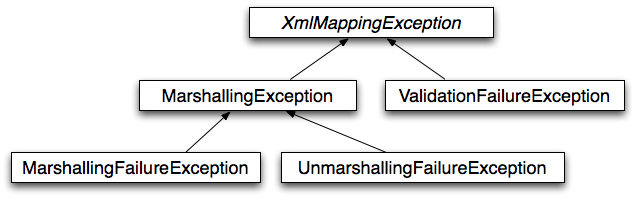
O/X Mapping exception hierarchy
Spring's OXM can be used for a wide variety of situations. In the following example, we will use it to marshal the settings of a Spring-managed application as an XML file. We will use a simple JavaBean to represent the settings:
public class Settings { private boolean fooEnabled; public boolean isFooEnabled() { return fooEnabled; } public void setFooEnabled(boolean fooEnabled) { this.fooEnabled = fooEnabled; } }
The application class uses this bean to store its settings. Besides a main method, the class has two
methods: saveSettings() saves the settings bean to a file named
settings.xml, and loadSettings() loads these settings again. A
main() method constructs a Spring application context, and calls these two methods.
import java.io.FileInputStream; import java.io.FileOutputStream; import java.io.IOException; import javax.xml.transform.stream.StreamResult; import javax.xml.transform.stream.StreamSource; import org.springframework.context.ApplicationContext; import org.springframework.context.support.ClassPathXmlApplicationContext; import org.springframework.oxm.Marshaller; import org.springframework.oxm.Unmarshaller; public class Application { private static final String FILE_NAME = "settings.xml"; private Settings settings = new Settings(); private Marshaller marshaller; private Unmarshaller unmarshaller; public void setMarshaller(Marshaller marshaller) { this.marshaller = marshaller; } public void setUnmarshaller(Unmarshaller unmarshaller) { this.unmarshaller = unmarshaller; } public void saveSettings() throws IOException { FileOutputStream os = null; try { os = new FileOutputStream(FILE_NAME); this.marshaller.marshal(settings, new StreamResult(os)); } finally { if (os != null) { os.close(); } } } public void loadSettings() throws IOException { FileInputStream is = null; try { is = new FileInputStream(FILE_NAME); this.settings = (Settings) this.unmarshaller.unmarshal(new StreamSource(is)); } finally { if (is != null) { is.close(); } } } public static void main(String[] args) throws IOException { ApplicationContext appContext = new ClassPathXmlApplicationContext("applicationContext.xml"); Application application = (Application) appContext.getBean("application"); application.saveSettings(); application.loadSettings(); } }
The Application requires both a marshaller
and unmarshaller property to be set. We can do so using the following
applicationContext.xml:
<beans> <bean id="application" class="Application"> <property name="marshaller" ref="castorMarshaller" /> <property name="unmarshaller" ref="castorMarshaller" /> </bean> <bean id="castorMarshaller" class="org.springframework.oxm.castor.CastorMarshaller"/> </beans>
This application context uses Castor, but we could have used any of the other marshaller instances described
later in this chapter. Note that Castor does not require any further configuration by default, so the bean
definition is rather simple. Also note that the CastorMarshaller implements both
Marshaller and Unmarshaller, so we can refer
to the castorMarshaller bean in both the marshaller and
unmarshaller property of the application.
This sample application produces the following settings.xml file:
<?xml version="1.0" encoding="UTF-8"?> <settings foo-enabled="false"/>
Marshallers could be configured more concisely using tags from the OXM namespace. To make these tags available, the appropriate schema has to be referenced first in the preamble of the XML configuration file. The emboldened text in the below snippet references the OXM schema:
<?xml version="1.0" encoding="UTF-8"?> <beans xmlns="http://www.springframework.org/schema/beans" xmlns:xsi="http://www.w3.org/2001/XMLSchema-instance" xmlns:oxm="http://www.springframework.org/schema/oxm" xsi:schemaLocation="http://www.springframework.org/schema/beans http://www.springframework.org/schema/beans/spring-beans-3.0.xsd http://www.springframework.org/schema/oxm http://www.springframework.org/schema/oxm/spring-oxm-3.0.xsd">
Currently, the following tags are available:
Each tag will be explained in its respective marshaller's section. As an example though, here is how the configuration of a JAXB2 marshaller might look like:
<oxm:jaxb2-marshaller id="marshaller" contextPath="org.springframework.ws.samples.airline.schema"/>
The JAXB binding compiler translates a W3C XML Schema into one or more Java classes, a
jaxb.properties file, and possibly some resource files. JAXB also offers a
way to generate a schema from annotated Java classes.
Spring supports the JAXB 2.0 API as XML marshalling strategies, following the
Marshaller and Unmarshaller
interfaces described in Section 14.2, “Marshaller and Unmarshaller”. The corresponding integration
classes reside in the org.springframework.oxm.jaxb package.
The Jaxb2Marshaller class implements both the Spring
Marshaller and Unmarshallerinterface. It
requires a context path to operate, which you can set using the contextPath
property. The context path is a list of colon (:) separated Java package names that contain schema
derived classes. It also offers a classesToBeBound property, which allows you to set an array of
classes to be supported by the marshaller. Schema validation is performed by specifying one or more
schema resource to the bean, like so:
<beans> <bean id="jaxb2Marshaller" class="org.springframework.oxm.jaxb.Jaxb2Marshaller"> <property name="classesToBeBound"> <list> <value>org.springframework.oxm.jaxb.Flight</value> <value>org.springframework.oxm.jaxb.Flights</value> </list> </property> <property name="schema" value="classpath:org/springframework/oxm/schema.xsd"/> </bean> ... </beans>
The jaxb2-marshaller tag configures a org.springframework.oxm.jaxb.Jaxb2Marshaller.
Here is an example:
<oxm:jaxb2-marshaller id="marshaller" contextPath="org.springframework.ws.samples.airline.schema"/>
Alternatively, the list of classes to bind can be provided to the marshaller via the class-to-be-bound child tag:
<oxm:jaxb2-marshaller id="marshaller"> <oxm:class-to-be-bound name="org.springframework.ws.samples.airline.schema.Airport"/> <oxm:class-to-be-bound name="org.springframework.ws.samples.airline.schema.Flight"/> ... </oxm:jaxb2-marshaller>
Available attributes are:
| Attribute | Description | Required |
|---|---|---|
id | the id of the marshaller | no |
contextPath | the JAXB Context path | no |
Castor XML mapping is an open source XML binding framework. It allows you to transform the data contained in a java object model into/from an XML document. By default, it does not require any further configuration, though a mapping file can be used to have more control over the behavior of Castor.
For more information on Castor, refer to the Castor web site. The Spring integration classes reside in the org.springframework.oxm.castor package.
As with JAXB, the CastorMarshaller implements both the
Marshaller and Unmarshaller interface.
It can be wired up as follows:
<beans> <bean id="castorMarshaller" class="org.springframework.oxm.castor.CastorMarshaller" /> ... </beans>
Although it is possible to rely on Castor's default marshalling behavior, it might be necessary to have more control over it. This can be accomplished using a Castor mapping file. For more information, refer to Castor XML Mapping.
The mapping can be set using the mappingLocation resource property, indicated below with a classpath resource.
<beans> <bean id="castorMarshaller" class="org.springframework.oxm.castor.CastorMarshaller" > <property name="mappingLocation" value="classpath:mapping.xml" /> </bean> </beans>
XMLBeans is an XML binding tool that has full XML Schema support, and offers full XML Infoset
fidelity. It takes a different approach to that of most other O/X mapping frameworks, in that
all classes that are generated from an XML Schema are all derived from
XmlObject, and contain XML binding information in them.
For more information on XMLBeans, refer to the XMLBeans web site . The Spring-WS integration classes reside in the org.springframework.oxm.xmlbeans package.
The XmlBeansMarshaller
implements both the Marshaller
and Unmarshaller
interfaces. It can be configured as follows:
<beans> <bean id="xmlBeansMarshaller" class="org.springframework.oxm.xmlbeans.XmlBeansMarshaller" /> ... </beans>
| Note |
|---|---|
Note that the |
The xmlbeans-marshaller tag configures a org.springframework.oxm.xmlbeans.XmlBeansMarshaller.
Here is an example:
<oxm:xmlbeans-marshaller id="marshaller"/>
Available attributes are:
| Attribute | Description | Required |
|---|---|---|
id | the id of the marshaller | no |
options | the bean name of the XmlOptions that is to be used for this marshaller. Typically a
XmlOptionsFactoryBean definition | no |
The JiBX framework offers a solution similar to that which JDO provides for ORM: a binding definition defines the rules for how your Java objects are converted to or from XML. After preparing the binding and compiling the classes, a JiBX binding compiler enhances the class files, and adds code to handle converting instances of the classes from or to XML.
For more information on JiBX, refer to the JiBX web site. The Spring integration classes reside in the org.springframework.oxm.jibx package.
The JibxMarshaller class implements both the
Marshaller and Unmarshaller interface.
To operate, it requires the name of the class to marshal in, which you can set using the
targetClass property. Optionally, you can set the binding name using the
bindingName property. In the next sample, we bind the
Flights class:
<beans> <bean id="jibxFlightsMarshaller" class="org.springframework.oxm.jibx.JibxMarshaller"> <property name="targetClass">org.springframework.oxm.jibx.Flights</property> </bean> ...
A JibxMarshaller is configured for a single class. If you want to marshal
multiple classes, you have to configure multiple JibxMarshallers with
different targetClass property values.
The jibx-marshaller tag configures a org.springframework.oxm.jibx.JibxMarshaller.
Here is an example:
<oxm:jibx-marshaller id="marshaller" target-class="org.springframework.ws.samples.airline.schema.Flight"/>
Available attributes are:
| Attribute | Description | Required |
|---|---|---|
id | the id of the marshaller | no |
target-class | the target class for this marshaller | yes |
bindingName | the binding name used by this marshaller | no |
XStream is a simple library to serialize objects to XML and back again. It does not require any mapping, and generates clean XML.
For more information on XStream, refer to the XStream web site. The Spring integration classes reside in the org.springframework.oxm.xstream package.
The XStreamMarshaller does not require any configuration, and can be configured
in an application context directly. To further customize the XML, you can set an
alias map, which consists of string aliases mapped to classes:
<beans> <bean id="xstreamMarshaller" class="org.springframework.oxm.xstream.XStreamMarshaller"> <property name="aliases"> <props> <prop key="Flight">org.springframework.oxm.xstream.Flight</prop> </props> </property> </bean> ... </beans>
| Warning |
|---|---|
By default, XStream allows for arbitrary classes to be unmarshalled, which can result in security
vulnerabilities.
As such, it is recommended to set the supportedClasses property on the
<bean id="xstreamMarshaller" class="org.springframework.oxm.xstream.XStreamMarshaller"> <property name="supportedClasses" value="org.springframework.oxm.xstream.Flight"/> ... </bean> This will make sure that only the registered classes are eligible for unmarshalling. Additionally, you can register custom converters to make sure that only your supported classes can be unmarshalled. |
| Note |
|---|---|
Note that XStream is an XML serialization library, not a data binding library. Therefore, it has limited namespace support. As such, it is rather unsuitable for usage within Web services. |
This part of the reference documentation covers the Spring Framework's support for the presentation tier (and specifically web-based presentation tiers).
The Spring Framework's own web framework, Spring Web MVC, is covered in the first couple of chapters. A number of the remaining chapters in this part of the reference documentation are concerned with the Spring Framework's integration with other web technologies, such as Struts and JSF (to name but two).
This section concludes with coverage of Spring's MVC portlet framework.
The Spring Web model-view-controller (MVC) framework is designed
around a DispatcherServlet that dispatches requests
to handlers, with configurable handler mappings, view resolution, locale
and theme resolution as well as support for uploading files. The default
handler is based on the @Controller and
@RequestMapping annotations, offering a
wide range of flexible handling methods. With the introduction of Spring
3.0, the @Controller mechanism also allows
you to create RESTful Web sites and applications, through the
@PathVariable annotation and other
features.
In Spring Web MVC you can use any object as a command or form-backing object; you do not need to implement a framework-specific interface or base class. Spring's data binding is highly flexible: for example, it treats type mismatches as validation errors that can be evaluated by the application, not as system errors. Thus you need not duplicate your business objects' properties as simple, untyped strings in your form objects simply to handle invalid submissions, or to convert the Strings properly. Instead, it is often preferable to bind directly to your business objects.
Spring's view resolution is extremely flexible. A
Controller implementation can even write
directly to the response stream. Typically, a
ModelAndView instance consists of a view name and a
model Map, which contains bean names and
corresponding objects such as a command or form, which contain reference
data. View name resolution is highly configurable, through bean names, a
properties file, or your own ViewResolver
implementation. The model (the M in MVC) is based on the
Map interface, which allows for the
complete abstraction of the view technology. You can integrate directly
JSP, Velocity, or any other rendering technology. The model
Map is simply transformed into an
appropriate format, such as JSP request attributes or a Velocity template
model.
Spring's web module includes many unique web support features:
Clear separation of roles. Each role -- controller, validator, command object, form object, model object,
DispatcherServlet, handler mapping, view resolver, and so on -- can be fulfilled by a specialized object.Powerful and straightforward configuration of both framework and application classes as JavaBeans. This configuration capability includes easy referencing across contexts, such as from web controllers to business objects and validators.
Adaptability, non-intrusiveness, and flexibility. Define any controller method signature you need, possibly using one of the parameter annotations (such as @RequestParam, @RequestHeader, @PathVariable, and more) for a given scenario.
Reusable business code, no need for duplication. Use existing business objects as command or form objects instead of mirroring them to extend a particular framework base class.
Customizable binding and validation. Type mismatches as application-level validation errors that keep the offending value, localized date and number binding, and so on instead of String-only form objects with manual parsing and conversion to business objects.
Customizable handler mapping and view resolution. Handler mapping and view resolution strategies range from simple URL-based configuration, to sophisticated, purpose-built resolution strategies. Spring is more flexible than web MVC frameworks that mandate a particular technique.
Flexible model transfer. Model transfer with a name/value
Mapsupports easy integration with any view technology.Customizable locale and theme resolution, support for JSPs with or without Spring tag library, support for JSTL, support for Velocity without the need for extra bridges, and so on.
A simple yet powerful JSP tag library known as the Spring tag library that provides support for features such as data binding and themes. The custom tags allow for maximum flexibility in terms of markup code. For information on the tag library descriptor, see the appendix entitled Appendix F, spring.tld
A JSP form tag library, introduced in Spring 2.0, that makes writing forms in JSP pages much easier. For information on the tag library descriptor, see the appendix entitled Appendix G, spring-form.tld
Beans whose lifecycle is scoped to the current HTTP request or HTTP
Session. This is not a specific feature of Spring MVC itself, but rather of theWebApplicationContextcontainer(s) that Spring MVC uses. These bean scopes are described in Section 3.5.4, “Request, session, and global session scopes”
Non-Spring MVC implementations are preferable for some projects. Many teams expect to leverage their existing investment in skills and tools. A large body of knowledge and experience exist for the Struts framework. If you can abide Struts' architectural flaws, it can be a viable choice for the web layer; the same applies to WebWork and other web MVC frameworks.
If you do not want to use Spring's web MVC, but intend to leverage
other solutions that Spring offers, you can integrate the web MVC
framework of your choice with Spring easily. Simply start up a Spring
root application context through its
ContextLoaderListener, and access it through
its
ServletContext attribute (or Spring's
respective helper method) from within a Struts or WebWork action. No
"plug-ins" are involved, so no dedicated integration is necessary. From
the web layer's point of view, you simply use Spring as a library, with
the root application context instance as the entry point.
Your registered beans and Spring's services can be at your fingertips even without Spring's Web MVC. Spring does not compete with Struts or WebWork in this scenario. It simply addresses the many areas that the pure web MVC frameworks do not, from bean configuration to data access and transaction handling. So you can enrich your application with a Spring middle tier and/or data access tier, even if you just want to use, for example, the transaction abstraction with JDBC or Hibernate.
Spring's web MVC framework is, like many other web MVC frameworks,
request-driven, designed around a central servlet that dispatches requests
to controllers and offers other functionality that facilitates the
development of web applications. Spring's
DispatcherServlet however, does more than just
that. It is completely integrated with the Spring IoC container and as
such allows you to use every other feature that Spring has.
The request processing workflow of the Spring Web MVC
DispatcherServlet is illustrated in the following
diagram. The pattern-savvy reader will recognize that the
DispatcherServlet is an expression of the
“Front Controller” design pattern (this is a pattern that
Spring Web MVC shares with many other leading web frameworks).
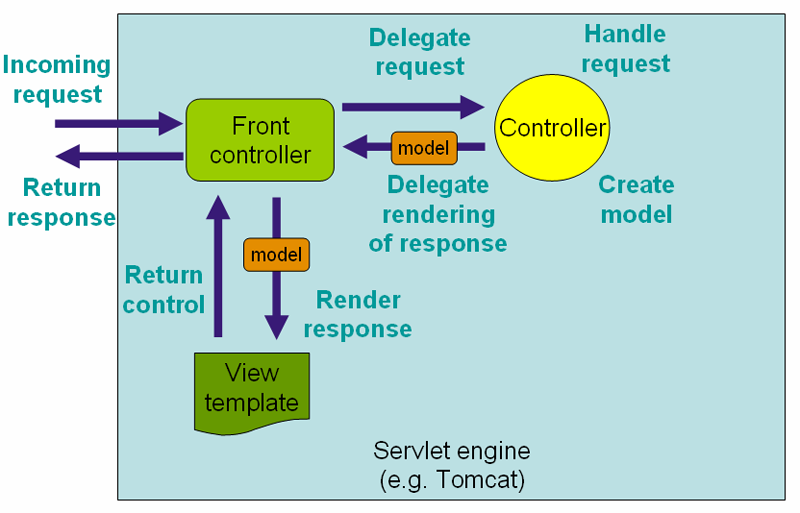
The requesting processing workflow in Spring Web MVC (high level)
The DispatcherServlet is an actual
Servlet (it inherits from the
HttpServlet base class), and as such is declared in
the web.xml of your web application. You need to map
requests that you want the DispatcherServlet to
handle, by using a URL mapping in the same web.xml
file. This is standard J2EE servlet configuration; the following example
shows such a DispatcherServlet declaration and
mapping:
<web-app> <servlet> <servlet-name>example</servlet-name> <servlet-class>org.springframework.web.servlet.DispatcherServlet</servlet-class> <load-on-startup>1</load-on-startup> </servlet> <servlet-mapping> <servlet-name>example</servlet-name> <url-pattern>*.form</url-pattern> </servlet-mapping> </web-app>
In the preceding example, all requests ending with
.form will be handled by the example
DispatcherServlet. This is only the first step in
setting up Spring Web MVC. You
now need to configure the various beans used by the Spring Web MVC
framework (over and above the DispatcherServlet
itself).
As detailed in Section 3.13, “Additional Capabilities of the
ApplicationContext”,
ApplicationContext instances in Spring can
be scoped. In the Web MVC framework, each
DispatcherServlet has its own
WebApplicationContext, which inherits all
the beans already defined in the root
WebApplicationContext. These inherited
beans can be overridden in the servlet-specific scope, and you can define
new scope-specific beans local to a given servlet instance.
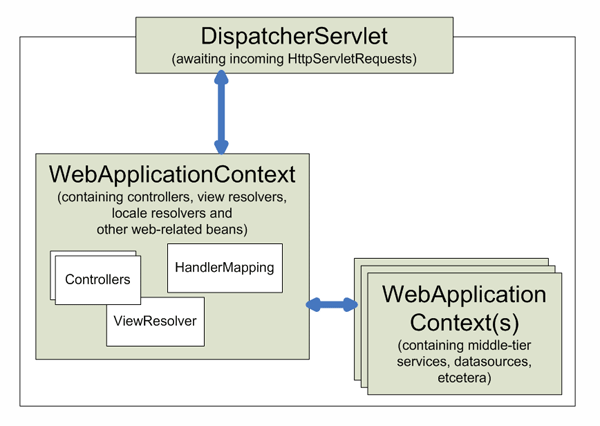
Upon initialization of a DispatcherServlet,
the framework looks
for a file named
[servlet-name]-servlet.xml in the
WEB-INF directory of your web application and creates
the beans defined there, overriding the definitions of any beans defined
with the same name in the global scope.
Consider the following DispatcherServlet
servlet configuration (in the web.xml file):
<web-app> <servlet> <servlet-name>golfing</servlet-name> <servlet-class>org.springframework.web.servlet.DispatcherServlet</servlet-class> <load-on-startup>1</load-on-startup> </servlet> <servlet-mapping> <servlet-name>golfing</servlet-name> <url-pattern>/golfing/*</url-pattern> </servlet-mapping> </web-app>
With the above servlet configuration in place, you
will need to have a file called /WEB-INF/golfing-servlet.xml in your
application; this file will contain all of your Spring Web MVC-specific
components (beans). You can change the exact location of this
configuration file through a servlet initialization parameter (see below
for details).
The WebApplicationContext is an
extension of the plain ApplicationContext
that has some extra features necessary for web applications. It differs
from a normal ApplicationContext in that it
is capable of resolving themes (see Section 15.7, “Using themes”),
and that it knows which servlet it is associated with (by having a link to
the ServletContext). The
WebApplicationContext is bound in the
ServletContext, and by using static methods
on the RequestContextUtils class you can always
look up the WebApplicationContext if you
need access to it.
The Spring DispatcherServlet uses special
beans to process requests and render the appropriate views. These beans
are part of Spring Framework. You can configure them in the
WebApplicationContext, just as you
configure any other bean. However, for most beans, sensible defaults are
provided so you initially do not need to configure them. These
beans are described in the following table.
Table 15.1. Special beans in the
WebApplicationContext
| Bean type | Explanation |
|---|---|
| controllers | Form the C part of the MVC. |
| handler mappings | Handle the execution of a list of pre-processors and post-processors and controllers that will be executed if they match certain criteria (for example, a matching URL specified with the controller). |
| view resolvers | Resolves view names to views. |
| locale resolver | A locale resolver is a component capable of resolving the locale a client is using, in order to be able to offer internationalized views |
| Theme resolver | A theme resolver is capable of resolving themes your web application can use, for example, to offer personalized layouts |
| multipart file resolver | Contains functionality to process file uploads from HTML forms. |
| handler exception resolvers | Contains functionality to map exceptions to views or implement other more complex exception handling code. |
After you set up a DispatcherServlet, and a
request comes in for that specific
DispatcherServlet, the
DispatcherServlet starts processing the request as
follows:
The
WebApplicationContextis searched for and bound in the request as an attribute that the controller and other elements in the process can use. It is bound by default under the keyDispatcherServlet.WEB_APPLICATION_CONTEXT_ATTRIBUTE.The locale resolver is bound to the request to enable elements in the process to resolve the locale to use when processing the request (rendering the view, preparing data, and so on). If you do not need locale resolving, you do not need it.
The theme resolver is bound to the request to let elements such as views determine which theme to use. If you do not use themes, you can ignore it.
If you specify a multipart file resolver, the request is inspected for multiparts; if multiparts are found, the request is wrapped in a
MultipartHttpServletRequestfor further processing by other elements in the process. (See Section 15.8.2, “Using the MultipartResolver” for further information about multipart handling).An appropriate handler is searched for. If a handler is found, the execution chain associated with the handler (preprocessors, postprocessors, and controllers) is executed in order to prepare a model or rendering.
If a model is returned, the view is rendered. If no model is returned, (may be due to a preprocessor or postprocessor intercepting the request, perhaps for security reasons), no view is rendered, because the request could already have been fulfilled.
Handler exception resolvers that are declared in the
WebApplicationContext pick up exceptions
that are thrown during processing of the request. Using these exception
resolvers allows you to define custom behaviors to address
exceptions.
The Spring DispatcherServlet also supports
the return of the last-modification-date, as
specified by the Servlet API. The process of determining the last
modification date for a specific request is straightforward: the
DispatcherServlet looks up an appropriate handler
mapping and tests whether the handler that is found implements the
LastModified
interface. If so, the value of the long
getLastModified(request) method of the
LastModified interface is returned to the
client.
You can customize individual
DispatcherServlet instances by adding servlet
initialization parameters (init-param elements) to the
servlet declaration in the web.xml file. See the
following table for the list of supported parameters.
Table 15.2. DispatcherServlet initialization
parameters
| Parameter | Explanation |
|---|---|
contextClass | Class that implements
WebApplicationContext, which
instantiates the context used by this servlet. By default, the
XmlWebApplicationContext is used. |
contextConfigLocation | String that is passed to the context instance (specified by
contextClass) to indicate where context(s) can
be found. The string consists potentially of multiple strings
(using a comma as a delimiter) to support multiple contexts. In
case of multiple context locations with beans that are defined
twice, the latest location takes precedence. |
namespace | Namespace of the
WebApplicationContext. Defaults to
[servlet-name]-servlet. |
Controllers provide access to the application behavior that you typically define through a service interface. Controllers interpret user input and transform it into a model that is represented to the user by the view. Spring implements a controller in a very abstract way, which enables you to create a wide variety of controllers.
Spring 2.5 introduced an annotation-based programming model for MVC
controllers that uses annotations such as
@RequestMapping,
@RequestParam,
@ModelAttribute, and so on. This annotation
support is available for both Servlet MVC and Portlet MVC. Controllers
implemented in this style do not have to extend specific base classes or
implement specific interfaces. Furthermore, they do not usually have
direct dependencies on Servlet or Portlet APIs, although you can easily
configure access to Servlet or Portlet facilities.
| Tip |
|---|---|
Available in the samples repository, the PetClinic web application leverages the annotation support described in this section, in the context of simple form processing. |
@Controller public class HelloWorldController { @RequestMapping("/helloWorld") public ModelAndView helloWorld() { ModelAndView mav = new ModelAndView(); mav.setViewName("helloWorld"); mav.addObject("message", "Hello World!"); return mav; } }
As you can see, the @Controller and
@RequestMapping annotations allow flexible
method names and signatures. In this particular example the method has no
parameters and returns a ModelAndView, but various
other (and better) strategies exist, as
are explained later in this section. ModelAndView,
@Controller, and
@RequestMapping form the basis for the
Spring MVC implementation. This section documents these annotations and
how they are most commonly used in a Servlet environment.
The @Controller annotation
indicates that a particular class serves the role of a
controller. Spring does not require you to extend
any controller base class or reference the Servlet API. However, you can
still reference Servlet-specific features if you need to.
The @Controller annotation acts as
a stereotype for the annotated class, indicating its role. The
dispatcher scans such annotated classes for mapped methods and detects
@RequestMapping annotations (see the next
section).
You can define annotated controller beans explicitly, using a
standard Spring bean definition in the dispatcher's context. However,
the @Controller stereotype also allows
for autodetection, aligned with Spring general support for detecting
component classes in the classpath and auto-registering bean definitions
for them.
To enable autodetection of such annotated controllers, you add component scanning to your configuration. Use the spring-context schema as shown in the following XML snippet:
<?xml version="1.0" encoding="UTF-8"?> <beans xmlns="http://www.springframework.org/schema/beans" xmlns:xsi="http://www.w3.org/2001/XMLSchema-instance" xmlns:p="http://www.springframework.org/schema/p" xmlns:context="http://www.springframework.org/schema/context" xsi:schemaLocation=" http://www.springframework.org/schema/beans http://www.springframework.org/schema/beans/spring-beans-3.0.xsd http://www.springframework.org/schema/context http://www.springframework.org/schema/context/spring-context-3.0.xsd"> <context:component-scan base-package="org.springframework.samples.petclinic.web"/> // ... </beans>
You use the @RequestMapping
annotation to map URLs such as /appointments onto
an entire class or a particular handler method. Typically the
class-level annotation maps a specific request path (or path pattern)
onto a form controller, with additional method-level annotations
narrowing the primary mapping for a specific HTTP method request method
("GET"/"POST") or specific HTTP request parameters.
The following example shows a controller in a Spring MVC application that uses this annotation:
@Controller @RequestMapping("/appointments") public class AppointmentsController { private final AppointmentBook appointmentBook; @Autowired public AppointmentsController(AppointmentBook appointmentBook) { this.appointmentBook = appointmentBook; } @RequestMapping(method = RequestMethod.GET) public Map<String, Appointment> get() { return appointmentBook.getAppointmentsForToday(); } @RequestMapping(value="/{day}", method = RequestMethod.GET) public Map<String, Appointment> getForDay(@PathVariable @DateTimeFormat(iso=ISO.DATE) Date day, Model model) { return appointmentBook.getAppointmentsForDay(day); } @RequestMapping(value="/new", method = RequestMethod.GET) public AppointmentForm getNewForm() { return new AppointmentForm(); } @RequestMapping(method = RequestMethod.POST) public String add(@Valid AppointmentForm appointment, BindingResult result) { if (result.hasErrors()) { return "appointments/new"; } appointmentBook.addAppointment(appointment); return "redirect:/appointments"; } }
In the example, the @RequestMapping
is used in a number of places. The first usage is on the type (class)
level, which indicates that all handling methods on this controller are
relative to the /appointments path. The
get() method has a further
@RequestMapping refinement: it only
accepts GET requests, meaning that an HTTP GET for
/appointments invokes this method. The
post() has a similar refinement, and the
getNewForm() combines the definition of HTTP
method and path into one, so that GET requests for
appointments/new are handled by that method.
The getForDay() method shows another
usage of @RequestMapping: URI templates.
(See the next
section ).
A @RequestMapping on the class
level is not required. Without it, all paths are simply absolute, and
not relative. The following example from the PetClinic sample
application shows a multi-action controller using
@RequestMapping:
@Controller public class ClinicController { private final Clinic clinic; @Autowired public ClinicController(Clinic clinic) { this.clinic = clinic; } @RequestMapping("/") public void welcomeHandler() { } @RequestMapping("/vets") public ModelMap vetsHandler() { return new ModelMap(this.clinic.getVets()); } }
| Working with interface-based @Controller classes |
|---|---|
A common pitfall when working with annotated controller classes
happens when applying functionality that requires creating a proxy
proxy for the controller object (e.g.
|
To access parts of a request URL in your handling methods, use
the URI templates in the
@RequestMapping path value.
Use the @PathVariable method
parameter annotation to indicate that a method parameter should be
bound to the value of a URI template variable.
The following code snippet shows the usage of a single
@PathVariable in a controller
method:
@RequestMapping(value="/owners/{ownerId}", method=RequestMethod.GET) public String findOwner(@PathVariable String ownerId, Model model) { Owner owner = ownerService.findOwner(ownerId); model.addAttribute("owner", owner); return "displayOwner"; }
The URI Template "/owners/{ownerId}"
specifies the variable name ownerId. When the
controller handles this request, the value of
ownerId is set to the value in the request URI.
For example, when a request comes in for /owners/fred, the value fred
is bound to the method parameter String
ownerId.
The matching of method parameter names to URI Template variable names can only be done if your code is compiled with debugging enabled. If you do not have debugging enabled, you must specify the name of the URI Template variable name in the @PathVariable annotation in order to bind the resolved value of the variable name to a method parameter. For example:
@RequestMapping(value="/owners/{ownerId}", method=RequestMethod.GET) public String findOwner(@PathVariable("ownerId") String ownerId, Model model) { // implementation omitted }
You can also use a controller method with the following signature:
@RequestMapping(value="/owners/{ownerId}", method=RequestMethod.GET) public String findOwner(@PathVariable("ownerId") String theOwner, Model model) { // implementation omitted }
You can use multiple @PathVariable annotations to bind to multiple URI Template variables:
@RequestMapping(value="/owners/{ownerId}/pets/{petId}", method=RequestMethod.GET) public String findPet(@PathVariable String ownerId, @PathVariable String petId, Model model) { Owner owner = ownerService.findOwner(ownderId); Pet pet = owner.getPet(petId); model.addAttribute("pet", pet); return "displayPet"; }
The following code snippet shows the usage of path variables on
a relative path, so that the findPet() method
will be invoked for /owners/42/pets/21, for
instance.
@Controller @RequestMapping("/owners/{ownerId}") public class RelativePathUriTemplateController { @RequestMapping("/pets/{petId}") public void findPet(@PathVariable String ownerId, @PathVariable String petId, Model model) { // implementation omitted } }
| Tip |
|---|---|
Method parameters that are decorated with the
|
In addition to URI templates, the
@RequestMapping annotation also
supports Ant-style path patterns (for example,
/myPath/*.do). A combination of URI templates and
Ant-style globs is also supported (for example,
/owners/*/pets/{petId}).
The handler method names are taken into account for narrowing if
no path was specified explicitly, according to the specified
org.springframework.web.servlet.mvc.multiaction.MethodNameResolver
(by default an
org.springframework.web.servlet.mvc.multiaction.InternalPathMethodNameResolver).
This only applies if annotation mappings do not specify a path mapping
explicitly. In other words, the method name is only used for narrowing
among a set of matching methods; it does not constitute a primary path
mapping itself.
If you have a single default method (without explicit path mapping), then all requests without a more specific mapped method found are dispatched to it. If you have multiple such default methods, then the method name is taken into account for choosing between them.
You can narrow path mappings through parameter conditions: a sequence of "myParam=myValue" style expressions, with a request only mapped if each such parameter is found to have the given value. For example:
@Controller @RequestMapping("/owners/{ownerId}") public class RelativePathUriTemplateController { @RequestMapping(value = "/pets/{petId}", params="myParam=myValue") public void findPet(@PathVariable String ownerId, @PathVariable String petId, Model model) { // implementation omitted } }
"myParam" style expressions are also supported, with such parameters having to be present in the request (allowed to have any value). Finally, "!myParam" style expressions indicate that the specified parameter is not supposed to be present in the request.
Similarly, path mappings can be narrowed down through header conditions:
@Controller @RequestMapping("/owners/{ownerId}") public class RelativePathUriTemplateController { @RequestMapping(value = "/pets", method = RequestMethod.POST, headers="content-type=text/*") public void addPet(Pet pet, @PathVariable String ownerId) { // implementation omitted } }
In the above example, the addPet()
method is only invoked when the content-type
matches the text/* pattern, for example,
text/xml.
Handler methods that are annotated with
@RequestMapping can have very flexible
signatures. Most of them can be used in arbitrary order (see below for
more details).
Request or response objects (Servlet API). Choose any specific request or response type, for example
ServletRequestorHttpServletRequest.Session object (Servlet API): of type
HttpSession. An argument of this type enforces the presence of a corresponding session. As a consequence, such an argument is nevernull.Note Session access may not be thread-safe, in particular in a Servlet environment. Consider setting the
AnnotationMethodHandlerAdapter's "synchronizeOnSession" flag to "true" if multiple requests are allowed to access a session concurrently.org.springframework.web.context.request.WebRequestororg.springframework.web.context.request.NativeWebRequest. Allows for generic request parameter access as well as request/session attribute access, without ties to the native Servlet/Portlet API.java.util.Localefor the current request locale, determined by the most specific locale resolver available, in effect, the configuredLocaleResolverin a Servlet environment.java.io.InputStream/java.io.Readerfor access to the request's content. This value is the raw InputStream/Reader as exposed by the Servlet API.java.io.OutputStream/java.io.Writerfor generating the response's content. This value is the raw OutputStream/Writer as exposed by the Servlet API.java.security.Principalcontaining the currently authenticated user.@PathVariableannotated parameters for access to URI template variables. See Section 15.3.2.1, “URI Templates”.@RequestParamannotated parameters for access to specific Servlet request parameters. Parameter values are converted to the declared method argument type. See Section 15.3.2.4, “Binding request parameters to method parameters with @RequestParam”.@RequestHeaderannotated parameters for access to specific Servlet request HTTP headers. Parameter values are converted to the declared method argument type.@RequestBodyannotated parameters for access to the HTTP request body. Parameter values are converted to the declared method argument type usingHttpMessageConverters. See Section 15.3.2.5, “Mapping the request body with the @RequestBody annotation”.HttpEntity<?>parameters for access to the Servlet request HTTP headers and contents. The request stream will be converted to the entity body usingHttpMessageConverters. See Section 15.3.2.7, “Using HttpEntity<?>”.java.util.Map/org.springframework.ui.Model/org.springframework.ui.ModelMapfor enriching the implicit model that is exposed to the web view.Command or form objects to bind parameters to: as bean properties or fields, with customizable type conversion, depending on
@InitBindermethods and/or the HandlerAdapter configuration. See thewebBindingInitializerproperty onAnnotationMethodHandlerAdapter. Such command objects along with their validation results will be exposed as model attributes by default, using the non-qualified command class name in property notation. For example, "orderAddress" for type "mypackage.OrderAddress". Specify a parameter-levelModelAttributeannotation for declaring a specific model attribute name.org.springframework.validation.Errors/org.springframework.validation.BindingResultvalidation results for a preceding command or form object (the immediately preceding method argument).org.springframework.web.bind.support.SessionStatusstatus handle for marking form processing as complete, which triggers the cleanup of session attributes that have been indicated by the@SessionAttributesannotation at the handler type level.
The Errors or
BindingResult parameters have to follow
the model object that is being bound immediately as the method
signature might have more that one model object and Spring will create
a separate BindingResult instance for
each of them so the following sample won't work:
Example 15.1. Invalid ordering of BindingResult and @ModelAttribute
@RequestMapping(method = RequestMethod.POST) public String processSubmit(@ModelAttribute("pet") Pet pet, Model model, BindingResult result) { … }
Note, that there is a Model
parameter in between Pet and
BindingResult. To get this working
you have to reorder the parameters as follows:
@RequestMapping(method = RequestMethod.POST) public String processSubmit(@ModelAttribute("pet") Pet pet, BindingResult result, Model model) { … }
The following return types are supported for handler methods:
A
ModelAndViewobject, with the model implicitly enriched with command objects and the results of@ModelAttributeannotated reference data accessor methods.A
Modelobject, with the view name implicitly determined through aRequestToViewNameTranslatorand the model implicitly enriched with command objects and the results of@ModelAttributeannotated reference data accessor methods.A
Mapobject for exposing a model, with the view name implicitly determined through aRequestToViewNameTranslatorand the model implicitly enriched with command objects and the results of@ModelAttributeannotated reference data accessor methods.A
Viewobject, with the model implicitly determined through command objects and@ModelAttributeannotated reference data accessor methods. The handler method may also programmatically enrich the model by declaring aModelargument (see above).A
Stringvalue that is interpreted as the logical view name, with the model implicitly determined through command objects and@ModelAttributeannotated reference data accessor methods. The handler method may also programmatically enrich the model by declaring aModelargument (see above).voidif the method handles the response itself (by writing the response content directly, declaring an argument of typeServletResponse/HttpServletResponsefor that purpose) or if the view name is supposed to be implicitly determined through aRequestToViewNameTranslator(not declaring a response argument in the handler method signature).If the method is annotated with
@ResponseBody, the return type is written to the response HTTP body. The return value will be converted to the declared method argument type usingHttpMessageConverters. See Section 15.3.2.6, “Mapping the response body with the @ResponseBody annotation”.A
HttpEntity<?>orResponseEntity<?>object to provide access to the Servlet reponse HTTP headers and contents. The entity body will be converted to the response stream usingHttpMessageConverters. See Section 15.3.2.7, “Using HttpEntity<?>”.Any other return type is considered to be a single model attribute to be exposed to the view, using the attribute name specified through
@ModelAttributeat the method level (or the default attribute name based on the return type class name). The model is implicitly enriched with command objects and the results of@ModelAttributeannotated reference data accessor methods.
Use the @RequestParam annotation to bind
request parameters to a method parameter in your controller.
The following code snippet shows the usage:
@Controller @RequestMapping("/pets") @SessionAttributes("pet") public class EditPetForm { // ... @RequestMapping(method = RequestMethod.GET) public String setupForm(@RequestParam("petId") int petId, ModelMap model) { Pet pet = this.clinic.loadPet(petId); model.addAttribute("pet", pet); return "petForm"; } // ...
Parameters using this annotation are required by default, but
you can specify that a parameter is optional by setting
@RequestParam's
required attribute to false
(e.g., @RequestParam(value="id",
required=false)).
The @RequestBody method parameter
annotation indicates that a method parameter should be bound to the
value of the HTTP request body. For example:
@RequestMapping(value = "/something", method = RequestMethod.PUT) public void handle(@RequestBody String body, Writer writer) throws IOException { writer.write(body); }
You convert the request body to the method argument by using an
HttpMessageConverter.
HttpMessageConverter is responsible for
converting from the HTTP request message to an object and converting
from an object to the HTTP response body.
DispatcherServlet supports annotation based
processing using the
DefaultAnnotationHandlerMapping and
AnnotationMethodHandlerAdapter. In Spring 3.0
the AnnotationMethodHandlerAdapter is extended
to support the @RequestBody and has the
following HttpMessageConverters
registered by default:
ByteArrayHttpMessageConverterconverts byte arrays.StringHttpMessageConverterconverts strings.FormHttpMessageConverterconverts form data to/from a MultiValueMap<String, String>.SourceHttpMessageConverterconverts to/from a javax.xml.transform.Source.MarshallingHttpMessageConverterconverts to/from an object using theorg.springframework.oxmpackage.
For more information on these converters, see Message Converters.
The MarshallingHttpMessageConverter
requires a Marshaller and
Unmarshaller from the
org.springframework.oxm package to be
configured on an instance of
AnnotationMethodHandlerAdapter in the
application context. For example:
<bean class="org.springframework.web.servlet.mvc.annotation.AnnotationMethodHandlerAdapter"> <property name="messageConverters"> <util:list id="beanList"> <ref bean="stringHttpMessageConverter"/> <ref bean="marshallingHttpMessageConverter"/> </util:list> </property </bean> <bean id="stringHttpMessageConverter" class="org.springframework.http.converter.StringHttpMessageConverter"/> <bean id="marshallingHttpMessageConverter" class="org.springframework.http.converter.xml.MarshallingHttpMessageConverter"> <property name="marshaller" ref="castorMarshaller" /> <property name="unmarshaller" ref="castorMarshaller" /> </bean> <bean id="castorMarshaller" class="org.springframework.oxm.castor.CastorMarshaller"/>
The @ResponseBody annotation is
similar to @RequestBody. This
annotation can be put on a method and
indicates that the return type should be written straight to the HTTP
response body (and not placed in a Model, or interpreted as a view
name). For example:
@RequestMapping(value = "/something", method = RequestMethod.PUT) @ResponseBody public String helloWorld() { return "Hello World"; }
The above example will result in the text Hello
World being written to the HTTP response stream.
As with @RequestBody, Spring
converts the returned object to a response body by using an
HttpMessageConverter. For more
information on these converters, see the previous section and Message Converters.
The HttpEntity is similar to
@RequestBody and
@ResponseBody. Besides getting
access to the request and response body, HttpEntity
(and the response-specific subclass ResponseEntity)
also allows access to the request and response headers, like so:
@RequestMapping("/something") public ResponseEntity<String> handle(HttpEntity<byte[]> requestEntity) throws UnsupportedEncodingException { String requestHeader = requestEntity.getHeaders().getFirst("MyRequestHeader")); byte[] requestBody = requestEntity.getBody(); // do something with request header and body HttpHeaders responseHeaders = new HttpHeaders(); responseHeaders.set("MyResponseHeader", "MyValue"); return new ResponseEntity<String>("Hello World", responseHeaders, HttpStatus.CREATED); }
The above example gets the value of the "MyRequestHeader" request
header, and reads the body as a byte array. It adds the "MyResponseHeader"
to the response, writes Hello World to the response
stream, and sets the response status code to 201 (Created).
As with @RequestBody and
@ResponseBody, Spring
uses HttpMessageConverter to convert
from and to the request and response streams. For more
information on these converters, see the previous section and Message Converters.
@ModelAttribute has two usage scenarios
in controllers. When you place it on a
method parameter, @ModelAttribute maps a model
attribute to the specific, annotated method parameter (see the
processSubmit() method below). This is how the
controller gets a reference to the object holding the data entered in
the form.
You can also use @ModelAttribute at the
method level to provide reference data for the
model (see the populatePetTypes() method in the
following example). For this usage the method signature can contain
the same types as documented previously for the
@RequestMapping annotation.
| Note |
|---|---|
|
The following code snippet shows these two usages of this annotation:
@Controller @RequestMapping("/owners/{ownerId}/pets/{petId}/edit") @SessionAttributes("pet") public class EditPetForm { // ... @ModelAttribute("types") public Collection<PetType> populatePetTypes() { return this.clinic.getPetTypes(); } @RequestMapping(method = RequestMethod.POST) public String processSubmit( @ModelAttribute("pet") Pet pet, BindingResult result, SessionStatus status) { new PetValidator().validate(pet, result); if (result.hasErrors()) { return "petForm"; } else { this.clinic.storePet(pet); status.setComplete(); return "redirect:owner.do?ownerId=" + pet.getOwner().getId(); } } }
The type-level @SessionAttributes
annotation declares session attributes used by a specific handler.
This will typically list the names of model attributes or types of
model attributes which should be transparently stored in the session
or some conversational storage, serving as form-backing beans between
subsequent requests.
The following code snippet shows the usage of this annotation, specifying the model attribute name:
@Controller @RequestMapping("/editPet.do") @SessionAttributes("pet") public class EditPetForm { // ... }
| Note |
|---|---|
When using controller interfaces (e.g. for AOP proxying), make sure to
consistently put all your mapping annotations - such as
|
The @CookieValue annotation
allows a method parameter to be bound to the value of an HTTP
cookie.
Let us consider that the following cookie has been received with an http request:
JSESSIONID=415A4AC178C59DACE0B2C9CA727CDD84
The following code sample demonstrates how to get the value of
the JSESSIONID cookie:
@RequestMapping("/displayHeaderInfo.do") public void displayHeaderInfo(@CookieValue("JSESSIONID") String cookie) { //... }
This annotation is supported for annotated handler methods in Servlet and Portlet environments.
The @RequestHeader annotation
allows a method parameter to be bound to a request header.
Here is a sample request header:
Host localhost:8080 Accept text/html,application/xhtml+xml,application/xml;q=0.9 Accept-Language fr,en-gb;q=0.7,en;q=0.3 Accept-Encoding gzip,deflate Accept-Charset ISO-8859-1,utf-8;q=0.7,*;q=0.7 Keep-Alive 300
The following code sample demonstrates how to get the value of
the Accept-Encoding and
Keep-Alive headers:
@RequestMapping("/displayHeaderInfo.do") public void displayHeaderInfo(@RequestHeader("Accept-Encoding") String encoding, @RequestHeader("Keep-Alive") long keepAlive) { //... }
This annotation is supported for annotated handler methods in Servlet and Portlet environments.
To customize request parameter binding with PropertyEditors
through Spring's WebDataBinder, you can use
either @InitBinder-annotated methods
within your controller or externalize your configuration by providing
a custom WebBindingInitializer.
Annotating controller methods with
@InitBinder allows you to configure
web data binding directly within your controller class.
@InitBinder identifies methods that
initialize the WebDataBinder that will be
used to populate command and form object arguments of annotated
handler methods.
Such init-binder methods support all arguments that
@RequestMapping supports, except for
command/form objects and corresponding validation result objects.
Init-binder methods must not have a return value. Thus, they are
usually declared as void. Typical arguments
include WebDataBinder in combination with
WebRequest or
java.util.Locale, allowing code to register
context-specific editors.
The following example demonstrates the use of
@InitBinder to configure a
CustomDateEditor for all
java.util.Date form properties.
@Controller public class MyFormController { @InitBinder public void initBinder(WebDataBinder binder) { SimpleDateFormat dateFormat = new SimpleDateFormat("yyyy-MM-dd"); dateFormat.setLenient(false); binder.registerCustomEditor(Date.class, new CustomDateEditor(dateFormat, false)); } // ... }
To externalize data binding initialization, you can provide a
custom implementation of the
WebBindingInitializer interface,
which you then enable by supplying a custom bean configuration for
an AnnotationMethodHandlerAdapter, thus
overriding the default configuration.
The following example from the PetClinic application shows a
configuration using a custom implementation of the
WebBindingInitializer interface,
org.springframework.samples.petclinic.web.ClinicBindingInitializer,
which configures PropertyEditors required by several of the
PetClinic controllers.
<bean class="org.springframework.web.servlet.mvc.annotation.AnnotationMethodHandlerAdapter"> <property name="cacheSeconds" value="0" /> <property name="webBindingInitializer"> <bean class="org.springframework.samples.petclinic.web.ClinicBindingInitializer" /> </property> </bean>
In previous versions of Spring, users were required to define
HandlerMappings in the web application
context to map incoming web requests to appropriate handlers. With the
introduction of Spring 2.5, the
DispatcherServlet enables the
DefaultAnnotationHandlerMapping, which looks for
@RequestMapping annotations on
@Controllers. Typically, you do not need to
override this default mapping, unless you need to override the default
property values. These properties are:
interceptorsList of interceptors to use.
HandlerInterceptors are discussed in Section 15.4.1, “Intercepting requests - the HandlerInterceptor interface”.defaultHandlerDefault handler to use, when this handler mapping does not result in a matching handler.
orderBased on the value of the order property (see the
org.springframework.core.Orderedinterface), Spring sorts all handler mappings available in the context and applies the first matching handler.alwaysUseFullPathIf
true, Spring uses the full path within the current servlet context to find an appropriate handler. Iffalse(the default), the path within the current servlet mapping is used. For example, if a servlet is mapped using/testing/*and thealwaysUseFullPathproperty is set to true,/testing/viewPage.htmlis used, whereas if the property is set to false,/viewPage.htmlis used.urlDecodeDefaults to
true, as of Spring 2.5. If you prefer to compare encoded paths, set this flag tofalse. However, theHttpServletRequestalways exposes the servlet path in decoded form. Be aware that the servlet path will not match when compared with encoded paths.lazyInitHandlersAllows lazy initialization of singleton handlers (prototype handlers are always lazy-initialized). The default value is
false.
| Note |
|---|---|
The |
The following example shows how to override the default mapping and add an interceptor:
<beans> <bean id="handlerMapping" class="org.springframework.web.servlet.mvc.annotation.DefaultAnnotationHandlerMapping"> <property name="interceptors"> <bean class="example.MyInterceptor"/> </property> </bean> <beans>
Spring's handler mapping mechanism includes handler interceptors, which are useful when you want to apply specific functionality to certain requests, for example, checking for a principal.
Interceptors located in the handler mapping must implement
HandlerInterceptor from the
org.springframework.web.servlet package. This
interface defines three methods: one is called
before the actual handler is executed; one is
called after the handler is executed; and one is
called after the complete request has finished.
These
three methods should provide enough flexibility to do all kinds of
preprocessing and postprocessing.
The preHandle(..) method returns a boolean
value. You can use this method to break or continue the processing of
the execution chain. When this method returns true,
the handler execution chain will continue; when it returns false, the
DispatcherServlet assumes the interceptor itself
has taken care of requests (and, for example, rendered an appropriate
view) and does not continue executing the other interceptors and the
actual handler in the execution chain.
The following example defines a handler mapping which maps all
requests matching the URL patterns "/*.form" and "/*.view" to a
particular controller, editAccountFormController. An
interceptor has been added that intercepts these requests and reroutes
the user to a specific page if the time is not between 9 a.m. and 6
p.m.
<beans> <bean id="handlerMapping" class="org.springframework.web.servlet.handler.SimpleUrlHandlerMapping"> <property name="interceptors"> <list> <ref bean="officeHoursInterceptor"/> </list> </property> <property name="mappings"> <value> /*.form=editAccountFormController /*.view=editAccountFormController </value> </property> </bean> <bean id="officeHoursInterceptor" class="samples.TimeBasedAccessInterceptor"> <property name="openingTime" value="9"/> <property name="closingTime" value="18"/> </bean> <beans>
package samples; public class TimeBasedAccessInterceptor extends HandlerInterceptorAdapter { private int openingTime; private int closingTime; public void setOpeningTime(int openingTime) { this.openingTime = openingTime; } public void setClosingTime(int closingTime) { this.closingTime = closingTime; } public boolean preHandle( HttpServletRequest request, HttpServletResponse response, Object handler) throws Exception { Calendar cal = Calendar.getInstance(); int hour = cal.get(HOUR_OF_DAY); if (openingTime <= hour < closingTime) { return true; } else { response.sendRedirect("http://host.com/outsideOfficeHours.html"); return false; } } }
Any request handled by this mapping is intercepted by the
TimeBasedAccessInterceptor. If the current time
is outside office hours, the user is redirected to a static HTML file
that says, for example, you can only access the website during office
hours.
As you can see, the Spring adapter class
HandlerInterceptorAdapter makes it easier to
extend the HandlerInterceptor
interface.
All MVC frameworks for web applications provide a way to address views. Spring provides view resolvers, which enable you to render models in a browser without tying you to a specific view technology. Out of the box, Spring enables you to use JSPs, Velocity templates and XSLT views, for example. See Chapter 16, View technologies for a discussion of how to integrate and use a number of disparate view technologies.
The two interfaces that are important to the way Spring handles
views are ViewResolver and
View. The
ViewResolver provides a mapping between
view names and actual views. The View
interface addresses the preparation of the request and hands the request
over to one of the view technologies.
As discussed in Section 15.3, “Implementing Controllers”, all handler
methods in the Spring Web MVC controllers must resolve to a logical view
name, either explicitly (e.g., by returning a String,
View, or ModelAndView) or
implicitly (i.e., based on conventions). Views in Spring are addressed
by a logical view name and are resolved by a view resolver. Spring comes
with quite a few view resolvers. This table lists most of them; a couple
of examples follow.
Table 15.3. View resolvers
ViewResolver | Description |
|---|---|
AbstractCachingViewResolver | Abstract view resolver that caches views. Often views need preparation before they can be used; extending this view resolver provides caching. |
XmlViewResolver | Implementation of
ViewResolver that accepts a
configuration file written in XML with the same DTD as Spring's
XML bean factories. The default configuration file is
/WEB-INF/views.xml. |
ResourceBundleViewResolver | Implementation of
ViewResolver that uses bean
definitions in a ResourceBundle,
specified by the bundle base name. Typically you define the
bundle in a properties file, located in the classpath. The
default file name is
views.properties. |
UrlBasedViewResolver | Simple implementation of the
ViewResolver interface that
effects the direct resolution of logical view names to URLs,
without an explicit mapping definition. This is appropriate if
your logical names match the names of your view resources in a
straightforward manner, without the need for arbitrary
mappings. |
InternalResourceViewResolver | Convenient subclass of
UrlBasedViewResolver that supports
InternalResourceView (in effect, Servlets
and JSPs) and subclasses such as JstlView
and TilesView. You can specify the view
class for all views generated by this resolver by using
setViewClass(..). See the Javadocs for the
UrlBasedViewResolver class for
details. |
VelocityViewResolver /
FreeMarkerViewResolver | Convenient subclass of
UrlBasedViewResolver that supports
VelocityView (in effect, Velocity
templates) or FreeMarkerView
,respectively, and custom subclasses of them. |
ContentNegotiatingViewResolver | Implementation of the
ViewResolver interface that
resolves a view based on the request file name or
Accept header. See Section 15.5.4, “ContentNegotiatingViewResolver”. |
As an example, with JSP as a view technology, you can use the
UrlBasedViewResolver. This view resolver
translates a view name to a URL and hands the request over to the
RequestDispatcher to render the view.
<bean id="viewResolver" class="org.springframework.web.servlet.view.UrlBasedViewResolver"> <property name="viewClass" value="org.springframework.web.servlet.view.JstlView"/> <property name="prefix" value="/WEB-INF/jsp/"/> <property name="suffix" value=".jsp"/> </bean>
When returning test as a logical view name,
this view resolver forwards the request to the
RequestDispatcher that will send the request to
/WEB-INF/jsp/test.jsp.
When you combine different view technologies in a web application,
you can use the
ResourceBundleViewResolver:
<bean id="viewResolver" class="org.springframework.web.servlet.view.ResourceBundleViewResolver"> <property name="basename" value="views"/> <property name="defaultParentView" value="parentView"/> </bean>
The ResourceBundleViewResolver inspects the
ResourceBundle identified by the basename, and
for each view it is supposed to resolve, it uses the value of the
property [viewname].(class) as the view class and the
value of the property [viewname].url as the view url.
Examples can be found in the next chapter which covers view
technologies. As you can see, you can identify a parent view, from which
all views in the properties file “extend”. This way you can
specify a default view class, for example.
| Note |
|---|---|
Subclasses of |
Spring supports multiple view resolvers. Thus you can chain
resolvers and, for example, override specific views in certain
circumstances. You chain view resolvers by adding more than one resolver
to your application context and, if necessary, by setting the
order property to specify ordering. Remember, the
higher the order property, the later the view resolver is positioned in
the chain.
In the following example, the chain of view resolvers consists of
two resolvers, an InternalResourceViewResolver,
which is always automatically positioned as the last resolver in the
chain, and an XmlViewResolver for specifying
Excel views. Excel views are not supported by the
InternalResourceViewResolver.
<bean id="jspViewResolver" class="org.springframework.web.servlet.view.InternalResourceViewResolver"> <property name="viewClass" value="org.springframework.web.servlet.view.JstlView"/> <property name="prefix" value="/WEB-INF/jsp/"/> <property name="suffix" value=".jsp"/> </bean> <bean id="excelViewResolver" class="org.springframework.web.servlet.view.XmlViewResolver"> <property name="order" value="1"/> <property name="location" value="/WEB-INF/views.xml"/> </bean> <!-- in views.xml --> <beans> <bean name="report" class="org.springframework.example.ReportExcelView"/> </beans>
If a specific view resolver does not result in a view, Spring
examines the context for other view resolvers. If additional view
resolvers exist, Spring continues to inspect them until a view is
resolved. If no view resolver returns a view, Spring throws a
ServletException.
The contract of a view resolver specifies that a view resolver
can return null to indicate the view could not be
found. Not all view resolvers do this, however, because in some cases,
the resolver simply cannot detect whether or not the view exists. For
example, the InternalResourceViewResolver uses
the RequestDispatcher internally, and dispatching
is the only way to figure out if a JSP exists, but this action can only
execute once. The same holds for the
VelocityViewResolver and some others. Check the
Javadoc for the view resolver to see whether it reports non-existing
views. Thus, putting an
InternalResourceViewResolver in the chain in a
place other than the last, results in the chain not being fully
inspected, because the
InternalResourceViewResolver will
always return a view!
As mentioned previously, a controller typically returns a logical
view name, which a view resolver resolves to a particular view
technology. For view technologies such as JSPs that are processed
through the Servlet or JSP engine, this resolution is usually handled
through the combination of
InternalResourceViewResolver and
InternalResourceView, which issues an internal
forward or include via the Servlet API's
RequestDispatcher.forward(..) method or
RequestDispatcher.include() method. For other view
technologies, such as Velocity, XSLT, and so on, the view itself writes
the content directly to the response stream.
It is sometimes desirable to issue an HTTP redirect back to the
client, before the view is rendered. This is desirable, for example,
when one controller has been called with POSTed data,
and the response is actually a delegation to another controller (for
example on a successful form submission). In this case, a normal
internal forward will mean that the other controller will also see the
same POST data, which is potentially problematic if
it can confuse it with other expected data. Another reason to perform a
redirect before displaying the result is to eliminate the possibility of
the user submitting the form data multiple times. In this scenario, the
browser will first send an initial POST; it will then
receive a response to redirect to a different URL; and finally the
browser will perform a subsequent GET for the URL
named in the redirect response. Thus, from the perspective of the
browser, the current page does not reflect the result of a
POST but rather of a GET. The end
effect is that there is no way the user can accidentally
re-POST the same data by performing a refresh. The
refresh forces a GET of the result page, not a resend
of the initial POST data.
One way to force a redirect as the result of a controller
response is for the controller to create and return an instance of
Spring's RedirectView. In this case,
DispatcherServlet does not use the normal view
resolution mechanism. Rather because it has been given the (redirect)
view already, the DispatcherServlet simply
instructs the view to do its work.
The RedirectView issues an
HttpServletResponse.sendRedirect() call that
returns to the client browser as an HTTP redirect. All
model attributes are exposed as HTTP query parameters. This means that
the model must contain only objects (generally Strings or objects
converted to a String representation), which can be readily converted
to a textual HTTP query parameter.
If you use RedirectView and the view is
created by the controller itself, it is recommended that you configure
the redirect URL to be injected into the controller so that it is not
baked into the controller but configured in the context along with the
view names. The
next section discusses this process.
While the use of RedirectView works fine,
if the controller itself creates the
RedirectView, there is no avoiding the fact
that the controller is aware that a redirection is happening. This is
really suboptimal and couples things too tightly. The controller
should not really care about how the response gets handled. In general
it should operate only in terms of view names that have been injected
into it.
The special redirect: prefix allows you to
accomplish this. If a view name is returned that has the prefix
redirect:, the
UrlBasedViewResolver (and all subclasses) will
recognize this as a special indication that a redirect is needed. The
rest of the view name will be treated as the redirect URL.
The net effect is the same as if the controller had returned a
RedirectView, but now the controller itself can
simply operate in terms of logical view names. A logical view name
such as redirect:/my/response/controller.html will
redirect relative to the current servlet context, while a name such as
redirect:http://myhost.com/some/arbitrary/path.html
will redirect to an absolute URL. The important thing is that, as long
as this redirect view name is injected into the controller like any
other logical view name, the controller is not even aware that
redirection is happening.
It is also possible to use a special forward:
prefix for view names that are ultimately resolved by
UrlBasedViewResolver and subclasses. This
creates an InternalResourceView (which
ultimately does a RequestDispatcher.forward())
around the rest of the view name, which is considered a URL.
Therefore, this prefix is not useful with
InternalResourceViewResolver and
InternalResourceView (for JSPs for example).
But the prefix can be helpful when you are primarily using another
view technology, but still want to force a forward of a resource to be
handled by the Servlet/JSP engine. (Note that you may also chain
multiple view resolvers, instead.)
As with the redirect: prefix, if the view
name with the forward: prefix is injected into the
controller, the controller does not detect that anything special is
happening in terms of handling the response.
The ContentNegotiatingViewResolver does not
resolve views itself but rather delegates to other view resolvers,
selecting the view that resembles the representation requested by the
client. Two strategies exist for a client to request a representation
from the server:
Use a distinct URI for each resource, typically by using a different file extension in the URI. For example, the URI
http://www.example.com/users/fred.pdfrequests a PDF representation of the user fred, andhttp://www.example.com/users/fred.xmlrequests an XML representation.
Use the same URI for the client to locate the resource, but set the
AcceptHTTP request header to list the media types that it understands. For example, an HTTP request forhttp://www.example.com/users/fredwith anAcceptheader set toapplication/pdfrequests a PDF representation of the user fred, whilehttp://www.example.com/users/fredwith anAcceptheader set totext/xmlrequests an XML representation. This strategy is known as content negotiation.
| Note |
|---|---|
One issue with the Accept: text/html,application/xhtml+xml,application/xml;q=0.9,*/*;q=0.8 For this reason it is common to see the use of a distinct URI for each representation when developing browser based web applications. |
To support multiple representations of a resource, Spring provides
the ContentNegotiatingViewResolver to resolve a
view based on the file extension or Accept header of
the HTTP request. ContentNegotiatingViewResolver
does not perform the view resolution itself but instead delegates to a
list of view resolvers that you specify through the bean property
ViewResolvers.
The ContentNegotiatingViewResolver selects
an appropriate View to handle the request by
comparing the request media type(s) with the media type (also known as
Content-Type) supported by the
View associated with each of its
ViewResolvers. The first
View in the list that has a compatible
Content-Type returns the representation to the
client. If a compatible view cannot be supplied by the
ViewResolver chain, then the list of views
specified through the DefaultViews property will be
consulted. This latter option is appropriate for singleton
Views that can render an appropriate
representation of the current resource regardless of the logical view
name. The Accept header may include wildcards, for
example text/*, in which case a View whose
Content-Type was text/xml is a compatible match.
To support the resolution of a view based on a file extension, use
the ContentNegotiatingViewResolver bean property
mediaTypes to specify a mapping of file extensions to
media types. For more information on the algorithm used to determine the
request media type, refer to the API documentation for
ContentNegotiatingViewResolver.
Here is an example configuration of a
ContentNegotiatingViewResolver:
<bean class="org.springframework.web.servlet.view.ContentNegotiatingViewResolver"> <property name="mediaTypes"> <map> <entry key="atom" value="application/atom+xml"/> <entry key="html" value="text/html"/> <entry key="json" value="application/json"/> </map> </property> <property name="viewResolvers"> <list> <bean class="org.springframework.web.servlet.view.BeanNameViewResolver"/> <bean class="org.springframework.web.servlet.view.InternalResourceViewResolver"> <property name="prefix" value="/WEB-INF/jsp/"/> <property name="suffix" value=".jsp"/> </bean> </list> </property> <property name="defaultViews"> <list> <bean class="org.springframework.web.servlet.view.json.MappingJacksonJsonView" /> </list> </property> </bean> <bean id="content" class="com.springsource.samples.rest.SampleContentAtomView"/>
The InternalResourceViewResolver handles
the translation of view names and JSP pages, while the
BeanNameViewResolver returns a view based on the
name of a bean. (See "Resolving views with the
ViewResolver interface" for more details on how Spring looks up
and instantiates a view.) In this example, the
content bean is a class that inherits from
AbstractAtomFeedView, which returns an Atom RSS
feed. For more information on creating an Atom Feed representation, see
the section Atom Views.
In the above configuration, if a request is made with an
.html extension, the view resolver looks for a view
that matches the text/html media type. The
InternalResourceViewResolver provides the
matching view for text/html. If the request is made
with the file extension .atom, the view resolver
looks for a view that matches the
application/atom+xml media type. This view is
provided by the BeanNameViewResolver that maps to
the SampleContentAtomView if the view name
returned is content. If the request is made with
the file extension .json, the
MappingJacksonJsonView instance from the
DefaultViews list will be selected regardless of the
view name. Alternatively, client requests can be made without a file
extension but with the Accept header set to the
preferred media-type, and the same resolution of request to views would
occur.
| Note |
|---|---|
If |
The corresponding controller code that returns an Atom RSS feed
for a URI of the form http://localhost/content.atom
or http://localhost/content with an
Accept header of application/atom+xml is shown
below.
@Controller public class ContentController { private List<SampleContent> contentList = new ArrayList<SampleContent>(); @RequestMapping(value="/content", method=RequestMethod.GET) public ModelAndView getContent() { ModelAndView mav = new ModelAndView(); mav.setViewName("content"); mav.addObject("sampleContentList", contentList); return mav; } }
Most parts of Spring's architecture support internationalization,
just as the Spring web MVC framework does.
DispatcherServlet enables you to automatically
resolve messages using the client's locale. This is done with
LocaleResolver objects.
When a request comes in, the
DispatcherServlet looks for a locale resolver, and
if it finds one it tries to use it to set the locale. Using the
RequestContext.getLocale() method, you can always
retrieve the locale that was resolved by the locale resolver.
In addition to automatic locale resolution, you can also attach an interceptor to the handler mapping (see Section 15.4.1, “Intercepting requests - the HandlerInterceptor interface” for more information on handler mapping interceptors) to change the locale under specific circumstances, for example, based on a parameter in the request.
Locale resolvers and interceptors are defined in the
org.springframework.web.servlet.i18n package and are
configured in your application context in the normal way. Here is a
selection of the locale resolvers included in Spring.
This locale resolver inspects the
accept-language header in the request that was sent
by the client (e.g., a web browser). Usually this header field contains
the locale of the client's operating system.
This locale resolver inspects a Cookie that
might exist on the client to see if a locale is specified. If so, it
uses the specified locale. Using the properties of this locale resolver,
you can specify the name of the cookie as well as the maximum age. Find
below an example of defining a
CookieLocaleResolver.
<bean id="localeResolver" class="org.springframework.web.servlet.i18n.CookieLocaleResolver"> <property name="cookieName" value="clientlanguage"/> <!-- in seconds. If set to -1, the cookie is not persisted (deleted when browser shuts down) --> <property name="cookieMaxAge" value="100000"> </bean>
Table 15.4. CookieLocaleResolver properties
| Property | Default | Description |
|---|---|---|
| cookieName | classname + LOCALE | The name of the cookie |
| cookieMaxAge | Integer.MAX_INT | The maximum time a cookie will stay persistent on the client. If -1 is specified, the cookie will not be persisted; it will only be available until the client shuts down his or her browser. |
| cookiePath | / | Limits the visibility of the cookie to a certain part of your site. When cookiePath is specified, the cookie will only be visible to that path and the paths below it. |
The SessionLocaleResolver allows you to
retrieve locales from the session that might be associated with the
user's request.
You can enable changing of locales by adding the
LocaleChangeInterceptor to one of the handler
mappings (see Section 15.4, “Handler mappings”). It will detect a
parameter in the request and change the locale. It calls
setLocale() on the
LocaleResolver that also exists in the
context. The following example shows that calls to all
*.view resources containing a parameter named
siteLanguage will now change the locale. So, for
example, a request for the following URL,
http://www.sf.net/home.view?siteLanguage=nl will
change the site language to Dutch.
<bean id="localeChangeInterceptor" class="org.springframework.web.servlet.i18n.LocaleChangeInterceptor"> <property name="paramName" value="siteLanguage"/> </bean> <bean id="localeResolver" class="org.springframework.web.servlet.i18n.CookieLocaleResolver"/> <bean id="urlMapping" class="org.springframework.web.servlet.handler.SimpleUrlHandlerMapping"> <property name="interceptors"> <list> <ref bean="localeChangeInterceptor"/> </list> </property> <property name="mappings"> <value>/**/*.view=someController</value> </property> </bean>
You can apply Spring Web MVC framework themes to set the overall look-and-feel of your application, thereby enhancing user experience. A theme is a collection of static resources, typically style sheets and images, that affect the visual style of the application.
To use themes in your web application, you must set up an
implementation of the
org.springframework.ui.context.ThemeSource
interface. The WebApplicationContext
interface extends ThemeSource but
delegates its responsibilities to a dedicated implementation. By default
the delegate will be an
org.springframework.ui.context.support.ResourceBundleThemeSource
implementation that loads properties files from the root of the
classpath. To use a custom ThemeSource
implementation or to configure the base name prefix of the
ResourceBundleThemeSource, you can register a
bean in the application context with the reserved name
themeSource. The web application context
automatically detects a bean with that name and uses it.
When using the ResourceBundleThemeSource, a
theme is defined in a simple properties file. The
properties file lists the resources that make up the theme. Here is an
example:
styleSheet=/themes/cool/style.css background=/themes/cool/img/coolBg.jpg
The keys of the properties are the names that refer to the themed
elements from view code. For a JSP, you typically do this using the
spring:theme custom tag, which is very similar to the
spring:message tag. The following JSP fragment uses
the theme defined in the previous example to customize the look and
feel:
<%@ taglib prefix="spring" uri="http://www.springframework.org/tags"%> <html> <head> <link rel="stylesheet" href="<spring:theme code='styleSheet'/>" type="text/css"/> </head> <body style="background=<spring:theme code='background'/>"> ... </body> </html>
By default, the ResourceBundleThemeSource
uses an empty base name prefix. As a result, the properties files are
loaded from the root of the classpath. Thus you would put the
cool.properties theme definition in a directory at
the root of the classpath, for example, in
/WEB-INF/classes. The
ResourceBundleThemeSource uses the standard Java
resource bundle loading mechanism, allowing for full
internationalization of themes. For example, we could have a
/WEB-INF/classes/cool_nl.properties that references a
special background image with Dutch text on it.
After you define themes, as in the preceding section, you decide
which theme to use. The DispatcherServlet will
look for a bean named themeResolver to find out
which ThemeResolver implementation to
use. A theme resolver works in much the same way as a
LocaleResolver. It detects the theme to
use for a particular request and can also alter the request's theme. The
following theme resolvers are provided by Spring:
Table 15.5. ThemeResolver
implementations
| Class | Description |
|---|---|
FixedThemeResolver | Selects a fixed theme, set using the
defaultThemeName property. |
SessionThemeResolver | The theme is maintained in the user's HTTP session. It only needs to be set once for each session, but is not persisted between sessions. |
CookieThemeResolver | The selected theme is stored in a cookie on the client. |
Spring also provides a
ThemeChangeInterceptor that allows theme changes
on every request with a simple request parameter.
Spring's built-in multipart support handles file uploads in web
applications. You enable this multipart support with pluggable
MultipartResolver objects, defined in the
org.springframework.web.multipart package. Spring
provides a MultipartResolver for use with
Commons FileUpload).
By default, Spring does no multipart handling, because some
developers want to handle multiparts themselves. You enable Spring
multipart handling by adding a multipart resolver to the web
application's context. Each request is inspected to see if it contains a
multipart. If no multipart is found, the request continues as expected.
If a multipart is found in the request, the
MultipartResolver that has been declared in your
context is used. After that, the multipart attribute in your request is
treated like any other attribute.
The following example shows how to use the
CommonsMultipartResolver:
<bean id="multipartResolver" class="org.springframework.web.multipart.commons.CommonsMultipartResolver"> <!-- one of the properties available; the maximum file size in bytes --> <property name="maxUploadSize" value="100000"/> </bean>
Of course you also need to put the appropriate jars in your
classpath for the multipart resolver to work. In the case of the
CommonsMultipartResolver, you need to use
commons-fileupload.jar.
When the Spring DispatcherServlet detects a
multi-part request, it activates the resolver that has been declared in
your context and hands over the request. The resolver then wraps the
current HttpServletRequest into a
MultipartHttpServletRequest that supports
multipart file uploads. Using the
MultipartHttpServletRequest, you can get
information about the multiparts contained by this request and actually
get access to the multipart files themselves in your controllers.
After the MultipartResolver completes its
job, the request is processed like any other. First, create a form with
a file input that will allow the user to upload a form. The encoding
attribute (enctype="multipart/form-data") lets the
browser know how to encode the form as multipart request:
<html> <head> <title>Upload a file please</title> </head> <body> <h1>Please upload a file</h1> <form method="post" action="/form" enctype="multipart/form-data"> <input type="text" name="name"/> <input type="file" name="file"/> <input type="submit"/> </form> </body> </html>
The next step is to create a controller that handles the file
upload. This controller is very similar to a normal annotated
@Controller, except that we use
MultipartHttpServletRequest or
MultipartFile in the method parameters:
@Controller public class FileUpoadController { @RequestMapping(value = "/form", method = RequestMethod.POST) public String handleFormUpload(@RequestParam("name") String name, @RequestParam("file") MultipartFile file) { if (!file.isEmpty()) { byte[] bytes = file.getBytes(); // store the bytes somewhere return "redirect:uploadSuccess"; } else { return "redirect:uploadFailure"; } } }
Note how the @RequestParam method
parameters map to the input elements declared in the form. In this
example, nothing is done with the byte[], but in
practice you can save it in a database, store it on the file system, and
so on.
Finally, you will have to declare the controller and the resolver in the application context:
<beans> <bean id="multipartResolver" class="org.springframework.web.multipart.commons.CommonsMultipartResolver"/> <!-- Declare explicitly, or use <context:annotation-config/> --> <bean id="fileUploadController" class="examples.FileUploadController"/> </beans>
Spring HandlerExceptionResolvers ease the pain
of unexpected exceptions that occur while your request is handled by a
controller that matched the request.
HandlerExceptionResolvers somewhat resemble the
exception mappings you can define in the web application descriptor
web.xml. However, they provide a more flexible way to
handle exceptions. They provide information about which handler was
executing when the exception was thrown. Furthermore, a programmatic way
of handling exceptions gives you more options for responding
appropriately before the request is forwarded to another URL (the same
end result as when you use the servlet specific exception
mappings).
Besides implementing the
HandlerExceptionResolver interface, which
is only a matter of implementing the
resolveException(Exception, Handler) method and
returning a ModelAndView, you may also use the
SimpleMappingExceptionResolver. This resolver
enables you to take the class name of any exception that might be thrown
and map it to a view name. This is functionally equivalent to the
exception mapping feature from the Servlet API, but it is also possible
to implement more finely grained mappings of exceptions from different
handlers.
By default, the DispatcherServlet registers
the DefaultHandlerExceptionResolver. This resolver
handles certain standard Spring MVC exceptions by setting a specific
response status code:
| Exception | HTTP Status Code |
|---|---|
ConversionNotSupportedException | 500 (Internal Server Error) |
HttpMediaTypeNotAcceptableException | 406 (Not Acceptable) |
HttpMediaTypeNotSupportedException | 415 (Unsupported Media Type) |
HttpMessageNotReadableException | 400 (Bad Request) |
HttpMessageNotWritableException | 500 (Internal Server Error) |
HttpRequestMethodNotSupportedException | 405 (Method Not Allowed) |
MissingServletRequestParameterException | 400 (Bad Request) |
NoSuchRequestHandlingMethodException | 404 (Not Found) |
TypeMismatchException | 400 (Bad Request) |
An alternative to the
HandlerExceptionResolver interface is the
@ExceptionHandler annotation. You use the
@ExceptionHandler method annotation within a
controller to specify which method is invoked when an exception of a
specific type is thrown during the execution of controller methods. For
example:
@Controller public class SimpleController { // other controller method omitted @ExceptionHandler(IOException.class) public String handleIOException(IOException ex, HttpServletRequest request) { return ClassUtils.getShortName(ex.getClass()); } }
will invoke the 'handlerIOException' method when a
java.io.IOException is thrown.
The @ExceptionHandler value can be set to
an array of Exception types. If an exception is thrown matches one of
the types in the list, then the method annotated with the matching
@ExceptionHandler will be invoked. If the
annotation value is not set then the exception types listed as method
arguments are used.
Much like standard controller methods annotated with a
@RequestMapping annotation, the method arguments
and return values of @ExceptionHandler methods
are very flexible. For example, the
HttpServletRequest can be accessed in Servlet
environments and the PortletRequest in Portlet
environments. The return type can be a String,
which is interpreted as a view name or a
ModelAndView object. Refer to the API
documentation for more details.
For a lot of projects, sticking to established conventions and
having reasonable defaults is just what they (the projects) need... this
theme of convention-over-configuration now has explicit support in Spring
Web MVC. What this means is that if you establish a set of naming
conventions and suchlike, you can substantially cut
down on the amount of configuration that is required to set up handler
mappings, view resolvers, ModelAndView instances,
etc. This is a great boon with regards to rapid prototyping, and can also
lend a degree of (always good-to-have) consistency across a codebase
should you choose to move forward with it into production.
Convention-over-configuration support addresses the three core areas of MVC -- models, views, and controllers.
The ControllerClassNameHandlerMapping class
is a HandlerMapping implementation that
uses a convention to determine the mapping between request URLs and the
Controller instances that are to handle
those requests.
Consider the following simple
Controller implementation. Take special
notice of the name of the class.
public class ViewShoppingCartController implements Controller { public ModelAndView handleRequest(HttpServletRequest request, HttpServletResponse response) { // the implementation is not hugely important for this example... } }
Here is a snippet from the attendent Spring Web MVC configuration file...
<bean class="org.springframework.web.servlet.mvc.support.ControllerClassNameHandlerMapping"/> <bean id="viewShoppingCart" class="x.y.z.ViewShoppingCartController"> <!-- inject dependencies as required... --> </bean>
The ControllerClassNameHandlerMapping finds
all of the various handler (or
Controller) beans defined in its
application context and strips Controller off the
name to define its handler mappings. Thus,
ViewShoppingCartController maps to the
/viewshoppingcart* request URL.
Let's look at some more examples so that the central idea becomes
immediately familiar. (Notice all lowercase in the URLs, in contrast to
camel-cased Controller class
names.)
WelcomeControllermaps to the/welcome*request URLHomeControllermaps to the/home*request URLIndexControllermaps to the/index*request URLRegisterControllermaps to the/register*request URL
In the case of MultiActionController
handler classes, the mappings generated are slightly more complex. The
Controller names in the following
examples are assumed to be MultiActionController
implementations:
AdminControllermaps to the/admin/* request URLCatalogControllermaps to the/catalog/* request URL
If you follow the convention of naming your
Controller implementations as
xxxController, the
ControllerClassNameHandlerMapping saves you the
tedium of defining and maintaining a potentially
looooong
SimpleUrlHandlerMapping (or suchlike).
The ControllerClassNameHandlerMapping class
extends the AbstractHandlerMapping base class so
you can define HandlerInterceptor
instances and everything else just as you would with many other
HandlerMapping implementations.
The ModelMap class is essentially a
glorified Map that can make adding
objects that are to be displayed in (or on) a
View adhere to a common naming
convention. Consider the following
Controller implementation; notice that
objects are added to the ModelAndView without any
associated name specified.
public class DisplayShoppingCartController implements Controller { public ModelAndView handleRequest(HttpServletRequest request, HttpServletResponse response) { List cartItems = // get a List of CartItem objects User user = // get the User doing the shopping ModelAndView mav = new ModelAndView("displayShoppingCart"); <-- the logical view name mav.addObject(cartItems); <-- look ma, no name, just the object mav.addObject(user); <-- and again ma! return mav; } }
The ModelAndView class uses a
ModelMap class that is a custom
Map implementation that automatically
generates a key for an object when an object is added to it. The
strategy for determining the name for an added object is, in the case of
a scalar object such as User, to use the short
class name of the object's class. The following examples are names that
are generated for scalar objects put into a
ModelMap instance.
An
x.y.Userinstance added will have the nameusergenerated.An
x.y.Registrationinstance added will have the nameregistrationgenerated.An
x.y.Fooinstance added will have the namefoogenerated.A
java.util.HashMapinstance added will have the namehashMapgenerated. You probably want to be explicit about the name in this case becausehashMapis less than intuitive.Adding
nullwill result in anIllegalArgumentExceptionbeing thrown. If the object (or objects) that you are adding could benull, then you will also want to be explicit about the name.
The strategy for generating a name after adding a
Set, List
or array object is to peek into the collection, take the short class
name of the first object in the collection, and use that with
List appended to the name. Some examples will make
the semantics of name generation for collections clearer...
An
x.y.User[]array with one or morex.y.Userelements added will have the nameuserListgenerated.An
x.y.Foo[]array with one or morex.y.Userelements added will have the namefooListgenerated.A
java.util.ArrayListwith one or morex.y.Userelements added will have the nameuserListgenerated.A
java.util.HashSetwith one or morex.y.Fooelements added will have the namefooListgenerated.An empty
java.util.ArrayListwill not be added at all (in effect, theaddObject(..)call will essentially be a no-op).
The RequestToViewNameTranslator
interface determines a logical View name
when no such logical view name is explicitly supplied. It has just one
implementation, the
DefaultRequestToViewNameTranslator class.
The DefaultRequestToViewNameTranslator maps
request URLs to logical view names, as with this example:
public class RegistrationController implements Controller { public ModelAndView handleRequest(HttpServletRequest request, HttpServletResponse response) { // process the request... ModelAndView mav = new ModelAndView(); // add data as necessary to the model... return mav; // notice that no View or logical view name has been set } }
<?xml version="1.0" encoding="UTF-8"?> <!DOCTYPE beans PUBLIC "-//SPRING//DTD BEAN 2.0//EN" "http://www.springframework.org/dtd/spring-beans-2.0.dtd"> <beans> <!-- this bean with the well known name generates view names for us --> <bean id="viewNameTranslator" class="org.springframework.web.servlet.view.DefaultRequestToViewNameTranslator"/> <bean class="x.y.RegistrationController"> <!-- inject dependencies as necessary --> </bean> <!-- maps request URLs to Controller names --> <bean class="org.springframework.web.servlet.mvc.support.ControllerClassNameHandlerMapping"/> <bean id="viewResolver" class="org.springframework.web.servlet.view.InternalResourceViewResolver"> <property name="prefix" value="/WEB-INF/jsp/"/> <property name="suffix" value=".jsp"/> </bean> </beans>
Notice how in the implementation of the
handleRequest(..) method no
View or logical view name is ever set on
the ModelAndView that is returned. The
DefaultRequestToViewNameTranslator is tasked with
generating a logical view name from the URL of the
request. In the case of the above
RegistrationController, which is used in
conjunction with the
ControllerClassNameHandlerMapping, a request URL
of http://localhost/registration.html results in a
logical view name of registration being generated by
the DefaultRequestToViewNameTranslator. This
logical view name is then resolved into the
/WEB-INF/jsp/registration.jsp view by the
InternalResourceViewResolver bean.
| Tip |
|---|---|
You do not need to define a
|
Of course, if you need to change the default settings, then you do
need to configure your own
DefaultRequestToViewNameTranslator bean
explicitly. Consult the comprehensive Javadoc for the
DefaultRequestToViewNameTranslator class for
details of the various properties that can be configured.
An ETag
(entity tag) is an HTTP response header returned by an HTTP/1.1 compliant
web server used to determine change in content at a given URL. It can be
considered to be the more sophisticated successor to the
Last-Modified header. When a server returns a
representation with an ETag header, the client can use this header in
subsequent GETs, in an If-None-Match header. If the
content has not changed, the server returns 304: Not
Modified.
Support for ETags is provided by the servlet filter
ShallowEtagHeaderFilter. It is a plain Servlet
Filter, and thus can be used in combination with any web framework. The
ShallowEtagHeaderFilter filter creates so-called
shallow ETags (as opposed to deep ETags, more about that later).The
filter caches the content of the rendered JSP (or other content),
generates an MD5 hash over that, and returns that as an ETag header in the
response. The next time a client sends a request for the same resource, it
uses that hash as the If-None-Match value. The filter
detects this, renders the view again, and compares the two hashes. If they
are equal, a 304 is returned. This filter will not save
processing power, as the view is still rendered. The only thing it saves
is bandwidth, as the rendered response is not sent back over the
wire.
You configure the ShallowEtagHeaderFilter in
web.xml:
<filter> <filter-name>etagFilter</filter-name> <filter-class>org.springframework.web.filter.ShallowEtagHeaderFilter</filter-class> </filter> <filter-mapping> <filter-name>etagFilter</filter-name> <servlet-name>petclinic</servlet-name> </filter-mapping>
Spring 3 introduces a mvc XML configuration namespace that simplifies the setup of Spring MVC inside your web application.
Instead of registering low-level beans such as AnnotationMethodHandlerAdapter, you can simply use the namespace and its higher-level constructs.
This is generally preferred unless you require finer-grained control of the configuration at the bean level.
The mvc namespace consists of three tags: mvc:annotation-driven, mvc:interceptors, and mvc:view-controller. Each of these tags is documented below and in the XML schema.
This tag registers the DefaultAnnotationHandlerMapping and AnnotationMethodHandlerAdapter beans that are required for Spring MVC to dispatch requests to @Controllers. The tag configures those two beans with sensible defaults based on what is present in your classpath. The defaults are:
Support for Spring 3's Type ConversionService in addition to JavaBeans PropertyEditors during Data Binding. A ConversionService instance produced by the
org.springframework.format.support.FormattingConversionServiceFactoryBeanis used by default. This can be overriden by setting theconversion-serviceattribute.Support for formatting Number fields using the @NumberFormat annotation
Support for formatting Date, Calendar, Long, and Joda Time fields using the @DateTimeFormat annotation, if Joda Time 1.3 or higher is present on the classpath.
Support for validating @Controller inputs with @Valid, if a JSR-303 Provider is present on the classpath. The validation system can be explicitly configured by setting the
validatorattribute.Support for reading and writing XML, if JAXB is present on the classpath.
Support for reading and writing JSON, if Jackson is present on the classpath.
A typical usage is shown below:
<?xml version="1.0" encoding="UTF-8"?> <beans xmlns="http://www.springframework.org/schema/beans" xmlns:mvc="http://www.springframework.org/schema/mvc" xmlns:xsi="http://www.w3.org/2001/XMLSchema-instance" xsi:schemaLocation=" http://www.springframework.org/schema/beans http://www.springframework.org/schema/beans/spring-beans-3.0.xsd http://www.springframework.org/schema/mvc http://www.springframework.org/schema/mvc/spring-mvc-3.0.xsd"> <!-- JSR-303 support will be detected on classpath and enabled automatically --> <mvc:annotation-driven/> </beans>
This tag allows you to register custom HandlerInterceptors or WebRequestInterceptors that should be applied to all HandlerMapping beans. You can also restrict the URL paths specifc interceptors apply to.
An example of registering an interceptor applied to all URL paths:
<mvc:interceptors> <bean class="org.springframework.web.servlet.i18n.LocaleChangeInterceptor" /> </mvc:interceptors>
An example of registering an interceptor limited to a specific URL path:
<mvc:interceptors> <mvc:interceptor> <mapping path="/secure/*"/> <bean class="org.example.SecurityInterceptor" /> </mvc:interceptor> </mvc:interceptors>
This tag is a shorcut for defining a ParameterizableViewController that immediately forwards to a view when invoked.
Use it in static cases when there is no Java Controller logic to execute before the view generates the response.
An example of view-controller that forwards to a home page is shown below:
<mvc:view-controller path="/" view-name="home"/>
This tag allows static resource requests following a particular URL pattern to be served by a ResourceHttpRequestHandler from
any of a list of Resource locations. This provides a convenient way to serve static resources from locations other than the
web application root, including locations on the classpath. The cache-period property may be used to set far future expiration headers
(1 year is the recommendation of optimization tools such as Page Speed and YSlow) so that they will be more efficiently utilized by the client. The handler
also properly evaluates the Last-Modified header (if present) so that a 304 status code will be returned as appropriate, avoiding
unnecessary overhead for resources that are already cached by the client. For example, to serve resource requests with a URL pattern of
/resources/** from a public-resources directory within the web application root, the tag would be used as follows:
<mvc:resources mapping="/resources/**" location="/public-resources/"/>
To serve these resources with a 1-year future expiration to ensure maximum use of the browser cache and a reduction in HTTP requests made by the browser:
<mvc:resources mapping="/resources/**" location="/public-resources/" cache-period="31556926"/>
The mapping attribute must be an Ant pattern that can be used by SimpleUrlHandlerMapping, and the location
attribute must specify one or more valid resource directory locations. Multiple resource locations may be specified using a comma-seperated list of values.
The locations specified will be checked in the specified order for the presence of the resource for any given request. For example, to enable the serving
of resources from both the web application root and from a known path of /META-INF/public-web-resources/ in any jar on the classpath, the tag
would be specified as:
<mvc:resources mapping="/resources/**" location="/, classpath:/META-INF/public-web-resources/"/>
When serving resources that may change when a new version of the application is deployed, it is recommended that you incorporate a version string into the mapping pattern used to request the resources, so that you may force clients to request the newly deployed version of your application's resources. Such a version string can be parameterized and accessed using SpEL so that it may be easily managed in a single place when deploying new versions.
As an example, let's consider an application that uses a performance-optimized custom build (as recommended) of the Dojo JavaScript library in production, and that the build is generally
deployed within the web application at a path of /public-resources/dojo/dojo.js. Since different parts of Dojo may be incorporated into the
custom build for each new version of the application, the client web browsers need to be forced to re-download that custom-built dojo.js resource
any time a new version of the application is deployed. A simple way to achieve this would be to manage the version of the application in a properties file,
such as:
application.version=1.0.0
and then to make the properties file's values accessible to SpEL as a bean using the util:properties tag:
<util:properties id="applicationProps" location="/WEB-INF/spring/application.properties"/>
With the application version now accessible via SpEL, we can incorporate this into the use of the resources tag:
<mvc:resources mapping="/resources-#{applicationProps['application.version']}/**" location="/public-resources/"/>
and finally, to request the resource with the proper URL, we can take advantage of the Spring JSP tags:
<spring:eval expression="@applicationProps['application.version']" var="applicationVersion"/> <spring:url value="/resources-{applicationVersion}" var="resourceUrl"> <spring:param name="applicationVersion" value="${applicationVersion}"/> </spring:url> <script src="${resourceUrl}/dojo/dojo.js" type="text/javascript"> </script>
This tag allows for mapping the DispatcherServlet to "/" (thus overriding the mapping of the container's default Servlet),
while still allowing static resource requests to be handled by the container's default Servlet. It configures a
DefaultServletHttpRequestHandler with a URL mapping (given a lowest precedence order) of "/**". This handler will
forward all requests to the default Servlet. To enable this feature using the default setup, simply include the tag in the form:
<mvc:default-servlet-handler/>
The caveat to overriding the "/" Servlet mapping is that the RequestDispatcher for the default Servlet must be
retrieved by name rather than by path. The DefaultServletHttpRequestHandler will attempt to auto-detect the default
Servlet for the container at startup time, using a list of known names for most of the major Servlet containers (including Tomcat,
Jetty, Glassfish, JBoss, Resin, WebLogic, and WebSphere). If the default Servlet has been custom configured
with a different name, or if a different Servlet container is being used where the default Servlet name is unknown, then the
default Servlet's name must be explicitly provided as in the following example:
<mvc:default-servlet-handler default-servlet-name="myCustomDefaultServlet"/>
See the following links and pointers for more resources about Spring Web MVC:
There are many excellent articles and tutorials that show how to build web applications with Spring MVC. Read them at the Spring Documentation page.
“Expert Spring Web MVC and Web Flow” by Seth Ladd and others (published by Apress) is an excellent hard copy source of Spring Web MVC goodness.
One of the areas in which Spring excels is in the separation of view technologies from the rest of the MVC framework. For example, deciding to use Velocity or XSLT in place of an existing JSP is primarily a matter of configuration. This chapter covers the major view technologies that work with Spring and touches briefly on how to add new ones. This chapter assumes you are already familiar with Section 15.5, “Resolving views” which covers the basics of how views in general are coupled to the MVC framework.
Spring provides a couple of out-of-the-box solutions for JSP and
JSTL views. Using JSP or JSTL is done using a normal view resolver defined
in the WebApplicationContext. Furthermore,
of course you need to write some JSPs that will actually render the
view.
| Note |
|---|---|
Setting up your application to use JSTL is a common source of error, mainly caused by confusion over the different servlet spec., JSP and JSTL version numbers, what they mean and how to declare the taglibs correctly. The article How to Reference and Use JSTL in your Web Application provides a useful guide to the common pitfalls and how to avoid them. Note that as of Spring 3.0, the minimum supported servlet version is 2.4 (JSP 2.0 and JSTL 1.1), which reduces the scope for confusion somewhat. |
Just as with any other view technology you're integrating with
Spring, for JSPs you'll need a view resolver that will resolve your
views. The most commonly used view resolvers when developing with JSPs
are the InternalResourceViewResolver and the
ResourceBundleViewResolver. Both are declared in
the WebApplicationContext:
<!-- the ResourceBundleViewResolver --> <bean id="viewResolver" class="org.springframework.web.servlet.view.ResourceBundleViewResolver"> <property name="basename" value="views"/> </bean> # And a sample properties file is uses (views.properties in WEB-INF/classes): welcome.(class)=org.springframework.web.servlet.view.JstlView welcome.url=/WEB-INF/jsp/welcome.jsp productList.(class)=org.springframework.web.servlet.view.JstlView productList.url=/WEB-INF/jsp/productlist.jsp
As you can see, the
ResourceBundleViewResolver needs a properties
file defining the view names mapped to 1) a class and 2) a URL. With a
ResourceBundleViewResolver you can mix different
types of views using only one resolver.
<bean id="viewResolver" class="org.springframework.web.servlet.view.InternalResourceViewResolver"> <property name="viewClass" value="org.springframework.web.servlet.view.JstlView"/> <property name="prefix" value="/WEB-INF/jsp/"/> <property name="suffix" value=".jsp"/> </bean>
The InternalResourceBundleViewResolver can
be configured for using JSPs as described above. As a best practice, we
strongly encourage placing your JSP files in a directory under the
'WEB-INF' directory, so there can
be no direct access by clients.
When using the Java Standard Tag Library you must use a special
view class, the JstlView, as JSTL needs some
preparation before things such as the I18N features will work.
Spring provides data binding of request parameters to command objects as described in earlier chapters. To facilitate the development of JSP pages in combination with those data binding features, Spring provides a few tags that make things even easier. All Spring tags have HTML escaping features to enable or disable escaping of characters.
The tag library descriptor (TLD) is included in the spring-webmvc.jar.
Further information about the individual tags can be found in
the appendix entitled Appendix F, spring.tld.
As of version 2.0, Spring provides a comprehensive set of data binding-aware tags for handling form elements when using JSP and Spring Web MVC. Each tag provides support for the set of attributes of its corresponding HTML tag counterpart, making the tags familiar and intuitive to use. The tag-generated HTML is HTML 4.01/XHTML 1.0 compliant.
Unlike other form/input tag libraries, Spring's form tag library is integrated with Spring Web MVC, giving the tags access to the command object and reference data your controller deals with. As you will see in the following examples, the form tags make JSPs easier to develop, read and maintain.
Let's go through the form tags and look at an example of how each tag is used. We have included generated HTML snippets where certain tags require further commentary.
The form tag library comes bundled in
spring-webmvc.jar.
The library descriptor is called
spring-form.tld.
To use the tags from this library, add the following directive to the top of your JSP page:
<%@ taglib prefix="form" uri="http://www.springframework.org/tags/form" %>
... where form is the tag name prefix you
want to use for the tags from this library.
This tag renders an HTML 'form' tag and exposes a binding path
to inner tags for binding. It puts the command object in the
PageContext so that the command object can be
accessed by inner tags. All the other tags in this library
are nested tags of the form tag.
Let's assume we have a domain object called
User. It is a JavaBean with properties such as
firstName and lastName. We will
use it as the form backing object of our form controller which returns
form.jsp. Below is an example of what
form.jsp would look like:
<form:form> <table> <tr> <td>First Name:</td> <td><form:input path="firstName" /></td> </tr> <tr> <td>Last Name:</td> <td><form:input path="lastName" /></td> </tr> <tr> <td colspan="2"> <input type="submit" value="Save Changes" /> </td> </tr> </table> </form:form>
The firstName and lastName
values are retrieved from the command object placed in the
PageContext by the page controller.
Keep reading to see more complex examples of how inner tags are used
with the form tag.
The generated HTML looks like a standard form:
<form method="POST"> <table> <tr> <td>First Name:</td> <td><input name="firstName" type="text" value="Harry"/></td> </tr> <tr> <td>Last Name:</td> <td><input name="lastName" type="text" value="Potter"/></td> </tr> <tr> <td colspan="2"> <input type="submit" value="Save Changes" /> </td> </tr> </table> </form>
The preceding JSP assumes that the variable name of the form
backing object is 'command'. If you have put the
form backing object into the model under another name (definitely a
best practice), then you can bind the form to the named variable like
so:
<form:form commandName="user"> <table> <tr> <td>First Name:</td> <td><form:input path="firstName" /></td> </tr> <tr> <td>Last Name:</td> <td><form:input path="lastName" /></td> </tr> <tr> <td colspan="2"> <input type="submit" value="Save Changes" /> </td> </tr> </table> </form:form>
This tag renders an HTML 'input' tag with type 'text' using the bound value. For an example of this tag, see Section 16.2.4.2, “The form tag”.
This tag renders an HTML 'input' tag with type 'checkbox'.
Let's assume our User has preferences
such as newsletter subscription and a list of hobbies. Below is an
example of the Preferences class:
public class Preferences { private boolean receiveNewsletter; private String[] interests; private String favouriteWord; public boolean isReceiveNewsletter() { return receiveNewsletter; } public void setReceiveNewsletter(boolean receiveNewsletter) { this.receiveNewsletter = receiveNewsletter; } public String[] getInterests() { return interests; } public void setInterests(String[] interests) { this.interests = interests; } public String getFavouriteWord() { return favouriteWord; } public void setFavouriteWord(String favouriteWord) { this.favouriteWord = favouriteWord; } }
The form.jsp would look like:
<form:form> <table> <tr> <td>Subscribe to newsletter?:</td> <%-- Approach 1: Property is of type java.lang.Boolean --%> <td><form:checkbox path="preferences.receiveNewsletter"/></td> </tr> <tr> <td>Interests:</td> <td> <%-- Approach 2: Property is of an array or of type java.util.Collection --%> Quidditch: <form:checkbox path="preferences.interests" value="Quidditch"/> Herbology: <form:checkbox path="preferences.interests" value="Herbology"/> Defence Against the Dark Arts: <form:checkbox path="preferences.interests" value="Defence Against the Dark Arts"/> </td> </tr> <tr> <td>Favourite Word:</td> <td> <%-- Approach 3: Property is of type java.lang.Object --%> Magic: <form:checkbox path="preferences.favouriteWord" value="Magic"/> </td> </tr> </table> </form:form>
There are 3 approaches to the checkbox tag
which should meet all your checkbox needs.
Approach One - When the bound value is of type
java.lang.Boolean, theinput(checkbox)is marked as 'checked' if the bound value istrue. Thevalueattribute corresponds to the resolved value of thesetValue(Object)value property.Approach Two - When the bound value is of type
arrayorjava.util.Collection, theinput(checkbox)is marked as 'checked' if the configuredsetValue(Object)value is present in the boundCollection.Approach Three - For any other bound value type, the
input(checkbox)is marked as 'checked' if the configuredsetValue(Object)is equal to the bound value.
Note that regardless of the approach, the same HTML structure is generated. Below is an HTML snippet of some checkboxes:
<tr> <td>Interests:</td> <td> Quidditch: <input name="preferences.interests" type="checkbox" value="Quidditch"/> <input type="hidden" value="1" name="_preferences.interests"/> Herbology: <input name="preferences.interests" type="checkbox" value="Herbology"/> <input type="hidden" value="1" name="_preferences.interests"/> Defence Against the Dark Arts: <input name="preferences.interests" type="checkbox" value="Defence Against the Dark Arts"/> <input type="hidden" value="1" name="_preferences.interests"/> </td> </tr>
What you might not expect to see is the additional hidden field
after each checkbox. When a checkbox in an HTML page is
not checked, its value will not be sent to the
server as part of the HTTP request parameters once the form is
submitted, so we need a workaround for this quirk in HTML in order for
Spring form data binding to work. The checkbox tag
follows the existing Spring convention of including a hidden parameter
prefixed by an underscore ("_") for each checkbox. By doing this, you
are effectively telling Spring that “
the checkbox was visible in the form and I want my object
to which the form data will be bound to reflect the state of the
checkbox no matter what
”.
This tag renders multiple HTML 'input' tags with type 'checkbox'.
Building on the example from the previous
checkbox tag section. Sometimes you prefer not
to have to list all the possible hobbies in your JSP page. You would
rather provide a list at runtime of the available options and pass
that in to the tag. That is the purpose of the
checkboxes tag. You pass in an
Array, a List or a
Map containing the available options in the
"items" property. Typically the bound property is a collection so it
can hold multiple values selected by the user. Below is an example of
the JSP using this tag:
<form:form> <table> <tr> <td>Interests:</td> <td> <%-- Property is of an array or of type java.util.Collection --%> <form:checkboxes path="preferences.interests" items="${interestList}"/> </td> </tr> </table> </form:form>
This example assumes that the "interestList" is a
List available as a model attribute containing
strings of the values to be selected from. In the case where you use a
Map, the map entry key will be used as the value and the map entry's
value will be used as the label to be displayed. You can also use a
custom object where you can provide the property names for the value
using "itemValue" and the label using "itemLabel".
This tag renders an HTML 'input' tag with type 'radio'.
A typical usage pattern will involve multiple tag instances bound to the same property but with different values.
<tr> <td>Sex:</td> <td>Male: <form:radiobutton path="sex" value="M"/> <br/> Female: <form:radiobutton path="sex" value="F"/> </td> </tr>
This tag renders multiple HTML 'input' tags with type 'radio'.
Just like the checkboxes tag above, you
might want to pass in the available options as a runtime variable. For
this usage you would use the radiobuttons tag.
You pass in an Array, a
List or a Map containing
the available options in the "items" property. In the case where you
use a Map, the map entry key will be used as the value and the map
entry's value will be used as the label to be displayed. You can also
use a custom object where you can provide the property names for the
value using "itemValue" and the label using "itemLabel".
<tr> <td>Sex:</td> <td><form:radiobuttons path="sex" items="${sexOptions}"/></td> </tr>
This tag renders an HTML 'input' tag with type 'password' using the bound value.
<tr> <td>Password:</td> <td> <form:password path="password" /> </td> </tr>
Please note that by default, the password value is
not shown. If you do want the password value to
be shown, then set the value of the 'showPassword'
attribute to true, like so.
<tr> <td>Password:</td> <td> <form:password path="password" value="^76525bvHGq" showPassword="true" /> </td> </tr>
This tag renders an HTML 'select' element. It supports data
binding to the selected option as well as the use of nested
option and options tags.
Let's assume a User has a list of
skills.
<tr> <td>Skills:</td> <td><form:select path="skills" items="${skills}"/></td> </tr>
If the User's skill were in Herbology, the
HTML source of the 'Skills' row would look like:
<tr> <td>Skills:</td> <td><select name="skills" multiple="true"> <option value="Potions">Potions</option> <option value="Herbology" selected="selected">Herbology</option> <option value="Quidditch">Quidditch</option></select> </td> </tr>
This tag renders an HTML 'option'. It sets 'selected' as appropriate based on the bound value.
<tr> <td>House:</td> <td> <form:select path="house"> <form:option value="Gryffindor"/> <form:option value="Hufflepuff"/> <form:option value="Ravenclaw"/> <form:option value="Slytherin"/> </form:select> </td> </tr>
If the User's house was in Gryffindor, the
HTML source of the 'House' row would look like:
<tr> <td>House:</td> <td> <select name="house"> <option value="Gryffindor" selected="selected">Gryffindor</option> <option value="Hufflepuff">Hufflepuff</option> <option value="Ravenclaw">Ravenclaw</option> <option value="Slytherin">Slytherin</option> </select> </td> </tr>
This tag renders a list of HTML 'option' tags. It sets the 'selected' attribute as appropriate based on the bound value.
<tr> <td>Country:</td> <td> <form:select path="country"> <form:option value="-" label="--Please Select"/> <form:options items="${countryList}" itemValue="code" itemLabel="name"/> </form:select> </td> </tr>
If the User lived in the UK, the HTML
source of the 'Country' row would look like:
<tr> <td>Country:</td> <td> <select name="country"> <option value="-">--Please Select</option> <option value="AT">Austria</option> <option value="UK" selected="selected">United Kingdom</option> <option value="US">United States</option> </select> </td> </tr>
As the example shows, the combined usage of an
option tag with the options tag
generates the same standard HTML, but allows you to explicitly specify
a value in the JSP that is for display only (where it belongs) such as
the default string in the example: "-- Please Select".
The items attribute is typically populated
with a collection or array of item objects.
itemValue and itemLabel simply
refer to bean properties of those item objects, if specified;
otherwise, the item objects themselves will be stringified.
Alternatively, you may specify a Map of items, in
which case the map keys are interpreted as option values and the map
values correspond to option labels. If itemValue
and/or itemLabel happen to be specified as well,
the item value property will apply to the map key and the item label
property will apply to the map value.
This tag renders an HTML 'textarea'.
<tr> <td>Notes:</td> <td><form:textarea path="notes" rows="3" cols="20" /></td> <td><form:errors path="notes" /></td> </tr>
This tag renders an HTML 'input' tag with type 'hidden' using
the bound value. To submit an unbound hidden value, use the HTML
input tag with type 'hidden'.
<form:hidden path="house" />
If we choose to submit the 'house' value as a hidden one, the HTML would look like:
<input name="house" type="hidden" value="Gryffindor"/>
This tag renders field errors in an HTML 'span' tag. It provides access to the errors created in your controller or those that were created by any validators associated with your controller.
Let's assume we want to display all error messages for the
firstName and lastName fields
once we submit the form. We have a validator for instances of the
User class called
UserValidator.
public class UserValidator implements Validator { public boolean supports(Class candidate) { return User.class.isAssignableFrom(candidate); } public void validate(Object obj, Errors errors) { ValidationUtils.rejectIfEmptyOrWhitespace(errors, "firstName", "required", "Field is required."); ValidationUtils.rejectIfEmptyOrWhitespace(errors, "lastName", "required", "Field is required."); } }
The form.jsp would look like:
<form:form> <table> <tr> <td>First Name:</td> <td><form:input path="firstName" /></td> <%-- Show errors for firstName field --%> <td><form:errors path="firstName" /></td> </tr> <tr> <td>Last Name:</td> <td><form:input path="lastName" /></td> <%-- Show errors for lastName field --%> <td><form:errors path="lastName" /></td> </tr> <tr> <td colspan="3"> <input type="submit" value="Save Changes" /> </td> </tr> </table> </form:form>
If we submit a form with empty values in the
firstName and lastName fields,
this is what the HTML would look like:
<form method="POST"> <table> <tr> <td>First Name:</td> <td><input name="firstName" type="text" value=""/></td> <%-- Associated errors to firstName field displayed --%> <td><span name="firstName.errors">Field is required.</span></td> </tr> <tr> <td>Last Name:</td> <td><input name="lastName" type="text" value=""/></td> <%-- Associated errors to lastName field displayed --%> <td><span name="lastName.errors">Field is required.</span></td> </tr> <tr> <td colspan="3"> <input type="submit" value="Save Changes" /> </td> </tr> </table> </form>
What if we want to display the entire list of errors for a given
page? The example below shows that the errors tag
also supports some basic wildcarding functionality.
path="*"- displays all errorspath="lastName"- displays all errors associated with thelastNamefield
The example below will display a list of errors at the top of the page, followed by field-specific errors next to the fields:
<form:form> <form:errors path="*" cssClass="errorBox" /> <table> <tr> <td>First Name:</td> <td><form:input path="firstName" /></td> <td><form:errors path="firstName" /></td> </tr> <tr> <td>Last Name:</td> <td><form:input path="lastName" /></td> <td><form:errors path="lastName" /></td> </tr> <tr> <td colspan="3"> <input type="submit" value="Save Changes" /> </td> </tr> </table> </form:form>
The HTML would look like:
<form method="POST"> <span name="*.errors" class="errorBox">Field is required.<br/>Field is required.</span> <table> <tr> <td>First Name:</td> <td><input name="firstName" type="text" value=""/></td> <td><span name="firstName.errors">Field is required.</span></td> </tr> <tr> <td>Last Name:</td> <td><input name="lastName" type="text" value=""/></td> <td><span name="lastName.errors">Field is required.</span></td> </tr> <tr> <td colspan="3"> <input type="submit" value="Save Changes" /> </td> </tr> </form>
A key principle of REST is the use of the Uniform Interface.
This means that all resources (URLs) can be manipulated using the same
four HTTP methods: GET, PUT, POST, and DELETE. For each method, the
HTTP specification defines the exact semantics. For instance, a GET
should always be a safe operation, meaning that is has no side
effects, and a PUT or DELETE should be idempotent, meaning that you
can repeat these operations over and over again, but the end result
should be the same. While HTTP defines these four methods, HTML only
supports two: GET and POST. Fortunately, there are two possible
workarounds: you can either use JavaScript to do your PUT or DELETE,
or simply do a POST with the 'real' method as an additional parameter
(modeled as a hidden input field in an HTML form). This latter trick
is what Spring's HiddenHttpMethodFilter does.
This filter is a plain Servlet Filter and therefore it can be used in
combination with any web framework (not just Spring MVC). Simply add
this filter to your web.xml, and a POST with a hidden _method
parameter will be converted into the corresponding HTTP method
request.
To support HTTP method conversion the Spring MVC form tag was updated to support setting the HTTP method. For example, the following snippet taken from the updated Petclinic sample
<form:form method="delete"> <p class="submit"><input type="submit" value="Delete Pet"/></p> </form:form>
This will actually perform an HTTP POST, with the 'real' DELETE
method hidden behind a request parameter, to be picked up by the
HiddenHttpMethodFilter, as defined in web.xml:
<filter>
<filter-name>httpMethodFilter</filter-name>
<filter-class>org.springframework.web.filter.HiddenHttpMethodFilter</filter-class>
</filter>
<filter-mapping>
<filter-name>httpMethodFilter</filter-name>
<servlet-name>petclinic</servlet-name>
</filter-mapping>The corresponding @Controller method is shown below:
@RequestMapping(method = RequestMethod.DELETE) public String deletePet(@PathVariable int ownerId, @PathVariable int petId) { this.clinic.deletePet(petId); return "redirect:/owners/" + ownerId; }
It is possible to integrate Tiles - just as any other view technology - in web applications using Spring. The following describes in a broad way how to do this.
NOTE: This section focuses on Spring's support
for Tiles 2 (the standalone version of Tiles, requiring Java 5+) in the
org.springframework.web.servlet.view.tiles2 package.
Spring also continues to support Tiles 1.x (a.k.a. "Struts Tiles", as
shipped with Struts 1.1+; compatible with Java 1.4) in the original
org.springframework.web.servlet.view.tiles
package.
To be able to use Tiles you have to have a couple of additional dependencies included in your project. The following is the list of dependencies you need.
Tiles version 2.1.2 or higherCommons BeanUtilsCommons DigesterCommons Logging
To be able to use Tiles, you have to configure it using files
containing definitions (for basic information on definitions and other
Tiles concepts, please have a look at http://tiles.apache.org). In Spring this is done using the
TilesConfigurer. Have a look at the following
piece of example ApplicationContext configuration:
<bean id="tilesConfigurer" class="org.springframework.web.servlet.view.tiles2.TilesConfigurer"> <property name="definitions"> <list> <value>/WEB-INF/defs/general.xml</value> <value>/WEB-INF/defs/widgets.xml</value> <value>/WEB-INF/defs/administrator.xml</value> <value>/WEB-INF/defs/customer.xml</value> <value>/WEB-INF/defs/templates.xml</value> </list> </property> </bean>
As you can see, there are five files containing definitions, which
are all located in the 'WEB-INF/defs' directory. At initialization
of the WebApplicationContext, the files
will be loaded and the definitions factory will be initialized. After
that has been done, the Tiles includes in the definition files can be
used as views within your Spring web application. To be able to use the
views you have to have a ViewResolver
just as with any other view technology used with Spring. Below you can
find two possibilities, the UrlBasedViewResolver
and the ResourceBundleViewResolver.
The UrlBasedViewResolver instantiates the
given viewClass for each view it has to
resolve.
<bean id="viewResolver" class="org.springframework.web.servlet.view.UrlBasedViewResolver"> <property name="viewClass" value="org.springframework.web.servlet.view.tiles2.TilesView"/> </bean>
The ResourceBundleViewResolver has to be
provided with a property file containing viewnames and viewclasses the
resolver can use:
<bean id="viewResolver" class="org.springframework.web.servlet.view.ResourceBundleViewResolver"> <property name="basename" value="views"/> </bean>
... welcomeView.(class)=org.springframework.web.servlet.view.tiles2.TilesView welcomeView.url=welcome (this is the name of a Tiles definition) vetsView.(class)=org.springframework.web.servlet.view.tiles2.TilesView vetsView.url=vetsView (again, this is the name of a Tiles definition) findOwnersForm.(class)=org.springframework.web.servlet.view.JstlView findOwnersForm.url=/WEB-INF/jsp/findOwners.jsp ...
As you can see, when using the
ResourceBundleViewResolver, you can easily mix
different view technologies.
Note that the TilesView class for Tiles 2
supports JSTL (the JSP Standard Tag Library) out of the box, whereas
there is a separate TilesJstlView subclass in the
Tiles 1.x support.
As an advanced feature, Spring also supports two special Tiles 2
PreparerFactory implementations. Check
out the Tiles documentation for details on how to use
ViewPreparer references in your Tiles
definition files.
Specify SimpleSpringPreparerFactory to
autowire ViewPreparer instances based on specified preparer classes,
applying Spring's container callbacks as well as applying configured
Spring BeanPostProcessors. If Spring's context-wide annotation-config
has been activated, annotations in ViewPreparer classes will be
automatically detected and applied. Note that this expects preparer
classes in the Tiles definition files, just like
the default PreparerFactory does.
Specify SpringBeanPreparerFactory to
operate on specified preparer names instead of
classes, obtaining the corresponding Spring bean from the
DispatcherServlet's application context. The full bean creation
process will be in the control of the Spring application context in
this case, allowing for the use of explicit dependency injection
configuration, scoped beans etc. Note that you need to define one
Spring bean definition per preparer name (as used in your Tiles
definitions).
<bean id="tilesConfigurer" class="org.springframework.web.servlet.view.tiles2.TilesConfigurer"> <property name="definitions"> <list> <value>/WEB-INF/defs/general.xml</value> <value>/WEB-INF/defs/widgets.xml</value> <value>/WEB-INF/defs/administrator.xml</value> <value>/WEB-INF/defs/customer.xml</value> <value>/WEB-INF/defs/templates.xml</value> </list> </property> <!-- resolving preparer names as Spring bean definition names --> <property name="preparerFactoryClass" value="org.springframework.web.servlet.view.tiles2.SpringBeanPreparerFactory"/> </bean>
Velocity and FreeMarker are two templating languages that can be used as view technologies within Spring MVC applications. The languages are quite similar and serve similar needs and so are considered together in this section. For semantic and syntactic differences between the two languages, see the FreeMarker web site.
Your web application will need to include velocity-1.x.x.jar or freemarker-2.x.jar in order to work with
Velocity or FreeMarker respectively and commons-collections.jar is required for
Velocity. Typically they are included in the
WEB-INF/lib folder where they are guaranteed to be
found by a Java EE server and added to the classpath for your application.
It is of course assumed that you already have the spring-webmvc.jar in your 'WEB-INF/lib' directory too! If you make use of
Spring's 'dateToolAttribute' or 'numberToolAttribute' in your Velocity
views, you will also need to include the velocity-tools-generic-1.x.jar
A suitable configuration is initialized by adding the relevant
configurer bean definition to your '*-servlet.xml'
as shown below:
<!-- This bean sets up the Velocity environment for us based on a root path for templates. Optionally, a properties file can be specified for more control over the Velocity environment, but the defaults are pretty sane for file based template loading. --> <bean id="velocityConfig" class="org.springframework.web.servlet.view.velocity.VelocityConfigurer"> <property name="resourceLoaderPath" value="/WEB-INF/velocity/"/> </bean> <!-- View resolvers can also be configured with ResourceBundles or XML files. If you need different view resolving based on Locale, you have to use the resource bundle resolver. --> <bean id="viewResolver" class="org.springframework.web.servlet.view.velocity.VelocityViewResolver"> <property name="cache" value="true"/> <property name="prefix" value=""/> <property name="suffix" value=".vm"/> </bean>
<!-- freemarker config --> <bean id="freemarkerConfig" class="org.springframework.web.servlet.view.freemarker.FreeMarkerConfigurer"> <property name="templateLoaderPath" value="/WEB-INF/freemarker/"/> </bean> <!-- View resolvers can also be configured with ResourceBundles or XML files. If you need different view resolving based on Locale, you have to use the resource bundle resolver. --> <bean id="viewResolver" class="org.springframework.web.servlet.view.freemarker.FreeMarkerViewResolver"> <property name="cache" value="true"/> <property name="prefix" value=""/> <property name="suffix" value=".ftl"/> </bean>
| Note |
|---|---|
For non web-apps add a
|
Your templates need to be stored in the directory specified by the
*Configurer bean shown above. This document does not
cover details of creating templates for the two languages - please see
their relevant websites for information. If you use the view resolvers
highlighted, then the logical view names relate to the template file
names in similar fashion to
InternalResourceViewResolver for JSP's. So if
your controller returns a ModelAndView object containing a view name of
"welcome" then the resolvers will look for the
/WEB-INF/freemarker/welcome.ftl or
/WEB-INF/velocity/welcome.vm template as
appropriate.
The basic configurations highlighted above will be suitable for most application requirements, however additional configuration options are available for when unusual or advanced requirements dictate.
This file is completely optional, but if specified, contains the
values that are passed to the Velocity runtime in order to configure
velocity itself. Only required for advanced configurations, if you
need this file, specify its location on the
VelocityConfigurer bean definition above.
<bean id="velocityConfig" class="org.springframework.web.servlet.view.velocity.VelocityConfigurer"> <property name="configLocation" value="/WEB-INF/velocity.properties"/> </bean>
Alternatively, you can specify velocity properties directly in the bean definition for the Velocity config bean by replacing the "configLocation" property with the following inline properties.
<bean id="velocityConfig" class="org.springframework.web.servlet.view.velocity.VelocityConfigurer"> <property name="velocityProperties"> <props> <prop key="resource.loader">file</prop> <prop key="file.resource.loader.class"> org.apache.velocity.runtime.resource.loader.FileResourceLoader </prop> <prop key="file.resource.loader.path">${webapp.root}/WEB-INF/velocity</prop> <prop key="file.resource.loader.cache">false</prop> </props> </property> </bean>
Refer to the API
documentation for Spring configuration of Velocity, or the
Velocity documentation for examples and definitions of the
'velocity.properties' file itself.
FreeMarker 'Settings' and 'SharedVariables' can be passed
directly to the FreeMarker Configuration object
managed by Spring by setting the appropriate bean properties on the
FreeMarkerConfigurer bean. The
freemarkerSettings property requires a
java.util.Properties object and the
freemarkerVariables property requires a
java.util.Map.
<bean id="freemarkerConfig" class="org.springframework.web.servlet.view.freemarker.FreeMarkerConfigurer"> <property name="templateLoaderPath" value="/WEB-INF/freemarker/"/> <property name="freemarkerVariables"> <map> <entry key="xml_escape" value-ref="fmXmlEscape"/> </map> </property> </bean> <bean id="fmXmlEscape" class="freemarker.template.utility.XmlEscape"/>
See the FreeMarker documentation for details of settings and
variables as they apply to the Configuration
object.
Spring provides a tag library for use in JSP's that contains
(amongst other things) a <spring:bind/> tag.
This tag primarily enables forms to display values from form backing
objects and to show the results of failed validations from a
Validator in the web or business tier. From version
1.1, Spring now has support for the same functionality in both Velocity
and FreeMarker, with additional convenience macros for generating form
input elements themselves.
A standard set of macros are maintained within the
spring-webmvc.jar file for both languages, so they are
always available to a suitably configured application.
Some of the macros defined in the Spring libraries are
considered internal (private) but no such scoping exists in the macro
definitions making all macros visible to calling code and user
templates. The following sections concentrate only on the macros you
need to be directly calling from within your templates. If you wish to
view the macro code directly, the files are called spring.vm /
spring.ftl and are in the packages
org.springframework.web.servlet.view.velocity or
org.springframework.web.servlet.view.freemarker
respectively.
In your html forms (vm / ftl templates) that act as the
'formView' for a Spring form controller, you can use code similar to
the following to bind to field values and display error messages for
each input field in similar fashion to the JSP equivalent. Note that
the name of the command object is "command" by default, but can be
overridden in your MVC configuration by setting the 'commandName' bean
property on your form controller. Example code is shown below for the
personFormV and personFormF
views configured earlier;
<!-- velocity macros are automatically available --> <html> ... <form action="" method="POST"> Name: #springBind( "command.name" ) <input type="text" name="${status.expression}" value="$!status.value" /><br> #foreach($error in $status.errorMessages) <b>$error</b> <br> #end <br> ... <input type="submit" value="submit"/> </form> ... </html>
<!-- freemarker macros have to be imported into a namespace. We strongly recommend sticking to 'spring' --> <#import "spring.ftl" as spring /> <html> ... <form action="" method="POST"> Name: <@spring.bind "command.name" /> <input type="text" name="${spring.status.expression}" value="${spring.status.value?default("")}" /><br> <#list spring.status.errorMessages as error> <b>${error}</b> <br> </#list> <br> ... <input type="submit" value="submit"/> </form> ... </html>
#springBind /
<@spring.bind> requires a 'path' argument
which consists of the name of your command object (it will be
'command' unless you changed it in your FormController properties)
followed by a period and the name of the field on the command object
you wish to bind to. Nested fields can be used too such as
"command.address.street". The bind macro assumes
the default HTML escaping behavior specified by the ServletContext
parameter defaultHtmlEscape in web.xml
The optional form of the macro called
#springBindEscaped /
<@spring.bindEscaped> takes a second argument
and explicitly specifies whether HTML escaping should be used in the
status error messages or values. Set to true or false as required.
Additional form handling macros simplify the use of HTML escaping and
these macros should be used wherever possible. They are explained in
the next section.
Additional convenience macros for both languages simplify both binding and form generation (including validation error display). It is never necessary to use these macros to generate form input fields, and they can be mixed and matched with simple HTML or calls direct to the spring bind macros highlighted previously.
The following table of available macros show the VTL and FTL definitions and the parameter list that each takes.
Table 16.1. Table of macro definitions
| macro | VTL definition | FTL definition |
|---|---|---|
| message (output a string from a resource bundle based on the code parameter) | #springMessage($code) | <@spring.message
code/> |
| messageText (output a string from a resource bundle based on the code parameter, falling back to the value of the default parameter) | #springMessageText($code
$text) | <@spring.messageText code,
text/> |
| url (prefix a relative URL with the application's context root) | #springUrl($relativeUrl) | <@spring.url
relativeUrl/> |
| formInput (standard input field for gathering user input) | #springFormInput($path
$attributes) | <@spring.formInput path, attributes,
fieldType/> |
| formHiddenInput * (hidden input field for submitting non-user input) | #springFormHiddenInput($path
$attributes) | <@spring.formHiddenInput path,
attributes/> |
| formPasswordInput * (standard input field for gathering passwords. Note that no value will ever be populated in fields of this type) | #springFormPasswordInput($path
$attributes) | <@spring.formPasswordInput path,
attributes/> |
| formTextarea (large text field for gathering long, freeform text input) | #springFormTextarea($path
$attributes) | <@spring.formTextarea path,
attributes/> |
| formSingleSelect (drop down box of options allowing a single required value to be selected) | #springFormSingleSelect( $path $options
$attributes) | <@spring.formSingleSelect path, options,
attributes/> |
| formMultiSelect (a list box of options allowing the user to select 0 or more values) | #springFormMultiSelect($path $options
$attributes) | <@spring.formMultiSelect path, options,
attributes/> |
| formRadioButtons (a set of radio buttons allowing a single selection to be made from the available choices) | #springFormRadioButtons($path $options
$separator $attributes) | <@spring.formRadioButtons path, options
separator, attributes/> |
| formCheckboxes (a set of checkboxes allowing 0 or more values to be selected) | #springFormCheckboxes($path $options
$separator $attributes) | <@spring.formCheckboxes path, options,
separator, attributes/> |
| formCheckbox (a single checkbox) | #springFormCheckbox($path
$attributes) | <@spring.formCheckbox path,
attributes/> |
| showErrors (simplify display of validation errors for the bound field) | #springShowErrors($separator
$classOrStyle) | <@spring.showErrors separator,
classOrStyle/> |
* In FTL (FreeMarker), these two macros are not actually
required as you can use the normal formInput macro,
specifying 'hidden' or
'password' as the value for the
fieldType parameter.
The parameters to any of the above macros have consistent meanings:
path: the name of the field to bind to (ie "command.name")
options: a Map of all the available values that can be selected from in the input field. The keys to the map represent the values that will be POSTed back from the form and bound to the command object. Map objects stored against the keys are the labels displayed on the form to the user and may be different from the corresponding values posted back by the form. Usually such a map is supplied as reference data by the controller. Any Map implementation can be used depending on required behavior. For strictly sorted maps, a
SortedMapsuch as aTreeMapwith a suitable Comparator may be used and for arbitrary Maps that should return values in insertion order, use aLinkedHashMapor aLinkedMapfrom commons-collections.separator: where multiple options are available as discreet elements (radio buttons or checkboxes), the sequence of characters used to separate each one in the list (ie "<br>").
attributes: an additional string of arbitrary tags or text to be included within the HTML tag itself. This string is echoed literally by the macro. For example, in a textarea field you may supply attributes as 'rows="5" cols="60"' or you could pass style information such as 'style="border:1px solid silver"'.
classOrStyle: for the showErrors macro, the name of the CSS class that the span tag wrapping each error will use. If no information is supplied (or the value is empty) then the errors will be wrapped in <b></b> tags.
Examples of the macros are outlined below some in FTL and some in VTL. Where usage differences exist between the two languages, they are explained in the notes.
<!-- the Name field example from above using form macros in VTL --> ... Name: #springFormInput("command.name" "")<br> #springShowErrors("<br>" "")<br>
The formInput macro takes the path parameter (command.name) and an additional attributes parameter which is empty in the example above. The macro, along with all other form generation macros, performs an implicit spring bind on the path parameter. The binding remains valid until a new bind occurs so the showErrors macro doesn't need to pass the path parameter again - it simply operates on whichever field a bind was last created for.
The showErrors macro takes a separator parameter (the characters that will be used to separate multiple errors on a given field) and also accepts a second parameter, this time a class name or style attribute. Note that FreeMarker is able to specify default values for the attributes parameter, unlike Velocity, and the two macro calls above could be expressed as follows in FTL:
<@spring.formInput "command.name"/> <@spring.showErrors "<br>"/>
Output is shown below of the form fragment generating the name field, and displaying a validation error after the form was submitted with no value in the field. Validation occurs through Spring's Validation framework.
The generated HTML looks like this:
Name: <input type="text" name="name" value="" > <br> <b>required</b> <br> <br>
The formTextarea macro works the same way as the formInput macro and accepts the same parameter list. Commonly, the second parameter (attributes) will be used to pass style information or rows and cols attributes for the textarea.
Four selection field macros can be used to generate common UI value selection inputs in your HTML forms.
formSingleSelect
formMultiSelect
formRadioButtons
formCheckboxes
Each of the four macros accepts a Map of options containing the value for the form field, and the label corresponding to that value. The value and the label can be the same.
An example of radio buttons in FTL is below. The form backing object specifies a default value of 'London' for this field and so no validation is necessary. When the form is rendered, the entire list of cities to choose from is supplied as reference data in the model under the name 'cityMap'.
... Town: <@spring.formRadioButtons "command.address.town", cityMap, "" /><br><br>
This renders a line of radio buttons, one for each value in
cityMap using the separator "". No additional
attributes are supplied (the last parameter to the macro is
missing). The cityMap uses the same String for each key-value pair
in the map. The map's keys are what the form actually submits as
POSTed request parameters, map values are the labels that the user
sees. In the example above, given a list of three well known cities
and a default value in the form backing object, the HTML would
be
Town: <input type="radio" name="address.town" value="London" > London <input type="radio" name="address.town" value="Paris" checked="checked" > Paris <input type="radio" name="address.town" value="New York" > New York
If your application expects to handle cities by internal codes for example, the map of codes would be created with suitable keys like the example below.
protected Map referenceData(HttpServletRequest request) throws Exception { Map cityMap = new LinkedHashMap(); cityMap.put("LDN", "London"); cityMap.put("PRS", "Paris"); cityMap.put("NYC", "New York"); Map m = new HashMap(); m.put("cityMap", cityMap); return m; }
The code would now produce output where the radio values are the relevant codes but the user still sees the more user friendly city names.
Town: <input type="radio" name="address.town" value="LDN" > London <input type="radio" name="address.town" value="PRS" checked="checked" > Paris <input type="radio" name="address.town" value="NYC" > New York
Default usage of the form macros above will result in HTML tags that are HTML 4.01 compliant and that use the default value for HTML escaping defined in your web.xml as used by Spring's bind support. In order to make the tags XHTML compliant or to override the default HTML escaping value, you can specify two variables in your template (or in your model where they will be visible to your templates). The advantage of specifying them in the templates is that they can be changed to different values later in the template processing to provide different behavior for different fields in your form.
To switch to XHTML compliance for your tags, specify a value of 'true' for a model/context variable named xhtmlCompliant:
## for Velocity.. #set($springXhtmlCompliant = true) <#-- for FreeMarker --> <#assign xhtmlCompliant = true in spring>
Any tags generated by the Spring macros will now be XHTML compliant after processing this directive.
In similar fashion, HTML escaping can be specified per field:
<#-- until this point, default HTML escaping is used --> <#assign htmlEscape = true in spring> <#-- next field will use HTML escaping --> <@spring.formInput "command.name" /> <#assign htmlEscape = false in spring> <#-- all future fields will be bound with HTML escaping off -->
XSLT is a transformation language for XML and is popular as a view technology within web applications. XSLT can be a good choice as a view technology if your application naturally deals with XML, or if your model can easily be converted to XML. The following section shows how to produce an XML document as model data and have it transformed with XSLT in a Spring Web MVC application.
This example is a trivial Spring application that creates a list
of words in the Controller and adds them
to the model map. The map is returned along with the view name of our
XSLT view. See Section 15.3, “Implementing Controllers” for details of Spring Web MVC's
Controller interface. The XSLT view will
turn the list of words into a simple XML document ready for
transformation.
Configuration is standard for a simple Spring application. The
dispatcher servlet config file contains a reference to a
ViewResolver, URL mappings and a single
controller bean...
<bean id="homeController"class="xslt.HomeController"/>
... that encapsulates our word generation logic.
The controller logic is encapsulated in a subclass of
AbstractController, with the handler method
being defined like so...
protected ModelAndView handleRequestInternal( HttpServletRequest request, HttpServletResponse response) throws Exception { Map map = new HashMap(); List wordList = new ArrayList(); wordList.add("hello"); wordList.add("world"); map.put("wordList", wordList); return new ModelAndView("home", map); }
So far we've done nothing that's XSLT specific. The model data
has been created in the same way as you would for any other Spring MVC
application. Depending on the configuration of the application now,
that list of words could be rendered by JSP/JSTL by having them added
as request attributes, or they could be handled by Velocity by adding
the object to the VelocityContext. In order to
have XSLT render them, they of course have to be converted into an XML
document somehow. There are software packages available that will
automatically 'domify' an object graph, but within Spring, you have
complete flexibility to create the DOM from your model in any way you
choose. This prevents the transformation of XML playing too great a
part in the structure of your model data which is a danger when using
tools to manage the domification process.
In order to create a DOM document from our list of words or any
other model data, we must subclass the (provided)
org.springframework.web.servlet.view.xslt.AbstractXsltView
class. In doing so, we must also typically implement the abstract
method createXsltSource(..) method. The first
parameter passed to this method is our model map. Here's the complete
listing of the HomePage class in our trivial
word application:
package xslt; // imports omitted for brevity public class HomePage extends AbstractXsltView { protected Source createXsltSource(Map model, String rootName, HttpServletRequest request, HttpServletResponse response) throws Exception { Document document = DocumentBuilderFactory.newInstance().newDocumentBuilder().newDocument(); Element root = document.createElement(rootName); List words = (List) model.get("wordList"); for (Iterator it = words.iterator(); it.hasNext();) { String nextWord = (String) it.next(); Element wordNode = document.createElement("word"); Text textNode = document.createTextNode(nextWord); wordNode.appendChild(textNode); root.appendChild(wordNode); } return new DOMSource(root); } }
A series of parameter name/value pairs can optionally be defined
by your subclass which will be added to the transformation object. The
parameter names must match those defined in your XSLT template
declared with <xsl:param
name="myParam">defaultValue</xsl:param>. To specify
the parameters, override the getParameters()
method of the AbstractXsltView class and return
a Map of the name/value pairs. If your
parameters need to derive information from the current request, you
can override the getParameters(HttpServletRequest
request) method instead.
The views.properties file (or equivalent xml definition if you're using an XML based view resolver as we did in the Velocity examples above) looks like this for the one-view application that is 'My First Words':
home.(class)=xslt.HomePage home.stylesheetLocation=/WEB-INF/xsl/home.xslt home.root=words
Here, you can see how the view is tied in with the
HomePage class just written which handles the
model domification in the first property '.(class)'.
The 'stylesheetLocation' property points to the
XSLT file which will handle the XML transformation into HTML for us
and the final property '.root' is the name that
will be used as the root of the XML document. This gets passed to the
HomePage class above in the second parameter to
the createXsltSource(..) method(s).
Finally, we have the XSLT code used for transforming the above
document. As shown in the above
'views.properties' file, the stylesheet is called
'home.xslt' and it lives in the war file in the
'WEB-INF/xsl' directory.
<?xml version="1.0" encoding="utf-8"?> <xsl:stylesheet version="1.0" xmlns:xsl="http://www.w3.org/1999/XSL/Transform"> <xsl:output method="html" omit-xml-declaration="yes"/> <xsl:template match="/"> <html> <head><title>Hello!</title></head> <body> <h1>My First Words</h1> <xsl:apply-templates/> </body> </html> </xsl:template> <xsl:template match="word"> <xsl:value-of select="."/><br/> </xsl:template> </xsl:stylesheet>
A summary of the files discussed and their location in the WAR file is shown in the simplified WAR structure below.
ProjectRoot
|
+- WebContent
|
+- WEB-INF
|
+- classes
| |
| +- xslt
| | |
| | +- HomePageController.class
| | +- HomePage.class
| |
| +- views.properties
|
+- lib
| |
| +- spring-*.jar
|
+- xsl
| |
| +- home.xslt
|
+- frontcontroller-servlet.xmlYou will also need to ensure that an XML parser and an XSLT engine are available on the classpath. JDK 1.4 provides them by default, and most Java EE containers will also make them available by default, but it's a possible source of errors to be aware of.
Returning an HTML page isn't always the best way for the user to view the model output, and Spring makes it simple to generate a PDF document or an Excel spreadsheet dynamically from the model data. The document is the view and will be streamed from the server with the correct content type to (hopefully) enable the client PC to run their spreadsheet or PDF viewer application in response.
In order to use Excel views, you need to add the 'poi' library to your classpath, and for PDF generation, the iText library.
Document based views are handled in an almost identical fashion to XSLT views, and the following sections build upon the previous one by demonstrating how the same controller used in the XSLT example is invoked to render the same model as both a PDF document and an Excel spreadsheet (which can also be viewed or manipulated in Open Office).
First, let's amend the views.properties file (or xml equivalent) and add a simple view definition for both document types. The entire file now looks like this with the XSLT view shown from earlier:
home.(class)=xslt.HomePage home.stylesheetLocation=/WEB-INF/xsl/home.xslt home.root=words xl.(class)=excel.HomePage pdf.(class)=pdf.HomePage
If you want to start with a template spreadsheet or a fillable PDF form to add your model data to, specify the location as the 'url' property in the view definition
The controller code we'll use remains exactly the same from the XSLT example earlier other than to change the name of the view to use. Of course, you could be clever and have this selected based on a URL parameter or some other logic - proof that Spring really is very good at decoupling the views from the controllers!
Exactly as we did for the XSLT example, we'll subclass suitable
abstract classes in order to implement custom behavior in generating
our output documents. For Excel, this involves writing a subclass of
org.springframework.web.servlet.view.document.AbstractExcelView
(for Excel files generated by POI) or
org.springframework.web.servlet.view.document.AbstractJExcelView
(for JExcelApi-generated Excel files) and implementing the
buildExcelDocument() method.
Here's the complete listing for our POI Excel view which displays the word list from the model map in consecutive rows of the first column of a new spreadsheet:
package excel; // imports omitted for brevity public class HomePage extends AbstractExcelView { protected void buildExcelDocument( Map model, HSSFWorkbook wb, HttpServletRequest req, HttpServletResponse resp) throws Exception { HSSFSheet sheet; HSSFRow sheetRow; HSSFCell cell; // Go to the first sheet // getSheetAt: only if wb is created from an existing document // sheet = wb.getSheetAt(0); sheet = wb.createSheet("Spring"); sheet.setDefaultColumnWidth((short) 12); // write a text at A1 cell = getCell(sheet, 0, 0); setText(cell, "Spring-Excel test"); List words = (List) model.get("wordList"); for (int i=0; i < words.size(); i++) { cell = getCell(sheet, 2+i, 0); setText(cell, (String) words.get(i)); } } }
And the following is a view generating the same Excel file, now using JExcelApi:
package excel; // imports omitted for brevity public class HomePage extends AbstractJExcelView { protected void buildExcelDocument(Map model, WritableWorkbook wb, HttpServletRequest request, HttpServletResponse response) throws Exception { WritableSheet sheet = wb.createSheet("Spring", 0); sheet.addCell(new Label(0, 0, "Spring-Excel test")); List words = (List) model.get("wordList"); for (int i = 0; i < words.size(); i++) { sheet.addCell(new Label(2+i, 0, (String) words.get(i))); } } }
Note the differences between the APIs. We've found that the JExcelApi is somewhat more intuitive, and furthermore, JExcelApi has slightly better image-handling capabilities. There have been memory problems with large Excel files when using JExcelApi however.
If you now amend the controller such that it returns
xl as the name of the view (return new
ModelAndView("xl", map);) and run your application again,
you should find that the Excel spreadsheet is created and downloaded
automatically when you request the same page as before.
The PDF version of the word list is even simpler. This time, the
class extends
org.springframework.web.servlet.view.document.AbstractPdfView
and implements the buildPdfDocument() method as
follows:
package pdf; // imports omitted for brevity public class PDFPage extends AbstractPdfView { protected void buildPdfDocument( Map model, Document doc, PdfWriter writer, HttpServletRequest req, HttpServletResponse resp) throws Exception { List words = (List) model.get("wordList"); for (int i=0; i<words.size(); i++) doc.add( new Paragraph((String) words.get(i))); } }
Once again, amend the controller to return the
pdf view with return new
ModelAndView("pdf", map);, and reload the URL in your
application. This time a PDF document should appear listing each of
the words in the model map.
JasperReports (http://jasperreports.sourceforge.net) is a powerful open-source reporting engine that supports the creation of report designs using an easily understood XML file format. JasperReports is capable of rendering reports in four different formats: CSV, Excel, HTML and PDF.
Your application will need to include the latest release of JasperReports, which at the time of writing was 0.6.1. JasperReports itself depends on the following projects:
BeanShell
Commons BeanUtils
Commons Collections
Commons Digester
Commons Logging
iText
POI
JasperReports also requires a JAXP compliant XML parser.
To configure JasperReports views in your Spring container
configuration you need to define a
ViewResolver to map view names to the
appropriate view class depending on which format you want your report
rendered in.
Typically, you will use the
ResourceBundleViewResolver to map view names to
view classes and files in a properties file.
<bean id="viewResolver" class="org.springframework.web.servlet.view.ResourceBundleViewResolver"> <property name="basename" value="views"/> </bean>
Here we've configured an instance of the
ResourceBundleViewResolver class that will look
for view mappings in the resource bundle with base name
views. (The content of this file is described in
the next section.)
The Spring Framework contains five different
View implementations for JasperReports,
four of which correspond to one of the four output formats supported
by JasperReports, and one that allows for the format to be determined
at runtime:
Table 16.2. JasperReports View
classes
| Class Name | Render Format |
|---|---|
JasperReportsCsvView | CSV |
JasperReportsHtmlView | HTML |
JasperReportsPdfView | |
JasperReportsXlsView | Microsoft Excel |
JasperReportsMultiFormatView | The view is decided upon at runtime |
Mapping one of these classes to a view name and a report file is a matter of adding the appropriate entries in the resource bundle configured in the previous section as shown here:
simpleReport.(class)=org.springframework.web.servlet.view.jasperreports.JasperReportsPdfView simpleReport.url=/WEB-INF/reports/DataSourceReport.jasper
Here you can see that the view with name
simpleReport is mapped to the
JasperReportsPdfView class, causing the output
of this report to be rendered in PDF format. The
url property of the view is set to the location of
the underlying report file.
JasperReports has two distinct types of report file: the design
file, which has a .jrxml extension, and the
compiled report file, which has a .jasper
extension. Typically, you use the JasperReports Ant task to compile
your .jrxml design file into a
.jasper file before deploying it into your
application. With the Spring Framework you can map either of these
files to your report file and the framework will take care of
compiling the .jrxml file on the fly for you. You
should note that after a .jrxml file is compiled by
the Spring Framework, the compiled report is cached for the lifetime
of the application. Thus, to make changes to the file you will need to
restart your application.
The JasperReportsMultiFormatView allows
for the report format to be specified at runtime. The actual rendering of
the report is delegated to one of the other JasperReports view classes
- the JasperReportsMultiFormatView class simply
adds a wrapper layer that allows for the exact implementation to be
specified at runtime.
The JasperReportsMultiFormatView class
introduces two concepts: the format key and the discriminator key. The
JasperReportsMultiFormatView class uses the
mapping key to look up the actual view implementation class, and it uses
the format key to lookup up the mapping key. From a coding perspective
you add an entry to your model with the format key as the key and the
mapping key as the value, for example:
public ModelAndView handleSimpleReportMulti(HttpServletRequest request, HttpServletResponse response) throws Exception { String uri = request.getRequestURI(); String format = uri.substring(uri.lastIndexOf(".") + 1); Map model = getModel(); model.put("format", format); return new ModelAndView("simpleReportMulti", model); }
In this example, the mapping key is determined from the
extension of the request URI and is added to the model under the
default format key: format. If you wish to use a
different format key then you can configure this using the
formatKey property of the
JasperReportsMultiFormatView class.
By default the following mapping key mappings are configured in
JasperReportsMultiFormatView:
Table 16.3. JasperReportsMultiFormatView Default
Mapping Key Mappings
| Mapping Key | View Class |
|---|---|
| csv | JasperReportsCsvView |
| html | JasperReportsHtmlView |
JasperReportsPdfView | |
| xls | JasperReportsXlsView |
So in the example above a request to URI /foo/myReport.pdf would
be mapped to the JasperReportsPdfView class. You
can override the mapping key to view class mappings using the
formatMappings property of
JasperReportsMultiFormatView.
In order to render your report correctly in the format you have
chosen, you must supply Spring with all of the data needed to populate
your report. For JasperReports this means you must pass in all report
parameters along with the report datasource. Report parameters are
simple name/value pairs and can be added to the
Map for your model as you would add any
name/value pair.
When adding the datasource to the model you have two approaches to
choose from. The first approach is to add an instance of
JRDataSource or a
Collection type to the model
Map under any arbitrary key. Spring will
then locate this object in the model and treat it as the report
datasource. For example, you may populate your model like so:
private Map getModel() { Map model = new HashMap(); Collection beanData = getBeanData(); model.put("myBeanData", beanData); return model; }
The second approach is to add the instance of
JRDataSource or Collection under a
specific key and then configure this key using the
reportDataKey property of the view class. In both
cases Spring will wrap instances of Collection in a
JRBeanCollectionDataSource instance. For
example:
private Map getModel() { Map model = new HashMap(); Collection beanData = getBeanData(); Collection someData = getSomeData(); model.put("myBeanData", beanData); model.put("someData", someData); return model; }
Here you can see that two Collection instances
are being added to the model. To ensure that the correct one is used, we
simply modify our view configuration as appropriate:
simpleReport.(class)=org.springframework.web.servlet.view.jasperreports.JasperReportsPdfView simpleReport.url=/WEB-INF/reports/DataSourceReport.jasper simpleReport.reportDataKey=myBeanData
Be aware that when using the first approach, Spring will use the
first instance of JRDataSource or
Collection that it encounters. If you need to place
multiple instances of JRDataSource or
Collection into the model you need to use the
second approach.
JasperReports provides support for embedded sub-reports within your master report files. There are a wide variety of mechanisms for including sub-reports in your report files. The easiest way is to hard code the report path and the SQL query for the sub report into your design files. The drawback of this approach is obvious: the values are hard-coded into your report files reducing reusability and making it harder to modify and update report designs. To overcome this you can configure sub-reports declaratively, and you can include additional data for these sub-reports directly from your controllers.
To control which sub-report files are included in a master report using Spring, your report file must be configured to accept sub-reports from an external source. To do this you declare a parameter in your report file like so:
<parameter name="ProductsSubReport" class="net.sf.jasperreports.engine.JasperReport"/>
Then, you define your sub-report to use this sub-report parameter:
<subreport> <reportElement isPrintRepeatedValues="false" x="5" y="25" width="325" height="20" isRemoveLineWhenBlank="true" backcolor="#ffcc99"/> <subreportParameter name="City"> <subreportParameterExpression><![CDATA[$F{city}]]></subreportParameterExpression> </subreportParameter> <dataSourceExpression><![CDATA[$P{SubReportData}]]></dataSourceExpression> <subreportExpression class="net.sf.jasperreports.engine.JasperReport"> <![CDATA[$P{ProductsSubReport}]]></subreportExpression> </subreport>
This defines a master report file that expects the sub-report to
be passed in as an instance of
net.sf.jasperreports.engine.JasperReports under the
parameter ProductsSubReport. When configuring your
Jasper view class, you can instruct Spring to load a report file and
pass it into the JasperReports engine as a sub-report using the
subReportUrls property:
<property name="subReportUrls"> <map> <entry key="ProductsSubReport" value="/WEB-INF/reports/subReportChild.jrxml"/> </map> </property>
Here, the key of the Map
corresponds to the name of the sub-report parameter in the report
design file, and the entry is the URL of the report file. Spring will
load this report file, compiling it if necessary, and pass it into
the JasperReports engine under the given key.
This step is entirely optional when using Spring to configure your
sub-reports. If you wish, you can still configure the data source for
your sub-reports using static queries. However, if you want Spring to
convert data returned in your ModelAndView into
instances of JRDataSource then you need to specify
which of the parameters in your ModelAndView Spring
should convert. To do this, configure the list of parameter names using
the subReportDataKeys property of your chosen
view class:
<property name="subReportDataKeys" value="SubReportData"/>
Here, the key you supply must
correspond to both the key used in your ModelAndView
and the key used in your report design file.
If you have special requirements for exporter configuration --
perhaps you want a specific page size for your PDF report -- you can
configure these exporter parameters declaratively in your Spring
configuration file using the exporterParameters
property of the view class. The exporterParameters
property is typed as a Map. In your
configuration the key of an entry should be the fully-qualified name of
a static field that contains the exporter parameter definition, and the
value of an entry should be the value you want to assign to the
parameter. An example of this is shown below:
<bean id="htmlReport" class="org.springframework.web.servlet.view.jasperreports.JasperReportsHtmlView"> <property name="url" value="/WEB-INF/reports/simpleReport.jrxml"/> <property name="exporterParameters"> <map> <entry key="net.sf.jasperreports.engine.export.JRHtmlExporterParameter.HTML_FOOTER"> <value>Footer by Spring! </td><td width="50%">&nbsp; </td></tr> </table></body></html> </value> </entry> </map> </property> </bean>
Here you can see that the
JasperReportsHtmlView is configured with an
exporter parameter for
net.sf.jasperreports.engine.export.JRHtmlExporterParameter.HTML_FOOTER
which will output a footer in the resulting HTML.
Both AbstractAtomFeedView and
AbstractRssFeedView inherit from the base class
AbstractFeedView and are used to provide Atom and
RSS Feed views respectfully. They are based on java.net's ROME project and are located in
the package
org.springframework.web.servlet.view.feed.
AbstractAtomFeedView requires you to
implement the buildFeedEntries() method and
optionally override the buildFeedMetadata() method
(the default implementation is empty), as shown below.
public class SampleContentAtomView extends AbstractAtomFeedView { @Override protected void buildFeedMetadata(Map<String, Object> model, Feed feed, HttpServletRequest request) { // implementation omitted } @Override protected List<Entry> buildFeedEntries(Map<String, Object> model, HttpServletRequest request, HttpServletResponse response) throws Exception { // implementation omitted } }
Similar requirements apply for implementing
AbstractRssFeedView, as shown below.
public class SampleContentAtomView extends AbstractRssFeedView { @Override protected void buildFeedMetadata(Map<String, Object> model, Channel feed, HttpServletRequest request) { // implementation omitted } @Override protected List<Item> buildFeedItems(Map<String, Object> model, HttpServletRequest request, HttpServletResponse response) throws Exception { // implementation omitted } }
The buildFeedItems() and
buildFeedEntires() methods pass in the HTTP request in case
you need to access the Locale. The HTTP response is passed in only for the
setting of cookies or other HTTP headers. The feed will automatically be
written to the response object after the method returns.
For an example of creating an Atom view please refer to Alef Arendsen's SpringSource Team Blog entry.
The MarhsallingView uses an XML
Marshaller defined in the
org.springframework.oxm package to render the
response content as XML. The object to be marshalled can be set explicitly
using MarhsallingView's
modelKey bean property. Alternatively, the view will
iterate over all model properties and marshal only those types that are
supported by the Marshaller. For more
information on the functionality in the
org.springframework.oxm package refer to the
chapter Marshalling XML using O/X
Mappers.
The MappingJacksonJsonView uses the Jackson
library's ObjectMapper to render the response content
as JSON. By default, the entire contents of the model map (with the exception
of framework-specific classes) will be encoded as JSON. For cases where the
contents of the map need to be filtered, users may specify a specific set of
model attributes to encode via the RenderedAttributes
property.
JSON mapping can be customized as needed through the use of Jackson's provided
annotations. When further control is needed, a custom
ObjectMapper can be injected through the
ObjectMapper property for cases where custom JSON
serializers/deserializers need to be provided for specific types.
This chapter details Spring's integration with third party web frameworks such as JSF, Struts, WebWork, and Tapestry.
One of the core value propositions of the Spring Framework is that of enabling choice. In a general sense, Spring does not force one to use or buy into any particular architecture, technology, or methodology (although it certainly recommends some over others). This freedom to pick and choose the architecture, technology, or methodology that is most relevant to a developer and his or her development team is arguably most evident in the web area, where Spring provides its own web framework (Spring MVC), while at the same time providing integration with a number of popular third party web frameworks. This allows one to continue to leverage any and all of the skills one may have acquired in a particular web framework such as Struts, while at the same time being able to enjoy the benefits afforded by Spring in other areas such as data access, declarative transaction management, and flexible configuration and application assembly.
Having dispensed with the woolly sales patter (c.f. the previous paragraph), the remainder of this chapter will concentrate upon the meaty details of integrating your favorite web framework with Spring. One thing that is often commented upon by developers coming to Java from other languages is the seeming super-abundance of web frameworks available in Java. There are indeed a great number of web frameworks in the Java space; in fact there are far too many to cover with any semblance of detail in a single chapter. This chapter thus picks four of the more popular web frameworks in Java, starting with the Spring configuration that is common to all of the supported web frameworks, and then detailing the specific integration options for each supported web framework.
| Note |
|---|---|
Please note that this chapter does not attempt to explain how to use any of the supported web frameworks. For example, if you want to use Struts for the presentation layer of your web application, the assumption is that you are already familiar with Struts. If you need further details about any of the supported web frameworks themselves, please do consult Section 17.7, “Further Resources” at the end of this chapter. |
Before diving into the integration specifics of each supported web framework, let us first take a look at the Spring configuration that is not specific to any one web framework. (This section is equally applicable to Spring's own web framework, Spring MVC.)
One of the concepts (for want of a better word) espoused by
(Spring's) lightweight application model is that of a layered
architecture. Remember that in a 'classic' layered architecture, the web
layer is but one of many layers; it serves as one of the entry points
into a server side application and it delegates to service objects
(facades) defined in a service layer to satisfy business specific (and
presentation-technology agnostic) use cases. In Spring, these service
objects, any other business-specific objects, data access objects, etc.
exist in a distinct 'business context', which contains
no web or presentation layer objects (presentation
objects such as Spring MVC controllers are typically configured in a
distinct 'presentation context'). This section details how one configures
a Spring container (a WebApplicationContext) that
contains all of the 'business beans' in one's application.
On to specifics: all that one need do is to declare a ContextLoaderListener
in the standard Java EE servlet web.xml file of one's web
application, and add a contextConfigLocation
<context-param/> section (in the same file) that defines which set
of Spring XML configuration files to load.
Find below the <listener/> configuration:
<listener> <listener-class>org.springframework.web.context.ContextLoaderListener</listener-class> </listener>
Find below the <context-param/> configuration:
<context-param> <param-name>contextConfigLocation</param-name> <param-value>/WEB-INF/applicationContext*.xml</param-value> </context-param>
If you don't specify the contextConfigLocation
context parameter, the ContextLoaderListener will
look for a file called /WEB-INF/applicationContext.xml
to load. Once the context files are loaded, Spring creates a WebApplicationContext
object based on the bean definitions and stores it in the
ServletContext of the web application.
All Java web frameworks are built on top of the Servlet API, and so
one can use the following code snippet to get access to this 'business
context' ApplicationContext created by the
ContextLoaderListener.
WebApplicationContext ctx = WebApplicationContextUtils.getWebApplicationContext(servletContext);
The WebApplicationContextUtils
class is for convenience, so you don't have to remember the name of the
ServletContext attribute. Its
getWebApplicationContext() method will return
null if an object doesn't exist under the
WebApplicationContext.ROOT_WEB_APPLICATION_CONTEXT_ATTRIBUTE
key. Rather than risk getting NullPointerExceptions
in your application, it's better to use the
getRequiredWebApplicationContext() method. This method
throws an exception when the ApplicationContext is
missing.
Once you have a reference to the
WebApplicationContext, you can retrieve beans by
their name or type. Most developers retrieve beans by name and then cast them
to one of their implemented interfaces.
Fortunately, most of the frameworks in this section have simpler ways of looking up beans. Not only do they make it easy to get beans from a Spring container, but they also allow you to use dependency injection on their controllers. Each web framework section has more detail on its specific integration strategies.
JavaServer Faces (JSF) is the JCP's standard component-based, event-driven web user interface framework. As of Java EE 5, it is an official part of the Java EE umbrella.
For a popular JSF runtime as well as for popular JSF component libraries, check out the Apache MyFaces project. The MyFaces project also provides common JSF extensions such as MyFaces Orchestra: a Spring-based JSF extension that provides rich conversation scope support.
| Note |
|---|---|
Spring Web Flow 2.0 provides rich JSF support through its newly established Spring Faces module, both for JSF-centric usage (as described in this section) and for Spring-centric usage (using JSF views within a Spring MVC dispatcher). Check out the Spring Web Flow website for details! |
The key element in Spring's JSF integration is the JSF 1.1
VariableResolver mechanism. On JSF 1.2, Spring
supports the ELResolver mechanism as a
next-generation version of JSF EL integration.
The easiest way to integrate one's Spring middle-tier with one's
JSF web layer is to use the
DelegatingVariableResolver class. To
configure this variable resolver in one's application, one will need to
edit one's faces-context.xml file. After the
opening <faces-config/> element, add an
<application/> element and a
<variable-resolver/> element within it. The
value of the variable resolver should reference Spring's
DelegatingVariableResolver; for example:
<faces-config> <application> <variable-resolver>org.springframework.web.jsf.DelegatingVariableResolver</variable-resolver> <locale-config> <default-locale>en</default-locale> <supported-locale>en</supported-locale> <supported-locale>es</supported-locale> </locale-config> <message-bundle>messages</message-bundle> </application> </faces-config>
The DelegatingVariableResolver will first
delegate value lookups to the default resolver of the underlying JSF
implementation and then to Spring's 'business context'
WebApplicationContext. This allows one to easily
inject dependencies into one's JSF-managed beans.
Managed beans are defined in one's
faces-config.xml file. Find below an example where
#{userManager} is a bean that is retrieved from the
Spring 'business context'.
<managed-bean> <managed-bean-name>userList</managed-bean-name> <managed-bean-class>com.whatever.jsf.UserList</managed-bean-class> <managed-bean-scope>request</managed-bean-scope> <managed-property> <property-name>userManager</property-name> <value>#{userManager}</value> </managed-property> </managed-bean>
SpringBeanVariableResolver is a variant of
DelegatingVariableResolver. It delegates to the
Spring's 'business context' WebApplicationContext
first and then to the default resolver of the
underlying JSF implementation. This is useful in particular when using
request/session-scoped beans with special Spring resolution rules, e.g.
Spring FactoryBean
implementations.
Configuration-wise, simply define
SpringBeanVariableResolver in your
faces-context.xml file:
<faces-config> <application> <variable-resolver>org.springframework.web.jsf.SpringBeanVariableResolver</variable-resolver> ... </application> </faces-config>
SpringBeanFacesELResolver is a JSF 1.2
compliant ELResolver implementation, integrating
with the standard Unified EL as used by JSF 1.2 and JSP 2.1. Like
SpringBeanVariableResolver, it delegates to the
Spring's 'business context' WebApplicationContext
first, then to the default resolver of the
underlying JSF implementation.
Configuration-wise, simply define
SpringBeanFacesELResolver in your JSF 1.2
faces-context.xml file:
<faces-config> <application> <el-resolver>org.springframework.web.jsf.el.SpringBeanFacesELResolver</el-resolver> ... </application> </faces-config>
A custom VariableResolver works
well when mapping one's properties to beans in
faces-config.xml, but at times one may need to grab
a bean explicitly. The
FacesContextUtils class makes this easy.
It is similar to WebApplicationContextUtils,
except that it takes a FacesContext parameter
rather than a ServletContext parameter.
ApplicationContext ctx = FacesContextUtils.getWebApplicationContext(FacesContext.getCurrentInstance());
Struts used to be the de facto web framework for Java applications, mainly because it was one of the first to be released (June 2001). It has now been renamed to Struts 1 (as opposed to Struts 2). Many applications still use it. Invented by Craig McClanahan, Struts is an open source project hosted by the Apache Software Foundation. At the time, it greatly simplified the JSP/Servlet programming paradigm and won over many developers who were using proprietary frameworks. It simplified the programming model, it was open source (and thus free as in beer), and it had a large community, which allowed the project to grow and become popular among Java web developers.
| Note |
|---|---|
The following section discusses Struts 1 a.k.a. "Struts Classic". Struts 2 is effectively a different product - a successor of WebWork 2.2 (as discussed in Section 17.5, “WebWork 2.x”), carrying the Struts brand now. Check out the Struts 2 Spring Plugin for the built-in Spring integration shipped with Struts 2. In general, Struts 2 is closer to WebWork 2.2 than to Struts 1 in terms of its Spring integration implications. |
To integrate your Struts 1.x application with Spring, you have two options:
Configure Spring to manage your Actions as beans, using the
ContextLoaderPlugin, and set their dependencies in a Spring context file.Subclass Spring's
ActionSupportclasses and grab your Spring-managed beans explicitly using a getWebApplicationContext() method.
The ContextLoaderPlugin
is a Struts 1.1+ plug-in that loads a Spring context file for the Struts
ActionServlet. This context refers to the root
WebApplicationContext (loaded by the
ContextLoaderListener) as its parent. The default
name of the context file is the name of the mapped servlet, plus
-servlet.xml. If
ActionServlet is defined in web.xml as
<servlet-name>action</servlet-name>, the
default is /WEB-INF/action-servlet.xml.
To configure this plug-in, add the following XML to the plug-ins section near the bottom of your struts-config.xml file:
<plug-in className="org.springframework.web.struts.ContextLoaderPlugIn"/>
The location of the context configuration files can be customized
using the 'contextConfigLocation' property.
<plug-in className="org.springframework.web.struts.ContextLoaderPlugIn"> <set-property property="contextConfigLocation" value="/WEB-INF/action-servlet.xml,/WEB-INF/applicationContext.xml"/> </plug-in>
It is possible to use this plugin to load all your context files,
which can be useful when using testing tools like StrutsTestCase.
StrutsTestCase's MockStrutsTestCase won't
initialize Listeners on startup so putting all your context files in the
plugin is a workaround. (A
bug has been filed for this issue, but has been closed as 'Wont
Fix').
After configuring this plug-in in
struts-config.xml, you can configure your
Action to be managed by Spring. Spring (1.1.3+)
provides two ways to do this:
Override Struts' default
RequestProcessorwith Spring'sDelegatingRequestProcessor.Use the
DelegatingActionProxyclass in thetypeattribute of your<action-mapping>.
Both of these methods allow you to manage your Actions and their dependencies in the action-servlet.xml file. The bridge between the Action in struts-config.xml and action-servlet.xml is built with the action-mapping's "path" and the bean's "name". If you have the following in your struts-config.xml file:
<action path="/users" .../>
You must define that Action's bean with the "/users" name in action-servlet.xml:
<bean name="/users" .../>
To configure the
DelegatingRequestProcessor in your
struts-config.xml file, override the
"processorClass" property in the <controller> element. These
lines follow the <action-mapping> element.
<controller> <set-property property="processorClass" value="org.springframework.web.struts.DelegatingRequestProcessor"/> </controller>
After adding this setting, your Action will automatically be looked up in Spring's context file, no matter what the type. In fact, you don't even need to specify a type. Both of the following snippets will work:
<action path="/user" type="com.whatever.struts.UserAction"/> <action path="/user"/>
If you're using Struts' modules feature,
your bean names must contain the module prefix. For example, an action
defined as <action path="/user"/> with module
prefix "admin" requires a bean name with <bean
name="/admin/user"/>.
| Note |
|---|---|
If you are using Tiles in your Struts application, you must
configure your <controller> with the |
If you have a custom RequestProcessor and
can't use the DelegatingRequestProcessor or
DelegatingTilesRequestProcessor approaches, you
can use the
DelegatingActionProxy as the type in
your action-mapping.
<action path="/user" type="org.springframework.web.struts.DelegatingActionProxy" name="userForm" scope="request" validate="false" parameter="method"> <forward name="list" path="/userList.jsp"/> <forward name="edit" path="/userForm.jsp"/> </action>
The bean definition in action-servlet.xml
remains the same, whether you use a custom
RequestProcessor or the
DelegatingActionProxy.
If you define your Action in a context
file, the full feature set of Spring's bean container will be
available for it: dependency injection as well as the option to
instantiate a new Action instance for each
request. To activate the latter, add
scope="prototype" to your Action's bean
definition.
<bean name="/user" scope="prototype" autowire="byName" class="org.example.web.UserAction"/>
As previously mentioned, you can retrieve the
WebApplicationContext from the
ServletContext using the
WebApplicationContextUtils class. An easier way
is to extend Spring's Action classes for Struts.
For example, instead of subclassing Struts'
Action class, you can subclass Spring's
ActionSupport class.
The ActionSupport class provides additional
convenience methods, like
getWebApplicationContext(). Below is an example of
how you might use this in an Action:
public class UserAction extends DispatchActionSupport { public ActionForward execute(ActionMapping mapping, ActionForm form, HttpServletRequest request, HttpServletResponse response) throws Exception { if (log.isDebugEnabled()) { log.debug("entering 'delete' method..."); } WebApplicationContext ctx = getWebApplicationContext(); UserManager mgr = (UserManager) ctx.getBean("userManager"); // talk to manager for business logic return mapping.findForward("success"); } }
Spring includes subclasses for all of the standard Struts Actions - the Spring versions merely have Support appended to the name:
The recommended strategy is to use the approach that best suits
your project. Subclassing makes your code more readable, and you know
exactly how your dependencies are resolved. In contrast, using the
ContextLoaderPlugin allows you to easily add new
dependencies in your context XML file. Either way, Spring provides some
nice options for integrating with Struts.
From the WebWork homepage:
“ WebWork is a Java web-application development framework. It is built specifically with developer productivity and code simplicity in mind, providing robust support for building reusable UI templates, such as form controls, UI themes, internationalization, dynamic form parameter mapping to JavaBeans, robust client and server side validation, and much more. ”
Web work's architecture and concepts are easy to understand, and the framework also has an extensive tag library as well as nicely decoupled validation.
One of the key enablers in WebWork's technology stack is an IoC container to manage Webwork Actions, handle the "wiring" of business objects, etc. Prior to WebWork version 2.2, WebWork used its own proprietary IoC container (and provided integration points so that one could integrate an IoC container such as Spring's into the mix). However, as of WebWork version 2.2, the default IoC container that is used within WebWork is Spring. This is obviously great news if one is a Spring developer, because it means that one is immediately familiar with the basics of IoC configuration, idioms, and suchlike within WebWork.
Now in the interests of adhering to the DRY (Don't Repeat Yourself) principle, it would be foolish to document the Spring-WebWork integration in light of the fact that the WebWork team have already written such a writeup. Please consult the Spring-WebWork integration page on the WebWork wiki for the full lowdown.
Note that the Spring-WebWork integration code was developed (and continues to be maintained and improved) by the WebWork developers themselves. So please refer first to the WebWork site and forums if you are having issues with the integration. But feel free to post comments and queries regarding the Spring-WebWork integration on the Spring support forums, too.
From the Tapestry homepage:
“ Tapestry is an open-source framework for creating dynamic, robust, highly scalable web applications in Java. Tapestry complements and builds upon the standard Java Servlet API, and so it works in any servlet container or application server. ”
While Spring has its own powerful web layer, there are a number of unique advantages to building an enterprise Java application using a combination of Tapestry for the web user interface and the Spring container for the lower layers. This section of the web integration chapter attempts to detail a few best practices for combining these two frameworks.
A typical layered enterprise Java application
built with Tapestry and Spring will consist of a top user interface (UI)
layer built with Tapestry, and a number of lower layers, all wired together
by one or more Spring containers. Tapestry's own reference documentation
contains the following snippet of best practice advice. (Text that the
author of this Spring section has added is contained within
[] brackets.)
“ A very succesful design pattern in Tapestry is to keep pages and components very simple, and delegate as much logic as possible out to HiveMind [or Spring, or whatever] services. Listener methods should ideally do little more than marshal together the correct information and pass it over to a service. ”
The key question then is: how does one supply Tapestry pages with collaborating services? The answer, ideally, is that one would want to dependency inject those services directly into one's Tapestry pages. In Tapestry, one can effect this dependency injection by a variety of means. This section is only going to enumerate the dependency injection means afforded by Spring. The real beauty of the rest of this Spring-Tapestry integration is that the elegant and flexible design of Tapestry itself makes doing this dependency injection of Spring-managed beans a cinch. (Another nice thing is that this Spring-Tapestry integration code was written - and continues to be maintained - by the Tapestry creator Howard M. Lewis Ship, so hats off to him for what is really some silky smooth integration).
Assume we have the following simple Spring container definition (in the ubiquitous XML format):
<?xml version="1.0" encoding="UTF-8"?> <beans xmlns="http://www.springframework.org/schema/beans" xmlns:xsi="http://www.w3.org/2001/XMLSchema-instance" xmlns:jee="http://www.springframework.org/schema/jee" xsi:schemaLocation=" http://www.springframework.org/schema/beans http://www.springframework.org/schema/beans/spring-beans-3.0.xsd http://www.springframework.org/schema/jee http://www.springframework.org/schema/jee/spring-jee-3.0.xsd"> <beans> <!-- the DataSource --> <jee:jndi-lookup id="dataSource" jndi-name="java:DefaultDS"/> <bean id="hibSessionFactory" class="org.springframework.orm.hibernate3.LocalSessionFactoryBean"> <property name="dataSource" ref="dataSource"/> </bean> <bean id="transactionManager" class="org.springframework.transaction.jta.JtaTransactionManager"/> <bean id="mapper" class="com.whatever.dataaccess.mapper.hibernate.MapperImpl"> <property name="sessionFactory" ref="hibSessionFactory"/> </bean> <!-- (transactional) AuthenticationService --> <bean id="authenticationService" class="org.springframework.transaction.interceptor.TransactionProxyFactoryBean"> <property name="transactionManager" ref="transactionManager"/> <property name="target"> <bean class="com.whatever.services.service.user.AuthenticationServiceImpl"> <property name="mapper" ref="mapper"/> </bean> </property> <property name="proxyInterfacesOnly" value="true"/> <property name="transactionAttributes"> <value> *=PROPAGATION_REQUIRED </value> </property> </bean> <!-- (transactional) UserService --> <bean id="userService" class="org.springframework.transaction.interceptor.TransactionProxyFactoryBean"> <property name="transactionManager" ref="transactionManager"/> <property name="target"> <bean class="com.whatever.services.service.user.UserServiceImpl"> <property name="mapper" ref="mapper"/> </bean> </property> <property name="proxyInterfacesOnly" value="true"/> <property name="transactionAttributes"> <value> *=PROPAGATION_REQUIRED </value> </property> </bean> </beans>
Inside the Tapestry application, the above bean definitions need
to be loaded into a Spring
container, and any relevant Tapestry pages need to be supplied
(injected) with the authenticationService and
userService beans, which implement the
AuthenticationService and
UserService interfaces,
respectively.
At this point, the application context is available to a web
application by calling Spring's static utility function
WebApplicationContextUtils.getApplicationContext(servletContext),
where servletContext is the standard
ServletContext from the Java EE Servlet
specification. As such, one simple mechanism for a page to get an
instance of the UserService, for example,
would be with code such as:
WebApplicationContext appContext = WebApplicationContextUtils.getApplicationContext(
getRequestCycle().getRequestContext().getServlet().getServletContext());
UserService userService = (UserService) appContext.getBean("userService");
// ... some code which uses UserServiceThis mechanism does work. Having said that, it can be made a lot less verbose by encapsulating most of the functionality in a method in the base class for the page or component. However, in some respects it goes against the IoC principle; ideally you would like the page to not have to ask the context for a specific bean by name, and in fact, the page would ideally not know about the context at all.
Luckily, there is a mechanism to allow this. We rely upon the fact that Tapestry already has a mechanism to declaratively add properties to a page, and it is in fact the preferred approach to manage all properties on a page in this declarative fashion, so that Tapestry can properly manage their lifecycle as part of the page and component lifecycle.
| Note |
|---|---|
This next section is applicable to Tapestry 3.x. If you are using Tapestry version 4.x, please consult the section entitled Section 17.6.1.4, “Dependency Injecting Spring Beans into Tapestry pages - Tapestry 4.x style”. |
First we need to make the
ApplicationContext available to the Tapestry
page or Component without having to have the
ServletContext; this is because at the stage in
the page's/component's lifecycle when we need to access the
ApplicationContext, the
ServletContext won't be easily available to the
page, so we can't use
WebApplicationContextUtils.getApplicationContext(servletContext)
directly. One way is by defining a custom version of the Tapestry
IEngine which exposes this for
us:
package com.whatever.web.xportal; // import ... public class MyEngine extends org.apache.tapestry.engine.BaseEngine { public static final String APPLICATION_CONTEXT_KEY = "appContext"; /** * @see org.apache.tapestry.engine.AbstractEngine#setupForRequest(org.apache.tapestry.request.RequestContext) */ protected void setupForRequest(RequestContext context) { super.setupForRequest(context); // insert ApplicationContext in global, if not there Map global = (Map) getGlobal(); ApplicationContext ac = (ApplicationContext) global.get(APPLICATION_CONTEXT_KEY); if (ac == null) { ac = WebApplicationContextUtils.getWebApplicationContext( context.getServlet().getServletContext() ); global.put(APPLICATION_CONTEXT_KEY, ac); } } }
This engine class places the Spring Application Context as an attribute called "appContext" in this Tapestry app's 'Global' object. Make sure to register the fact that this special IEngine instance should be used for this Tapestry application, with an entry in the Tapestry application definition file. For example:
file: xportal.application: <?xml version="1.0" encoding="UTF-8"?> <!DOCTYPE application PUBLIC "-//Apache Software Foundation//Tapestry Specification 3.0//EN" "http://jakarta.apache.org/tapestry/dtd/Tapestry_3_0.dtd"> <application name="Whatever xPortal" engine-class="com.whatever.web.xportal.MyEngine"> </application>
Now in our page or component definition file (*.page or *.jwc),
we simply add property-specification elements to grab the beans we
need out of the ApplicationContext, and
create page or component properties for them. For example:
<property-specification name="userService" type="com.whatever.services.service.user.UserService"> global.appContext.getBean("userService") </property-specification> <property-specification name="authenticationService" type="com.whatever.services.service.user.AuthenticationService"> global.appContext.getBean("authenticationService") </property-specification>
The OGNL expression inside the property-specification specifies the initial value for the property, as a bean obtained from the context. The entire page definition might look like this:
<?xml version="1.0" encoding="UTF-8"?> <!DOCTYPE page-specification PUBLIC "-//Apache Software Foundation//Tapestry Specification 3.0//EN" "http://jakarta.apache.org/tapestry/dtd/Tapestry_3_0.dtd"> <page-specification class="com.whatever.web.xportal.pages.Login"> <property-specification name="username" type="java.lang.String"/> <property-specification name="password" type="java.lang.String"/> <property-specification name="error" type="java.lang.String"/> <property-specification name="callback" type="org.apache.tapestry.callback.ICallback" persistent="yes"/> <property-specification name="userService" type="com.whatever.services.service.user.UserService"> global.appContext.getBean("userService") </property-specification> <property-specification name="authenticationService" type="com.whatever.services.service.user.AuthenticationService"> global.appContext.getBean("authenticationService") </property-specification> <bean name="delegate" class="com.whatever.web.xportal.PortalValidationDelegate"/> <bean name="validator" class="org.apache.tapestry.valid.StringValidator" lifecycle="page"> <set-property name="required" expression="true"/> <set-property name="clientScriptingEnabled" expression="true"/> </bean> <component id="inputUsername" type="ValidField"> <static-binding name="displayName" value="Username"/> <binding name="value" expression="username"/> <binding name="validator" expression="beans.validator"/> </component> <component id="inputPassword" type="ValidField"> <binding name="value" expression="password"/> <binding name="validator" expression="beans.validator"/> <static-binding name="displayName" value="Password"/> <binding name="hidden" expression="true"/> </component> </page-specification>
Now in the Java class definition for the page or component itself, all we need to do is add an abstract getter method for the properties we have defined (in order to be able to access the properties).
// our UserService implementation; will come from page definition public abstract UserService getUserService(); // our AuthenticationService implementation; will come from page definition public abstract AuthenticationService getAuthenticationService();
For the sake of completeness, the entire Java class, for a login page in this example, might look like this:
package com.whatever.web.xportal.pages; /** * Allows the user to login, by providing username and password. * After successfully logging in, a cookie is placed on the client browser * that provides the default username for future logins (the cookie * persists for a week). */ public abstract class Login extends BasePage implements ErrorProperty, PageRenderListener { /** the key under which the authenticated user object is stored in the visit as */ public static final String USER_KEY = "user"; /** The name of the cookie that identifies a user **/ private static final String COOKIE_NAME = Login.class.getName() + ".username"; private final static int ONE_WEEK = 7 * 24 * 60 * 60; public abstract String getUsername(); public abstract void setUsername(String username); public abstract String getPassword(); public abstract void setPassword(String password); public abstract ICallback getCallback(); public abstract void setCallback(ICallback value); public abstract UserService getUserService(); public abstract AuthenticationService getAuthenticationService(); protected IValidationDelegate getValidationDelegate() { return (IValidationDelegate) getBeans().getBean("delegate"); } protected void setErrorField(String componentId, String message) { IFormComponent field = (IFormComponent) getComponent(componentId); IValidationDelegate delegate = getValidationDelegate(); delegate.setFormComponent(field); delegate.record(new ValidatorException(message)); } /** * Attempts to login. * <p> * If the user name is not known, or the password is invalid, then an error * message is displayed. **/ public void attemptLogin(IRequestCycle cycle) { String password = getPassword(); // Do a little extra work to clear out the password. setPassword(null); IValidationDelegate delegate = getValidationDelegate(); delegate.setFormComponent((IFormComponent) getComponent("inputPassword")); delegate.recordFieldInputValue(null); // An error, from a validation field, may already have occurred. if (delegate.getHasErrors()) { return; } try { User user = getAuthenticationService().login(getUsername(), getPassword()); loginUser(user, cycle); } catch (FailedLoginException ex) { this.setError("Login failed: " + ex.getMessage()); return; } } /** * Sets up the {@link User} as the logged in user, creates * a cookie for their username (for subsequent logins), * and redirects to the appropriate page, or * a specified page). **/ public void loginUser(User user, IRequestCycle cycle) { String username = user.getUsername(); // Get the visit object; this will likely force the // creation of the visit object and an HttpSession Map visit = (Map) getVisit(); visit.put(USER_KEY, user); // After logging in, go to the MyLibrary page, unless otherwise specified ICallback callback = getCallback(); if (callback == null) { cycle.activate("Home"); } else { callback.performCallback(cycle); } IEngine engine = getEngine(); Cookie cookie = new Cookie(COOKIE_NAME, username); cookie.setPath(engine.getServletPath()); cookie.setMaxAge(ONE_WEEK); // Record the user's username in a cookie cycle.getRequestContext().addCookie(cookie); engine.forgetPage(getPageName()); } public void pageBeginRender(PageEvent event) { if (getUsername() == null) { setUsername(getRequestCycle().getRequestContext().getCookieValue(COOKIE_NAME)); } } }
Effecting the dependency injection of Spring-managed beans into
Tapestry pages in Tapestry version 4.x is so much
simpler. All that is needed is a single add-on
library, and some (small) amount of (essentially boilerplate)
configuration. Simply package and deploy this library with the (any of
the) other libraries required by your web application (typically in
WEB-INF/lib).
You will then need to create and expose the Spring container
using the method detailed
previously. You can then inject Spring-managed beans into
Tapestry very easily; if we are using Java 5, consider the
Login page from above: we simply need to
annotate the appropriate getter methods in order to dependency inject
the Spring-managed userService and
authenticationService objects (lots of the class
definition has been elided for clarity).
package com.whatever.web.xportal.pages; public abstract class Login extends BasePage implements ErrorProperty, PageRenderListener { @InjectObject("spring:userService") public abstract UserService getUserService(); @InjectObject("spring:authenticationService") public abstract AuthenticationService getAuthenticationService(); }
We are almost done. All that remains is the HiveMind
configuration that exposes the Spring container stored in the
ServletContext as a HiveMind service;
for example:
<?xml version="1.0"?> <module id="com.javaforge.tapestry.spring" version="0.1.1"> <service-point id="SpringApplicationInitializer" interface="org.apache.tapestry.services.ApplicationInitializer" visibility="private"> <invoke-factory> <construct class="com.javaforge.tapestry.spring.SpringApplicationInitializer"> <set-object property="beanFactoryHolder" value="service:hivemind.lib.DefaultSpringBeanFactoryHolder" /> </construct> </invoke-factory> </service-point> <!-- Hook the Spring setup into the overall application initialization. --> <contribution configuration-id="tapestry.init.ApplicationInitializers"> <command id="spring-context" object="service:SpringApplicationInitializer" /> </contribution> </module>
If you are using Java 5 (and thus have access to annotations), then that really is it.
If you are not using Java 5, then one obviously doesn't annotate
one's Tapestry page classes with annotations; instead, one simply uses
good old fashioned XML to declare the dependency injection; for
example, inside the .page or
.jwc file for the Login page
(or component):
<inject property="userService" object="spring:userService"/> <inject property="authenticationService" object="spring:authenticationService"/>
In this example, we've managed to allow service beans defined in a Spring container to be provided to the Tapestry page in a declarative fashion. The page class does not know where the service implementations are coming from, and in fact it is easy to slip in another implementation, for example, during testing. This inversion of control is one of the prime goals and benefits of the Spring Framework, and we have managed to extend it throughout the stack in this Tapestry application.
In addition to supporting conventional (servlet-based) Web development, Spring also supports JSR-168 Portlet development. As much as possible, the Portlet MVC framework is a mirror image of the Web MVC framework, and also uses the same underlying view abstractions and integration technology. So, be sure to review the chapters entitled Chapter 15, Web MVC framework and Chapter 16, View technologies before continuing with this chapter.
| Note |
|---|---|
Bear in mind that while the concepts of Spring MVC are the same in Spring Portlet MVC, there are some notable differences created by the unique workflow of JSR-168 portlets. |
The main way in which portlet workflow differs from servlet workflow is that the request to the portlet can have two distinct phases: the action phase and the render phase. The action phase is executed only once and is where any 'backend' changes or actions occur, such as making changes in a database. The render phase then produces what is displayed to the user each time the display is refreshed. The critical point here is that for a single overall request, the action phase is executed only once, but the render phase may be executed multiple times. This provides (and requires) a clean separation between the activities that modify the persistent state of your system and the activities that generate what is displayed to the user.
The dual phases of portlet requests are one of the real strengths
of the JSR-168 specification. For example, dynamic search results can be
updated routinely on the display without the user explicitly rerunning
the search. Most other portlet MVC frameworks attempt to completely
hide the two phases from the developer and make it look as much like
traditional servlet development as possible - we think this
approach removes one of the main benefits of using portlets. So, the
separation of the two phases is preserved throughout the Spring Portlet
MVC framework. The primary manifestation of this approach is that where
the servlet version of the MVC classes will have one method that deals
with the request, the portlet version of the MVC classes will have two
methods that deal with the request: one for the action phase and one for
the render phase. For example, where the servlet version of
AbstractController has the
handleRequestInternal(..) method, the portlet
version of AbstractController has
handleActionRequestInternal(..) and
handleRenderRequestInternal(..) methods.
The framework is designed around a
DispatcherPortlet that dispatches requests to
handlers, with configurable handler mappings and view resolution, just
as the DispatcherServlet in the web framework
does. File upload is also supported in the same way.
Locale resolution and theme resolution are not supported in
Portlet MVC - these areas are in the purview of the
portal/portlet container and are not appropriate at the Spring level.
However, all mechanisms in Spring that depend on the locale (such as
internationalization of messages) will still function properly because
DispatcherPortlet exposes the current locale in
the same way as DispatcherServlet.
The default handler is still a very simple
Controller interface, offering just two
methods:
void handleActionRequest(request,response)ModelAndView handleRenderRequest(request,response)
The framework also includes most of the same controller
implementation hierarchy, such as AbstractController,
SimpleFormController, and so on. Data binding,
command object usage, model handling, and view resolution are all the
same as in the servlet framework.
All the view rendering capabilities of the servlet framework are
used directly via a special bridge servlet named
ViewRendererServlet. By using this servlet, the
portlet request is converted into a servlet request and the view can be
rendered using the entire normal servlet infrastructure. This means all
the existing renderers, such as JSP, Velocity, etc., can still be used
within the portlet.
Spring Portlet MVC supports beans whose lifecycle is scoped to the
current HTTP request or HTTP Session (both
normal and global). This is not a specific feature of Spring Portlet MVC
itself, but rather of the WebApplicationContext
container(s) that Spring Portlet MVC uses. These bean scopes are described
in detail in Section 3.5.4, “Request, session, and global session scopes”
Portlet MVC is a request-driven web MVC framework, designed around
a portlet that dispatches requests to controllers and offers other
functionality facilitating the development of portlet applications.
Spring's DispatcherPortlet however, does more
than just that. It is completely integrated with the Spring
ApplicationContext and allows you to use
every other feature Spring has.
Like ordinary portlets, the
DispatcherPortlet is declared in the
portlet.xml file of your web application:
<portlet> <portlet-name>sample</portlet-name> <portlet-class>org.springframework.web.portlet.DispatcherPortlet</portlet-class> <supports> <mime-type>text/html</mime-type> <portlet-mode>view</portlet-mode> </supports> <portlet-info> <title>Sample Portlet</title> </portlet-info> </portlet>
The DispatcherPortlet now needs to be
configured.
In the Portlet MVC framework, each
DispatcherPortlet has its own
WebApplicationContext, which inherits all
the beans already defined in the Root
WebApplicationContext. These inherited
beans can be overridden in the portlet-specific scope, and new
scope-specific beans can be defined local to a given portlet instance.
The framework will, on initialization of a
DispatcherPortlet, look for a file named
[portlet-name]-portlet.xml in the WEB-INF
directory of your web application and create the beans defined there
(overriding the definitions of any beans defined with the same name in
the global scope).
The config location used by the
DispatcherPortlet can be modified through a
portlet initialization parameter (see below for details).
The Spring DispatcherPortlet has a few
special beans it uses, in order to be able to process requests and
render the appropriate views. These beans are included in the Spring
framework and can be configured in the
WebApplicationContext, just as any other
bean would be configured. Each of those beans is described in more
detail below. Right now, we'll just mention them, just to let you know
they exist and to enable us to go on talking about the
DispatcherPortlet. For most of the beans,
defaults are provided so you don't have to worry about configuring
them.
Table 18.1. Special beans in the WebApplicationContext
| Expression | Explanation |
|---|---|
| handler mapping(s) | (Section 18.5, “Handler mappings”) a list of pre- and post-processors and controllers that will be executed if they match certain criteria (for instance a matching portlet mode specified with the controller) |
| controller(s) | (Section 18.4, “Controllers”) the beans providing the actual functionality (or at least, access to the functionality) as part of the MVC triad |
| view resolver | (Section 18.6, “Views and resolving them”) capable of resolving view names to view definitions |
| multipart resolver | (Section 18.7, “Multipart (file upload) support”) offers functionality to process file uploads from HTML forms |
| handler exception resolver | (Section 18.8, “Handling exceptions”) offers functionality to map exceptions to views or implement other more complex exception handling code |
When a DispatcherPortlet is setup for use
and a request comes in for that specific
DispatcherPortlet, it starts processing the
request. The list below describes the complete process a request goes
through if handled by a DispatcherPortlet:
The locale returned by
PortletRequest.getLocale()is bound to the request to let elements in the process resolve the locale to use when processing the request (rendering the view, preparing data, etc.).If a multipart resolver is specified and this is an
ActionRequest, the request is inspected for multiparts and if they are found, it is wrapped in aMultipartActionRequestfor further processing by other elements in the process. (See Section 18.7, “Multipart (file upload) support” for further information about multipart handling).An appropriate handler is searched for. If a handler is found, the execution chain associated with the handler (pre-processors, post-processors, controllers) will be executed in order to prepare a model.
If a model is returned, the view is rendered, using the view resolver that has been configured with the
WebApplicationContext. If no model is returned (which could be due to a pre- or post-processor intercepting the request, for example, for security reasons), no view is rendered, since the request could already have been fulfilled.
Exceptions that are thrown during processing of the request
get picked up by any of the handler exception resolvers that are
declared in the WebApplicationContext.
Using these exception resolvers you can define custom behavior in case
such exceptions get thrown.
You can customize Spring's DispatcherPortlet
by adding context parameters in the portlet.xml file or
portlet init-parameters. The possibilities are listed below.
Table 18.2. DispatcherPortlet initialization parameters
| Parameter | Explanation |
|---|---|
contextClass | Class that implements
WebApplicationContext,
which will be used to instantiate the context used by
this portlet. If this parameter isn't specified, the
XmlPortletApplicationContext will
be used. |
contextConfigLocation | String which is passed to the context instance
(specified by contextClass) to
indicate where context(s) can be found. The String is
potentially split up into multiple Strings (using a
comma as a delimiter) to support multiple contexts (in
case of multiple context locations, for beans that are
defined twice, the latest takes precedence). |
namespace | The namespace of the
WebApplicationContext.
Defaults to [portlet-name]-portlet. |
viewRendererUrl | The URL at which
DispatcherPortlet can access an
instance of ViewRendererServlet
(see Section 18.3, “The ViewRendererServlet”). |
The rendering process in Portlet MVC is a bit more complex than in
Web MVC. In order to reuse all the view technologies
from Spring Web MVC, we must convert the
PortletRequest /
PortletResponse to
HttpServletRequest /
HttpServletResponse and then call the
render method of the
View. To do this,
DispatcherPortlet uses a special servlet that
exists for just this purpose: the
ViewRendererServlet.
In order for DispatcherPortlet rendering to
work, you must declare an instance of the
ViewRendererServlet in the
web.xml file for your web application as
follows:
<servlet> <servlet-name>ViewRendererServlet</servlet-name> <servlet-class>org.springframework.web.servlet.ViewRendererServlet</servlet-class> </servlet> <servlet-mapping> <servlet-name>ViewRendererServlet</servlet-name> <url-pattern>/WEB-INF/servlet/view</url-pattern> </servlet-mapping>
To perform the actual rendering, DispatcherPortlet
does the following:
Binds the
WebApplicationContextto the request as an attribute under the sameWEB_APPLICATION_CONTEXT_ATTRIBUTEkey thatDispatcherServletuses.Binds the
ModelandViewobjects to the request to make them available to theViewRendererServlet.Constructs a
PortletRequestDispatcherand performs anincludeusing the/WEB- INF/servlet/viewURL that is mapped to theViewRendererServlet.
The ViewRendererServlet is then able to
call the render method on the
View with the appropriate
arguments.
The actual URL for the ViewRendererServlet
can be changed using DispatcherPortlet’s
viewRendererUrl configuration parameter.
The controllers in Portlet MVC are very similar to the Web MVC Controllers, and porting code from one to the other should be simple.
The basis for the Portlet MVC controller architecture is the
org.springframework.web.portlet.mvc.Controller
interface, which is listed below.
public interface Controller { /** * Process the render request and return a ModelAndView object which the * DispatcherPortlet will render. */ ModelAndView handleRenderRequest(RenderRequest request, RenderResponse response) throws Exception; /** * Process the action request. There is nothing to return. */ void handleActionRequest(ActionRequest request, ActionResponse response) throws Exception; }
As you can see, the Portlet
Controller interface requires two methods
that handle the two phases of a portlet request: the action request and
the render request. The action phase should be capable of handling an
action request, and the render phase should be capable of handling a
render request and returning an appropriate model and view. While the
Controller interface is quite abstract,
Spring Portlet MVC offers several controllers that already contain a
lot of the functionality you might need; most of these are very similar
to controllers from Spring Web MVC. The
Controller interface just defines the
most common functionality required of every controller: handling an
action request, handling a render request, and returning a model and a
view.
Of course, just a Controller
interface isn't enough. To provide a basic infrastructure, all of
Spring Portlet MVC's Controllers
inherit from AbstractController, a class
offering access to Spring's
ApplicationContext and control over
caching.
Table 18.3. Features offered by the AbstractController
| Parameter | Explanation |
|---|---|
requireSession | Indicates whether or not this
Controller requires a
session to do its work. This feature is offered to
all controllers. If a session is not present when
such a controller receives a request, the user is
informed using a
SessionRequiredException. |
synchronizeSession | Use this if you want handling by this
controller to be synchronized on the user's session.
To be more specific, the extending controller will
override the handleRenderRequestInternal(..) and
handleActionRequestInternal(..) methods, which will be
synchronized on the user’s session if you specify
this variable. |
renderWhenMinimized | If you want your controller to actually render the view when the portlet is in a minimized state, set this to true. By default, this is set to false so that portlets that are in a minimized state don’t display any content. |
cacheSeconds | When you want a controller to override the
default cache expiration defined for the portlet,
specify a positive integer here. By default it is
set to -1, which does not change
the default caching. Setting it to 0
will ensure the result is never cached. |
The requireSession and
cacheSeconds properties are declared on the
PortletContentGenerator class, which is the
superclass of AbstractController) but are
included here for completeness.
When using the AbstractController as a
baseclass for your controllers (which is not recommended since there
are a lot of other controllers that might already do the job for
you) you only have to override either the
handleActionRequestInternal(ActionRequest,
ActionResponse) method or the
handleRenderRequestInternal(RenderRequest,
RenderResponse) method (or both), implement your logic,
and return a ModelAndView object (in the case
of handleRenderRequestInternal).
The default implementations of both
handleActionRequestInternal(..) and
handleRenderRequestInternal(..) throw a
PortletException. This is consistent with
the behavior of GenericPortlet from the JSR-
168 Specification API. So you only need to override the method that
your controller is intended to handle.
Here is short example consisting of a class and a declaration in the web application context.
package samples; import javax.portlet.RenderRequest; import javax.portlet.RenderResponse; import org.springframework.web.portlet.mvc.AbstractController; import org.springframework.web.portlet.ModelAndView; public class SampleController extends AbstractController { public ModelAndView handleRenderRequestInternal(RenderRequest request, RenderResponse response) { ModelAndView mav = new ModelAndView("foo"); mav.addObject("message", "Hello World!"); return mav; } } <bean id="sampleController" class="samples.SampleController"> <property name="cacheSeconds" value="120"/> </bean>
The class above and the declaration in the web application context is all you need besides setting up a handler mapping (see Section 18.5, “Handler mappings”) to get this very simple controller working.
Although you can extend AbstractController,
Spring Portlet MVC provides a number of concrete implementations which offer
functionality that is commonly used in simple MVC applications.
The ParameterizableViewController is
basically the same as the example above, except for the fact that
you can specify the view name that it will return in the web
application context (no need to hard-code the view name).
The PortletModeNameViewController uses
the current mode of the portlet as the view name. So, if your
portlet is in View mode (i.e. PortletMode.VIEW)
then it uses "view" as the view name.
Spring Portlet MVC has the exact same hierarchy of
command controllers as Spring Web MVC. They
provide a way to interact with data objects and dynamically bind
parameters from the PortletRequest to
the data object specified. Your data objects don't have to
implement a framework-specific interface, so you can directly
manipulate your persistent objects if you desire. Let's examine what
command controllers are available, to get an overview of what you can do
with them:
AbstractCommandController- a command controller you can use to create your own command controller, capable of binding request parameters to a data object you specify. This class does not offer form functionality, it does however offer validation features and lets you specify in the controller itself what to do with the command object that has been filled with the parameters from the request.AbstractFormController- an abstract controller offering form submission support. Using this controller you can model forms and populate them using a command object you retrieve in the controller. After a user has filled the form,AbstractFormControllerbinds the fields, validates, and hands the object back to the controller to take appropriate action. Supported features are: invalid form submission (resubmission), validation, and normal form workflow. You implement methods to determine which views are used for form presentation and success. Use this controller if you need forms, but don't want to specify what views you're going to show the user in the application context.SimpleFormController- a concreteAbstractFormControllerthat provides even more support when creating a form with a corresponding command object. TheSimpleFormControllerlets you specify a command object, a viewname for the form, a viewname for the page you want to show the user when form submission has succeeded, and more.AbstractWizardFormController– a concreteAbstractFormControllerthat provides a wizard-style interface for editing the contents of a command object across multiple display pages. Supports multiple user actions: finish, cancel, or page change, all of which are easily specified in request parameters from the view.
These command controllers are quite powerful, but they do require a detailed understanding of how they operate in order to use them efficiently. Carefully review the Javadocs for this entire hierarchy and then look at some sample implementations before you start using them.
Instead of developing new controllers, it is possible to use
existing portlets and map requests to them from a
DispatcherPortlet. Using the
PortletWrappingController, you can
instantiate an existing Portlet as a
Controller as follows:
<bean id="myPortlet" class="org.springframework.web.portlet.mvc.PortletWrappingController"> <property name="portletClass" value="sample.MyPortlet"/> <property name="portletName" value="my-portlet"/> <property name="initParameters"> <value>config=/WEB-INF/my-portlet-config.xml</value> </property> </bean>
This can be very valuable since you can then use interceptors
to pre-process and post-process requests going to these portlets.
Since JSR-168 does not support any kind of filter mechanism, this is
quite handy. For example, this can be used to wrap the Hibernate
OpenSessionInViewInterceptor around a MyFaces
JSF Portlet.
Using a handler mapping you can map incoming portlet requests to
appropriate handlers. There are some handler mappings you can use out
of the box, for example, the
PortletModeHandlerMapping, but let's first
examine the general concept of a
HandlerMapping.
Note: We are intentionally using the term “Handler” here instead
of “Controller”. DispatcherPortlet is designed
to be used with other ways to process requests than just Spring Portlet
MVC’s own Controllers. A Handler is any Object that can handle portlet
requests. Controllers are an example of Handlers, and they are of
course the default. To use some other framework with
DispatcherPortlet, a corresponding implementation
of HandlerAdapter is all that is needed.
The functionality a basic
HandlerMapping provides is the delivering
of a HandlerExecutionChain, which must contain
the handler that matches the incoming request, and may also contain a
list of handler interceptors that are applied to the request. When a
request comes in, the DispatcherPortlet will hand
it over to the handler mapping to let it inspect the request and come up
with an appropriate HandlerExecutionChain. Then
the DispatcherPortlet will execute the handler
and interceptors in the chain (if any). These concepts are all exactly
the same as in Spring Web MVC.
The concept of configurable handler mappings that can optionally
contain interceptors (executed before or after the actual handler was
executed, or both) is extremely powerful. A lot of supporting
functionality can be built into a custom
HandlerMapping. Think of a custom handler
mapping that chooses a handler not only based on the portlet mode of the
request coming in, but also on a specific state of the session
associated with the request.
In Spring Web MVC, handler mappings are commonly based on URLs. Since there is really no such thing as a URL within a Portlet, we must use other mechanisms to control mappings. The two most common are the portlet mode and a request parameter, but anything available to the portlet request can be used in a custom handler mapping.
The rest of this section describes three of Spring Portlet MVC's
most commonly used handler mappings. They all extend
AbstractHandlerMapping and share the following
properties:
interceptors: The list of interceptors to use.HandlerInterceptors are discussed in Section 18.5.4, “Adding HandlerInterceptors”.defaultHandler: The default handler to use, when this handler mapping does not result in a matching handler.order: Based on the value of the order property (see theorg.springframework.core.Orderedinterface), Spring will sort all handler mappings available in the context and apply the first matching handler.lazyInitHandlers: Allows for lazy initialization of singleton handlers (prototype handlers are always lazily initialized). Default value is false. This property is directly implemented in the three concrete Handlers.
This is a simple handler mapping that maps incoming requests based on the current mode of the portlet (e.g. ‘view’, ‘edit’, ‘help’). An example:
<bean class="org.springframework.web.portlet.handler.PortletModeHandlerMapping"> <property name="portletModeMap"> <map> <entry key="view" value-ref="viewHandler"/> <entry key="edit" value-ref="editHandler"/> <entry key="help" value-ref="helpHandler"/> </map> </property> </bean>
If we need to navigate around to multiple controllers without changing portlet mode, the simplest way to do this is with a request parameter that is used as the key to control the mapping.
ParameterHandlerMapping uses the value
of a specific request parameter to control the mapping. The default
name of the parameter is 'action', but can be changed
using the 'parameterName' property.
The bean configuration for this mapping will look something like this:
<bean class="org.springframework.web.portlet.handler.ParameterHandlerMapping”> <property name="parameterMap"> <map> <entry key="add" value-ref="addItemHandler"/> <entry key="edit" value-ref="editItemHandler"/> <entry key="delete" value-ref="deleteItemHandler"/> </map> </property> </bean>
The most powerful built-in handler mapping,
PortletModeParameterHandlerMapping combines
the capabilities of the two previous ones to allow different
navigation within each portlet mode.
Again the default name of the parameter is "action", but can
be changed using the parameterName
property.
By default, the same parameter value may not be used in two
different portlet modes. This is so that if the portal itself
changes the portlet mode, the request will no longer be valid in the
mapping. This behavior can be changed by setting the
allowDupParameters property to true. However,
this is not recommended.
The bean configuration for this mapping will look something like this:
<bean class="org.springframework.web.portlet.handler.PortletModeParameterHandlerMapping"> <property name="portletModeParameterMap"> <map> <entry key="view"> <!-- 'view' portlet mode --> <map> <entry key="add" value-ref="addItemHandler"/> <entry key="edit" value-ref="editItemHandler"/> <entry key="delete" value-ref="deleteItemHandler"/> </map> </entry> <entry key="edit"> <!-- 'edit' portlet mode --> <map> <entry key="prefs" value-ref="prefsHandler"/> <entry key="resetPrefs" value-ref="resetPrefsHandler"/> </map> </entry> </map> </property> </bean>
This mapping can be chained ahead of a
PortletModeHandlerMapping, which can then provide
defaults for each mode and an overall default as well.
Spring's handler mapping mechanism has a notion of handler interceptors, which can be extremely useful when you want to apply specific functionality to certain requests, for example, checking for a principal. Again Spring Portlet MVC implements these concepts in the same way as Web MVC.
Interceptors located in the handler mapping must implement
HandlerInterceptor from the
org.springframework.web.portlet package. Just
like the servlet version, this interface defines three methods: one
that will be called before the actual handler will be executed
(preHandle), one that will be called after the
handler is executed (postHandle), and one that is
called after the complete request has finished
(afterCompletion). These three methods should
provide enough flexibility to do all kinds of pre- and post-
processing.
The preHandle method returns a boolean
value. You can use this method to break or continue the processing
of the execution chain. When this method returns
true, the handler execution chain will continue.
When it returns false, the
DispatcherPortlet assumes the interceptor
itself has taken care of requests (and, for example, rendered an
appropriate view) and does not continue executing the other
interceptors and the actual handler in the execution chain.
The postHandle method is only called on a
RenderRequest. The
preHandle and afterCompletion
methods are called on both an
ActionRequest and a
RenderRequest. If you need to
execute logic in these methods for just one type of request, be sure
to check what kind of request it is before processing it.
As with the servlet package, the portlet package has a
concrete implementation of
HandlerInterceptor called
HandlerInterceptorAdapter. This class has
empty versions of all the methods so that you can inherit from this
class and implement just one or two methods when that is all you
need.
The portlet package also has a concrete interceptor named
ParameterMappingInterceptor that is meant to
be used directly with ParameterHandlerMapping
and PortletModeParameterHandlerMapping. This
interceptor will cause the parameter that is being used to control
the mapping to be forwarded from an
ActionRequest to the subsequent
RenderRequest. This will help ensure
that the RenderRequest is mapped to
the same Handler as the
ActionRequest. This is done in the
preHandle method of the interceptor, so you can
still modify the parameter value in your handler to change where the
RenderRequest will be mapped.
Be aware that this interceptor is calling
setRenderParameter on the
ActionResponse, which means that you
cannot call sendRedirect in your handler when
using this interceptor. If you need to do external redirects then
you will either need to forward the mapping parameter manually or
write a different interceptor to handle this for you.
As mentioned previously, Spring Portlet MVC directly reuses all
the view technologies from Spring Web MVC. This includes not only the
various View implementations themselves,
but also the ViewResolver implementations.
For more information, refer to Chapter 16, View technologies and
Section 15.5, “Resolving views” respectively.
A few items on using the existing View and
ViewResolver implementations are worth mentioning:
Most portals expect the result of rendering a portlet to be an HTML fragment. So, things like JSP/JSTL, Velocity, FreeMarker, and XSLT all make sense. But it is unlikely that views that return other document types will make any sense in a portlet context.
There is no such thing as an HTTP redirect from within a portlet (the
sendRedirect(..)method ofActionResponsecannot be used to stay within the portal). So,RedirectViewand use of the'redirect:'prefix will not work correctly from within Portlet MVC.It may be possible to use the
'forward:'prefix from within Portlet MVC. However, remember that since you are in a portlet, you have no idea what the current URL looks like. This means you cannot use a relative URL to access other resources in your web application and that you will have to use an absolute URL.
Also, for JSP development, the new Spring Taglib and the new Spring Form Taglib both work in portlet views in exactly the same way that they work in servlet views.
Spring Portlet MVC has built-in multipart support to handle file
uploads in portlet applications, just like Web MVC does. The design for
the multipart support is done with pluggable
PortletMultipartResolver objects, defined
in the org.springframework.web.portlet.multipart
package. Spring provides a PortletMultipartResolver
for use with
Commons FileUpload.
How uploading files is supported will be described in the rest of this section.
By default, no multipart handling will be done by Spring Portlet
MVC, as some developers will want to handle multiparts themselves. You
will have to enable it yourself by adding a multipart resolver to the
web application's context. After you have done that,
DispatcherPortlet will inspect each request to
see if it contains a multipart. If no multipart is found, the request
will continue as expected. However, if a multipart is found in the
request, the PortletMultipartResolver
that has been declared in your context will be used. After that, the
multipart attribute in your request will be treated like any other
attribute.
| Note |
|---|---|
Any configured |
The following example shows how to use the
CommonsPortletMultipartResolver:
<bean id="portletMultipartResolver" class="org.springframework.web.portlet.multipart.CommonsPortletMultipartResolver"> <!-- one of the properties available; the maximum file size in bytes --> <property name="maxUploadSize" value="100000"/> </bean>
Of course you also need to put the appropriate jars in your
classpath for the multipart resolver to work. In the case of the
CommonsMultipartResolver, you need to use
commons-fileupload.jar. Be sure to use at least
version 1.1 of Commons FileUpload as previous versions do not
support JSR-168 Portlet applications.
Now that you have seen how to set Portlet MVC up to handle
multipart requests, let's talk about how to actually use it. When
DispatcherPortlet detects a multipart
request, it activates the resolver that has been declared in your
context and hands over the request. What the resolver then does is
wrap the current ActionRequest in a
MultipartActionRequest that has
support for multipart file uploads. Using the
MultipartActionRequest you can get
information about the multiparts contained by this request and
actually get access to the multipart files themselves in your
controllers.
Note that you can only receive multipart file uploads as part
of an ActionRequest, not as part of a
RenderRequest.
After the
PortletMultipartResolver has finished
doing its job, the request will be processed like any other. To use
the PortletMultipartResolver, create
a form with an upload field (see example below),
then let Spring bind the file onto your form (backing object). To
actually let the user upload a file, we have to create a (JSP/HTML)
form:
<h1>Please upload a file</h1> <form method="post" action="<portlet:actionURL/>" enctype="multipart/form-data"> <input type="file" name="file"/> <input type="submit"/> </form>
As you can see, we've created a field named “file” that matches the
property of the bean that holds the byte[] array.
Furthermore we've added the encoding attribute
(enctype="multipart/form-data"), which is
necessary to let the browser know how to encode the multipart fields
(do not forget this!).
Just as with any other property that's not automagically
convertible to a string or primitive type, to be able to put binary
data in your objects you have to register a custom editor with the
PortletRequestDataBinder. There are a couple
of editors available for handling files and setting the results on
an object. There's a
StringMultipartFileEditor capable of
converting files to Strings (using a user-defined character set), and
there is a ByteArrayMultipartFileEditor which
converts files to byte arrays. They function analogous to the
CustomDateEditor.
So, to be able to upload files using a form, declare the resolver, a mapping to a controller that will process the bean, and the controller itself.
<bean id="portletMultipartResolver" class="org.springframework.web.portlet.multipart.CommonsPortletMultipartResolver"/> <bean class="org.springframework.web.portlet.handler.PortletModeHandlerMapping"> <property name="portletModeMap"> <map> <entry key="view" value-ref="fileUploadController"/> </map> </property> </bean> <bean id="fileUploadController" class="examples.FileUploadController"> <property name="commandClass" value="examples.FileUploadBean"/> <property name="formView" value="fileuploadform"/> <property name="successView" value="confirmation"/> </bean>
After that, create the controller and the actual class to hold the file property.
public class FileUploadController extends SimpleFormController { public void onSubmitAction(ActionRequest request, ActionResponse response, Object command, BindException errors) throws Exception { // cast the bean FileUploadBean bean = (FileUploadBean) command; // let's see if there's content there byte[] file = bean.getFile(); if (file == null) { // hmm, that's strange, the user did not upload anything } // do something with the file here } protected void initBinder( PortletRequest request, PortletRequestDataBinder binder) throws Exception { // to actually be able to convert Multipart instance to byte[] // we have to register a custom editor binder.registerCustomEditor(byte[].class, new ByteArrayMultipartFileEditor()); // now Spring knows how to handle multipart object and convert } } public class FileUploadBean { private byte[] file; public void setFile(byte[] file) { this.file = file; } public byte[] getFile() { return file; } }
As you can see, the FileUploadBean has
a property of type byte[] that holds the file. The
controller registers a custom editor to let Spring know how to
actually convert the multipart objects the resolver has found to
properties specified by the bean. In this example, nothing is done
with the byte[] property of the bean itself, but
in practice you can do whatever you want (save it in a database,
mail it to somebody, etc).
An equivalent example in which a file is bound straight to a String-typed property on a form backing object might look like this:
public class FileUploadController extends SimpleFormController { public void onSubmitAction(ActionRequest request, ActionResponse response, Object command, BindException errors) throws Exception { // cast the bean FileUploadBean bean = (FileUploadBean) command; // let's see if there's content there String file = bean.getFile(); if (file == null) { // hmm, that's strange, the user did not upload anything } // do something with the file here } protected void initBinder( PortletRequest request, PortletRequestDataBinder binder) throws Exception { // to actually be able to convert Multipart instance to a String // we have to register a custom editor binder.registerCustomEditor(String.class, new StringMultipartFileEditor()); // now Spring knows how to handle multipart objects and convert } } public class FileUploadBean { private String file; public void setFile(String file) { this.file = file; } public String getFile() { return file; } }
Of course, this last example only makes (logical) sense in the context of uploading a plain text file (it wouldn't work so well in the case of uploading an image file).
The third (and final) option is where one binds directly to a
MultipartFile property declared on
the (form backing) object's class. In this case one does not need to
register any custom property editor because there is no type
conversion to be performed.
public class FileUploadController extends SimpleFormController { public void onSubmitAction(ActionRequest request, ActionResponse response, Object command, BindException errors) throws Exception { // cast the bean FileUploadBean bean = (FileUploadBean) command; // let's see if there's content there MultipartFile file = bean.getFile(); if (file == null) { // hmm, that's strange, the user did not upload anything } // do something with the file here } } public class FileUploadBean { private MultipartFile file; public void setFile(MultipartFile file) { this.file = file; } public MultipartFile getFile() { return file; } }
Just like Servlet MVC, Portlet MVC provides
HandlerExceptionResolvers to ease the
pain of unexpected exceptions that occur while your request is being
processed by a handler that matched the request. Portlet MVC also
provides a portlet-specific, concrete
SimpleMappingExceptionResolver that enables you
to take the class name of any exception that might be thrown and map it
to a view name.
Spring 2.5 introduced an annotation-based programming model for MVC
controllers, using annotations such as
@RequestMapping,
@RequestParam,
@ModelAttribute, etc. This annotation
support is available for both Servlet MVC and Portlet MVC. Controllers
implemented in this style do not have to extend specific base classes or
implement specific interfaces. Furthermore, they do not usually have
direct dependencies on Servlet or Portlet API's, although they can easily
get access to Servlet or Portlet facilities if desired.
The following sections document these annotations and how they are most commonly used in a Portlet environment.
@RequestMapping will only be processed
if a corresponding HandlerMapping (for type level annotations)
and/or HandlerAdapter (for method level annotations) is
present in the dispatcher. This is the case by default in both
DispatcherServlet and DispatcherPortlet.
However, if you are defining custom HandlerMappings or
HandlerAdapters, then you need to make sure that a
corresponding custom DefaultAnnotationHandlerMapping
and/or AnnotationMethodHandlerAdapter is defined as well
- provided that you intend to use @RequestMapping.
<?xml version="1.0" encoding="UTF-8"?> <beans xmlns="http://www.springframework.org/schema/beans" xmlns:xsi="http://www.w3.org/2001/XMLSchema-instance" xsi:schemaLocation="http://www.springframework.org/schema/beans http://www.springframework.org/schema/beans/spring-beans-3.0.xsd"> <bean class="org.springframework.web.portlet.mvc.annotation.DefaultAnnotationHandlerMapping"/> <bean class="org.springframework.web.portlet.mvc.annotation.AnnotationMethodHandlerAdapter"/> // ... (controller bean definitions) ... </beans>
Defining a DefaultAnnotationHandlerMapping
and/or AnnotationMethodHandlerAdapter explicitly
also makes sense if you would like to customize the mapping strategy, e.g.
specifying a custom WebBindingInitializer (see below).
The @Controller annotation indicates
that a particular class serves the role of a controller.
There is no need to extend any controller base class or reference the
Portlet API. You are of course still able to reference Portlet-specific
features if you need to.
The basic purpose of the @Controller
annotation is to act as a stereotype for the annotated class, indicating
its role. The dispatcher will scan such annotated classes for mapped
methods, detecting @RequestMapping
annotations (see the next section).
Annotated controller beans may be defined explicitly,
using a standard Spring bean definition in the dispatcher's context.
However, the @Controller stereotype also
allows for autodetection, aligned with Spring 2.5's general support for
detecting component classes in the classpath and auto-registering bean
definitions for them.
To enable autodetection of such annotated controllers, you have to add component scanning to your configuration. This is easily achieved by using the spring-context schema as shown in the following XML snippet:
<?xml version="1.0" encoding="UTF-8"?> <beans xmlns="http://www.springframework.org/schema/beans" xmlns:xsi="http://www.w3.org/2001/XMLSchema-instance" xmlns:p="http://www.springframework.org/schema/p" xmlns:context="http://www.springframework.org/schema/context" xsi:schemaLocation=" http://www.springframework.org/schema/beans http://www.springframework.org/schema/beans/spring-beans-3.0.xsd http://www.springframework.org/schema/context http://www.springframework.org/schema/context/spring-context-3.0.xsd"> <context:component-scan base-package="org.springframework.samples.petportal.portlet"/> // ... </beans>
The @RequestMapping annotation is used
to map portlet modes like 'VIEW'/'EDIT' onto an entire class or a particular
handler method. Typically the type-level annotation maps a specific mode
(or mode plus parameter condition) onto a form controller, with additional
method-level annotations 'narrowing' the primary mapping for specific
portlet request parameters.
| Tip |
|---|---|
In the following discussion, we'll focus on controllers that are based on annotated handler methods. |
The following is an example of a form controller from the PetPortal sample application using this annotation:
@Controller @RequestMapping("EDIT") @SessionAttributes("site") public class PetSitesEditController { private Properties petSites; public void setPetSites(Properties petSites) { this.petSites = petSites; } @ModelAttribute("petSites") public Properties getPetSites() { return this.petSites; } @RequestMapping // default (action=list) public String showPetSites() { return "petSitesEdit"; } @RequestMapping(params = "action=add") // render phase public String showSiteForm(Model model) { // Used for the initial form as well as for redisplaying with errors. if (!model.containsAttribute("site")) { model.addAttribute("site", new PetSite()); } return "petSitesAdd"; } @RequestMapping(params = "action=add") // action phase public void populateSite( @ModelAttribute("site") PetSite petSite, BindingResult result, SessionStatus status, ActionResponse response) { new PetSiteValidator().validate(petSite, result); if (!result.hasErrors()) { this.petSites.put(petSite.getName(), petSite.getUrl()); status.setComplete(); response.setRenderParameter("action", "list"); } } @RequestMapping(params = "action=delete") public void removeSite(@RequestParam("site") String site, ActionResponse response) { this.petSites.remove(site); response.setRenderParameter("action", "list"); } }
Handler methods which are annotated with
@RequestMapping are allowed to have very flexible
signatures. They may have arguments of the following types, in arbitrary
order (except for validation results, which need to follow right after
the corresponding command object, if desired):
Request and/or response objects (Portlet API). You may choose any specific request/response type, e.g. PortletRequest / ActionRequest / RenderRequest. An explicitly declared action/render argument is also used for mapping specific request types onto a handler method (in case of no other information given that differentiates between action and render requests).
Session object (Portlet API): of type PortletSession. An argument of this type will enforce the presence of a corresponding session. As a consequence, such an argument will never be
null.org.springframework.web.context.request.WebRequestororg.springframework.web.context.request.NativeWebRequest. Allows for generic request parameter access as well as request/session attribute access, without ties to the native Servlet/Portlet API.java.util.Localefor the current request locale (the portal locale in a Portlet environment).java.io.InputStream/java.io.Readerfor access to the request's content. This will be the raw InputStream/Reader as exposed by the Portlet API.java.io.OutputStream/java.io.Writerfor generating the response's content. This will be the raw OutputStream/Writer as exposed by the Portlet API.@RequestParamannotated parameters for access to specific Portlet request parameters. Parameter values will be converted to the declared method argument type.java.util.Map/org.springframework.ui.Model/org.springframework.ui.ModelMapfor enriching the implicit model that will be exposed to the web view.Command/form objects to bind parameters to: as bean properties or fields, with customizable type conversion, depending on
@InitBindermethods and/or the HandlerAdapter configuration - see the "webBindingInitializer" property onAnnotationMethodHandlerAdapter. Such command objects along with their validation results will be exposed as model attributes, by default using the non-qualified command class name in property notation (e.g. "orderAddress" for type "mypackage.OrderAddress"). Specify a parameter-levelModelAttributeannotation for declaring a specific model attribute name.org.springframework.validation.Errors/org.springframework.validation.BindingResultvalidation results for a preceding command/form object (the immediate preceding argument).org.springframework.web.bind.support.SessionStatusstatus handle for marking form processing as complete (triggering the cleanup of session attributes that have been indicated by the@SessionAttributesannotation at the handler type level).
The following return types are supported for handler methods:
A
ModelAndViewobject, with the model implicitly enriched with command objects and the results of@ModelAttributeannotated reference data accessor methods.A
Modelobject, with the view name implicitly determined through aRequestToViewNameTranslatorand the model implicitly enriched with command objects and the results of@ModelAttributeannotated reference data accessor methods.A
Mapobject for exposing a model, with the view name implicitly determined through aRequestToViewNameTranslatorand the model implicitly enriched with command objects and the results of@ModelAttributeannotated reference data accessor methods.A
Viewobject, with the model implicitly determined through command objects and@ModelAttributeannotated reference data accessor methods. The handler method may also programmatically enrich the model by declaring aModelargument (see above).A
Stringvalue which is interpreted as view name, with the model implicitly determined through command objects and@ModelAttributeannotated reference data accessor methods. The handler method may also programmatically enrich the model by declaring aModelargument (see above).voidif the method handles the response itself (e.g. by writing the response content directly).Any other return type will be considered a single model attribute to be exposed to the view, using the attribute name specified through
@ModelAttributeat the method level (or the default attribute name based on the return type's class name otherwise). The model will be implicitly enriched with command objects and the results of@ModelAttributeannotated reference data accessor methods.
The @RequestParam annotation is used to
bind request parameters to a method parameter in your controller.
The following code snippet from the PetPortal sample application shows the usage:
@Controller @RequestMapping("EDIT") @SessionAttributes("site") public class PetSitesEditController { // ... public void removeSite(@RequestParam("site") String site, ActionResponse response) { this.petSites.remove(site); response.setRenderParameter("action", "list"); } // ... }
Parameters using this annotation are required by default, but you
can specify that a parameter is optional by setting
@RequestParam's
required attribute to false (e.g.,
@RequestParam(value="id", required=false)).
@ModelAttribute has two usage scenarios in
controllers. When placed on a method parameter,
@ModelAttribute is used to map a model attribute
to the specific, annotated method parameter (see the
populateSite() method below). This is how the
controller gets a reference to the object holding the data entered in
the form. In addition, the parameter can be declared as the specific
type of the form backing object rather than as a generic
java.lang.Object, thus increasing type
safety.
@ModelAttribute is also used at the method
level to provide reference data for the model (see
the getPetSites() method below). For this usage
the method signature can contain the same types as documented above for
the @RequestMapping annotation.
Note: @ModelAttribute
annotated methods will be executed before the
chosen @RequestMapping annotated handler method.
They effectively pre-populate the implicit model with specific attributes,
often loaded from a database. Such an attribute can then already be
accessed through @ModelAttribute annotated
handler method parameters in the chosen handler method, potentially
with binding and validation applied to it.
The following code snippet shows these two usages of this annotation:
@Controller @RequestMapping("EDIT") @SessionAttributes("site") public class PetSitesEditController { // ... @ModelAttribute("petSites") public Properties getPetSites() { return this.petSites; } @RequestMapping(params = "action=add") // action phase public void populateSite( @ModelAttribute("site") PetSite petSite, BindingResult result, SessionStatus status, ActionResponse response) { new PetSiteValidator().validate(petSite, result); if (!result.hasErrors()) { this.petSites.put(petSite.getName(), petSite.getUrl()); status.setComplete(); response.setRenderParameter("action", "list"); } } }
The type-level @SessionAttributes
annotation declares session attributes used by a specific handler.
This will typically list the names of model attributes or types of
model attributes which should be
transparently stored in the session or some conversational storage,
serving as form-backing beans between subsequent requests.
The following code snippet shows the usage of this annotation:
@Controller @RequestMapping("EDIT") @SessionAttributes("site") public class PetSitesEditController { // ... }
To customize request parameter binding with PropertyEditors, etc.
via Spring's WebDataBinder, you can either use
@InitBinder-annotated methods within your
controller or externalize your configuration by providing a custom
WebBindingInitializer.
Annotating controller methods with
@InitBinder allows you to configure web
data binding directly within your controller class.
@InitBinder identifies methods which
initialize the WebDataBinder which will be used
for populating command and form object arguments of annotated handler
methods.
Such init-binder methods support all arguments that
@RequestMapping supports, except for
command/form objects and corresponding validation result objects.
Init-binder methods must not have a return value. Thus, they are
usually declared as void. Typical arguments include
WebDataBinder in combination with
WebRequest or
java.util.Locale, allowing code to register
context-specific editors.
The following example demonstrates the use of
@InitBinder for configuring a
CustomDateEditor for all
java.util.Date form properties.
@Controller public class MyFormController { @InitBinder public void initBinder(WebDataBinder binder) { SimpleDateFormat dateFormat = new SimpleDateFormat("yyyy-MM-dd"); dateFormat.setLenient(false); binder.registerCustomEditor(Date.class, new CustomDateEditor(dateFormat, false)); } // ... }
To externalize data binding initialization, you can provide a
custom implementation of the
WebBindingInitializer interface, which
you then enable by supplying a custom bean configuration for an
AnnotationMethodHandlerAdapter, thus overriding
the default configuration.
The process of deploying a Spring Portlet MVC application is no different than deploying any JSR-168 Portlet application. However, this area is confusing enough in general that it is worth talking about here briefly.
Generally, the portal/portlet container runs in one webapp in your
servlet container and your portlets run in another webapp in your
servlet container. In order for the portlet container webapp to make
calls into your portlet webapp it must make cross-context calls to a
well-known servlet that provides access to the portlet services defined
in your portlet.xml file.
The JSR-168 specification does not specify exactly how this should happen, so each portlet container has its own mechanism for this, which usually involves some kind of “deployment process” that makes changes to the portlet webapp itself and then registers the portlets within the portlet container.
At a minimum, the web.xml file in your portlet
webapp is modified to inject the well-known servlet that the portlet
container will call. In some cases a single servlet will service all
portlets in the webapp, in other cases there will be an instance of the
servlet for each portlet.
Some portlet containers will also inject libraries and/or configuration files into the webapp as well. The portlet container must also make its implementation of the Portlet JSP Tag Library available to your webapp.
The bottom line is that it is important to understand the deployment needs of your target portal and make sure they are met (usually by following the automated deployment process it provides). Be sure to carefully review the documentation from your portal for this process.
Once you have deployed your portlet, review the resulting
web.xml file for sanity. Some older portals have
been known to corrupt the definition of the
ViewRendererServlet, thus breaking the rendering
of your portlets.
This part of the reference documentation covers the Spring Framework's integration with a number of Java EE (and related) technologies.
Spring features integration classes for remoting support using various technologies. The remoting support eases the development of remote-enabled services, implemented by your usual (Spring) POJOs. Currently, Spring supports the following remoting technologies:
Remote Method Invocation (RMI). Through the use of the
RmiProxyFactoryBeanand theRmiServiceExporterSpring supports both traditional RMI (withjava.rmi.Remoteinterfaces andjava.rmi.RemoteException) and transparent remoting via RMI invokers (with any Java interface).Spring's HTTP invoker. Spring provides a special remoting strategy which allows for Java serialization via HTTP, supporting any Java interface (just like the RMI invoker). The corresponding support classes are
HttpInvokerProxyFactoryBeanandHttpInvokerServiceExporter.Hessian. By using Spring's
HessianProxyFactoryBeanand theHessianServiceExporteryou can transparently expose your services using the lightweight binary HTTP-based protocol provided by Caucho.Burlap. Burlap is Caucho's XML-based alternative to Hessian. Spring provides support classes such as
BurlapProxyFactoryBeanandBurlapServiceExporter.JAX-RPC. Spring provides remoting support for web services via JAX-RPC (J2EE 1.4's web service API).
JAX-WS. Spring provides remoting support for web services via JAX-WS (the successor of JAX-RPC, as introduced in Java EE 5 and Java 6).
JMS. Remoting using JMS as the underlying protocol is supported via the
JmsInvokerServiceExporterandJmsInvokerProxyFactoryBeanclasses.
While discussing the remoting capabilities of Spring, we'll use the following domain model and corresponding services:
public class Account implements Serializable{ private String name; public String getName(){ return name; } public void setName(String name) { this.name = name; } }
public interface AccountService { public void insertAccount(Account account); public List<Account> getAccounts(String name); }
public interface RemoteAccountService extends Remote { public void insertAccount(Account account) throws RemoteException; public List<Account> getAccounts(String name) throws RemoteException; }
// the implementation doing nothing at the moment public class AccountServiceImpl implements AccountService { public void insertAccount(Account acc) { // do something... } public List<Account> getAccounts(String name) { // do something... } }
We will start exposing the service to a remote client by using RMI and talk a bit about the drawbacks of using RMI. We'll then continue to show an example using Hessian as the protocol.
Using Spring's support for RMI, you can transparently expose your services through the RMI infrastructure. After having this set up, you basically have a configuration similar to remote EJBs, except for the fact that there is no standard support for security context propagation or remote transaction propagation. Spring does provide hooks for such additional invocation context when using the RMI invoker, so you can for example plug in security frameworks or custom security credentials here.
Using the RmiServiceExporter, we can expose
the interface of our AccountService object as RMI object. The interface
can be accessed by using RmiProxyFactoryBean, or
via plain RMI in case of a traditional RMI service. The
RmiServiceExporter explicitly supports the
exposing of any non-RMI services via RMI invokers.
Of course, we first have to set up our service in the Spring container:
<bean id="accountService" class="example.AccountServiceImpl"> <!-- any additional properties, maybe a DAO? --> </bean>
Next we'll have to expose our service using the
RmiServiceExporter:
<bean class="org.springframework.remoting.rmi.RmiServiceExporter"> <!-- does not necessarily have to be the same name as the bean to be exported --> <property name="serviceName" value="AccountService"/> <property name="service" ref="accountService"/> <property name="serviceInterface" value="example.AccountService"/> <!-- defaults to 1099 --> <property name="registryPort" value="1199"/> </bean>
As you can see, we're overriding the port for the RMI registry.
Often, your application server also maintains an RMI registry and it is
wise to not interfere with that one. Furthermore, the service name is
used to bind the service under. So right now, the service will be bound
at 'rmi://HOST:1199/AccountService'. We'll use the
URL later on to link in the service at the client side.
| Note |
|---|---|
The |
Our client is a simple object using the
AccountService to manage accounts:
public class SimpleObject { private AccountService accountService; public void setAccountService(AccountService accountService) { this.accountService = accountService; } // additional methods using the accountService }
To link in the service on the client, we'll create a separate Spring container, containing the simple object and the service linking configuration bits:
<bean class="example.SimpleObject"> <property name="accountService" ref="accountService"/> </bean> <bean id="accountService" class="org.springframework.remoting.rmi.RmiProxyFactoryBean"> <property name="serviceUrl" value="rmi://HOST:1199/AccountService"/> <property name="serviceInterface" value="example.AccountService"/> </bean>
That's all we need to do to support the remote account service on
the client. Spring will transparently create an invoker and remotely
enable the account service through the
RmiServiceExporter. At the client we're linking
it in using the RmiProxyFactoryBean.
Hessian offers a binary HTTP-based remoting protocol. It is developed by Caucho and more information about Hessian itself can be found at http://www.caucho.com.
Hessian communicates via HTTP and does so using a custom servlet.
Using Spring's DispatcherServlet principles, as
known from Spring Web MVC usage, you can easily wire up such a servlet
exposing your services. First we'll have to create a new servlet in your
application (this is an excerpt from
'web.xml'):
<servlet> <servlet-name>remoting</servlet-name> <servlet-class>org.springframework.web.servlet.DispatcherServlet</servlet-class> <load-on-startup>1</load-on-startup> </servlet> <servlet-mapping> <servlet-name>remoting</servlet-name> <url-pattern>/remoting/*</url-pattern> </servlet-mapping>
You're probably familiar with Spring's
DispatcherServlet principles and if so, you know
that now you'll have to create a Spring container configuration resource
named 'remoting-servlet.xml' (after the name of
your servlet) in the 'WEB-INF'
directory. The application context will be used in the next
section.
Alternatively, consider the use of Spring's simpler
HttpRequestHandlerServlet. This allows you to
embed the remote exporter definitions in your root application context
(by default in 'WEB-INF/applicationContext.xml'),
with individual servlet definitions pointing to specific exporter beans.
Each servlet name needs to match the bean name of its target exporter in
this case.
In the newly created application context called
remoting-servlet.xml, we'll create a
HessianServiceExporter exporting your
services:
<bean id="accountService" class="example.AccountServiceImpl"> <!-- any additional properties, maybe a DAO? --> </bean> <bean name="/AccountService" class="org.springframework.remoting.caucho.HessianServiceExporter"> <property name="service" ref="accountService"/> <property name="serviceInterface" value="example.AccountService"/> </bean>
Now we're ready to link in the service at the client. No explicit
handler mapping is specified, mapping request URLs onto services, so
BeanNameUrlHandlerMapping will be used: Hence,
the service will be exported at the URL indicated through its bean name
within the containing DispatcherServlet's mapping
(as defined above):
'http://HOST:8080/remoting/AccountService'.
Alternatively, create a
HessianServiceExporter in your root application
context (e.g. in
'WEB-INF/applicationContext.xml'):
<bean name="accountExporter" class="org.springframework.remoting.caucho.HessianServiceExporter"> <property name="service" ref="accountService"/> <property name="serviceInterface" value="example.AccountService"/> </bean>
In the latter case, define a corresponding servlet for this
exporter in 'web.xml', with the same end result:
The exporter getting mapped to the request path
/remoting/AccountService. Note that the servlet name
needs to match the bean name of the target exporter.
<servlet> <servlet-name>accountExporter</servlet-name> <servlet-class>org.springframework.web.context.support.HttpRequestHandlerServlet</servlet-class> </servlet> <servlet-mapping> <servlet-name>accountExporter</servlet-name> <url-pattern>/remoting/AccountService</url-pattern> </servlet-mapping>
Using the HessianProxyFactoryBean we can
link in the service at the client. The same principles apply as with the
RMI example. We'll create a separate bean factory or application context
and mention the following beans where the
SimpleObject is using the
AccountService to manage accounts:
<bean class="example.SimpleObject"> <property name="accountService" ref="accountService"/> </bean> <bean id="accountService" class="org.springframework.remoting.caucho.HessianProxyFactoryBean"> <property name="serviceUrl" value="http://remotehost:8080/remoting/AccountService"/> <property name="serviceInterface" value="example.AccountService"/> </bean>
We won't discuss Burlap, the XML-based equivalent of Hessian, in
detail here, since it is configured and set up in exactly the same way
as the Hessian variant explained above. Just replace the word
Hessian with Burlap and you're all
set to go.
One of the advantages of Hessian and Burlap is that we can easily
apply HTTP basic authentication, because both protocols are HTTP-based.
Your normal HTTP server security mechanism can easily be applied through
using the web.xml security features, for example.
Usually, you don't use per-user security credentials here, but rather
shared credentials defined at the
Hessian/BurlapProxyFactoryBean level (similar to a
JDBC DataSource).
<bean class="org.springframework.web.servlet.handler.BeanNameUrlHandlerMapping"> <property name="interceptors" ref="authorizationInterceptor"/> </bean> <bean id="authorizationInterceptor" class="org.springframework.web.servlet.handler.UserRoleAuthorizationInterceptor"> <property name="authorizedRoles" value="administrator,operator"/> </bean>
This is an example where we explicitly mention the
BeanNameUrlHandlerMapping and set an interceptor
allowing only administrators and operators to call the beans mentioned
in this application context.
| Note |
|---|---|
Of course, this example doesn't show a flexible kind of security infrastructure. For more options as far as security is concerned, have a look at the Spring Security project at http://static.springsource.org/spring-security/site/. |
As opposed to Burlap and Hessian, which are both lightweight protocols using their own slim serialization mechanisms, Spring HTTP invokers use the standard Java serialization mechanism to expose services through HTTP. This has a huge advantage if your arguments and return types are complex types that cannot be serialized using the serialization mechanisms Hessian and Burlap use (refer to the next section for more considerations when choosing a remoting technology).
Under the hood, Spring uses either the standard facilities provided
by J2SE to perform HTTP calls or Commons
HttpClient. Use the latter if you need more
advanced and easy-to-use functionality. Refer to jakarta.apache.org/commons/httpclient
for more info.
Setting up the HTTP invoker infrastructure for a service object
resembles closely the way you would do the same using Hessian or Burlap.
Just as Hessian support provides the
HessianServiceExporter, Spring's HttpInvoker
support provides the
org.springframework.remoting.httpinvoker.HttpInvokerServiceExporter.
To expose the AccountService (mentioned above)
within a Spring Web MVC DispatcherServlet, the
following configuration needs to be in place in the dispatcher's
application context:
<bean name="/AccountService" class="org.springframework.remoting.httpinvoker.HttpInvokerServiceExporter"> <property name="service" ref="accountService"/> <property name="serviceInterface" value="example.AccountService"/> </bean>
Such an exporter definition will be exposed through the
DispatcherServlet's standard mapping facilities,
as explained in the section on Hessian.
Alternatively, create an
HttpInvokerServiceExporter in your root
application context (e.g. in
'WEB-INF/applicationContext.xml'):
<bean name="accountExporter" class="org.springframework.remoting.httpinvoker.HttpInvokerServiceExporter"> <property name="service" ref="accountService"/> <property name="serviceInterface" value="example.AccountService"/> </bean>
In addition, define a corresponding servlet for this exporter in
'web.xml', with the servlet name matching the bean
name of the target exporter:
<servlet> <servlet-name>accountExporter</servlet-name> <servlet-class>org.springframework.web.context.support.HttpRequestHandlerServlet</servlet-class> </servlet> <servlet-mapping> <servlet-name>accountExporter</servlet-name> <url-pattern>/remoting/AccountService</url-pattern> </servlet-mapping>
If you are running outside of a servlet container and are using
Sun's Java 6, then you can use the built-in HTTP server implementation.
You can configure the SimpleHttpServerFactoryBean together with a
SimpleHttpInvokerServiceExporter as is shown in this example:
<bean name="accountExporter" class="org.springframework.remoting.httpinvoker.SimpleHttpInvokerServiceExporter"> <property name="service" ref="accountService"/> <property name="serviceInterface" value="example.AccountService"/> </bean> <bean id="httpServer" class="org.springframework.remoting.support.SimpleHttpServerFactoryBean"> <property name="contexts"> <util:map> <entry key="/remoting/AccountService" value-ref="accountExporter"/> </util:map> </property> <property name="port" value="8080" /> </bean>
Again, linking in the service from the client much resembles the way you would do it when using Hessian or Burlap. Using a proxy, Spring will be able to translate your calls to HTTP POST requests to the URL pointing to the exported service.
<bean id="httpInvokerProxy" class="org.springframework.remoting.httpinvoker.HttpInvokerProxyFactoryBean"> <property name="serviceUrl" value="http://remotehost:8080/remoting/AccountService"/> <property name="serviceInterface" value="example.AccountService"/> </bean>
As mentioned before, you can choose what HTTP client you want to
use. By default, the HttpInvokerProxy uses the
J2SE HTTP functionality, but you can also use the Commons
HttpClient by setting the
httpInvokerRequestExecutor property:
<property name="httpInvokerRequestExecutor"> <bean class="org.springframework.remoting.httpinvoker.CommonsHttpInvokerRequestExecutor"/> </property>
Spring provides full support for standard Java web services APIs:
Exposing web services using JAX-RPC
Accessing web services using JAX-RPC
Exposing web services using JAX-WS
Accessing web services using JAX-WS
| Note |
|---|---|
Why two standard Java web services APIs? JAX-RPC 1.1 is the standard web service API in J2EE 1.4. As its name indicates, it focuses on on RPC bindings, which became less and less popular in the past couple of years. As a consequence, it has been superseded by JAX-WS 2.0 in Java EE 5, being more flexible in terms of bindings but also being heavily annotation-based. JAX-WS 2.1 is also included in Java 6 (or more specifically, in Sun's JDK 1.6.0_04 and above; previous Sun JDK 1.6.0 releases included JAX-WS 2.0), integrated with the JDK's built-in HTTP server. Spring can work with both standard Java web services APIs. On Java EE 5 / Java 6, the obvious choice is JAX-WS. On J2EE 1.4 environments that run on Java 5, you might have the option to plug in a JAX-WS provider; check your Java EE server's documentation. |
In addition to stock support for JAX-RPC and JAX-WS in Spring Core, the Spring portfolio also features Spring Web Services, a solution for contract-first, document-driven web services - highly recommended for building modern, future-proof web services.
Spring provides a convenience base class for JAX-RPC servlet
endpoint implementations -
ServletEndpointSupport. To expose our
AccountService we extend Spring's
ServletEndpointSupport class and implement our
business logic here, usually delegating the call to the business
layer.
/** * JAX-RPC compliant RemoteAccountService implementation that simply delegates * to the AccountService implementation in the root web application context. * * This wrapper class is necessary because JAX-RPC requires working with dedicated * endpoint classes. If an existing service needs to be exported, a wrapper that * extends ServletEndpointSupport for simple application context access is * the simplest JAX-RPC compliant way. * * This is the class registered with the server-side JAX-RPC implementation. * In the case of Axis, this happens in "server-config.wsdd" respectively via * deployment calls. The web service engine manages the lifecycle of instances * of this class: A Spring application context can just be accessed here. */import org.springframework.remoting.jaxrpc.ServletEndpointSupport; public class AccountServiceEndpoint extends ServletEndpointSupport implements RemoteAccountService { private AccountService biz; protected void onInit() { this.biz = (AccountService) getWebApplicationContext().getBean("accountService"); } public void insertAccount(Account acc) throws RemoteException { biz.insertAccount(acc); } public Account[] getAccounts(String name) throws RemoteException { return biz.getAccounts(name); } }
Our AccountServletEndpoint needs to run in
the same web application as the Spring context to allow for access to
Spring's facilities. In case of Axis, copy the
AxisServlet definition into your
'web.xml', and set up the endpoint in
'server-config.wsdd' (or use the deploy tool). See
the sample application JPetStore where the
OrderService is exposed as a web service
using Axis.
Spring provides two factory beans to create JAX-RPC web service
proxies, namely LocalJaxRpcServiceFactoryBean and
JaxRpcPortProxyFactoryBean. The former can only
return a JAX-RPC service class for us to work with. The latter is the
full-fledged version that can return a proxy that implements our
business service interface. In this example we use the latter to create
a proxy for the AccountService endpoint
we exposed in the previous section. You will see that Spring has great
support for web services requiring little coding efforts - most of the
setup is done in the Spring configuration file as usual:
<bean id="accountWebService" class="org.springframework.remoting.jaxrpc.JaxRpcPortProxyFactoryBean"> <property name="serviceInterface" value="example.RemoteAccountService"/> <property name="wsdlDocumentUrl" value="http://localhost:8080/account/services/accountService?WSDL"/> <property name="namespaceUri" value="http://localhost:8080/account/services/accountService"/> <property name="serviceName" value="AccountService"/> <property name="portName" value="AccountPort"/> </bean>
Where serviceInterface is our remote business
interface the clients will use. wsdlDocumentUrl is
the URL for the WSDL file. Spring needs this at startup time to create
the JAX-RPC Service. namespaceUri corresponds to the
targetNamespace in the .wsdl file. serviceName
corresponds to the service name in the .wsdl file.
portName corresponds to the port name in the .wsdl
file.
Accessing the web service is now very easy as we have a bean
factory for it that will expose it as
RemoteAccountService interface. We can wire this up
in Spring:
<bean id="client" class="example.AccountClientImpl"> ... <property name="service" ref="accountWebService"/> </bean>
From the client code we can access the web service just as if it
was a normal class, except that it throws
RemoteException.
public class AccountClientImpl { private RemoteAccountService service; public void setService(RemoteAccountService service) { this.service = service; } public void foo() { try { service.insertAccount(...); } catch (RemoteException ex) { // ouch } } }
We can get rid of the checked
RemoteException since Spring supports
automatic conversion to its corresponding unchecked
RemoteException. This requires that we
provide a non-RMI interface also. Our configuration is now:
<bean id="accountWebService" class="org.springframework.remoting.jaxrpc.JaxRpcPortProxyFactoryBean"> <property name="serviceInterface" value="example.AccountService"/> <property name="portInterface" value="example.RemoteAccountService"/> ... </bean>
Where serviceInterface is changed to our non
RMI interface. Our RMI interface is now defined using the property
portInterface. Our client code can now avoid handling
java.rmi.RemoteException:
public class AccountClientImpl { private AccountService service; public void setService(AccountService service) { this.service = service; } public void foo() { service.insertAccount(...); } }
Note that you can also drop the "portInterface" part and specify a
plain business interface as "serviceInterface". In this case,
JaxRpcPortProxyFactoryBean will automatically
switch to the JAX-RPC "Dynamic Invocation Interface", performing dynamic
invocations without a fixed port stub. The advantage is that you don't
even need to have an RMI-compliant Java port interface around (e.g. in
case of a non-Java target web service); all you need is a matching
business interface. Check out
JaxRpcPortProxyFactoryBean's javadoc for details
on the runtime implications.
To transfer complex objects over the wire such as
Account we must register bean mappings on the
client side.
| Note |
|---|---|
On the server side using Axis registering bean mappings is
usually done in the |
We will use Axis to register bean mappings on the client side. To do this we need to register the bean mappings programmatically:
public class AxisPortProxyFactoryBean extends JaxRpcPortProxyFactoryBean { protected void postProcessJaxRpcService(Service service) { TypeMappingRegistry registry = service.getTypeMappingRegistry(); TypeMapping mapping = registry.createTypeMapping(); registerBeanMapping(mapping, Account.class, "Account"); registry.register("http://schemas.xmlsoap.org/soap/encoding/", mapping); } protected void registerBeanMapping(TypeMapping mapping, Class type, String name) { QName qName = new QName("http://localhost:8080/account/services/accountService", name); mapping.register(type, qName, new BeanSerializerFactory(type, qName), new BeanDeserializerFactory(type, qName)); } }
In this section we will register our own
javax.rpc.xml.handler.Handler to the web
service proxy where we can do custom code before the SOAP message is
sent over the wire. The Handler is a
callback interface. There is a convenience base class provided in
jaxrpc.jar, namely
javax.rpc.xml.handler.GenericHandler that we will
extend:
public class AccountHandler extends GenericHandler { public QName[] getHeaders() { return null; } public boolean handleRequest(MessageContext context) { SOAPMessageContext smc = (SOAPMessageContext) context; SOAPMessage msg = smc.getMessage(); try { SOAPEnvelope envelope = msg.getSOAPPart().getEnvelope(); SOAPHeader header = envelope.getHeader(); ... } catch (SOAPException ex) { throw new JAXRPCException(ex); } return true; } }
What we need to do now is to register our AccountHandler to
JAX-RPC Service so it would invoke
handleRequest(..) before the message is sent
over the wire. Spring has at this time of writing no declarative support
for registering handlers, so we must use the programmatic approach.
However Spring has made it very easy for us to do this as we can
override the postProcessJaxRpcService(..)
method that is designed for this:
public class AccountHandlerJaxRpcPortProxyFactoryBean extends JaxRpcPortProxyFactoryBean { protected void postProcessJaxRpcService(Service service) { QName port = new QName(this.getNamespaceUri(), this.getPortName()); List list = service.getHandlerRegistry().getHandlerChain(port); list.add(new HandlerInfo(AccountHandler.class, null, null)); logger.info("Registered JAX-RPC AccountHandler on port " + port); } }
The last thing we must remember to do is to change the Spring configuration to use our factory bean:
<bean id="accountWebService" class="example.AccountHandlerJaxRpcPortProxyFactoryBean"> ... </bean>
Spring provides a convenient base class for JAX-WS servlet
endpoint implementations -
SpringBeanAutowiringSupport. To expose our
AccountService we extend Spring's
SpringBeanAutowiringSupport class and implement
our business logic here, usually delegating the call to the business
layer. We'll simply use Spring 2.5's @Autowired
annotation for expressing such dependencies on Spring-managed
beans.
/** * JAX-WS compliant AccountService implementation that simply delegates * to the AccountService implementation in the root web application context. * * This wrapper class is necessary because JAX-WS requires working with dedicated * endpoint classes. If an existing service needs to be exported, a wrapper that * extends SpringBeanAutowiringSupport for simple Spring bean autowiring (through * the @Autowired annotation) is the simplest JAX-WS compliant way. * * This is the class registered with the server-side JAX-WS implementation. * In the case of a Java EE 5 server, this would simply be defined as a servlet * in web.xml, with the server detecting that this is a JAX-WS endpoint and reacting * accordingly. The servlet name usually needs to match the specified WS service name. * * The web service engine manages the lifecycle of instances of this class. * Spring bean references will just be wired in here. */ import org.springframework.web.context.support.SpringBeanAutowiringSupport; @WebService(serviceName="AccountService") public class AccountServiceEndpoint extends SpringBeanAutowiringSupport { @Autowired private AccountService biz; @WebMethod public void insertAccount(Account acc) { biz.insertAccount(acc); } @WebMethod public Account[] getAccounts(String name) { return biz.getAccounts(name); } }
Our AccountServletEndpoint needs to run in
the same web application as the Spring context to allow for access to
Spring's facilities. This is the case by default in Java EE 5
environments, using the standard contract for JAX-WS servlet endpoint
deployment. See Java EE 5 web service tutorials for details.
The built-in JAX-WS provider that comes with Sun's JDK 1.6
supports exposure of web services using the built-in HTTP server that's
included in JDK 1.6 as well. Spring's
SimpleJaxWsServiceExporter detects all
@WebService annotated beans in the Spring application
context, exporting them through the default JAX-WS server (the JDK 1.6
HTTP server).
In this scenario, the endpoint instances are defined and managed
as Spring beans themselves; they will be registered with the JAX-WS
engine but their lifecycle will be up to the Spring application context.
This means that Spring functionality like explicit dependency injection
may be applied to the endpoint instances. Of course, annotation-driven
injection through @Autowired will work as
well.
<bean class="org.springframework.remoting.jaxws.SimpleJaxWsServiceExporter"> <property name="baseAddress" value="http://localhost:8080/"/> </bean> <bean id="accountServiceEndpoint" class="example.AccountServiceEndpoint"> ... </bean> ...
The AccountServiceEndpoint may derive from
Spring's SpringBeanAutowiringSupport but doesn't
have to since the endpoint is a fully Spring-managed bean here. This
means that the endpoint implementation may look like as follows, without
any superclass declared - and Spring's @Autowired
configuration annotation still being honored:
@WebService(serviceName="AccountService") public class AccountServiceEndpoint { @Autowired private AccountService biz; @WebMethod public void insertAccount(Account acc) { biz.insertAccount(acc); } @WebMethod public List<Account> getAccounts(String name) { return biz.getAccounts(name); } }
Sun's JAX-WS RI, developed as part of the GlassFish project, ships Spring support as part of its JAX-WS Commons project. This allows for defining JAX-WS endpoints as Spring-managed beans, similar to the standalone mode discussed in the previous section - but this time in a Servlet environment. Note that this is not portable in a Java EE 5 environment; it is mainly intended for non-EE environments such as Tomcat, embedding the JAX-WS RI as part of the web application.
The difference to the standard style of exporting servlet-based
endpoints is that the lifecycle of the endpoint instances themselves
will be managed by Spring here, and that there will be only one JAX-WS
servlet defined in web.xml. With the standard Java EE
5 style (as illustrated above), you'll have one servlet definition per
service endpoint, with each endpoint typically delegating to Spring
beans (through the use of @Autowired, as shown
above).
Check out https://jax-ws-commons.dev.java.net/spring/ for the details on setup and usage style.
Analogous to the JAX-RPC support, Spring provides two factory
beans to create JAX-WS web service proxies, namely
LocalJaxWsServiceFactoryBean and
JaxWsPortProxyFactoryBean. The former can only
return a JAX-WS service class for us to work with. The latter is the
full-fledged version that can return a proxy that implements our
business service interface. In this example we use the latter to create
a proxy for the AccountService endpoint
(again):
<bean id="accountWebService" class="org.springframework.remoting.jaxws.JaxWsPortProxyFactoryBean"> <property name="serviceInterface" value="example.AccountService"/> <property name="wsdlDocumentUrl" value="http://localhost:8888/AccountServiceEndpoint?WSDL"/> <property name="namespaceUri" value="http://example/"/> <property name="serviceName" value="AccountService"/> <property name="portName" value="AccountServiceEndpointPort"/> </bean>
Where serviceInterface is our business
interface the clients will use. wsdlDocumentUrl is
the URL for the WSDL file. Spring needs this a startup time to create
the JAX-WS Service. namespaceUri corresponds to the
targetNamespace in the .wsdl file. serviceName
corresponds to the service name in the .wsdl file.
portName corresponds to the port name in the .wsdl
file.
Accessing the web service is now very easy as we have a bean
factory for it that will expose it as AccountService
interface. We can wire this up in Spring:
<bean id="client" class="example.AccountClientImpl"> ... <property name="service" ref="accountWebService"/> </bean>
From the client code we can access the web service just as if it was a normal class:
public class AccountClientImpl { private AccountService service; public void setService(AccountService service) { this.service = service; } public void foo() { service.insertAccount(...); } }
NOTE: The above is slightly simplified in
that JAX-WS requires endpoint interfaces and implementation classes to
be annotated with @WebService,
@SOAPBinding etc annotations. This means that you
cannot (easily) use plain Java interfaces and implementation classes as
JAX-WS endpoint artifacts; you need to annotate them accordingly first.
Check the JAX-WS documentation for details on those requirements.
It is also possible to expose services transparently using JMS as
the underlying communication protocol. The JMS remoting support in the
Spring Framework is pretty basic - it sends and receives on the
same thread and in the same
non-transactional Session, and
as such throughput will be very implementation dependent. Note that
these single-threaded and non-transactional constraints apply only to
Spring's JMS remoting support. See
Chapter 21, JMS (Java Message Service) for information on Spring's rich support for
JMS-based messaging.
The following interface is used on both the server and the client side.
package com.foo; public interface CheckingAccountService { public void cancelAccount(Long accountId); }
The following simple implementation of the above interface is used on the server-side.
package com.foo; public class SimpleCheckingAccountService implements CheckingAccountService { public void cancelAccount(Long accountId) { System.out.println("Cancelling account [" + accountId + "]"); } }
This configuration file contains the JMS-infrastructure beans that are shared on both the client and server.
<?xml version="1.0" encoding="UTF-8"?> <beans xmlns="http://www.springframework.org/schema/beans" xmlns:xsi="http://www.w3.org/2001/XMLSchema-instance" xsi:schemaLocation="http://www.springframework.org/schema/beans http://www.springframework.org/schema/beans/spring-beans-3.0.xsd"> <bean id="connectionFactory" class="org.apache.activemq.ActiveMQConnectionFactory"> <property name="brokerURL" value="tcp://ep-t43:61616"/> </bean> <bean id="queue" class="org.apache.activemq.command.ActiveMQQueue"> <constructor-arg value="mmm"/> </bean> </beans>
On the server, you just need to expose the service object using
the JmsInvokerServiceExporter.
<?xml version="1.0" encoding="UTF-8"?> <beans xmlns="http://www.springframework.org/schema/beans" xmlns:xsi="http://www.w3.org/2001/XMLSchema-instance" xsi:schemaLocation="http://www.springframework.org/schema/beans http://www.springframework.org/schema/beans/spring-beans-3.0.xsd"> <bean id="checkingAccountService" class="org.springframework.jms.remoting.JmsInvokerServiceExporter"> <property name="serviceInterface" value="com.foo.CheckingAccountService"/> <property name="service"> <bean class="com.foo.SimpleCheckingAccountService"/> </property> </bean> <bean class="org.springframework.jms.listener.SimpleMessageListenerContainer"> <property name="connectionFactory" ref="connectionFactory"/> <property name="destination" ref="queue"/> <property name="concurrentConsumers" value="3"/> <property name="messageListener" ref="checkingAccountService"/> </bean> </beans>
package com.foo; import org.springframework.context.support.ClassPathXmlApplicationContext; public class Server { public static void main(String[] args) throws Exception { new ClassPathXmlApplicationContext(new String[]{"com/foo/server.xml", "com/foo/jms.xml"}); } }
The client merely needs to create a client-side proxy that will
implement the agreed upon interface
(CheckingAccountService). The resulting
object created off the back of the following bean definition can be
injected into other client side objects, and the proxy will take care of
forwarding the call to the server-side object via JMS.
<?xml version="1.0" encoding="UTF-8"?> <beans xmlns="http://www.springframework.org/schema/beans" xmlns:xsi="http://www.w3.org/2001/XMLSchema-instance" xsi:schemaLocation="http://www.springframework.org/schema/beans http://www.springframework.org/schema/beans/spring-beans-3.0.xsd"> <bean id="checkingAccountService" class="org.springframework.jms.remoting.JmsInvokerProxyFactoryBean"> <property name="serviceInterface" value="com.foo.CheckingAccountService"/> <property name="connectionFactory" ref="connectionFactory"/> <property name="queue" ref="queue"/> </bean> </beans>
package com.foo; import org.springframework.context.ApplicationContext; import org.springframework.context.support.ClassPathXmlApplicationContext; public class Client { public static void main(String[] args) throws Exception { ApplicationContext ctx = new ClassPathXmlApplicationContext( new String[] {"com/foo/client.xml", "com/foo/jms.xml"}); CheckingAccountService service = (CheckingAccountService) ctx.getBean("checkingAccountService"); service.cancelAccount(new Long(10)); } }
You may also wish to investigate the support provided by the Lingo project, which (to quote the homepage blurb) “ ... is a lightweight POJO based remoting and messaging library based on the Spring Framework's remoting libraries which extends it to support JMS. ”
The main reason why auto-detection of implemented interfaces does
not occur for remote interfaces is to avoid opening too many doors to
remote callers. The target object might implement internal callback
interfaces like InitializingBean or
DisposableBean which one would not want to
expose to callers.
Offering a proxy with all interfaces implemented by the target usually does not matter in the local case. But when exporting a remote service, you should expose a specific service interface, with specific operations intended for remote usage. Besides internal callback interfaces, the target might implement multiple business interfaces, with just one of them intended for remote exposure. For these reasons, we require such a service interface to be specified.
This is a trade-off between configuration convenience and the risk of accidental exposure of internal methods. Always specifying a service interface is not too much effort, and puts you on the safe side regarding controlled exposure of specific methods.
Each and every technology presented here has its drawbacks. You should carefully consider your needs, the services you are exposing and the objects you'll be sending over the wire when choosing a technology.
When using RMI, it's not possible to access the objects through the HTTP protocol, unless you're tunneling the RMI traffic. RMI is a fairly heavy-weight protocol in that it supports full-object serialization which is important when using a complex data model that needs serialization over the wire. However, RMI-JRMP is tied to Java clients: It is a Java-to-Java remoting solution.
Spring's HTTP invoker is a good choice if you need HTTP-based remoting but also rely on Java serialization. It shares the basic infrastructure with RMI invokers, just using HTTP as transport. Note that HTTP invokers are not only limited to Java-to-Java remoting but also to Spring on both the client and server side. (The latter also applies to Spring's RMI invoker for non-RMI interfaces.)
Hessian and/or Burlap might provide significant value when operating in a heterogeneous environment, because they explicitly allow for non-Java clients. However, non-Java support is still limited. Known issues include the serialization of Hibernate objects in combination with lazily-initialized collections. If you have such a data model, consider using RMI or HTTP invokers instead of Hessian.
JMS can be useful for providing clusters of services and allowing the JMS broker to take care of load balancing, discovery and auto-failover. By default: Java serialization is used when using JMS remoting but the JMS provider could use a different mechanism for the wire formatting, such as XStream to allow servers to be implemented in other technologies.
Last but not least, EJB has an advantage over RMI in that it supports standard role-based authentication and authorization and remote transaction propagation. It is possible to get RMI invokers or HTTP invokers to support security context propagation as well, although this is not provided by core Spring: There are just appropriate hooks for plugging in third-party or custom solutions here.
The RestTemplate is the core class for
client-side access to RESTful services. It is conceptually similar to
other template classes in Spring, such as
JdbcTemplate and JmsTemplate
and other template classes found in other Spring portfolio projects.
RestTemplate's behavior is customized by providing
callback methods and configuring the
HttpMessageConverter used to marshal
objects into the HTTP request body and to unmarshal any response back
into an object. As it is common to use XML as a message format, Spring
provides a MarshallingHttpMessageConverter that
uses the Object-to-XML framework that is part of the
org.springframework.oxm package. This gives you a
wide range of choices of XML to Object mapping technologies to choose
from.
This section describes how to use the
RestTemplate and its associated
HttpMessageConverters.
Invoking RESTful services in Java is typically done using a helper
class such as Jakarta Commons HttpClient. For
common REST operations this approach is too low level as shown
below.
String uri = "http://example.com/hotels/1/bookings";
PostMethod post = new PostMethod(uri);
String request = // create booking request content
post.setRequestEntity(new StringRequestEntity(request));
httpClient.executeMethod(post);
if (HttpStatus.SC_CREATED == post.getStatusCode()) {
Header location = post.getRequestHeader("Location");
if (location != null) {
System.out.println("Created new booking at :" + location.getValue());
}
}RestTemplate provides higher level methods that correspond to each of the six main HTTP methods that make invoking many RESTful services a one-liner and enforce REST best practices.
Table 19.1. Overview of RestTemplate methods
The names of RestTemplate methods follow a
naming convention, the first part indicates what HTTP method is being
invoked and the second part indicates what is returned. For example, the
method getForObject() will perform a GET, convert
the HTTP response into an object type of your choice and return that
object. The method postForLocation() will do a
POST, converting the given object into a HTTP request and return the
response HTTP Location header where the newly created object can be
found. In case of an exception processing the HTTP request, an exception
of the type RestClientException will be
thrown; this behavior can be changed by plugging in another ResponseErrorHandler
implementation into the RestTemplate.
Objects passed to and returned from these methods are converted to
and from HTTP messages by
HttpMessageConverter instances.
Converters for the main mime types are registered by default, but you
can also write your own converter and register it via the
messageConverters() bean property. The default
converter instances registered with the template are
ByteArrayHttpMessageConverter,
StringHttpMessageConverter,
FormHttpMessageConverter and
SourceHttpMessageConverter. You can override
these defaults using the messageConverters() bean
property as would be required if using the
MarshallingHttpMessageConverter or
MappingJacksonHttpMessageConverter.
Each method takes URI template arguments in two forms, either as a
String variable length argument or a
Map<String,String>. For example,
String result = restTemplate.getForObject("http://example.com/hotels/{hotel}/bookings/{booking}", String.class,"42", "21");
using variable length arguments and
Map<String, String> vars = Collections.singletonMap("hotel", "42"); String result = restTemplate.getForObject("http://example.com/hotels/{hotel}/rooms/{hotel}", String.class, vars);
using a Map<String,String>.
To create an instance of RestTemplate you can
simply call the default no-arg constructor. This will use standard Java
classes from the java.net package as the underlying
implementation to create HTTP requests. This can be overridden by
specifying an implementation of
ClientHttpRequestFactory. Spring provides
the implementation
CommonsClientHttpRequestFactory that uses the
Jakarta Commons HttpClient to create requests.
CommonsClientHttpRequestFactory is configured
using an instance of
org.apache.commons.httpclient.HttpClient which
can in turn be configured with credentials information or connection
pooling functionality.
The previous example using Jakarta Commons
HttpClient directly rewritten to use the
RestTemplate is shown below
uri = "http://example.com/hotels/{id}/bookings";
RestTemplate template = new RestTemplate();
Booking booking = // create booking object
URI location = template.postForLocation(uri, booking, "1");
The general callback interface is
RequestCallback and is called when the
execute method is invoked.
public <T> T execute(String url, HttpMethod method, RequestCallback requestCallback, ResponseExtractor<T> responseExtractor, String... urlVariables) // also has an overload with urlVariables as a Map<String, String>.
The RequestCallback interface is
defined as
public interface RequestCallback { void doWithRequest(ClientHttpRequest request) throws IOException; }
and allows you to manipulate the request headers and write to the request body. When using the execute method you do not have to worry about any resource management, the template will always close the request and handle any errors. Refer to the API documentation for more information on using the execute method and the meaning of its other method arguments.
Besides the methods described above, the RestTemplate
also has the exchange() method, which can be
used for arbitrary HTTP method execution based on the HttpEntity
class.
Perhaps most importantly, the exchange()
method can be used to add request headers and read response headers.
For example:
HttpHeaders requestHeaders = new HttpHeaders(); requestHeaders.set("MyRequestHeader", "MyValue"); HttpEntity<?> requestEntity = new HttpEntity(requestHeaders); HttpEntity<String> response = template.exchange("http://example.com/hotels/{hotel}", HttpMethod.GET, requestEntity, String.class, "42"); String responseHeader = response.getHeaders().getFirst("MyResponseHeader"); String body = response.getBody();
In the above example, we first prepare a request entity that contains the
MyRequestHeader header. We then retrieve the response, and
read the MyResponseHeader and body.
Objects passed to and returned from the methods
getForObject(),
postForLocation(), and
put() are converted to HTTP requests and from
HTTP responses by HttpMessageConverters.
The HttpMessageConverter interface is
shown below to give you a better feel for its functionality
public interface HttpMessageConverter<T> { // Indicate whether the given class and media type can be read by this converter. boolean canRead(Class<?> clazz, MediaType mediaType); // Indicate whether the given class and media type can be written by this converter. boolean canWrite(Class<?> clazz, MediaType mediaType); // Return the list of MediaType objects supported by this converter. List<MediaType> getSupportedMediaTypes(); // Read an object of the given type from the given input message, and returns it. T read(Class<T> clazz, HttpInputMessage inputMessage) throws IOException, HttpMessageNotReadableException; // Write an given object to the given output message. void write(T t, HttpOutputMessage outputMessage) throws IOException, HttpMessageNotWritableException; }
Concrete implementations for the main media (mime) types are
provided in the framework and are registered by default with the
RestTemplate on the client-side and with
AnnotationMethodHandlerAdapter on the
server-side.
The implementations of
HttpMessageConverters are described in the
following sections. For all converters a default media type is used but
can be overridden by setting the
supportedMediaTypes bean property
An HttpMessageConverter
implementation that can read and write Strings from the HTTP request
and response. By default, this converter supports all text media types
(text/*), and writes with a
Content-Type of
text/plain.
An HttpMessageConverter
implementation that can read and write form data from the HTTP request
and response. By default, this converter reads and writes the media
type application/x-www-form-urlencoded. Form data
is read from and written into a MultiValueMap<String,
String>.
An HttpMessageConverter
implementation that can read and write byte arrays from the HTTP
request and response. By default, this converter supports all media
types (*/*), and writes with a
Content-Type of
application/octet-stream. This can be overridden by
setting the supportedMediaTypes property, and
overriding getContentType(byte[]).
An HttpMessageConverter
implementation that can read and write XML using Spring's
Marshaller and
Unmarshaller abstractions from the
org.springframework.oxm package. This converter
requires a Marshaller and
Unmarshaller before it can be used.
These can be injected via constructor or bean properties. By default
this converter supports (text/xml) and
(application/xml).
An HttpMessageConverter
implementation that can read and write JSON using Jackson's
ObjectMapper. JSON mapping can be
customized as needed through the use of Jackson's provided annotations. When
further control is needed, a custom
ObjectMapper can be injected through
the ObjectMapper property for cases where custom
JSON serializers/deserializers need to be provided for specific types.
By default this converter supports (application/json).
An HttpMessageConverter
implementation that can read and write
javax.xml.transform.Source from the HTTP
request and response. Only DOMSource,
SAXSource, and
StreamSource are supported. By default, this
converter supports (text/xml) and
(application/xml).
As a lightweight container, Spring is often considered an EJB replacement. We do believe that for many if not most applications and use cases, Spring as a container, combined with its rich supporting functionality in the area of transactions, ORM and JDBC access, is a better choice than implementing equivalent functionality via an EJB container and EJBs.
However, it is important to note that using Spring does not prevent you from using EJBs. In fact, Spring makes it much easier to access EJBs and implement EJBs and functionality within them. Additionally, using Spring to access services provided by EJBs allows the implementation of those services to later transparently be switched between local EJB, remote EJB, or POJO (plain old Java object) variants, without the client code having to be changed.
In this chapter, we look at how Spring can help you access and implement EJBs. Spring provides particular value when accessing stateless session beans (SLSBs), so we'll begin by discussing this.
To invoke a method on a local or remote stateless session bean, client code must normally perform a JNDI lookup to obtain the (local or remote) EJB Home object, then use a 'create' method call on that object to obtain the actual (local or remote) EJB object. One or more methods are then invoked on the EJB.
To avoid repeated low-level code, many EJB applications use the Service Locator and Business Delegate patterns. These are better than spraying JNDI lookups throughout client code, but their usual implementations have significant disadvantages. For example:
Typically code using EJBs depends on Service Locator or Business Delegate singletons, making it hard to test.
In the case of the Service Locator pattern used without a Business Delegate, application code still ends up having to invoke the create() method on an EJB home, and deal with the resulting exceptions. Thus it remains tied to the EJB API and the complexity of the EJB programming model.
Implementing the Business Delegate pattern typically results in significant code duplication, where we have to write numerous methods that simply call the same method on the EJB.
The Spring approach is to allow the creation and use of proxy objects, normally configured inside a Spring container, which act as codeless business delegates. You do not need to write another Service Locator, another JNDI lookup, or duplicate methods in a hand-coded Business Delegate unless you are actually adding real value in such code.
Assume that we have a web controller that needs to use a local
EJB. We’ll follow best practice and use the EJB Business Methods
Interface pattern, so that the EJB’s local interface extends a non
EJB-specific business methods interface. Let’s call this business
methods interface MyComponent.
public interface MyComponent { ... }
One of the main reasons to use the Business Methods Interface pattern
is to ensure that synchronization between method signatures in local
interface and bean implementation class is automatic. Another reason is
that it later makes it much easier for us to switch to a POJO (plain old
Java object) implementation of the service if it makes sense to do so.
Of course we’ll also need to implement the local home interface and
provide an implementation class that implements SessionBean
and the MyComponent business methods interface. Now the
only Java coding we’ll need to do to hook up our web tier controller to the
EJB implementation is to expose a setter method of type MyComponent
on the controller. This will save the reference as an instance variable in the
controller:
private MyComponent myComponent; public void setMyComponent(MyComponent myComponent) { this.myComponent = myComponent; }
We can subsequently use this instance variable in any business
method in the controller. Now assuming we are obtaining our controller
object out of a Spring container, we can (in the same context) configure a
LocalStatelessSessionProxyFactoryBean instance, which
will be the EJB proxy object. The configuration of the proxy, and setting of
the myComponent property of the controller is done
with a configuration entry such as:
<bean id="myComponent" class="org.springframework.ejb.access.LocalStatelessSessionProxyFactoryBean"> <property name="jndiName" value="ejb/myBean"/> <property name="businessInterface" value="com.mycom.MyComponent"/> </bean> <bean id="myController" class="com.mycom.myController"> <property name="myComponent" ref="myComponent"/> </bean>
There’s a lot of work happening behind the scenes, courtesy of
the Spring AOP framework, although you aren’t forced to work with AOP
concepts to enjoy the results. The myComponent bean
definition creates a proxy for the EJB, which implements the business
method interface. The EJB local home is cached on startup, so there’s
only a single JNDI lookup. Each time the EJB is invoked, the proxy
invokes the classname method on the local EJB and
invokes the corresponding business method on the EJB.
The myController bean definition sets the
myComponent property of the controller class to the
EJB proxy.
Alternatively (and preferably in case of many such proxy definitions),
consider using the <jee:local-slsb>
configuration element in Spring's "jee" namespace:
<jee:local-slsb id="myComponent" jndi-name="ejb/myBean" business-interface="com.mycom.MyComponent"/> <bean id="myController" class="com.mycom.myController"> <property name="myComponent" ref="myComponent"/> </bean>
This EJB access mechanism delivers huge simplification of
application code: the web tier code (or other EJB client code) has no
dependence on the use of EJB. If we want to replace this EJB reference
with a POJO or a mock object or other test stub, we could simply change
the myComponent bean definition without changing a
line of Java code. Additionally, we haven’t had to write a single line of
JNDI lookup or other EJB plumbing code as part of our application.
Benchmarks and experience in real applications indicate that the performance overhead of this approach (which involves reflective invocation of the target EJB) is minimal, and is typically undetectable in typical use. Remember that we don’t want to make fine-grained calls to EJBs anyway, as there’s a cost associated with the EJB infrastructure in the application server.
There is one caveat with regards to the JNDI lookup. In a bean
container, this class is normally best used as a singleton (there simply
is no reason to make it a prototype). However, if that bean container
pre-instantiates singletons (as do the various XML
ApplicationContext variants)
you may have a problem if the bean container is loaded before the EJB
container loads the target EJB. That is because the JNDI lookup will be
performed in the init() method of this class and then
cached, but the EJB will not have been bound at the target location yet.
The solution is to not pre-instantiate this factory object, but allow it
to be created on first use. In the XML containers, this is controlled via
the lazy-init attribute.
Although this will not be of interest to the majority of Spring
users, those doing programmatic AOP work with EJBs may want to look at
LocalSlsbInvokerInterceptor.
Accessing remote EJBs is essentially identical to accessing local
EJBs, except that the
SimpleRemoteStatelessSessionProxyFactoryBean or
<jee:remote-slsb> configuration element is used.
Of course, with or without Spring, remote invocation semantics apply; a
call to a method on an object in another VM in another computer does
sometimes have to be treated differently in terms of usage scenarios and
failure handling.
Spring's EJB client support adds one more advantage over the
non-Spring approach. Normally it is problematic for EJB client code to
be easily switched back and forth between calling EJBs locally or
remotely. This is because the remote interface methods must declare that
they throw RemoteException, and client code must deal
with this, while the local interface methods don't. Client code
written for local EJBs which needs to be moved to remote EJBs
typically has to be modified to add handling for the remote exceptions,
and client code written for remote EJBs which needs to be moved to local
EJBs, can either stay the same but do a lot of unnecessary handling of
remote exceptions, or needs to be modified to remove that code. With the
Spring remote EJB proxy, you can instead not declare any thrown
RemoteException in your Business Method Interface and
implementing EJB code, have a remote interface which is identical except
that it does throw RemoteException, and rely on the
proxy to dynamically treat the two interfaces as if they were the same.
That is, client code does not have to deal with the checked
RemoteException class. Any actual
RemoteException that is thrown during the EJB
invocation will be re-thrown as the non-checked
RemoteAccessException class, which is a subclass of
RuntimeException. The target service can then be
switched at will between a local EJB or remote EJB (or even plain Java
object) implementation, without the client code knowing or caring. Of
course, this is optional; there is nothing stopping you from declaring
RemoteExceptions in your business interface.
Accessing EJB 2.x Session Beans and EJB 3 Session Beans via Spring
is largely transparent. Spring's EJB accessors, including the
<jee:local-slsb> and <jee:remote-slsb>
facilities, transparently adapt to the actual component at runtime.
They handle a home interface if found (EJB 2.x style), or perform straight
component invocations if no home interface is available (EJB 3 style).
Note: For EJB 3 Session Beans, you could effectively use a
JndiObjectFactoryBean / <jee:jndi-lookup>
as well, since fully usable component references are exposed for plain
JNDI lookups there. Defining explicit <jee:local-slsb>
/ <jee:remote-slsb> lookups simply provides
consistent and more explicit EJB access configuration.
Spring provides convenience classes to help you implement EJBs. These are designed to encourage the good practice of putting business logic behind EJBs in POJOs, leaving EJBs responsible for transaction demarcation and (optionally) remoting.
To implement a Stateless or Stateful session bean, or a Message Driven
bean, you need only derive your implementation class from
AbstractStatelessSessionBean,
AbstractStatefulSessionBean, and
AbstractMessageDrivenBean/AbstractJmsMessageDrivenBean,
respectively.
Consider an example Stateless Session bean which actually delegates the implementation to a plain java service object. We have the business interface:
public interface MyComponent { public void myMethod(...); ... }
We also have the plain Java implementation object:
public class MyComponentImpl implements MyComponent { public String myMethod(...) { ... } ... }
And finally the Stateless Session Bean itself:
public class MyFacadeEJB extends AbstractStatelessSessionBean implements MyFacadeLocal { private MyComponent myComp; /** * Obtain our POJO service object from the BeanFactory/ApplicationContext * @see org.springframework.ejb.support.AbstractStatelessSessionBean#onEjbCreate() */ protected void onEjbCreate() throws CreateException { myComp = (MyComponent) getBeanFactory().getBean( ServicesConstants.CONTEXT_MYCOMP_ID); } // for business method, delegate to POJO service impl. public String myFacadeMethod(...) { return myComp.myMethod(...); } ... }
The Spring EJB support base classes will by default create and load
a Spring IoC container as part of their lifecycle, which is then available
to the EJB (for example, as used in the code above to obtain the POJO
service object). The loading is done via a strategy object which is a subclass of
BeanFactoryLocator. The actual implementation of
BeanFactoryLocator used by default is
ContextJndiBeanFactoryLocator, which creates the
ApplicationContext from a resource locations specified as a JNDI
environment variable (in the case of the EJB classes, at
java:comp/env/ejb/BeanFactoryPath). If there is a need
to change the BeanFactory/ApplicationContext loading strategy, the default
BeanFactoryLocator implementation used may be overridden
by calling the setBeanFactoryLocator() method, either
in setSessionContext(), or in the actual constructor of
the EJB. Please see the Javadocs for more details.
As described in the Javadocs, Stateful Session beans expecting to be
passivated and reactivated as part of their lifecycle, and which use a
non-serializable container instance (which is the normal case) will have
to manually call unloadBeanFactory() and
loadBeanFactory() from ejbPassivate()
and ejbActivate(), respectively, to unload and reload the
BeanFactory on passivation and activation, since it can not be saved by
the EJB container.
The default behavior of the
ContextJndiBeanFactoryLocator class is to load an
ApplicationContext for use by an EJB, and is
adequate for some situations. However, it is problematic when the
ApplicationContext is loading a number of beans,
or the initialization of those beans is time consuming or memory
intensive (such as a Hibernate SessionFactory
initialization, for example), since every EJB will have their own copy.
In this case, the user may want to override the default
ContextJndiBeanFactoryLocator usage and use
another BeanFactoryLocator variant, such as the
ContextSingletonBeanFactoryLocator which can load
and use a shared container to be used by multiple EJBs or other clients.
Doing this is relatively simple, by adding code similar to this to the
EJB:
/** * Override default BeanFactoryLocator implementation * @see javax.ejb.SessionBean#setSessionContext(javax.ejb.SessionContext) */ public void setSessionContext(SessionContext sessionContext) { super.setSessionContext(sessionContext); setBeanFactoryLocator(ContextSingletonBeanFactoryLocator.getInstance()); setBeanFactoryLocatorKey(ServicesConstants.PRIMARY_CONTEXT_ID); }
You would then need to create a bean definition file named beanRefContext.xml.
This file defines all bean factories (usually in the form of application contexts) that may be used
in the EJB. In many cases, this file will only contain a single bean definition such as this (where
businessApplicationContext.xml contains the bean definitions for all business
service POJOs):
<beans> <bean id="businessBeanFactory" class="org.springframework.context.support.ClassPathXmlApplicationContext"> <constructor-arg value="businessApplicationContext.xml" /> </bean> </beans>
In the above example, the ServicesConstants.PRIMARY_CONTEXT_ID constant
would be defined as follows:
public static final String ServicesConstants.PRIMARY_CONTEXT_ID = "businessBeanFactory";
Please see the respective Javadocs for the BeanFactoryLocator and
ContextSingletonBeanFactoryLocator classes for more information on
their usage.
For EJB 3 Session Beans and Message-Driven Beans, Spring provides a convenient
interceptor that resolves Spring 2.5's @Autowired annotation
in the EJB component class:
org.springframework.ejb.interceptor.SpringBeanAutowiringInterceptor.
This interceptor can be applied through an @Interceptors annotation
in the EJB component class, or through an interceptor-binding
XML element in the EJB deployment descriptor.
@Stateless @Interceptors(SpringBeanAutowiringInterceptor.class) public class MyFacadeEJB implements MyFacadeLocal { // automatically injected with a matching Spring bean @Autowired private MyComponent myComp; // for business method, delegate to POJO service impl. public String myFacadeMethod(...) { return myComp.myMethod(...); } ... }
SpringBeanAutowiringInterceptor by default obtains target
beans from a ContextSingletonBeanFactoryLocator, with the
context defined in a bean definition file named beanRefContext.xml.
By default, a single context definition is expected, which is obtained by type rather
than by name. However, if you need to choose between multiple context definitions,
a specific locator key is required. The locator key (i.e. the name of the context
definition in beanRefContext.xml) can be explicitly specified
either through overriding the getBeanFactoryLocatorKey method
in a custom SpringBeanAutowiringInterceptor subclass.
Alternatively, consider overriding SpringBeanAutowiringInterceptor's
getBeanFactory method, e.g. obtaining a shared
ApplicationContext from a custom holder class.
Spring provides a JMS integration framework that simplifies the use of the JMS API much like Spring's integration does for the JDBC API.
JMS can be roughly divided into two areas of functionality, namely
the production and consumption of messages. The
JmsTemplate class is used for message production
and synchronous message reception. For asynchronous reception similar to
Java EE's message-driven bean style, Spring provides a number of message
listener containers that are used to create Message-Driven POJOs
(MDPs).
The package org.springframework.jms.core provides
the core functionality for using JMS. It contains JMS template classes
that simplify the use of the JMS by handling the creation and release of
resources, much like the JdbcTemplate does for
JDBC. The design principle common to Spring template classes is to provide
helper methods to perform common operations and for more sophisticated
usage, delegate the essence of the processing task to user implemented
callback interfaces. The JMS template follows the same design. The classes
offer various convenience methods for the sending of messages, consuming a
message synchronously, and exposing the JMS session and message producer
to the user.
The package org.springframework.jms.support
provides JMSException translation functionality.
The translation converts the checked JMSException
hierarchy to a mirrored hierarchy of unchecked exceptions. If there are
any provider specific subclasses of the checked
javax.jms.JMSException, this exception is wrapped
in the unchecked UncategorizedJmsException.
The package
org.springframework.jms.support.converter provides a
MessageConverter abstraction to convert
between Java objects and JMS messages.
The package
org.springframework.jms.support.destination provides
various strategies for managing JMS destinations, such as providing a
service locator for destinations stored in JNDI.
Finally, the package
org.springframework.jms.connection provides an
implementation of the ConnectionFactory suitable
for use in standalone applications. It also contains an implementation of
Spring's PlatformTransactionManager for JMS
(the cunningly named JmsTransactionManager). This
allows for seamless integration of JMS as a transactional resource into
Spring's transaction management mechanisms.
The JmsTemplate class is the central class
in the JMS core package. It simplifies the use of JMS since it handles
the creation and release of resources when sending or synchronously
receiving messages.
Code that uses the JmsTemplate only needs
to implement callback interfaces giving them a clearly defined high
level contract. The MessageCreator callback
interface creates a message given a
Session provided by the calling code in
JmsTemplate. In order to allow for more complex
usage of the JMS API, the callback
SessionCallback provides the user with the JMS
session and the callback ProducerCallback exposes
a Session and
MessageProducer pair.
The JMS API exposes two types of send methods, one that takes
delivery mode, priority, and time-to-live as Quality of Service (QOS)
parameters and one that takes no QOS parameters which uses default
values. Since there are many send methods in
JmsTemplate, the setting of the QOS parameters
have been exposed as bean properties to avoid duplication in the number
of send methods. Similarly, the timeout value for synchronous receive
calls is set using the property
setReceiveTimeout.
Some JMS providers allow the setting of default QOS values
administratively through the configuration of the ConnectionFactory.
This has the effect that a call to
MessageProducer's send method
send(Destination destination, Message message)
will use different QOS default values than those specified in the JMS
specification. In order to provide consistent management of QOS values,
the JmsTemplate must therefore be specifically
enabled to use its own QOS values by setting the boolean property
isExplicitQosEnabled to
true.
| Note |
|---|---|
Instances of the |
The JmsTemplate requires a reference to a
ConnectionFactory. The
ConnectionFactory is part of the JMS
specification and serves as the entry point for working with JMS. It is
used by the client application as a factory to create connections with
the JMS provider and encapsulates various configuration parameters, many
of which are vendor specific such as SSL configuration options.
When using JMS inside an EJB, the vendor provides implementations
of the JMS interfaces so that they can participate in declarative
transaction management and perform pooling of connections and sessions.
In order to use this implementation, Java EE containers typically
require that you declare a JMS connection factory as a
resource-ref inside the EJB or servlet deployment
descriptors. To ensure the use of these features with the
JmsTemplate inside an EJB, the client application
should ensure that it references the managed implementation of the
ConnectionFactory.
The standard API involves creating many intermediate objects. To send a message the following 'API' walk is performed
ConnectionFactory->Connection->Session->MessageProducer->send
Between the ConnectionFactory and the Send operation there are three intermediate objects that are created and destroyed. To optimise the resource usage and increase performance two implementations of IConnectionFactory are provided.
Spring provides an implementation of the
ConnectionFactory interface,
SingleConnectionFactory, that will return the
same Connection on all
createConnection() calls and ignore calls to
close(). This is useful for testing and
standalone environments so that the same connection can be used for
multiple JmsTemplate calls that may span any
number of transactions. SingleConnectionFactory
takes a reference to a standard
ConnectionFactory that would typically come
from JNDI.
The CachingConnectionFactory extends the
functionality of SingleConnectionFactory and
adds the caching of Sessions, MessageProducers, and MessageConsumers.
The initial cache size is set to 1, use the property
SessionCacheSize to increase the number of cached
sessions. Note that the number of actual cached sessions will be more
than that number as sessions are cached based on their acknowledgment
mode, so there can be up to 4 cached session instances when
SessionCacheSize is set to one, one for each
AcknowledgementMode. MessageProducers and MessageConsumers are cached
within their owning session and also take into account the unique
properties of the producers and consumers when caching.
MessageProducers are cached based on their destination.
MessageConsumers are cached based on a key composed of the
destination, selector, noLocal delivery flag, and the durable
subscription name (if creating durable consumers).
Destinations, like ConnectionFactories, are JMS administered
objects that can be stored and retrieved in JNDI. When configuring a
Spring application context you can use the JNDI factory class
JndiObjectFactoryBean /
<jee:jndi-lookup> to perform dependency
injection on your object's references to JMS destinations. However,
often this strategy is cumbersome if there are a large number of
destinations in the application or if there are advanced destination
management features unique to the JMS provider. Examples of such
advanced destination management would be the creation of dynamic
destinations or support for a hierarchical namespace of destinations.
The JmsTemplate delegates the resolution of a
destination name to a JMS destination object to an implementation of the
interface DestinationResolver.
DynamicDestinationResolver is the default
implementation used by JmsTemplate and
accommodates resolving dynamic destinations. A
JndiDestinationResolver is also provided that
acts as a service locator for destinations contained in JNDI and
optionally falls back to the behavior contained in
DynamicDestinationResolver.
Quite often the destinations used in a JMS application are only
known at runtime and therefore cannot be administratively created when
the application is deployed. This is often because there is shared
application logic between interacting system components that create
destinations at runtime according to a well-known naming convention.
Even though the creation of dynamic destinations is not part of the JMS
specification, most vendors have provided this functionality. Dynamic
destinations are created with a name defined by the user which
differentiates them from temporary destinations and are often not
registered in JNDI. The API used to create dynamic destinations varies
from provider to provider since the properties associated with the
destination are vendor specific. However, a simple implementation choice
that is sometimes made by vendors is to disregard the warnings in the
JMS specification and to use the TopicSession
method createTopic(String topicName) or the
QueueSession method
createQueue(String queueName) to create a new
destination with default destination properties. Depending on the vendor
implementation, DynamicDestinationResolver may
then also create a physical destination instead of only resolving
one.
The boolean property pubSubDomain is used to
configure the JmsTemplate with knowledge of what
JMS domain is being used. By default the value of this property is
false, indicating that the point-to-point domain, Queues, will be used.
This property used by JmsTemplate determines the
behavior of dynamic destination resolution via implementations of the
DestinationResolver interface.
You can also configure the JmsTemplate with
a default destination via the property
defaultDestination. The default destination will be
used with send and receive operations that do not refer to a specific
destination.
One of the most common uses of JMS messages in the EJB world is to drive message-driven beans (MDBs). Spring offers a solution to create message-driven POJOs (MDPs) in a way that does not tie a user to an EJB container. (See Section 21.4.2, “Asynchronous Reception - Message-Driven POJOs” for detailed coverage of Spring's MDP support.)
A message listener container is used to receive messages from a JMS message queue and drive the MessageListener that is injected into it. The listener container is responsible for all threading of message reception and dispatches into the listener for processing. A message listener container is the intermediary between an MDP and a messaging provider, and takes care of registering to receive messages, participating in transactions, resource acquisition and release, exception conversion and suchlike. This allows you as an application developer to write the (possibly complex) business logic associated with receiving a message (and possibly responding to it), and delegates boilerplate JMS infrastructure concerns to the framework.
There are two standard JMS message listener containers packaged with Spring, each with its specialised feature set.
This message listener container is the simpler of the two
standard flavors. It creates a fixed number of JMS sessions and
consumers at startup, registers the listener using the standard JMS
MessageConsumer.setMessageListener() method,
and leaves it up the JMS provider to perform listener callbacks.
This variant does not allow for dynamic adaption to runtime demands or
for participation in externally managed transactions. Compatibility-wise,
it stays very close to the spirit of the standalone JMS specification
- but is generally not compatible with Java EE's JMS restrictions.
This message listener container is the one used in most cases.
In contrast to SimpleMessageListenerContainer,
this container variant does allow for dynamic adaption to runtime
demands and is able to participate in externally managed transactions.
Each received message is registered with an XA transaction when
configured with a JtaTransactionManager; so
processing may take advantage of XA transaction semantics. This
listener container strikes a good balance between low requirements on
the JMS provider, advanced functionality such as transaction
participation, and compatibility with Java EE environments.
Spring provides a JmsTransactionManager
that manages transactions for a single JMS
ConnectionFactory. This allows JMS applications
to leverage the managed transaction features of Spring as described in
Chapter 10, Transaction Management. The
JmsTransactionManager performs local resource
transactions, binding a JMS Connection/Session pair from the specified
ConnectionFactory to the thread.
JmsTemplate automatically detects such
transactional resources and operates on them accordingly.
In a Java EE environment, the
ConnectionFactory will pool Connections and
Sessions, so those resources are efficiently reused across transactions.
In a standalone environment, using Spring's
SingleConnectionFactory will result in a shared
JMS Connection, with each transaction having its
own independent Session. Alternatively, consider
the use of a provider-specific pooling adapter such as ActiveMQ's
PooledConnectionFactory class.
JmsTemplate can also be used with the
JtaTransactionManager and an XA-capable JMS
ConnectionFactory for performing distributed
transactions. Note that this requires the use of a JTA transaction
manager as well as a properly XA-configured ConnectionFactory! (Check
your Java EE server's / JMS provider's documentation.)
Reusing code across a managed and unmanaged transactional
environment can be confusing when using the JMS API to create a
Session from a Connection.
This is because the JMS API has only one factory method to create a
Session and it requires values for the
transaction and acknowledgement modes. In a managed environment, setting
these values is the responsibility of the environment's transactional
infrastructure, so these values are ignored by the vendor's wrapper to
the JMS Connection. When using the JmsTemplate in
an unmanaged environment you can specify these values through the use of
the properties sessionTransacted and
sessionAcknowledgeMode. When using a
PlatformTransactionManager with
JmsTemplate, the template will always be given a
transactional JMS Session.
The JmsTemplate contains many convenience
methods to send a message. There are send methods that specify the
destination using a javax.jms.Destination object
and those that specify the destination using a string for use in a JNDI
lookup. The send method that takes no destination argument uses the
default destination. Here is an example that sends a message to a queue
using the 1.0.2 implementation.
import javax.jms.ConnectionFactory; import javax.jms.JMSException; import javax.jms.Message; import javax.jms.Queue; import javax.jms.Session; import org.springframework.jms.core.MessageCreator; import org.springframework.jms.core.JmsTemplate; public class JmsQueueSender { private JmsTemplate jmsTemplate; private Queue queue; public void setConnectionFactory(ConnectionFactory cf) { this.jmsTemplate = new JmsTemplate(cf); } public void setQueue(Queue queue) { this.queue = queue; } public void simpleSend() { this.jmsTemplate.send(this.queue, new MessageCreator() { public Message createMessage(Session session) throws JMSException { return session.createTextMessage("hello queue world"); } }); } }
This example uses the MessageCreator callback
to create a text message from the supplied Session
object. The JmsTemplate is constructed by passing a
reference to a ConnectionFactory. As an alternative,
a zero argument constructor and connectionFactory
is provided and can be used for constructing the instance in JavaBean style
(using a BeanFactory or plain Java code). Alternatively, consider deriving
from Spring's JmsGatewaySupport convenience base class,
which provides pre-built bean properties for JMS configuration.
The method send(String destinationName, MessageCreator
creator) lets you send a message using the string name of
the destination. If these names are registered in JNDI, you should set the
destinationResolver property of the template to an
instance of JndiDestinationResolver.
If you created the JmsTemplate and specified
a default destination, the send(MessageCreator c)
sends a message to that destination.
In order to facilitate the sending of domain model objects, the
JmsTemplate has various send methods that take a
Java object as an argument for a message's data content. The overloaded
methods convertAndSend() and
receiveAndConvert() in
JmsTemplate delegate the conversion process to an
instance of the MessageConverter interface. This
interface defines a simple contract to convert between Java objects and
JMS messages. The default implementation
SimpleMessageConverter supports conversion
between String and
TextMessage, byte[] and
BytesMesssage, and
java.util.Map and
MapMessage. By using the converter, you and your
application code can focus on the business object that is being sent or
received via JMS and not be concerned with the details of how it is
represented as a JMS message.
The sandbox currently includes a
MapMessageConverter which uses reflection to
convert between a JavaBean and a MapMessage.
Other popular implementation choices you might implement yourself are
Converters that use an existing XML marshalling package, such as JAXB,
Castor, XMLBeans, or XStream, to create a
TextMessage representing the
object.
To accommodate the setting of a message's properties, headers, and
body that can not be generically encapsulated inside a converter class,
the MessagePostProcessor interface gives
you access to the message after it has been converted, but before it is
sent. The example below demonstrates how to modify a message header and
a property after a java.util.Map is
converted to a message.
public void sendWithConversion() { Map map = new HashMap(); map.put("Name", "Mark"); map.put("Age", new Integer(47)); jmsTemplate.convertAndSend("testQueue", map, new MessagePostProcessor() { public Message postProcessMessage(Message message) throws JMSException { message.setIntProperty("AccountID", 1234); message.setJMSCorrelationID("123-00001"); return message; } }); }
This results in a message of the form:
MapMessage={
Header={
... standard headers ...
CorrelationID={123-00001}
}
Properties={
AccountID={Integer:1234}
}
Fields={
Name={String:Mark}
Age={Integer:47}
}
}While the send operations cover many common usage scenarios, there
are cases when you want to perform multiple operations on a JMS
Session or
MessageProducer. The
SessionCallback and
ProducerCallback expose the JMS
Session and
Session /
MessageProducer pair respectively. The
execute() methods on
JmsTemplate execute these callback
methods.
While JMS is typically associated with asynchronous processing, it
is possible to consume messages synchronously. The overloaded
receive(..) methods provide this functionality.
During a synchronous receive, the calling thread blocks until a message
becomes available. This can be a dangerous operation since the calling
thread can potentially be blocked indefinitely. The property
receiveTimeout specifies how long the receiver
should wait before giving up waiting for a message.
In a fashion similar to a Message-Driven Bean (MDB) in the EJB
world, the Message-Driven POJO (MDP) acts as a receiver for JMS
messages. The one restriction (but see also below for the discussion of
the MessageListenerAdapter class) on an MDP is
that it must implement the
javax.jms.MessageListener interface.
Please also be aware that in the case where your POJO will be receiving
messages on multiple threads, it is important to ensure that your
implementation is thread-safe.
Below is a simple implementation of an MDP:
import javax.jms.JMSException; import javax.jms.Message; import javax.jms.MessageListener; import javax.jms.TextMessage; public class ExampleListener implements MessageListener { public void onMessage(Message message) { if (message instanceof TextMessage) { try { System.out.println(((TextMessage) message).getText()); } catch (JMSException ex) { throw new RuntimeException(ex); } } else { throw new IllegalArgumentException("Message must be of type TextMessage"); } } }
Once you've implemented your
MessageListener, it's time to create a
message listener container.
Find below an example of how to define and configure one of the
message listener containers that ships with Spring (in this case the
DefaultMessageListenerContainer).
<!-- this is the Message Driven POJO (MDP) --> <bean id="messageListener" class="jmsexample.ExampleListener" /> <!-- and this is the message listener container --> <bean id="jmsContainer" class="org.springframework.jms.listener.DefaultMessageListenerContainer"> <property name="connectionFactory" ref="connectionFactory"/> <property name="destination" ref="destination"/> <property name="messageListener" ref="messageListener" /> </bean>
Please refer to the Spring Javadoc of the various message listener containers for a full description of the features supported by each implementation.
The SessionAwareMessageListener
interface is a Spring-specific interface that provides a similar
contract to the JMS MessageListener
interface, but also provides the message handling method with access to
the JMS Session from which the
Message was received.
package org.springframework.jms.listener; public interface SessionAwareMessageListener { void onMessage(Message message, Session session) throws JMSException; }
You can choose to have your MDPs implement this interface (in
preference to the standard JMS
MessageListener interface) if you want
your MDPs to be able to respond to any received messages (using the
Session supplied in the
onMessage(Message, Session) method). All of the
message listener container implementations that ship with Spring have
support for MDPs that implement either the
MessageListener or
SessionAwareMessageListener interface.
Classes that implement the
SessionAwareMessageListener come with the
caveat that they are then tied to Spring through the interface. The
choice of whether or not to use it is left entirely up to you as an
application developer or architect.
Please note that the 'onMessage(..)' method of
the SessionAwareMessageListener interface
throws JMSException. In contrast to the standard
JMS MessageListener interface, when using
the SessionAwareMessageListener
interface, it is the responsibility of the client code to handle any
exceptions thrown.
The MessageListenerAdapter class is the
final component in Spring's asynchronous messaging support: in a
nutshell, it allows you to expose almost any class
as a MDP (there are of course some constraints).
Consider the following interface definition. Notice that although
the interface extends neither the
MessageListener nor
SessionAwareMessageListener interfaces,
it can still be used as a MDP via the use of the
MessageListenerAdapter class. Notice also how the
various message handling methods are strongly typed according to the
contents of the various
Message types that they can receive and
handle.
public interface MessageDelegate { void handleMessage(String message); void handleMessage(Map message); void handleMessage(byte[] message); void handleMessage(Serializable message); }
public class DefaultMessageDelegate implements MessageDelegate { // implementation elided for clarity... }
In particular, note how the above implementation of the
MessageDelegate interface (the above
DefaultMessageDelegate class) has
no JMS dependencies at all. It truly is a POJO that
we will make into an MDP via the following configuration.
<!-- this is the Message Driven POJO (MDP) --> <bean id="messageListener" class="org.springframework.jms.listener.adapter.MessageListenerAdapter"> <constructor-arg> <bean class="jmsexample.DefaultMessageDelegate"/> </constructor-arg> </bean> <!-- and this is the message listener container... --> <bean id="jmsContainer" class="org.springframework.jms.listener.DefaultMessageListenerContainer"> <property name="connectionFactory" ref="connectionFactory"/> <property name="destination" ref="destination"/> <property name="messageListener" ref="messageListener" /> </bean>
Below is an example of another MDP that can only handle the
receiving of JMS TextMessage messages.
Notice how the message handling method is actually called
'receive' (the name of the message handling method in
a MessageListenerAdapter defaults to
'handleMessage'), but it is configurable (as you will
see below). Notice also how the 'receive(..)' method
is strongly typed to receive and respond only to JMS
TextMessage messages.
public interface TextMessageDelegate { void receive(TextMessage message); }
public class DefaultTextMessageDelegate implements TextMessageDelegate { // implementation elided for clarity... }
The configuration of the attendant
MessageListenerAdapter would look like
this:
<bean id="messageListener" class="org.springframework.jms.listener.adapter.MessageListenerAdapter"> <constructor-arg> <bean class="jmsexample.DefaultTextMessageDelegate"/> </constructor-arg> <property name="defaultListenerMethod" value="receive"/> <!-- we don't want automatic message context extraction --> <property name="messageConverter"> <null/> </property> </bean>
Please note that if the above 'messageListener'
receives a JMS Message of a type other
than TextMessage, an
IllegalStateException will be thrown (and
subsequently swallowed). Another of the capabilities of the
MessageListenerAdapter class is the ability to
automatically send back a response
Message if a handler method returns a
non-void value. Consider the interface and class:
public interface ResponsiveTextMessageDelegate { // notice the return type... String receive(TextMessage message); }
public class DefaultResponsiveTextMessageDelegate implements ResponsiveTextMessageDelegate { // implementation elided for clarity... }
If the above
DefaultResponsiveTextMessageDelegate is used in
conjunction with a MessageListenerAdapter then
any non-null value that is returned from the execution of the
'receive(..)' method will (in the default
configuration) be converted into a
TextMessage. The resulting
TextMessage will then be sent to the
Destination (if one exists) defined in
the JMS Reply-To property of the original
Message, or the default
Destination set on the
MessageListenerAdapter (if one has been
configured); if no Destination is found
then an InvalidDestinationException will be
thrown (and please note that this exception will
not be swallowed and will propagate up
the call stack).
Invoking a message listener within a transaction only requires reconfiguration of the listener container.
Local resource transactions can simply be activated through the
sessionTransacted flag on the listener container
definition. Each message listener invocation will then operate within an
active JMS transaction, with message reception rolled back in case of
listener execution failure. Sending a response message (via
SessionAwareMessageListener) will be part
of the same local transaction, but any other resource operations (such
as database access) will operate independently. This usually requires
duplicate message detection in the listener implementation, covering the
case where database processing has committed but message processing
failed to commit.
<bean id="jmsContainer" class="org.springframework.jms.listener.DefaultMessageListenerContainer"> <property name="connectionFactory" ref="connectionFactory"/> <property name="destination" ref="destination"/> <property name="messageListener" ref="messageListener"/> <property name="sessionTransacted" value="true"/> </bean>
For participating in an externally managed transaction, you will
need to configure a transaction manager and use a listener container
which supports externally managed transactions: typically
DefaultMessageListenerContainer.
To configure a message listener container for XA transaction
participation, you'll want to configure a
JtaTransactionManager (which, by default,
delegates to the Java EE server's transaction subsystem). Note that the
underlying JMS ConnectionFactory needs to be XA-capable and properly
registered with your JTA transaction coordinator! (Check your Java EE
server's configuration of JNDI resources.) This allows message reception
as well as e.g. database access to be part of the same transaction (with
unified commit semantics, at the expense of XA transaction log
overhead).
<bean id="transactionManager" class="org.springframework.transaction.jta.JtaTransactionManager"/>
Then you just need to add it to our earlier container configuration. The container will take care of the rest.
<bean id="jmsContainer" class="org.springframework.jms.listener.DefaultMessageListenerContainer"> <property name="connectionFactory" ref="connectionFactory"/> <property name="destination" ref="destination"/> <property name="messageListener" ref="messageListener"/> <property name="transactionManager" ref="transactionManager"/> </bean>
Beginning with version 2.5, Spring also provides support for a
JCA-based MessageListener container. The
JmsMessageEndpointManager will attempt to
automatically determine the ActivationSpec
class name from the provider's
ResourceAdapter class name. Therefore, it
is typically possible to just provide Spring's generic
JmsActivationSpecConfig as shown in the following
example.
<bean class="org.springframework.jms.listener.endpoint.JmsMessageEndpointManager"> <property name="resourceAdapter" ref="resourceAdapter"/> <property name="activationSpecConfig"> <bean class="org.springframework.jms.listener.endpoint.JmsActivationSpecConfig"> <property name="destinationName" value="myQueue"/> </bean> </property> <property name="messageListener" ref="myMessageListener"/> </bean>
Alternatively, you may set up a
JmsMessageEndpointManager with a given
ActivationSpec object. The
ActivationSpec object may also come from a
JNDI lookup (using <jee:jndi-lookup>).
<bean class="org.springframework.jms.listener.endpoint.JmsMessageEndpointManager"> <property name="resourceAdapter" ref="resourceAdapter"/> <property name="activationSpec"> <bean class="org.apache.activemq.ra.ActiveMQActivationSpec"> <property name="destination" value="myQueue"/> <property name="destinationType" value="javax.jms.Queue"/> </bean> </property> <property name="messageListener" ref="myMessageListener"/> </bean>
Using Spring's ResourceAdapterFactoryBean,
the target ResourceAdapter may be
configured locally as depicted in the following example.
<bean id="resourceAdapter" class="org.springframework.jca.support.ResourceAdapterFactoryBean"> <property name="resourceAdapter"> <bean class="org.apache.activemq.ra.ActiveMQResourceAdapter"> <property name="serverUrl" value="tcp://localhost:61616"/> </bean> </property> <property name="workManager"> <bean class="org.springframework.jca.work.SimpleTaskWorkManager"/> </property> </bean>
The specified WorkManager may also
point to an environment-specific thread pool - typically through
SimpleTaskWorkManager's "asyncTaskExecutor"
property. Consider defining a shared thread pool for all your
ResourceAdapter instances if you happen to
use multiple adapters.
In some environments (e.g. WebLogic 9 or above), the entire
ResourceAdapter object may be obtained from
JNDI instead (using <jee:jndi-lookup>). The
Spring-based message listeners can then interact with the server-hosted
ResourceAdapter, also using the server's
built-in WorkManager.
Please consult the JavaDoc for
JmsMessageEndpointManager,
JmsActivationSpecConfig, and
ResourceAdapterFactoryBean for more details.
Spring also provides a generic JCA message endpoint manager which is
not tied to JMS:
org.springframework.jca.endpoint.GenericMessageEndpointManager.
This component allows for using any message listener type (e.g. a CCI
MessageListener) and any provider-specific ActivationSpec object. Check
out your JCA provider's documentation to find out about the actual
capabilities of your connector, and consult
GenericMessageEndpointManager's JavaDoc for the
Spring-specific configuration details.
| Note |
|---|---|
JCA-based message endpoint management is very analogous to EJB 2.1 Message-Driven Beans; it uses the same underlying resource provider contract. Like with EJB 2.1 MDBs, any message listener interface supported by your JCA provider can be used in the Spring context as well. Spring nevertheless provides explicit 'convenience' support for JMS, simply because JMS is the most common endpoint API used with the JCA endpoint management contract. |
Spring 2.5 introduces an XML namespace for simplifying JMS configuration. To use the JMS namespace elements you will need to reference the JMS schema:
<?xml version="1.0" encoding="UTF-8"?> <beans xmlns="http://www.springframework.org/schema/beans" xmlns:xsi="http://www.w3.org/2001/XMLSchema-instance" xmlns:jms="http://www.springframework.org/schema/jms" xsi:schemaLocation=" http://www.springframework.org/schema/beans http://www.springframework.org/schema/beans/spring-beans-3.0.xsd http://www.springframework.org/schema/jms http://www.springframework.org/schema/jms/spring-jms-3.0.xsd"> <!-- <bean/> definitions here --> </beans>
The namespace consists of two top-level elements:
<listener-container/> and
<jca-listener-container/> both of which may
contain one or more <listener/> child elements.
Here is an example of a basic configuration for two listeners.
<jms:listener-container> <jms:listener destination="queue.orders" ref="orderService" method="placeOrder"/> <jms:listener destination="queue.confirmations" ref="confirmationLogger" method="log"/> </jms:listener-container>
The example above is equivalent to creating two distinct listener
container bean definitions and two distinct
MessageListenerAdapter bean definitions as
demonstrated in Section 21.4.4, “The MessageListenerAdapter”.
In addition to the attributes shown above, the listener element
may contain several optional ones. The following table describes all available
attributes:
Table 21.1. Attributes of the JMS <listener>
element
| Attribute | Description |
|---|---|
| id | A bean name for the hosting listener container. If not specified, a bean name will be automatically generated. |
| destination (required) | The destination name for this listener, resolved
through the |
| ref (required) | The bean name of the handler object. |
| method | The name of the handler method to invoke. If the
|
| response-destination | The name of the default response destination to send response messages to. This will be applied in case of a request message that does not carry a "JMSReplyTo" field. The type of this destination will be determined by the listener-container's "destination-type" attribute. Note: This only applies to a listener method with a return value, for which each result object will be converted into a response message. |
| subscription | The name of the durable subscription, if any. |
| selector | An optional message selector for this listener. |
The <listener-container/> element also
accepts several optional attributes. This allows for customization of the
various strategies (for example, taskExecutor and
destinationResolver) as well as basic JMS settings
and resource references. Using these attributes, it is possible to define
highly-customized listener containers while still benefiting from the
convenience of the namespace.
<jms:listener-container connection-factory="myConnectionFactory" task-executor="myTaskExecutor" destination-resolver="myDestinationResolver" transaction-manager="myTransactionManager" concurrency="10"> <jms:listener destination="queue.orders" ref="orderService" method="placeOrder"/> <jms:listener destination="queue.confirmations" ref="confirmationLogger" method="log"/> </jms:listener-container>
The following table describes all available attributes. Consult the
class-level Javadoc of the
AbstractMessageListenerContainer and its concrete
subclasses for more details on the individual properties. The Javadoc also
provides a discussion of transaction choices and message redelivery
scenarios.
Table 21.2. Attributes of the JMS
<listener-container> element
| Attribute | Description |
|---|---|
| container-type | The type of this listener container. Available
options are: |
| connection-factory | A reference to the JMS
|
| task-executor | A reference to the Spring
|
| destination-resolver | A reference to the
|
| message-converter | A reference to the
|
| destination-type | The JMS destination type for this listener:
|
| client-id | The JMS client id for this listener container. Needs to be specified when using durable subscriptions. |
| cache | The cache level for JMS resources:
|
| acknowledge | The native JMS acknowledge mode:
|
| transaction-manager | A reference to an external
|
| concurrency | The number of concurrent sessions/consumers to start for each listener. Can either be a simple number indicating the maximum number (e.g. "5") or a range indicating the lower as well as the upper limit (e.g. "3-5"). Note that a specified minimum is just a hint and might be ignored at runtime. Default is 1; keep concurrency limited to 1 in case of a topic listener or if queue ordering is important; consider raising it for general queues. |
| prefetch | The maximum number of messages to load into a single session. Note that raising this number might lead to starvation of concurrent consumers! |
Configuring a JCA-based listener container with the "jms" schema support is very similar.
<jms:jca-listener-container resource-adapter="myResourceAdapter" destination-resolver="myDestinationResolver" transaction-manager="myTransactionManager" concurrency="10"> <jms:listener destination="queue.orders" ref="myMessageListener"/> </jms:jca-listener-container>
The available configuration options for the JCA variant are described in the following table:
Table 21.3. Attributes of the JMS
<jca-listener-container/> element
| Attribute | Description |
|---|---|
| resource-adapter | A reference to the JCA
|
| activation-spec-factory | A reference to the
|
| destination-resolver | A reference to the
|
| message-converter | A reference to the
|
| destination-type | The JMS destination type for this listener:
|
| client-id | The JMS client id for this listener container. Needs to be specified when using durable subscriptions. |
| acknowledge | The native JMS acknowledge mode:
|
| transaction-manager | A reference to a Spring
|
| concurrency | The number of concurrent sessions/consumers to start for each listener. Can either be a simple number indicating the maximum number (e.g. "5") or a range indicating the lower as well as the upper limit (e.g. "3-5"). Note that a specified minimum is just a hint and will typically be ignored at runtime when using a JCA listener container. Default is 1. |
| prefetch | The maximum number of messages to load into a single session. Note that raising this number might lead to starvation of concurrent consumers! |
The JMX support in Spring provides you with the features to easily and transparently integrate your Spring application into a JMX infrastructure.
Specifically, Spring's JMX support provides four core features:
The automatic registration of any Spring bean as a JMX MBean
A flexible mechanism for controlling the management interface of your beans
The declarative exposure of MBeans over remote, JSR-160 connectors
The simple proxying of both local and remote MBean resources
These features are designed to work without coupling your application components to either Spring or JMX interfaces and classes. Indeed, for the most part your application classes need not be aware of either Spring or JMX in order to take advantage of the Spring JMX features.
The core class in Spring's JMX framework is the
MBeanExporter. This class is responsible for taking
your Spring beans and registering them with a JMX
MBeanServer. For example, consider the following
class:
package org.springframework.jmx; public class JmxTestBean implements IJmxTestBean { private String name; private int age; private boolean isSuperman; public int getAge() { return age; } public void setAge(int age) { this.age = age; } public void setName(String name) { this.name = name; } public String getName() { return name; } public int add(int x, int y) { return x + y; } public void dontExposeMe() { throw new RuntimeException(); } }
To expose the properties and methods of this bean as attributes and
operations of an MBean you simply configure an instance of the
MBeanExporter class in your configuration file and
pass in the bean as shown below:
<beans> <!-- this bean must not be lazily initialized if the exporting is to happen --> <bean id="exporter" class="org.springframework.jmx.export.MBeanExporter" lazy-init="false"> <property name="beans"> <map> <entry key="bean:name=testBean1" value-ref="testBean"/> </map> </property> </bean> <bean id="testBean" class="org.springframework.jmx.JmxTestBean"> <property name="name" value="TEST"/> <property name="age" value="100"/> </bean> </beans>
The pertinent bean definition from the above configuration snippet
is the exporter bean. The beans
property tells the MBeanExporter exactly which of
your beans must be exported to the JMX MBeanServer.
In the default configuration, the key of each entry in the
beans Map is used as the
ObjectName for the bean referenced by the
corresponding entry value. This behavior can be changed as described in
Section 22.4, “Controlling the ObjectNames for your beans”.
With this configuration the testBean bean is
exposed as an MBean under the ObjectName
bean:name=testBean1. By default, all
public properties of the bean are exposed as
attributes and all public methods (bar those
inherited from the Object class) are exposed as
operations.
The above configuration assumes that the application is running in
an environment that has one (and only one)
MBeanServer already running. In this case, Spring
will attempt to locate the running MBeanServer
and register your beans with that server (if any). This behavior is
useful when your application is running inside a container such as
Tomcat or IBM WebSphere that has its own
MBeanServer.
However, this approach is of no use in a standalone environment,
or when running inside a container that does not provide an
MBeanServer. To address this you can create an
MBeanServer instance declaratively by adding an
instance of the
org.springframework.jmx.support.MBeanServerFactoryBean
class to your configuration. You can also ensure that a specific
MBeanServer is used by setting the value of the
MBeanExporter's server
property to the MBeanServer value returned by an
MBeanServerFactoryBean; for example:
<beans> <bean id="mbeanServer" class="org.springframework.jmx.support.MBeanServerFactoryBean"/> <!-- this bean needs to be eagerly pre-instantiated in order for the exporting to occur; this means that it must not be marked as lazily initialized --> <bean id="exporter" class="org.springframework.jmx.export.MBeanExporter"> <property name="beans"> <map> <entry key="bean:name=testBean1" value-ref="testBean"/> </map> </property> <property name="server" ref="mbeanServer"/> </bean> <bean id="testBean" class="org.springframework.jmx.JmxTestBean"> <property name="name" value="TEST"/> <property name="age" value="100"/> </bean> </beans>
Here an instance of MBeanServer is created
by the MBeanServerFactoryBean and is supplied to
the MBeanExporter via the server property. When
you supply your own MBeanServer instance, the
MBeanExporter will not attempt to locate a
running MBeanServer and will use the supplied
MBeanServer instance. For this to work correctly,
you must (of course) have a JMX implementation on your classpath.
If no server is specified, the MBeanExporter
tries to automatically detect a running MBeanServer.
This works in most environment where only one
MBeanServer instance is used, however when multiple
instances exist, the exporter might pick the wrong server. In such
cases, one should use the MBeanServer
agentId to indicate which instance to be used:
<beans> <bean id="mbeanServer" class="org.springframework.jmx.support.MBeanServerFactoryBean"> <!-- indicate to first look for a server --> <property name="locateExistingServerIfPossible" value="true"/> <!-- search for the MBeanServer instance with the given agentId --> <property name="agentId" value="<MBeanServer instance agentId>"/> </bean> <bean id="exporter" class="org.springframework.jmx.export.MBeanExporter"> <property name="server" ref="mbeanServer"/> ... </bean> </beans>
For platforms/cases where the existing MBeanServer
has a dynamic (or unknown) agentId which is retrieved through lookup
methods, one should use factory-method:
<beans> <bean id="exporter" class="org.springframework.jmx.export.MBeanExporter"> <property name="server"> <!-- Custom MBeanServerLocator --> <bean class="platform.package.MBeanServerLocator" factory-method="locateMBeanServer"/> </property> <!-- other beans here --> </bean> </beans>
If you configure a bean with the
MBeanExporter that is also configured for lazy
initialization, then the MBeanExporter will
not break this contract and will avoid
instantiating the bean. Instead, it will register a proxy with
the MBeanServer and will defer obtaining the bean
from the container until the first invocation on the proxy occurs.
Any beans that are exported through the
MBeanExporter and are already valid MBeans are
registered as-is with the MBeanServer without
further intervention from Spring. MBeans can be automatically detected
by the MBeanExporter by setting the
autodetect property to true:
<bean id="exporter" class="org.springframework.jmx.export.MBeanExporter"> <property name="autodetect" value="true"/> </bean> <bean name="spring:mbean=true" class="org.springframework.jmx.export.TestDynamicMBean"/>
Here, the bean called spring:mbean=true is
already a valid JMX MBean and will be automatically registered by
Spring. By default, beans that are autodetected for JMX registration
have their bean name used as the ObjectName. This
behavior can be overridden as detailed in Section 22.4, “Controlling the ObjectNames for your beans”.
Consider the scenario where a Spring
MBeanExporter attempts to register an
MBean with an MBeanServer
using the ObjectName
'bean:name=testBean1'. If an
MBean instance has already been registered under
that same ObjectName, the default behavior is to
fail (and throw an
InstanceAlreadyExistsException).
It is possible to control the behavior of exactly what happens
when an MBean is registered with an
MBeanServer. Spring's JMX support allows for
three different registration behaviors to control the registration
behavior when the registration process finds that an
MBean has already been registered under the same
ObjectName; these registration behaviors are
summarized on the following table:
Table 22.1. Registration Behaviors
| Registration behavior | Explanation |
|---|---|
| This is the default registration behavior. If an
|
| If an This is useful in settings where multiple applications
want to share a common |
| If an |
The above values are defined as constants on the
MBeanRegistrationSupport class (the
MBeanExporter class derives from this
superclass). If you want to change the default registration behavior,
you simply need to set the value of the
registrationBehaviorName property on your
MBeanExporter definition to one of those
values.
The following example illustrates how to effect a change from the
default registration behavior to the
REGISTRATION_REPLACE_EXISTING behavior:
<beans> <bean id="exporter" class="org.springframework.jmx.export.MBeanExporter"> <property name="beans"> <map> <entry key="bean:name=testBean1" value-ref="testBean"/> </map> </property> <property name="registrationBehaviorName" value="REGISTRATION_REPLACE_EXISTING"/> </bean> <bean id="testBean" class="org.springframework.jmx.JmxTestBean"> <property name="name" value="TEST"/> <property name="age" value="100"/> </bean> </beans>
In the previous example, you had little control over the management interface of your bean; all of the public properties and methods of each exported bean was exposed as JMX attributes and operations respectively. To exercise finer-grained control over exactly which properties and methods of your exported beans are actually exposed as JMX attributes and operations, Spring JMX provides a comprehensive and extensible mechanism for controlling the management interfaces of your beans.
Behind the scenes, the MBeanExporter
delegates to an implementation of the
org.springframework.jmx.export.assembler.MBeanInfoAssembler
interface which is responsible for defining the management interface of
each bean that is being exposed. The default implementation,
org.springframework.jmx.export.assembler.SimpleReflectiveMBeanInfoAssembler,
simply defines a management interface that exposes all public properties
and methods (as you saw in the previous examples). Spring provides two
additional implementations of the
MBeanInfoAssembler interface that allow
you to control the generated management interface using either
source-level metadata or any arbitrary interface.
Using the MetadataMBeanInfoAssembler you
can define the management interfaces for your beans using source level
metadata. The reading of metadata is encapsulated by the
org.springframework.jmx.export.metadata.JmxAttributeSource
interface. Spring JMX provides a default implementation which uses JDK 5.0 annotations, namely
org.springframework.jmx.export.annotation.AnnotationJmxAttributeSource. The
MetadataMBeanInfoAssembler
must be configured with an implementation instance
of the JmxAttributeSource interface for it to
function correctly (there is no default).
To mark a bean for export to JMX, you should annotate the bean
class with the ManagedResource annotation. Each
method you wish to expose as an operation must be marked with the
ManagedOperation annotation and each property you
wish to expose must be marked with the
ManagedAttribute annotation. When marking
properties you can omit either the annotation of the getter or the
setter to create a write-only or read-only attribute
respectively.
The example below shows the annotated version of the
JmxTestBean class that you saw earlier:
package org.springframework.jmx; import org.springframework.jmx.export.annotation.ManagedResource; import org.springframework.jmx.export.annotation.ManagedOperation; import org.springframework.jmx.export.annotation.ManagedAttribute; @ManagedResource(objectName="bean:name=testBean4", description="My Managed Bean", log=true, logFile="jmx.log", currencyTimeLimit=15, persistPolicy="OnUpdate", persistPeriod=200, persistLocation="foo", persistName="bar") public class AnnotationTestBean implements IJmxTestBean { private String name; private int age; @ManagedAttribute(description="The Age Attribute", currencyTimeLimit=15) public int getAge() { return age; } public void setAge(int age) { this.age = age; } @ManagedAttribute(description="The Name Attribute", currencyTimeLimit=20, defaultValue="bar", persistPolicy="OnUpdate") public void setName(String name) { this.name = name; } @ManagedAttribute(defaultValue="foo", persistPeriod=300) public String getName() { return name; } @ManagedOperation(description="Add two numbers") @ManagedOperationParameters({ @ManagedOperationParameter(name = "x", description = "The first number"), @ManagedOperationParameter(name = "y", description = "The second number")}) public int add(int x, int y) { return x + y; } public void dontExposeMe() { throw new RuntimeException(); } }
Here you can see that the JmxTestBean class
is marked with the ManagedResource annotation and
that this ManagedResource annotation is configured
with a set of properties. These properties can be used to configure
various aspects of the MBean that is generated by the
MBeanExporter, and are explained in greater
detail later in section entitled Section 22.3.3, “Source-Level Metadata Types”.
You will also notice that both the age and
name properties are annotated with the
ManagedAttribute annotation, but in the case of
the age property, only the getter is marked. This
will cause both of these properties to be included in the management
interface as attributes, but the age attribute will
be read-only.
Finally, you will notice that the add(int, int)
method is marked with the ManagedOperation
attribute whereas the dontExposeMe() method is not.
This will cause the management interface to contain only one operation,
add(int, int), when using the
MetadataMBeanInfoAssembler.
The configuration below shows how you configure the
MBeanExporter to use the
MetadataMBeanInfoAssembler:
<beans> <bean id="exporter" class="org.springframework.jmx.export.MBeanExporter"> <property name="assembler" ref="assembler"/> <property name="namingStrategy" ref="namingStrategy"/> <property name="autodetect" value="true"/> </bean> <bean id="jmxAttributeSource" class="org.springframework.jmx.export.annotation.AnnotationJmxAttributeSource"/> <!-- will create management interface using annotation metadata --> <bean id="assembler" class="org.springframework.jmx.export.assembler.MetadataMBeanInfoAssembler"> <property name="attributeSource" ref="jmxAttributeSource"/> </bean> <!-- will pick up the ObjectName from the annotation --> <bean id="namingStrategy" class="org.springframework.jmx.export.naming.MetadataNamingStrategy"> <property name="attributeSource" ref="jmxAttributeSource"/> </bean> <bean id="testBean" class="org.springframework.jmx.AnnotationTestBean"> <property name="name" value="TEST"/> <property name="age" value="100"/> </bean> </beans>
Here you can see that an
MetadataMBeanInfoAssembler bean has been
configured with an instance of the
AnnotationJmxAttributeSource class and passed to
the MBeanExporter through the assembler property.
This is all that is required to take advantage of metadata-driven
management interfaces for your Spring-exposed MBeans.
The following source level metadata types are available for use in Spring JMX:
Table 22.2. Source-Level Metadata Types
| Purpose | Annotation | Annotation Type |
|---|---|---|
Mark all instances of a Class as
JMX managed resources | @ManagedResource | Class |
| Mark a method as a JMX operation | @ManagedOperation | Method |
| Mark a getter or setter as one half of a JMX attribute | @ManagedAttribute | Method (only getters and setters) |
| Define descriptions for operation parameters | @ManagedOperationParameter and
@ManagedOperationParameters | Method |
The following configuration parameters are available for use on these source-level metadata types:
Table 22.3. Source-Level Metadata Parameters
| Parameter | Description | Applies to |
|---|---|---|
ObjectName | Used by MetadataNamingStrategy
to determine the ObjectName of a
managed resource | ManagedResource |
description | Sets the friendly description of the resource, attribute or operation | ManagedResource,
ManagedAttribute,
ManagedOperation,
ManagedOperationParameter |
currencyTimeLimit | Sets the value of the
currencyTimeLimit descriptor field | ManagedResource,
ManagedAttribute |
defaultValue | Sets the value of the defaultValue
descriptor field | ManagedAttribute |
log | Sets the value of the log descriptor
field | ManagedResource |
logFile | Sets the value of the logFile
descriptor field | ManagedResource |
persistPolicy | Sets the value of the persistPolicy
descriptor field | ManagedResource |
persistPeriod | Sets the value of the persistPeriod
descriptor field | ManagedResource |
persistLocation | Sets the value of the
persistLocation descriptor field | ManagedResource |
persistName | Sets the value of the persistName
descriptor field | ManagedResource |
name | Sets the display name of an operation parameter | ManagedOperationParameter |
index | Sets the index of an operation parameter | ManagedOperationParameter |
To simplify configuration even further, Spring introduces the
AutodetectCapableMBeanInfoAssembler interface
which extends the MBeanInfoAssembler
interface to add support for autodetection of MBean resources. If you
configure the MBeanExporter with an instance of
AutodetectCapableMBeanInfoAssembler then it is
allowed to "vote" on the inclusion of beans for exposure to JMX.
Out of the box, the only implementation of the
AutodetectCapableMBeanInfo interface is the
MetadataMBeanInfoAssembler which will vote to
include any bean which is marked with the
ManagedResource attribute. The default approach
in this case is to use the bean name as the
ObjectName which results in a configuration like
this:
<beans> <bean id="exporter" class="org.springframework.jmx.export.MBeanExporter"> <!-- notice how no 'beans' are explicitly configured here --> <property name="autodetect" value="true"/> <property name="assembler" ref="assembler"/> </bean> <bean id="testBean" class="org.springframework.jmx.JmxTestBean"> <property name="name" value="TEST"/> <property name="age" value="100"/> </bean> <bean id="assembler" class="org.springframework.jmx.export.assembler.MetadataMBeanInfoAssembler"> <property name="attributeSource"> <bean class="org.springframework.jmx.export.annotation.AnnotationJmxAttributeSource"/> </property> </bean> </beans>
Notice that in this configuration no beans are passed to the
MBeanExporter; however, the
JmxTestBean will still be registered since it is
marked with the ManagedResource attribute and the
MetadataMBeanInfoAssembler detects this and votes
to include it. The only problem with this approach is that the name of
the JmxTestBean now has business meaning. You can
address this issue by changing the default behavior for
ObjectName creation as defined in
Section 22.4, “Controlling the ObjectNames for your beans”.
In addition to the
MetadataMBeanInfoAssembler, Spring also includes
the InterfaceBasedMBeanInfoAssembler which allows
you to constrain the methods and properties that are exposed based on
the set of methods defined in a collection of interfaces.
Although the standard mechanism for exposing MBeans is to use
interfaces and a simple naming scheme, the
InterfaceBasedMBeanInfoAssembler extends this
functionality by removing the need for naming conventions, allowing you
to use more than one interface and removing the need for your beans to
implement the MBean interfaces.
Consider this interface that is used to define a management
interface for the JmxTestBean class that you saw
earlier:
public interface IJmxTestBean { public int add(int x, int y); public long myOperation(); public int getAge(); public void setAge(int age); public void setName(String name); public String getName(); }
This interface defines the methods and properties that will be exposed as operations and attributes on the JMX MBean. The code below shows how to configure Spring JMX to use this interface as the definition for the management interface:
<beans> <bean id="exporter" class="org.springframework.jmx.export.MBeanExporter"> <property name="beans"> <map> <entry key="bean:name=testBean5" value-ref="testBean"/> </map> </property> <property name="assembler"> <bean class="org.springframework.jmx.export.assembler.InterfaceBasedMBeanInfoAssembler"> <property name="managedInterfaces"> <value>org.springframework.jmx.IJmxTestBean</value> </property> </bean> </property> </bean> <bean id="testBean" class="org.springframework.jmx.JmxTestBean"> <property name="name" value="TEST"/> <property name="age" value="100"/> </bean> </beans>
Here you can see that the
InterfaceBasedMBeanInfoAssembler is configured to
use the IJmxTestBean interface when
constructing the management interface for any bean. It is important to
understand that beans processed by the
InterfaceBasedMBeanInfoAssembler are
not required to implement the interface used to
generate the JMX management interface.
In the case above, the IJmxTestBean
interface is used to construct all management interfaces for all beans.
In many cases this is not the desired behavior and you may want to use
different interfaces for different beans. In this case, you can pass
InterfaceBasedMBeanInfoAssembler a
Properties instance via the
interfaceMappings property, where the key of each
entry is the bean name and the value of each entry is a comma-separated
list of interface names to use for that bean.
If no management interface is specified through either the
managedInterfaces or
interfaceMappings properties, then the
InterfaceBasedMBeanInfoAssembler will reflect on
the bean and use all of the interfaces implemented by that bean to
create the management interface.
The MethodNameBasedMBeanInfoAssembler
allows you to specify a list of method names that will be exposed to JMX
as attributes and operations. The code below shows a sample
configuration for this:
<bean id="exporter" class="org.springframework.jmx.export.MBeanExporter"> <property name="beans"> <map> <entry key="bean:name=testBean5" value-ref="testBean"/> </map> </property> <property name="assembler"> <bean class="org.springframework.jmx.export.assembler.MethodNameBasedMBeanInfoAssembler"> <property name="managedMethods"> <value>add,myOperation,getName,setName,getAge</value> </property> </bean> </property> </bean>
Here you can see that the methods add and
myOperation will be exposed as JMX operations and
getName(), setName(String) and
getAge() will be exposed as the appropriate half of a
JMX attribute. In the code above, the method mappings apply to beans
that are exposed to JMX. To control method exposure on a bean-by-bean
basis, use the methodMappings property of
MethodNameMBeanInfoAssembler to map bean names to
lists of method names.
Behind the scenes, the MBeanExporter
delegates to an implementation of the
ObjectNamingStrategy to obtain
ObjectNames for each of the beans it is
registering. The default implementation,
KeyNamingStrategy, will, by default, use the key of
the beans Map as the
ObjectName. In addition, the
KeyNamingStrategy can map the key of the
beans Map to an entry in a
Properties file (or files) to resolve the
ObjectName. In addition to the
KeyNamingStrategy, Spring provides two additional
ObjectNamingStrategy implementations: the
IdentityNamingStrategy that builds an
ObjectName based on the JVM identity of the bean
and the MetadataNamingStrategy that uses source
level metadata to obtain the ObjectName.
You can configure your own
KeyNamingStrategy instance and configure it to
read ObjectNames from a
Properties instance rather than use bean key. The
KeyNamingStrategy will attempt to locate an entry
in the Properties with a key corresponding to the
bean key. If no entry is found or if the
Properties instance is null
then the bean key itself is used.
The code below shows a sample configuration for the
KeyNamingStrategy:
<beans> <bean id="exporter" class="org.springframework.jmx.export.MBeanExporter"> <property name="beans"> <map> <entry key="testBean" value-ref="testBean"/> </map> </property> <property name="namingStrategy" ref="namingStrategy"/> </bean> <bean id="testBean" class="org.springframework.jmx.JmxTestBean"> <property name="name" value="TEST"/> <property name="age" value="100"/> </bean> <bean id="namingStrategy" class="org.springframework.jmx.export.naming.KeyNamingStrategy"> <property name="mappings"> <props> <prop key="testBean">bean:name=testBean1</prop> </props> </property> <property name="mappingLocations"> <value>names1.properties,names2.properties</value> </property> </bean </beans>
Here an instance of KeyNamingStrategy is
configured with a Properties instance that is
merged from the Properties instance defined by
the mapping property and the properties files located in the paths
defined by the mappings property. In this configuration, the
testBean bean will be given the
ObjectName bean:name=testBean1
since this is the entry in the Properties
instance that has a key corresponding to the bean key.
If no entry in the Properties instance can
be found then the bean key name is used as the
ObjectName.
The MetadataNamingStrategy uses
the objectName property of the
ManagedResource attribute on each bean to create
the ObjectName. The code below shows the
configuration for the
MetadataNamingStrategy:
<beans> <bean id="exporter" class="org.springframework.jmx.export.MBeanExporter"> <property name="beans"> <map> <entry key="testBean" value-ref="testBean"/> </map> </property> <property name="namingStrategy" ref="namingStrategy"/> </bean> <bean id="testBean" class="org.springframework.jmx.JmxTestBean"> <property name="name" value="TEST"/> <property name="age" value="100"/> </bean> <bean id="namingStrategy" class="org.springframework.jmx.export.naming.MetadataNamingStrategy"> <property name="attributeSource" ref="attributeSource"/> </bean> <bean id="attributeSource" class="org.springframework.jmx.export.metadata.AttributesJmxAttributeSource"/> </beans>
If no objectName has been provided for
the ManagedResource attribute, then an
ObjectName will be created with the
following format:
[fully-qualified-package-name]:type=[short-classname],name=[bean-name].
For example, the generated ObjectName for the
following bean would be: com.foo:type=MyClass,name=myBean.
<bean id="myBean" class="com.foo.MyClass"/>
If you are using at least Java 5, then a convenience subclass of
MBeanExporter is available:
AnnotationMBeanExporter.
When defining an instance of this subclass, the namingStrategy,
assembler, and attributeSource
configuration is no longer needed, since it will always use standard Java
annotation-based metadata (autodetection is always enabled as well). In fact,
an even simpler syntax is supported by Spring's
'context' namespace.. Rather than defining an
MBeanExporter bean, just provide this single element:
<context:mbean-export/>You can provide a reference to a particular MBean server if
necessary, and the defaultDomain attribute
(a property of AnnotationMBeanExporter)
accepts an alternate value for the generated MBean
ObjectNames' domains. This would be used
in place of the fully qualified package name as described in the
previous section on
MetadataNamingStrategy.
<context:mbean-export server="myMBeanServer" default-domain="myDomain"/>.
| Note |
|---|---|
Do not use interface-based AOP proxies in combination with autodetection of
JMX annotations in your bean classes. Interface-based proxies 'hide' the target class,
which also hides the JMX managed resource annotations. Hence, use target-class proxies
in that case: through setting the 'proxy-target-class' flag on |
For remote access, Spring JMX module offers two
FactoryBean implementations inside the
org.springframework.jmx.support package for creating
both server- and client-side connectors.
To have Spring JMX create, start and expose a JSR-160
JMXConnectorServer use the following
configuration:
<bean id="serverConnector" class="org.springframework.jmx.support.ConnectorServerFactoryBean"/>
By default ConnectorServerFactoryBean creates a
JMXConnectorServer bound to
"service:jmx:jmxmp://localhost:9875". The
serverConnector bean thus exposes the local
MBeanServer to clients through the JMXMP protocol
on localhost, port 9875. Note that the JMXMP protocol is marked as
optional by the JSR 160 specification: currently, the main open-source
JMX implementation, MX4J, and the one provided with J2SE 5.0 do
not support JMXMP.
To specify another URL and register the
JMXConnectorServer itself with the
MBeanServer use the serviceUrl
and ObjectName properties respectively:
<bean id="serverConnector" class="org.springframework.jmx.support.ConnectorServerFactoryBean"> <property name="objectName" value="connector:name=rmi"/> <property name="serviceUrl" value="service:jmx:rmi://localhost/jndi/rmi://localhost:1099/myconnector"/> </bean>
If the ObjectName property is set Spring
will automatically register your connector with the
MBeanServer under that
ObjectName. The example below shows the full set
of parameters which you can pass to the
ConnectorServerFactoryBean when creating a
JMXConnector:
<bean id="serverConnector" class="org.springframework.jmx.support.ConnectorServerFactoryBean"> <property name="objectName" value="connector:name=iiop"/> <property name="serviceUrl" value="service:jmx:iiop://localhost/jndi/iiop://localhost:900/myconnector"/> <property name="threaded" value="true"/> <property name="daemon" value="true"/> <property name="environment"> <map> <entry key="someKey" value="someValue"/> </map> </property> </bean>
Note that when using a RMI-based connector you need the lookup service (tnameserv or rmiregistry) to be started in order for the name registration to complete. If you are using Spring to export remote services for you via RMI, then Spring will already have constructed an RMI registry. If not, you can easily start a registry using the following snippet of configuration:
<bean id="registry" class="org.springframework.remoting.rmi.RmiRegistryFactoryBean"> <property name="port" value="1099"/> </bean>
To create an MBeanServerConnection to a
remote JSR-160 enabled MBeanServer use the
MBeanServerConnectionFactoryBean as shown
below:
<bean id="clientConnector" class="org.springframework.jmx.support.MBeanServerConnectionFactoryBean"> <property name="serviceUrl" value="service:jmx:rmi://localhost:9875"/> </bean>
JSR-160 permits extensions to the way in which communication is done between the client and the server. The examples above are using the mandatory RMI-based implementation required by the JSR-160 specification (IIOP and JRMP) and the (optional) JMXMP. By using other providers or JMX implementations (such as MX4J) you can take advantage of protocols like SOAP, Hessian, Burlap over simple HTTP or SSL and others:
<bean id="serverConnector" class="org.springframework.jmx.support.ConnectorServerFactoryBean"> <property name="objectName" value="connector:name=burlap"/> <property name="serviceUrl" value="service:jmx:burlap://localhost:9874"/> </bean>
In the case of the above example, MX4J 3.0.0 was used; see the official MX4J documentation for more information.
Spring JMX allows you to create proxies that re-route calls to
MBeans registered in a local or remote MBeanServer.
These proxies provide you with a standard Java interface through which you
can interact with your MBeans. The code below shows how to configure a
proxy for an MBean running in a local
MBeanServer:
<bean id="proxy" class="org.springframework.jmx.access.MBeanProxyFactoryBean"> <property name="objectName" value="bean:name=testBean"/> <property name="proxyInterface" value="org.springframework.jmx.IJmxTestBean"/> </bean>
Here you can see that a proxy is created for the MBean registered
under the ObjectName:
bean:name=testBean. The set of interfaces that the
proxy will implement is controlled by the
proxyInterfaces property and the rules for mapping
methods and properties on these interfaces to operations and attributes on
the MBean are the same rules used by the
InterfaceBasedMBeanInfoAssembler.
The MBeanProxyFactoryBean can create a proxy
to any MBean that is accessible via an
MBeanServerConnection. By default, the local
MBeanServer is located and used, but you can
override this and provide an MBeanServerConnection
pointing to a remote MBeanServer to cater for
proxies pointing to remote MBeans:
<bean id="clientConnector" class="org.springframework.jmx.support.MBeanServerConnectionFactoryBean"> <property name="serviceUrl" value="service:jmx:rmi://remotehost:9875"/> </bean> <bean id="proxy" class="org.springframework.jmx.access.MBeanProxyFactoryBean"> <property name="objectName" value="bean:name=testBean"/> <property name="proxyInterface" value="org.springframework.jmx.IJmxTestBean"/> <property name="server" ref="clientConnector"/> </bean>
Here you can see that we create an
MBeanServerConnection pointing to a remote machine
using the MBeanServerConnectionFactoryBean. This
MBeanServerConnection is then passed to the
MBeanProxyFactoryBean via the
server property. The proxy that is created will forward
all invocations to the MBeanServer via this
MBeanServerConnection.
Spring's JMX offering includes comprehensive support for JMX notifications.
Spring's JMX support makes it very easy to register any number of
NotificationListeners with any number of MBeans
(this includes MBeans exported by Spring's
MBeanExporter and MBeans registered via some
other mechanism). By way of an example, consider the scenario where one
would like to be informed (via a Notification)
each and every time an attribute of a target MBean changes.
package com.example; import javax.management.AttributeChangeNotification; import javax.management.Notification; import javax.management.NotificationFilter; import javax.management.NotificationListener; public class ConsoleLoggingNotificationListener implements NotificationListener, NotificationFilter { public void handleNotification(Notification notification, Object handback) { System.out.println(notification); System.out.println(handback); } public boolean isNotificationEnabled(Notification notification) { return AttributeChangeNotification.class.isAssignableFrom(notification.getClass()); } }
<beans> <bean id="exporter" class="org.springframework.jmx.export.MBeanExporter"> <property name="beans"> <map> <entry key="bean:name=testBean1" value-ref="testBean"/> </map> </property> <property name="notificationListenerMappings"> <map> <entry key="bean:name=testBean1"> <bean class="com.example.ConsoleLoggingNotificationListener"/> </entry> </map> </property> </bean> <bean id="testBean" class="org.springframework.jmx.JmxTestBean"> <property name="name" value="TEST"/> <property name="age" value="100"/> </bean> </beans>
With the above configuration in place, every time a JMX
Notification is broadcast from the target MBean
(bean:name=testBean1), the
ConsoleLoggingNotificationListener bean that was
registered as a listener via the
notificationListenerMappings property will be
notified. The ConsoleLoggingNotificationListener
bean can then take whatever action it deems appropriate in response to
the Notification.
You can also use straight bean names as the link between exported beans and listeners:
<beans> <bean id="exporter" class="org.springframework.jmx.export.MBeanExporter"> <property name="beans"> <map> <entry key="bean:name=testBean1" value-ref="testBean"/> </map> </property> <property name="notificationListenerMappings"> <map> <entry key="testBean"> <bean class="com.example.ConsoleLoggingNotificationListener"/> </entry> </map> </property> </bean> <bean id="testBean" class="org.springframework.jmx.JmxTestBean"> <property name="name" value="TEST"/> <property name="age" value="100"/> </bean> </beans>
If one wants to register a single NotificationListener
instance for all of the beans that the enclosing MBeanExporter
is exporting, one can use the special wildcard '*' (sans quotes)
as the key for an entry in the notificationListenerMappings
property map; for example:
<property name="notificationListenerMappings"> <map> <entry key="*"> <bean class="com.example.ConsoleLoggingNotificationListener"/> </entry> </map> </property>
If one needs to do the inverse (that is, register a number of distinct
listeners against an MBean), then one has to use the
notificationListeners list property instead (and in
preference to the notificationListenerMappings
property). This time, instead of configuring simply a
NotificationListener for a single MBean, one
configures NotificationListenerBean instances...
a NotificationListenerBean encapsulates a
NotificationListener and the
ObjectName (or
ObjectNames) that it is to be registered against
in an MBeanServer. The
NotificationListenerBean also encapsulates a
number of other properties such as a
NotificationFilter and an arbitrary handback
object that can be used in advanced JMX notification scenarios.
The configuration when using
NotificationListenerBean instances is not wildly
different to what was presented previously:
<beans> <bean id="exporter" class="org.springframework.jmx.export.MBeanExporter"> <property name="beans"> <map> <entry key="bean:name=testBean1" value-ref="testBean"/> </map> </property> <property name="notificationListeners"> <list> <bean class="org.springframework.jmx.export.NotificationListenerBean"> <constructor-arg> <bean class="com.example.ConsoleLoggingNotificationListener"/> </constructor-arg> <property name="mappedObjectNames"> <list> <value>bean:name=testBean1</value> </list> </property> </bean> </list> </property> </bean> <bean id="testBean" class="org.springframework.jmx.JmxTestBean"> <property name="name" value="TEST"/> <property name="age" value="100"/> </bean> </beans>
The above example is equivalent to the first notification example.
Lets assume then that we want to be given a handback object every time a
Notification is raised, and that additionally we
want to filter out extraneous Notifications by
supplying a NotificationFilter. (For a full
discussion of just what a handback object is, and indeed what a
NotificationFilter is, please do consult that
section of the JMX specification (1.2) entitled 'The JMX
Notification Model'.)
<beans> <bean id="exporter" class="org.springframework.jmx.export.MBeanExporter"> <property name="beans"> <map> <entry key="bean:name=testBean1" value-ref="testBean1"/> <entry key="bean:name=testBean2" value-ref="testBean2"/> </map> </property> <property name="notificationListeners"> <list> <bean class="org.springframework.jmx.export.NotificationListenerBean"> <constructor-arg ref="customerNotificationListener"/> <property name="mappedObjectNames"> <list> <!-- handles notifications from two distinct MBeans --> <value>bean:name=testBean1</value> <value>bean:name=testBean2</value> </list> </property> <property name="handback"> <bean class="java.lang.String"> <constructor-arg value="This could be anything..."/> </bean> </property> <property name="notificationFilter" ref="customerNotificationListener"/> </bean> </list> </property> </bean> <!-- implements both the NotificationListener and NotificationFilter interfaces --> <bean id="customerNotificationListener" class="com.example.ConsoleLoggingNotificationListener"/> <bean id="testBean1" class="org.springframework.jmx.JmxTestBean"> <property name="name" value="TEST"/> <property name="age" value="100"/> </bean> <bean id="testBean2" class="org.springframework.jmx.JmxTestBean"> <property name="name" value="ANOTHER TEST"/> <property name="age" value="200"/> </bean> </beans>
Spring provides support not just for registering to receive
Notifications, but also for publishing
Notifications.
| Note |
|---|---|
Please note that this section is really only relevant to Spring
managed beans that have been exposed as MBeans via an
|
The key interface in Spring's JMX notification publication support
is the NotificationPublisher interface (defined
in the org.springframework.jmx.export.notification
package). Any bean that is going to be exported as an MBean via an
MBeanExporter instance can implement the related
NotificationPublisherAware interface to gain
access to a NotificationPublisher instance. The
NotificationPublisherAware interface simply
supplies an instance of a NotificationPublisher
to the implementing bean via a simple setter method, which the bean can
then use to publish Notifications.
As stated in the Javadoc for the
NotificationPublisher class, managed beans that
are publishing events via the
NotificationPublisher mechanism are
not responsible for the state management of any
notification listeners and the like ... Spring's JMX support will take
care of handling all the JMX infrastructure issues. All one need do as
an application developer is implement the
NotificationPublisherAware interface and start
publishing events using the supplied
NotificationPublisher instance. Note that the
NotificationPublisher will be set
after the managed bean has been registered with an
MBeanServer.
Using a NotificationPublisher instance is
quite straightforward... one simply creates a JMX
Notification instance (or an instance of an
appropriate Notification subclass), populates
the notification with the data pertinent to the event that is to be
published, and one then invokes the
sendNotification(Notification) on the
NotificationPublisher instance, passing in the
Notification.
Find below a simple example... in this scenario, exported
instances of the JmxTestBean are going to publish
a NotificationEvent every time the
add(int, int) operation is invoked.
package org.springframework.jmx; import org.springframework.jmx.export.notification.NotificationPublisherAware; import org.springframework.jmx.export.notification.NotificationPublisher; import javax.management.Notification; public class JmxTestBean implements IJmxTestBean, NotificationPublisherAware { private String name; private int age; private boolean isSuperman; private NotificationPublisher publisher; // other getters and setters omitted for clarity public int add(int x, int y) { int answer = x + y; this.publisher.sendNotification(new Notification("add", this, 0)); return answer; } public void dontExposeMe() { throw new RuntimeException(); } public void setNotificationPublisher(NotificationPublisher notificationPublisher) { this.publisher = notificationPublisher; } }
The NotificationPublisher interface and the
machinery to get it all working is one of the nicer features of Spring's JMX support.
It does however come with the price tag of coupling your classes to both Spring and JMX; as
always, the advice here is to be pragmatic... if you need the functionality offered by the
NotificationPublisher and you can accept the coupling to both Spring
and JMX, then do so.
This section contains links to further resources about JMX.
The JMX homepage at Sun
The JMX specification (JSR-000003)
The JMX Remote API specification (JSR-000160)
The MX4J homepage (an Open Source implementation of various JMX specs)
Getting Started with JMX - an introductory article from Sun.
Java EE provides a specification to standardize access to enterprise information systems (EIS): the JCA (J2EE Connector Architecture). This specification is divided into several different parts:
SPI (Service provider interfaces) that the connector provider must implement. These interfaces constitute a resource adapter which can be deployed on a Java EE application server. In such a scenario, the server manages connection pooling, transaction and security (managed mode). The application server is also responsible for managing the configuration, which is held outside the client application. A connector can be used without an application server as well; in this case, the application must configure it directly (non-managed mode).
CCI (Common Client Interface) that an application can use to interact with the connector and thus communicate with an EIS. An API for local transaction demarcation is provided as well.
The aim of the Spring CCI support is to provide classes to access a CCI connector in typical Spring style, leveraging the Spring Framework's general resource and transaction management facilities.
| Note |
|---|---|
The client side of connectors doesn't alway use CCI. Some connectors expose their own APIs, only providing JCA resource adapter to use the system contracts of a Java EE container (connection pooling, global transactions, security). Spring does not offer special support for such connector-specific APIs. |
The base resource to use JCA CCI is the
ConnectionFactory interface. The
connector used must provide an implementation of this interface.
To use your connector, you can deploy it on your application
server and fetch the ConnectionFactory
from the server's JNDI environment (managed mode). The connector must be
packaged as a RAR file (resource adapter archive) and contain a
ra.xml file to describe its deployment
characteristics. The actual name of the resource is specified when you
deploy it. To access it within Spring, simply use Spring's
JndiObjectFactoryBean /
<jee:jndi-lookup> fetch the factory by its JNDI
name.
Another way to use a connector is to embed it in your application
(non-managed mode), not using an application server to deploy and
configure it. Spring offers the possibility to configure a connector as
a bean, through a provided FactoryBean
(LocalConnectionFactoryBean). In this manner, you
only need the connector library in the classpath (no RAR file and no
ra.xml descriptor needed). The library must be
extracted from the connector's RAR file, if necessary.
Once you have got access to your
ConnectionFactory instance, you can
inject it into your components. These components can either be coded
against the plain CCI API or leverage Spring's support classes for CCI
access (e.g. CciTemplate).
| Note |
|---|---|
When you use a connector in non-managed mode, you can't use global transactions because the resource is never enlisted / delisted in the current global transaction of the current thread. The resource is simply not aware of any global Java EE transactions that might be running. |
In order to make connections to the EIS, you need to obtain a
ConnectionFactory from the application
server if you are in a managed mode, or directly from Spring if you are
in a non-managed mode.
In a managed mode, you access a
ConnectionFactory from JNDI; its
properties will be configured in the application server.
<jee:jndi-lookup id="eciConnectionFactory" jndi-name="eis/cicseci"/>
In non-managed mode, you must configure the
ConnectionFactory you want to use in the
configuration of Spring as a JavaBean. The
LocalConnectionFactoryBean class offers this
setup style, passing in the
ManagedConnectionFactory implementation of your
connector, exposing the application-level CCI
ConnectionFactory.
<bean id="eciManagedConnectionFactory" class="com.ibm.connector2.cics.ECIManagedConnectionFactory"> <property name="serverName" value="TXSERIES"/> <property name="connectionURL" value="tcp://localhost/"/> <property name="portNumber" value="2006"/> </bean> <bean id="eciConnectionFactory" class="org.springframework.jca.support.LocalConnectionFactoryBean"> <property name="managedConnectionFactory" ref="eciManagedConnectionFactory"/> </bean>
| Note |
|---|---|
You can't directly instantiate a specific
|
JCA CCI allow the developer to configure the connections to the
EIS using the ConnectionSpec
implementation of your connector. In order to configure its properties,
you need to wrap the target connection factory with a dedicated adapter,
ConnectionSpecConnectionFactoryAdapter. So, the
dedicated ConnectionSpec can be
configured with the property connectionSpec (as an
inner bean).
This property is not mandatory because the CCI
ConnectionFactory interface defines two
different methods to obtain a CCI connection. Some of the
ConnectionSpec properties can often be
configured in the application server (in managed mode) or on the
corresponding local ManagedConnectionFactory
implementation.
public interface ConnectionFactory implements Serializable, Referenceable { ... Connection getConnection() throws ResourceException; Connection getConnection(ConnectionSpec connectionSpec) throws ResourceException; ... }
Spring provides a
ConnectionSpecConnectionFactoryAdapter that
allows for specifying a ConnectionSpec
instance to use for all operations on a given factory. If the adapter's
connectionSpec property is specified, the adapter
uses the getConnection variant without argument, else
the one with the ConnectionSpec
argument.
<bean id="managedConnectionFactory" class="com.sun.connector.cciblackbox.CciLocalTxManagedConnectionFactory"> <property name="connectionURL" value="jdbc:hsqldb:hsql://localhost:9001"/> <property name="driverName" value="org.hsqldb.jdbcDriver"/> </bean> <bean id="targetConnectionFactory" class="org.springframework.jca.support.LocalConnectionFactoryBean"> <property name="managedConnectionFactory" ref="managedConnectionFactory"/> </bean> <bean id="connectionFactory" class="org.springframework.jca.cci.connection.ConnectionSpecConnectionFactoryAdapter"> <property name="targetConnectionFactory" ref="targetConnectionFactory"/> <property name="connectionSpec"> <bean class="com.sun.connector.cciblackbox.CciConnectionSpec"> <property name="user" value="sa"/> <property name="password" value=""/> </bean> </property> </bean>
If you want to use a single CCI connection, Spring provides a
further ConnectionFactory adapter to
manage this. The SingleConnectionFactory adapter
class will open a single connection lazily and close it when this bean
is destroyed at application shutdown. This class will expose special
Connection proxies that behave
accordingly, all sharing the same underlying physical connection.
<bean id="eciManagedConnectionFactory" class="com.ibm.connector2.cics.ECIManagedConnectionFactory"> <property name="serverName" value="TEST"/> <property name="connectionURL" value="tcp://localhost/"/> <property name="portNumber" value="2006"/> </bean> <bean id="targetEciConnectionFactory" class="org.springframework.jca.support.LocalConnectionFactoryBean"> <property name="managedConnectionFactory" ref="eciManagedConnectionFactory"/> </bean> <bean id="eciConnectionFactory" class="org.springframework.jca.cci.connection.SingleConnectionFactory"> <property name="targetConnectionFactory" ref="targetEciConnectionFactory"/> </bean>
| Note |
|---|---|
This |
One of the aims of the JCA CCI support is to provide convenient
facilities for manipulating CCI records. The developer can specify the
strategy to create records and extract datas from records, for use with
Spring's CciTemplate. The following interfaces
will configure the strategy to use input and output records if you don't
want to work with records directly in your application.
In order to create an input Record,
the developer can use a dedicated implementation of the
RecordCreator interface.
public interface RecordCreator { Record createRecord(RecordFactory recordFactory) throws ResourceException, DataAccessException; }
As you can see, the createRecord(..) method
receives a RecordFactory instance as
parameter, which corresponds to the
RecordFactory of the
ConnectionFactory used. This reference
can be used to create IndexedRecord or
MappedRecord instances. The following
sample shows how to use the RecordCreator
interface and indexed/mapped records.
public class MyRecordCreator implements RecordCreator { public Record createRecord(RecordFactory recordFactory) throws ResourceException { IndexedRecord input = recordFactory.createIndexedRecord("input"); input.add(new Integer(id)); return input; } }
An output Record can be used to
receive data back from the EIS. Hence, a specific implementation of the
RecordExtractor interface can be passed
to Spring's CciTemplate for extracting data from
the output Record.
public interface RecordExtractor { Object extractData(Record record) throws ResourceException, SQLException, DataAccessException; }
The following sample shows how to use the
RecordExtractor interface.
public class MyRecordExtractor implements RecordExtractor { public Object extractData(Record record) throws ResourceException { CommAreaRecord commAreaRecord = (CommAreaRecord) record; String str = new String(commAreaRecord.toByteArray()); String field1 = string.substring(0,6); String field2 = string.substring(6,1); return new OutputObject(Long.parseLong(field1), field2); } }
The CciTemplate is the central class of the
core CCI support package
(org.springframework.jca.cci.core). It simplifies the
use of CCI since it handles the creation and release of resources. This
helps to avoid common errors like forgetting to always close the
connection. It cares for the lifecycle of connection and interaction
objects, letting application code focus on generating input records from
application data and extracting application data from output
records.
The JCA CCI specification defines two distinct methods to call
operations on an EIS. The CCI Interaction
interface provides two execute method signatures:
public interface javax.resource.cci.Interaction { ... boolean execute(InteractionSpec spec, Record input, Record output) throws ResourceException; Record execute(InteractionSpec spec, Record input) throws ResourceException; ... }
Depending on the template method called,
CciTemplate will know which
execute method to call on the interaction. In any
case, a correctly initialized
InteractionSpec instance is
mandatory.
CciTemplate.execute(..) can be used in two
ways:
With direct
Recordarguments. In this case, you simply need to pass the CCI input record in, and the returned object be the corresponding CCI output record.With application objects, using record mapping. In this case, you need to provide corresponding
RecordCreatorandRecordExtractorinstances.
With the first approach, the following methods of the template
will be used. These methods directly correspond to those on the
Interaction interface.
public class CciTemplate implements CciOperations { public Record execute(InteractionSpec spec, Record inputRecord) throws DataAccessException { ... } public void execute(InteractionSpec spec, Record inputRecord, Record outputRecord) throws DataAccessException { ... } }
With the second approach, we need to specify the record creation
and record extraction strategies as arguments. The interfaces used are
those describe in the previous section on record conversion. The
corresponding CciTemplate methods are the
following:
public class CciTemplate implements CciOperations { public Record execute(InteractionSpec spec, RecordCreator inputCreator) throws DataAccessException { ... } public Object execute(InteractionSpec spec, Record inputRecord, RecordExtractor outputExtractor) throws DataAccessException { ... } public Object execute(InteractionSpec spec, RecordCreator creator, RecordExtractor extractor) throws DataAccessException { ... } }
Unless the outputRecordCreator property is set
on the template (see the following section), every method will call the
corresponding execute method of the CCI
Interaction with two parameters:
InteractionSpec and input
Record, receiving an output
Record as return value.
CciTemplate also provides methods to create
IndexRecord and MappedRecord
outside a RecordCreator implementation,
through its createIndexRecord(..) and
createMappedRecord(..) methods. This can be used
within DAO implementations to create
Record instances to pass into
corresponding CciTemplate.execute(..) methods.
public class CciTemplate implements CciOperations { public IndexedRecord createIndexedRecord(String name) throws DataAccessException { ... } public MappedRecord createMappedRecord(String name) throws DataAccessException { ... } }
Spring's CCI support provides a abstract class for DAOs,
supporting injection of a
ConnectionFactory or a
CciTemplate instances. The name of the class is
CciDaoSupport: It provides simple
setConnectionFactory and
setCciTemplate methods. Internally, this class will
create a CciTemplate instance for a passed-in
ConnectionFactory, exposing it to
concrete data access implementations in subclasses.
public abstract class CciDaoSupport { public void setConnectionFactory(ConnectionFactory connectionFactory) { ... } public ConnectionFactory getConnectionFactory() { ... } public void setCciTemplate(CciTemplate cciTemplate) { ... } public CciTemplate getCciTemplate() { ... } }
If the connector used only supports the
Interaction.execute(..) method with input and
output records as parameters (that is, it requires the desired output
record to be passed in instead of returning an appropriate output
record), you can set the outputRecordCreator property
of the CciTemplate to automatically generate an
output record to be filled by the JCA connector when the response is
received. This record will be then returned to the caller of the
template.
This property simply holds an implementation of the
RecordCreator interface, used for that
purpose. The RecordCreator interface has
already been discussed in Section 23.3.1, “Record conversion”. The
outputRecordCreator property must be directly
specified on the CciTemplate. This could be done
in the application code like so:
cciTemplate.setOutputRecordCreator(new EciOutputRecordCreator());Or (recommended) in the Spring configuration, if the
CciTemplate is configured as a dedicated bean
instance:
<bean id="eciOutputRecordCreator" class="eci.EciOutputRecordCreator"/> <bean id="cciTemplate" class="org.springframework.jca.cci.core.CciTemplate"> <property name="connectionFactory" ref="eciConnectionFactory"/> <property name="outputRecordCreator" ref="eciOutputRecordCreator"/> </bean>
| Note |
|---|---|
As the |
The following table summarizes the mechanisms of the
CciTemplate class and the corresponding methods
called on the CCI Interaction
interface:
Table 23.1. Usage of Interaction execute
methods
| CciTemplate method signature | CciTemplate outputRecordCreator property | execute method called on the CCI Interaction |
|---|---|---|
| Record execute(InteractionSpec, Record) | not set | Record execute(InteractionSpec, Record) |
| Record execute(InteractionSpec, Record) | set | boolean execute(InteractionSpec, Record, Record) |
| void execute(InteractionSpec, Record, Record) | not set | void execute(InteractionSpec, Record, Record) |
| void execute(InteractionSpec, Record, Record) | set | void execute(InteractionSpec, Record, Record) |
| Record execute(InteractionSpec, RecordCreator) | not set | Record execute(InteractionSpec, Record) |
| Record execute(InteractionSpec, RecordCreator) | set | void execute(InteractionSpec, Record, Record) |
| Record execute(InteractionSpec, Record, RecordExtractor) | not set | Record execute(InteractionSpec, Record) |
| Record execute(InteractionSpec, Record, RecordExtractor) | set | void execute(InteractionSpec, Record, Record) |
| Record execute(InteractionSpec, RecordCreator, RecordExtractor) | not set | Record execute(InteractionSpec, Record) |
| Record execute(InteractionSpec, RecordCreator, RecordExtractor) | set | void execute(InteractionSpec, Record, Record) |
CciTemplate also offers the possibility to
work directly with CCI connections and interactions, in the same manner
as JdbcTemplate and
JmsTemplate. This is useful when you want to
perform multiple operations on a CCI connection or interaction, for
example.
The interface ConnectionCallback
provides a CCI Connection as argument, in
order to perform custom operations on it, plus the CCI
ConnectionFactory which the
Connection was created with. The latter
can be useful for example to get an associated
RecordFactory instance and create
indexed/mapped records, for example.
public interface ConnectionCallback { Object doInConnection(Connection connection, ConnectionFactory connectionFactory) throws ResourceException, SQLException, DataAccessException; }
The interface InteractionCallback
provides the CCI Interaction, in order to
perform custom operations on it, plus the corresponding CCI
ConnectionFactory.
public interface InteractionCallback { Object doInInteraction(Interaction interaction, ConnectionFactory connectionFactory) throws ResourceException, SQLException, DataAccessException; }
| Note |
|---|---|
|
In this section, the usage of the
CciTemplate will be shown to acces to a CICS with
ECI mode, with the IBM CICS ECI connector.
Firstly, some initializations on the CCI
InteractionSpec must be done to specify
which CICS program to access and how to interact with it.
ECIInteractionSpec interactionSpec = new ECIInteractionSpec(); interactionSpec.setFunctionName("MYPROG"); interactionSpec.setInteractionVerb(ECIInteractionSpec.SYNC_SEND_RECEIVE);
Then the program can use CCI via Spring's template and specify
mappings between custom objects and CCI
Records.
public class MyDaoImpl extends CciDaoSupport implements MyDao { public OutputObject getData(InputObject input) { ECIInteractionSpec interactionSpec = ...; OutputObject output = (ObjectOutput) getCciTemplate().execute(interactionSpec, new RecordCreator() { public Record createRecord(RecordFactory recordFactory) throws ResourceException { return new CommAreaRecord(input.toString().getBytes()); } }, new RecordExtractor() { public Object extractData(Record record) throws ResourceException { CommAreaRecord commAreaRecord = (CommAreaRecord)record; String str = new String(commAreaRecord.toByteArray()); String field1 = string.substring(0,6); String field2 = string.substring(6,1); return new OutputObject(Long.parseLong(field1), field2); } }); return output; } }
As discussed previously, callbacks can be used to work directly on CCI connections or interactions.
public class MyDaoImpl extends CciDaoSupport implements MyDao { public OutputObject getData(InputObject input) { ObjectOutput output = (ObjectOutput) getCciTemplate().execute( new ConnectionCallback() { public Object doInConnection(Connection connection, ConnectionFactory factory) throws ResourceException { // do something... } }); } return output; } }
| Note |
|---|---|
With a |
For a more specific callback, you can implement an
InteractionCallback. The passed-in
Interaction will be managed and closed by
the CciTemplate in this case.
public class MyDaoImpl extends CciDaoSupport implements MyDao { public String getData(String input) { ECIInteractionSpec interactionSpec = ...; String output = (String) getCciTemplate().execute(interactionSpec, new InteractionCallback() { public Object doInInteraction(Interaction interaction, ConnectionFactory factory) throws ResourceException { Record input = new CommAreaRecord(inputString.getBytes()); Record output = new CommAreaRecord(); interaction.execute(holder.getInteractionSpec(), input, output); return new String(output.toByteArray()); } }); return output; } }
For the examples above, the corresponding configuration of the involved Spring beans could look like this in non-managed mode:
<bean id="managedConnectionFactory" class="com.ibm.connector2.cics.ECIManagedConnectionFactory"> <property name="serverName" value="TXSERIES"/> <property name="connectionURL" value="local:"/> <property name="userName" value="CICSUSER"/> <property name="password" value="CICS"/> </bean> <bean id="connectionFactory" class="org.springframework.jca.support.LocalConnectionFactoryBean"> <property name="managedConnectionFactory" ref="managedConnectionFactory"/> </bean> <bean id="component" class="mypackage.MyDaoImpl"> <property name="connectionFactory" ref="connectionFactory"/> </bean>
In managed mode (that is, in a Java EE environment), the configuration could look as follows:
<jee:jndi-lookup id="connectionFactory" jndi-name="eis/cicseci"/> <bean id="component" class="MyDaoImpl"> <property name="connectionFactory" ref="connectionFactory"/> </bean>
The org.springframework.jca.cci.object package
contains support classes that allow you to access the EIS in a different
style: through reusable operation objects, analogous to Spring's JDBC
operation objects (see JDBC chapter). This will usually encapsulate the
CCI API: an application-level input object will be passed to the operation
object, so it can construct the input record and then convert the received
record data to an application-level output object and return it.
Note: This approach is internally based on the
CciTemplate class and the
RecordCreator /
RecordExtractor interfaces, reusing the
machinery of Spring's core CCI support.
MappingRecordOperation essentially performs
the same work as CciTemplate, but represents a
specific, pre-configured operation as an object. It provides two
template methods to specify how to convert an input object to a input
record, and how to convert an output record to an output object (record
mapping):
createInputRecord(..)to specify how to convert an input object to an inputRecordextractOutputData(..)to specify how to extract an output object from an outputRecord
Here are the signatures of these methods:
public abstract class MappingRecordOperation extends EisOperation { ... protected abstract Record createInputRecord(RecordFactory recordFactory, Object inputObject) throws ResourceException, DataAccessException { ... } protected abstract Object extractOutputData(Record outputRecord) throws ResourceException, SQLException, DataAccessException { ... } ... }
Thereafter, in order to execute an EIS operation, you need to use a single execute method, passing in an application-level input object and receiving an application-level output object as result:
public abstract class MappingRecordOperation extends EisOperation { ... public Object execute(Object inputObject) throws DataAccessException { ... }
As you can see, contrary to the CciTemplate
class, this execute(..) method does not have an
InteractionSpec as argument. Instead, the
InteractionSpec is global to the
operation. The following constructor must be used to instantiate an
operation object with a specific
InteractionSpec:
InteractionSpec spec = ...;
MyMappingRecordOperation eisOperation = new MyMappingRecordOperation(getConnectionFactory(), spec);
...Some connectors use records based on a COMMAREA which represents
an array of bytes containing parameters to send to the EIS and data
returned by it. Spring provides a special operation class for working
directly on COMMAREA rather than on records. The
MappingCommAreaOperation class extends the
MappingRecordOperation class to provide such
special COMMAREA support. It implicitly uses the
CommAreaRecord class as input and output record
type, and provides two new methods to convert an input object into an
input COMMAREA and the output COMMAREA into an output object.
public abstract class MappingCommAreaOperation extends MappingRecordOperation { ... protected abstract byte[] objectToBytes(Object inObject) throws IOException, DataAccessException; protected abstract Object bytesToObject(byte[] bytes) throws IOException, DataAccessException; ... }
As every MappingRecordOperation subclass is
based on CciTemplate internally, the same way to automatically generate
output records as with CciTemplate is available.
Every operation object provides a corresponding
setOutputRecordCreator(..) method. For further
information, see Section 23.3.4, “Automatic output record generation”.
The operation object approach uses records in the same manner as
the CciTemplate class.
Table 23.2. Usage of Interaction execute methods
MappingRecordOperation
method signature | MappingRecordOperation
outputRecordCreator property | execute method called on the CCI
Interaction |
|---|---|---|
| Object execute(Object) | not set | Record execute(InteractionSpec, Record) |
| Object execute(Object) | set | boolean execute(InteractionSpec, Record, Record) |
In this section, the usage of the
MappingRecordOperation will be shown to access a
database with the Blackbox CCI connector.
| Note |
|---|---|
The original version of this connector is provided by the Java EE SDK (version 1.3), available from Sun. |
Firstly, some initializations on the CCI
InteractionSpec must be done to specify
which SQL request to execute. In this sample, we directly define the way
to convert the parameters of the request to a CCI record and the way to
convert the CCI result record to an instance of the
Person class.
public class PersonMappingOperation extends MappingRecordOperation { public PersonMappingOperation(ConnectionFactory connectionFactory) { setConnectionFactory(connectionFactory); CciInteractionSpec interactionSpec = new CciConnectionSpec(); interactionSpec.setSql("select * from person where person_id=?"); setInteractionSpec(interactionSpec); } protected Record createInputRecord(RecordFactory recordFactory, Object inputObject) throws ResourceException { Integer id = (Integer) inputObject; IndexedRecord input = recordFactory.createIndexedRecord("input"); input.add(new Integer(id)); return input; } protected Object extractOutputData(Record outputRecord) throws ResourceException, SQLException { ResultSet rs = (ResultSet) outputRecord; Person person = null; if (rs.next()) { Person person = new Person(); person.setId(rs.getInt("person_id")); person.setLastName(rs.getString("person_last_name")); person.setFirstName(rs.getString("person_first_name")); } return person; } }
Then the application can execute the operation object, with the person identifier as argument. Note that operation object could be set up as shared instance, as it is thread-safe.
public class MyDaoImpl extends CciDaoSupport implements MyDao { public Person getPerson(int id) { PersonMappingOperation query = new PersonMappingOperation(getConnectionFactory()); Person person = (Person) query.execute(new Integer(id)); return person; } }
The corresponding configuration of Spring beans could look as follows in non-managed mode:
<bean id="managedConnectionFactory" class="com.sun.connector.cciblackbox.CciLocalTxManagedConnectionFactory"> <property name="connectionURL" value="jdbc:hsqldb:hsql://localhost:9001"/> <property name="driverName" value="org.hsqldb.jdbcDriver"/> </bean> <bean id="targetConnectionFactory" class="org.springframework.jca.support.LocalConnectionFactoryBean"> <property name="managedConnectionFactory" ref="managedConnectionFactory"/> </bean> <bean id="connectionFactory" class="org.springframework.jca.cci.connection.ConnectionSpecConnectionFactoryAdapter"> <property name="targetConnectionFactory" ref="targetConnectionFactory"/> <property name="connectionSpec"> <bean class="com.sun.connector.cciblackbox.CciConnectionSpec"> <property name="user" value="sa"/> <property name="password" value=""/> </bean> </property> </bean> <bean id="component" class="MyDaoImpl"> <property name="connectionFactory" ref="connectionFactory"/> </bean>
In managed mode (that is, in a Java EE environment), the configuration could look as follows:
<jee:jndi-lookup id="targetConnectionFactory" jndi-name="eis/blackbox"/> <bean id="connectionFactory" class="org.springframework.jca.cci.connection.ConnectionSpecConnectionFactoryAdapter"> <property name="targetConnectionFactory" ref="targetConnectionFactory"/> <property name="connectionSpec"> <bean class="com.sun.connector.cciblackbox.CciConnectionSpec"> <property name="user" value="sa"/> <property name="password" value=""/> </bean> </property> </bean> <bean id="component" class="MyDaoImpl"> <property name="connectionFactory" ref="connectionFactory"/> </bean>
In this section, the usage of the
MappingCommAreaOperation will be shown: accessing
a CICS with ECI mode with the IBM CICS ECI connector.
Firstly, the CCI InteractionSpec
needs to be initialized to specify which CICS program to access and how
to interact with it.
public abstract class EciMappingOperation extends MappingCommAreaOperation { public EciMappingOperation(ConnectionFactory connectionFactory, String programName) { setConnectionFactory(connectionFactory); ECIInteractionSpec interactionSpec = new ECIInteractionSpec(), interactionSpec.setFunctionName(programName); interactionSpec.setInteractionVerb(ECIInteractionSpec.SYNC_SEND_RECEIVE); interactionSpec.setCommareaLength(30); setInteractionSpec(interactionSpec); setOutputRecordCreator(new EciOutputRecordCreator()); } private static class EciOutputRecordCreator implements RecordCreator { public Record createRecord(RecordFactory recordFactory) throws ResourceException { return new CommAreaRecord(); } } }
The abstract EciMappingOperation class can
then be subclassed to specify mappings between custom objects and
Records.
public class MyDaoImpl extends CciDaoSupport implements MyDao { public OutputObject getData(Integer id) { EciMappingOperation query = new EciMappingOperation(getConnectionFactory(), "MYPROG") { protected abstract byte[] objectToBytes(Object inObject) throws IOException { Integer id = (Integer) inObject; return String.valueOf(id); } protected abstract Object bytesToObject(byte[] bytes) throws IOException; String str = new String(bytes); String field1 = str.substring(0,6); String field2 = str.substring(6,1); String field3 = str.substring(7,1); return new OutputObject(field1, field2, field3); } }); return (OutputObject) query.execute(new Integer(id)); } }
The corresponding configuration of Spring beans could look as follows in non-managed mode:
<bean id="managedConnectionFactory" class="com.ibm.connector2.cics.ECIManagedConnectionFactory"> <property name="serverName" value="TXSERIES"/> <property name="connectionURL" value="local:"/> <property name="userName" value="CICSUSER"/> <property name="password" value="CICS"/> </bean> <bean id="connectionFactory" class="org.springframework.jca.support.LocalConnectionFactoryBean"> <property name="managedConnectionFactory" ref="managedConnectionFactory"/> </bean> <bean id="component" class="MyDaoImpl"> <property name="connectionFactory" ref="connectionFactory"/> </bean>
In managed mode (that is, in a Java EE environment), the configuration could look as follows:
<jee:jndi-lookup id="connectionFactory" jndi-name="eis/cicseci"/> <bean id="component" class="MyDaoImpl"> <property name="connectionFactory" ref="connectionFactory"/> </bean>
JCA specifies several levels of transaction support for resource
adapters. The kind of transactions that your resource adapter supports is
specified in its ra.xml file. There are essentially
three options: none (for example with CICS EPI connector), local
transactions (for example with a CICS ECI connector), global transactions
(for example with an IMS connector).
<connector> <resourceadapter> <!-- <transaction-support>NoTransaction</transaction-support> --> <!-- <transaction-support>LocalTransaction</transaction-support> --> <transaction-support>XATransaction</transaction-support> <resourceadapter> <connector>
For global transactions, you can use Spring's generic transaction
infrastructure to demarcate transactions, with
JtaTransactionManager as backend (delegating to the
Java EE server's distributed transaction coordinator underneath).
For local transactions on a single CCI
ConnectionFactory, Spring provides a
specific transaction management strategy for CCI, analogous to the
DataSourceTransactionManager for JDBC. The CCI API
defines a local transaction object and corresponding local transaction
demarcation methods. Spring's
CciLocalTransactionManager executes such local CCI
transactions, fully compliant with Spring's generic
PlatformTransactionManager
abstraction.
<jee:jndi-lookup id="eciConnectionFactory" jndi-name="eis/cicseci"/> <bean id="eciTransactionManager" class="org.springframework.jca.cci.connection.CciLocalTransactionManager"> <property name="connectionFactory" ref="eciConnectionFactory"/> </bean>
Both transaction strategies can be used with any of Spring's
transaction demarcation facilities, be it declarative or programmatic.
This is a consequence of Spring's generic
PlatformTransactionManager abstraction,
which decouples transaction demarcation from the actual execution
strategy. Simply switch between
JtaTransactionManager and
CciLocalTransactionManager as needed, keeping your
transaction demarcation as-is.
For more information on Spring's transaction facilities, see the chapter entitled Chapter 10, Transaction Management.
The Spring Framework provides a helpful utility library for sending email that shields the user from the specifics of the underlying mailing system and is responsible for low level resource handling on behalf of the client.
The org.springframework.mail package is the root level package
for the Spring Framework's email support. The central interface for sending
emails is the MailSender interface; a simple value object
encapsulating the properties of a simple mail such as from and
to (plus many others) is the SimpleMailMessage class.
This package also contains a hierarchy of checked exceptions which provide
a higher level of abstraction over the lower level mail system exceptions
with the root exception being MailException. Please
refer to the JavaDocs for more information on the rich mail exception hierarchy.
The org.springframework.mail.javamail.JavaMailSender
interface adds specialized JavaMail features such as MIME
message support to the MailSender interface
(from which it inherits). JavaMailSender also provides a
callback interface for preparation of JavaMail MIME messages, called
org.springframework.mail.javamail.MimeMessagePreparator
Let's assume there is a business interface called OrderManager:
public interface OrderManager { void placeOrder(Order order); }
Let us also assume that there is a requirement stating that an email message with an order number needs to be generated and sent to a customer placing the relevant order.
import org.springframework.mail.MailException; import org.springframework.mail.MailSender; import org.springframework.mail.SimpleMailMessage; public class SimpleOrderManager implements OrderManager { private MailSender mailSender; private SimpleMailMessage templateMessage; public void setMailSender(MailSender mailSender) { this.mailSender = mailSender; } public void setTemplateMessage(SimpleMailMessage templateMessage) { this.templateMessage = templateMessage; } public void placeOrder(Order order) { // Do the business calculations... // Call the collaborators to persist the order... // Create a thread safe "copy" of the template message and customize it SimpleMailMessage msg = new SimpleMailMessage(this.templateMessage); msg.setTo(order.getCustomer().getEmailAddress()); msg.setText( "Dear " + order.getCustomer().getFirstName() + order.getCustomer().getLastName() + ", thank you for placing order. Your order number is " + order.getOrderNumber()); try{ this.mailSender.send(msg); } catch(MailException ex) { // simply log it and go on... System.err.println(ex.getMessage()); } } }
Find below the bean definitions for the above code:
<bean id="mailSender" class="org.springframework.mail.javamail.JavaMailSenderImpl"> <property name="host" value="mail.mycompany.com"/> </bean> <!-- this is a template message that we can pre-load with default state --> <bean id="templateMessage" class="org.springframework.mail.SimpleMailMessage"> <property name="from" value="[email protected]"/> <property name="subject" value="Your order"/> </bean> <bean id="orderManager" class="com.mycompany.businessapp.support.SimpleOrderManager"> <property name="mailSender" ref="mailSender"/> <property name="templateMessage" ref="templateMessage"/> </bean>
Here is another implementation of OrderManager using
the MimeMessagePreparator callback interface. Please note
in this case that the mailSender property is of type
JavaMailSender so that we are able to use the JavaMail
MimeMessage class:
import javax.mail.Message; import javax.mail.MessagingException; import javax.mail.internet.InternetAddress; import javax.mail.internet.MimeMessage; import javax.mail.internet.MimeMessage; import org.springframework.mail.MailException; import org.springframework.mail.javamail.JavaMailSender; import org.springframework.mail.javamail.MimeMessagePreparator; public class SimpleOrderManager implements OrderManager { private JavaMailSender mailSender; public void setMailSender(JavaMailSender mailSender) { this.mailSender = mailSender; } public void placeOrder(final Order order) { // Do the business calculations... // Call the collaborators to persist the order... MimeMessagePreparator preparator = new MimeMessagePreparator() { public void prepare(MimeMessage mimeMessage) throws Exception { mimeMessage.setRecipient(Message.RecipientType.TO, new InternetAddress(order.getCustomer().getEmailAddress())); mimeMessage.setFrom(new InternetAddress("[email protected]")); mimeMessage.setText( "Dear " + order.getCustomer().getFirstName() + " " + order.getCustomer().getLastName() + ", thank you for placing order. Your order number is " + order.getOrderNumber()); } }; try { this.mailSender.send(preparator); } catch (MailException ex) { // simply log it and go on... System.err.println(ex.getMessage()); } } }
| Note |
|---|---|
The mail code is a crosscutting concern and could well be a candidate
for refactoring into a custom Spring AOP aspect,
which then could be executed at appropriate joinpoints on the
|
The Spring Framework's mail support ships with the standard JavaMail implementation. Please refer to the relevant JavaDocs for more information.
A class that comes in pretty handy when dealing with JavaMail messages is
the org.springframework.mail.javamail.MimeMessageHelper class,
which shields you from having to use the verbose JavaMail API. Using
the MimeMessageHelper it is pretty easy to
create a MimeMessage:
// of course you would use DI in any real-world cases JavaMailSenderImpl sender = new JavaMailSenderImpl(); sender.setHost("mail.host.com"); MimeMessage message = sender.createMimeMessage(); MimeMessageHelper helper = new MimeMessageHelper(message); helper.setTo("[email protected]"); helper.setText("Thank you for ordering!"); sender.send(message);
Multipart email messages allow for both attachments and inline resources. Examples of inline resources would be images or a stylesheet you want to use in your message, but that you don't want displayed as an attachment.
The following example shows you how to use the
MimeMessageHelper to send an email along with a
single JPEG image attachment.
JavaMailSenderImpl sender = new JavaMailSenderImpl(); sender.setHost("mail.host.com"); MimeMessage message = sender.createMimeMessage(); // use the true flag to indicate you need a multipart message MimeMessageHelper helper = new MimeMessageHelper(message, true); helper.setTo("[email protected]"); helper.setText("Check out this image!"); // let's attach the infamous windows Sample file (this time copied to c:/) FileSystemResource file = new FileSystemResource(new File("c:/Sample.jpg")); helper.addAttachment("CoolImage.jpg", file); sender.send(message);
The following example shows you how to use the
MimeMessageHelper to send an email along with an
inline image.
JavaMailSenderImpl sender = new JavaMailSenderImpl(); sender.setHost("mail.host.com"); MimeMessage message = sender.createMimeMessage(); // use the true flag to indicate you need a multipart message MimeMessageHelper helper = new MimeMessageHelper(message, true); helper.setTo("[email protected]"); // use the true flag to indicate the text included is HTML helper.setText("<html><body><img src='cid:identifier1234'></body></html>", true); // let's include the infamous windows Sample file (this time copied to c:/) FileSystemResource res = new FileSystemResource(new File("c:/Sample.jpg")); helper.addInline("identifier1234", res); sender.send(message);
| Warning |
|---|---|
Inline resources are added to the mime message using the
specified |
The code in the previous examples explicitly created the
content of the email message, using methods calls such as
message.setText(..). This is fine for
simple cases, and it is okay in the context of the aforementioned
examples, where the intent was to show you the very basics of the API.
In your typical enterprise application though, you are not going to create the content of your emails using the above approach for a number of reasons.
Creating HTML-based email content in Java code is tedious and error prone
There is no clear separation between display logic and business logic
Changing the display structure of the email content requires writing Java code, recompiling, redeploying...
Typically the approach taken to address these issues is to use a template library such as FreeMarker or Velocity to define the display structure of email content. This leaves your code tasked only with creating the data that is to be rendered in the email template and sending the email. It is definitely a best practice for when the content of your emails becomes even moderately complex, and with the Spring Framework's support classes for FreeMarker and Velocity becomes quite easy to do. Find below an example of using the Velocity template library to create email content.
To use Velocity to create your email template(s), you will need to have the Velocity libraries available on your classpath. You will also need to create one or more Velocity templates for the email content that your application needs. Find below the Velocity template that this example will be using. As you can see it is HTML-based, and since it is plain text it can be created using your favorite HTML or text editor.
# in the com/foo/package <html> <body> <h3>Hi ${user.userName}, welcome to the Chipping Sodbury On-the-Hill message boards!</h3> <div> Your email address is <a href="mailto:${user.emailAddress}">${user.emailAddress}</a>. </div> </body> </html>
Find below some simple code and Spring XML configuration that makes use of the above Velocity template to create email content and send email(s).
package com.foo; import org.apache.velocity.app.VelocityEngine; import org.springframework.mail.javamail.JavaMailSender; import org.springframework.mail.javamail.MimeMessageHelper; import org.springframework.mail.javamail.MimeMessagePreparator; import org.springframework.ui.velocity.VelocityEngineUtils; import javax.mail.internet.MimeMessage; import java.util.HashMap; import java.util.Map; public class SimpleRegistrationService implements RegistrationService { private JavaMailSender mailSender; private VelocityEngine velocityEngine; public void setMailSender(JavaMailSender mailSender) { this.mailSender = mailSender; } public void setVelocityEngine(VelocityEngine velocityEngine) { this.velocityEngine = velocityEngine; } public void register(User user) { // Do the registration logic... sendConfirmationEmail(user); } private void sendConfirmationEmail(final User user) { MimeMessagePreparator preparator = new MimeMessagePreparator() { public void prepare(MimeMessage mimeMessage) throws Exception { MimeMessageHelper message = new MimeMessageHelper(mimeMessage); message.setTo(user.getEmailAddress()); message.setFrom("[email protected]"); // could be parameterized... Map model = new HashMap(); model.put("user", user); String text = VelocityEngineUtils.mergeTemplateIntoString( velocityEngine, "com/dns/registration-confirmation.vm", model); message.setText(text, true); } }; this.mailSender.send(preparator); } }
<?xml version="1.0" encoding="UTF-8"?> <beans xmlns="http://www.springframework.org/schema/beans" xmlns:xsi="http://www.w3.org/2001/XMLSchema-instance" xsi:schemaLocation="http://www.springframework.org/schema/beans http://www.springframework.org/schema/beans/spring-beans-3.0.xsd"> <bean id="mailSender" class="org.springframework.mail.javamail.JavaMailSenderImpl"> <property name="host" value="mail.csonth.gov.uk"/> </bean> <bean id="registrationService" class="com.foo.SimpleRegistrationService"> <property name="mailSender" ref="mailSender"/> <property name="velocityEngine" ref="velocityEngine"/> </bean> <bean id="velocityEngine" class="org.springframework.ui.velocity.VelocityEngineFactoryBean"> <property name="velocityProperties"> <value> resource.loader=class class.resource.loader.class=org.apache.velocity.runtime.resource.loader.ClasspathResourceLoader </value> </property> </bean> </beans>
The Spring Framework provides abstractions for asynchronous
execution and scheduling of tasks with the
TaskExecutor and
TaskScheduler interfaces, respectively.
Spring also features implementations of those interfaces that support
thread pools or delegation to CommonJ within an application server
environment. Ultimately the use of these implementations behind the common
interfaces abstracts away the differences between Java SE 5, Java SE 6 and
Java EE environments.
Spring also features integration classes for supporting scheduling
with the Timer, part of the JDK since 1.3, and the
Quartz Scheduler (http://www.opensymphony.com/quartz/). Both of those
schedulers are set up using a FactoryBean
with optional references to Timer or
Trigger instances, respectively. Furthermore, a
convenience class for both the Quartz Scheduler and the
Timer is available that allows you to invoke a
method of an existing target object (analogous to the normal
MethodInvokingFactoryBean operation).
Spring 2.0 introduces a new abstraction for dealing with executors. Executors are the Java 5 name for the concept of thread pools. The "executor" naming is due to the fact that there is no guarantee that the underlying implementation is actually a pool; an executor may be single-threaded or even synchronous. Spring's abstraction hides implementation details between Java SE 1.4, Java SE 5 and Java EE environments.
Spring's TaskExecutor interface is
identical to the java.util.concurrent.Executor
interface. In fact, its primary reason for existence is to abstract away
the need for Java 5 when using thread pools. The interface has a single
method execute(Runnable task) that accepts a task
for execution based on the semantics and configuration of the thread
pool.
The TaskExecutor was originally
created to give other Spring components an abstraction for thread pooling
where needed. Components such as the
ApplicationEventMulticaster, JMS's
AbstractMessageListenerContainer, and Quartz
integration all use the TaskExecutor
abstraction to pool threads. However, if your beans need thread pooling
behavior, it is possible to use this abstraction for your own
needs.
There are a number of pre-built implementations of
TaskExecutor included with the Spring
distribution. In all likelihood, you shouldn't ever need to implement
your own.
SimpleAsyncTaskExecutorThis implementation does not reuse any threads, rather it starts up a new thread for each invocation. However, it does support a concurrency limit which will block any invocations that are over the limit until a slot has been freed up. If you're looking for true pooling, keep scrolling further down the page.
This implementation doesn't execute invocations asynchronously. Instead, each invocation takes place in the calling thread. It is primarily used in situations where multithreading isn't necessary such as simple test cases.
This implementation is a wrapper for a Java 5
java.util.concurrent.Executor. There is an alternative,ThreadPoolTaskExecutor, that exposes theExecutorconfiguration parameters as bean properties. It is rare to need to use theConcurrentTaskExecutorbut if theThreadPoolTaskExecutorisn't robust enough for your needs, theConcurrentTaskExecutoris an alternative.This implementation is actually a subclass of Quartz's
SimpleThreadPoolwhich listens to Spring's lifecycle callbacks. This is typically used when you have a thread pool that may need to be shared by both Quartz and non-Quartz components.This implementation can only be used in a Java 5 environment but is also the most commonly used one in that environment. It exposes bean properties for configuring a
java.util.concurrent.ThreadPoolExecutorand wraps it in aTaskExecutor. If you need something advanced such as aScheduledThreadPoolExecutor, it is recommended that you use aConcurrentTaskExecutorinstead.TimerTaskExecutorThis implementation uses a single
TimerTaskas its backing implementation. It's different from theSyncTaskExecutorin that the method invocations are executed in a separate thread, although they are synchronous in that thread.WorkManagerTaskExecutorThis implementation uses the CommonJ WorkManager as its backing implementation and is the central convenience class for setting up a CommonJ WorkManager reference in a Spring context. Similar to the
SimpleThreadPoolTaskExecutor, this class implements the WorkManager interface and therefore can be used directly as a WorkManager as well.
Spring's TaskExecutor
implementations are used as simple JavaBeans. In the example below, we
define a bean that uses the
ThreadPoolTaskExecutor to asynchronously print
out a set of messages.
import org.springframework.core.task.TaskExecutor; public class TaskExecutorExample { private class MessagePrinterTask implements Runnable { private String message; public MessagePrinterTask(String message) { this.message = message; } public void run() { System.out.println(message); } } private TaskExecutor taskExecutor; public TaskExecutorExample(TaskExecutor taskExecutor) { this.taskExecutor = taskExecutor; } public void printMessages() { for(int i = 0; i < 25; i++) { taskExecutor.execute(new MessagePrinterTask("Message" + i)); } } }
As you can see, rather than retrieving a thread from the pool and
executing yourself, you add your Runnable to the
queue and the TaskExecutor uses its
internal rules to decide when the task gets executed.
To configure the rules that the
TaskExecutor will use, simple bean
properties have been exposed.
<bean id="taskExecutor" class="org.springframework.scheduling.concurrent.ThreadPoolTaskExecutor"> <property name="corePoolSize" value="5" /> <property name="maxPoolSize" value="10" /> <property name="queueCapacity" value="25" /> </bean> <bean id="taskExecutorExample" class="TaskExecutorExample"> <constructor-arg ref="taskExecutor" /> </bean>
In addition to the TaskExecutor
abstraction, Spring 3.0 introduces a
TaskScheduler with a variety of methods for
scheduling tasks to run at some point in the future.
public interface TaskScheduler { ScheduledFuture schedule(Runnable task, Trigger trigger); ScheduledFuture schedule(Runnable task, Date startTime); ScheduledFuture scheduleAtFixedRate(Runnable task, Date startTime, long period); ScheduledFuture scheduleAtFixedRate(Runnable task, long period); ScheduledFuture scheduleWithFixedDelay(Runnable task, Date startTime, long delay); ScheduledFuture scheduleWithFixedDelay(Runnable task, long delay); }
The simplest method is the one named 'schedule' that takes a
Runnable and Date
only. That will cause the task to run once after the specified time. All
of the other methods are capable of scheduling tasks to run repeatedly.
The fixed-rate and fixed-delay methods are for simple, periodic execution,
but the method that accepts a Trigger is much more flexible.
The Trigger interface is
essentially inspired by JSR-236, which, as of Spring 3.0, has not yet
been officially implemented. The basic idea of the
Trigger is that execution times may be
determined based on past execution outcomes or even arbitrary
conditions. If these determinations do take into account the outcome of
the preceding execution, that information is available within a
TriggerContext. The
Trigger interface itself is quite
simple:
public interface Trigger { Date nextExecutionTime(TriggerContext triggerContext); }
As you can see, the TriggerContext
is the most important part. It encapsulates all of the relevant data,
and is open for extension in the future if necessary. The
TriggerContext is an interface (a
SimpleTriggerContext implementation is used by
default). Here you can see what methods are available for
Trigger implementations.
public interface TriggerContext { Date lastScheduledExecutionTime(); Date lastActualExecutionTime(); Date lastCompletionTime(); }
Spring provides two implementations of the
Trigger interface. The most interesting
one is the CronTrigger. It enables the scheduling
of tasks based on cron expressions. For example the following task is
being scheduled to run 15 minutes past each hour but only during the
9-to-5 "business hours" on weekdays.
scheduler.schedule(task, new CronTrigger("* 15 9-17 * * MON-FRI"));
The other out-of-the-box implementation is a
PeriodicTrigger that accepts a fixed period, an
optional initial delay value, and a boolean to indicate whether the
period should be interpreted as a fixed-rate or a fixed-delay. Since the
TaskScheduler interface already defines
methods for scheduling tasks at a fixed-rate or with a fixed-delay,
those methods should be used directly whenever possible. The value of
the PeriodicTrigger implementation is that it can
be used within components that rely on the
Trigger abstraction. For example, it may
be convenient to allow periodic triggers, cron-based triggers, and even
custom trigger implementations to be used interchangeably. Such a
component could take advantage of dependency injection so that such
Triggers could be configured
externally.
As with Spring's TaskExecutor
abstraction, the primary benefit of the
TaskScheduler is that code relying on
scheduling behavior need not be coupled to a particular scheduler
implementation. The flexibility this provides is particularly relevant
when running within Application Server environments where threads should
not be created directly by the application itself. For such cases,
Spring provides a TimerManagerTaskScheduler that
delegates to a CommonJ TimerManager instance, typically configured with
a JNDI-lookup.
A simpler alternative, the
ThreadPoolTaskScheduler, can be used whenever
external thread management is not a requirement. Internally, it
delegates to a ScheduledExecutorService
instance. ThreadPoolTaskScheduler actually
implements Spring's TaskExecutor
interface as well, so that a single instance can be used for
asynchronous execution as soon as possible as well
as scheduled, and potentially recurring, executions.
Beginning with Spring 3.0, there is an XML namespace for configuring
TaskExecutor and
TaskScheduler instances. It also provides a
convenient way to configure tasks to be scheduled with a trigger.
The following element will create a
ThreadPoolTaskScheduler instance with the
specified thread pool size.
<task:scheduler id="scheduler" pool-size="10"/>
The value provided for the 'id' attribute will be used as the prefix for thread names within the pool. The 'scheduler' element is relatively straightforward. If you do not provide a 'pool-size' attribute, the default thread pool will only have a single thread. There are no other configuration options for the scheduler.
The following will create a
ThreadPoolTaskExecutor instance:
<task:executor id="executor" pool-size="10"/>
As with the scheduler above, the value provided for the 'id'
attribute will be used as the prefix for thread names within the pool.
As far as the pool size is concerned, the 'executor' element supports
more configuration options than the 'scheduler' element. For one thing,
the thread pool for a ThreadPoolTaskExecutor is
itself more configurable. Rather than just a single size, an executor's
thread pool may have different values for the core
and the max size. If a single value is provided
then the executor will have a fixed-size thread pool (the core and max
sizes are the same). However, the 'executor' element's 'pool-size'
attribute also accepts a range in the form of "min-max".
<task:executor id="executorWithPoolSizeRange" pool-size="5-25" queue-capacity="100"/>
As you can see from that configuration, a 'queue-capacity' value has also been provided. The configuration of the thread pool should also be considered in light of the executor's queue capacity. For the full description of the relationship between pool size and queue capacity, consult the documentation for ThreadPoolExecutor. The main idea is that when a task is submitted, the executor will first try to use a free thread if the number of active threads is currently less than the core size. If the core size has been reached, then the task will be added to the queue as long as its capacity has not yet been reached. Only then, if the queue's capacity has been reached, will the executor create a new thread beyond the core size. If the max size has also been reached, then the executor will reject the task.
By default, the queue is unbounded, but this
is rarely the desired configuration, because it can lead to
OutOfMemoryErrors if enough tasks are added to
that queue while all pool threads are busy. Furthermore, if the queue is
unbounded, then the max size has no effect at all. Since the executor
will always try the queue before creating a new thread beyond the core
size, a queue must have a finite capacity for the thread pool to grow
beyond the core size (this is why a fixed size pool
is the only sensible case when using an unbounded queue).
In a moment, we will review the effects of the keep-alive setting
which adds yet another factor to consider when providing a pool size
configuration. First, let's consider the case, as mentioned above, when
a task is rejected. By default, when a task is rejected, a thread pool
executor will throw a TaskRejectedException.
However, the rejection policy is actually configurable. The exception is
thrown when using the default rejection policy which is the
AbortPolicy implementation. For applications
where some tasks can be skipped under heavy load, either the
DiscardPolicy or
DiscardOldestPolicy may be configured instead.
Another option that works well for applications that need to throttle
the submitted tasks under heavy load is the
CallerRunsPolicy. Instead of throwing an
exception or discarding tasks, that policy will simply force the thread
that is calling the submit method to run the task itself. The idea is
that such a caller will be busy while running that task and not able to
submit other tasks immediately. Therefore it provides a simple way to
throttle the incoming load while maintaining the limits of the thread
pool and queue. Typically this allows the executor to "catch up" on the
tasks it is handling and thereby frees up some capacity on the queue, in
the pool, or both. Any of these options can be chosen from an
enumeration of values available for the 'rejection-policy' attribute on
the 'executor' element.
<task:executor id="executorWithCallerRunsPolicy" pool-size="5-25" queue-capacity="100" rejection-policy="CALLER_RUNS"/>
The most powerful feature of Spring's task namespace is the support for configuring tasks to be scheduled within a Spring Application Context. This follows an approach similar to other "method-invokers" in Spring, such as that provided by the JMS namespace for configuring Message-driven POJOs. Basically a "ref" attribute can point to any Spring-managed object, and the "method" attribute provides the name of a method to be invoked on that object. Here is a simple example.
<task:scheduled-tasks scheduler="myScheduler"> <task:scheduled ref="someObject" method="someMethod" fixed-delay="5000"/> </task:scheduled-tasks> <task:scheduler id="myScheduler" pool-size="10"/>
As you can see, the scheduler is referenced by the outer element, and each individual task includes the configuration of its trigger metadata. In the preceding example, that metadata defines a periodic trigger with a fixed delay. It could also be configured with a "fixed-rate", or for more control, a "cron" attribute could be provided instead. Here's an example featuring these other options.
<task:scheduled-tasks scheduler="myScheduler"> <task:scheduled ref="someObject" method="someMethod" fixed-rate="5000"/> <task:scheduled ref="anotherObject" method="anotherMethod" cron="*/5 * * * * MON-FRI"/> </task:scheduled-tasks> <task:scheduler id="myScheduler" pool-size="10"/>
Spring 3.0 also adds annotation support for both task scheduling and asynchronous method execution.
The @Scheduled annotation can be added to a method along with trigger metadata. For example, the following method would be invoked every 5 seconds with a fixed delay, meaning that the period will be measured from the completion time of each preceding invocation.
@Scheduled(fixedDelay=5000) public void doSomething() { // something that should execute periodically }
If a fixed rate execution is desired, simply change the property name specified within the annotation. The following would be executed every 5 seconds measured between the successive start times of each invocation.
@Scheduled(fixedRate=5000) public void doSomething() { // something that should execute periodically }
If simple periodic scheduling is not expressive enough, then a cron expression may be provided. For example, the following will only execute on weekdays.
@Scheduled(cron="*/5 * * * * MON-FRI") public void doSomething() { // something that should execute on weekdays only }
Notice that the methods to be scheduled must have void returns and must not expect any arguments. If the method needs to interact with other objects from the Application Context, then those would typically have been provided through dependency injection.
| Note |
|---|---|
Make sure that you are not initializing multiple instances of the same @Scheduled annotation class at runtime, unless you do want to schedule callbacks to each such instance. Related to this, make sure that you do not use @Configurable on bean classes which are annotated with @Scheduled and registered as regular Spring beans with the container: You would get double initialization otherwise, once through the container and once through the @Configurable aspect, with the consequence of each @Scheduled method being invoked twice. |
The @Async annotation can be
provided on a method so that invocation of that method will occur
asynchronously. In other words, the caller will return immediately upon
invocation and the actual execution of the method will occur in a task
that has been submitted to a Spring
TaskExecutor. In the simplest case, the
annotation may be applied to a void-returning
method.
@Async void doSomething() { // this will be executed asynchronously }
Unlike the methods annotated with the
@Scheduled annotation, these methods can
expect arguments, because they will be invoked in the "normal" way by
callers at runtime rather than from a scheduled task being managed by
the container. For example, the following is a legitimate application of
the @Async annotation.
@Async void doSomething(String s) { // this will be executed asynchronously }
Even methods that return a value can be invoked asynchronously.
However, such methods are required to have a
Future typed return value. This still
provides the benefit of asynchronous execution so that the caller can
perform other tasks prior to calling get() on
that Future.
@Async Future<String> returnSomething(int i) { // this will be executed asynchronously }
@Async can not be used in
conjunction with lifecycle callbacks such as
@PostConstruct. To asynchonously
initialize Spring beans you currently have to use a separate
initializing Spring bean that invokes the
@Async annotated method on the target
then.
public class SampleBeanImpl implements SampleBean { @Async void doSomething() { … } } public class SampleBeanInititalizer { private final SampleBean bean; public SampleBeanInitializer(SampleBean bean) { this.bean = bean; } @PostConstruct public void initialize() { bean.doSomething(); } }
To enable both @Scheduled and @Async annotations, simply include the 'annotation-driven' element from the task namespace in your configuration.
<task:annotation-driven executor="myExecutor" scheduler="myScheduler"/> <task:executor id="myExecutor" pool-size="5"/> <task:scheduler id="myScheduler" pool-size="10"/>}
Notice that an executor reference is provided for handling those tasks that correspond to methods with the @Async annotation, and the scheduler reference is provided for managing those methods annotated with @Scheduled.
Quartz uses Trigger,
Job and JobDetail objects to
realize scheduling of all kinds of jobs. For the basic concepts behind
Quartz, have a look at http://www.opensymphony.com/quartz. For convenience
purposes, Spring offers a couple of classes that simplify the usage of
Quartz within Spring-based applications.
JobDetail objects contain all information
needed to run a job. The Spring Framework provides a
JobDetailBean that makes the
JobDetail more of an actual JavaBean with
sensible defaults. Let's have a look at an example:
<bean name="exampleJob" class="org.springframework.scheduling.quartz.JobDetailBean"> <property name="jobClass" value="example.ExampleJob" /> <property name="jobDataAsMap"> <map> <entry key="timeout" value="5" /> </map> </property> </bean>
The job detail bean has all information it needs to run the job
(ExampleJob). The timeout is specified in the job
data map. The job data map is available through the
JobExecutionContext (passed to you at execution
time), but the JobDetailBean also maps the
properties from the job data map to properties of the actual job. So in
this case, if the ExampleJob contains a property
named timeout, the
JobDetailBean will automatically apply it:
package example; public class ExampleJob extends QuartzJobBean { private int timeout; /** * Setter called after the ExampleJob is instantiated * with the value from the JobDetailBean (5) */ public void setTimeout(int timeout) { this.timeout = timeout; } protected void executeInternal(JobExecutionContext ctx) throws JobExecutionException { // do the actual work } }
All additional settings from the job detail bean are of course available to you as well.
Note: Using the name and
group properties, you can modify the name and the
group of the job, respectively. By default, the name of the job matches
the bean name of the job detail bean (in the example above, this is
exampleJob).
Often you just need to invoke a method on a specific object. Using
the MethodInvokingJobDetailFactoryBean you can do
exactly this:
<bean id="jobDetail" class="org.springframework.scheduling.quartz.MethodInvokingJobDetailFactoryBean"> <property name="targetObject" ref="exampleBusinessObject" /> <property name="targetMethod" value="doIt" /> </bean>
The above example will result in the doIt
method being called on the exampleBusinessObject
method (see below):
public class ExampleBusinessObject { // properties and collaborators public void doIt() { // do the actual work } }
<bean id="exampleBusinessObject" class="examples.ExampleBusinessObject"/>
Using the
MethodInvokingJobDetailFactoryBean, you don't
need to create one-line jobs that just invoke a method, and you only
need to create the actual business object and wire up the detail
object.
By default, Quartz Jobs are stateless, resulting in the
possibility of jobs interfering with each other. If you specify two
triggers for the same JobDetail, it might be
possible that before the first job has finished, the second one will
start. If JobDetail classes implement the
Stateful interface, this won't happen.
The second job will not start before the first one has finished. To make
jobs resulting from the
MethodInvokingJobDetailFactoryBean
non-concurrent, set the concurrent flag to
false.
<bean id="jobDetail" class="org.springframework.scheduling.quartz.MethodInvokingJobDetailFactoryBean"> <property name="targetObject" ref="exampleBusinessObject" /> <property name="targetMethod" value="doIt" /> <property name="concurrent" value="false" /> </bean>
| Note |
|---|---|
By default, jobs will run in a concurrent fashion. |
We've created job details and jobs. We've also reviewed the
convenience bean that allows you to invoke a method on a specific
object. Of course, we still need to schedule the jobs themselves. This
is done using triggers and a
SchedulerFactoryBean. Several triggers are
available within Quartz. Spring offers two subclassed triggers with
convenient defaults: CronTriggerBean and
SimpleTriggerBean.
Triggers need to be scheduled. Spring offers a
SchedulerFactoryBean that exposes triggers to be
set as properties. SchedulerFactoryBean schedules
the actual jobs with those triggers.
Find below a couple of examples:
<bean id="simpleTrigger" class="org.springframework.scheduling.quartz.SimpleTriggerBean"> <!-- see the example of method invoking job above --> <property name="jobDetail" ref="jobDetail" /> <!-- 10 seconds --> <property name="startDelay" value="10000" /> <!-- repeat every 50 seconds --> <property name="repeatInterval" value="50000" /> </bean> <bean id="cronTrigger" class="org.springframework.scheduling.quartz.CronTriggerBean"> <property name="jobDetail" ref="exampleJob" /> <!-- run every morning at 6 AM --> <property name="cronExpression" value="0 0 6 * * ?" /> </bean>
Now we've set up two triggers, one running every 50 seconds with a
starting delay of 10 seconds and one every morning at 6 AM. To finalize
everything, we need to set up the
SchedulerFactoryBean:
<bean class="org.springframework.scheduling.quartz.SchedulerFactoryBean"> <property name="triggers"> <list> <ref bean="cronTrigger" /> <ref bean="simpleTrigger" /> </list> </property> </bean>
More properties are available for the
SchedulerFactoryBean for you to set, such as the
calendars used by the job details, properties to customize Quartz with,
etc. Have a look at the SchedulerFactoryBean
Javadoc for more information.
The other way to schedule jobs in Spring is to use JDK
Timer objects. You can create custom timers or use
the timer that invokes methods. Wiring timers is done using the
TimerFactoryBean.
Using the TimerTask you can create customer
timer tasks, similar to Quartz jobs:
public class CheckEmailAddresses extends TimerTask { private List emailAddresses; public void setEmailAddresses(List emailAddresses) { this.emailAddresses = emailAddresses; } public void run() { // iterate over all email addresses and archive them } }
Wiring it up is simple:
<bean id="checkEmail" class="examples.CheckEmailAddress"> <property name="emailAddresses"> <list> <value>[email protected]</value> <value>[email protected]</value> <value>[email protected]</value> </list> </property> </bean> <bean id="scheduledTask" class="org.springframework.scheduling.timer.ScheduledTimerTask"> <!-- wait 10 seconds before starting repeated execution --> <property name="delay" value="10000" /> <!-- run every 50 seconds --> <property name="period" value="50000" /> <property name="timerTask" ref="checkEmail" /> </bean>
Note that letting the task only run once can be done by
changing the period property to 0 (or a negative
value).
Similar to the Quartz support, the Timer
support also features a component that allows you to periodically invoke
a method:
<bean id="doIt" class="org.springframework.scheduling.timer.MethodInvokingTimerTaskFactoryBean"> <property name="targetObject" ref="exampleBusinessObject" /> <property name="targetMethod" value="doIt" /> </bean>
The above example will result in the doIt
method being called on the exampleBusinessObject (see
below):
public class BusinessObject { // properties and collaborators public void doIt() { // do the actual work } }
Changing the timerTask reference of the
ScheduledTimerTask example to the bean
doIt will result in the doIt
method being executed on a fixed schedule.
The TimerFactoryBean is similar to the
Quartz SchedulerFactoryBean in that it serves the
same purpose: setting up the actual scheduling. The
TimerFactoryBean sets up an actual
Timer and schedules the tasks it has references
to. You can specify whether or not daemon threads should be used.
<bean id="timerFactory" class="org.springframework.scheduling.timer.TimerFactoryBean"> <property name="scheduledTimerTasks"> <list> <!-- see the example above --> <ref bean="scheduledTask" /> </list> </property> </bean>
Spring 2.0 introduces comprehensive support for using classes and objects that have been defined using a dynamic language (such as JRuby) with Spring. This support allows you to write any number of classes in a supported dynamic language, and have the Spring container transparently instantiate, configure and dependency inject the resulting objects.
The dynamic languages currently supported are:
JRuby 0.9 / 1.0
Groovy 1.0 / 1.5
BeanShell 2.0
Fully working examples of where this dynamic language support can be immediately useful are described in Section 26.4, “Scenarios”.
Note: Only the specific versions as listed above are supported in Spring 2.5. In particular, JRuby 1.1 (which introduced many incompatible API changes) is not supported at this point of time.
This bulk of this chapter is concerned with describing the dynamic language support in detail. Before diving into all of the ins and outs of the dynamic language support, let's look at a quick example of a bean defined in a dynamic language. The dynamic language for this first bean is Groovy (the basis of this example was taken from the Spring test suite, so if you want to see equivalent examples in any of the other supported languages, take a look at the source code).
Find below the Messenger interface that the
Groovy bean is going to be implementing, and note that this interface is defined
in plain Java. Dependent objects that are injected with a reference to the
Messenger won't know that the underlying
implementation is a Groovy script.
package org.springframework.scripting;
public interface Messenger {
String getMessage();
}
Here is the definition of a class that has a dependency on the
Messenger interface.
package org.springframework.scripting;
public class DefaultBookingService implements BookingService {
private Messenger messenger;
public void setMessenger(Messenger messenger) {
this.messenger = messenger;
}
public void processBooking() {
// use the injected Messenger object...
}
}Here is an implementation of the Messenger interface
in Groovy.
// from the file 'Messenger.groovy'
package org.springframework.scripting.groovy;
// import the Messenger interface (written in Java) that is to be implemented
import org.springframework.scripting.Messenger
// define the implementation in Groovy
class GroovyMessenger implements Messenger {
String message
}
Finally, here are the bean definitions that will effect the injection of the
Groovy-defined Messenger implementation into
an instance of the DefaultBookingService class.
| Note |
|---|---|
To use the custom dynamic language tags to define dynamic-language-backed beans,
you need to have the XML Schema preamble at the top of your Spring XML
configuration file. You also need to be using a Spring
For more information on schema-based configuration, see Appendix C, XML Schema-based configuration. |
<?xml version="1.0" encoding="UTF-8"?> <beans xmlns="http://www.springframework.org/schema/beans" xmlns:xsi="http://www.w3.org/2001/XMLSchema-instance" xmlns:lang="http://www.springframework.org/schema/lang" xsi:schemaLocation=" http://www.springframework.org/schema/beans http://www.springframework.org/schema/beans/spring-beans-3.0.xsd http://www.springframework.org/schema/lang http://www.springframework.org/schema/lang/spring-lang-3.0.xsd"> <!-- this is the bean definition for the Groovy-backed Messenger implementation --> <lang:groovy id="messenger" script-source="classpath:Messenger.groovy"> <lang:property name="message" value="I Can Do The Frug" /> </lang:groovy> <!-- an otherwise normal bean that will be injected by the Groovy-backed Messenger --> <bean id="bookingService" class="x.y.DefaultBookingService"> <property name="messenger" ref="messenger" /> </bean> </beans>
The bookingService bean (a
DefaultBookingService) can now use its private
messenger member variable as normal because the
Messenger instance that was injected
into it is a Messenger
instance. There is nothing special going on here, just plain Java and
plain Groovy.
Hopefully the above XML snippet is self-explanatory, but don't worry unduly if it isn't. Keep reading for the in-depth detail on the whys and wherefores of the above configuration.
This section describes exactly how you define Spring managed beans in any of the supported dynamic languages.
Please note that this chapter does not attempt to explain the syntax and idioms of the supported dynamic languages. For example, if you want to use Groovy to write certain of the classes in your application, then the assumption is that you already know Groovy. If you need further details about the dynamic languages themselves, please consult Section 26.6, “Further Resources” at the end of this chapter.
The steps involved in using dynamic-language-backed beans are as follows:
Write the test for the dynamic language source code (naturally)
Then write the dynamic language source code itself :)
Define your dynamic-language-backed beans using the appropriate
<lang:language/>element in the XML configuration (you can of course define such beans programmatically using the Spring API - although you will have to consult the source code for directions on how to do this as this type of advanced configuration is not covered in this chapter). Note this is an iterative step. You will need at least one bean definition per dynamic language source file (although the same dynamic language source file can of course be referenced by multiple bean definitions).
The first two steps (testing and writing your dynamic language source files) are beyond the scope of this chapter. Refer to the language specification and / or reference manual for your chosen dynamic language and crack on with developing your dynamic language source files. You will first want to read the rest of this chapter though, as Spring's dynamic language support does make some (small) assumptions about the contents of your dynamic language source files.
The final step involves defining dynamic-language-backed bean definitions,
one for each bean that you want to configure (this is no different from
normal JavaBean configuration). However, instead of specifying the
fully qualified classname of the class that is to be instantiated and
configured by the container, you use the <lang:language/>
element to define the dynamic language-backed bean.
Each of the supported languages has a corresponding
<lang:language/> element:
<lang:jruby/>(JRuby)<lang:groovy/>(Groovy)<lang:bsh/>(BeanShell)
The exact attributes and child elements that are available for configuration depends on exactly which language the bean has been defined in (the language-specific sections below provide the full lowdown on this).
One of the (if not the) most compelling value adds of the dynamic language support in Spring is the 'refreshable bean' feature.
A refreshable bean is a dynamic-language-backed bean that with a small amount of configuration, a dynamic-language-backed bean can monitor changes in its underlying source file resource, and then reload itself when the dynamic language source file is changed (for example when a developer edits and saves changes to the file on the filesystem).
This allows a developer to deploy any number of dynamic language source files as part of an application, configure the Spring container to create beans backed by dynamic language source files (using the mechanisms described in this chapter), and then later, as requirements change or some other external factor comes into play, simply edit a dynamic language source file and have any change they make reflected in the bean that is backed by the changed dynamic language source file. There is no need to shut down a running application (or redeploy in the case of a web application). The dynamic-language-backed bean so amended will pick up the new state and logic from the changed dynamic language source file.
| Note |
|---|---|
Please note that this feature is off by default. |
Let's take a look at an example to see just how easy it is to start using
refreshable beans. To turn on the refreshable beans
feature, you simply have to specify exactly one
additional attribute on the <lang:language/> element
of your bean definition. So if we stick with
the example from earlier
in this chapter, here's what we would change in the Spring XML configuration
to effect refreshable beans:
<beans> <!-- this bean is now 'refreshable' due to the presence of the 'refresh-check-delay' attribute --> <lang:groovy id="messenger" refresh-check-delay="5000" <!-- switches refreshing on with 5 seconds between checks --> script-source="classpath:Messenger.groovy"> <lang:property name="message" value="I Can Do The Frug" /> </lang:groovy> <bean id="bookingService" class="x.y.DefaultBookingService"> <property name="messenger" ref="messenger" /> </bean> </beans>
That really is all you have to do. The 'refresh-check-delay'
attribute defined on the 'messenger' bean definition
is the number of milliseconds after which the bean will be refreshed with
any changes made to the underlying dynamic language source file.
You can turn off the refresh behavior by assigning a negative value
to the 'refresh-check-delay' attribute.
Remember that, by default, the refresh behavior is disabled. If you don't
want the refresh behavior, then simply don't define the attribute.
If we then run the following application we can exercise the refreshable feature;
please do excuse the 'jumping-through-hoops-to-pause-the-execution'
shenanigans in this next slice of code. The System.in.read()
call is only there so that the execution of the program pauses while I (the author)
go off and edit the underlying dynamic language source file so that the refresh will
trigger on the dynamic-language-backed bean when the program resumes execution.
import org.springframework.context.ApplicationContext;
import org.springframework.context.support.ClassPathXmlApplicationContext;
import org.springframework.scripting.Messenger;
public final class Boot {
public static void main(final String[] args) throws Exception {
ApplicationContext ctx = new ClassPathXmlApplicationContext("beans.xml");
Messenger messenger = (Messenger) ctx.getBean("messenger");
System.out.println(messenger.getMessage());
// pause execution while I go off and make changes to the source file...
System.in.read();
System.out.println(messenger.getMessage());
}
}
Let's assume then, for the purposes of this example, that all
calls to the getMessage() method of
Messenger implementations have to be
changed such that the message is surrounded by quotes.
Below are the changes that I (the author) make to the
Messenger.groovy source file when the execution of
the program is paused.
package org.springframework.scripting
class GroovyMessenger implements Messenger {
private String message = "Bingo"
public String getMessage() {
// change the implementation to surround the message in quotes
return "'" + this.message + "'"
}
public void setMessage(String message) {
this.message = message
}
}
When the program executes, the output before the input pause will be
I Can Do The Frug. After the change
to the source file is made and saved, and the program resumes execution,
the result of calling the getMessage() method on the
dynamic-language-backed Messenger implementation
will be 'I Can Do The Frug' (notice
the inclusion of the additional quotes).
It is important to understand that changes to a script will
not trigger a refresh if the changes occur
within the window of the 'refresh-check-delay' value.
It is equally important to understand that changes to the script are
not actually 'picked up' until a method is called
on the dynamic-language-backed bean. It is only when a method is called on a
dynamic-language-backed bean that it checks to see if its underlying script
source has changed. Any exceptions relating to refreshing the script
(such as encountering a compilation error, or finding that the script
file has been deleted) will result in a fatal
exception being propagated to the calling code.
The refreshable bean behavior described above does
not apply to dynamic language source files
defined using the <lang:inline-script/> element
notation (see Section 26.3.1.3, “Inline dynamic language source files”).
Additionally, it only applies to beans where
changes to the underlying source file can actually be detected;
for example, by code that checks the last modified date of a
dynamic language source file that exists on the filesystem.
The dynamic language support can also cater for dynamic language
source files that are embedded directly in Spring bean definitions.
More specifically, the <lang:inline-script/>
element allows you to define dynamic language source immediately
inside a Spring configuration file. An example will perhaps make the
inline script feature crystal clear:
<lang:groovy id="messenger"> <lang:inline-script> package org.springframework.scripting.groovy; import org.springframework.scripting.Messenger class GroovyMessenger implements Messenger { String message } </lang:inline-script> <lang:property name="message" value="I Can Do The Frug" /> </lang:groovy>
If we put to one side the issues surrounding whether it is good practice
to define dynamic language source inside a Spring configuration file, the
<lang:inline-script/> element can be useful in
some scenarios. For instance, we might want to quickly add a Spring
Validator implementation to a Spring MVC
Controller. This is but a moment's work
using inline source. (See Section 26.4.2, “Scripted Validators”
for such an example.)
Find below an example of defining the source for a JRuby-based bean
directly in a Spring XML configuration file using the
inline: notation. (Notice the use of the <
characters to denote a '<' character. In such a case
surrounding the inline source in a <![CDATA[]]> region might be better.)
<lang:jruby id="messenger" script-interfaces="org.springframework.scripting.Messenger"> <lang:inline-script> require 'java' include_class 'org.springframework.scripting.Messenger' class RubyMessenger < Messenger def setMessage(message) @@message = message end def getMessage @@message end end </lang:inline-script> <lang:property name="message" value="Hello World!" /> </lang:jruby>
There is one very important thing to be aware of with regard to Spring's dynamic language support. Namely, it is not (currently) possible to supply constructor arguments to dynamic-language-backed beans (and hence constructor-injection is not available for dynamic-language-backed beans). In the interests of making this special handling of constructors and properties 100% clear, the following mixture of code and configuration will not work.
// from the file 'Messenger.groovy'
package org.springframework.scripting.groovy;
import org.springframework.scripting.Messenger
class GroovyMessenger implements Messenger {
GroovyMessenger() {}
// this constructor is not available for Constructor Injection
GroovyMessenger(String message) {
this.message = message;
}
String message
String anotherMessage
}<lang:groovy id="badMessenger" script-source="classpath:Messenger.groovy"> <!-- this next constructor argument will *not* be injected into the GroovyMessenger --> <!-- in fact, this isn't even allowed according to the schema --> <constructor-arg value="This will *not* work" /> <!-- only property values are injected into the dynamic-language-backed object --> <lang:property name="anotherMessage" value="Passed straight through to the dynamic-language-backed object" /> </lang>
In practice this limitation is not as significant as it first appears since setter injection is the injection style favored by the overwhelming majority of developers anyway (let's leave the discussion as to whether that is a good thing to another day).
From the JRuby homepage...
“ JRuby is an 100% pure-Java implementation of the Ruby programming language. ”In keeping with the Spring philosophy of offering choice, Spring's dynamic language support also supports beans defined in the JRuby language. The JRuby language is based on the quite intuitive Ruby language, and has support for inline regular expressions, blocks (closures), and a whole host of other features that do make solutions for some domain problems a whole lot easier to develop.
The implementation of the JRuby dynamic language support in Spring is
interesting in that what happens is this: Spring creates a JDK dynamic
proxy implementing all of the interfaces that are specified in the
'script-interfaces' attribute value of the
<lang:ruby> element (this is why
you must supply at least one interface in the value
of the attribute, and (accordingly) program to interfaces when using
JRuby-backed beans).
Let us look at a fully working example of using a JRuby-based bean. Here is
the JRuby implementation of the Messenger
interface that was defined earlier in this chapter (for your convenience it
is repeated below).
package org.springframework.scripting;
public interface Messenger {
String getMessage();
}require 'java'
class RubyMessenger
include org.springframework.scripting.Messenger
def setMessage(message)
@@message = message
end
def getMessage
@@message
end
end
# this last line is not essential (but see below)
RubyMessenger.new
And here is the Spring XML that defines an instance of the
RubyMessenger JRuby bean.
<lang:jruby id="messageService" script-interfaces="org.springframework.scripting.Messenger" script-source="classpath:RubyMessenger.rb"> <lang:property name="message" value="Hello World!" /> </lang:jruby>
Take note of the last line of that JRuby source ('RubyMessenger.new').
When using JRuby in the context of Spring's dynamic language support, you are encouraged
to instantiate and return a new instance of the JRuby class that you want to use as a
dynamic-language-backed bean as the result of the execution of your JRuby source. You
can achieve this by simply instantiating a new instance of your JRuby class on the last
line of the source file like so:
require 'java' include_class 'org.springframework.scripting.Messenger' # class definition same as above... # instantiate and return a new instance of the RubyMessenger class RubyMessenger.new
If you forget to do this, it is not the end of the world; this will however result in
Spring having to trawl (reflectively) through the type representation of your JRuby class
looking for a class to instantiate. In the grand scheme of things this will be so fast
that you'll never notice it, but it is something that can be avoided by simply
having a line such as the one above as the last line of your JRuby script. If you don't
supply such a line, or if Spring cannot find a JRuby class in your script to instantiate
then an opaque ScriptCompilationException
will be thrown immediately after the source is executed by the JRuby
interpreter. The key text that identifies this as the root cause of an
exception can be found immediately below (so if your Spring container
throws the following exception when creating your dynamic-language-backed bean
and the following text is there in the corresponding stacktrace, this will hopefully
allow you to identify and then easily rectify the issue):
org.springframework.scripting.ScriptCompilationException: Compilation of JRuby script returned ''To rectify this, simply instantiate a new instance of whichever class you want to expose as a JRuby-dynamic-language-backed bean (as shown above). Please also note that you can actually define as many classes and objects as you want in your JRuby script; what is important is that the source file as a whole must return an object (for Spring to configure).
See Section 26.4, “Scenarios” for some scenarios where you might want to use JRuby-based beans.
From the Groovy homepage...
“ Groovy is an agile dynamic language for the Java 2 Platform that has many of the features that people like so much in languages like Python, Ruby and Smalltalk, making them available to Java developers using a Java-like syntax. ”If you have read this chapter straight from the top, you will already have seen an example of a Groovy-dynamic-language-backed bean. Let's look at another example (again using an example from the Spring test suite).
package org.springframework.scripting;
public interface Calculator {
int add(int x, int y);
}
Here is an implementation of the Calculator
interface in Groovy.
// from the file 'calculator.groovy'
package org.springframework.scripting.groovy
class GroovyCalculator implements Calculator {
int add(int x, int y) {
x + y
}
}<-- from the file 'beans.xml' --> <beans> <lang:groovy id="calculator" script-source="classpath:calculator.groovy"/> </beans>
Lastly, here is a small application to exercise the above configuration.
package org.springframework.scripting;
import org.springframework.context.ApplicationContext;
import org.springframework.context.support.ClassPathXmlApplicationContext;
public class Main {
public static void Main(String[] args) {
ApplicationContext ctx = new ClassPathXmlApplicationContext("beans.xml");
Calculator calc = (Calculator) ctx.getBean("calculator");
System.out.println(calc.add(2, 8));
}
}
The resulting output from running the above program will be
(unsurprisingly) 10.
(Exciting example, huh? Remember that the intent is to illustrate the
concept. Please consult the dynamic language showcase project for a
more complex example, or indeed Section 26.4, “Scenarios”
later in this chapter).
It is important that you do not define more than one class per Groovy source file. While this is perfectly legal in Groovy, it is (arguably) a bad practice: in the interests of a consistent approach, you should (in the opinion of this author) respect the standard Java conventions of one (public) class per source file.
The GroovyObjectCustomizer
interface is a callback that allows you to hook additional
creation logic into the process of creating a Groovy-backed bean.
For example, implementations of this interface could invoke
any required initialization method(s), or set some default property
values, or specify a custom MetaClass.
public interface GroovyObjectCustomizer {
void customize(GroovyObject goo);
}
The Spring Framework will instantiate an instance of your Groovy-backed
bean, and will then pass the created GroovyObject
to the specified GroovyObjectCustomizer
if one has been defined. You can do whatever you like with the supplied
GroovyObject reference: it is expected
that the setting of a custom MetaClass is what most
folks will want to do with this callback, and you can see an example
of doing that below.
public final class SimpleMethodTracingCustomizer implements GroovyObjectCustomizer {
public void customize(GroovyObject goo) {
DelegatingMetaClass metaClass = new DelegatingMetaClass(goo.getMetaClass()) {
public Object invokeMethod(Object object, String methodName, Object[] arguments) {
System.out.println("Invoking '" + methodName + "'.");
return super.invokeMethod(object, methodName, arguments);
}
};
metaClass.initialize();
goo.setMetaClass(metaClass);
}
}
A full discussion of meta-programming in Groovy is beyond the scope of the
Spring reference manual. Consult the relevant section of the Groovy
reference manual, or do a search online: there are plenty of articles
concerning this topic.
Actually making use of a GroovyObjectCustomizer
is easy if you are using the Spring 2.0 namespace support.
<!-- define the GroovyObjectCustomizer just like any other bean --> <bean id="tracingCustomizer" class="example.SimpleMethodTracingCustomizer" /> <!-- ... and plug it into the desired Groovy bean via the 'customizer-ref' attribute --> <lang:groovy id="calculator" script-source="classpath:org/springframework/scripting/groovy/Calculator.groovy" customizer-ref="tracingCustomizer" />
If you are not using the Spring 2.0 namespace support, you can still
use the GroovyObjectCustomizer functionality.
<bean id="calculator" class="org.springframework.scripting.groovy.GroovyScriptFactory"> <constructor-arg value="classpath:org/springframework/scripting/groovy/Calculator.groovy"/> <!-- define the GroovyObjectCustomizer (as an inner bean) --> <constructor-arg> <bean id="tracingCustomizer" class="example.SimpleMethodTracingCustomizer" /> </constructor-arg> </bean> <bean class="org.springframework.scripting.support.ScriptFactoryPostProcessor"/>
From the BeanShell homepage...
“ BeanShell is a small, free, embeddable Java source interpreter with dynamic language features, written in Java. BeanShell dynamically executes standard Java syntax and extends it with common scripting conveniences such as loose types, commands, and method closures like those in Perl and JavaScript. ”
In contrast to Groovy, BeanShell-backed bean definitions require some (small)
additional configuration. The implementation of the BeanShell dynamic language
support in Spring is interesting in that what happens is this: Spring creates
a JDK dynamic proxy implementing all of the interfaces that are specified in the
'script-interfaces' attribute value of the
<lang:bsh> element (this is why
you must supply at least one interface in the value
of the attribute, and (accordingly) program to interfaces when using
BeanShell-backed beans). This means that every method call on a BeanShell-backed
object is going through the JDK dynamic proxy invocation mechanism.
Let's look at a fully working example of using a BeanShell-based bean
that implements the Messenger interface
that was defined earlier in this chapter (repeated below for your
convenience).
package org.springframework.scripting;
public interface Messenger {
String getMessage();
}Here is the BeanShell 'implementation' (the term is used loosely here) of the
Messenger interface.
String message;
String getMessage() {
return message;
}
void setMessage(String aMessage) {
message = aMessage;
}And here is the Spring XML that defines an 'instance' of the above 'class' (again, the term is used very loosely here).
<lang:bsh id="messageService" script-source="classpath:BshMessenger.bsh" script-interfaces="org.springframework.scripting.Messenger"> <lang:property name="message" value="Hello World!" /> </lang:bsh>
See Section 26.4, “Scenarios” for some scenarios where you might want to use BeanShell-based beans.
The possible scenarios where defining Spring managed beans in a scripting language would be beneficial are, of course, many and varied. This section describes two possible use cases for the dynamic language support in Spring.
One group of classes that may benefit from using dynamic-language-backed beans is that of Spring MVC controllers. In pure Spring MVC applications, the navigational flow through a web application is to a large extent determined by code encapsulated within your Spring MVC controllers. As the navigational flow and other presentation layer logic of a web application needs to be updated to respond to support issues or changing business requirements, it may well be easier to effect any such required changes by editing one or more dynamic language source files and seeing those changes being immediately reflected in the state of a running application.
Remember that in the lightweight architectural model espoused by projects such as Spring, you are typically aiming to have a really thin presentation layer, with all the meaty business logic of an application being contained in the domain and service layer classes. Developing Spring MVC controllers as dynamic-language-backed beans allows you to change presentation layer logic by simply editing and saving text files; any changes to such dynamic language source files will (depending on the configuration) automatically be reflected in the beans that are backed by dynamic language source files.
| Note |
|---|---|
In order to effect this automatic 'pickup' of any changes to dynamic-language-backed beans, you will have had to enable the 'refreshable beans' functionality. See Section 26.3.1.2, “Refreshable beans” for a full treatment of this feature. |
Find below an example of an
org.springframework.web.servlet.mvc.Controller
implemented using the Groovy dynamic language.
// from the file '/WEB-INF/groovy/FortuneController.groovy'
package org.springframework.showcase.fortune.web
import org.springframework.showcase.fortune.service.FortuneService
import org.springframework.showcase.fortune.domain.Fortune
import org.springframework.web.servlet.ModelAndView
import org.springframework.web.servlet.mvc.Controller
import javax.servlet.http.HttpServletRequest
import javax.servlet.http.HttpServletResponse
class FortuneController implements Controller {
@Property FortuneService fortuneService
ModelAndView handleRequest(
HttpServletRequest request, HttpServletResponse httpServletResponse) {
return new ModelAndView("tell", "fortune", this.fortuneService.tellFortune())
}
}<lang:groovy id="fortune" refresh-check-delay="3000" script-source="/WEB-INF/groovy/FortuneController.groovy"> <lang:property name="fortuneService" ref="fortuneService"/> </lang:groovy>
Another area of application development with Spring that may benefit from the flexibility afforded by dynamic-language-backed beans is that of validation. It may be easier to express complex validation logic using a loosely typed dynamic language (that may also have support for inline regular expressions) as opposed to regular Java.
Again, developing validators as dynamic-language-backed beans allows you to change validation logic by simply editing and saving a simple text file; any such changes will (depending on the configuration) automatically be reflected in the execution of a running application and would not require the restart of an application.
| Note |
|---|---|
Please note that in order to effect the automatic 'pickup' of any changes to dynamic-language-backed beans, you will have had to enable the 'refreshable beans' feature. See Section 26.3.1.2, “Refreshable beans” for a full and detailed treatment of this feature. |
Find below an example of a Spring
org.springframework.validation.Validator
implemented using the Groovy dynamic language. (See Section 5.2, “Validation using Spring's Validator
interface”
for a discussion of the Validator interface.)
import org.springframework.validation.Validator
import org.springframework.validation.Errors
import org.springframework.beans.TestBean
class TestBeanValidator implements Validator {
boolean supports(Class clazz) {
return TestBean.class.isAssignableFrom(clazz)
}
void validate(Object bean, Errors errors) {
if(bean.name?.trim()?.size() > 0) {
return
}
errors.reject("whitespace", "Cannot be composed wholly of whitespace.")
}
}This last section contains some bits and bobs related to the dynamic language support.
It is possible to use the Spring AOP framework to advise scripted beans. The Spring AOP framework actually is unaware that a bean that is being advised might be a scripted bean, so all of the AOP use cases and functionality that you may be using or aim to use will work with scripted beans. There is just one (small) thing that you need to be aware of when advising scripted beans... you cannot use class-based proxies, you must use interface-based proxies.
You are of course not just limited to advising scripted beans... you can also write aspects themselves in a supported dynamic language and use such beans to advise other Spring beans. This really would be an advanced use of the dynamic language support though.
In case it is not immediately obvious, scripted beans can of course be scoped
just like any other bean. The scope attribute on the
various <lang:language/> elements allows you to
control the scope of the underlying scripted bean, just as it does with a
regular bean. (The default scope is
singleton, just as it
is with 'regular' beans.)
Find below an example of using the scope attribute
to define a Groovy bean scoped as a
prototype.
<?xml version="1.0" encoding="UTF-8"?> <beans xmlns="http://www.springframework.org/schema/beans" xmlns:xsi="http://www.w3.org/2001/XMLSchema-instance" xmlns:lang="http://www.springframework.org/schema/lang" xsi:schemaLocation=" http://www.springframework.org/schema/beans http://www.springframework.org/schema/beans/spring-beans-3.0.xsd http://www.springframework.org/schema/lang http://www.springframework.org/schema/lang/spring-lang-3.0.xsd"> <lang:groovy id="messenger" script-source="classpath:Messenger.groovy" scope="prototype"> <lang:property name="message" value="I Can Do The RoboCop" /> </lang:groovy> <bean id="bookingService" class="x.y.DefaultBookingService"> <property name="messenger" ref="messenger" /> </bean> </beans>
See Section 3.5, “Bean scopes” in Chapter 3, The IoC container for a fuller discussion of the scoping support in the Spring Framework.
Find below links to further resources about the various dynamic languages described in this chapter.
Some of the more active members of the Spring community have also added support for a number of additional dynamic languages above and beyond the ones covered in this chapter. While it is possible that such third party contributions may be added to the list of languages supported by the main Spring distribution, your best bet for seeing if your favourite scripting language is supported is the Spring Modules project.
This appendix discusses some classic Spring usage patterns as a reference for developers maintaining legacy Spring applications. These usage patterns no longer reflect the recommended way of using these features and the current recommended usage is covered in the respective sections of the reference manual.
This section documents the classic usage patterns that you might encounter in a legacy Spring application. For the currently recommended usage patterns, please refer to the Chapter 13, Object Relational Mapping (ORM) Data Access chapter.
For the currently recommended usage patterns for Hibernate see Section 13.3, “Hibernate”
The basic programming model for templating looks as follows, for
methods that can be part of any custom data access object or business
service. There are no restrictions on the implementation of the
surrounding object at all, it just needs to provide a Hibernate
SessionFactory. It can get the latter
from anywhere, but preferably as bean reference from a Spring IoC
container - via a simple
setSessionFactory(..) bean property setter.
The following snippets show a DAO definition in a Spring container,
referencing the above defined
SessionFactory, and an example for a
DAO method implementation.
<beans> <bean id="myProductDao" class="product.ProductDaoImpl"> <property name="sessionFactory" ref="mySessionFactory"/> </bean> </beans>
public class ProductDaoImpl implements ProductDao { private HibernateTemplate hibernateTemplate; public void setSessionFactory(SessionFactory sessionFactory) { this.hibernateTemplate = new HibernateTemplate(sessionFactory); } public Collection loadProductsByCategory(String category) throws DataAccessException { return this.hibernateTemplate.find("from test.Product product where product.category=?", category); } }
The HibernateTemplate class provides many
methods that mirror the methods exposed on the Hibernate
Session interface, in addition to a
number of convenience methods such as the one shown above. If you need
access to the Session to invoke methods
that are not exposed on the HibernateTemplate,
you can always drop down to a callback-based approach like so.
public class ProductDaoImpl implements ProductDao { private HibernateTemplate hibernateTemplate; public void setSessionFactory(SessionFactory sessionFactory) { this.hibernateTemplate = new HibernateTemplate(sessionFactory); } public Collection loadProductsByCategory(final String category) throws DataAccessException { return this.hibernateTemplate.execute(new HibernateCallback() { public Object doInHibernate(Session session) { Criteria criteria = session.createCriteria(Product.class); criteria.add(Expression.eq("category", category)); criteria.setMaxResults(6); return criteria.list(); } }; } }
A callback implementation effectively can be used for any
Hibernate data access. HibernateTemplate will
ensure that Session instances are
properly opened and closed, and automatically participate in
transactions. The template instances are thread-safe and reusable,
they can thus be kept as instance variables of the surrounding class.
For simple single step actions like a single find, load, saveOrUpdate,
or delete call, HibernateTemplate offers
alternative convenience methods that can replace such one line
callback implementations. Furthermore, Spring provides a convenient
HibernateDaoSupport base class that provides a
setSessionFactory(..) method for receiving a
SessionFactory, and
getSessionFactory() and
getHibernateTemplate()for use by subclasses.
In combination, this allows for very simple DAO implementations for
typical requirements:
public class ProductDaoImpl extends HibernateDaoSupport implements ProductDao { public Collection loadProductsByCategory(String category) throws DataAccessException { return this.getHibernateTemplate().find( "from test.Product product where product.category=?", category); } }
As alternative to using Spring's
HibernateTemplate to implement DAOs, data
access code can also be written in a more traditional fashion, without
wrapping the Hibernate access code in a callback, while still
respecting and participating in Spring's generic
DataAccessException hierarchy. The
HibernateDaoSupport base class offers methods
to access the current transactional
Session and to convert exceptions in
such a scenario; similar methods are also available as static helpers
on the SessionFactoryUtils class. Note that
such code will usually pass 'false' as the value of
the getSession(..) methods
'allowCreate' argument, to enforce running within a
transaction (which avoids the need to close the returned
Session, as its lifecycle is managed by
the transaction).
public class HibernateProductDao extends HibernateDaoSupport implements ProductDao { public Collection loadProductsByCategory(String category) throws DataAccessException, MyException { Session session = getSession(false); try { Query query = session.createQuery("from test.Product product where product.category=?"); query.setString(0, category); List result = query.list(); if (result == null) { throw new MyException("No search results."); } return result; } catch (HibernateException ex) { throw convertHibernateAccessException(ex); } } }
The advantage of such direct Hibernate access code is that it
allows any checked application exception to be
thrown within the data access code; contrast this to the
HibernateTemplate class which is restricted to
throwing only unchecked exceptions within the callback. Note that you
can often defer the corresponding checks and the throwing of
application exceptions to after the callback, which still allows
working with HibernateTemplate. In general, the
HibernateTemplate class' convenience methods
are simpler and more convenient for many scenarios.
For the currently recommended usage patterns for JDO see Section 13.4, “JDO”
Each JDO-based DAO will then receive the
PersistenceManagerFactory through
dependency injection. Such a DAO could be coded against plain JDO API,
working with the given
PersistenceManagerFactory, but will
usually rather be used with the Spring Framework's
JdoTemplate:
<beans> <bean id="myProductDao" class="product.ProductDaoImpl"> <property name="persistenceManagerFactory" ref="myPmf"/> </bean> </beans>
public class ProductDaoImpl implements ProductDao { private JdoTemplate jdoTemplate; public void setPersistenceManagerFactory(PersistenceManagerFactory pmf) { this.jdoTemplate = new JdoTemplate(pmf); } public Collection loadProductsByCategory(final String category) throws DataAccessException { return (Collection) this.jdoTemplate.execute(new JdoCallback() { public Object doInJdo(PersistenceManager pm) throws JDOException { Query query = pm.newQuery(Product.class, "category = pCategory"); query.declareParameters("String pCategory"); List result = query.execute(category); // do some further stuff with the result list return result; } }); } }
A callback implementation can effectively be used for any JDO
data access. JdoTemplate will ensure that
PersistenceManagers are properly opened and
closed, and automatically participate in transactions. The template
instances are thread-safe and reusable, they can thus be kept as
instance variables of the surrounding class. For simple single-step
actions such as a single find,
load, makePersistent, or
delete call, JdoTemplate
offers alternative convenience methods that can replace such one line
callback implementations. Furthermore, Spring provides a convenient
JdoDaoSupport base class that provides a
setPersistenceManagerFactory(..) method for
receiving a PersistenceManagerFactory, and
getPersistenceManagerFactory() and
getJdoTemplate() for use by subclasses. In
combination, this allows for very simple DAO implementations for
typical requirements:
public class ProductDaoImpl extends JdoDaoSupport implements ProductDao { public Collection loadProductsByCategory(String category) throws DataAccessException { return getJdoTemplate().find( Product.class, "category = pCategory", "String category", new Object[] {category}); } }
As alternative to working with Spring's
JdoTemplate, you can also code Spring-based
DAOs at the JDO API level, explicitly opening and closing a
PersistenceManager. As elaborated in
the corresponding Hibernate section, the main advantage of this
approach is that your data access code is able to throw checked
exceptions. JdoDaoSupport offers a variety of
support methods for this scenario, for fetching and releasing a
transactional PersistenceManager as
well as for converting exceptions.
For the currently recommended usage patterns for JPA see Section 13.5, “JPA”
Each JPA-based DAO will then receive a
EntityManagerFactory via dependency
injection. Such a DAO can be coded against plain JPA and work with the
given EntityManagerFactory or through
Spring's JpaTemplate:
<beans> <bean id="myProductDao" class="product.ProductDaoImpl"> <property name="entityManagerFactory" ref="myEmf"/> </bean> </beans>
public class JpaProductDao implements ProductDao { private JpaTemplate jpaTemplate; public void setEntityManagerFactory(EntityManagerFactory emf) { this.jpaTemplate = new JpaTemplate(emf); } public Collection loadProductsByCategory(final String category) throws DataAccessException { return (Collection) this.jpaTemplate.execute(new JpaCallback() { public Object doInJpa(EntityManager em) throws PersistenceException { Query query = em.createQuery("from Product as p where p.category = :category"); query.setParameter("category", category); List result = query.getResultList(); // do some further processing with the result list return result; } }); } }
The JpaCallback implementation
allows any type of JPA data access. The
JpaTemplate will ensure that
EntityManagers are properly opened and
closed and automatically participate in transactions. Moreover, the
JpaTemplate properly handles exceptions, making
sure resources are cleaned up and the appropriate transactions rolled
back. The template instances are thread-safe and reusable and they can
be kept as instance variable of the enclosing class. Note that
JpaTemplate offers single-step actions such as
find, load, merge, etc along with alternative convenience methods that
can replace one line callback implementations.
Furthermore, Spring provides a convenient
JpaDaoSupport base class that provides the
get/setEntityManagerFactory and
getJpaTemplate() to be used by
subclasses:
public class ProductDaoImpl extends JpaDaoSupport implements ProductDao { public Collection loadProductsByCategory(String category) throws DataAccessException { Map<String, String> params = new HashMap<String, String>(); params.put("category", category); return getJpaTemplate().findByNamedParams("from Product as p where p.category = :category", params); } }
Besides working with Spring's
JpaTemplate, one can also code Spring-based
DAOs against the JPA, doing one's own explicit
EntityManager handling. As also
elaborated in the corresponding Hibernate section, the main advantage
of this approach is that your data access code is able to throw
checked exceptions. JpaDaoSupport offers a
variety of support methods for this scenario, for retrieving and
releasing a transaction EntityManager,
as well as for converting exceptions.
JpaTemplate mainly exists as a sibling of JdoTemplate and HibernateTemplate, offering the same style for people used to it.
One of the benefits of Spring's JMS support is to shield the user from differences between the JMS 1.0.2 and 1.1 APIs. (For a description of the differences between the two APIs see sidebar on Domain Unification). Since it is now common to encounter only the JMS 1.1 API the use of classes that are based on the JMS 1.0.2 API has been deprecated in Spring 3.0. This section describes Spring JMS support for the JMS 1.0.2 deprecated classes.
Domain Unification
There are two major releases of the JMS specification, 1.0.2 and 1.1.
JMS 1.0.2 defined two types of messaging domains, point-to-point
(Queues) and publish/subscribe (Topics). The 1.0.2 API reflected these
two messaging domains by providing a parallel class hierarchy for each
domain. As a result, a client application became domain specific in its
use of the JMS API. JMS 1.1 introduced the concept of domain unification
that minimized both the functional differences and client API
differences between the two domains. As an example of a functional
difference that was removed, if you use a JMS 1.1 provider you can
transactionally consume a message from one domain and produce a message
on the other using the same
Session.
| Note |
|---|---|
The JMS 1.1 specification was released in April 2002 and incorporated as part of J2EE 1.4 in November 2003. As a result, common J2EE 1.3 application servers which are still in widespread use (such as BEA WebLogic 8.1 and IBM WebSphere 5.1) are based on JMS 1.0.2. |
Located in the package
org.springframework.jms.core the class
JmsTemplate102 provides all of the features of
the JmsTemplate described the JMS chapter, but is
based on the JMS 1.0.2 API instead of the JMS 1.1 API. As a consequence,
if you are using JmsTemplate102 you need to set the boolean property
pubSubDomain to configure the
JmsTemplate with knowledge of what JMS domain is
being used. By default the value of this property is false, indicating
that the point-to-point domain, Queues, will be used.
MessageListenerAdapter's
are used in conjunction with Spring's message
listener containers to support asynchronous message reception by
exposing almost any class as a Message-driven POJO. If you are using the
JMS 1.0.2 API, you will want to use the 1.0.2 specific classes such as
MessageListenerAdapter102,
SimpleMessageListenerContainer102, and
DefaultMessageListenerContainer102. These classes
provide the same functionality as the JMS 1.1 based counterparts but
rely only on the JMS 1.0.2 API.
The ConnectionFactory interface is part of
the JMS specification and serves as the entry point for working with
JMS. Spring provides an implementation of the
ConnectionFactory interface,
SingleConnectionFactory102, based on the JMS
1.0.2 API that will return the same Connection on
all createConnection() calls and ignore calls to
close(). You will need to set the boolean
property pubSubDomain to indicate which messaging
domain is used as SingleConnectionFactory102 will
always explicitly differentiate between a
javax.jms.QueueConnection and a
javax.jmsTopicConnection.
In a JMS 1.0.2 environment the class
JmsTransactionManager102 provides support for
managing JMS transactions for a single Connection Factory. Please refer
to the reference documentation on JMS Transaction
Management for more information on this functionality.
In this appendix we discuss the lower-level Spring AOP APIs and the AOP support used in Spring 1.2 applications. For new applications, we recommend the use of the Spring 2.0 AOP support described in the AOP chapter, but when working with existing applications, or when reading books and articles, you may come across Spring 1.2 style examples. Spring 2.0 is fully backwards compatible with Spring 1.2 and everything described in this appendix is fully supported in Spring 2.0.
Let's look at how Spring handles the crucial pointcut concept.
Spring's pointcut model enables pointcut reuse independent of advice types. It's possible to target different advice using the same pointcut.
The org.springframework.aop.Pointcut interface
is the central interface, used to target advices to particular classes
and methods. The complete interface is shown below:
public interface Pointcut { ClassFilter getClassFilter(); MethodMatcher getMethodMatcher(); }
Splitting the Pointcut interface into two parts
allows reuse of class and method matching parts, and fine-grained
composition operations (such as performing a "union" with another method
matcher).
The ClassFilter interface is used to restrict
the pointcut to a given set of target classes. If the
matches() method always returns true, all target
classes will be matched:
public interface ClassFilter { boolean matches(Class clazz); }
The MethodMatcher interface is normally more
important. The complete interface is shown below:
public interface MethodMatcher { boolean matches(Method m, Class targetClass); boolean isRuntime(); boolean matches(Method m, Class targetClass, Object[] args); }
The matches(Method, Class) method is used to
test whether this pointcut will ever match a given method on a target
class. This evaluation can be performed when an AOP proxy is created, to
avoid the need for a test on every method invocation. If the 2-argument
matches method returns true for a given method, and the
isRuntime() method for the MethodMatcher returns
true, the 3-argument matches method will be invoked on every method
invocation. This enables a pointcut to look at the arguments passed to
the method invocation immediately before the target advice is to
execute.
Most MethodMatchers are static, meaning that their
isRuntime() method returns false. In this case, the
3-argument matches method will never be invoked.
| Tip |
|---|---|
If possible, try to make pointcuts static, allowing the AOP framework to cache the results of pointcut evaluation when an AOP proxy is created. |
Spring supports operations on pointcuts: notably, union and intersection.
Union means the methods that either pointcut matches.
Intersection means the methods that both pointcuts match.
Union is usually more useful.
Pointcuts can be composed using the static methods in the org.springframework.aop.support.Pointcuts class, or using the ComposablePointcut class in the same package. However, using AspectJ pointcut expressions is usually a simpler approach.
Since 2.0, the most important type of pointcut used by Spring is
org.springframework.aop.aspectj.AspectJExpressionPointcut.
This is a pointcut that uses an AspectJ supplied library to parse an AspectJ
pointcut expression string.
See the previous chapter for a discussion of supported AspectJ pointcut primitives.
Spring provides several convenient pointcut implementations. Some can be used out of the box; others are intended to be subclassed in application-specific pointcuts.
Static pointcuts are based on method and target class, and cannot take into account the method's arguments. Static pointcuts are sufficient - and best - for most usages. It's possible for Spring to evaluate a static pointcut only once, when a method is first invoked: after that, there is no need to evaluate the pointcut again with each method invocation.
Let's consider some static pointcut implementations included with Spring.
One obvious way to specify static pointcuts is regular
expressions. Several AOP frameworks besides Spring make this
possible.
org.springframework.aop.support.Perl5RegexpMethodPointcut
is a generic regular expression pointcut, using Perl 5 regular
expression syntax. The Perl5RegexpMethodPointcut
class depends on Jakarta ORO for regular expression matching. Spring
also provides the JdkRegexpMethodPointcut class
that uses the regular expression support in JDK 1.4+.
Using the Perl5RegexpMethodPointcut class,
you can provide a list of pattern Strings. If any of these is a
match, the pointcut will evaluate to true. (So the result is
effectively the union of these pointcuts.)
The usage is shown below:
<bean id="settersAndAbsquatulatePointcut" class="org.springframework.aop.support.Perl5RegexpMethodPointcut"> <property name="patterns"> <list> <value>.*set.*</value> <value>.*absquatulate</value> </list> </property> </bean>
Spring provides a convenience class,
RegexpMethodPointcutAdvisor, that allows us to
also reference an Advice (remember that an Advice can be an
interceptor, before advice, throws advice etc.). Behind the scenes,
Spring will use a JdkRegexpMethodPointcut. Using
RegexpMethodPointcutAdvisor simplifies wiring,
as the one bean encapsulates both pointcut and advice, as shown
below:
<bean id="settersAndAbsquatulateAdvisor" class="org.springframework.aop.support.RegexpMethodPointcutAdvisor"> <property name="advice"> <ref local="beanNameOfAopAllianceInterceptor"/> </property> <property name="patterns"> <list> <value>.*set.*</value> <value>.*absquatulate</value> </list> </property> </bean>
RegexpMethodPointcutAdvisor can be used with any Advice type.
Dynamic pointcuts are costlier to evaluate than static pointcuts. They take into account method arguments, as well as static information. This means that they must be evaluated with every method invocation; the result cannot be cached, as arguments will vary.
The main example is the control flow
pointcut.
Spring control flow pointcuts are conceptually similar to
AspectJ cflow pointcuts, although less
powerful. (There is currently no way to specify that a pointcut
executes below a join point matched by another pointcut.)
A control flow pointcut matches
the current call stack. For example, it might fire if the join point
was invoked by a method in the com.mycompany.web
package, or by the SomeCaller class. Control flow
pointcuts are specified using the
org.springframework.aop.support.ControlFlowPointcut
class.
| Note |
|---|---|
Control flow pointcuts are significantly more expensive to evaluate at runtime than even other dynamic pointcuts. In Java 1.4, the cost is about 5 times that of other dynamic pointcuts. |
Spring provides useful pointcut superclasses to help you to implement your own pointcuts.
Because static pointcuts are most useful, you'll probably subclass StaticMethodMatcherPointcut, as shown below. This requires implementing just one abstract method (although it's possible to override other methods to customize behavior):
class TestStaticPointcut extends StaticMethodMatcherPointcut { public boolean matches(Method m, Class targetClass) { // return true if custom criteria match } }
There are also superclasses for dynamic pointcuts.
You can use custom pointcuts with any advice type in Spring 1.0 RC2 and above.
Because pointcuts in Spring AOP are Java classes, rather than language features (as in AspectJ) it's possible to declare custom pointcuts, whether static or dynamic. Custom pointcuts in Spring can be arbitrarily complex. However, using the AspectJ pointcut expression language is recommended if possible.
| Note |
|---|---|
Later versions of Spring may offer support for "semantic pointcuts" as offered by JAC: for example, "all methods that change instance variables in the target object." |
Let's now look at how Spring AOP handles advice.
Each advice is a Spring bean. An advice instance can be shared across all advised objects, or unique to each advised object. This corresponds to per-class or per-instance advice.
Per-class advice is used most often. It is appropriate for generic advice such as transaction advisors. These do not depend on the state of the proxied object or add new state; they merely act on the method and arguments.
Per-instance advice is appropriate for introductions, to support mixins. In this case, the advice adds state to the proxied object.
It's possible to use a mix of shared and per-instance advice in the same AOP proxy.
Spring provides several advice types out of the box, and is extensible to support arbitrary advice types. Let us look at the basic concepts and standard advice types.
The most fundamental advice type in Spring is interception around advice.
Spring is compliant with the AOP Alliance interface for around advice using method interception. MethodInterceptors implementing around advice should implement the following interface:
public interface MethodInterceptor extends Interceptor { Object invoke(MethodInvocation invocation) throws Throwable; }
The MethodInvocation argument to the
invoke() method exposes the method being invoked;
the target join point; the AOP proxy; and the arguments to the method.
The invoke() method should return the
invocation's result: the return value of the join point.
A simple MethodInterceptor implementation
looks as follows:
public class DebugInterceptor implements MethodInterceptor { public Object invoke(MethodInvocation invocation) throws Throwable { System.out.println("Before: invocation=[" + invocation + "]"); Object rval = invocation.proceed(); System.out.println("Invocation returned"); return rval; } }
Note the call to the MethodInvocation's
proceed() method. This proceeds down the
interceptor chain towards the join point. Most interceptors will invoke
this method, and return its return value. However, a
MethodInterceptor, like any around advice, can return a different
value or throw an exception rather than invoke the proceed method.
However, you don't want to do this without good reason!
| Note |
|---|---|
MethodInterceptors offer interoperability with other AOP Alliance-compliant AOP implementations. The other advice types discussed in the remainder of this section implement common AOP concepts, but in a Spring-specific way. While there is an advantage in using the most specific advice type, stick with MethodInterceptor around advice if you are likely to want to run the aspect in another AOP framework. Note that pointcuts are not currently interoperable between frameworks, and the AOP Alliance does not currently define pointcut interfaces. |
A simpler advice type is a before
advice. This does not need a
MethodInvocation object, since it will only be
called before entering the method.
The main advantage of a before advice is that there is no need
to invoke the proceed() method, and therefore no
possibility of inadvertently failing to proceed down the interceptor
chain.
The MethodBeforeAdvice interface is shown
below. (Spring's API design would allow for field before advice,
although the usual objects apply to field interception and it's
unlikely that Spring will ever implement it).
public interface MethodBeforeAdvice extends BeforeAdvice { void before(Method m, Object[] args, Object target) throws Throwable; }
Note the return type is void. Before
advice can insert custom behavior before the join point executes, but
cannot change the return value. If a before advice throws an
exception, this will abort further execution of the interceptor chain.
The exception will propagate back up the interceptor chain. If it is
unchecked, or on the signature of the invoked method, it will be
passed directly to the client; otherwise it will be wrapped in an
unchecked exception by the AOP proxy.
An example of a before advice in Spring, which counts all method invocations:
public class CountingBeforeAdvice implements MethodBeforeAdvice { private int count; public void before(Method m, Object[] args, Object target) throws Throwable { ++count; } public int getCount() { return count; } }
| Tip |
|---|---|
Before advice can be used with any pointcut. |
Throws advice is invoked after
the return of the join point if the join point threw an exception.
Spring offers typed throws advice. Note that this means that the
org.springframework.aop.ThrowsAdvice interface does
not contain any methods: It is a tag interface identifying that the
given object implements one or more typed throws advice methods. These
should be in the form of:
afterThrowing([Method, args, target], subclassOfThrowable)
Only the last argument is required. The method signatures may have either one or four arguments, depending on whether the advice method is interested in the method and arguments. The following classes are examples of throws advice.
The advice below is invoked if a RemoteException
is thrown (including subclasses):
public class RemoteThrowsAdvice implements ThrowsAdvice { public void afterThrowing(RemoteException ex) throws Throwable { // Do something with remote exception } }
The following advice is invoked if a
ServletException is thrown. Unlike the above
advice, it declares 4 arguments, so that it has access to the invoked
method, method arguments and target object:
public class ServletThrowsAdviceWithArguments implements ThrowsAdvice { public void afterThrowing(Method m, Object[] args, Object target, ServletException ex) { // Do something with all arguments } }
The final example illustrates how these two methods could be
used in a single class, which handles both
RemoteException and
ServletException. Any number of throws advice
methods can be combined in a single class.
public static class CombinedThrowsAdvice implements ThrowsAdvice { public void afterThrowing(RemoteException ex) throws Throwable { // Do something with remote exception } public void afterThrowing(Method m, Object[] args, Object target, ServletException ex) { // Do something with all arguments } }
Note: If a throws-advice method throws an exception itself, it will override the original exception (i.e. change the exception thrown to the user). The overriding exception will typically be a RuntimeException; this is compatible with any method signature. However, if a throws-advice method throws a checked exception, it will have to match the declared exceptions of the target method and is hence to some degree coupled to specific target method signatures. Do not throw an undeclared checked exception that is incompatible with the target method's signature!
| Tip |
|---|---|
Throws advice can be used with any pointcut. |
An after returning advice in Spring must implement the org.springframework.aop.AfterReturningAdvice interface, shown below:
public interface AfterReturningAdvice extends Advice { void afterReturning(Object returnValue, Method m, Object[] args, Object target) throws Throwable; }
An after returning advice has access to the return value (which it cannot modify), invoked method, methods arguments and target.
The following after returning advice counts all successful method invocations that have not thrown exceptions:
public class CountingAfterReturningAdvice implements AfterReturningAdvice { private int count; public void afterReturning(Object returnValue, Method m, Object[] args, Object target) throws Throwable { ++count; } public int getCount() { return count; } }
This advice doesn't change the execution path. If it throws an exception, this will be thrown up the interceptor chain instead of the return value.
| Tip |
|---|---|
After returning advice can be used with any pointcut. |
Spring treats introduction advice as a special kind of interception advice.
Introduction requires an IntroductionAdvisor,
and an IntroductionInterceptor, implementing the
following interface:
public interface IntroductionInterceptor extends MethodInterceptor { boolean implementsInterface(Class intf); }
The invoke() method inherited from the AOP
Alliance MethodInterceptor interface must implement
the introduction: that is, if the invoked method is on an introduced
interface, the introduction interceptor is responsible for handling
the method call - it cannot invoke proceed().
Introduction advice cannot be used with any pointcut, as it
applies only at class, rather than method, level. You can only use
introduction advice with the IntroductionAdvisor,
which has the following methods:
public interface IntroductionAdvisor extends Advisor, IntroductionInfo { ClassFilter getClassFilter(); void validateInterfaces() throws IllegalArgumentException; } public interface IntroductionInfo { Class[] getInterfaces(); }
There is no MethodMatcher, and hence no
Pointcut, associated with introduction advice. Only
class filtering is logical.
The getInterfaces() method returns the
interfaces introduced by this advisor.
validateInterfaces()
method is used internally to see whether or not the introduced interfaces can be implemented by the configured
IntroductionInterceptor
.
Let's look at a simple example from the Spring test suite. Let's suppose we want to introduce the following interface to one or more objects:
public interface Lockable { void lock(); void unlock(); boolean locked(); }
This illustrates a mixin. We
want to be able to cast advised objects to Lockable, whatever their
type, and call lock and unlock methods. If we call the lock() method,
we want all setter methods to throw a
LockedException. Thus we can add an aspect that
provides the ability to make objects immutable, without them having
any knowledge of it: a good example of AOP.
Firstly, we'll need an
IntroductionInterceptor that does the heavy
lifting. In this case, we extend the
org.springframework.aop.support.DelegatingIntroductionInterceptor
convenience class. We could implement IntroductionInterceptor
directly, but using
DelegatingIntroductionInterceptor is best for most
cases.
The DelegatingIntroductionInterceptor is
designed to delegate an introduction to an actual implementation of
the introduced interface(s), concealing the use of interception to do
so. The delegate can be set to any object using a constructor
argument; the default delegate (when the no-arg constructor is used)
is this. Thus in the example below, the delegate is the
LockMixin subclass of
DelegatingIntroductionInterceptor. Given a delegate
(by default itself), a
DelegatingIntroductionInterceptor instance looks
for all interfaces implemented by the delegate (other than
IntroductionInterceptor), and will support introductions against any
of them. It's possible for subclasses such as
LockMixin to call the
suppressInterface(Class intf) method to suppress
interfaces that should not be exposed. However, no matter how many
interfaces an IntroductionInterceptor is prepared
to support, the IntroductionAdvisor used will
control which interfaces are actually exposed. An introduced interface
will conceal any implementation of the same interface by the
target.
Thus LockMixin subclasses
DelegatingIntroductionInterceptor and implements
Lockable itself. The superclass automatically picks up that Lockable
can be supported for introduction, so we don't need to specify that.
We could introduce any number of interfaces in this way.
Note the use of the locked instance variable.
This effectively adds additional state to that held in the target
object.
public class LockMixin extends DelegatingIntroductionInterceptor implements Lockable { private boolean locked; public void lock() { this.locked = true; } public void unlock() { this.locked = false; } public boolean locked() { return this.locked; } public Object invoke(MethodInvocation invocation) throws Throwable { if (locked() && invocation.getMethod().getName().indexOf("set") == 0) throw new LockedException(); return super.invoke(invocation); } }
Often it isn't necessary to override the invoke()
method: the
DelegatingIntroductionInterceptor
implementation - which calls the delegate method if the method is
introduced, otherwise proceeds towards the join point - is usually
sufficient. In the present case, we need to add a check: no setter
method can be invoked if in locked mode.
The introduction advisor required is simple. All it needs to do
is hold a distinct LockMixin instance, and specify
the introduced interfaces - in this case, just
Lockable. A more complex example might take a
reference to the introduction interceptor (which would be defined as a
prototype): in this case, there's no configuration relevant for a
LockMixin, so we simply create it using
new.
public class LockMixinAdvisor extends DefaultIntroductionAdvisor { public LockMixinAdvisor() { super(new LockMixin(), Lockable.class); } }
We can apply this advisor very simply: it requires no
configuration. (However, it is necessary: It's
impossible to use an IntroductionInterceptor
without an IntroductionAdvisor.) As usual with
introductions, the advisor must be per-instance, as it is stateful. We
need a different instance of LockMixinAdvisor, and
hence LockMixin, for each advised object. The
advisor comprises part of the advised object's state.
We can apply this advisor programmatically, using the
Advised.addAdvisor() method, or (the recommended
way) in XML configuration, like any other advisor. All proxy creation
choices discussed below, including "auto proxy creators," correctly
handle introductions and stateful mixins.
In Spring, an Advisor is an aspect that contains just a single advice object associated with a pointcut expression.
Apart from the special case of introductions, any advisor can be
used with any advice.
org.springframework.aop.support.DefaultPointcutAdvisor
is the most commonly used advisor class. For example, it can be used with
a MethodInterceptor, BeforeAdvice or
ThrowsAdvice.
It is possible to mix advisor and advice types in Spring in the same AOP proxy. For example, you could use a interception around advice, throws advice and before advice in one proxy configuration: Spring will automatically create the necessary interceptor chain.
If you're using the Spring IoC container (an ApplicationContext or BeanFactory) for your business objects - and you should be! - you will want to use one of Spring's AOP FactoryBeans. (Remember that a factory bean introduces a layer of indirection, enabling it to create objects of a different type.)
| Note |
|---|---|
The Spring 2.0 AOP support also uses factory beans under the covers. |
The basic way to create an AOP proxy in Spring is to use the org.springframework.aop.framework.ProxyFactoryBean. This gives complete control over the pointcuts and advice that will apply, and their ordering. However, there are simpler options that are preferable if you don't need such control.
The ProxyFactoryBean, like other Spring
FactoryBean implementations, introduces a level of
indirection. If you define a ProxyFactoryBean with
name foo, what objects referencing
foo see is not the
ProxyFactoryBean instance itself, but an object
created by the ProxyFactoryBean's implementation of
the getObject() method. This method will create an
AOP proxy wrapping a target object.
One of the most important benefits of using a
ProxyFactoryBean or another IoC-aware class to create
AOP proxies, is that it means that advices and pointcuts can also be
managed by IoC. This is a powerful feature, enabling certain approaches
that are hard to achieve with other AOP frameworks. For example, an
advice may itself reference application objects (besides the target,
which should be available in any AOP framework), benefiting from all the
pluggability provided by Dependency Injection.
In common with most FactoryBean implementations
provided with Spring, the ProxyFactoryBean class is
itself a JavaBean. Its properties are used to:
Specify the target you want to proxy.
Specify whether to use CGLIB (see below and also Section 8.5.3, “JDK- and CGLIB-based proxies”).
Some key properties are inherited from
org.springframework.aop.framework.ProxyConfig (the
superclass for all AOP proxy factories in Spring). These key properties include:
proxyTargetClass:trueif the target class is to be proxied, rather than the target class' interfaces. If this property value is set totrue, then CGLIB proxies will be created (but see also below Section 8.5.3, “JDK- and CGLIB-based proxies”).optimize: controls whether or not aggressive optimizations are applied to proxies created via CGLIB. One should not blithely use this setting unless one fully understands how the relevant AOP proxy handles optimization. This is currently used only for CGLIB proxies; it has no effect with JDK dynamic proxies.frozen: if a proxy configuration isfrozen, then changes to the configuration are no longer allowed. This is useful both as a slight optimization and for those cases when you don't want callers to be able to manipulate the proxy (via theAdvisedinterface) after the proxy has been created. The default value of this property isfalse, so changes such as adding additional advice are allowed.exposeProxy: determines whether or not the current proxy should be exposed in aThreadLocalso that it can be accessed by the target. If a target needs to obtain the proxy and theexposeProxyproperty is set totrue, the target can use theAopContext.currentProxy()method.aopProxyFactory: the implementation ofAopProxyFactoryto use. Offers a way of customizing whether to use dynamic proxies, CGLIB or any other proxy strategy. The default implementation will choose dynamic proxies or CGLIB appropriately. There should be no need to use this property; it is intended to allow the addition of new proxy types in Spring 1.1.
Other properties specific to ProxyFactoryBean include:
proxyInterfaces: array of String interface names. If this isn't supplied, a CGLIB proxy for the target class will be used (but see also below Section 8.5.3, “JDK- and CGLIB-based proxies”).interceptorNames: String array ofAdvisor, interceptor or other advice names to apply. Ordering is significant, on a first come-first served basis. That is to say that the first interceptor in the list will be the first to be able to intercept the invocation.The names are bean names in the current factory, including bean names from ancestor factories. You can't mention bean references here since doing so would result in the
ProxyFactoryBeanignoring the singleton setting of the advice.You can append an interceptor name with an asterisk (
*). This will result in the application of all advisor beans with names starting with the part before the asterisk to be applied. An example of using this feature can be found in Section 8.5.6, “Using 'global' advisors”.singleton: whether or not the factory should return a single object, no matter how often the
getObject()method is called. SeveralFactoryBeanimplementations offer such a method. The default value istrue. If you want to use stateful advice - for example, for stateful mixins - use prototype advices along with a singleton value offalse.
This section serves as the definitive documentation on how the
ProxyFactoryBean chooses to create one of
either a JDK- and CGLIB-based proxy for a particular target object
(that is to be proxied).
| Note |
|---|---|
The behavior of the |
If the class of a target object that is to be proxied (hereafter simply
referred to as the target class) doesn't implement any interfaces, then
a CGLIB-based proxy will be created. This is the easiest scenario, because
JDK proxies are interface based, and no interfaces means JDK proxying
isn't even possible. One simply plugs in the target bean, and specifies the
list of interceptors via the interceptorNames property.
Note that a CGLIB-based proxy will be created even if the
proxyTargetClass property of the
ProxyFactoryBean has been set to false.
(Obviously this makes no sense, and is best removed from the bean
definition because it is at best redundant, and at worst confusing.)
If the target class implements one (or more) interfaces, then the type of
proxy that is created depends on the configuration of the
ProxyFactoryBean.
If the proxyTargetClass property of the
ProxyFactoryBean has been set to true,
then a CGLIB-based proxy will be created. This makes sense, and is in
keeping with the principle of least surprise. Even if the
proxyInterfaces property of the
ProxyFactoryBean has been set to one or more
fully qualified interface names, the fact that the
proxyTargetClass property is set to
true will cause
CGLIB-based proxying to be in effect.
If the proxyInterfaces property of the
ProxyFactoryBean has been set to one or more
fully qualified interface names, then a JDK-based proxy will be created.
The created proxy will implement all of the interfaces that were specified
in the proxyInterfaces property; if the target class
happens to implement a whole lot more interfaces than those specified in
the proxyInterfaces property, that is all well and
good but those additional interfaces will not be implemented by the
returned proxy.
If the proxyInterfaces property of the
ProxyFactoryBean has not been
set, but the target class does implement one (or more)
interfaces, then the ProxyFactoryBean will auto-detect
the fact that the target class does actually implement at least one interface,
and a JDK-based proxy will be created. The interfaces that are actually
proxied will be all of the interfaces that the target
class implements; in effect, this is the same as simply supplying a list
of each and every interface that the target class implements to the
proxyInterfaces property. However, it is significantly less
work, and less prone to typos.
Let's look at a simple example of ProxyFactoryBean
in action. This example involves:
A target bean that will be proxied. This is the "personTarget" bean definition in the example below.
An Advisor and an Interceptor used to provide advice.
An AOP proxy bean definition specifying the target object (the personTarget bean) and the interfaces to proxy, along with the advices to apply.
<bean id="personTarget" class="com.mycompany.PersonImpl"> <property name="name"><value>Tony</value></property> <property name="age"><value>51</value></property> </bean> <bean id="myAdvisor" class="com.mycompany.MyAdvisor"> <property name="someProperty"><value>Custom string property value</value></property> </bean> <bean id="debugInterceptor" class="org.springframework.aop.interceptor.DebugInterceptor"> </bean> <bean id="person" class="org.springframework.aop.framework.ProxyFactoryBean"> <property name="proxyInterfaces"><value>com.mycompany.Person</value></property> <property name="target"><ref local="personTarget"/></property> <property name="interceptorNames"> <list> <value>myAdvisor</value> <value>debugInterceptor</value> </list> </property> </bean>
Note that the interceptorNames property takes a
list of String: the bean names of the interceptor or advisors in the
current factory. Advisors, interceptors, before, after returning and
throws advice objects can be used. The ordering of advisors is
significant.
| Note |
|---|---|
You might be wondering why the list doesn't hold bean references. The reason for this is that if the ProxyFactoryBean's singleton property is set to false, it must be able to return independent proxy instances. If any of the advisors is itself a prototype, an independent instance would need to be returned, so it's necessary to be able to obtain an instance of the prototype from the factory; holding a reference isn't sufficient. |
The "person" bean definition above can be used in place of a Person implementation, as follows:
Person person = (Person) factory.getBean("person");Other beans in the same IoC context can express a strongly typed dependency on it, as with an ordinary Java object:
<bean id="personUser" class="com.mycompany.PersonUser"> <property name="person"><ref local="person" /></property> </bean>
The PersonUser class in this example would
expose a property of type Person. As far as it's concerned, the AOP
proxy can be used transparently in place of a "real" person
implementation. However, its class would be a dynamic proxy class. It
would be possible to cast it to the Advised interface
(discussed below).
It's possible to conceal the distinction between target and proxy
using an anonymous inner bean, as follows. Only the
ProxyFactoryBean definition is different; the advice
is included only for completeness:
<bean id="myAdvisor" class="com.mycompany.MyAdvisor"> <property name="someProperty"><value>Custom string property value</value></property> </bean> <bean id="debugInterceptor" class="org.springframework.aop.interceptor.DebugInterceptor"/> <bean id="person" class="org.springframework.aop.framework.ProxyFactoryBean"> <property name="proxyInterfaces"><value>com.mycompany.Person</value></property> <!-- Use inner bean, not local reference to target --> <property name="target"> <bean class="com.mycompany.PersonImpl"> <property name="name"><value>Tony</value></property> <property name="age"><value>51</value></property> </bean> </property> <property name="interceptorNames"> <list> <value>myAdvisor</value> <value>debugInterceptor</value> </list> </property> </bean>
This has the advantage that there's only one object of type
Person: useful if we want to prevent users of the
application context from obtaining a reference to the un-advised object, or
need to avoid any ambiguity with Spring IoC
autowiring. There's also arguably an advantage in
that the ProxyFactoryBean definition is self-contained. However, there
are times when being able to obtain the un-advised target from the
factory might actually be an advantage: for
example, in certain test scenarios.
What if you need to proxy a class, rather than one or more interfaces?
Imagine that in our example above, there was no
Person interface: we needed to advise a class called
Person that didn't implement any business interface.
In this case, you can configure Spring to use CGLIB proxying, rather
than dynamic proxies. Simply set the proxyTargetClass
property on the ProxyFactoryBean above to true. While it's best to
program to interfaces, rather than classes, the ability to advise
classes that don't implement interfaces can be useful when working with
legacy code. (In general, Spring isn't prescriptive. While it makes it
easy to apply good practices, it avoids forcing a particular
approach.)
If you want to, you can force the use of CGLIB in any case, even if you do have interfaces.
CGLIB proxying works by generating a subclass of the target class at runtime. Spring configures this generated subclass to delegate method calls to the original target: the subclass is used to implement the Decorator pattern, weaving in the advice.
CGLIB proxying should generally be transparent to users. However, there are some issues to consider:
Finalmethods can't be advised, as they can't be overridden.You'll need the CGLIB 2 binaries on your classpath; dynamic proxies are available with the JDK.
There's little performance difference between CGLIB proxying and dynamic proxies. As of Spring 1.0, dynamic proxies are slightly faster. However, this may change in the future. Performance should not be a decisive consideration in this case.
By appending an asterisk to an interceptor name, all advisors with bean names matching the part before the asterisk, will be added to the advisor chain. This can come in handy if you need to add a standard set of 'global' advisors:
<bean id="proxy" class="org.springframework.aop.framework.ProxyFactoryBean"> <property name="target" ref="service"/> <property name="interceptorNames"> <list> <value>global*</value> </list> </property> </bean> <bean id="global_debug" class="org.springframework.aop.interceptor.DebugInterceptor"/> <bean id="global_performance" class="org.springframework.aop.interceptor.PerformanceMonitorInterceptor"/>
Especially when defining transactional proxies, you may end up with many similar proxy definitions. The use of parent and child bean definitions, along with inner bean definitions, can result in much cleaner and more concise proxy definitions.
First a parent, template, bean definition is created for the proxy:
<bean id="txProxyTemplate" abstract="true" class="org.springframework.transaction.interceptor.TransactionProxyFactoryBean"> <property name="transactionManager" ref="transactionManager"/> <property name="transactionAttributes"> <props> <prop key="*">PROPAGATION_REQUIRED</prop> </props> </property> </bean>
This will never be instantiated itself, so may actually be incomplete. Then each proxy which needs to be created is just a child bean definition, which wraps the target of the proxy as an inner bean definition, since the target will never be used on its own anyway.
<bean id="myService" parent="txProxyTemplate"> <property name="target"> <bean class="org.springframework.samples.MyServiceImpl"> </bean> </property> </bean>
It is of course possible to override properties from the parent template, such as in this case, the transaction propagation settings:
<bean id="mySpecialService" parent="txProxyTemplate"> <property name="target"> <bean class="org.springframework.samples.MySpecialServiceImpl"> </bean> </property> <property name="transactionAttributes"> <props> <prop key="get*">PROPAGATION_REQUIRED,readOnly</prop> <prop key="find*">PROPAGATION_REQUIRED,readOnly</prop> <prop key="load*">PROPAGATION_REQUIRED,readOnly</prop> <prop key="store*">PROPAGATION_REQUIRED</prop> </props> </property> </bean>
Note that in the example above, we have explicitly marked the parent bean definition as abstract by using the abstract attribute, as described previously, so that it may not actually ever be instantiated. Application contexts (but not simple bean factories) will by default pre-instantiate all singletons. It is therefore important (at least for singleton beans) that if you have a (parent) bean definition which you intend to use only as a template, and this definition specifies a class, you must make sure to set the abstract attribute to true, otherwise the application context will actually try to pre-instantiate it.
It's easy to create AOP proxies programmatically using Spring. This enables you to use Spring AOP without dependency on Spring IoC.
The following listing shows creation of a proxy for a target object, with one interceptor and one advisor. The interfaces implemented by the target object will automatically be proxied:
ProxyFactory factory = new ProxyFactory(myBusinessInterfaceImpl);
factory.addInterceptor(myMethodInterceptor);
factory.addAdvisor(myAdvisor);
MyBusinessInterface tb = (MyBusinessInterface) factory.getProxy();The first step is to construct an object of type
org.springframework.aop.framework.ProxyFactory. You can
create this with a target object, as in the above example, or specify the
interfaces to be proxied in an alternate constructor.
You can add interceptors or advisors, and manipulate them for the life of the ProxyFactory. If you add an IntroductionInterceptionAroundAdvisor you can cause the proxy to implement additional interfaces.
There are also convenience methods on ProxyFactory (inherited from
AdvisedSupport) which allow you to add other advice types
such as before and throws advice. AdvisedSupport is the superclass of both
ProxyFactory and ProxyFactoryBean.
| Tip |
|---|---|
Integrating AOP proxy creation with the IoC framework is best practice in most applications. We recommend that you externalize configuration from Java code with AOP, as in general. |
However you create AOP proxies, you can manipulate them using the
org.springframework.aop.framework.Advised interface.
Any AOP proxy can be cast to this interface, whichever other interfaces it
implements. This interface includes the following methods:
Advisor[] getAdvisors(); void addAdvice(Advice advice) throws AopConfigException; void addAdvice(int pos, Advice advice) throws AopConfigException; void addAdvisor(Advisor advisor) throws AopConfigException; void addAdvisor(int pos, Advisor advisor) throws AopConfigException; int indexOf(Advisor advisor); boolean removeAdvisor(Advisor advisor) throws AopConfigException; void removeAdvisor(int index) throws AopConfigException; boolean replaceAdvisor(Advisor a, Advisor b) throws AopConfigException; boolean isFrozen();
The getAdvisors() method will return an Advisor
for every advisor, interceptor or other advice type that has been added to
the factory. If you added an Advisor, the returned advisor at this index
will be the object that you added. If you added an interceptor or other
advice type, Spring will have wrapped this in an advisor with a pointcut
that always returns true. Thus if you added a
MethodInterceptor, the advisor returned for this index
will be an DefaultPointcutAdvisor returning your
MethodInterceptor and a pointcut that matches all
classes and methods.
The addAdvisor() methods can be used to add any
Advisor. Usually the advisor holding pointcut and advice will be the
generic DefaultPointcutAdvisor, which can be used with
any advice or pointcut (but not for introductions).
By default, it's possible to add or remove advisors or interceptors even once a proxy has been created. The only restriction is that it's impossible to add or remove an introduction advisor, as existing proxies from the factory will not show the interface change. (You can obtain a new proxy from the factory to avoid this problem.)
A simple example of casting an AOP proxy to the
Advised interface and examining and manipulating its
advice:
Advised advised = (Advised) myObject; Advisor[] advisors = advised.getAdvisors(); int oldAdvisorCount = advisors.length; System.out.println(oldAdvisorCount + " advisors"); // Add an advice like an interceptor without a pointcut // Will match all proxied methods // Can use for interceptors, before, after returning or throws advice advised.addAdvice(new DebugInterceptor()); // Add selective advice using a pointcut advised.addAdvisor(new DefaultPointcutAdvisor(mySpecialPointcut, myAdvice)); assertEquals("Added two advisors", oldAdvisorCount + 2, advised.getAdvisors().length);
| Note |
|---|---|
It's questionable whether it's advisable (no pun intended) to modify advice on a business object in production, although there are no doubt legitimate usage cases. However, it can be very useful in development: for example, in tests. I have sometimes found it very useful to be able to add test code in the form of an interceptor or other advice, getting inside a method invocation I want to test. (For example, the advice can get inside a transaction created for that method: for example, to run SQL to check that a database was correctly updated, before marking the transaction for roll back.) |
Depending on how you created the proxy, you can usually set a
frozen flag, in which case the
Advised isFrozen() method will
return true, and any attempts to modify advice through addition or removal
will result in an AopConfigException. The ability to
freeze the state of an advised object is useful in some cases, for
example, to prevent calling code removing a security interceptor. It may
also be used in Spring 1.1 to allow aggressive optimization if runtime
advice modification is known not to be required.
So far we've considered explicit creation of AOP proxies using a
ProxyFactoryBean or similar factory bean.
Spring also allows us to use "autoproxy" bean definitions, which can automatically proxy selected bean definitions. This is built on Spring "bean post processor" infrastructure, which enables modification of any bean definition as the container loads.
In this model, you set up some special bean definitions in your XML
bean definition file to configure the auto proxy infrastructure. This
allows you just to declare the targets eligible for autoproxying: you
don't need to use ProxyFactoryBean.
There are two ways to do this:
Using an autoproxy creator that refers to specific beans in the current context.
A special case of autoproxy creation that deserves to be considered separately; autoproxy creation driven by source-level metadata attributes.
The org.springframework.aop.framework.autoproxy
package provides the following standard autoproxy creators.
The BeanNameAutoProxyCreator class is a
BeanPostProcessor that automatically creates AOP proxies
for beans with names matching literal values or wildcards.
<bean class="org.springframework.aop.framework.autoproxy.BeanNameAutoProxyCreator"> <property name="beanNames"><value>jdk*,onlyJdk</value></property> <property name="interceptorNames"> <list> <value>myInterceptor</value> </list> </property> </bean>
As with ProxyFactoryBean, there is an
interceptorNames property rather than a list of interceptors, to allow
correct behavior for prototype advisors. Named "interceptors" can be
advisors or any advice type.
As with auto proxying in general, the main point of using
BeanNameAutoProxyCreator is to apply the same
configuration consistently to multiple objects, with minimal
volume of configuration. It is a popular choice for applying
declarative transactions to multiple objects.
Bean definitions whose names match, such as "jdkMyBean" and
"onlyJdk" in the above example, are plain old bean definitions with
the target class. An AOP proxy will be created automatically by the
BeanNameAutoProxyCreator. The same advice will be
applied to all matching beans. Note that if advisors are used (rather
than the interceptor in the above example), the pointcuts may apply
differently to different beans.
A more general and extremely powerful auto proxy creator is
DefaultAdvisorAutoProxyCreator. This will
automagically apply eligible advisors in the current context, without
the need to include specific bean names in the autoproxy advisor's
bean definition. It offers the same merit of consistent configuration
and avoidance of duplication as
BeanNameAutoProxyCreator.
Using this mechanism involves:
Specifying a
DefaultAdvisorAutoProxyCreatorbean definition.Specifying any number of Advisors in the same or related contexts. Note that these must be Advisors, not just interceptors or other advices. This is necessary because there must be a pointcut to evaluate, to check the eligibility of each advice to candidate bean definitions.
The DefaultAdvisorAutoProxyCreator will
automatically evaluate the pointcut contained in each advisor, to see
what (if any) advice it should apply to each business object (such as
"businessObject1" and "businessObject2" in the example).
This means that any number of advisors can be applied automatically to each business object. If no pointcut in any of the advisors matches any method in a business object, the object will not be proxied. As bean definitions are added for new business objects, they will automatically be proxied if necessary.
Autoproxying in general has the advantage of making it impossible for callers or dependencies to obtain an un-advised object. Calling getBean("businessObject1") on this ApplicationContext will return an AOP proxy, not the target business object. (The "inner bean" idiom shown earlier also offers this benefit.)
<bean class="org.springframework.aop.framework.autoproxy.DefaultAdvisorAutoProxyCreator"/> <bean class="org.springframework.transaction.interceptor.TransactionAttributeSourceAdvisor"> <property name="transactionInterceptor" ref="transactionInterceptor"/> </bean> <bean id="customAdvisor" class="com.mycompany.MyAdvisor"/> <bean id="businessObject1" class="com.mycompany.BusinessObject1"> <!-- Properties omitted --> </bean> <bean id="businessObject2" class="com.mycompany.BusinessObject2"/>
The DefaultAdvisorAutoProxyCreator is very
useful if you want to apply the same advice consistently to many
business objects. Once the infrastructure definitions are in place,
you can simply add new business objects without including specific
proxy configuration. You can also drop in additional aspects very
easily - for example, tracing or performance monitoring aspects - with
minimal change to configuration.
The DefaultAdvisorAutoProxyCreator offers support for filtering
(using a naming convention so that only certain advisors are
evaluated, allowing use of multiple, differently configured,
AdvisorAutoProxyCreators in the same factory) and ordering. Advisors
can implement the org.springframework.core.Ordered
interface to ensure correct ordering if this is an issue. The
TransactionAttributeSourceAdvisor used in the above example has a
configurable order value; the default setting is unordered.
This is the superclass of DefaultAdvisorAutoProxyCreator. You
can create your own autoproxy creators by subclassing this class, in
the unlikely event that advisor definitions offer insufficient
customization to the behavior of the framework
DefaultAdvisorAutoProxyCreator.
A particularly important type of autoproxying is driven by
metadata. This produces a similar programming model to .NET
ServicedComponents. Instead of using XML deployment
descriptors as in EJB, configuration for transaction management and
other enterprise services is held in source-level attributes.
In this case, you use the
DefaultAdvisorAutoProxyCreator, in combination with
Advisors that understand metadata attributes. The metadata specifics are
held in the pointcut part of the candidate advisors, rather than in the
autoproxy creation class itself.
This is really a special case of the
DefaultAdvisorAutoProxyCreator, but deserves
consideration on its own. (The metadata-aware code is in the pointcuts
contained in the advisors, not the AOP framework itself.)
The /attributes directory of the JPetStore
sample application shows the use of attribute-driven autoproxying. In
this case, there's no need to use the
TransactionProxyFactoryBean. Simply defining
transactional attributes on business objects is sufficient, because of
the use of metadata-aware pointcuts. The bean definitions include the
following code, in /WEB-INF/declarativeServices.xml.
Note that this is generic, and can be used outside the JPetStore:
<bean class="org.springframework.aop.framework.autoproxy.DefaultAdvisorAutoProxyCreator"/> <bean class="org.springframework.transaction.interceptor.TransactionAttributeSourceAdvisor"> <property name="transactionInterceptor" ref="transactionInterceptor"/> </bean> <bean id="transactionInterceptor" class="org.springframework.transaction.interceptor.TransactionInterceptor"> <property name="transactionManager" ref="transactionManager"/> <property name="transactionAttributeSource"> <bean class="org.springframework.transaction.interceptor.AttributesTransactionAttributeSource"> <property name="attributes" ref="attributes"/> </bean> </property> </bean> <bean id="attributes" class="org.springframework.metadata.commons.CommonsAttributes"/>
The DefaultAdvisorAutoProxyCreator bean
definition (the name is not significant, hence it can even be omitted)
will pick up all eligible pointcuts in the current application context.
In this case, the "transactionAdvisor" bean definition, of type
TransactionAttributeSourceAdvisor, will apply to
classes or methods carrying a transaction attribute. The
TransactionAttributeSourceAdvisor depends on a TransactionInterceptor,
via constructor dependency. The example resolves this via autowiring.
The AttributesTransactionAttributeSource depends on
an implementation of the
org.springframework.metadata.Attributes interface. In
this fragment, the "attributes" bean satisfies this, using the Jakarta
Commons Attributes API to obtain attribute information. (The application
code must have been compiled using the Commons Attributes compilation
task.)
The /annotation directory of the JPetStore
sample application contains an analogous example for auto-proxying
driven by JDK 1.5+ annotations. The following configuration enables
automatic detection of Spring's Transactional
annotation, leading to implicit proxies for beans containing that
annotation:
<bean class="org.springframework.aop.framework.autoproxy.DefaultAdvisorAutoProxyCreator"/> <bean class="org.springframework.transaction.interceptor.TransactionAttributeSourceAdvisor"> <property name="transactionInterceptor" ref="transactionInterceptor"/> </bean> <bean id="transactionInterceptor" class="org.springframework.transaction.interceptor.TransactionInterceptor"> <property name="transactionManager" ref="transactionManager"/> <property name="transactionAttributeSource"> <bean class="org.springframework.transaction.annotation.AnnotationTransactionAttributeSource"/> </property> </bean>
The TransactionInterceptor defined here depends
on a PlatformTransactionManager definition, which is
not included in this generic file (although it could be) because it will
be specific to the application's transaction requirements (typically
JTA, as in this example, or Hibernate, JDO or JDBC):
<bean id="transactionManager" class="org.springframework.transaction.jta.JtaTransactionManager"/>
| Tip |
|---|---|
If you require only declarative transaction management, using these generic XML definitions will result in Spring automatically proxying all classes or methods with transaction attributes. You won't need to work directly with AOP, and the programming model is similar to that of .NET ServicedComponents. |
This mechanism is extensible. It's possible to do autoproxying based on custom attributes. You need to:
Define your custom attribute.
Specify an Advisor with the necessary advice, including a pointcut that is triggered by the presence of the custom attribute on a class or method. You may be able to use an existing advice, merely implementing a static pointcut that picks up the custom attribute.
It's possible for such advisors to be unique to each advised class
(for example, mixins): they simply need to be defined as prototype,
rather than singleton, bean definitions. For example, the
LockMixin introduction interceptor from the Spring
test suite, shown above, could be used in conjunction with an
attribute-driven pointcut to target a mixin, as shown here. We use the
generic DefaultPointcutAdvisor, configured using
JavaBean properties:
<bean id="lockMixin" class="org.springframework.aop.LockMixin" scope="prototype"/> <bean id="lockableAdvisor" class="org.springframework.aop.support.DefaultPointcutAdvisor" scope="prototype"> <property name="pointcut" ref="myAttributeAwarePointcut"/> <property name="advice" ref="lockMixin"/> </bean> <bean id="anyBean" class="anyclass" ...
If the attribute aware pointcut matches any methods in the
anyBean or other bean definitions, the mixin will be
applied. Note that both lockMixin and
lockableAdvisor definitions are prototypes. The
myAttributeAwarePointcut pointcut can be a singleton
definition, as it doesn't hold state for individual advised
objects.
Spring offers the concept of a TargetSource,
expressed in the org.springframework.aop.TargetSource
interface. This interface is responsible for returning the "target object"
implementing the join point. The TargetSource
implementation is asked for a target instance each time the AOP proxy
handles a method invocation.
Developers using Spring AOP don't normally need to work directly with TargetSources, but this provides a powerful means of supporting pooling, hot swappable and other sophisticated targets. For example, a pooling TargetSource can return a different target instance for each invocation, using a pool to manage instances.
If you do not specify a TargetSource, a default implementation is used that wraps a local object. The same target is returned for each invocation (as you would expect).
Let's look at the standard target sources provided with Spring, and how you can use them.
| Tip |
|---|---|
When using a custom target source, your target will usually need to be a prototype rather than a singleton bean definition. This allows Spring to create a new target instance when required. |
The
org.springframework.aop.target.HotSwappableTargetSource
exists to allow the target of an AOP proxy to be switched while allowing
callers to keep their references to it.
Changing the target source's target takes effect immediately. The
HotSwappableTargetSource is threadsafe.
You can change the target via the swap() method
on HotSwappableTargetSource as follows:
HotSwappableTargetSource swapper =
(HotSwappableTargetSource) beanFactory.getBean("swapper");
Object oldTarget = swapper.swap(newTarget);The XML definitions required look as follows:
<bean id="initialTarget" class="mycompany.OldTarget"/> <bean id="swapper" class="org.springframework.aop.target.HotSwappableTargetSource"> <constructor-arg ref="initialTarget"/> </bean> <bean id="swappable" class="org.springframework.aop.framework.ProxyFactoryBean"> <property name="targetSource" ref="swapper"/> </bean>
The above swap() call changes the target of the
swappable bean. Clients who hold a reference to that bean will be
unaware of the change, but will immediately start hitting the new
target.
Although this example doesn't add any advice - and it's not
necessary to add advice to use a TargetSource - of
course any TargetSource can be used in conjunction
with arbitrary advice.
Using a pooling target source provides a similar programming model to stateless session EJBs, in which a pool of identical instances is maintained, with method invocations going to free objects in the pool.
A crucial difference between Spring pooling and SLSB pooling is that Spring pooling can be applied to any POJO. As with Spring in general, this service can be applied in a non-invasive way.
Spring provides out-of-the-box support for Jakarta Commons Pool
1.3, which provides a fairly efficient pooling implementation. You'll
need the commons-pool Jar on your application's classpath to use this
feature. It's also possible to subclass
org.springframework.aop.target.AbstractPoolingTargetSource
to support any other pooling API.
Sample configuration is shown below:
<bean id="businessObjectTarget" class="com.mycompany.MyBusinessObject" scope="prototype"> ... properties omitted </bean> <bean id="poolTargetSource" class="org.springframework.aop.target.CommonsPoolTargetSource"> <property name="targetBeanName" value="businessObjectTarget"/> <property name="maxSize" value="25"/> </bean> <bean id="businessObject" class="org.springframework.aop.framework.ProxyFactoryBean"> <property name="targetSource" ref="poolTargetSource"/> <property name="interceptorNames" value="myInterceptor"/> </bean>
Note that the target object - "businessObjectTarget" in the
example - must be a prototype. This allows the
PoolingTargetSource implementation to create new
instances of the target to grow the pool as necessary. See the havadoc
for AbstractPoolingTargetSource and the concrete
subclass you wish to use for information about its properties: "maxSize"
is the most basic, and always guaranteed to be present.
In this case, "myInterceptor" is the name of an interceptor that would need to be defined in the same IoC context. However, it isn't necessary to specify interceptors to use pooling. If you want only pooling, and no other advice, don't set the interceptorNames property at all.
It's possible to configure Spring so as to be able to cast any
pooled object to the
org.springframework.aop.target.PoolingConfig
interface, which exposes information about the configuration and current
size of the pool through an introduction. You'll need to define an
advisor like this:
<bean id="poolConfigAdvisor" class="org.springframework.beans.factory.config.MethodInvokingFactoryBean"> <property name="targetObject" ref="poolTargetSource"/> <property name="targetMethod" value="getPoolingConfigMixin"/> </bean>
This advisor is obtained by calling a convenience method on the
AbstractPoolingTargetSource class, hence the use of
MethodInvokingFactoryBean. This advisor's name ("poolConfigAdvisor"
here) must be in the list of interceptors names in the ProxyFactoryBean
exposing the pooled object.
The cast will look as follows:
PoolingConfig conf = (PoolingConfig) beanFactory.getBean("businessObject"); System.out.println("Max pool size is " + conf.getMaxSize());
| Note |
|---|---|
Pooling stateless service objects is not usually necessary. We don't believe it should be the default choice, as most stateless objects are naturally thread safe, and instance pooling is problematic if resources are cached. |
Simpler pooling is available using autoproxying. It's possible to set the TargetSources used by any autoproxy creator.
Setting up a "prototype" target source is similar to a pooling TargetSource. In this case, a new instance of the target will be created on every method invocation. Although the cost of creating a new object isn't high in a modern JVM, the cost of wiring up the new object (satisfying its IoC dependencies) may be more expensive. Thus you shouldn't use this approach without very good reason.
To do this, you could modify the
poolTargetSource definition shown above as follows.
(I've also changed the name, for clarity.)
<bean id="prototypeTargetSource" class="org.springframework.aop.target.PrototypeTargetSource"> <property name="targetBeanName" ref="businessObjectTarget"/> </bean>
There's only one property: the name of the target bean. Inheritance is used in the TargetSource implementations to ensure consistent naming. As with the pooling target source, the target bean must be a prototype bean definition.
ThreadLocal target sources are useful if you need an object to be
created for each incoming request (per thread that is). The concept of a
ThreadLocal provide a JDK-wide facility to
transparently store resource alongside a thread. Setting up a
ThreadLocalTargetSource is pretty much the same as was explained for the
other types of target source:
<bean id="threadlocalTargetSource" class="org.springframework.aop.target.ThreadLocalTargetSource"> <property name="targetBeanName" value="businessObjectTarget"/> </bean>
| Note |
|---|---|
ThreadLocals come with serious issues (potentially
resulting in memory leaks) when incorrectly using them in a
multi-threaded and multi-classloader environments. One should always
consider wrapping a threadlocal in some other class and never directly
use the |
Spring AOP is designed to be extensible. While the interception implementation strategy is presently used internally, it is possible to support arbitrary advice types in addition to the out-of-the-box interception around advice, before, throws advice and after returning advice.
The org.springframework.aop.framework.adapter
package is an SPI package allowing support for new custom advice types to
be added without changing the core framework. The only constraint on a
custom Advice type is that it must implement the
org.aopalliance.aop.Advice tag interface.
Please refer to the
org.springframework.aop.framework.adapter package's
Javadocs for further information.
Please refer to the Spring sample applications for further examples of Spring AOP:
The JPetStore's default configuration illustrates the use of the
TransactionProxyFactoryBeanfor declarative transaction management.The
/attributesdirectory of the JPetStore illustrates the use of attribute-driven declarative transaction management.
This appendix details the XML Schema-based configuration introduced in Spring 2.0 and enhanced and extended in Spring 2.5 and 3.0.
The central motivation for moving to XML Schema based configuration files was
to make Spring XML configuration easier. The 'classic'
<bean/>-based approach is good, but its generic-nature comes
with a price in terms of configuration overhead.
From the Spring IoC containers point-of-view, everything is a bean. That's great news for the Spring IoC container, because if everything is a bean then everything can be treated in the exact same fashion. The same, however, is not true from a developer's point-of-view. The objects defined in a Spring XML configuration file are not all generic, vanilla beans. Usually, each bean requires some degree of specific configuration.
Spring 2.0's new XML Schema-based configuration addresses this issue.
The <bean/> element is still present, and if you
wanted to, you could continue to write the exact same
style of Spring XML configuration using only <bean/>
elements. The new XML Schema-based configuration does, however, make
Spring XML configuration files substantially clearer to read. In addition, it allows
you to express the intent of a bean definition.
The key thing to remember is that the new custom tags work best for infrastructure or integration beans: for example, AOP, collections, transactions, integration with 3rd-party frameworks such as Mule, etc., while the existing bean tags are best suited to application-specific beans, such as DAOs, service layer objects, validators, etc.
The examples included below will hopefully convince you that the inclusion of XML Schema support in Spring 2.0 was a good idea. The reception in the community has been encouraging; also, please note the fact that this new configuration mechanism is totally customisable and extensible. This means you can write your own domain-specific configuration tags that would better represent your application's domain; the process involved in doing so is covered in the appendix entitled Appendix D, Extensible XML authoring.
To switch over from the DTD-style to the new XML Schema-style, you need to make the following change.
<?xml version="1.0" encoding="UTF-8"?> <!DOCTYPE beans PUBLIC "-//SPRING//DTD BEAN 2.0//EN" "http://www.springframework.org/dtd/spring-beans-2.0.dtd"> <beans> <!-- <bean/> definitions here --> </beans>
The equivalent file in the XML Schema-style would be...
<?xml version="1.0" encoding="UTF-8"?> <beans xmlns="http://www.springframework.org/schema/beans" xmlns:xsi="http://www.w3.org/2001/XMLSchema-instance" xsi:schemaLocation=" http://www.springframework.org/schema/beans http://www.springframework.org/schema/beans/spring-beans-3.0.xsd"> <!-- <bean/> definitions here --> </beans>
| Note |
|---|---|
The |
The above Spring XML configuration fragment is boilerplate that you can copy and paste
(!) and then plug <bean/> definitions into like you have always
done. However, the entire point of switching over is to
take advantage of the new Spring 2.0 XML tags since they make configuration easier. The
section entitled Section C.2.2, “The util schema” demonstrates how you can
start immediately by using some of the more common utility tags.
The rest of this chapter is devoted to showing examples of the new Spring XML Schema based configuration, with at least one example for every new tag. The format follows a before and after style, with a before snippet of XML showing the old (but still 100% legal and supported) style, followed immediately by an after example showing the equivalent in the new XML Schema-based style.
First up is coverage of the util tags. As the name
implies, the util tags deal with common, utility
configuration issues, such as configuring collections, referencing constants,
and suchlike.
To use the tags in the util schema, you need to have
the following preamble at the top of your Spring XML configuration file;
the bold text in the snippet below references the correct schema so that
the tags in the util namespace are available to you.
<?xml version="1.0" encoding="UTF-8"?> <beans xmlns="http://www.springframework.org/schema/beans" xmlns:xsi="http://www.w3.org/2001/XMLSchema-instance" xmlns:util="http://www.springframework.org/schema/util" xsi:schemaLocation=" http://www.springframework.org/schema/beans http://www.springframework.org/schema/beans/spring-beans-3.0.xsd http://www.springframework.org/schema/util http://www.springframework.org/schema/util/spring-util-3.0.xsd"> <!-- <bean/> definitions here --> </beans>
Before...
<bean id="..." class="..."> <property name="isolation"> <bean id="java.sql.Connection.TRANSACTION_SERIALIZABLE" class="org.springframework.beans.factory.config.FieldRetrievingFactoryBean" /> </property> </bean>
The above configuration uses a Spring FactoryBean
implementation, the FieldRetrievingFactoryBean, to
set the value of the 'isolation' property on a bean
to the value of the 'java.sql.Connection.TRANSACTION_SERIALIZABLE'
constant. This is all well and good, but it is a tad verbose and (unneccessarily)
exposes Spring's internal plumbing to the end user.
The following XML Schema-based version is more concise and clearly expresses the developer's intent ('inject this constant value'), and it just reads better.
<bean id="..." class="..."> <property name="isolation"> <util:constant static-field="java.sql.Connection.TRANSACTION_SERIALIZABLE"/> </property> </bean>
FieldRetrievingFactoryBean
is a FactoryBean which retrieves a
static or non-static field value. It is typically
used for retrieving public static
final constants, which may then be used to set a
property value or constructor arg for another bean.
Find below an example which shows how a static field is exposed, by
using the staticField
property:
<bean id="myField" class="org.springframework.beans.factory.config.FieldRetrievingFactoryBean"> <property name="staticField" value="java.sql.Connection.TRANSACTION_SERIALIZABLE"/> </bean>
There is also a convenience usage form where the static
field is specified as the bean name:
<bean id="java.sql.Connection.TRANSACTION_SERIALIZABLE" class="org.springframework.beans.factory.config.FieldRetrievingFactoryBean"/>
This does mean that there is no longer any choice in what the bean id is (so any other bean that refers to it will also have to use this longer name), but this form is very concise to define, and very convenient to use as an inner bean since the id doesn't have to be specified for the bean reference:
<bean id="..." class="..."> <property name="isolation"> <bean id="java.sql.Connection.TRANSACTION_SERIALIZABLE" class="org.springframework.beans.factory.config.FieldRetrievingFactoryBean" /> </property> </bean>
It is also possible to access a non-static (instance) field of another bean,
as described in the API documentation for the
FieldRetrievingFactoryBean
class.
Injecting enum values into beans as either property or constructor arguments is very
easy to do in Spring, in that you don't actually have to do
anything or know anything about the Spring internals (or even about classes such
as the FieldRetrievingFactoryBean). Let's look at an example
to see how easy injecting an enum value is; consider this JDK 5 enum:
package javax.persistence; public enum PersistenceContextType { TRANSACTION, EXTENDED }
Now consider a setter of type PersistenceContextType:
package example; public class Client { private PersistenceContextType persistenceContextType; public void setPersistenceContextType(PersistenceContextType type) { this.persistenceContextType = type; } }
.. and the corresponding bean definition:
<bean class="example.Client"> <property name="persistenceContextType" value="TRANSACTION" /> </bean>
This works for classic type-safe emulated enums (on JDK 1.4 and JDK 1.3) as well; Spring will automatically attempt to match the string property value to a constant on the enum class.
Before...
<!-- target bean to be referenced by name --> <bean id="testBean" class="org.springframework.beans.TestBean" scope="prototype"> <property name="age" value="10"/> <property name="spouse"> <bean class="org.springframework.beans.TestBean"> <property name="age" value="11"/> </bean> </property> </bean> <!-- will result in 10, which is the value of property 'age' of bean 'testBean' --> <bean id="testBean.age" class="org.springframework.beans.factory.config.PropertyPathFactoryBean"/>
The above configuration uses a Spring FactoryBean
implementation, the PropertyPathFactoryBean, to
create a bean (of type int) called
'testBean.age' that has a value equal to the 'age'
property of the 'testBean' bean.
After...
<!-- target bean to be referenced by name --> <bean id="testBean" class="org.springframework.beans.TestBean" scope="prototype"> <property name="age" value="10"/> <property name="spouse"> <bean class="org.springframework.beans.TestBean"> <property name="age" value="11"/> </bean> </property> </bean> <!-- will result in 10, which is the value of property 'age' of bean 'testBean' --> <util:property-path id="name" path="testBean.age"/>
The value of the 'path' attribute of the
<property-path/> tag follows the form 'beanName.beanProperty'.
PropertyPathFactoryBean is a
FactoryBean that evaluates a property path on a given
target object. The target object can be specified directly or via a bean
name. This value may then be used in another bean definition as a property
value or constructor argument.
Here's an example where a path is used against another bean, by name:
// target bean to be referenced by name <bean id="person" class="org.springframework.beans.TestBean" scope="prototype"> <property name="age" value="10"/> <property name="spouse"> <bean class="org.springframework.beans.TestBean"> <property name="age" value="11"/> </bean> </property> </bean> // will result in 11, which is the value of property 'spouse.age' of bean 'person' <bean id="theAge" class="org.springframework.beans.factory.config.PropertyPathFactoryBean"> <property name="targetBeanName" value="person"/> <property name="propertyPath" value="spouse.age"/> </bean>
In this example, a path is evaluated against an inner bean:
<!-- will result in 12, which is the value of property 'age' of the inner bean --> <bean id="theAge" class="org.springframework.beans.factory.config.PropertyPathFactoryBean"> <property name="targetObject"> <bean class="org.springframework.beans.TestBean"> <property name="age" value="12"/> </bean> </property> <property name="propertyPath" value="age"/> </bean>
There is also a shortcut form, where the bean name is the property path.
<!-- will result in 10, which is the value of property 'age' of bean 'person' --> <bean id="person.age" class="org.springframework.beans.factory.config.PropertyPathFactoryBean"/>
This form does mean that there is no choice in the name of the bean. Any reference to it will also have to use the same id, which is the path. Of course, if used as an inner bean, there is no need to refer to it at all:
<bean id="..." class="..."> <property name="age"> <bean id="person.age" class="org.springframework.beans.factory.config.PropertyPathFactoryBean"/> </property> </bean>
The result type may be specifically set in the actual definition. This is not necessary for most use cases, but can be of use for some. Please see the Javadocs for more info on this feature.
Before...
<!-- creates a java.util.Properties instance with values loaded from the supplied location --> <bean id="jdbcConfiguration" class="org.springframework.beans.factory.config.PropertiesFactoryBean"> <property name="location" value="classpath:com/foo/jdbc-production.properties"/> </bean>
The above configuration uses a Spring FactoryBean
implementation, the PropertiesFactoryBean, to
instantiate a java.util.Properties instance with values loaded from
the supplied Resource location).
After...
<!-- creates a java.util.Properties instance with values loaded from the supplied location --> <util:properties id="jdbcConfiguration" location="classpath:com/foo/jdbc-production.properties"/>
Before...
<!-- creates a java.util.List instance with values loaded from the supplied 'sourceList' --> <bean id="emails" class="org.springframework.beans.factory.config.ListFactoryBean"> <property name="sourceList"> <list> <value>[email protected]</value> <value>[email protected]</value> <value>[email protected]</value> <value>[email protected]</value> </list> </property> </bean>
The above configuration uses a Spring FactoryBean
implementation, the ListFactoryBean, to
create a java.util.List instance initialized
with values taken from the supplied 'sourceList'.
After...
<!-- creates a java.util.List instance with the supplied values --> <util:list id="emails"> <value>[email protected]</value> <value>[email protected]</value> <value>[email protected]</value> <value>[email protected]</value> </util:list>
You can also explicitly control the exact type of List
that will be instantiated and populated via the use of the 'list-class'
attribute on the <util:list/> element. For example, if we
really need a java.util.LinkedList to be instantiated, we could
use the following configuration:
<util:list id="emails" list-class="java.util.LinkedList"> <value>[email protected]</value> <value>[email protected]</value> <value>[email protected]</value> <value>d'[email protected]</value> </util:list>
If no 'list-class' attribute is supplied, a
List implementation will be chosen by the container.
Before...
<!-- creates a java.util.Map instance with values loaded from the supplied 'sourceMap' --> <bean id="emails" class="org.springframework.beans.factory.config.MapFactoryBean"> <property name="sourceMap"> <map> <entry key="pechorin" value="[email protected]"/> <entry key="raskolnikov" value="[email protected]"/> <entry key="stavrogin" value="[email protected]"/> <entry key="porfiry" value="[email protected]"/> </map> </property> </bean>
The above configuration uses a Spring FactoryBean
implementation, the MapFactoryBean, to
create a java.util.Map instance initialized
with key-value pairs taken from the supplied 'sourceMap'.
After...
<!-- creates a java.util.Map instance with the supplied key-value pairs --> <util:map id="emails"> <entry key="pechorin" value="[email protected]"/> <entry key="raskolnikov" value="[email protected]"/> <entry key="stavrogin" value="[email protected]"/> <entry key="porfiry" value="[email protected]"/> </util:map>
You can also explicitly control the exact type of Map
that will be instantiated and populated via the use of the 'map-class'
attribute on the <util:map/> element. For example, if we
really need a java.util.TreeMap to be instantiated, we could
use the following configuration:
<util:map id="emails" map-class="java.util.TreeMap"> <entry key="pechorin" value="[email protected]"/> <entry key="raskolnikov" value="[email protected]"/> <entry key="stavrogin" value="[email protected]"/> <entry key="porfiry" value="[email protected]"/> </util:map>
If no 'map-class' attribute is supplied, a
Map implementation will be chosen by the container.
Before...
<!-- creates a java.util.Set instance with values loaded from the supplied 'sourceSet' --> <bean id="emails" class="org.springframework.beans.factory.config.SetFactoryBean"> <property name="sourceSet"> <set> <value>[email protected]</value> <value>[email protected]</value> <value>[email protected]</value> <value>[email protected]</value> </set> </property> </bean>
The above configuration uses a Spring FactoryBean
implementation, the SetFactoryBean, to
create a java.util.Set instance initialized
with values taken from the supplied 'sourceSet'.
After...
<!-- creates a java.util.Set instance with the supplied values --> <util:set id="emails"> <value>[email protected]</value> <value>[email protected]</value> <value>[email protected]</value> <value>[email protected]</value> </util:set>
You can also explicitly control the exact type of Set
that will be instantiated and populated via the use of the 'set-class'
attribute on the <util:set/> element. For example, if we
really need a java.util.TreeSet to be instantiated, we could
use the following configuration:
<util:set id="emails" set-class="java.util.TreeSet"> <value>[email protected]</value> <value>[email protected]</value> <value>[email protected]</value> <value>[email protected]</value> </util:set>
If no 'set-class' attribute is supplied, a
Set implementation will be chosen by the container.
The jee tags deal with Java EE (Java Enterprise Edition)-related
configuration issues, such as looking up a JNDI object and defining EJB references.
To use the tags in the jee schema, you need to have
the following preamble at the top of your Spring XML configuration file;
the bold text in the following snippet references the correct schema so that
the tags in the jee namespace are available to you.
<?xml version="1.0" encoding="UTF-8"?> <beans xmlns="http://www.springframework.org/schema/beans" xmlns:xsi="http://www.w3.org/2001/XMLSchema-instance" xmlns:jee="http://www.springframework.org/schema/jee" xsi:schemaLocation=" http://www.springframework.org/schema/beans http://www.springframework.org/schema/beans/spring-beans-3.0.xsd http://www.springframework.org/schema/jee http://www.springframework.org/schema/jee/spring-jee-3.0.xsd"> <!-- <bean/> definitions here --> </beans>
Before...
<bean id="dataSource" class="org.springframework.jndi.JndiObjectFactoryBean"> <property name="jndiName" value="jdbc/MyDataSource"/> </bean> <bean id="userDao" class="com.foo.JdbcUserDao"> <!-- Spring will do the cast automatically (as usual) --> <property name="dataSource" ref="dataSource"/> </bean>
After...
<jee:jndi-lookup id="dataSource" jndi-name="jdbc/MyDataSource"/> <bean id="userDao" class="com.foo.JdbcUserDao"> <!-- Spring will do the cast automatically (as usual) --> <property name="dataSource" ref="dataSource"/> </bean>
Before...
<bean id="simple" class="org.springframework.jndi.JndiObjectFactoryBean"> <property name="jndiName" value="jdbc/MyDataSource"/> <property name="jndiEnvironment"> <props> <prop key="foo">bar</prop> </props> </property> </bean>
After...
<jee:jndi-lookup id="simple" jndi-name="jdbc/MyDataSource"> <jee:environment>foo=bar</jee:environment> </jee:jndi-lookup>
Before...
<bean id="simple" class="org.springframework.jndi.JndiObjectFactoryBean"> <property name="jndiName" value="jdbc/MyDataSource"/> <property name="jndiEnvironment"> <props> <prop key="foo">bar</prop> <prop key="ping">pong</prop> </props> </property> </bean>
After...
<jee:jndi-lookup id="simple" jndi-name="jdbc/MyDataSource"> <!-- newline-separated, key-value pairs for the environment (standard Properties format) --> <jee:environment> foo=bar ping=pong </jee:environment> </jee:jndi-lookup>
Before...
<bean id="simple" class="org.springframework.jndi.JndiObjectFactoryBean"> <property name="jndiName" value="jdbc/MyDataSource"/> <property name="cache" value="true"/> <property name="resourceRef" value="true"/> <property name="lookupOnStartup" value="false"/> <property name="expectedType" value="com.myapp.DefaultFoo"/> <property name="proxyInterface" value="com.myapp.Foo"/> </bean>
After...
<jee:jndi-lookup id="simple" jndi-name="jdbc/MyDataSource" cache="true" resource-ref="true" lookup-on-startup="false" expected-type="com.myapp.DefaultFoo" proxy-interface="com.myapp.Foo"/>
The <jee:local-slsb/> tag configures a
reference to an EJB Stateless SessionBean.
Before...
<bean id="simple" class="org.springframework.ejb.access.LocalStatelessSessionProxyFactoryBean"> <property name="jndiName" value="ejb/RentalServiceBean"/> <property name="businessInterface" value="com.foo.service.RentalService"/> </bean>
After...
<jee:local-slsb id="simpleSlsb" jndi-name="ejb/RentalServiceBean" business-interface="com.foo.service.RentalService"/>
<bean id="complexLocalEjb" class="org.springframework.ejb.access.LocalStatelessSessionProxyFactoryBean"> <property name="jndiName" value="ejb/RentalServiceBean"/> <property name="businessInterface" value="com.foo.service.RentalService"/> <property name="cacheHome" value="true"/> <property name="lookupHomeOnStartup" value="true"/> <property name="resourceRef" value="true"/> </bean>
After...
<jee:local-slsb id="complexLocalEjb" jndi-name="ejb/RentalServiceBean" business-interface="com.foo.service.RentalService" cache-home="true" lookup-home-on-startup="true" resource-ref="true">
The <jee:remote-slsb/> tag configures a
reference to a remote EJB Stateless SessionBean.
Before...
<bean id="complexRemoteEjb" class="org.springframework.ejb.access.SimpleRemoteStatelessSessionProxyFactoryBean"> <property name="jndiName" value="ejb/MyRemoteBean"/> <property name="businessInterface" value="com.foo.service.RentalService"/> <property name="cacheHome" value="true"/> <property name="lookupHomeOnStartup" value="true"/> <property name="resourceRef" value="true"/> <property name="homeInterface" value="com.foo.service.RentalService"/> <property name="refreshHomeOnConnectFailure" value="true"/> </bean>
After...
<jee:remote-slsb id="complexRemoteEjb" jndi-name="ejb/MyRemoteBean" business-interface="com.foo.service.RentalService" cache-home="true" lookup-home-on-startup="true" resource-ref="true" home-interface="com.foo.service.RentalService" refresh-home-on-connect-failure="true">
The lang tags deal with exposing objects that have been
written in a dynamic language such as JRuby or Groovy as beans in the Spring
container.
These tags (and the dynamic language support) are comprehensively covered
in the chapter entitled Chapter 26, Dynamic language support. Please do consult that
chapter for full details on this support and the lang tags
themselves.
In the interest of completeness, to use the tags in the lang
schema, you need to have the following preamble at the top of your Spring XML
configuration file; the bold text in the following snippet references the
correct schema so that the tags in the lang namespace are
available to you.
<?xml version="1.0" encoding="UTF-8"?> <beans xmlns="http://www.springframework.org/schema/beans" xmlns:xsi="http://www.w3.org/2001/XMLSchema-instance" xmlns:lang="http://www.springframework.org/schema/lang" xsi:schemaLocation=" http://www.springframework.org/schema/beans http://www.springframework.org/schema/beans/spring-beans-3.0.xsd http://www.springframework.org/schema/lang http://www.springframework.org/schema/lang/spring-lang-3.0.xsd"> <!-- <bean/> definitions here --> </beans>
The jms tags deal with configuring JMS-related
beans such as Spring's MessageListenerContainers.
These tags are detailed in the section of the JMS chapter
entitled Section 21.6, “JMS Namespace Support”. Please do consult that
chapter for full details on this support and the jms tags
themselves.
In the interest of completeness, to use the tags in the jms
schema, you need to have the following preamble at the top of your Spring XML
configuration file; the bold text in the following snippet references the
correct schema so that the tags in the jms namespace are
available to you.
<?xml version="1.0" encoding="UTF-8"?> <beans xmlns="http://www.springframework.org/schema/beans" xmlns:xsi="http://www.w3.org/2001/XMLSchema-instance" xmlns:jms="http://www.springframework.org/schema/jms" xsi:schemaLocation=" http://www.springframework.org/schema/beans http://www.springframework.org/schema/beans/spring-beans-3.0.xsd http://www.springframework.org/schema/jms http://www.springframework.org/schema/jms/spring-jms-3.0.xsd"> <!-- <bean/> definitions here --> </beans>
The tx tags deal with configuring all of those
beans in Spring's comprehensive support for transactions. These tags are
covered in the chapter entitled Chapter 10, Transaction Management.
| Tip |
|---|---|
You are strongly encouraged to look at the
|
In the interest of completeness, to use the tags in the tx
schema, you need to have the following preamble at the top of your Spring XML
configuration file; the bold text in the following snippet references the
correct schema so that the tags in the tx namespace are
available to you.
<?xml version="1.0" encoding="UTF-8"?> <beans xmlns="http://www.springframework.org/schema/beans" xmlns:xsi="http://www.w3.org/2001/XMLSchema-instance" xmlns:aop="http://www.springframework.org/schema/aop" xmlns:tx="http://www.springframework.org/schema/tx" xsi:schemaLocation=" http://www.springframework.org/schema/beans http://www.springframework.org/schema/beans/spring-beans-3.0.xsd http://www.springframework.org/schema/tx http://www.springframework.org/schema/tx/spring-tx-3.0.xsd http://www.springframework.org/schema/aop http://www.springframework.org/schema/aop/spring-aop-3.0.xsd"> <!-- <bean/> definitions here --> </beans>
| Note |
|---|---|
Often when using the tags in the |
The aop tags deal with configuring all things
AOP in Spring: this includes Spring's own proxy-based AOP framework and Spring's
integration with the AspectJ AOP framework. These tags are
comprehensively covered in the chapter entitled Chapter 7, Aspect Oriented Programming with Spring.
In the interest of completeness, to use the tags in the aop
schema, you need to have the following preamble at the top of your Spring XML
configuration file; the bold text in the following snippet references the
correct schema so that the tags in the aop namespace are
available to you.
<?xml version="1.0" encoding="UTF-8"?> <beans xmlns="http://www.springframework.org/schema/beans" xmlns:xsi="http://www.w3.org/2001/XMLSchema-instance" xmlns:aop="http://www.springframework.org/schema/aop" xsi:schemaLocation=" http://www.springframework.org/schema/beans http://www.springframework.org/schema/beans/spring-beans-3.0.xsd http://www.springframework.org/schema/aop http://www.springframework.org/schema/aop/spring-aop-3.0.xsd"> <!-- <bean/> definitions here --> </beans>
The context tags deal with ApplicationContext
configuration that relates to plumbing - that is, not usually beans that are important to an end-user
but rather beans that do a lot of grunt work in Spring, such as BeanfactoryPostProcessors.
The following snippet references the correct schema so that the tags in the context
namespace are available to you.
<?xml version="1.0" encoding="UTF-8"?> <beans xmlns="http://www.springframework.org/schema/beans" xmlns:xsi="http://www.w3.org/2001/XMLSchema-instance" xmlns:context="http://www.springframework.org/schema/context" xsi:schemaLocation=" http://www.springframework.org/schema/beans http://www.springframework.org/schema/beans/spring-beans-3.0.xsd http://www.springframework.org/schema/context http://www.springframework.org/schema/context/spring-context-3.0.xsd"> <!-- <bean/> definitions here --> </beans>
| Note |
|---|---|
The |
This element activates the replacement of ${...} placeholders, resolved
against the specified properties file (as a Spring resource location).
This element is a convenience mechanism that sets up a
PropertyPlaceholderConfigurer
for you; if you need more control over the PropertyPlaceholderConfigurer, just
define one yourself explicitly.
Activates the Spring infrastructure for various annotations to be detected in bean classes:
Spring's @Required
and @Autowired, as well as
JSR 250's @PostConstruct, @PreDestroy and
@Resource (if available), and JPA's
@PersistenceContext and @PersistenceUnit
(if available). Alternatively, you can choose to activate the individual
BeanPostProcessors for those annotations explictly.
| Note |
|---|---|
This element does not activate processing of Spring's
|
This element is detailed in Section 3.9, “Annotation-based container configuration”.
This element is detailed in Section 7.8.4, “Load-time weaving with AspectJ in the Spring Framework”.
This element is detailed in Section 7.8.1, “Using AspectJ to dependency inject domain objects with Spring”.
This element is detailed in Section 22.4.3, “The <context:mbean-export/> element”.
The tool tags are for use when you want to add
tooling-specific metadata to your custom configuration elements. This metadata
can then be consumed by tools that are aware of this metadata, and the tools can
then do pretty much whatever they want with it (validation, etc.).
The tool tags are not documented in this release of
Spring as they are currently undergoing review. If you are a third party tool
vendor and you would like to contribute to this review process, then do mail
the Spring mailing list. The currently supported tool
tags can be found in the file 'spring-tool-3.0.xsd' in the
'src/org/springframework/beans/factory/xml' directory of the
Spring source distribution.
Last but not least we have the tags in the beans schema.
These are the same tags that have been in Spring since the very dawn of the framework.
Examples of the various tags in the beans schema are not shown here
because they are quite comprehensively covered in Section 3.4.2, “Dependencies and configuration in detail”
(and indeed in that entire chapter).
One thing that is new to the beans tags themselves in Spring 2.0 is the idea
of arbitrary bean metadata. In Spring 2.0 it is now possible to add zero or more
key / value pairs to <bean/> XML definitions. What, if
anything, is done with this extra metadata is totally up to your own custom logic (and
so is typically only of use if you are writing your own custom tags as described in
the appendix entitled Appendix D, Extensible XML authoring).
Find below an example of the <meta/> tag in the context
of a surrounding <bean/> (please note that without any logic
to interpret it the metadata is effectively useless as-is).
<?xml version="1.0" encoding="UTF-8"?> <beans xmlns="http://www.springframework.org/schema/beans" xmlns:xsi="http://www.w3.org/2001/XMLSchema-instance" xsi:schemaLocation=" http://www.springframework.org/schema/beans http://www.springframework.org/schema/beans/spring-beans-3.0.xsd"> <bean id="foo" class="x.y.Foo"> <meta key="cacheName" value="foo"/> <property name="name" value="Rick"/> </bean> </beans>
In the case of the above example, you would assume that there is some logic that will consume the bean definition and set up some caching infrastructure using the supplied metadata.
Since version 2.0, Spring has featured a mechanism for schema-based extensions to the basic Spring XML format for defining and configuring beans. This section is devoted to detailing how you would go about writing your own custom XML bean definition parsers and integrating such parsers into the Spring IoC container.
To facilitate the authoring of configuration files using a schema-aware XML editor, Spring's extensible XML configuration mechanism is based on XML Schema. If you are not familiar with Spring's current XML configuration extensions that come with the standard Spring distribution, please first read the appendix entitled Appendix C, XML Schema-based configuration.
Creating new XML configuration extensions can be done by following these (relatively) simple steps:
Authoring an XML schema to describe your custom element(s).
Coding a custom
NamespaceHandlerimplementation (this is an easy step, don't worry).Coding one or more
BeanDefinitionParserimplementations (this is where the real work is done).Registering the above artifacts with Spring (this too is an easy step).
What follows is a description of each of these steps. For the example, we will create
an XML extension (a custom XML element) that allows us to configure objects of the type
SimpleDateFormat (from the java.text package)
in an easy manner. When we are done, we will be able to define bean definitions of type
SimpleDateFormat like this:
<myns:dateformat id="dateFormat" pattern="yyyy-MM-dd HH:mm" lenient="true"/>
(Don't worry about the fact that this example is very simple; much more detailed examples follow afterwards. The intent in this first simple example is to walk you through the basic steps involved.)
Creating an XML configuration extension for use with Spring's IoC container
starts with authoring an XML Schema to describe the extension. What follows
is the schema we'll use to configure SimpleDateFormat
objects.
<!-- myns.xsd (inside package org/springframework/samples/xml) --> <?xml version="1.0" encoding="UTF-8"?> <xsd:schema xmlns="http://www.mycompany.com/schema/myns" xmlns:xsd="http://www.w3.org/2001/XMLSchema" xmlns:beans="http://www.springframework.org/schema/beans" targetNamespace="http://www.mycompany.com/schema/myns" elementFormDefault="qualified" attributeFormDefault="unqualified"> <xsd:import namespace="http://www.springframework.org/schema/beans"/> <xsd:element name="dateformat"> <xsd:complexType> <xsd:complexContent> <xsd:extension base="beans:identifiedType"> <xsd:attribute name="lenient" type="xsd:boolean"/> <xsd:attribute name="pattern" type="xsd:string" use="required"/> </xsd:extension> </xsd:complexContent> </xsd:complexType> </xsd:element> </xsd:schema>
(The emphasized line contains an extension base for all tags that
will be identifiable (meaning they have an id attribute
that will be used as the bean identifier in the container). We are able to use this
attribute because we imported the Spring-provided 'beans'
namespace.)
The above schema will be used to configure SimpleDateFormat
objects, directly in an XML application context file using the
<myns:dateformat/> element.
<myns:dateformat id="dateFormat" pattern="yyyy-MM-dd HH:mm" lenient="true"/>
Note that after we've created the infrastructure classes, the above snippet of XML
will essentially be exactly the same as the following XML snippet. In other words,
we're just creating a bean in the container, identified by the name
'dateFormat' of type SimpleDateFormat, with a
couple of properties set.
<bean id="dateFormat" class="java.text.SimpleDateFormat"> <constructor-arg value="yyyy-HH-dd HH:mm"/> <property name="lenient" value="true"/> </bean>
| Note |
|---|---|
The schema-based approach to creating configuration format allows for tight integration with an IDE that has a schema-aware XML editor. Using a properly authored schema, you can use autocompletion to have a user choose between several configuration options defined in the enumeration. |
In addition to the schema, we need a NamespaceHandler
that will parse all elements of this specific namespace Spring encounters
while parsing configuration files. The NamespaceHandler
should in our case take care of the parsing of the myns:dateformat
element.
The NamespaceHandler interface is pretty simple in that
it features just three methods:
init()- allows for initialization of theNamespaceHandlerand will be called by Spring before the handler is usedBeanDefinition parse(Element, ParserContext)- called when Spring encounters a top-level element (not nested inside a bean definition or a different namespace). This method can register bean definitions itself and/or return a bean definition.BeanDefinitionHolder decorate(Node, BeanDefinitionHolder, ParserContext)- called when Spring encounters an attribute or nested element of a different namespace. The decoration of one or more bean definitions is used for example with the out-of-the-box scopes Spring 2.0 supports. We'll start by highlighting a simple example, without using decoration, after which we will show decoration in a somewhat more advanced example.
Although it is perfectly possible to code your own
NamespaceHandler for the entire namespace
(and hence provide code that parses each and every element in the namespace),
it is often the case that each top-level XML element in a Spring XML
configuration file results in a single bean definition (as in our
case, where a single <myns:dateformat/> element
results in a single SimpleDateFormat bean definition).
Spring features a number of convenience classes that support this scenario.
In this example, we'll make use the NamespaceHandlerSupport class:
package org.springframework.samples.xml; import org.springframework.beans.factory.xml.NamespaceHandlerSupport; public class MyNamespaceHandler extends NamespaceHandlerSupport { public void init() { registerBeanDefinitionParser("dateformat", new SimpleDateFormatBeanDefinitionParser()); } }
The observant reader will notice that there isn't actually a whole lot of
parsing logic in this class. Indeed... the NamespaceHandlerSupport
class has a built in notion of delegation. It supports the registration of any number
of BeanDefinitionParser instances, to which it will delegate
to when it needs to parse an element in its namespace. This clean separation of concerns
allows a NamespaceHandler to handle the orchestration
of the parsing of all of the custom elements in its namespace,
while delegating to BeanDefinitionParsers to do the grunt work of the
XML parsing; this means that each BeanDefinitionParser will
contain just the logic for parsing a single custom element, as we can see in the next step
A BeanDefinitionParser will be used if the
NamespaceHandler encounters an XML element of the type
that has been mapped to the specific bean definition parser (which is 'dateformat'
in this case). In other words, the BeanDefinitionParser is
responsible for parsing one distinct top-level XML element defined in the
schema. In the parser, we'll have access to the XML element (and thus its subelements too)
so that we can parse our custom XML content, as can be seen in the following example:
package org.springframework.samples.xml; import org.springframework.beans.factory.support.BeanDefinitionBuilder; import org.springframework.beans.factory.xml.AbstractSingleBeanDefinitionParser; import org.springframework.util.StringUtils; import org.w3c.dom.Element; import java.text.SimpleDateFormat; public class SimpleDateFormatBeanDefinitionParser extends AbstractSingleBeanDefinitionParser { protected Class getBeanClass(Element element) { return SimpleDateFormat.class; } protected void doParse(Element element, BeanDefinitionBuilder bean) { // this will never be null since the schema explicitly requires that a value be supplied String pattern = element.getAttribute("pattern"); bean.addConstructorArg(pattern); // this however is an optional property String lenient = element.getAttribute("lenient"); if (StringUtils.hasText(lenient)) { bean.addPropertyValue("lenient", Boolean.valueOf(lenient)); } } }
| We use the Spring-provided |
| We supply the |
In this simple case, this is all that we need to do. The creation of our single
BeanDefinition is handled by the AbstractSingleBeanDefinitionParser
superclass, as is the extraction and setting of the bean definition's unique identifier.
The coding is finished! All that remains to be done is to somehow make the Spring XML
parsing infrastructure aware of our custom element; we do this by registering our custom
namespaceHandler and custom XSD file in two special purpose
properties files. These properties files are both placed in a
'META-INF' directory in your application, and can, for
example, be distributed alongside your binary classes in a JAR file. The Spring XML parsing
infrastructurewill automatically pick up your new extension by consuming these special
properties files, the formats of which are detailed below.
The properties file called 'spring.handlers' contains a mapping
of XML Schema URIs to namespace handler classes. So for our example, we need to write the
following:
http\://www.mycompany.com/schema/myns=org.springframework.samples.xml.MyNamespaceHandler
(The ':' character is a valid delimiter in the Java properties format,
and so the ':' character in the URI needs to be escaped with a backslash.)
The first part (the key) of the key-value pair is the URI associated with your custom namespace
extension, and needs to match exactly the value of the
'targetNamespace' attribute as specified in your custom XSD schema.
The properties file called 'spring.schemas' contains a mapping
of XML Schema locations (referred to along with the schema declaration in XML files
that use the schema as part of the 'xsi:schemaLocation' attribute)
to classpath resources. This file is needed to prevent Spring from
absolutely having to use a default EntityResolver that requires
Internet access to retrieve the schema file. If you specify the mapping in this properties file,
Spring will search for the schema on the classpath (in this case 'myns.xsd'
in the 'org.springframework.samples.xml' package):
http\://www.mycompany.com/schema/myns/myns.xsd=org/springframework/samples/xml/myns.xsd
The upshot of this is that you are encouraged to deploy your XSD file(s) right alongside
the NamespaceHandler and BeanDefinitionParser
classes on the classpath.
Using a custom extension that you yourself have implemented is no different from
using one of the 'custom' extensions that Spring provides straight out of the box. Find below
an example of using the custom <dateformat/> element developed in the
previous steps in a Spring XML configuration file.
<?xml version="1.0" encoding="UTF-8"?> <beans xmlns="http://www.springframework.org/schema/beans" xmlns:xsi="http://www.w3.org/2001/XMLSchema-instance" xmlns:myns="http://www.mycompany.com/schema/myns" xsi:schemaLocation=" http://www.springframework.org/schema/beans http://www.springframework.org/schema/beans/spring-beans-3.0.xsd http://www.mycompany.com/schema/myns http://www.mycompany.com/schema/myns/myns.xsd"> <!-- as a top-level bean --> <myns:dateformat id="defaultDateFormat" pattern="yyyy-MM-dd HH:mm" lenient="true"/> <bean id="jobDetailTemplate" abstract="true"> <property name="dateFormat"> <!-- as an inner bean --> <myns:dateformat pattern="HH:mm MM-dd-yyyy"/> </property> </bean> </beans>
Find below some much meatier examples of custom XML extensions.
This example illustrates how you might go about writing the various artifacts required to satisfy a target of the following configuration:
<?xml version="1.0" encoding="UTF-8"?> <beans xmlns="http://www.springframework.org/schema/beans" xmlns:xsi="http://www.w3.org/2001/XMLSchema-instance" xmlns:foo="http://www.foo.com/schema/component" xsi:schemaLocation=" http://www.springframework.org/schema/beans http://www.springframework.org/schema/beans/spring-beans-3.0.xsd http://www.foo.com/schema/component http://www.foo.com/schema/component/component.xsd"> <foo:component id="bionic-family" name="Bionic-1"> <foo:component name="Mother-1"> <foo:component name="Karate-1"/> <foo:component name="Sport-1"/> </foo:component> <foo:component name="Rock-1"/> </foo:component> </beans>
The above configuration actually nests custom extensions within each other. The class
that is actually configured by the above <foo:component/>
element is the Component class (shown directly below). Notice
how the Component class does not expose
a setter method for the 'components' property; this makes it hard
(or rather impossible) to configure a bean definition for the Component
class using setter injection.
package com.foo; import java.util.ArrayList; import java.util.List; public class Component { private String name; private List<Component> components = new ArrayList<Component> (); // mmm, there is no setter method for the 'components' public void addComponent(Component component) { this.components.add(component); } public List<Component> getComponents() { return components; } public String getName() { return name; } public void setName(String name) { this.name = name; } }
The typical solution to this issue is to create a custom FactoryBean
that exposes a setter property for the 'components' property.
package com.foo; import org.springframework.beans.factory.FactoryBean; import java.util.List; public class ComponentFactoryBean implements FactoryBean<Component> { private Component parent; private List<Component> children; public void setParent(Component parent) { this.parent = parent; } public void setChildren(List<Component> children) { this.children = children; } public Component getObject() throws Exception { if (this.children != null && this.children.size() > 0) { for (Component child : children) { this.parent.addComponent(child); } } return this.parent; } public Class<Component> getObjectType() { return Component.class; } public boolean isSingleton() { return true; } }
This is all very well, and does work nicely, but exposes a lot of Spring plumbing to the end user. What we are going to do is write a custom extension that hides away all of this Spring plumbing. If we stick to the steps described previously, we'll start off by creating the XSD schema to define the structure of our custom tag.
<?xml version="1.0" encoding="UTF-8" standalone="no"?> <xsd:schema xmlns="http://www.foo.com/schema/component" xmlns:xsd="http://www.w3.org/2001/XMLSchema" targetNamespace="http://www.foo.com/schema/component" elementFormDefault="qualified" attributeFormDefault="unqualified"> <xsd:element name="component"> <xsd:complexType> <xsd:choice minOccurs="0" maxOccurs="unbounded"> <xsd:element ref="component"/> </xsd:choice> <xsd:attribute name="id" type="xsd:ID"/> <xsd:attribute name="name" use="required" type="xsd:string"/> </xsd:complexType> </xsd:element> </xsd:schema>
We'll then create a custom NamespaceHandler.
package com.foo; import org.springframework.beans.factory.xml.NamespaceHandlerSupport; public class ComponentNamespaceHandler extends NamespaceHandlerSupport { public void init() { registerBeanDefinitionParser("component", new ComponentBeanDefinitionParser()); } }
Next up is the custom BeanDefinitionParser. Remember
that what we are creating is a BeanDefinition describing
a ComponentFactoryBean.
package com.foo; import org.springframework.beans.factory.config.BeanDefinition; import org.springframework.beans.factory.support.AbstractBeanDefinition; import org.springframework.beans.factory.support.BeanDefinitionBuilder; import org.springframework.beans.factory.support.ManagedList; import org.springframework.beans.factory.xml.AbstractBeanDefinitionParser; import org.springframework.beans.factory.xml.ParserContext; import org.springframework.util.xml.DomUtils; import org.w3c.dom.Element; import java.util.List; public class ComponentBeanDefinitionParser extends AbstractBeanDefinitionParser { protected AbstractBeanDefinition parseInternal(Element element, ParserContext parserContext) { return parseComponentElement(element); } private static AbstractBeanDefinition parseComponentElement(Element element) { BeanDefinitionBuilder factory = BeanDefinitionBuilder.rootBeanDefinition(ComponentFactoryBean.class); factory.addPropertyValue("parent", parseComponent(element)); List<Element> childElements = DomUtils.getChildElementsByTagName(element, "component"); if (childElements != null && childElements.size() > 0) { parseChildComponents(childElements, factory); } return factory.getBeanDefinition(); } private static BeanDefinition parseComponent(Element element) { BeanDefinitionBuilder component = BeanDefinitionBuilder.rootBeanDefinition(Component.class); component.addPropertyValue("name", element.getAttribute("name")); return component.getBeanDefinition(); } private static void parseChildComponents(List<Element> childElements, BeanDefinitionBuilder factory) { ManagedList<BeanDefinition> children = new ManagedList<BeanDefinition>(childElements.size()); for (Element element : childElements) { children.add(parseComponentElement(element)); } factory.addPropertyValue("children", children); } }
Lastly, the various artifacts need to be registered with the Spring XML infrastructure.
# in 'META-INF/spring.handlers'
http\://www.foo.com/schema/component=com.foo.ComponentNamespaceHandler# in 'META-INF/spring.schemas'
http\://www.foo.com/schema/component/component.xsd=com/foo/component.xsdWriting your own custom parser and the associated artifacts isn't hard, but sometimes it is not the right thing to do. Consider the scenario where you need to add metadata to already existing bean definitions. In this case you certainly don't want to have to go off and write your own entire custom extension; rather you just want to add an additional attribute to the existing bean definition element.
By way of another example, let's say that the service class that you are defining a bean definition for a service object that will (unknown to it) be accessing a clustered JCache, and you want to ensure that the named JCache instance is eagerly started within the surrounding cluster:
<bean id="checkingAccountService" class="com.foo.DefaultCheckingAccountService" jcache:cache-name="checking.account"> <!-- other dependencies here... --> </bean>
What we are going to do here is create another BeanDefinition
when the 'jcache:cache-name' attribute is parsed; this
BeanDefinition will then initialize the named JCache
for us. We will also modify the existing BeanDefinition for the
'checkingAccountService' so that it will have a dependency on this
new JCache-initializing BeanDefinition.
package com.foo; public class JCacheInitializer { private String name; public JCacheInitializer(String name) { this.name = name; } public void initialize() { // lots of JCache API calls to initialize the named cache... } }
Now onto the custom extension. Firstly, the authoring of the XSD schema describing the custom attribute (quite easy in this case).
<?xml version="1.0" encoding="UTF-8" standalone="no"?> <xsd:schema xmlns="http://www.foo.com/schema/jcache" xmlns:xsd="http://www.w3.org/2001/XMLSchema" targetNamespace="http://www.foo.com/schema/jcache" elementFormDefault="qualified"> <xsd:attribute name="cache-name" type="xsd:string"/> </xsd:schema>
Next, the associated NamespaceHandler.
package com.foo; import org.springframework.beans.factory.xml.NamespaceHandlerSupport; public class JCacheNamespaceHandler extends NamespaceHandlerSupport { public void init() { super.registerBeanDefinitionDecoratorForAttribute("cache-name", new JCacheInitializingBeanDefinitionDecorator()); } }
Next, the parser. Note that in this case, because we are going to be parsing an XML
attribute, we write a BeanDefinitionDecorator rather than a
BeanDefinitionParser.
package com.foo; import org.springframework.beans.factory.config.BeanDefinitionHolder; import org.springframework.beans.factory.support.AbstractBeanDefinition; import org.springframework.beans.factory.support.BeanDefinitionBuilder; import org.springframework.beans.factory.xml.BeanDefinitionDecorator; import org.springframework.beans.factory.xml.ParserContext; import org.w3c.dom.Attr; import org.w3c.dom.Node; import java.util.ArrayList; import java.util.Arrays; import java.util.List; public class JCacheInitializingBeanDefinitionDecorator implements BeanDefinitionDecorator { private static final String[] EMPTY_STRING_ARRAY = new String[0]; public BeanDefinitionHolder decorate( Node source, BeanDefinitionHolder holder, ParserContext ctx) { String initializerBeanName = registerJCacheInitializer(source, ctx); createDependencyOnJCacheInitializer(holder, initializerBeanName); return holder; } private void createDependencyOnJCacheInitializer(BeanDefinitionHolder holder, String initializerBeanName) { AbstractBeanDefinition definition = ((AbstractBeanDefinition) holder.getBeanDefinition()); String[] dependsOn = definition.getDependsOn(); if (dependsOn == null) { dependsOn = new String[]{initializerBeanName}; } else { List dependencies = new ArrayList(Arrays.asList(dependsOn)); dependencies.add(initializerBeanName); dependsOn = (String[]) dependencies.toArray(EMPTY_STRING_ARRAY); } definition.setDependsOn(dependsOn); } private String registerJCacheInitializer(Node source, ParserContext ctx) { String cacheName = ((Attr) source).getValue(); String beanName = cacheName + "-initializer"; if (!ctx.getRegistry().containsBeanDefinition(beanName)) { BeanDefinitionBuilder initializer = BeanDefinitionBuilder.rootBeanDefinition(JCacheInitializer.class); initializer.addConstructorArg(cacheName); ctx.getRegistry().registerBeanDefinition(beanName, initializer.getBeanDefinition()); } return beanName; } }
Lastly, the various artifacts need to be registered with the Spring XML infrastructure.
# in 'META-INF/spring.handlers'
http\://www.foo.com/schema/jcache=com.foo.JCacheNamespaceHandler# in 'META-INF/spring.schemas'
http\://www.foo.com/schema/jcache/jcache.xsd=com/foo/jcache.xsdFind below links to further resources concerning XML Schema and the extensible XML support described in this chapter.
<!-- Spring XML Beans DTD, version 2.0 Authors: Rod Johnson, Juergen Hoeller, Alef Arendsen, Colin Sampaleanu, Rob Harrop This defines a simple and consistent way of creating a namespace of JavaBeans objects, managed by a Spring BeanFactory, read by XmlBeanDefinitionReader (with DefaultBeanDefinitionDocumentReader). This document type is used by most Spring functionality, including web application contexts, which are based on bean factories. Each "bean" element in this document defines a JavaBean. Typically the bean class is specified, along with JavaBean properties and/or constructor arguments. A bean instance can be a "singleton" (shared instance) or a "prototype" (independent instance). Further scopes can be provided by extended bean factories, for example in a web environment. References among beans are supported, that is, setting a JavaBean property or a constructor argument to refer to another bean in the same factory (or an ancestor factory). As alternative to bean references, "inner bean definitions" can be used. Singleton flags of such inner bean definitions are effectively ignored: Inner beans are typically anonymous prototypes. There is also support for lists, sets, maps, and java.util.Properties as bean property types or constructor argument types. For simple purposes, this DTD is sufficient. As of Spring 2.0, XSD-based bean definitions are supported as more powerful alternative. XML documents that conform to this DTD should declare the following doctype: <!DOCTYPE beans PUBLIC "-//SPRING//DTD BEAN 2.0//EN" "http://www.springframework.org/dtd/spring-beans-2.0.dtd"> --> <!-- The document root. A document can contain bean definitions only, imports only, or a mixture of both (typically with imports first). --> <!ELEMENT beans ( description?, (import | alias | bean)* )> <!-- Default values for all bean definitions. Can be overridden at the "bean" level. See those attribute definitions for details. --> <!ATTLIST beans default-lazy-init (true | false) "false"> <!ATTLIST beans default-autowire (no | byName | byType | constructor | autodetect) "no"> <!ATTLIST beans default-dependency-check (none | objects | simple | all) "none"> <!ATTLIST beans default-init-method CDATA #IMPLIED> <!ATTLIST beans default-destroy-method CDATA #IMPLIED> <!ATTLIST beans default-merge (true | false) "false"> <!-- Element containing informative text describing the purpose of the enclosing element. Always optional. Used primarily for user documentation of XML bean definition documents. --> <!ELEMENT description (#PCDATA)> <!-- Specifies an XML bean definition resource to import. --> <!ELEMENT import EMPTY> <!-- The relative resource location of the XML bean definition file to import, for example "myImport.xml" or "includes/myImport.xml" or "../myImport.xml". --> <!ATTLIST import resource CDATA #REQUIRED> <!-- Defines an alias for a bean, which can reside in a different definition file. --> <!ELEMENT alias EMPTY> <!-- The name of the bean to define an alias for. --> <!ATTLIST alias name CDATA #REQUIRED> <!-- The alias name to define for the bean. --> <!ATTLIST alias alias CDATA #REQUIRED> <!-- Allows for arbitrary metadata to be attached to a bean definition. --> <!ELEMENT meta EMPTY> <!-- Specifies the key name of the metadata parameter being defined. --> <!ATTLIST meta key CDATA #REQUIRED> <!-- Specifies the value of the metadata parameter being defined as a String. --> <!ATTLIST meta value CDATA #REQUIRED> <!-- Defines a single (usually named) bean. A bean definition may contain nested tags for constructor arguments, property values, lookup methods, and replaced methods. Mixing constructor injection and setter injection on the same bean is explicitly supported. --> <!ELEMENT bean ( description?, (meta | constructor-arg | property | lookup-method | replaced-method)* )> <!-- Beans can be identified by an id, to enable reference checking. There are constraints on a valid XML id: if you want to reference your bean in Java code using a name that's illegal as an XML id, use the optional "name" attribute. If neither is given, the bean class name is used as id (with an appended counter like "#2" if there is already a bean with that name). --> <!ATTLIST bean id ID #IMPLIED> <!-- Optional. Can be used to create one or more aliases illegal in an id. Multiple aliases can be separated by any number of spaces, commas, or semi-colons (or indeed any mixture of the three). --> <!ATTLIST bean name CDATA #IMPLIED> <!-- Each bean definition must specify the fully qualified name of the class, except if it pure serves as parent for child bean definitions. --> <!ATTLIST bean class CDATA #IMPLIED> <!-- Optionally specify a parent bean definition. Will use the bean class of the parent if none specified, but can also override it. In the latter case, the child bean class must be compatible with the parent, i.e. accept the parent's property values and constructor argument values, if any. A child bean definition will inherit constructor argument values, property values and method overrides from the parent, with the option to add new values. If init method, destroy method, factory bean and/or factory method are specified, they will override the corresponding parent settings. The remaining settings will always be taken from the child definition: depends on, autowire mode, dependency check, scope, lazy init. --> <!ATTLIST bean parent CDATA #IMPLIED> <!-- The scope of this bean: typically "singleton" (one shared instance, which will be returned by all calls to getBean() with the id), or "prototype" (independent instance resulting from each call to getBean(). Default is "singleton". Singletons are most commonly used, and are ideal for multi-threaded service objects. Further scopes, such as "request" or "session", might be supported by extended bean factories (for example, in a web environment). Note: This attribute will not be inherited by child bean definitions. Hence, it needs to be specified per concrete bean definition. Inner bean definitions inherit the singleton status of their containing bean definition, unless explicitly specified: The inner bean will be a singleton if the containing bean is a singleton, and a prototype if the containing bean has any other scope. --> <!ATTLIST bean scope CDATA #IMPLIED> <!-- Is this bean "abstract", i.e. not meant to be instantiated itself but rather just serving as parent for concrete child bean definitions. Default is "false". Specify "true" to tell the bean factory to not try to instantiate that particular bean in any case. Note: This attribute will not be inherited by child bean definitions. Hence, it needs to be specified per abstract bean definition. --> <!ATTLIST bean abstract (true | false) #IMPLIED> <!-- If this bean should be lazily initialized. If false, it will get instantiated on startup by bean factories that perform eager initialization of singletons. Note: This attribute will not be inherited by child bean definitions. Hence, it needs to be specified per concrete bean definition. --> <!ATTLIST bean lazy-init (true | false | default) "default"> <!-- Indicates whether or not this bean should be considered when looking for candidates to satisfy another beans autowiring requirements. --> <!ATTLIST bean autowire-candidate (true | false) #IMPLIED> <!-- Optional attribute controlling whether to "autowire" bean properties. This is an automagical process in which bean references don't need to be coded explicitly in the XML bean definition file, but Spring works out dependencies. There are 5 modes: 1. "no" The traditional Spring default. No automagical wiring. Bean references must be defined in the XML file via the <ref> element. We recommend this in most cases as it makes documentation more explicit. 2. "byName" Autowiring by property name. If a bean of class Cat exposes a dog property, Spring will try to set this to the value of the bean "dog" in the current factory. If there is no matching bean by name, nothing special happens; use dependency-check="objects" to raise an error in that case. 3. "byType" Autowiring if there is exactly one bean of the property type in the bean factory. If there is more than one, a fatal error is raised, and you can't use byType autowiring for that bean. If there is none, nothing special happens; use dependency-check="objects" to raise an error in that case. 4. "constructor" Analogous to "byType" for constructor arguments. If there isn't exactly one bean of the constructor argument type in the bean factory, a fatal error is raised. 5. "autodetect" Chooses "constructor" or "byType" through introspection of the bean class. If a default no-arg constructor is found, "byType" gets applied. The latter two are similar to PicoContainer and make bean factories simple to configure for small namespaces, but doesn't work as well as standard Spring behaviour for bigger applications. Note that explicit dependencies, i.e. "property" and "constructor-arg" elements, always override autowiring. Autowire behavior can be combined with dependency checking, which will be performed after all autowiring has been completed. Note: This attribute will not be inherited by child bean definitions. Hence, it needs to be specified per concrete bean definition. --> <!ATTLIST bean autowire (no | byName | byType | constructor | autodetect | default) "default"> <!-- Optional attribute controlling whether to check whether all this beans dependencies, expressed in its properties, are satisfied. Default is no dependency checking. "simple" type dependency checking includes primitives and String; "objects" includes collaborators (other beans in the factory); "all" includes both types of dependency checking. Note: This attribute will not be inherited by child bean definitions. Hence, it needs to be specified per concrete bean definition. --> <!ATTLIST bean dependency-check (none | objects | simple | all | default) "default"> <!-- The names of the beans that this bean depends on being initialized. The bean factory will guarantee that these beans get initialized before. Note that dependencies are normally expressed through bean properties or constructor arguments. This property should just be necessary for other kinds of dependencies like statics (*ugh*) or database preparation on startup. Note: This attribute will not be inherited by child bean definitions. Hence, it needs to be specified per concrete bean definition. --> <!ATTLIST bean depends-on CDATA #IMPLIED> <!-- Optional attribute for the name of the custom initialization method to invoke after setting bean properties. The method must have no arguments, but may throw any exception. --> <!ATTLIST bean init-method CDATA #IMPLIED> <!-- Optional attribute for the name of the custom destroy method to invoke on bean factory shutdown. The method must have no arguments, but may throw any exception. Note: Only invoked on beans whose lifecycle is under full control of the factory - which is always the case for singletons, but not guaranteed for any other scope. --> <!ATTLIST bean destroy-method CDATA #IMPLIED> <!-- Optional attribute specifying the name of a factory method to use to create this object. Use constructor-arg elements to specify arguments to the factory method, if it takes arguments. Autowiring does not apply to factory methods. If the "class" attribute is present, the factory method will be a static method on the class specified by the "class" attribute on this bean definition. Often this will be the same class as that of the constructed object - for example, when the factory method is used as an alternative to a constructor. However, it may be on a different class. In that case, the created object will *not* be of the class specified in the "class" attribute. This is analogous to FactoryBean behavior. If the "factory-bean" attribute is present, the "class" attribute is not used, and the factory method will be an instance method on the object returned from a getBean call with the specified bean name. The factory bean may be defined as a singleton or a prototype. The factory method can have any number of arguments. Autowiring is not supported. Use indexed constructor-arg elements in conjunction with the factory-method attribute. Setter Injection can be used in conjunction with a factory method. Method Injection cannot, as the factory method returns an instance, which will be used when the container creates the bean. --> <!ATTLIST bean factory-method CDATA #IMPLIED> <!-- Alternative to class attribute for factory-method usage. If this is specified, no class attribute should be used. This should be set to the name of a bean in the current or ancestor factories that contains the relevant factory method. This allows the factory itself to be configured using Dependency Injection, and an instance (rather than static) method to be used. --> <!ATTLIST bean factory-bean CDATA #IMPLIED> <!-- Bean definitions can specify zero or more constructor arguments. This is an alternative to "autowire constructor". Arguments correspond to either a specific index of the constructor argument list or are supposed to be matched generically by type. Note: A single generic argument value will just be used once, rather than potentially matched multiple times (as of Spring 1.1). constructor-arg elements are also used in conjunction with the factory-method element to construct beans using static or instance factory methods. --> <!ELEMENT constructor-arg ( description?, (bean | ref | idref | value | null | list | set | map | props)? )> <!-- The constructor-arg tag can have an optional index attribute, to specify the exact index in the constructor argument list. Only needed to avoid ambiguities, e.g. in case of 2 arguments of the same type. --> <!ATTLIST constructor-arg index CDATA #IMPLIED> <!-- The constructor-arg tag can have an optional type attribute, to specify the exact type of the constructor argument. Only needed to avoid ambiguities, e.g. in case of 2 single argument constructors that can both be converted from a String. --> <!ATTLIST constructor-arg type CDATA #IMPLIED> <!-- A short-cut alternative to a child element "ref bean=". --> <!ATTLIST constructor-arg ref CDATA #IMPLIED> <!-- A short-cut alternative to a child element "value". --> <!ATTLIST constructor-arg value CDATA #IMPLIED> <!-- Bean definitions can have zero or more properties. Property elements correspond to JavaBean setter methods exposed by the bean classes. Spring supports primitives, references to other beans in the same or related factories, lists, maps and properties. --> <!ELEMENT property ( description?, meta*, (bean | ref | idref | value | null | list | set | map | props)? )> <!-- The property name attribute is the name of the JavaBean property. This follows JavaBean conventions: a name of "age" would correspond to setAge()/optional getAge() methods. --> <!ATTLIST property name CDATA #REQUIRED> <!-- A short-cut alternative to a child element "ref bean=". --> <!ATTLIST property ref CDATA #IMPLIED> <!-- A short-cut alternative to a child element "value". --> <!ATTLIST property value CDATA #IMPLIED> <!-- A lookup method causes the IoC container to override the given method and return the bean with the name given in the bean attribute. This is a form of Method Injection. It's particularly useful as an alternative to implementing the BeanFactoryAware interface, in order to be able to make getBean() calls for non-singleton instances at runtime. In this case, Method Injection is a less invasive alternative. --> <!ELEMENT lookup-method EMPTY> <!-- Name of a lookup method. This method should take no arguments. --> <!ATTLIST lookup-method name CDATA #IMPLIED> <!-- Name of the bean in the current or ancestor factories that the lookup method should resolve to. Often this bean will be a prototype, in which case the lookup method will return a distinct instance on every invocation. This is useful for single-threaded objects. --> <!ATTLIST lookup-method bean CDATA #IMPLIED> <!-- Similar to the lookup method mechanism, the replaced-method element is used to control IoC container method overriding: Method Injection. This mechanism allows the overriding of a method with arbitrary code. --> <!ELEMENT replaced-method ( (arg-type)* )> <!-- Name of the method whose implementation should be replaced by the IoC container. If this method is not overloaded, there's no need to use arg-type subelements. If this method is overloaded, arg-type subelements must be used for all override definitions for the method. --> <!ATTLIST replaced-method name CDATA #IMPLIED> <!-- Bean name of an implementation of the MethodReplacer interface in the current or ancestor factories. This may be a singleton or prototype bean. If it's a prototype, a new instance will be used for each method replacement. Singleton usage is the norm. --> <!ATTLIST replaced-method replacer CDATA #IMPLIED> <!-- Subelement of replaced-method identifying an argument for a replaced method in the event of method overloading. --> <!ELEMENT arg-type (#PCDATA)> <!-- Specification of the type of an overloaded method argument as a String. For convenience, this may be a substring of the FQN. E.g. all the following would match "java.lang.String": - java.lang.String - String - Str As the number of arguments will be checked also, this convenience can often be used to save typing. --> <!ATTLIST arg-type match CDATA #IMPLIED> <!-- Defines a reference to another bean in this factory or an external factory (parent or included factory). --> <!ELEMENT ref EMPTY> <!-- References must specify a name of the target bean. The "bean" attribute can reference any name from any bean in the context, to be checked at runtime. Local references, using the "local" attribute, have to use bean ids; they can be checked by this DTD, thus should be preferred for references within the same bean factory XML file. --> <!ATTLIST ref bean CDATA #IMPLIED> <!ATTLIST ref local IDREF #IMPLIED> <!ATTLIST ref parent CDATA #IMPLIED> <!-- Defines a string property value, which must also be the id of another bean in this factory or an external factory (parent or included factory). While a regular 'value' element could instead be used for the same effect, using idref in this case allows validation of local bean ids by the XML parser, and name completion by supporting tools. --> <!ELEMENT idref EMPTY> <!-- ID refs must specify a name of the target bean. The "bean" attribute can reference any name from any bean in the context, potentially to be checked at runtime by bean factory implementations. Local references, using the "local" attribute, have to use bean ids; they can be checked by this DTD, thus should be preferred for references within the same bean factory XML file. --> <!ATTLIST idref bean CDATA #IMPLIED> <!ATTLIST idref local IDREF #IMPLIED> <!-- Contains a string representation of a property value. The property may be a string, or may be converted to the required type using the JavaBeans PropertyEditor machinery. This makes it possible for application developers to write custom PropertyEditor implementations that can convert strings to arbitrary target objects. Note that this is recommended for simple objects only. Configure more complex objects by populating JavaBean properties with references to other beans. --> <!ELEMENT value (#PCDATA)> <!-- The value tag can have an optional type attribute, to specify the exact type that the value should be converted to. Only needed if the type of the target property or constructor argument is too generic: for example, in case of a collection element. --> <!ATTLIST value type CDATA #IMPLIED> <!-- Denotes a Java null value. Necessary because an empty "value" tag will resolve to an empty String, which will not be resolved to a null value unless a special PropertyEditor does so. --> <!ELEMENT null (#PCDATA)> <!-- A list can contain multiple inner bean, ref, collection, or value elements. Java lists are untyped, pending generics support in Java 1.5, although references will be strongly typed. A list can also map to an array type. The necessary conversion is automatically performed by the BeanFactory. --> <!ELEMENT list ( (bean | ref | idref | value | null | list | set | map | props)* )> <!-- Enable/disable merging for collections when using parent/child beans. --> <!ATTLIST list merge (true | false | default) "default"> <!-- Specify the default Java type for nested values. --> <!ATTLIST list value-type CDATA #IMPLIED> <!-- A set can contain multiple inner bean, ref, collection, or value elements. Java sets are untyped, pending generics support in Java 1.5, although references will be strongly typed. --> <!ELEMENT set ( (bean | ref | idref | value | null | list | set | map | props)* )> <!-- Enable/disable merging for collections when using parent/child beans. --> <!ATTLIST set merge (true | false | default) "default"> <!-- Specify the default Java type for nested values. --> <!ATTLIST set value-type CDATA #IMPLIED> <!-- A Spring map is a mapping from a string key to object. Maps may be empty. --> <!ELEMENT map ( (entry)* )> <!-- Enable/disable merging for collections when using parent/child beans. --> <!ATTLIST map merge (true | false | default) "default"> <!-- Specify the default Java type for nested entry keys. --> <!ATTLIST map key-type CDATA #IMPLIED> <!-- Specify the default Java type for nested entry values. --> <!ATTLIST map value-type CDATA #IMPLIED> <!-- A map entry can be an inner bean, ref, value, or collection. The key of the entry is given by the "key" attribute or child element. --> <!ELEMENT entry ( key?, (bean | ref | idref | value | null | list | set | map | props)? )> <!-- Each map element must specify its key as attribute or as child element. A key attribute is always a String value. --> <!ATTLIST entry key CDATA #IMPLIED> <!-- A short-cut alternative to a "key" element with a "ref bean=" child element. --> <!ATTLIST entry key-ref CDATA #IMPLIED> <!-- A short-cut alternative to a child element "value". --> <!ATTLIST entry value CDATA #IMPLIED> <!-- A short-cut alternative to a child element "ref bean=". --> <!ATTLIST entry value-ref CDATA #IMPLIED> <!-- A key element can contain an inner bean, ref, value, or collection. --> <!ELEMENT key ( (bean | ref | idref | value | null | list | set | map | props) )> <!-- Props elements differ from map elements in that values must be strings. Props may be empty. --> <!ELEMENT props ( (prop)* )> <!-- Enable/disable merging for collections when using parent/child beans. --> <!ATTLIST props merge (true | false | default) "default"> <!-- Element content is the string value of the property. Note that whitespace is trimmed off to avoid unwanted whitespace caused by typical XML formatting. --> <!ELEMENT prop (#PCDATA)> <!-- Each property element must specify its key. --> <!ATTLIST prop key CDATA #REQUIRED>
One of the view technologies you can use with the Spring Framework is Java Server Pages (JSPs). To help you implement views using Java Server Pages the Spring Framework provides you with some tags for evaluating errors, setting themes and outputting internationalized messages.
Please note that the various tags generated by this form tag library are compliant with the XHTML-1.0-Strict specification and attendant DTD.
This appendix describes the spring.tld tag library.
- Section F.2, “The bind tag”
- Section F.3, “The escapeBody tag”
- Section F.4, “The hasBindErrors tag”
- Section F.5, “The htmlEscape tag”
- Section F.6, “The message tag”
- Section F.7, “The nestedPath tag”
- Section F.8, “The theme tag”
- Section F.9, “The transform tag”
- Section F.10, “The url tag”
- Section F.11, “The eval tag”
Provides BindStatus object for the given bind path. The HTML escaping flag participates in a page-wide or application-wide setting (i.e. by HtmlEscapeTag or a "defaultHtmlEscape" context-param in web.xml).
Table F.1. Attributes
| Attribute | Required? | Runtime Expression? | Description |
|---|---|---|---|
|
htmlEscape |
false |
true |
Set HTML escaping for this tag, as boolean value. Overrides the default HTML escaping setting for the current page. |
|
ignoreNestedPath |
false |
true |
Set whether to ignore a nested path, if any. Default is to not ignore. |
|
path |
true |
true |
The path to the bean or bean property to bind status information for. For instance account.name, company.address.zipCode or just employee. The status object will exported to the page scope, specifically for this bean or bean property |
Escapes its enclosed body content, applying HTML escaping and/or JavaScript escaping. The HTML escaping flag participates in a page-wide or application-wide setting (i.e. by HtmlEscapeTag or a "defaultHtmlEscape" context-param in web.xml).
Table F.2. Attributes
| Attribute | Required? | Runtime Expression? | Description |
|---|---|---|---|
|
htmlEscape |
false |
true |
Set HTML escaping for this tag, as boolean value. Overrides the default HTML escaping setting for the current page. |
|
javaScriptEscape |
false |
true |
Set JavaScript escaping for this tag, as boolean value. Default is false. |
Provides Errors instance in case of bind errors. The HTML escaping flag participates in a page-wide or application-wide setting (i.e. by HtmlEscapeTag or a "defaultHtmlEscape" context-param in web.xml).
Table F.3. Attributes
| Attribute | Required? | Runtime Expression? | Description |
|---|---|---|---|
|
htmlEscape |
false |
true |
Set HTML escaping for this tag, as boolean value. Overrides the default HTML escaping setting for the current page. |
|
name |
true |
true |
The name of the bean in the request, that needs to be inspected for errors. If errors are available for this bean, they will be bound under the 'errors' key. |
Sets default HTML escape value for the current page. Overrides a "defaultHtmlEscape" context-param in web.xml, if any.
Table F.4. Attributes
| Attribute | Required? | Runtime Expression? | Description |
|---|---|---|---|
|
defaultHtmlEscape |
true |
true |
Set the default value for HTML escaping, to be put into the current PageContext. |
Retrieves the message with the given code, or text if code isn't resolvable. The HTML escaping flag participates in a page-wide or application-wide setting (i.e. by HtmlEscapeTag or a "defaultHtmlEscape" context-param in web.xml).
Table F.5. Attributes
| Attribute | Required? | Runtime Expression? | Description |
|---|---|---|---|
|
arguments |
false |
true |
Set optional message arguments for this tag, as a (comma-)delimited String (each String argument can contain JSP EL), an Object array (used as argument array), or a single Object (used as single argument). |
|
argumentSeparator |
false |
true |
The separator character to be used for splitting the arguments string value; defaults to a 'comma' (','). |
|
code |
false |
true |
The code (key) to use when looking up the message. If code is not provided, the text attribute will be used. |
|
htmlEscape |
false |
true |
Set HTML escaping for this tag, as boolean value. Overrides the default HTML escaping setting for the current page. |
|
javaScriptEscape |
false |
true |
Set JavaScript escaping for this tag, as boolean value. Default is false. |
|
message |
false |
true |
A MessageSourceResolvable argument (direct or through JSP EL). Fits nicely when used in conjunction with Spring's own validation error classes which all implement the MessageSourceResolvable interface. For example, this allows you to iterate over all of the errors in a form, passing each error (using a runtime expression) as the value of this 'message' attribute, thus effecting the easy display of such error messages. |
|
scope |
false |
true |
The scope to use when exporting the result to a variable. This attribute is only used when var is also set. Possible values are page, request, session and application. |
|
text |
false |
true |
Default text to output when a message for the given code could not be found. If both text and code are not set, the tag will output null. |
|
var |
false |
true |
The string to use when binding the result to the page, request, session or application scope. If not specified, the result gets outputted to the writer (i.e. typically directly to the JSP). |
Sets a nested path to be used by the bind tag's path.
Table F.6. Attributes
| Attribute | Required? | Runtime Expression? | Description |
|---|---|---|---|
|
path |
true |
true |
Set the path that this tag should apply. E.g. 'customer' to allow bind paths like 'address.street' rather than 'customer.address.street'. |
Retrieves the theme message with the given code, or text if code isn't resolvable. The HTML escaping flag participates in a page-wide or application-wide setting (i.e. by HtmlEscapeTag or a "defaultHtmlEscape" context-param in web.xml).
Table F.7. Attributes
| Attribute | Required? | Runtime Expression? | Description |
|---|---|---|---|
|
arguments |
false |
true |
Set optional message arguments for this tag, as a (comma-)delimited String (each String argument can contain JSP EL), an Object array (used as argument array), or a single Object (used as single argument). |
|
argumentSeparator |
false |
true |
The separator character to be used for splitting the arguments string value; defaults to a 'comma' (','). |
|
code |
false |
true |
The code (key) to use when looking up the message. If code is not provided, the text attribute will be used. |
|
htmlEscape |
false |
true |
Set HTML escaping for this tag, as boolean value. Overrides the default HTML escaping setting for the current page. |
|
javaScriptEscape |
false |
true |
Set JavaScript escaping for this tag, as boolean value. Default is false. |
|
message |
false |
true |
A MessageSourceResolvable argument (direct or through JSP EL). |
|
scope |
false |
true |
The scope to use when exporting the result to a variable. This attribute is only used when var is also set. Possible values are page, request, session and application. |
|
text |
false |
true |
Default text to output when a message for the given code could not be found. If both text and code are not set, the tag will output null. |
|
var |
false |
true |
The string to use when binding the result to the page, request, session or application scope. If not specified, the result gets outputted to the writer (i.e. typically directly to the JSP). |
Provides transformation of variables to Strings, using an appropriate custom PropertyEditor from BindTag (can only be used inside BindTag). The HTML escaping flag participates in a page-wide or application-wide setting (i.e. by HtmlEscapeTag or a 'defaultHtmlEscape' context-param in web.xml).
Table F.8. Attributes
| Attribute | Required? | Runtime Expression? | Description |
|---|---|---|---|
|
htmlEscape |
false |
true |
Set HTML escaping for this tag, as boolean value. Overrides the default HTML escaping setting for the current page. |
|
scope |
false |
true |
The scope to use when exported the result to a variable. This attribute is only used when var is also set. Possible values are page, request, session and application. |
|
value |
true |
true |
The value to transform. This is the actual object you want to have transformed (for instance a Date). Using the PropertyEditor that is currently in use by the 'spring:bind' tag. |
|
var |
false |
true |
The string to use when binding the result to the page, request, session or application scope. If not specified, the result gets outputted to the writer (i.e. typically directly to the JSP). |
Creates URLs with support for URI template variables, HTML/XML escaping, and Javascript escaping. Modeled after the JSTL c:url tag with backwards compatibility in mind.
Table F.9. Attributes
| Attribute | Required? | Runtime Expression? | Description |
|---|---|---|---|
|
url |
true |
true |
The URL to build. This value can include template {placeholders} that are replaced with the URL encoded value of the named parameter. Parameters must be defined using the param tag inside the body of this tag. |
|
context |
false |
true |
Specifies a remote application context path. The default is the current application context path. |
|
var |
false |
true |
The name of the variable to export the URL value to. If not specified the URL is written as output. |
|
scope |
false |
true |
The scope for the var. 'application', 'session', 'request' and 'page' scopes are supported. Defaults to page scope. This attribute has no effect unless the var attribute is also defined. |
|
htmlEncoding |
false |
true |
Set HTML escaping for this tag, as a boolean value. Overrides the default HTML escaping setting for the current page. |
|
javascriptEncoding |
false |
true |
Set JavaScript escaping for this tag, as a boolean value. Default is false. |
Evaluates a Spring expression (SpEL) and either prints the result or assigns it to a variable.
Table F.10. Attributes
| Attribute | Required? | Runtime Expression? | Description |
|---|---|---|---|
|
expression |
true |
true |
The expression to evaluate. |
|
var |
false |
true |
The name of the variable to export the evaluation result to. If not specified the evaluation result is converted to a String and written as output. |
|
scope |
false |
true |
The scope for the var. 'application', 'session', 'request' and 'page' scopes are supported. Defaults to page scope. This attribute has no effect unless the var attribute is also defined. |
|
htmlEncoding |
false |
true |
Set HTML escaping for this tag, as a boolean value. Overrides the default HTML escaping setting for the current page. |
|
javascriptEncoding |
false |
true |
Set JavaScript escaping for this tag, as a boolean value. Default is false. |
One of the view technologies you can use with the Spring Framework is Java Server Pages (JSPs). To help you implement views using Java Server Pages the Spring Framework provides you with some tags for evaluating errors, setting themes and outputting internationalized messages.
Please note that the various tags generated by this form tag library are compliant with the XHTML-1.0-Strict specification and attendant DTD.
This appendix describes the spring-form.tld tag library.
- Section G.2, “The checkbox tag”
- Section G.3, “The checkboxes tag”
- Section G.4, “The errors tag”
- Section G.5, “The form tag”
- Section G.6, “The hidden tag”
- Section G.7, “The input tag”
- Section G.8, “The label tag”
- Section G.9, “The option tag”
- Section G.10, “The options tag”
- Section G.11, “The password tag”
- Section G.12, “The radiobutton tag”
- Section G.13, “The radiobuttons tag”
- Section G.14, “The select tag”
- Section G.15, “The textarea tag”
Renders an HTML 'input' tag with type 'checkbox'.
Table G.1. Attributes
| Attribute | Required? | Runtime Expression? | Description |
|---|---|---|---|
|
accesskey |
false |
true |
HTML Standard Attribute |
|
cssClass |
false |
true |
Equivalent to "class" - HTML Optional Attribute |
|
cssErrorClass |
false |
true |
Equivalent to "class" - HTML Optional Attribute. Used when the bound field has errors. |
|
cssStyle |
false |
true |
Equivalent to "style" - HTML Optional Attribute |
|
dir |
false |
true |
HTML Standard Attribute |
|
disabled |
false |
true |
HTML Optional Attribute. Setting the value of this attribute to 'true' (without the quotes) will disable the HTML element. |
|
htmlEscape |
false |
true |
Enable/disable HTML escaping of rendered values. |
|
id |
false |
true |
HTML Standard Attribute |
|
label |
false |
true |
Value to be displayed as part of the tag |
|
lang |
false |
true |
HTML Standard Attribute |
|
onblur |
false |
true |
HTML Event Attribute |
|
onchange |
false |
true |
HTML Event Attribute |
|
onclick |
false |
true |
HTML Event Attribute |
|
ondblclick |
false |
true |
HTML Event Attribute |
|
onfocus |
false |
true |
HTML Event Attribute |
|
onkeydown |
false |
true |
HTML Event Attribute |
|
onkeypress |
false |
true |
HTML Event Attribute |
|
onkeyup |
false |
true |
HTML Event Attribute |
|
onmousedown |
false |
true |
HTML Event Attribute |
|
onmousemove |
false |
true |
HTML Event Attribute |
|
onmouseout |
false |
true |
HTML Event Attribute |
|
onmouseover |
false |
true |
HTML Event Attribute |
|
onmouseup |
false |
true |
HTML Event Attribute |
|
path |
true |
true |
Path to property for data binding |
|
tabindex |
false |
true |
HTML Standard Attribute |
|
title |
false |
true |
HTML Standard Attribute |
|
value |
false |
true |
HTML Optional Attribute |
Renders multiple HTML 'input' tags with type 'checkbox'.
Table G.2. Attributes
| Attribute | Required? | Runtime Expression? | Description |
|---|---|---|---|
|
accesskey |
false |
true |
HTML Standard Attribute |
|
cssClass |
false |
true |
Equivalent to "class" - HTML Optional Attribute |
|
cssErrorClass |
false |
true |
Equivalent to "class" - HTML Optional Attribute. Used when the bound field has errors. |
|
cssStyle |
false |
true |
Equivalent to "style" - HTML Optional Attribute |
|
delimiter |
false |
true |
Delimiter to use between each 'input' tag with type 'checkbox'. There is no delimiter by default. |
|
dir |
false |
true |
HTML Standard Attribute |
|
disabled |
false |
true |
HTML Optional Attribute. Setting the value of this attribute to 'true' (without the quotes) will disable the HTML element. |
|
element |
false |
true |
Specifies the HTML element that is used to enclose each 'input' tag with type 'checkbox'. Defaults to 'span'. |
|
htmlEscape |
false |
true |
Enable/disable HTML escaping of rendered values. |
|
id |
false |
true |
HTML Standard Attribute |
|
itemLabel |
false |
true |
Value to be displayed as part of the 'input' tags with type 'checkbox' |
|
items |
true |
true |
The Collection, Map or array of objects used to generate the 'input' tags with type 'checkbox' |
|
itemValue |
false |
true |
Name of the property mapped to 'value' attribute of the 'input' tags with type 'checkbox' |
|
lang |
false |
true |
HTML Standard Attribute |
|
onblur |
false |
true |
HTML Event Attribute |
|
onchange |
false |
true |
HTML Event Attribute |
|
onclick |
false |
true |
HTML Event Attribute |
|
ondblclick |
false |
true |
HTML Event Attribute |
|
onfocus |
false |
true |
HTML Event Attribute |
|
onkeydown |
false |
true |
HTML Event Attribute |
|
onkeypress |
false |
true |
HTML Event Attribute |
|
onkeyup |
false |
true |
HTML Event Attribute |
|
onmousedown |
false |
true |
HTML Event Attribute |
|
onmousemove |
false |
true |
HTML Event Attribute |
|
onmouseout |
false |
true |
HTML Event Attribute |
|
onmouseover |
false |
true |
HTML Event Attribute |
|
onmouseup |
false |
true |
HTML Event Attribute |
|
path |
true |
true |
Path to property for data binding |
|
tabindex |
false |
true |
HTML Standard Attribute |
|
title |
false |
true |
HTML Standard Attribute |
Renders field errors in an HTML 'span' tag.
Table G.3. Attributes
| Attribute | Required? | Runtime Expression? | Description |
|---|---|---|---|
|
cssClass |
false |
true |
Equivalent to "class" - HTML Optional Attribute |
|
cssStyle |
false |
true |
Equivalent to "style" - HTML Optional Attribute |
|
delimiter |
false |
true |
Delimiter for displaying multiple error messages. Defaults to the br tag. |
|
dir |
false |
true |
HTML Standard Attribute |
|
element |
false |
true |
Specifies the HTML element that is used to render the enclosing errors. |
|
htmlEscape |
false |
true |
Enable/disable HTML escaping of rendered values. |
|
id |
false |
true |
HTML Standard Attribute |
|
lang |
false |
true |
HTML Standard Attribute |
|
onclick |
false |
true |
HTML Event Attribute |
|
ondblclick |
false |
true |
HTML Event Attribute |
|
onkeydown |
false |
true |
HTML Event Attribute |
|
onkeypress |
false |
true |
HTML Event Attribute |
|
onkeyup |
false |
true |
HTML Event Attribute |
|
onmousedown |
false |
true |
HTML Event Attribute |
|
onmousemove |
false |
true |
HTML Event Attribute |
|
onmouseout |
false |
true |
HTML Event Attribute |
|
onmouseover |
false |
true |
HTML Event Attribute |
|
onmouseup |
false |
true |
HTML Event Attribute |
|
path |
false |
true |
Path to errors object for data binding |
|
tabindex |
false |
true |
HTML Standard Attribute |
|
title |
false |
true |
HTML Standard Attribute |
Renders an HTML 'form' tag and exposes a binding path to inner tags for binding.
Table G.4. Attributes
| Attribute | Required? | Runtime Expression? | Description |
|---|---|---|---|
|
acceptCharset |
false |
true |
Specifies the list of character encodings for input data that is accepted by the server processing this form. The value is a space- and/or comma-delimited list of charset values. The client must interpret this list as an exclusive-or list, i.e., the server is able to accept any single character encoding per entity received. |
|
action |
false |
true |
HTML Required Attribute |
|
commandName |
false |
true |
Name of the model attribute under which the form object is exposed. Defaults to 'command'. |
|
cssClass |
false |
true |
Equivalent to "class" - HTML Optional Attribute |
|
cssStyle |
false |
true |
Equivalent to "style" - HTML Optional Attribute |
|
dir |
false |
true |
HTML Standard Attribute |
|
enctype |
false |
true |
HTML Optional Attribute |
|
htmlEscape |
false |
true |
Enable/disable HTML escaping of rendered values. |
|
id |
false |
true |
HTML Standard Attribute |
|
lang |
false |
true |
HTML Standard Attribute |
|
method |
false |
true |
HTML Optional Attribute |
|
modelAttribute |
false |
true |
Name of the model attribute under which the form object is exposed. Defaults to 'command'. |
|
name |
false |
true |
HTML Standard Attribute - added for backwards compatibility cases |
|
onclick |
false |
true |
HTML Event Attribute |
|
ondblclick |
false |
true |
HTML Event Attribute |
|
onkeydown |
false |
true |
HTML Event Attribute |
|
onkeypress |
false |
true |
HTML Event Attribute |
|
onkeyup |
false |
true |
HTML Event Attribute |
|
onmousedown |
false |
true |
HTML Event Attribute |
|
onmousemove |
false |
true |
HTML Event Attribute |
|
onmouseout |
false |
true |
HTML Event Attribute |
|
onmouseover |
false |
true |
HTML Event Attribute |
|
onmouseup |
false |
true |
HTML Event Attribute |
|
onreset |
false |
true |
HTML Event Attribute |
|
onsubmit |
false |
true |
HTML Event Attribute |
|
target |
false |
true |
HTML Optional Attribute |
|
title |
false |
true |
HTML Standard Attribute |
Renders an HTML 'input' tag with type 'hidden' using the bound value.
Table G.5. Attributes
| Attribute | Required? | Runtime Expression? | Description |
|---|---|---|---|
|
htmlEscape |
false |
true |
Enable/disable HTML escaping of rendered values. |
|
id |
false |
true |
HTML Standard Attribute |
|
path |
true |
true |
Path to property for data binding |
Renders an HTML 'input' tag with type 'text' using the bound value.
Table G.6. Attributes
| Attribute | Required? | Runtime Expression? | Description |
|---|---|---|---|
|
accesskey |
false |
true |
HTML Standard Attribute |
|
alt |
false |
true |
HTML Optional Attribute |
|
autocomplete |
false |
true |
Common Optional Attribute |
|
cssClass |
false |
true |
Equivalent to "class" - HTML Optional Attribute |
|
cssErrorClass |
false |
true |
Equivalent to "class" - HTML Optional Attribute. Used when the bound field has errors. |
|
cssStyle |
false |
true |
Equivalent to "style" - HTML Optional Attribute |
|
dir |
false |
true |
HTML Standard Attribute |
|
disabled |
false |
true |
HTML Optional Attribute. Setting the value of this attribute to 'true' (without the quotes) will disable the HTML element. |
|
htmlEscape |
false |
true |
Enable/disable HTML escaping of rendered values. |
|
id |
false |
true |
HTML Standard Attribute |
|
lang |
false |
true |
HTML Standard Attribute |
|
maxlength |
false |
true |
HTML Optional Attribute |
|
onblur |
false |
true |
HTML Event Attribute |
|
onchange |
false |
true |
HTML Event Attribute |
|
onclick |
false |
true |
HTML Event Attribute |
|
ondblclick |
false |
true |
HTML Event Attribute |
|
onfocus |
false |
true |
HTML Event Attribute |
|
onkeydown |
false |
true |
HTML Event Attribute |
|
onkeypress |
false |
true |
HTML Event Attribute |
|
onkeyup |
false |
true |
HTML Event Attribute |
|
onmousedown |
false |
true |
HTML Event Attribute |
|
onmousemove |
false |
true |
HTML Event Attribute |
|
onmouseout |
false |
true |
HTML Event Attribute |
|
onmouseover |
false |
true |
HTML Event Attribute |
|
onmouseup |
false |
true |
HTML Event Attribute |
|
onselect |
false |
true |
HTML Event Attribute |
|
path |
true |
true |
Path to property for data binding |
|
readonly |
false |
true |
HTML Optional Attribute. Setting the value of this attribute to 'true' (without the quotes) will make the HTML element readonly. |
|
size |
false |
true |
HTML Optional Attribute |
|
tabindex |
false |
true |
HTML Standard Attribute |
|
title |
false |
true |
HTML Standard Attribute |
Renders a form field label in an HTML 'label' tag.
Table G.7. Attributes
| Attribute | Required? | Runtime Expression? | Description |
|---|---|---|---|
|
cssClass |
false |
true |
Equivalent to "class" - HTML Optional Attribute. |
|
cssErrorClass |
false |
true |
Equivalent to "class" - HTML Optional Attribute. Used only when errors are present. |
|
cssStyle |
false |
true |
Equivalent to "style" - HTML Optional Attribute |
|
dir |
false |
true |
HTML Standard Attribute |
|
for |
false |
true |
HTML Standard Attribute |
|
htmlEscape |
false |
true |
Enable/disable HTML escaping of rendered values. |
|
id |
false |
true |
HTML Standard Attribute |
|
lang |
false |
true |
HTML Standard Attribute |
|
onclick |
false |
true |
HTML Event Attribute |
|
ondblclick |
false |
true |
HTML Event Attribute |
|
onkeydown |
false |
true |
HTML Event Attribute |
|
onkeypress |
false |
true |
HTML Event Attribute |
|
onkeyup |
false |
true |
HTML Event Attribute |
|
onmousedown |
false |
true |
HTML Event Attribute |
|
onmousemove |
false |
true |
HTML Event Attribute |
|
onmouseout |
false |
true |
HTML Event Attribute |
|
onmouseover |
false |
true |
HTML Event Attribute |
|
onmouseup |
false |
true |
HTML Event Attribute |
|
path |
true |
true |
Path to errors object for data binding |
|
tabindex |
false |
true |
HTML Standard Attribute |
|
title |
false |
true |
HTML Standard Attribute |
Renders a single HTML 'option'. Sets 'selected' as appropriate based on bound value.
Table G.8. Attributes
| Attribute | Required? | Runtime Expression? | Description |
|---|---|---|---|
|
cssClass |
false |
true |
Equivalent to "class" - HTML Optional Attribute |
|
cssErrorClass |
false |
true |
Equivalent to "class" - HTML Optional Attribute. Used when the bound field has errors. |
|
cssStyle |
false |
true |
Equivalent to "style" - HTML Optional Attribute |
|
dir |
false |
true |
HTML Standard Attribute |
|
disabled |
false |
true |
HTML Optional Attribute. Setting the value of this attribute to 'true' (without the quotes) will disable the HTML element. |
|
htmlEscape |
false |
true |
Enable/disable HTML escaping of rendered values. |
|
id |
false |
true |
HTML Standard Attribute |
|
label |
false |
true |
HTML Optional Attribute |
|
lang |
false |
true |
HTML Standard Attribute |
|
onclick |
false |
true |
HTML Event Attribute |
|
ondblclick |
false |
true |
HTML Event Attribute |
|
onkeydown |
false |
true |
HTML Event Attribute |
|
onkeypress |
false |
true |
HTML Event Attribute |
|
onkeyup |
false |
true |
HTML Event Attribute |
|
onmousedown |
false |
true |
HTML Event Attribute |
|
onmousemove |
false |
true |
HTML Event Attribute |
|
onmouseout |
false |
true |
HTML Event Attribute |
|
onmouseover |
false |
true |
HTML Event Attribute |
|
onmouseup |
false |
true |
HTML Event Attribute |
|
tabindex |
false |
true |
HTML Standard Attribute |
|
title |
false |
true |
HTML Standard Attribute |
|
value |
true |
true |
HTML Optional Attribute |
Renders a list of HTML 'option' tags. Sets 'selected' as appropriate based on bound value.
Table G.9. Attributes
| Attribute | Required? | Runtime Expression? | Description |
|---|---|---|---|
|
cssClass |
false |
true |
Equivalent to "class" - HTML Optional Attribute |
|
cssErrorClass |
false |
true |
Equivalent to "class" - HTML Optional Attribute. Used when the bound field has errors. |
|
cssStyle |
false |
true |
Equivalent to "style" - HTML Optional Attribute |
|
dir |
false |
true |
HTML Standard Attribute |
|
disabled |
false |
true |
HTML Optional Attribute. Setting the value of this attribute to 'true' (without the quotes) will disable the HTML element. |
|
htmlEscape |
false |
true |
Enable/disable HTML escaping of rendered values. |
|
id |
false |
true |
HTML Standard Attribute |
|
itemLabel |
false |
true |
Name of the property mapped to the inner text of the 'option' tag |
|
items |
true |
true |
The Collection, Map or array of objects used to generate the inner 'option' tags |
|
itemValue |
false |
true |
Name of the property mapped to 'value' attribute of the 'option' tag |
|
lang |
false |
true |
HTML Standard Attribute |
|
onclick |
false |
true |
HTML Event Attribute |
|
ondblclick |
false |
true |
HTML Event Attribute |
|
onkeydown |
false |
true |
HTML Event Attribute |
|
onkeypress |
false |
true |
HTML Event Attribute |
|
onkeyup |
false |
true |
HTML Event Attribute |
|
onmousedown |
false |
true |
HTML Event Attribute |
|
onmousemove |
false |
true |
HTML Event Attribute |
|
onmouseout |
false |
true |
HTML Event Attribute |
|
onmouseover |
false |
true |
HTML Event Attribute |
|
onmouseup |
false |
true |
HTML Event Attribute |
|
tabindex |
false |
true |
HTML Standard Attribute |
|
title |
false |
true |
HTML Standard Attribute |
Renders an HTML 'input' tag with type 'password' using the bound value.
Table G.10. Attributes
| Attribute | Required? | Runtime Expression? | Description |
|---|---|---|---|
|
accesskey |
false |
true |
HTML Standard Attribute |
|
alt |
false |
true |
HTML Optional Attribute |
|
autocomplete |
false |
true |
Common Optional Attribute |
|
cssClass |
false |
true |
Equivalent to "class" - HTML Optional Attribute |
|
cssErrorClass |
false |
true |
Equivalent to "class" - HTML Optional Attribute. Used when the bound field has errors. |
|
cssStyle |
false |
true |
Equivalent to "style" - HTML Optional Attribute |
|
dir |
false |
true |
HTML Standard Attribute |
|
disabled |
false |
true |
HTML Optional Attribute. Setting the value of this attribute to 'true' (without the quotes) will disable the HTML element. |
|
htmlEscape |
false |
true |
Enable/disable HTML escaping of rendered values. |
|
id |
false |
true |
HTML Standard Attribute |
|
lang |
false |
true |
HTML Standard Attribute |
|
maxlength |
false |
true |
HTML Optional Attribute |
|
onblur |
false |
true |
HTML Event Attribute |
|
onchange |
false |
true |
HTML Event Attribute |
|
onclick |
false |
true |
HTML Event Attribute |
|
ondblclick |
false |
true |
HTML Event Attribute |
|
onfocus |
false |
true |
HTML Event Attribute |
|
onkeydown |
false |
true |
HTML Event Attribute |
|
onkeypress |
false |
true |
HTML Event Attribute |
|
onkeyup |
false |
true |
HTML Event Attribute |
|
onmousedown |
false |
true |
HTML Event Attribute |
|
onmousemove |
false |
true |
HTML Event Attribute |
|
onmouseout |
false |
true |
HTML Event Attribute |
|
onmouseover |
false |
true |
HTML Event Attribute |
|
onmouseup |
false |
true |
HTML Event Attribute |
|
onselect |
false |
true |
HTML Event Attribute |
|
path |
true |
true |
Path to property for data binding |
|
readonly |
false |
true |
HTML Optional Attribute. Setting the value of this attribute to 'true' (without the quotes) will make the HTML element readonly. |
|
showPassword |
false |
true |
Is the password value to be shown? Defaults to false. |
|
size |
false |
true |
HTML Optional Attribute |
|
tabindex |
false |
true |
HTML Standard Attribute |
|
title |
false |
true |
HTML Standard Attribute |
Renders an HTML 'input' tag with type 'radio'.
Table G.11. Attributes
| Attribute | Required? | Runtime Expression? | Description |
|---|---|---|---|
|
accesskey |
false |
true |
HTML Standard Attribute |
|
cssClass |
false |
true |
Equivalent to "class" - HTML Optional Attribute |
|
cssErrorClass |
false |
true |
Equivalent to "class" - HTML Optional Attribute. Used when the bound field has errors. |
|
cssStyle |
false |
true |
Equivalent to "style" - HTML Optional Attribute |
|
dir |
false |
true |
HTML Standard Attribute |
|
disabled |
false |
true |
HTML Optional Attribute. Setting the value of this attribute to 'true' (without the quotes) will disable the HTML element. |
|
htmlEscape |
false |
true |
Enable/disable HTML escaping of rendered values. |
|
id |
false |
true |
HTML Standard Attribute |
|
label |
false |
true |
Value to be displayed as part of the tag |
|
lang |
false |
true |
HTML Standard Attribute |
|
onblur |
false |
true |
HTML Event Attribute |
|
onchange |
false |
true |
HTML Event Attribute |
|
onclick |
false |
true |
HTML Event Attribute |
|
ondblclick |
false |
true |
HTML Event Attribute |
|
onfocus |
false |
true |
HTML Event Attribute |
|
onkeydown |
false |
true |
HTML Event Attribute |
|
onkeypress |
false |
true |
HTML Event Attribute |
|
onkeyup |
false |
true |
HTML Event Attribute |
|
onmousedown |
false |
true |
HTML Event Attribute |
|
onmousemove |
false |
true |
HTML Event Attribute |
|
onmouseout |
false |
true |
HTML Event Attribute |
|
onmouseover |
false |
true |
HTML Event Attribute |
|
onmouseup |
false |
true |
HTML Event Attribute |
|
path |
true |
true |
Path to property for data binding |
|
tabindex |
false |
true |
HTML Standard Attribute |
|
title |
false |
true |
HTML Standard Attribute |
|
value |
false |
true |
HTML Optional Attribute |
Renders multiple HTML 'input' tags with type 'radio'.
Table G.12. Attributes
| Attribute | Required? | Runtime Expression? | Description |
|---|---|---|---|
|
accesskey |
false |
true |
HTML Standard Attribute |
|
cssClass |
false |
true |
Equivalent to "class" - HTML Optional Attribute |
|
cssErrorClass |
false |
true |
Equivalent to "class" - HTML Optional Attribute. Used when the bound field has errors. |
|
cssStyle |
false |
true |
Equivalent to "style" - HTML Optional Attribute |
|
delimiter |
false |
true |
Delimiter to use between each 'input' tag with type 'radio'. There is no delimiter by default. |
|
dir |
false |
true |
HTML Standard Attribute |
|
disabled |
false |
true |
HTML Optional Attribute. Setting the value of this attribute to 'true' (without the quotes) will disable the HTML element. |
|
element |
false |
true |
Specifies the HTML element that is used to enclose each 'input' tag with type 'radio'. Defaults to 'span'. |
|
htmlEscape |
false |
true |
Enable/disable HTML escaping of rendered values. |
|
id |
false |
true |
HTML Standard Attribute |
|
itemLabel |
false |
true |
Value to be displayed as part of the 'input' tags with type 'radio' |
|
items |
true |
true |
The Collection, Map or array of objects used to generate the 'input' tags with type 'radio' |
|
itemValue |
false |
true |
Name of the property mapped to 'value' attribute of the 'input' tags with type 'radio' |
|
lang |
false |
true |
HTML Standard Attribute |
|
onblur |
false |
true |
HTML Event Attribute |
|
onchange |
false |
true |
HTML Event Attribute |
|
onclick |
false |
true |
HTML Event Attribute |
|
ondblclick |
false |
true |
HTML Event Attribute |
|
onfocus |
false |
true |
HTML Event Attribute |
|
onkeydown |
false |
true |
HTML Event Attribute |
|
onkeypress |
false |
true |
HTML Event Attribute |
|
onkeyup |
false |
true |
HTML Event Attribute |
|
onmousedown |
false |
true |
HTML Event Attribute |
|
onmousemove |
false |
true |
HTML Event Attribute |
|
onmouseout |
false |
true |
HTML Event Attribute |
|
onmouseover |
false |
true |
HTML Event Attribute |
|
onmouseup |
false |
true |
HTML Event Attribute |
|
path |
true |
true |
Path to property for data binding |
|
tabindex |
false |
true |
HTML Standard Attribute |
|
title |
false |
true |
HTML Standard Attribute |
Renders an HTML 'select' element. Supports databinding to the selected option.
Table G.13. Attributes
| Attribute | Required? | Runtime Expression? | Description |
|---|---|---|---|
|
accesskey |
false |
true |
HTML Standard Attribute |
|
cssClass |
false |
true |
Equivalent to "class" - HTML Optional Attribute |
|
cssErrorClass |
false |
true |
Equivalent to "class" - HTML Optional Attribute. Used when the bound field has errors. |
|
cssStyle |
false |
true |
Equivalent to "style" - HTML Optional Attribute |
|
dir |
false |
true |
HTML Standard Attribute |
|
disabled |
false |
true |
HTML Optional Attribute. Setting the value of this attribute to 'true' (without the quotes) will disable the HTML element. |
|
htmlEscape |
false |
true |
Enable/disable HTML escaping of rendered values. |
|
id |
false |
true |
HTML Standard Attribute |
|
itemLabel |
false |
true |
Name of the property mapped to the inner text of the 'option' tag |
|
items |
false |
true |
The Collection, Map or array of objects used to generate the inner 'option' tags |
|
itemValue |
false |
true |
Name of the property mapped to 'value' attribute of the 'option' tag |
|
lang |
false |
true |
HTML Standard Attribute |
|
multiple |
false |
true |
HTML Optional Attribute |
|
onblur |
false |
true |
HTML Event Attribute |
|
onchange |
false |
true |
HTML Event Attribute |
|
onclick |
false |
true |
HTML Event Attribute |
|
ondblclick |
false |
true |
HTML Event Attribute |
|
onfocus |
false |
true |
HTML Event Attribute |
|
onkeydown |
false |
true |
HTML Event Attribute |
|
onkeypress |
false |
true |
HTML Event Attribute |
|
onkeyup |
false |
true |
HTML Event Attribute |
|
onmousedown |
false |
true |
HTML Event Attribute |
|
onmousemove |
false |
true |
HTML Event Attribute |
|
onmouseout |
false |
true |
HTML Event Attribute |
|
onmouseover |
false |
true |
HTML Event Attribute |
|
onmouseup |
false |
true |
HTML Event Attribute |
|
path |
true |
true |
Path to property for data binding |
|
size |
false |
true |
HTML Optional Attribute |
|
tabindex |
false |
true |
HTML Standard Attribute |
|
title |
false |
true |
HTML Standard Attribute |
Renders an HTML 'textarea'.
Table G.14. Attributes
| Attribute | Required? | Runtime Expression? | Description |
|---|---|---|---|
|
accesskey |
false |
true |
HTML Standard Attribute |
|
cols |
false |
true |
HTML Required Attribute |
|
cssClass |
false |
true |
Equivalent to "class" - HTML Optional Attribute |
|
cssErrorClass |
false |
true |
Equivalent to "class" - HTML Optional Attribute. Used when the bound field has errors. |
|
cssStyle |
false |
true |
Equivalent to "style" - HTML Optional Attribute |
|
dir |
false |
true |
HTML Standard Attribute |
|
disabled |
false |
true |
HTML Optional Attribute. Setting the value of this attribute to 'true' (without the quotes) will disable the HTML element. |
|
htmlEscape |
false |
true |
Enable/disable HTML escaping of rendered values. |
|
id |
false |
true |
HTML Standard Attribute |
|
lang |
false |
true |
HTML Standard Attribute |
|
onblur |
false |
true |
HTML Event Attribute |
|
onchange |
false |
true |
HTML Event Attribute |
|
onclick |
false |
true |
HTML Event Attribute |
|
ondblclick |
false |
true |
HTML Event Attribute |
|
onfocus |
false |
true |
HTML Event Attribute |
|
onkeydown |
false |
true |
HTML Event Attribute |
|
onkeypress |
false |
true |
HTML Event Attribute |
|
onkeyup |
false |
true |
HTML Event Attribute |
|
onmousedown |
false |
true |
HTML Event Attribute |
|
onmousemove |
false |
true |
HTML Event Attribute |
|
onmouseout |
false |
true |
HTML Event Attribute |
|
onmouseover |
false |
true |
HTML Event Attribute |
|
onmouseup |
false |
true |
HTML Event Attribute |
|
onselect |
false |
true |
HTML Event Attribute |
|
path |
true |
true |
Path to property for data binding |
|
readonly |
false |
true |
HTML Optional Attribute. Setting the value of this attribute to 'true' (without the quotes) will make the HTML element readonly. |
|
rows |
false |
true |
HTML Required Attribute |
|
tabindex |
false |
true |
HTML Standard Attribute |
|
title |
false |
true |
HTML Standard Attribute |